
SC6540 - Vacuum Cleaner SAMSUNG - Free user manual and instructions
Find the device manual for free SC6540 SAMSUNG in PDF.


| Brand | Samsung |
| Model | SC6540 |
| Product Type | Canister Vacuum Cleaner |
| Rated Voltage | 220-240 V |
| Rated Frequency | 50-60 Hz |
| Motor Power | 2000 W |
| Dust Capacity | 2 L |
| Filtration System | HEPA filter, motor protection filter, dust pack sponge & filter |
| Cord Length | 8 m |
| Suction Control | Slide control on handle or body control (depending on model) |
| Telescopic Pipe | Yes, adjustable length |
| Floor Nozzle | With carpet/floor selector |
| Accessories Included | Dusting brush, upholstery tool, crevice tool (optional blanket brush) |
| Weight | 5.5 kg |
| Dimensions (L x W x H) | 400 x 300 x 250 mm |
| Noise Level | 78 dB(A) |
| Safety Features | Thermal cut-out, automatic cord rewind |
| Maintenance | Empty dust bin when full; wash dust pack sponge & filter every 3 months; clean motor protection filter; replace HEPA filter when indicator lights up |
| Warranty | 2 years (subject to local regulations) |
Frequently Asked Questions - SC6540 SAMSUNG
User questions about SC6540 SAMSUNG
0 question about this device. Answer the ones you know or ask your own.
Ask a new question about this device
Download the instructions for your Vacuum Cleaner in PDF format for free! Find your manual SC6540 - SAMSUNG and take your electronic device back in hand. On this page are published all the documents necessary for the use of your device. SC6540 by SAMSUNG.
USER MANUAL SC6540 SAMSUNG
natural_image
Line drawing of a vacuum cleaner device (no text or symbols)* Before operating this unit, please read the instructions carefully.
* Indoor use only.
IMPORTANT SAFEGUARDS
- Read all instructions carefully. Before switching on, make sure that the voltage of your electricity supply is the same as that indicated on the rating plate on the bottom of the cleaner.
- WARNING: Do not use the vacuum cleaner when rug or floor is wet.
Do not use to suck up water.
- Close supervision is necessary when any appliance is used by or near children. Do not allow the vacuum cleaner to be used as a toy. Do not allow the vacuum cleaner to run unattended at any time. Use the vacuum cleaner only for its intended use as described in these instructions.
- Do not use the vacuum cleaner without a dust bin. Empty the dust bin before it is full in order to maintain the best efficiency.
- Do not use the vacuum cleaner to pick up matches, live ashes or cigarette butts. Keep the vacuum cleaner away from stoves and other heat sources. Heat can deform and discolour the plastic parts of the unit.
- Avoid picking up hard, sharp objects with the vacuum cleaner as they may damage the cleaner parts. Do not stand on the hose assembly. Do not put weight on the hose. Do not block the suction or the exhaust port.
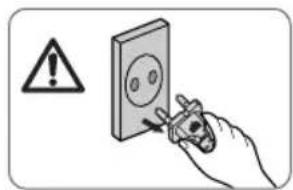
- Switch the vacuum cleaner off on the body of the machine before unplugging from the electrical outlet. Disconnect the plug from the electrical outlet before changing the dust bag or dust container. To avoid damage, please remove the plug by grasping the plug itself, not by pulling on the cord.
- This appliance is not intended for use by persons (including children) with reduced physical, sensory or mental capabilities, or lack of experience and knowledge, unless they have been given supervision or instruction concerning use of the appliance by a person responsible for their safety.
Children should be supervised to ensure that they do not play with the appliance.
- The plug must be removed from the socket outlet before cleaning or maintaining the appliance.
- The use of an extension cord is not recommended.
- If your vacuum cleaner is not operating correctly, switch off the power supply and consult an authorized service agent.
- If the supply cord is damaged, it must be replaced by the manufacturer or its service agent or a similarly qualified person in order to avoid a hazard.
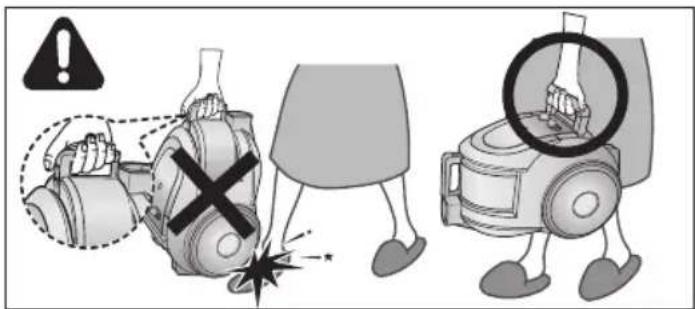
- Don't carry the vacuum cleaner by holding the hose.
Use the handle on the vacuum cleaner set.
1 ASSEMBLING THE CLEANER


▶ Features may vary according to model.
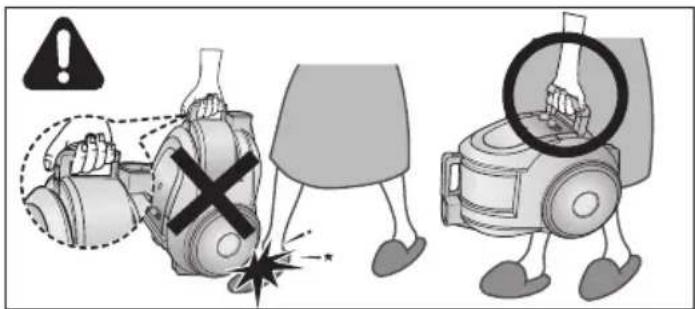
CAUTION
Please do not press the button of dust bin handle when carrying machine.

natural_image
Technical illustration of two views of a mechanical device with no visible text or symbolsFor storage, park the floor nozzle.
natural_image
Illustration of a robotic vacuum cleaner with a foot and labeled component (no text or symbols)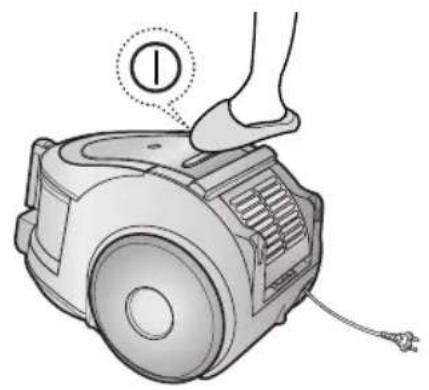
natural_image
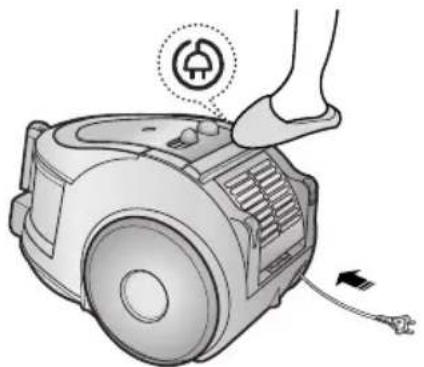
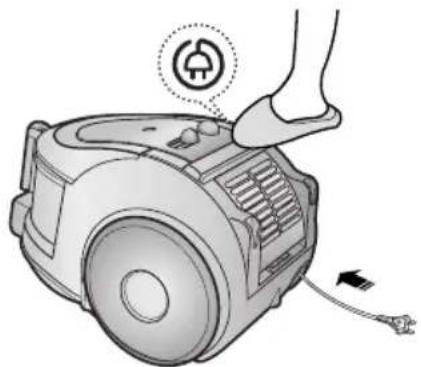
Illustration of a robotic vacuum cleaner with a foot and labeled component (no text or symbols on the device itself)2-2 POWER CORD
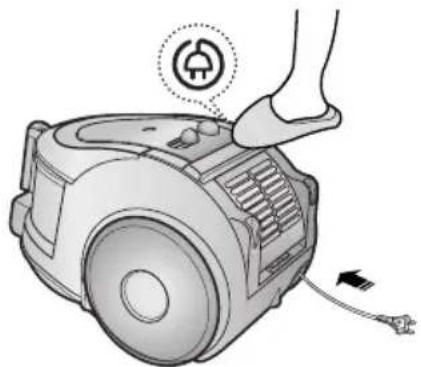
natural_image
Illustration of a hand pressing down on a small mechanical device with an electrical plug icon (no text or symbols)!

natural_image
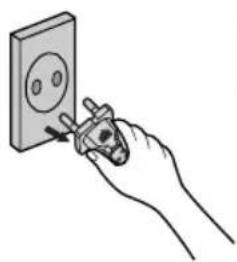
Hand using a power tool to switch an electrical outlet (no text or symbols visible)NOTE
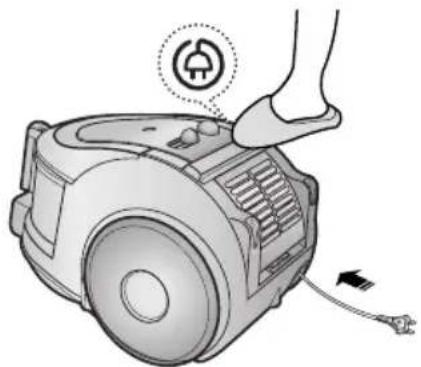
When removing the plug from the electrical outlet, grasp the plug, not the cord.
2-3 POWER-CONTROL
1) SILDE CONTROL TYPE ONLY (Optional)
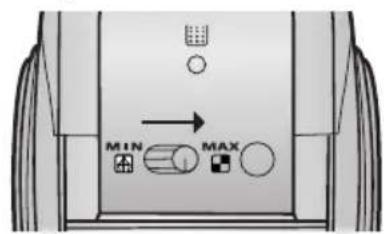
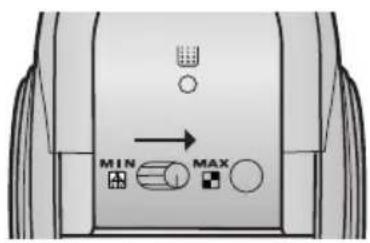
• SLIDE TO THE STOP POSITION
Vacuum-cleaner switches off (stand by mode)
• SLIDE FORWARD TO MAX
Suction capacity increases smoothly up to maximum.

2) BODY-CONTROL TYPE / ON/OFF TYPE
- HOSE - BODY (BODY-CONTROL TYPE ONLY)
natural_image
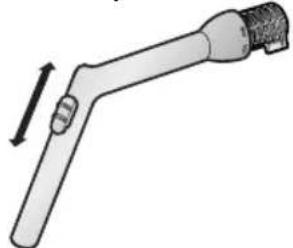
Diagram of a mechanical tool with a lever and threaded end (no text or symbols)To reduce suction for cleaning draperies, small rugs, and other light fabrics, pull the tap air until the hole is open.

MIN = For delicate surface e.g. net curtains. MAX = For hard floors and heavily soiled carpets.
2-4 HOW TO USE AND MAINTAIN THE ACCESSORIES
▶ Features may vary according to model.
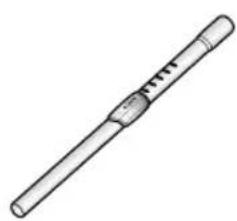
PIPE
natural_image
Simple line drawing of a cylindrical object with a central handle and segmented body (no text or symbols)
natural_image
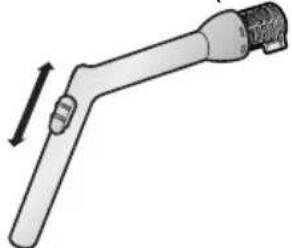
Illustration of a cylindrical tool with a handle and internal grooves, emitting blue motion lines (no text or symbols)Adjust the length of the telescopic pipe by sliding the length control button located in the center of the telescopic pipe back and forth.
natural_image
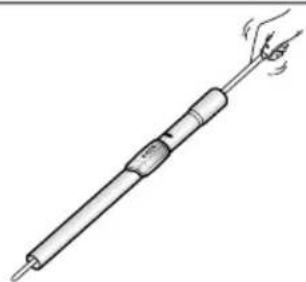
Illustration of a hand holding a test tube with a flame, no text or symbols presentTo check for blockages, separate the telescopic pipe and adjust to shorten. This allows for easier removal of waste clogging the tube.
ACCESSORY


natural_image
Illustration of a robotic arm with directional arrows indicating movement (no text or symbols)
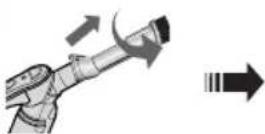


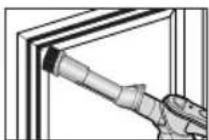
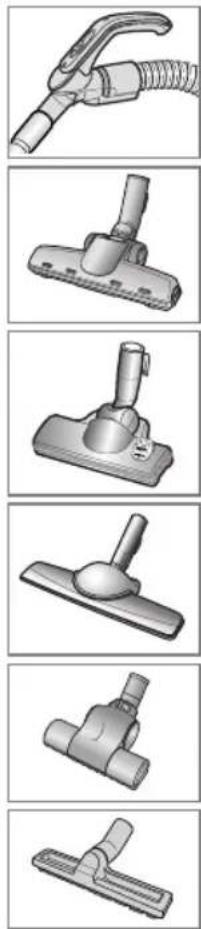
Push the accessory on to the end of the hose handle.
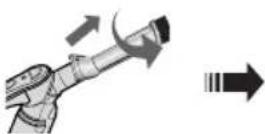
Pull out and turn the dust- ing brush for cleaning deli- cate areas.
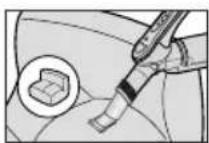
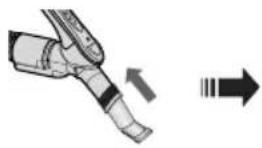
To use the upholstery tool, push the accessory on to the end of the hose handle in the opposite direction.
OPTION

natural_image
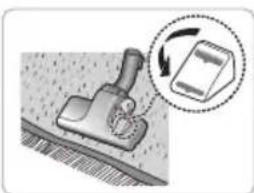
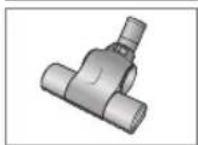
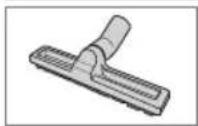
3D rendered image of a gray vacuum cleaner (no text or symbols visible)▶ Carpet Cleaning
▶ Floor Cleaning
natural_image
Illustration of a tool on a textured surface with an arrow indicating rotation (no text or symbols)
natural_image
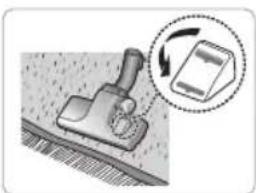
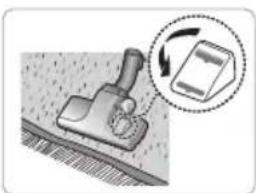
Illustration of a mechanical device with a magnified inset showing rotational motion (no text or symbols)Adjust the inlet lever according to the floor surface.

natural_image
Illustration of a hand using a tool to cut or mark a mechanical component (no text or symbols present)Remove waste matter completely if the inlet is blocked.
OPTION

natural_image
3D rendered image of a mechanical clamp or bracket component (no text or symbols visible)- Detach transparent drum cover for easy cleaning.
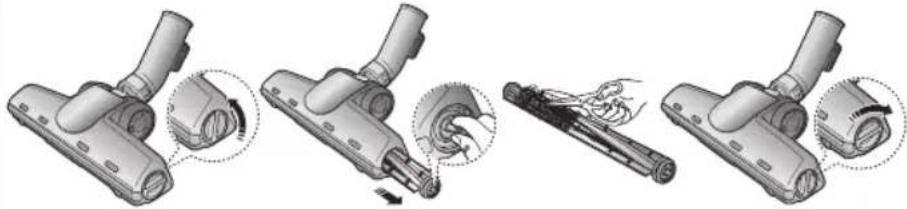
natural_image
Four-step illustration of a vacuum cleaner's internal structure, showing assembly and disassembly (no text or symbols)OPTION

Brush for blanket
For picking up pet hair and fibre on upholstery and bed linen.
Clogs on turbine keep brush from turning, thus need to be unclogged as follows.

Remove waste matter com- pletely when inlet is blocked.

Turn the lock button to 'UNLOCK', and remove waste matter.

natural_image
Mechanical assembly diagram showing a valve mechanism with directional arrows and a close-up inset (no text or labels)To reassemble, align the cover to the front of the main body and close. After closing the cover, ensure that the lock button is turned to the 'LOCK' position.
Warning : Use for bedclothes only. Be cautious not to damage brush during unclogging.
3 EMPTYING THE DUST BIN
1 2 3 Option


natural_image
Illustration of a hand using a vacuum cleaner to adjust the component (no text or symbols present)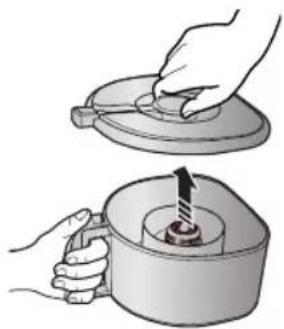
natural_image
Illustration of two hands operating a mechanical device with a handle and a knob (no text or symbols)Once dust reaches the dust full mark, or once the dust full light is on, empty the dust bin.
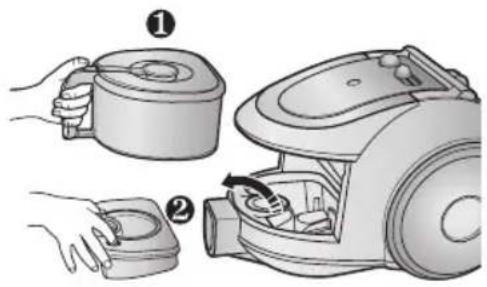
Take the dust bin out by pressing the button.
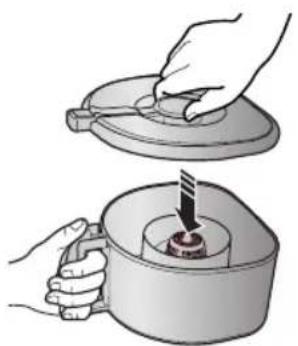
Separate the dust bin cover.
4

natural_image
Illustration of a hand pouring liquid into a container with granular material (no text or symbols)5

natural_image
Illustration of hands using a tool to press or install a mechanical component into a container (no text or symbols visible)6

Throw away dust into the bin.
Close the dust bin cover.
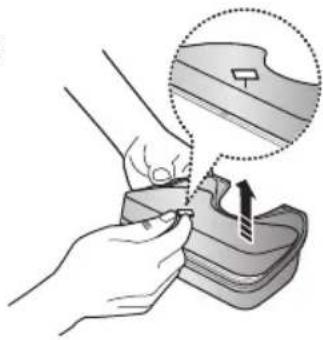
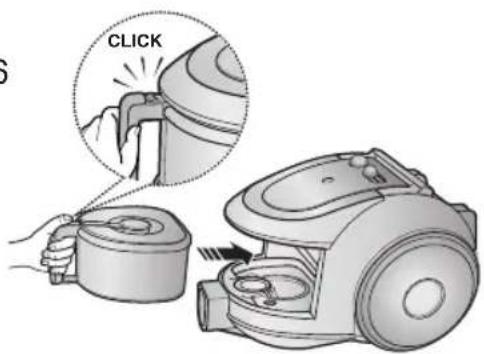
Before use, push the dust bin into the main body of the vacuum cleaner until you hear the "click" sound.
- Empty into a plastic bag (recommended for asthma/allergy sufferers)
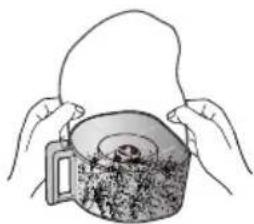
natural_image
Illustration of hands holding a bag over a container filled with food (no text or symbols visible)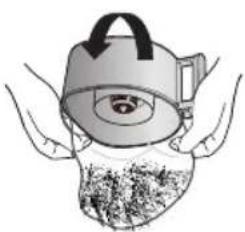
natural_image
Illustration of a medical device with a stylized eye and tentacles, no text or symbols present
natural_image
Illustration of hands using a tool to lift a container filled with granular material (no text or symbols)

You may rinse the dust bin with cold water

natural_image
Illustration of hands using a tool to clean or wash a water bottle (no text or symbols present)4 CLEANING THE DUST PACK
4-1. WHEN TO CLEAN THE DUST PACK
- If suction is noticeably reduced during cleaning, please check the dust pack as indicated below.

HANDLE CONTROL

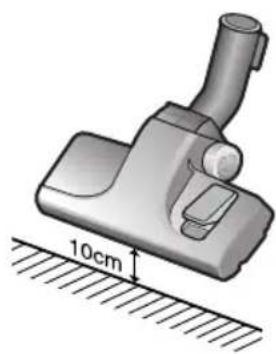
Turn the vacuum power to 'MAX'
natural_image
Illustration of a vacuum cleaner with a 10cm height measurement indicator (no text or symbols on the device itself)If the filter check indicator turns red with the inlet floating 10 cm above flat floor, clean it.


natural_image
Diagram of a device with a highlighted sun and a shopping cart, no text or symbols presentWhen the indicator light comes on, please empty the Dust Pack(4-2) as shown in the following illustrations.
4-2 CLEANING THE DUST PACK
1

Remove the dust bin and dust pack as shown.
2

natural_image
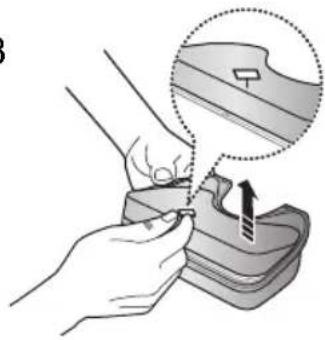
Illustration of hands using a tool to adjust or install a device, with a magnified inset showing the detail (no text or symbols present)Remove the fixed frame of the dust pack cover.
3
natural_image
Illustration of a hand using a tool to adjust or install a mechanical component, with no visible text or symbols.Remove the sponge and filter from the dust pack.
4
natural_image
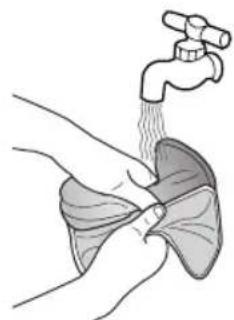
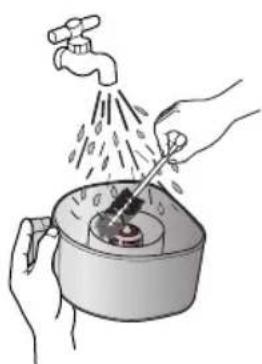
Illustration of a hand washing the lungs with a faucet above (no text or symbols)Wash the sponge and the filter of the dust pack with water.
5
natural_image
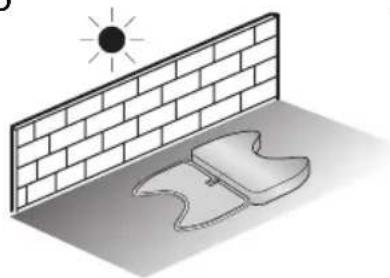
Illustration of a sun shining on a brick wall and a pair of objects under sunlight (no text or symbols)Let the sponge and filter dry in the shade for more than 12 hours.
6

natural_image
Illustration of a hand using a tool to press or install a mechanical component, with an inset showing a warning symbol (no text or labels present)Put the sponge and filter into the dust pack.

Before reassembly, align the dust pack cover and dust pack correctly.
8
natural_image
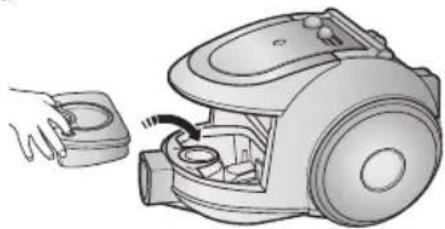
Illustration of a hand holding a small device next to an open vacuum cleaner (no text or symbols visible)Put the assembled dust pack into the main body.

NOTE : Make sure the filter is completely dry before putting it back into the vacuum cleaner. Allow 12 hours for it to dry.
5 CLEANING THE MOTOR PROTECTION FILTER

natural_image
Illustration of a hand holding a small appliance next to a vacuum cleaner (no text or symbols present)Take out both the dust bin and the dust pack.

natural_image
Illustration of a hand using a tool to clean or adjust a vacuum cleaner's interior (no text or symbols visible)Remove the motor protection filter from the vacuum cleaner. Shake and tap the dust from it and put back in machine.
6 CLEANING THE OUTLET FILTER

natural_image
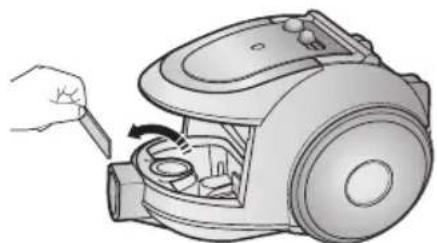
Illustration of a robotic vacuum cleaner with handle and control panel (no text or symbols)Press the fixed frame part at the back of the main body to remove.

natural_image
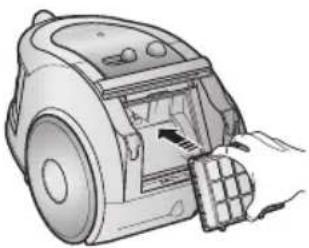
Line drawing of a robotic vacuum cleaner with hand inserting a component (no text or symbols)Pull out the HEPA Filter using the tab.

natural_image
Illustration of a hand placing a grid on top of a trash can (no text or symbols)Dust the HEPA filter. Put the HEPA filter into the main body until you hear a 'click' sound.

natural_image
Illustration of a hand inserting a component into a vacuum cleaner (no text or symbols visible)OPTION - MICRO CARBON FILTER

natural_image
Illustration showing two steps: adding a brick to a house and removing a block into a trash can (no text or symbols)Remove and replace the blocked outlet filter.
NOTE : Replacement filters are available at your local Samsung distributor.
- IF YOU HAVE A PROBLEM
| PROBLEM CAUSE REMEDY | ||
| Motor does not start. | No power supply. Thermal cut-out. | Check cable, plug and socket. Leave to cool. |
| Suction force is gradually decreasing. | Nozzle, suction hose or tube is blocked. | Check for blockage and remove it. |
| Cord does not rewind fully. Check that the cord is not twisted or wound unevenly. | Pull the cord out 2-3m and push the cord rewind button. | |
| Vacuum cleaner does not pick up dirt. | Crack or hole in hose. | Check hose and replace if required. |
| Low or decreasing suction | Filter is full of dust. | Please check filter and, if necessary, clean as illustrated in the instructions. |
This Vacuum cleaner is approved the following.
EMC Directive : 2004/108/EEC
Low Voltage Directive : 2006/95/EC
If you have any questions or comments relating to Samsung products, please contact the SAMSUNG customer care center.
| Country | Customer Care Center | Web Site |
| LITHUANIA | 8-800-77777 | www.samsung.com/lt |
| LATVIA | 8000-7267 | www.samsung.com/lv |
| ESTONIA | 800-7267 | www.samsung.com/ee |

natural_image
Line drawing of a vacuum cleaner device (no text or symbols)ОПЦИЯ


ПРЕДУПРЕЖДЕНИЕ!
natural_image
Technical illustration of two views of a vacuum cleaner's internal components (no text or symbols)
natural_image
Illustration of a hand pressing down on a small vacuum cleaner with a numbered label (1) and cable, no text or symbols present.2-2 ШНУР ПИТАНИЯ

natural_image
Illustration of a robotic vacuum cleaner with a foot and power plug, showing mechanical components and wiring (no text or symbols)!

natural_image
Hand using a power tool to switch an electrical outlet (no text or symbols visible)ПРИМЕЧАНИЕ
natural_image
Diagram of a mechanical tool with an arrow indicating direction (no text or symbols present)natural_image
Simple line drawing of a cylindrical object with a handle and central slot (no text or symbols)
natural_image
Illustration of a cylindrical tool with a handle and internal structure, emitting blue motion arrows (no text or symbols)natural_image
Illustration of a hand holding a cylindrical tool with a handle, emitting vapor or smoke (no text or symbols)natural_image
3D rendered image of a vacuum cleaner (no text or symbols visible)▶ Чистка ковров
▶ Чистка полов
natural_image
Illustration of a mechanical tool interacting with a device, showing motion and rotation (no text or symbols)
natural_image
Mechanical assembly diagram showing a lever and base with an arrow indicating rotation (no text or symbols)natural_image
Illustration of a hand using a tool to cut or mark a mechanical component (no text or symbols present)natural_image
Illustration of a mechanical clamp or bracket component (no text or symbols)natural_image
Four-step diagram showing a hairdryer tool being adjusted, with no visible text or symbols.natural_image
Illustration of a robotic arm with motion arrows and a close-up inset showing the hand (no text or symbols)natural_image
Illustration of a hand using a vacuum cleaner to adjust the component (no text or symbols present)Извлеките пылесборник, нажав кнопку.

natural_image
Illustration of two hands using a tool to lift a lid, with a magnified view showing the lid being inserted (no text or symbols present)natural_image
Illustration of a hand pouring liquid into a trash bin with granular material (no text or symbols)natural_image
Illustration of hands using a tool to press or install a mechanical component into a container (no text or symbols visible)natural_image
Illustration showing three steps of a container being handled, with no visible text or symbols.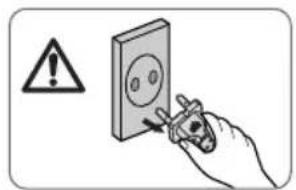

natural_image
Illustration of hands using a tool to clean or wash water from a faucet (no text or symbols)ПРИМЕЧАНИЕ

natural_image
Illustration of a vacuum cleaner with a 10cm height measurement indicator (no text or symbols on the device itself)
natural_image
Diagram of a mechanical component with a highlighted circular feature and a small inset showing a tool or device (no text or symbols present)natural_image
Illustration of hands using a tool to adjust or install a component, with a magnified inset showing the detail (no text or symbols present)natural_image
Illustration of hands using a tool to adjust or install a mechanical component, with no visible text or symbols.natural_image
Illustration of hands performing a medical procedure with a faucet and tubing (no text or symbols)natural_image
Illustration of a sun shining on a brick wall and a pair of boots, no text or symbols presentnatural_image
Illustration of a hand using a tool to press or install a component, with a warning symbol and magnified detail (no text or symbols present)natural_image
Illustration of a hand holding a small mechanical component next to an open vacuum cleaner (no text or symbols visible)natural_image
Illustration of a hand using a tool to adjust or install a vacuum cleaner's air gap (no text or symbols present)natural_image
Illustration of a robotic vacuum cleaner with handle and control panel (no text or symbols)natural_image
Illustration of a hand inserting a component into a robotic device (no text or symbols visible)natural_image
Illustration of a hand placing a grid block onto a trash can (no text or symbols)natural_image
Illustration of a hand inserting a component into a robotic vacuum cleaner (no text or symbols visible)natural_image
Illustration showing two steps: adding a block to a container and removing it from a granular container (no text or symbols)natural_image
Line drawing of a vacuum cleaner device (no text or symbols)VARIANTAS



DÉMESIO
natural_image
Technical illustration of a vacuum cleaner assembly (no text or symbols visible)natural_image
Illustration of a robotic vacuum cleaner with a foot and labeled component (no text or symbols)
natural_image
Illustration of a robotic vacuum cleaner with a foot and labeled component (no text or symbols)2-2 ELEKTROS LAIDAS
natural_image
Illustration of a robotic vacuum cleaner with a foot and power plug, showing mechanical components and wiring (no text or symbols)!
natural_image
Hand using a power tool to switch an electrical outlet (no text or symbols visible)NOTE
When removing the plug from the electrical outlet, grasp the plug, not the cord.
2-3 GALIOS REGULIATORIUS
1) TIK MODELIUI SU PASLANKIU REGULIATORIUMI (PASIRINKTINAI)
• PERJUNKITE I PADÊTI "STOP"
- ŽARNA - KORPUSAS (TIK MODELIUI SU REGU-
natural_image
Diagram of a mechanical tool with a lever and threaded end (no text or symbols)natural_image
Simple line drawing of a cylindrical object with a handle and central slot (no text or symbols)
natural_image
Illustration of a cylindrical tool with a handle and internal structure, emitting blue motion lines (no text or symbols)natural_image
Line drawing of a soldering iron with a handle and flame (no text or symbols)natural_image
Illustration of a robotic arm with directional arrows indicating movement (no text or symbols)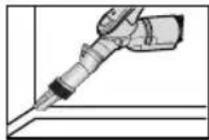


natural_image
3D rendered image of a gray vacuum cleaner (no text or symbols visible)▶ Kilimų valymas
▶ Grindų valymas
natural_image
Illustration of a tool pressing down on a surface with a magnified inset showing a device (no text or symbols)
natural_image
Diagram of a mechanical device with a magnified inset showing rotation and assembly (no text or symbols)natural_image
Illustration of a hand using a tool to cut or mark a mechanical component (no text or symbols present)natural_image
3D rendering of a mechanical clamp or bracket component (no text or symbols visible)natural_image
Four-step illustration of a vacuum cleaner's internal mechanism, showing step-by-step assembly and disassembly (no text or symbols)VARIANTAS
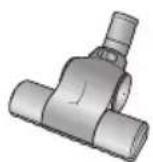
Šepetys skirtas užvalkalams.
natural_image
Illustration of a robotic arm with motion arrows indicating movement, showing a close-up of the arm's head (no text or symbols present)natural_image
Illustration of a hand using a vacuum cleaner to adjust the component (no text or symbols present)natural_image
Illustration of two hands performing a manual operation: one using a tool to lift a lid, the other holding a container with a handle (no text or symbols)Atidarykite dulkiş surinkimo konteinerio dangteşi.
4

natural_image
Illustration of a hand pouring liquid into a trash bin with a lid (no text or symbols)natural_image
Illustration of hands using a tool to press or install a mechanical component, no text or symbols presentnatural_image
Illustration of hands holding a bag over a bowl with a small container (no text or symbols)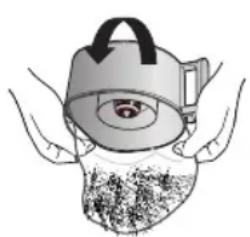
natural_image
Illustration of a medical device with a cap and eye, showing hands and internal components (no text or symbols)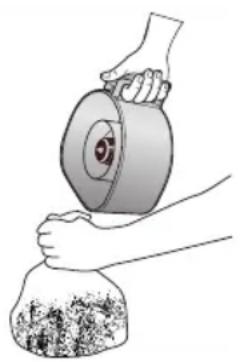
natural_image
Illustration of hands using a tool to lift a cylindrical object into a bag (no text or symbols visible)

natural_image
Illustration of hands using a tool to clean or wash a container with water droplets (no text or symbols)PASTABA

natural_image
Illustration of a vacuum cleaner with a 10cm height measurement indicator (no text or symbols on the device itself)
natural_image
Diagram of a mechanical component with a highlighted circular feature and a small inset showing a tool or device (no text or symbols present)2

natural_image
Illustration of hands using a tool to adjust or install a component, with an inset showing the magnified detail (no text or symbols present)3
natural_image
Illustration of a hand using a tool to cut a component, with an arrow indicating the process (no text or symbols present)natural_image
Illustration of a hand washing the lungs with a faucet above (no text or symbols)natural_image
Illustration of a sun shining on a brick wall and a pair of objects under a shadow (no text or symbols)natural_image
Illustration of a hand using a tool to press or install a mechanical component, with a warning symbol and dotted circle highlighting the component (no text or labels present)natural_image
Illustration of a hand using a tool to adjust a medical device, with an inset showing a magnified view of the device (no text or symbols present)natural_image
Illustration of a hand holding a small device next to an open vacuum cleaner (no text or symbols visible)natural_image
Illustration of a hand using a tool to adjust or install a vacuum cleaner's interior (no text or symbols visible)natural_image
Illustration of a robotic vacuum cleaner with airflow direction indicated (no text or symbols)natural_image
Illustration of a hand inserting a component into a vacuum cleaner's air vent (no text or symbols visible)natural_image
Illustration of a hand placing a grid block onto a trash can (no text or symbols)natural_image
Illustration of a hand inserting a component into a device (no text or symbols visible)natural_image
Illustration showing two steps: one applying a block to a container, the other handling a rectangular block over a trash can (no text or symbols present)natural_image
Line drawing of a vacuum cleaner device (no text or symbols)VÕIMALUS
natural_image
Six technical illustrations of a vacuum cleaner's handle and lever assembly (no text or symbols)ETTEVAATUST!
natural_image
Technical illustration of two mechanical components with dashed outlines highlighting internal features (no text or symbols)natural_image
Illustration of a hand pressing down on a small vacuum cleaner with a numbered circle indicating the step (no text or symbols present)
natural_image
Illustration of a robotic vacuum cleaner with a foot and labeled component (no text or symbols)2-2 TOITEJUHE
natural_image
Illustration of a hand pressing down on a small electric vacuum cleaner with a power button icon (no text or symbols)!

natural_image
Hand using a power tool to switch an electrical outlet (no text or symbols visible)MÄRKUS.
natural_image
Diagram of a mechanical tool with a lever and handle, showing a force or movement direction (no text or symbols)- KORPUS (AINULT KORPUSELY JUHITAV TÜÜP)
MIN = örnade pindade jaoks, nt vörkkardinad.
natural_image
Simple line drawing of a cylindrical object with a handle and internal slot (no text or symbols)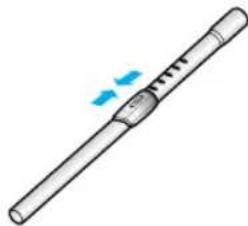
natural_image
Illustration of a cylindrical tool with a handle and blue motion indicators (no text or symbols)natural_image
Line drawing of a hand holding a cylindrical tool with a handle, emitting smoke or vapor (no text or symbols)natural_image
Illustration of a robotic arm with directional arrows indicating movement (no text or symbols)


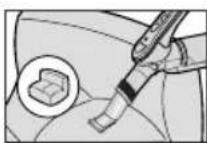
Suruge tarvik voolikihoidiku otsa.
natural_image
3D rendered image of a vacuum cleaner (no text or symbols visible)natural_image
Illustration of a mechanical tool interacting with a rectangular object, showing motion and rotation (no text or symbols)
natural_image
Illustration of a mechanical device with a magnified inset showing rotational motion (no text or symbols)natural_image
Line drawing of a hand using a tool to lift a component on a flat surface (no text or symbols)natural_image
3D rendering of a mechanical clamp or bracket component (no text or symbols visible)natural_image
Four-step illustration of a vacuum cleaner's internal components, showing assembly and disassembly (no text or symbols)VÕIMALUSED

Hari teki jaoks
natural_image
Mechanical assembly diagram showing a motor with rotating arm and gear mechanism (no text or labels)natural_image
Diagram of a sunken emitting rays, showing minimum and maximum force directions (no text or symbols)natural_image
Illustration of a hand turning a vacuum cleaner into a device, showing the process with no text or symbols.natural_image
Illustration of two hands using a tool to lift a lid and add a small object into a container (no text or symbols)Eemaldage tol- mumahuti kate.
4

natural_image
Illustration of a hand pouring liquid into a trash bin with granular material (no text or symbols)5
natural_image
Illustration of hands using a tool to press or install a mechanical component into a container (no text or symbols visible)Visake tolm prügikasti. Asetage tolmumahuti kate tagasi.
6
natural_image
Illustration of hands holding a large container with a small container inside, no text or symbols present
natural_image
Illustration of a person wearing a hat with a circular object inside, partially covered by hands (no text or symbols)
natural_image
Illustration of hands using a tool to lift a cylindrical object into a bag (no text or symbols visible)
MÄRKUS.
natural_image
Illustration of hands using a tool to clean or wash a water bottle (no text or symbols present)4 TOLMUMOODULI PUHASTAMINE
4-1 MILLAL TOLMUMOODULIT PUHASTADA?
natural_image
Illustration of a vacuum cleaner with a 10cm height measurement indicator (no text or symbols on the device itself)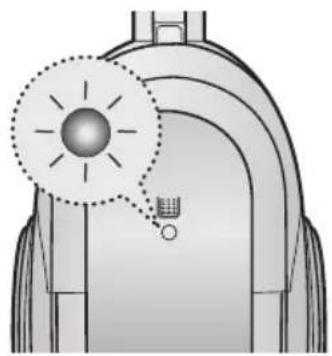
natural_image
Diagram of a mechanical or electrical component with a highlighted circular component and a small inset showing a tool or device (no text or symbols present)natural_image
Illustration of hands using a tool to adjust or install a component, with no visible text or symbols.natural_image
Illustration of hands using a tool to adjust or install a mechanical component, with no visible text or symbols.Eemaldage käsn ja filter tolmukotist.
4

natural_image
Illustration of a hand washing the lungs with a faucet above (no text or symbols)natural_image
Illustration of a sun shining on a brick wall and a pair of shoes under sunlight (no text or symbols)natural_image
Illustration of a hand using a tool to press or install a mechanical component, with an inset showing a warning symbol (no text or labels present)natural_image
Illustration of a hand holding a small device next to an open vacuum cleaner (no text or symbols visible)MÄRKUS. : Veenduge enne filtri tagasipanemist tolmuimejasse, et filter on täielikult kuivanud. Laske sellele kuivada 12 tundi.
5 MOOTORIKAITSEFILTRI PUHASTAMINE
natural_image
Illustration of a hand holding a vacuum cleaner and a small device, showing two steps (1 and 2) without any text or symbols.natural_image
Illustration of a hand using a tool to clean or adjust a vacuum cleaner's interior (no text or symbols visible)natural_image
Illustration of a robotic vacuum cleaner with handle and control panel (no text or symbols)natural_image
Illustration of a hand inserting a component into a robotic vacuum cleaner (no text or symbols visible)natural_image
Illustration of a hand placing a block into a trash can (no text or symbols)natural_image
Illustration of a hand inserting a component into a vacuum cleaner (no text or symbols visible)natural_image
Illustration showing two steps of hand removing a block into a trash can (no text or symbols present)natural_image
Line drawing of a vacuum cleaner device (no text or symbols)
▶ Funkcijas var atškirties atbilstoši modelim.
UZMANIBU!
natural_image
Technical illustration of two views of a mechanical device with no visible text or symbols1) KORPUSA VADIBAS VEIDS 2) ON/OFF VEIDS

natural_image
Illustration of a hand pressing down on a small vacuum cleaner with a numbered circle indicating the step (no text or symbols present)
2-2 STRĀVAS VADS
natural_image
Illustration of a robotic vacuum cleaner with a foot and plug, showing internal components and wiring (no text or symbols)!

natural_image
Hand using a power tool to switch an electrical outlet (no text or symbols visible)PIEZIME
Atvienojot kontaktdakšu no rozetes, satveriet aiz kontaktdakšas, nevis aiz vada.
2-3 JAUDAS KONTROLE
1) TIKAI PĀRBĪDĪŠANAS VEIDS (Izvēles)
• NOVIETOJIET STOP POZÍCIJÁ
2) KORPUSA VADIBAS VEIDS / ON/OFF VEIDS
- ŠLŪTENE

natural_image
Simple line drawing of a mechanical tool with a handle and lever (no text or symbols)- KORPUSS (TIKAI KORPUSA VADIBAS VEIDS)

natural_image
Simple line drawing of a cylindrical object with a central handle and flange (no text or symbols)
natural_image
Illustration of a cylindrical tool with internal grooves and blue motion arrows indicating movement (no text or symbols)natural_image
Illustration of a hand holding a cylindrical tool with a flame, no text or symbols presentnatural_image
Illustration of a robotic arm with directional arrows indicating movement (no text or symbols)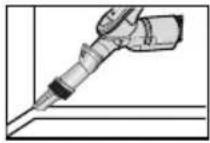


natural_image
3D rendered image of a vacuum cleaner (no text or symbols visible)▶ Paklāja tīrīšana
▶ Grīdas tīrīšana

natural_image
Illustration of a tool on a textured surface with an arrow indicating rotation around it, no text or symbols present.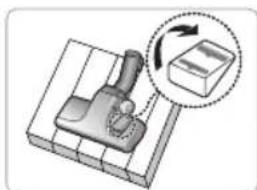
natural_image
Illustration of a mechanical device with a magnified inset showing rotational motion (no text or symbols)natural_image
Illustration of a hand using a tool to cut or mark a mechanical component (no text or symbols present)natural_image
3D rendering of a mechanical clamp or bracket component (no text or symbols visible)natural_image
Four-step diagram showing a hairdryer tool being adjusted, with no visible text or symbols.OPCIJA

Birste segām
natural_image
Mechanical assembly diagram showing a motor with rotating arm and gear mechanism (no text or labels)natural_image
Illustration of a hand operating a vacuum cleaner with a close-up view of the component (no text or symbols present)Iznemiet puteklu tvertni, nospiežot pogu.

natural_image
Illustration of two hands performing a manual operation: adding a lid to a cup with a rotating knob (no text or symbols)natural_image
Illustration of a hand pouring liquid into a trash bin with granular material (no text or symbols)Izmetiet puteklus atkritumos.
5

natural_image
Illustration of hands using a tool to press or install a mechanical component into a container (no text or symbols present)natural_image
Illustration of hands holding a container with a lid, containing a small object inside (no text or symbols)
natural_image
Illustration of hands holding a medical device with an eye and granular substance inside (no text or symbols)

PIEZIME
Puteklu tvertni drīkst izskalot ar aukstuūdeni.
natural_image
Illustration of hands using a tool to clean or wash a water bottle (no text or symbols present)4 PUTEKŁU MAISINA TİRİŞANA
4-1 KAD TİRİT PUTEKLU MAISINU?
natural_image
Illustration of a vacuum cleaner with a 10cm height measurement on a surface (no text or symbols)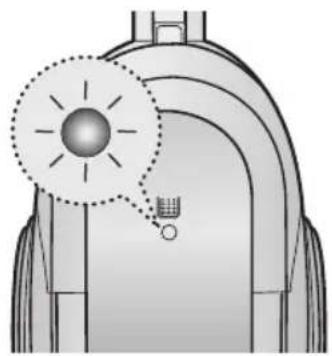
natural_image
Diagram of a mechanical component with a highlighted circular feature and a small inset showing a tool or device (no text or symbols present)natural_image
Illustration of hands using a tool to adjust or install a component, with no visible text or symbols.natural_image
Illustration of a hand using a tool to adjust or install a mechanical component, with no visible text or symbols.Iznemiet sūkli un filtru no puteklu maisiņa.
4

natural_image
Illustration of a hand washing lungs with a faucet above it (no text or symbols)natural_image
Illustration of a sun shining on a brick wall and a pair of clothes lying on the ground (no text or symbols)natural_image
Illustration of a hand using a tool to press or install a mechanical component, with an inset showing a warning symbol (no text or labels present)natural_image
Illustration of a hand using a medical or surgical instrument to interact with a device, showing a magnified inset of the device (no text or symbols present)natural_image
Illustration of a hand holding a small device next to an open vacuum cleaner (no text or symbols visible)natural_image
Illustration of a hand holding a vacuum cleaner and a small device, showing two steps (1 and 2) without any text or symbols.Iznemiet puteklu tvertni un puteklu maisinu.
natural_image
Illustration of a hand using a tool to clean or adjust a vacuum cleaner's interior (no text or symbols visible)natural_image
Illustration of a robotic vacuum cleaner with handle and control panel (no text or symbols)natural_image
Illustration of a hand inserting a component into a device (no text or symbols visible)natural_image
Illustration of a hand placing a small block into a trash can (no text or symbols)Iztīriet puteklus no HEPA filtra.
natural_image
Illustration of a hand inserting a component into a vacuum cleaner (no text or symbols visible)natural_image
Illustration showing two steps: one lifting a block, the other pressing down on a cylindrical object (no text or symbols present)- IMPORTANT SAFEGUARDS
- ASSEMBLING THE CLEANER
- CAUTION
- 2-2 POWER CORD
- NOTE
- 2-3 POWER-CONTROL
- 1) SILDE CONTROL TYPE ONLY (Optional)
- 2) BODY-CONTROL TYPE / ON/OFF TYPE
- - HOSE - BODY (BODY-CONTROL TYPE ONLY)
- 2-4 HOW TO USE AND MAINTAIN THE ACCESSORIES
- EMPTYING THE DUST BIN
- CLEANING THE DUST PACK
- 4-1. WHEN TO CLEAN THE DUST PACK
- 4-2 CLEANING THE DUST PACK
- CLEANING THE MOTOR PROTECTION FILTER
- CLEANING THE OUTLET FILTER
- ПРЕДУПРЕЖДЕНИЕ!
- 2-2 ШНУР ПИТАНИЯ
- ПРИМЕЧАНИЕ
- DÉMESIO
- 2-2 ELEKTROS LAIDAS
- 2-3 GALIOS REGULIATORIUS
- PASTABA
- ETTEVAATUST!
- 2-2 TOITEJUHE
- MÄRKUS.
- TOLMUMOODULI PUHASTAMINE
- 4-1 MILLAL TOLMUMOODULIT PUHASTADA?
- MOOTORIKAITSEFILTRI PUHASTAMINE
- UZMANIBU!
- 1) KORPUSA VADIBAS VEIDS 2) ON/OFF VEIDS
- 2-2 STRĀVAS VADS
- PIEZIME
- 2-3 JAUDAS KONTROLE
- 1) TIKAI PĀRBĪDĪŠANAS VEIDS (Izvēles)
- 2) KORPUSA VADIBAS VEIDS / ON/OFF VEIDS
- - ŠLŪTENE
- - KORPUSS (TIKAI KORPUSA VADIBAS VEIDS)
- PUTEKŁU MAISINA TİRİŞANA
- 4-1 KAD TİRİT PUTEKLU MAISINU?
Brand : SAMSUNG
Model : SC6540
Category : Vacuum Cleaner