
GP7A-HD - Desktop computer AOPEN - Free user manual and instructions
Find the device manual for free GP7A-HD AOPEN in PDF.


Pick your language and provide your email: we'll send you a specifically translated version.
| Product Type | Desktop computer (Mini PC/Nettop) |
| Brand | AOpen |
| Model | GP7A-HD |
| Dimensions | Approximately 190 x 150 x 30 mm (7.5 x 5.9 x 1.2 inches) |
| Weight | Approximately 0.8 kg (1.76 lbs) |
| Power Supply | External power adapter, 19V DC, 65W typical |
| Main Functions | General computing, web browsing, office applications, multimedia playback |
| Processor | Intel Celeron or Core i3 (typical for model) |
| Memory | Up to 16 GB DDR3L or DDR4 SODIMM |
| Storage | 1 x 2.5-inch SATA HDD/SSD; optional M.2 SSD |
| Connectivity | Wi-Fi 802.11 b/g/n, Bluetooth 4.0, Gigabit Ethernet |
| Video Output | 1 x HDMI 1.4a, 1 x VGA (or DisplayPort) |
| USB Ports | 4 x USB 2.0, 2 x USB 3.0 |
| Audio | 3.5mm headphone/mic combo jack, built-in speaker optional |
| Operating System | Typically Windows 7/8/10 or Linux |
| Cleaning and Maintenance | Clean with a soft dry cloth. Do not use liquid or aerosol cleaners. Keep vents free of dust. |
| Safety Warnings | Do not open the power adapter. Keep away from liquids. Operate in a well-ventilated area. |
| Spare Parts and Repairability | RAM and storage are user-upgradable. Battery (CMOS) replaceable. Other components may require professional service. |
| General Information | This device is designed for home or office use. Refer to the user manual for detailed setup and troubleshooting. |
Frequently Asked Questions - GP7A-HD AOPEN
How do I connect the GP7A-HD to a monitor?
Use an HDMI cable from the HDMI port on the device to your monitor's HDMI input. If your monitor only has VGA, use a VGA cable (if available) or an HDMI-to-VGA adapter.
Can I upgrade the memory in the GP7A-HD?
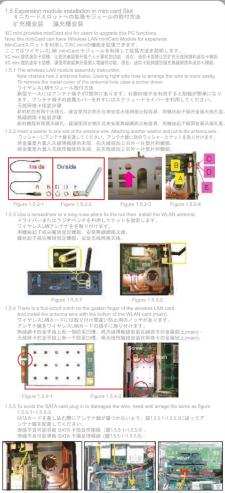
Yes, the device has two SO-DIMM slots that support up to 16 GB total (8 GB per slot). You can access them by removing the bottom cover.
What type of storage does the GP7A-HD support?
It supports one 2.5-inch SATA hard drive or SSD. Some models also have an M.2 slot for an additional SSD.
How do I perform a factory reset on the GP7A-HD?
Factory reset is typically done through the operating system. For Windows, go to Settings > Update & Security > Recovery and select 'Reset this PC'. Backup your data first.
The device does not power on. What should I check?
First, ensure the power adapter is properly connected to the device and a working power outlet. Try a different cable if possible. If still no power, the adapter or internal component may be faulty.
Can I install Linux on the GP7A-HD?
Yes, the GP7A-HD is compatible with many Linux distributions, such as Ubuntu or Linux Mint. You may need to adjust BIOS settings for boot order.
How do I clean the GP7A-HD?
Use a soft, lint-free cloth slightly dampened with water or a mild cleaning solution. Do not spray liquid directly. Clean vents with compressed air to remove dust.
Is the GP7A-HD suitable for gaming?
The GP7A-HD is not designed for high-end gaming. It can handle older or less demanding games, but for modern games, a dedicated graphics card is recommended.
How do I access the BIOS?
During startup, press the Del or F2 key repeatedly until the BIOS setup screen appears. Refer to the manual for exact key.
Where can I find the user manual for the GP7A-HD?
The user manual is available for free download on notice-facile.com for the AOpen GP7A-HD. It contains detailed specifications, setup instructions, and troubleshooting tips.
User questions about GP7A-HD AOPEN
0 question about this device. Answer the ones you know or ask your own.
Ask a new question about this device
No questions yet. Be the first to ask one.
Download the instructions for your Desktop computer in PDF format for free! Find your manual GP7A-HD - AOPEN and take your electronic device back in hand. On this page are published all the documents necessary for the use of your device. GP7A-HD by AOPEN.
USER MANUAL GP7A-HD AOPEN




Manual assistant
Powered by Anthropic
Waiting for your message
Product information
Brand : AOPEN
Model : GP7A-HD
Category : Desktop computer