MX-101SP1 - Blender PANASONIC - Free user manual and instructions

Find the device manual for free MX-101SP1 PANASONIC in PDF.

PANASONIC MX-101SP1 - Blender
📄 12 pages English EN Download 💬 AI Question 10 questions ⚙️ Specs
Notice PANASONIC MX-101SP1 - page 1
Pick your language and provide your email: we'll send you a specifically translated version.
Product Type Blender
Brand Panasonic
Model MX-101SP1
Power Consumption 350 W
Voltage 220-240 V, 50/60 Hz
Jar Capacity 1.5 L
Jar Material Plastic (BPA-free)
Blade Material Stainless steel
Number of Speed Settings 2 speeds + Pulse
Safety Lock System Yes (lid lock)
Overheat Protection Yes (automatic shut-off)
Non-Slip Feet Yes
Cord Length 1.2 m
Weight 1.5 kg
Dimensions (W x D x H) 20 x 15 x 35 cm
Color White / Black
Dishwasher Safe Parts Jar and lid (top rack), hand wash blades recommended
Pulse Function Yes
Warranty 1 year (depending on region)
Manual Included Yes (printed and online)

Frequently Asked Questions - MX-101SP1 PANASONIC

How do I clean the blender jar?
Fill the jar halfway with warm water and a drop of dish soap, then run the blender on pulse for 30 seconds. Rinse thoroughly. The jar and lid are top-rack dishwasher safe, but hand washing is recommended for longer life.
Can I blend ice cubes?
Yes, this blender can crush ice. Use the Pulse function in short bursts to avoid overloading the motor. Do not fill the jar more than half with ice.
What is the maximum capacity for hot liquids?
Do not blend hot liquids above 60°C (140°F) to prevent pressure buildup and potential lid ejection. Allow hot liquids to cool before blending.
Why does the blender stop during operation?
The blender has an overheat protection feature that automatically shuts off the motor if it gets too hot. Unplug the unit, let it cool for 15-20 minutes, then resume use.
Is the blender jar BPA-free?
Yes, the plastic jar is made from BPA-free materials, safe for food contact.
How do I replace the blade assembly?
The blade assembly is not user-serviceable. If damaged, contact Panasonic customer service or an authorized service center for replacement.
Can I use the blender for grinding nuts or coffee beans?
This blender is not designed for dry grinding. Use the Pulse function for brief blending of soft nuts, but avoid prolonged use for hard items like coffee beans.
What does the pulse function do?
The Pulse function provides short bursts of maximum power for chopping or mixing without continuous blending. Press and release the button for momentary operation.
Is the blender noisy?
This blender operates at a typical noise level for its category (around 80 dB). Place it on a stable, non-slip surface to minimize vibration noise.
Where can I download the user manual?
You can download the manual in PDF format from the Panasonic support website or from notice-facile.com using the model number MX-101SP1.

User questions about MX-101SP1 PANASONIC

0 question about this device. Answer the ones you know or ask your own.

Ask a new question about this device

Your email remains private: it is only used to notify you if someone answers your question.

No questions yet. Be the first to ask one.

Download the instructions for your Blender in PDF format for free! Find your manual MX-101SP1 - PANASONIC and take your electronic device back in hand. On this page are published all the documents necessary for the use of your device. MX-101SP1 by PANASONIC.

USER MANUAL MX-101SP1 PANASONIC

Contents

Attention 2

Diagram of a blender with labeled parts including liquid level, handle, and spout.

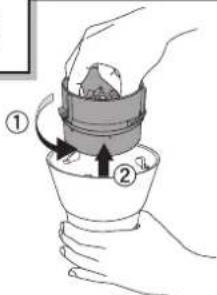
ONLine drawing of a device with a close-up inset showing a mechanical component. No text or symbols.

Press the "o" button.

Resume operation.

2

Diagram showing a food processor with two steps: adding granular material to a lid and then adding a flavor into a kitchen appliance.

Line drawing of a blender with a control panel and arrow indicating rotation. No text or symbols.

Illustration of a blender with a hand pressing a button, next to a control panel. No text or symbols.

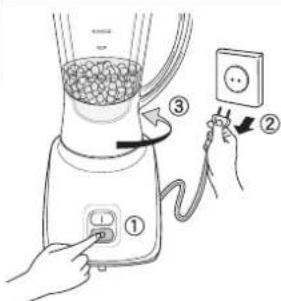
4Diagram showing hands operating a blender with labeled parts and electrical socket connection.

Line drawing of a hand pouring liquid from a cup into a bowl. No text or symbols.

2Diagram showing a kitchen appliance with three labeled parts: top view, middle view, and electrical outlet.

3Diagram showing a hand pressing down on a blender with labeled parts ① and ②, likely illustrating a cooking or cleaning process.

5Diagram showing a blender with labeled parts and a hand inserting a power outlet into it, illustrating the process of adding electrical power.

6Diagram showing a hand pouring liquid into a container with labeled steps ① and ②, indicating a process or procedure.

© Panasonic Corporation 2010

X0909-930

F0410Y0
Table of contents Click a title to access it
Manual assistant
Powered by Anthropic
Waiting for your message
Product information

Brand : PANASONIC

Model : MX-101SP1

Category : Blender