
EFS9010AINDB - Cooker Euromaid - Free user manual and instructions
Find the device manual for free EFS9010AINDB Euromaid in PDF.


| Product Type | Freestanding Cooker |
| Brand | Euromaid |
| Model | EFS9010AINDB |
| Width | 90 cm (35.4 inches) |
| Depth | 60 cm (23.6 inches) |
| Height | 85-95 cm (adjustable) |
| Weight | Approximately 80 kg |
| Power Supply | 220-240 V, 50/60 Hz, 10.5 kW |
| Hob Type | Induction |
| Number of Cooking Zones | 5 |
| Oven Type | Electric, Multi-function |
| Oven Capacity | 110 liters |
| Oven Functions | Fan forced, grill, bake, defrost |
| Cleaning Type | Pyrolytic self-cleaning |
| Safety Features | Child lock, residual heat indicators, automatic shut-off |
| Energy Efficiency Class | A+ |
| Spare Parts Availability | Via authorized service centers |
| Repairability Index | 8.5/10 |
| Control Type | Touch and knobs |
| Display | Digital LED |
Frequently Asked Questions - EFS9010AINDB Euromaid
User questions about EFS9010AINDB Euromaid
0 question about this device. Answer the ones you know or ask your own.
Ask a new question about this device
Download the instructions for your Cooker in PDF format for free! Find your manual EFS9010AINDB - Euromaid and take your electronic device back in hand. On this page are published all the documents necessary for the use of your device. EFS9010AINDB by Euromaid.
USER MANUAL EFS9010AINDB Euromaid
natural_image
Line drawing of a standard open-plan oven with control knobs and top panel (no text or symbols)EFS9010AINDB
90cm Induction
Freestanding Cooker
Dear Customer,
Congratulations on the purchase of your new product from Euromaid.
We recommend you please take some time to read the instruction manual thoroughly to familiarise yourself with the functionality and operations to ensure optimum performance of your new appliance.
After reading the manual, please store it in a safe and accessible location for future reference.
Installation
The installation of your new appliance must be carried out by a qualified installer / technician in accordance to local regulations. Please ensure all packaging materials are disposed of correctly.
Customer Care
Our Customer Care centre is available should you wish to learn more about your appliance in relation to how to use it to its best potential, or tips on cleaning as well as available accessories.
For further details please contact our Customer Care Team
Australia
Ph: 1300 556 816
customer.care.ha@glendimplex.com.au
New Zealand
Ph: 09 274 8265
nztechserv@glendimplex.co.nz
Thank you.
Regards,
Euromaid Australia and New Zealand
CONTENTS
GENERAL INFORMATION
SAFETY INFORMATION 6 - 11
General Warnings 8
Oven Specific Warnings 9
Cooktop Specific Warnings 10
Environment Protection 11
PRODUCT OVERVIEW 12 - 15
Freestanding Cooker 12
Cooktop 13
Control Panel 14
Oven and Accessories 15
INSTALLATION 16 - 25
Dimensions and
Installation Features 16
Freestanding Oven Clearances 18
Important Notes 20
Levelling the Feet 20
Fitting the Safety Stabiliser Chain 21
Electrical Connection 23
Connection of the
Cable to the Mains 24
Ventilation 25
Combustible Surfaces 25
PRODUCT INFORMATION 69
MANUFACTURERS GURANTEE 70 - 72
OVEN
OVERVIEW 26 - 29
Cooking Modes 27
DAILY USE 30 - 36
Positioning the
Oven Trays & Shelves 30
Telescopic Rails 31
How to Use Your Oven 32
Touch Control Digital Timer 33
HINTS & TIPS 37 - 43
Cooking Advice 37
Cooking Guide 40
CLEANING & MAINTENANCE 44 - 47
How to Remove the Oven Door 45
How to Dismantle the
Oven Door for Cleaning
Replacing the Oven Lamps 47
CONTENTS
COOKTOP
OVERVIEW 48 - 53
| Induction Cooking 49 |
| Before Using Your New Hob 49 |
| Using the Touch Controls 50 |
| Choosing the Right Cookware 51 |
DAILY USE 54 - 60
| To Start Cooking 54 |
| When You Have |
| Finished Cooking 54 |
| Using the Boost Function 55 |
| Power Management 57 |
| Locking the Cooktop 58 |
| Residual Heat Warning | 58 |
| Auto Shutdown | 58 |
| Using the Timer | 59 |
HINTS & TIPS 61 - 63
| Cooking Guidelines | 61 |
| Heat Settings | 63 |
TROUBLE SHOOTING 64 - 66
| Cooktop Failure | |
| Display and Inspection | 66 |
CLEANING & MAINTENANCE 67 - 68
Icon Type Meaning

Warning Serious injury or death risk

Caution Injury or property damage risk

Important / note Operating the system correctly
SAFETY INFORMATION
We recommend that you read the instructions in this owner's manual carefully before use for the best performance and to extend the life of your appliance. It will provide you with all the information you need to ensure its safe installation, use and maintenance. Retain this owner's manual for future reference.
When handling the appliance, we recommend you always use the handles recessed into the sides of the oven to prevent personal injury or damage to the appliance.
To maintain the efficiency and safety of this appliance, we recommend that you do the following:
- Always call the Glen Dimplex service department if there are any faults with your appliance.
• Always use original spare parts available from Glen Dimplex. - This appliance is designed for non-commercial, household use and it must not be altered in any way.
Warning! This appliance is a domestic kitchen appliance suitable for indoor installation. It is not suitable for outdoor installations such as alfresco kitchens or garages unless a qualified, competent installer has deemed the location and installation to be suitable & compliant.
- This appliance can only be used safely when it is correctly connected to an efficient earthing system in compliance with current electrical safety standards.
- If the supply cord is damaged, it must be replaced by the manufacturer or its service agent or a similarly qualified person in order to avoid a hazard.
- During use, the appliance becomes hot. Care should be taken to avoid touching heating elements inside the oven.
⚠ Warning! Accessible parts will become hot when in use.
- To avoid burns and scalds, children should be kept away.
- This appliance is not intended for use by persons (including children) with reduced physical, sensory or mental capabilities, or lack of experience and knowledge, unless they have been given supervision or instruction concerning use of the appliance by a person responsible for their safety.
- Young children should be supervised to ensure that they do not play with the appliance.
- Do not use a steam cleaner to clean the appliance.
SAFETY INFORMATION
Packaging items such as plastic bags, polystyrene, nails, etc. are potentially dangerous, and therefore appropriate measures must be taken to prevent children and the disabled from coming into contact with them.
Avoid the following:
- Touching the appliance with wet parts of the body.
• Using the appliance while barefoot. - Improper or dangerous operation.
- Obstructing the ventilation or heat dissipation slots.
- Allowing power supply cables of other appliances to come into contact with hot parts of the oven.
- Exposing the appliance to atmospheric agents such as rain, or direct sunlight.
• Using the oven for storage purposes.
• Using flammable liquids near the appliance.
Authorised personnel must be contracted to:
- Install the appliance according to these installation instructions and any local requirements.
- Replace the temperature probe if it is damaged. The probe is part of thermostat. Only use the temperature sensing probe recommended for this oven.
Glen Dimplex Service Department must be contacted:
- If in doubt about the operation of the appliance.
- If in doubt about the soundness of the appliance after removing it from its packaging.
- If the power supply cable has been damaged or needs to be replaced.
- If the appliance requires a service.
• If you need spare parts.
SAFETY INFORMATION
General Warnings
⚠ Warning! Do not steam clean the oven.
⚠ Warning! Do not use harsh abrasive cleaners or sharp metal scrapers to clean the oven door glass since they can scratch the surface, which may result in shattering of the glass.
⚠ Warning! Do not install the appliance behind a decorative door in order to avoid overheating.
⚠ Warning! Only use the appliance to cook food and nothing else.
⚠ Warning! Check that the appliance has not been damaged immediately after it has been unpacked.
⚠ Warning! Disconnect the appliance from the electrical mains if it is not functioning properly and before cleaning or performing maintenance.
⚠ Warning! When left unused for a long period, unplug the appliance from the electricity mains.
⚠ Warning! Use oven gloves to place cookware in the oven or when removing it.
⚠ Warning! Always grip the oven door handle in the centre.
⚠ Warning! Make sure the knobs are in the off position when the appliance is not in use.
⚠ Warning! Glen Dimplex will not accept any liability as a result of any damage due to incorrect installation or improper use.
Caution! Do not touch hot surfaces. The heating elements and other accessible parts including inside the oven cavity and on the cooktop become extremely hot during operation and can cause burns on contact. Take care when handling the food you are cooking to avoid touching hot parts inadvertently. Keep young children well away when using the appliance.
⚠ Warning! Do not spray aerosols in the vicinity of this appliance while it is in operation. Do not store or use flammable liquids or items in the vicinity of this appliance.
⚠ Warning! Please ensure the appliance is secured using the safety stabilising chain, as per the installation instructions.
⚠ Warning! Do not attempt to lift or move the oven by using the oven door or handle, as this may cause damage to the appliance or result in injury to the person lifting the appliance.
SAFETY INFORMATION
Oven Specific Warnings
⚠ Warning! Do not place heavy objects on the oven door. Do not lean on the oven door when it is open, as this can damage the door hinges.
⚠ Warning! Keep the oven door closed when using the grill function.
⚠ Warning! During cooking, never place pans, trays or other cookware directly onto the bottom of your oven, including any dishes with water or ice. Always place them on the shelves provided.
⚠ Warning! When removing the baking/drip tray or rack from the hot oven, always use an oven mitt.
⚠ Warning! Do not use aluminium foil to cover the grill pan or heat items wrapped in aluminium foil under the grill. The high reflectivity of the foil could potentially damage the grill element. You should also never line the base of your oven with aluminium foil. The trapped heat can irreversibly damage the enamel and may even cause a fire.
⚠ Warning! Do not line the oven with foil or place anything on the bottom of the oven while baking to avoid permanent damage, as trapped heat will crack or damage the enamel floor of the oven cavity.
⚠ Warning! Do not attempt to lift or move the oven by using the oven door or handle, as this may cause damage to the appliance or result in injury to the person lifting the appliance.
⚠ Warning! Never use the storage compartment at the base of the Cooker for storing any flammable items or objects that cannot withstand heat (including but not limited to timber, paper, spray cans, rags, etc).
⚠ Warning! Use all of the oven functions with the oven door closed.
⚠ Warning! Do not use plastic wrap or wax paper in the oven.
⚠ Warning! For food safety reasons, do not leave food in the oven for longer than two hours before and after cooking or defrosting. This is to avoid contamination by organisms which may cause food poisoning. Take particular care during warmer weather. In the event of power failure while cooking, return the oven dials in off position to prevent overheating of the appliance.
Caution! Opening the door. Be careful when opening the oven door to avoid contact with hot parts of the oven and steam.
SAFETY INFORMATION
Cooktop Specific Warnings
⚠ Warning! Do not allow pots to boil dry, as damage to heating elements or the hob itself may result.
⚠ Warning! Do not operate cooktop heating elements without a pot, fry pan, etc.
⚠ Warning! Do not use pots or pans with unstable or deformed bases to avoid an accident.
⚠ Warning! Do not allow cookware to overhang the hob onto adjacent bench tops as this may cause scorching to the bench top surface.
⚠ Warning! After a burner is extinguished, turn the control knob to the off position and wait at least one minute before relighting the burner.
SAFETY INFORMATION
Environment Protection
The appliance shall not be discarded together with the urban refuse and rubbish. The materials used on this appliance marked by the symbol are recyclable.

The symbol on the product or on its packaging indicates that this product may not be treated as household waste. Instead it should be taken to the appropriate collection point for the recycling of electrical and electronic equipment.
By ensuring this product is disposed of correctly, you will help prevent potential negative consequences for the environment and human health, which could otherwise be caused by inappropriate waste handling of this product. For more details information about recycling of this product, please contact your local council, your household waste disposal service or the shop where you purchased the product.
Packaging Materials
The materials with the symbol are recyclable.
Dispose the packaging in a suitable collection containers to recycle it.
PRODUCT OVERVIEW
Freestanding Cooker
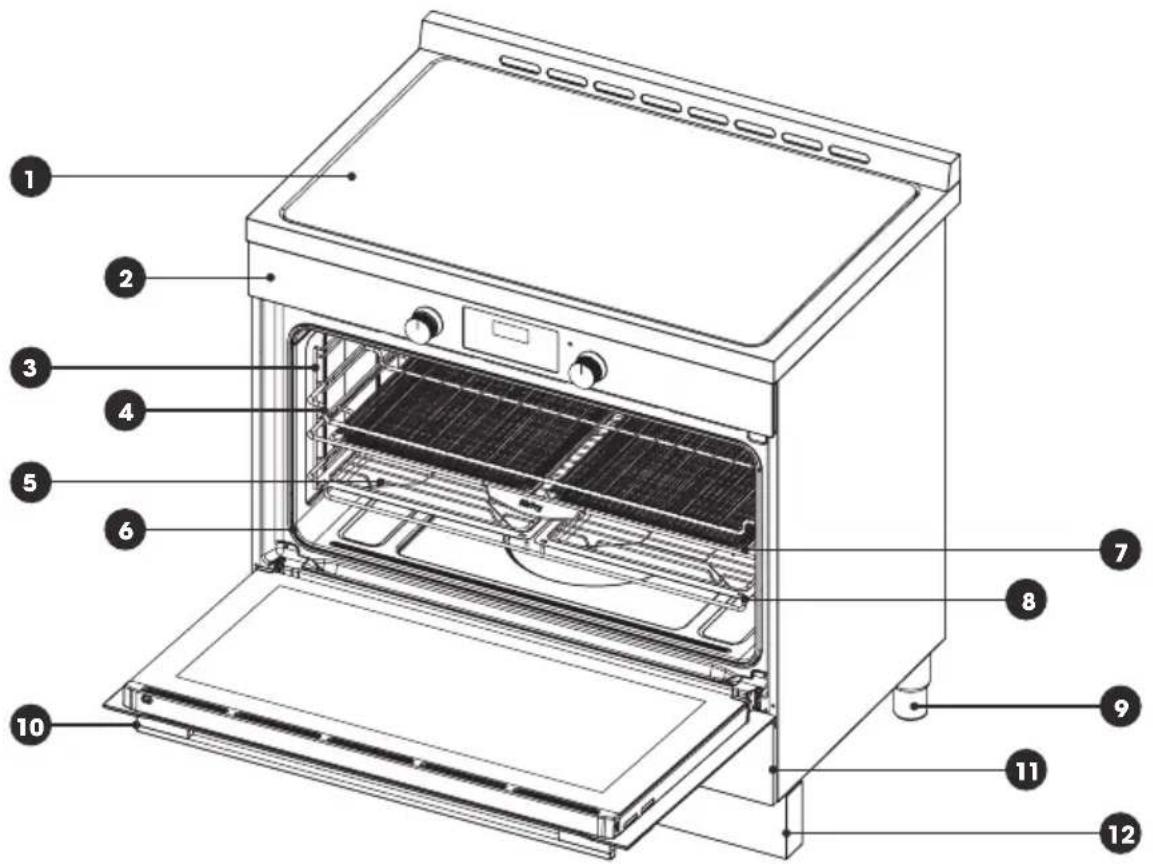
| 1 | Cooktop 2x Air Fry baskets and shelf | 7 |
| 2 | Control panel 2x baking trays and holder | 8 |
| 3 | Side racks Adjustable legs | 9 |
| 4 | Chrome wire shelf Oven handle | ○ |
| 5 | Grill insert Storage drawer | ○ |
| ○ | Door seal Kick panel | 126 |
① Note: Above picture is for reference only. The actual appliance may be slightly different.
PRODUCT OVERVIEW
Cooktop
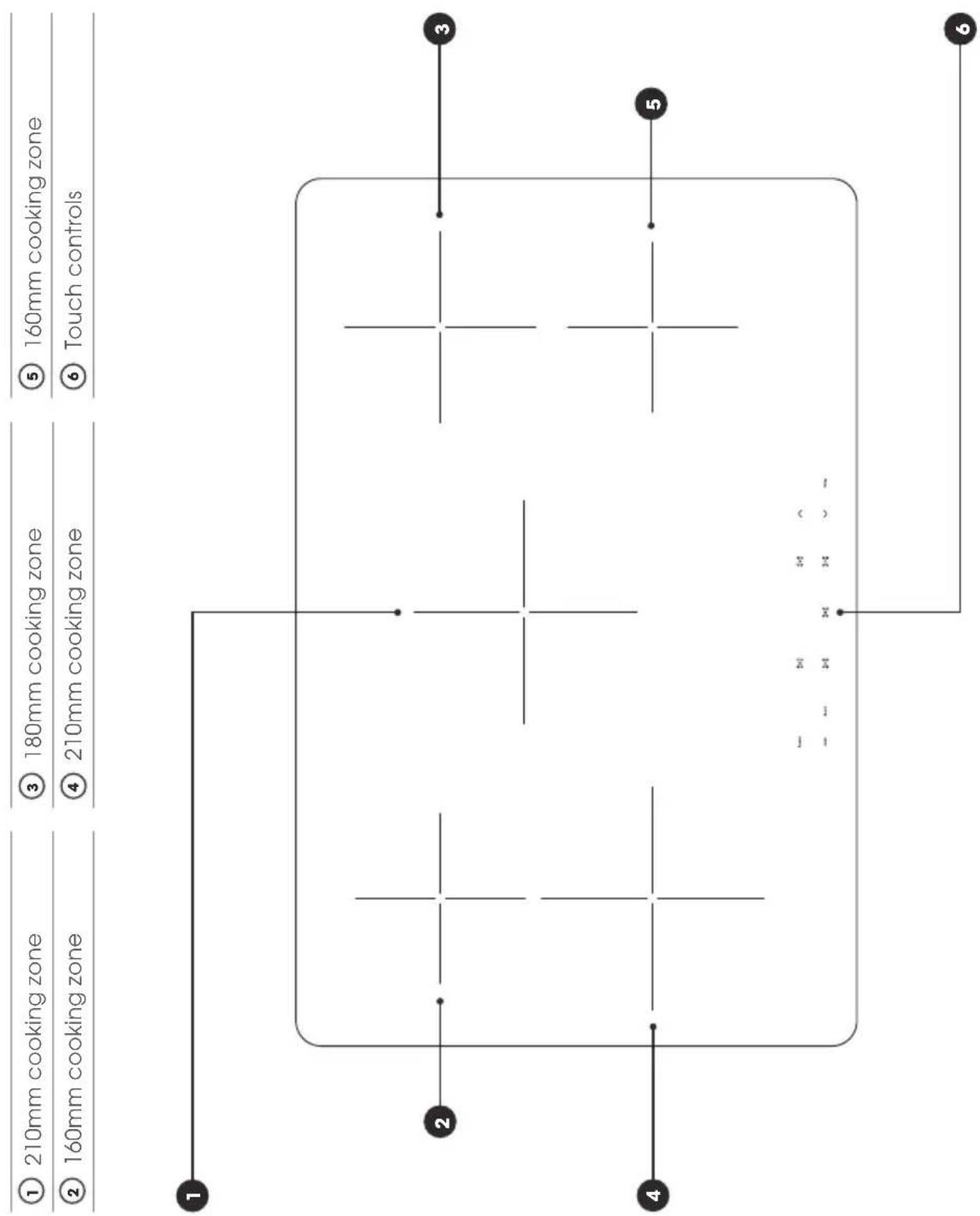
PRODUCT OVERVIEW
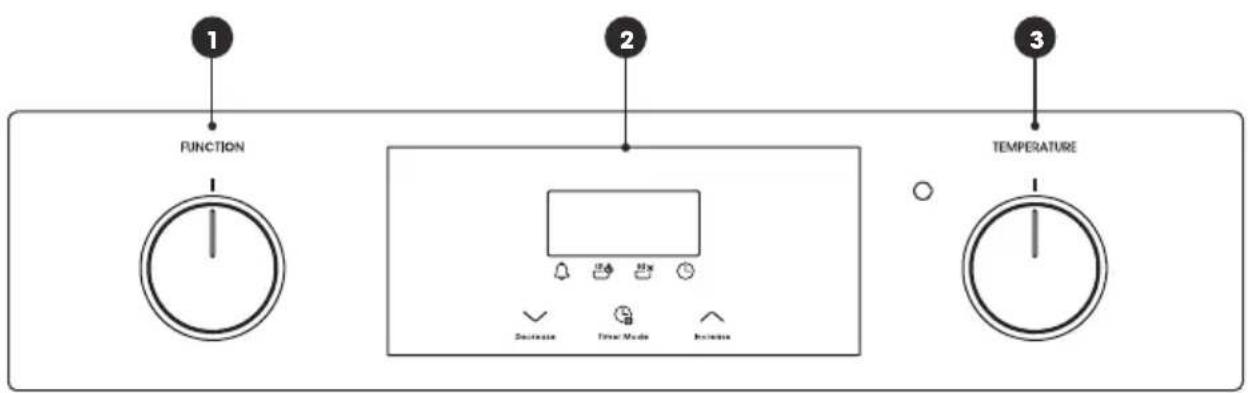
Control Panel
① Cooking mode selection knob
② Touch programmable timer / clock
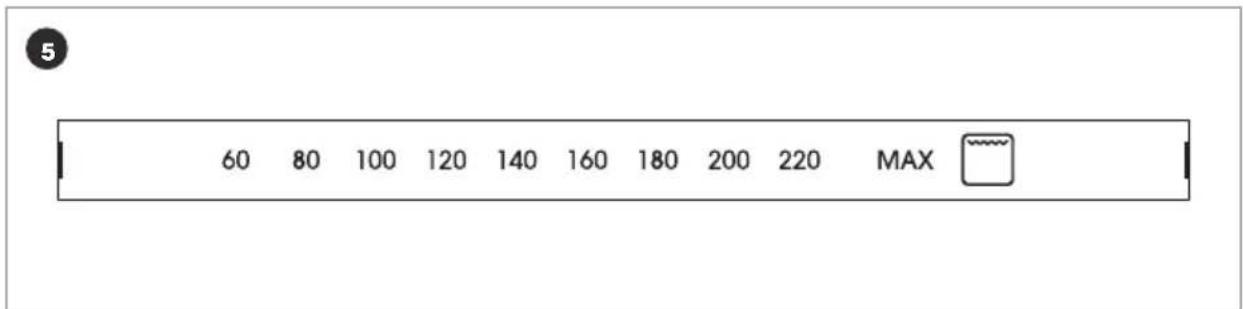
③ Cooking temperature selection knob
④ Cooking mode selections (printed on the knob collar)
⑤ Cooking temperature selections (printed on the knob collar)
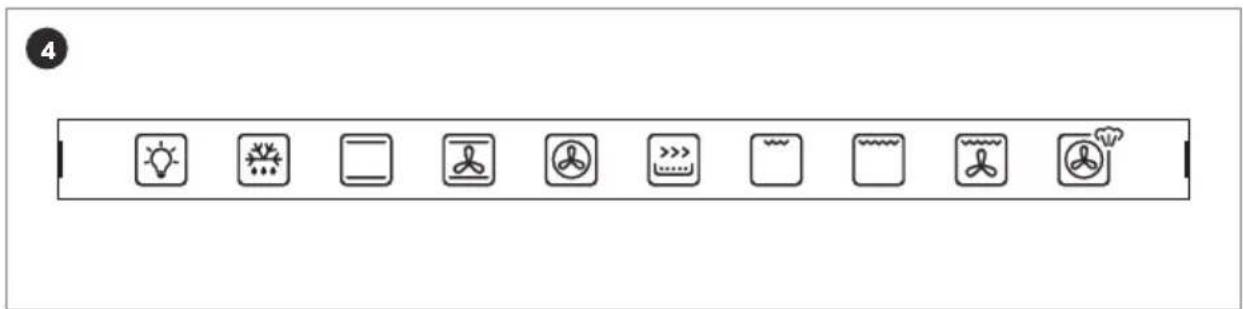
PRODUCT OVERVIEW
Oven and Accessories
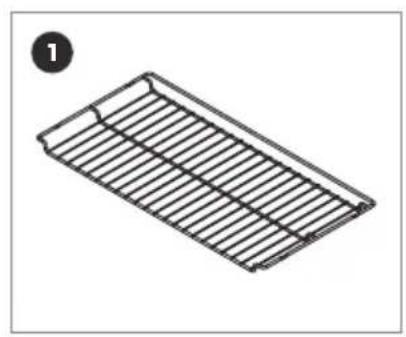
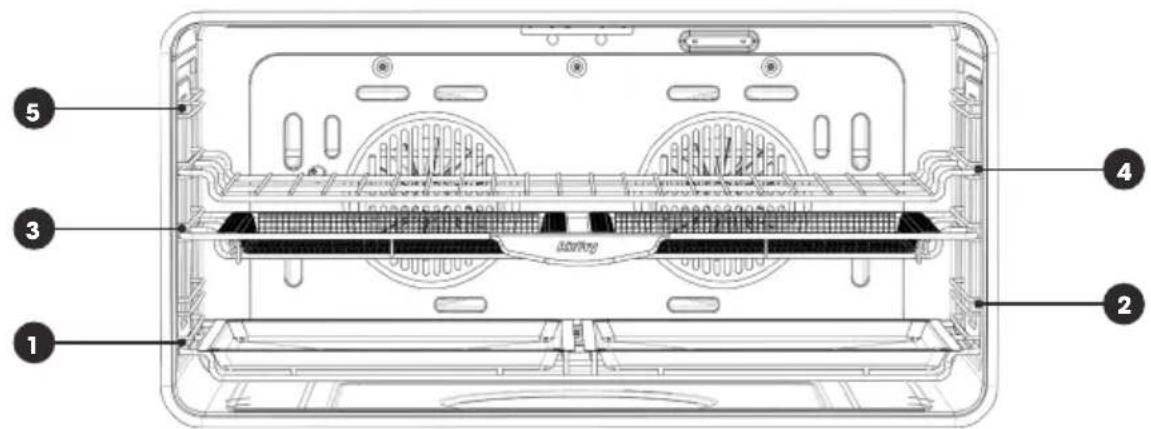
There are five shelf positions in the oven. The oven is supplied with:
① 2x chrome wire shelf supports
④ 2x grill inserts
② 2x split baking trays
⑤ 2x Air Fry baskets + 1x holder
③ 1x baking tray holder
⑥ 1x set telescopic rails
natural_image
Isometric line drawing of a rectangular metal tray with horizontal slats (no text or symbols)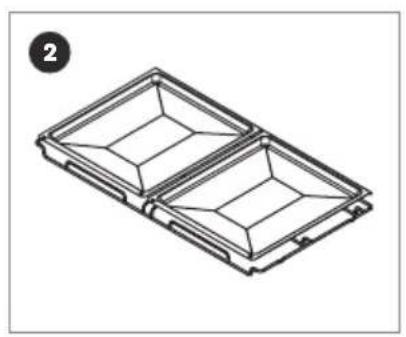
natural_image
Isometric line drawing of a two-tiered plastic tray or tray device (no text or symbols)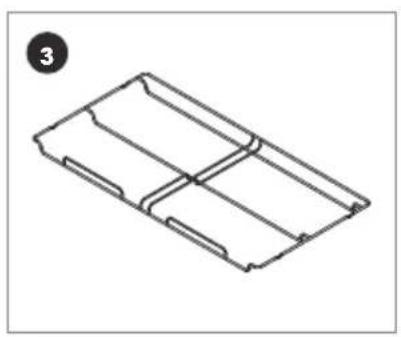
natural_image
Isometric line drawing of a rectangular mechanical part with internal divisions (no text or symbols)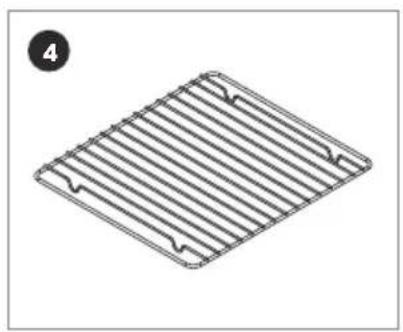
natural_image
Isometric view of a rectangular metal grate with slats and rivets, no text or symbols present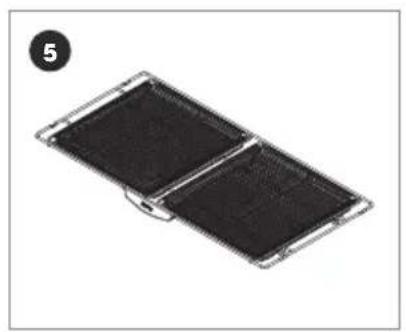
natural_image
Two black rectangular panels with a metallic frame, no visible text or symbols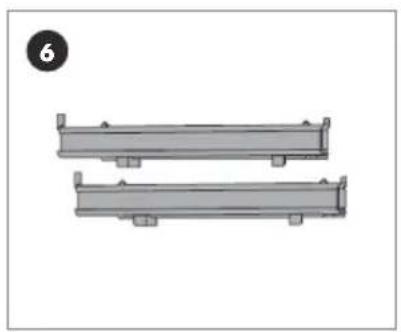
natural_image
Two identical gray rectangular mechanical components with mounting holes, shown without any text or symbols.Shelf positions / levels
INSTALLATION
Dimensions and Installation Features

Warning! Prior to installation, ensure that the local distribution
conditions and the adjustment of the appliance are compatible;
The adjustment conditions for this appliance are stated on data plate;
This appliance is not connected to a combustion products evacuation device.
It shall be installed and connected in accordance with current installation regulations.
Particular attention shall be given to the relevant requirements regarding ventilation.
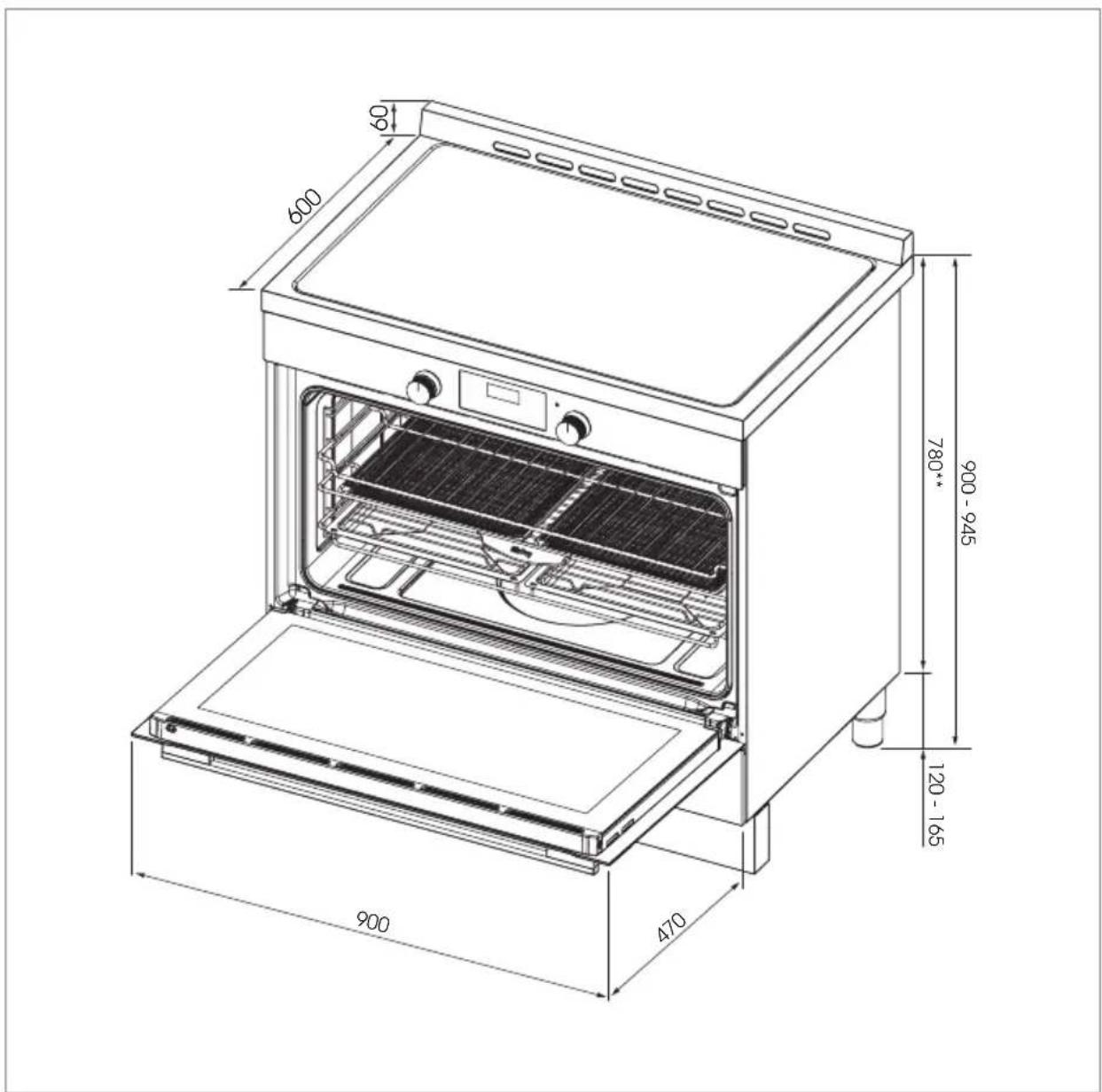
INSTALLATION
| Product dimensions mm | ||
| A) Overall width of the freestanding oven 900 | ||
| B) | Overall height of the freestanding oven (from the floor to top of the cooktop, excluding the optional backguard) | 900 - 945 |
| C) | Overall depth of the freestanding oven (excluding handles and knobs) | 600 |
| D) | Height of the freestanding oven chassis (excluding the adjustable legs) | **780 |
| E) Depth of the open door to the front of the freestanding oven 470 | ||
INSTALLATION
Freestanding Oven Clearances
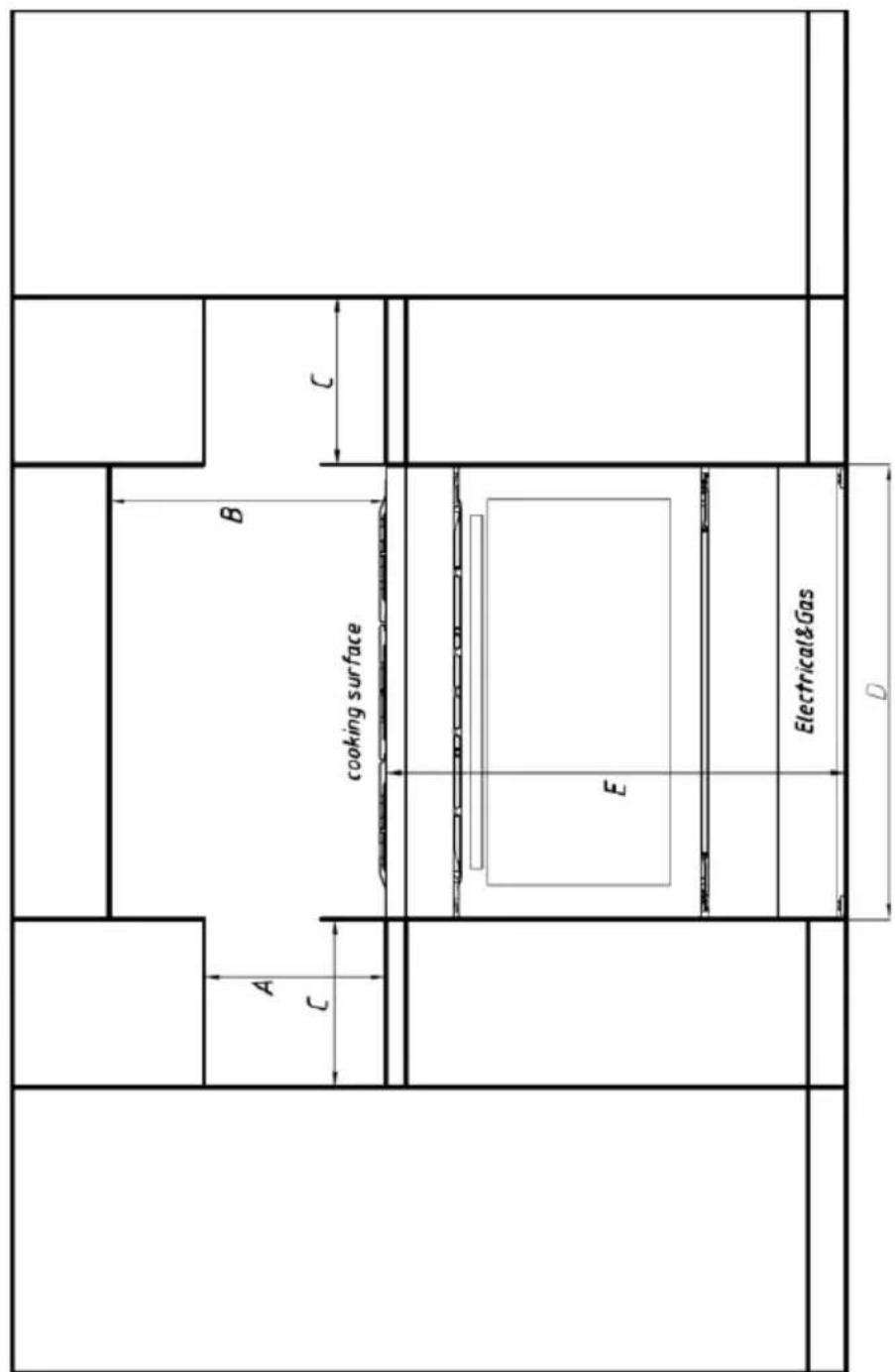
INSTALLATION
| Product dimensions mm | ||
| A) | Minimum vertical distance between benchtop and cabinet extending above the counter | 450 |
| B) Minimum clearance from the top of the burner cap (cooking surface) to: | Overhead cabinet centered above the cooktop (combustible / unprotected)* | 650 |
| Overhead cabinet centered above the cooktop (non-combustible / protected)* | 450 | |
| Ventilation hood centered above the cooking surface | 750 | |
| C) | Minimum clearance from left and right hand edge of the freestanding oven to the nearest combustible surface* | 200 |
| D) Width of cabinetry opening 900 | ||
| E) | Maximum height of cabinetry immediately adjacent to the freestanding oven (from floor to countertop)** | 946 |
| F) Maximum depth from wall to cabinetry face 600 | ||
*Installation clearances and protection of combustible surfaces shall comply with
the current local regulations e.g. AS/NZS5601.1 (latest edition) Gas Installations code.
The standards above specify that where required protection shall ensure that the surface
temperature of the combustible surface does not exceed 65°C above room temperature.
**Depending on the height of the leg adjustment.
The cooking surface must sit flush or above countertop level.
INSTALLATION
Important Notes
Overhead clearances
In no case shall the clearances between the highest part of the cooker be less than 650mm or for an overhead exhaust fan 750 mm. All other downward facing combustible surfaces less than 650 mm above the cooker surface shall be protected for the full width of the cooking surface in accordance with the standards noted above. In no case shall the clearance be less than 450 mm.
Rear and side clearances
- Where the dimensions from the periphery of the nearest burner to any vertical combustible surface is less than 200 mm the surface shall be protected in accordance with the standards to a height of not less than 150 mm above the cooking surface for the full width or depth of the cooking surface.
- Where the dimensions from the periphery of the nearest burner to any horizontal combustible surface is less than 200 mm, the horizontal surface shall be greater than 10 mm below the surface of the hob, or the horizontal surface requirement above.
- Do not install the range near flammable materials such as curtains.
Installing the range on a plinth
- The freestanding oven can be installed on a plinth without the adjustable legs fitted.
- Ensure the freestanding oven is secure and provide safety measures to keep it in place.
- Cabinetry dimensions can be adjusted to suit the plinth height, see product dimensions for chassis height.
Levelling the Feet
The height and level of the appliance can be adjusted by rotating the feet located underneath the appliance at each corner. Rotate the feet to decrease or increase the height.
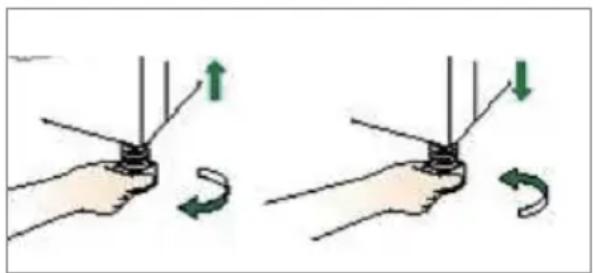
natural_image
Illustration of two hands holding a device with arrows indicating rotation or movement (no text or symbols)INSTALLATION
Fitting the Safety Stabiliser Chain
The cooker is supplied with an anti-tilting chain to prevent the appliance from tilting forward and accidental damage to the gas pipe.
A Fitting the chain
① Take the expansion hook and make an adequate hole in the wall behind, at the same height as the chain fixing area. Insert the plug into the hole and then screw in the hook until it is firmly fixed to the wall.
② Fix the chain to the hook.
③ Adjust to level of the cooker inserting the feet provided.
natural_image
Diagram of a server rack with ventilation slots and two labeled components (no text or symbols)INSTALLATION
B If you can't fit the chain
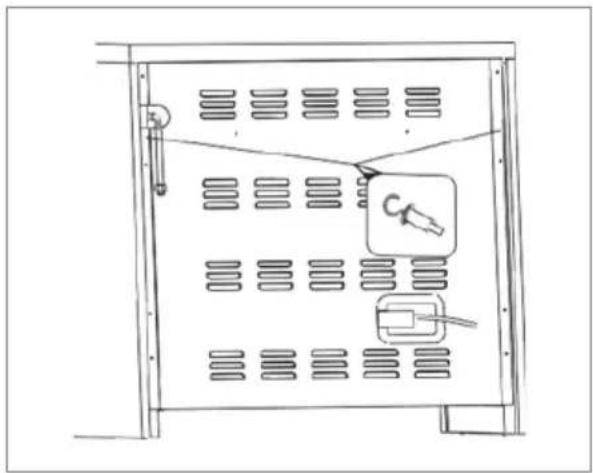
For a situation where the appliance is between two cupboards and the anti tilt chain cannot be fitted we suggest securing by screwing both sides of the cupboards into the sides of the cooker. The screws should be fitted as follows:
① Position the oven between the cupboards in it's final position, then mark the location of the pilot hole inside the cupboard. Refer to the diagram below for the location of the pilot hole.
② Use 3.5mm diameter drill bit to drill the pilot hole through the cupboard and both sides of the cooker. Before drilling, check your measurements to ensure the pilot holes are located within the range specified in the diagram.
③ Fix two 12 gauge x 40mm long self tapping screws through the pilot holes inside both cupboards and into the side of the cooker.
Note: A drilled hole in the side of the cooker which is outside the range specified may void the warrantee. Inspect cupboards thoroughly before drilling to avoid damage to electrical wires or gas lines.
① Note: Screw length is based on cupboard thickness of 20mm, gap between cupboard and oven of 10mm. Screw length could vary depending on cupboard material thickness and gap between oven and cupboards.
① Note: The screws must be accessible for removal if the cooker requires service. Cupboards must not be built over these screws.
Equipment type: Freestanding (class 1)
Insulation class: Class 1
⚠ Warning! The manufacturer declines any and all responsibilities for damages to things or injuries to persons or animals deriving from incorrect installation or use of the equipment.
INSTALLATION
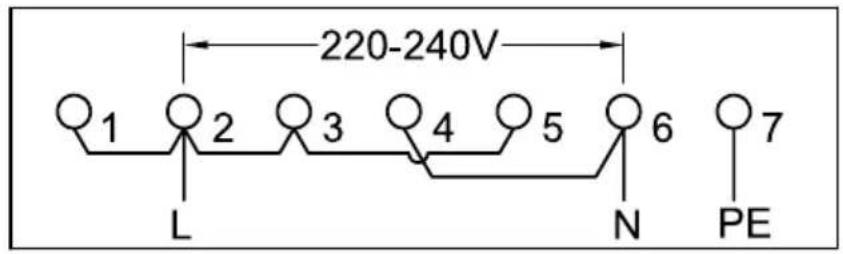
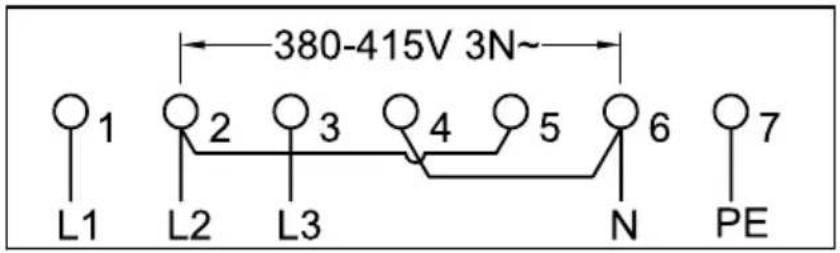
Electrical Connection
The manufacturer is not liable for any direct or indirect damage caused by faulty installation or connection. It is therefore necessary that all installation and connection operations are carried out by qualified personnel complying with the local and general regulations in force.
① Note: The wire section on the cable must not be less than 2.5mm (5×2.5 cable).
① Single phase connection
② Three phase connection
1
2
INSTALLATION
Connection of the Cable to the Mains
Connect the feeding cable to a plug suitable for the load indicated on the rating plate of the product. In case of a direct connection to the mains (cable without plug), it is necessary to insert a suitable omnipolar switch before the appliance, with minimum opening between contacts of 3mm (the grounding wire should not be interrupted by the switch). Before connecting to the mains, make sure that:
- The electrical counter, the safety valve, the feeding line and the socket are adequate to withstand the maximum load required (see rating plate).
- The supply system is regularly grounded, according to the regulations in force. The socket or the omnipolar switch can easily be reached after the installation of the oven.
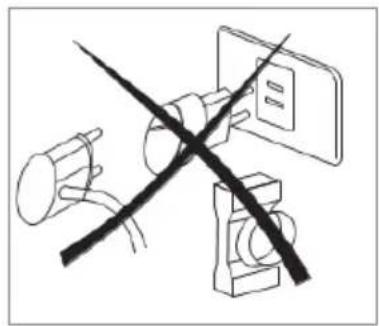
• After carrying out the connection to the mains, check that the supplying cable does not come into contact with parts subject to heating. - Never use reductions, shunts, adaptors which can cause overheating or burning.
The manufacturer is not liable for any direct or indirect damage caused by faulty installation or connection. It is therefore necessary that all installation and connection operations are carried out by qualified personnel complying with the local and general regulations in force.
| Electrical features Watt | |
| Oven light 25 | |
| Upper heating element 1600 | |
| Bottom heating element 1300 | |
| Grill heating element 2600 | |
| Circular heating element 2000 | |
| Ventilator motor 18 | |
| Cooling fan 18 | |
natural_image
Diagram showing two crossed electrical connectors with a switch, no text or symbols present① Note: This appliance shall be installed only by authorised persons and in accordance with the manufacturer's installation instructions, local as fitting regulations, municipal building codes, electrical wiring regulations, local water supply regulations.
INSTALLATION
Ventilation
In general, the appliance should have adequate ventilation to maintain temperature of immediate surroundings within safe limits.
Combustible Surfaces
Any adjoining wall surface situated within 200mm from the edge of any hob burner must be a suitable non-combustible material for a height of 150mm for the entire length of the hob. Any combustible construction above the hotplate must be at least 600mm above the top of the burner and no construction shall be within 450mm above the top of the burner. Zero clearance is permitted on side and rear adjoining surfaces below the hob.
OVERVIEW
natural_image
Line drawing of a standard open oven with top shelf and side doors (no text or symbols)OVERVIEW 26 - 29
DAILY USE 30 - 36
HINTS & TIPS 37 - 43
CLEANING & MAINTENANCE 44 - 47
OVERVIEW
Cooking Modes

Grill
Directs radiant heat from the powerful upper element onto the food. The grill function is best suited for cooking different cuts of meat such as steak, chops, sausages and fish, or for making toasted sandwiches and other quick-cooking foods. For the best results, allow the grill to preheat for 3 minutes before placing food inside. This will help to seal in the natural juices and maintain tenderness of meats. Always grill with the oven door closed.

Maxi Grill
Directs radiant heat from the 2 powerful upper elements onto the food.
Maxi grill allows you to use the full size of the grill tray for cooking larger meals, and will cook faster than the grill function.
Maxi grill is best suited for cooking different cuts of meat such as steak, chops, sausages and fish, or for making toasted sandwiches and other quick-cooking foods. For the best results, allow the grill to preheat for 3 minutes before placing food inside. This will help to seal in the natural juices and maintain tenderness of meats. Always use maxi grill with the oven door closed.

Fan Grill
Generates heat from the upper element which is circulated throughout the cavity by the fan. This combination helps to distribute the heat more evenly onto the food, which helps to avoid burning or overcooking. The fan grill function is ideal for larger cuts of meat which require longer cooking times and will achieve results similar to rotisserie cooked meat. Use the fan grill function with the oven door closed.

Bake
The oven is heated using two elements, one located at the top of the cavity and the other below the floor of the oven. This traditional baking function achieves the best results when cooking on a single oven shelf, to ensure even heat distribution to the food. It is ideal for cooking single trays of biscuits, muffins, cakes and roasts.
OVERVIEW

Fan Assist
The oven is heated using two elements, one located at the top of the cavity and the other below the floor of the oven. The fan circulates the hot air around the cavity for better heat distribution, allowing you to place food in different positions in the oven to cook at the same time. It is suggested to use a maximum of two shelves with the fan assist function and avoid using the bottom shelf to prevent overcooking the base. Food placed on the upper shelf will cook more quickly than the lower shelf.

Air Fry
Delivers the benefits of a bench top Air Fryer into your built-in oven. This premium function generates heat from the powerful upper and fan elements, which is circulated by the fan to rapidly heat the oven cavity. The hot air ensures food is cooked quickly and thoroughly without having to turn it, while the radiant heat from the upper element helps to achieve the crispiest results. The Air Fry function combined with the Euromaid Air Fry basket are ideal for oven frying your favourite frozen foods such as chips, wedges or chicken nuggets without any oil.

Fan Forced
Uses the rear element surrounding the fan to generate heat. The fan then circulates the hot air to maintain a consistent temperature throughout the oven cavity. This allows you to cook food in different areas of the oven at the same time. Fan forced is a very versatile cooking function which can be used for most types of cooking and baking, and will cook foods faster and at a lower temperature than standard bake functions.

Defrost
Uses the fan to circulate room temperature air around the cavity. This function helps to defrost (thaw) different kinds of food before cooking. Using the defrost function will reduce defrosting times by up to 50%.

Light
Turns on only the oven light, the light remains on when the oven is operating.
OVERVIEW

Easy Steam / Steam assisted cooking
Cooking with steam is a great addition to regular hot air or fan forced cooking functions. Steam helps to bring out the natural flavours of food, cooking it more evenly and retaining more nutrients and goodness. Steam assisting cooking functions, such as Euromaid easy steam, consistently produce juicy, succulent interiors with crispy, golden finishes.
⚠ Warning! Risk of burns or damage to the appliance.
⚠ Warning! Do not open the oven door when the Easy Steam function is in operation, except when preheating.
⚠ Warning! Open the oven door carefully once the steam function has completed.
How to use
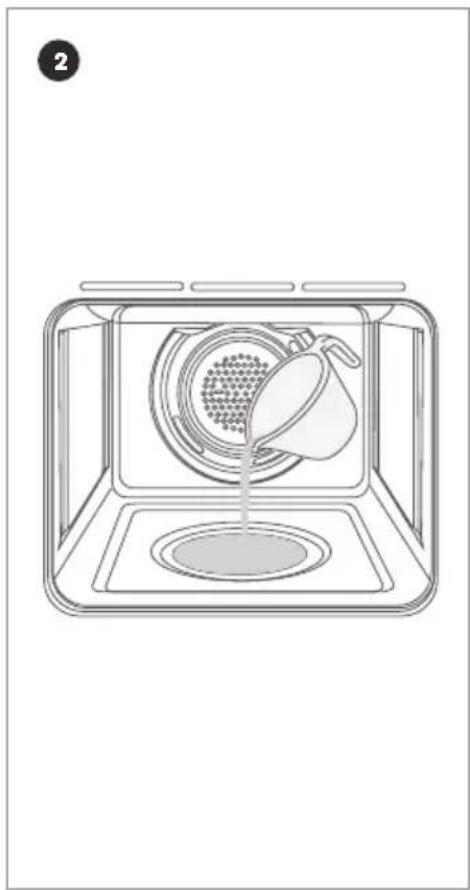
① Open the oven door.
② Add 150ml of water to the well on the base of the cavity while oven is cold.
③ Turn the function knob to easy steam mode
④ Turn the temperature knob to select the cooking temperature between 220 and Max.
⑤ Pre heat for 10 minutes or until the oven has reached the set temperature.
⑥ Place food into the oven and cook as per recipe suggestions.
Caution! Do not refill cavity well with water during cooking or while oven is hot.
⑦ To turn off the oven, turn the function control knob to the 12 o'clock position.
⑧ Once the oven is cool, wipe away any excess water from the cavity well.
natural_image
Line drawing of a microwave oven with a lid pouring liquid into the air (no text or symbols)DAILY USE
Positioning the Oven Trays & Shelves
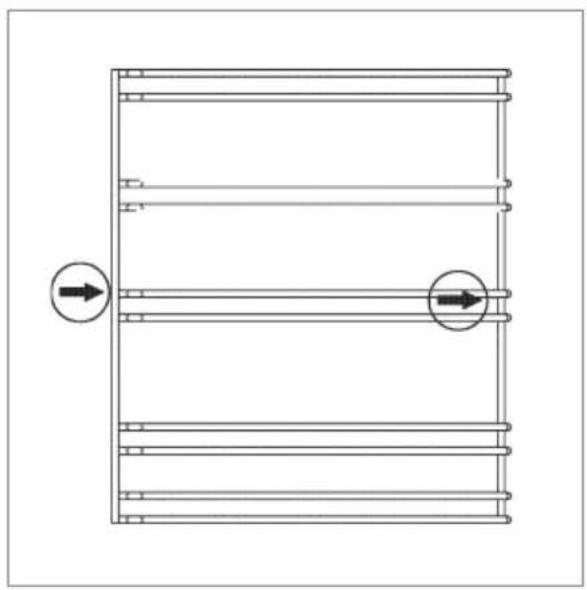
- The Grill Tray or Oven Shelf can be located in any of the five height positions in the oven. Refer to the cooking guide table for the recommended shelf position. When fitting the trays or shelves, ensure they are fitted between the two wires that are closest together as shown below.
- Oven Shelves have a stop so that they are not fully withdrawn by accident. To fully remove the oven shelves, lift the front of the shelf slightly and withdraw fully from the oven.
① Note: that the Grill Tray does not have a stop position and can be fully withdrawn without interruption, so be careful not to accidentally fully withdraw the tray.
- Fit trays and shelves between bars as shown below.
- To remove the oven shelf support, push down on the wire below the top locking pin, pull away from the oven wall until you can release the top of the support from the holes in the oven wall. Replace in reverse procedure.
natural_image
Pure technical diagram of a multi-layered structure with two circular arrows indicating direction, no text or symbols present.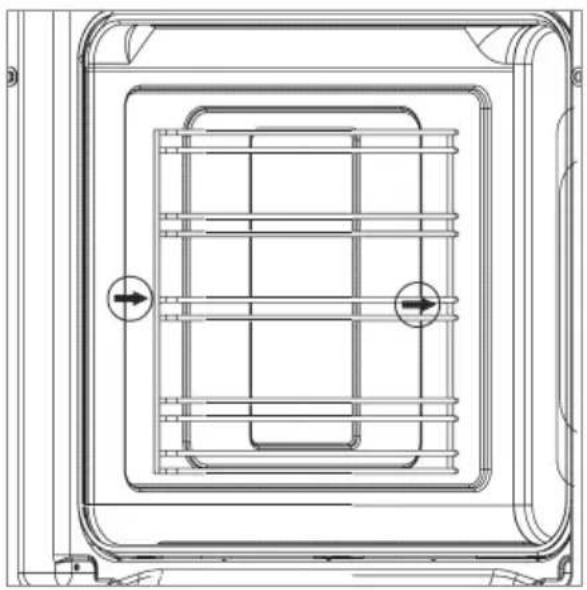
natural_image
Technical line drawing of a rectangular enclosure with internal grid structure and two circular arrows indicating flow or movement (no text or symbols)DAILY USE
Telescopic Rails
The oven includes a set of fully-extending telescopic rails which can be positioned on different shelf levels, allowing the oven racks, trays and Air Fry basket to slide in and out effortlessly.
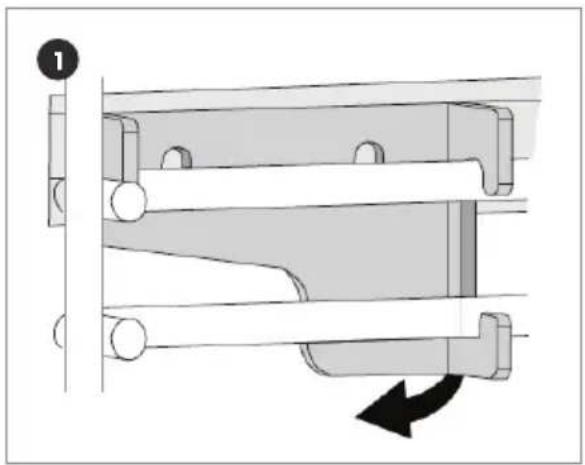
① To un-clip the telescopic rail for cleaning or repositioning purposes you must apply outward pressure on the underside of the telescopic rail to release. (Note: reverse of rail shown).
② To re-fit the telescopic rail, locate the clip into the top rail on the shelf guide and push downward, the rail will clip into place.
③ The telescopic rail is designed to support either a shelf or grill / baking tray and can be installed on any of the shelf positions.
natural_image
Mechanical assembly diagram showing a roller mechanism with a black arrow indicating rotational motion (no text or symbols)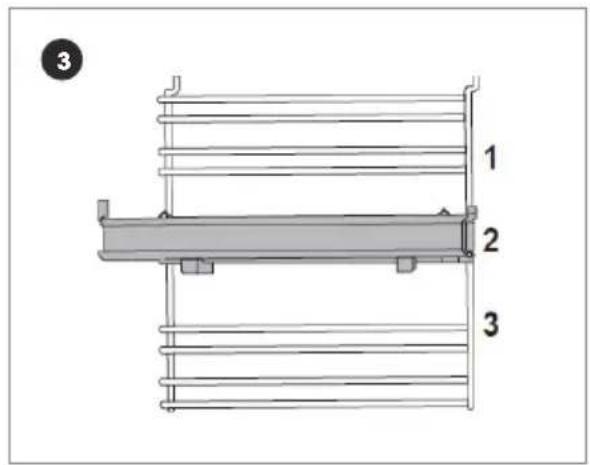
DAILY USE
How to Use Your Oven
This fan forced oven is an extremely versatile appliance that allows you to choose easily and safely between different cooking modes. The various cooking modes are selected by means of a cooking mode selection knob, located on the control panel.
To operate the oven
- Turn the cooking mode selection knob to the desired cooking mode (explanation of cooking modes is on pages 27 to 29).
- Turn the cooking temperature selection knob to the desired temperature (cooking guide is on page 40 to 43) or to Max if Grilling.
- The first time you use your appliance, we recommend that you set the thermostat to the highest setting, set the cooking mode selection knob to a cooking mode and leave the oven on for about half an hour with nothing in it and the oven door closed. Then, open the oven door and allow the oven to cool. Any odour that may be detected during this initial use is due to the evaporation of substances used to protect the oven during storage.
① Note: Place tray on the bottom shelf position of the oven to prevent any spillages from dripping onto the bottom of the oven. Never place anything (including foil and oven trays) on the bottom of the oven when it is in operation because this could damage the enamel. Only place your cookware (dishes, trays, aluminum foil, etc.) on the oven shelves provided with the appliance.
DAILY USE
Touch Control Digital Timer
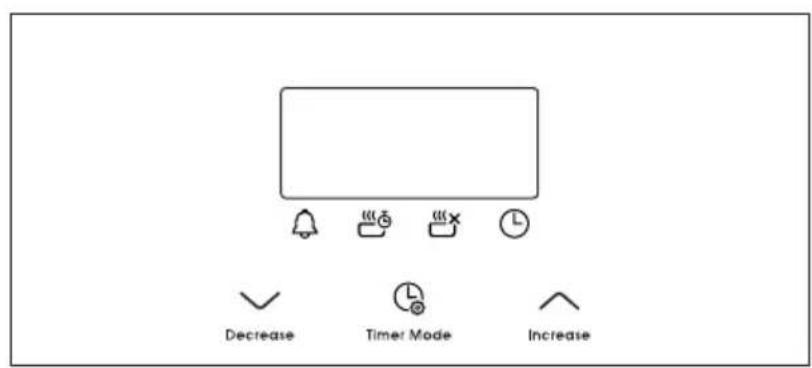

Button functions
| √ | Decrease time |
| ^ | Increase time |
| Timer mode | |
| Timer | |
| Set cooking time (amount of time to cook) | |
| End cooking time (end time for cooking) | |
| Set the time |
DAILY USE
This model has a digital display, 24hr clock with 3 control buttons. When the power is connected, the screen displays 12:00 and the bar above the Ⓛ symbol flashes.
Setting the time when power is first connected
- To set the correct time, press the OK button to advance forward or backward until the correct time is displayed. After 5 seconds the time will be locked in.
Adjusting the time
- Press the function button repeatedly until the bar above flashes, then press or button to set the time. After 5 seconds the time will be locked in.
Manual operation setting
- When power is first connected, the oven will be in manual operation as soon as the time is set. Manual operation will only be cancelled if the power to the oven is switched off or if an automatic cooking time is selected and the bar above or is flashing. See next section on automatic setting.
Automatic setting
- Automatic setting of the oven allows you to select the end time, cooking time, temperature and cooking mode. The oven will switch on, cook according to the selected cooking mode and temperature and then switch o automatically.
① Press the function button repeatedly until the bar above flashes, then press or button to set the time frame for cooking.
② Press the function button repeatedly until the bar above flashes, then press or button to set the time to switch off.
③ Set cooking temperature and cooking mode by turning the thermostat knob and selector knob.
- After these settings, the bars above and with rash, indicating that the automatic cooking feature of the oven is set. For example: if cooking time takes 45 minutes and you want it to finish at 14:00:
① Press the function button repeatedly until the bar above 🎨flashes and set the cooking time 45 minutes.
② Press the function button repeatedly until the bar above 📄 flashes and set the finish time to 14:00.
DAILY USE
- After the above setting, the current time is displayed and the bars above 📁 and 🌐 flash indicating that the automatic cooking feature is set. When the clock displays 13:15, the oven will start cooking automatically. While cooking the bar will flash.
- When the clock displays 14:00, the oven automatically stops cooking. The alarm will sound and the bar will flash, press any button to stop the alarm.
Semi-automatic setting
There are two methods of semi-automatic cooking:
A Start cooking now and set cooking time
This semi-automatic setting of the oven allows you to start cooking immediately, set the cooking time (up to 10 hours), select the temperature and cooking mode. The oven will cook according to the selected cooking mode and temperature and then switch o automatically once the cooking time has elapsed.
① Press the function button repeatedly until the bar above flashes, then press or button to set the time frame for cooking.
② Set cooking temperature and cooking mode by turning the thermostat knob and selector knob. The oven starts immediately, the bar above will flash. After the cooking time has elapsed, the oven automatically stops cooking. The alarm will ring and the bar above will flash, press any button to stop the alarm.
B Start cooking now and set the finish time
① Press the function button repeatedly until the bar above flashes, then press ∧ or √button to set the time to finish cooking (up to 23 hours and 59 minutes).
② Set cooking temperature and cooking mode by turning the thermostat knob and selector knob.
③ The oven starts immediately, the bar above will flash. When the finish time is reached, the oven automatically stops cooking. The alarm will ring and the bar above will flash, press any button to stop the alarm.
④ When any button is pressed during semi-automatic cooking, the set cooking time is displayed. If the finish time is set to the current time, the semi-automatic setting will be cancelled.
DAILY USE
Timer
- The digital countdown timer can be set up to 23 hours and 59 minutes maximum.
- To set the timer, press the function button repeatedly until the bar above ✉ashes. Then press ↗ or button to set the countdown timer. After 5 seconds, the time will be set and begin to count down. When the set time is reached, 🔊 disappears and the alarm will sound, press any button to stop the alarm.
① Note: After pressing the function button, timer settings should be done within 5 seconds.
- In case of a power failure, all settings including the time display will be lost. The time and any settings will need to be re-set.
The oven light
- Set the cooking mode selection knob to the symbol to switch on the oven light(s). The oven light(s) remains on when the oven is operating.
Cooling ventilation
- In order to cool down the exterior of the appliance, this model is equipped with a cooling fan, which switches on automatically.
- When the cooling fan is on, you will notice a flow of air exiting between the oven door and the control panel.
① Note: When cooking is finished, the cooling fan continues to operate until the oven cools down and then switches off automatically.
HINTS & TIPS
Cooking Advice
The oven offers a range of settings which allow you to cook any type of food in the best possible way. With time you will learn to make the best use of this versatile cooking appliance and the following directions are only a guideline which may be varied according to your own personal experience.
Preheating
- If the oven needs to be preheated, the rapid cook mode should be selected. This is the most efficient mode, which will reach the desired temperature as quickly as possible using the least amount of energy.
- Once the food has been placed in the oven, the desired cooking mode can then be selected.
Multi shelf cooking
• If you want to cook food on several shelves, select fan assist mode 📄.
- When cooking delicate foods on more than one shelf, use the fan forced mode This mode allows you to cook on 3 shelves at the same time. Refer to the cooking guide table.
Using the grill
- This multi-function oven has 3 different grilling modes.
- Use the grill mode ☐, maxi grill mode ☐ or fan grill mode ☐ with the oven door closed, place the food on the centre of the grill pan, insert and fit the grill pan on either the 3rd or 4th shelf from the bottom.
- When using grill mode we recommend you set the thermostat to the highest setting.
HINTS & TIPS
Using fan grill
- Use fan grill mode 📁 with the oven door closed. This mode is very useful for grilling foods rapidly, as the distribution of heat by the fan makes it possible not only to brown the surface, but also to cook the bottom of the food.
- It can also be used for browning foods at the end of the cooking process, such as adding that gratin finish to pasta bakes for example.
- When using fan grill mode 📁, place the food on the 2nd or 3rd oven shelf from the bottom, then place a dripping-pan on the 1st rack from the bottom to prevent fat and grease from dripping onto the oven floor. We recommend you set the thermostat to 180°C, as it is the most efficient temperature for fan grill mode 📁.
- However, this does not mean you cannot use other temperatures, simply adjust the thermostat knob to the desired temperature.
① Important! For best results and to save energy, always use the grill functions with the oven door closed.
Baking cakes
- When baking cakes, always place them in a preheated oven. Make sure you wait until the oven has been preheated thoroughly (the indicator light will turn off). To prevent heat loss and the cake from dropping, do not open the oven door during baking.
- In general, if pastry is too dry: increase the temperature by 10^ and reduce the cooking time.
- If pastry has dropped: use less liquid or lower the temperature by 10^ .
- If pastry is too dark on top: place it on a lower shelf, lower the temperature, and increase the cooking time.
- If cooked well on the inside but sticky on the outside: use less liquid, lower the temperature, and increase the cooking time.
- If the pastry sticks to the pan: grease the pan well and sprinkle it with a dusting of flour or use greaseproof paper.
- If I used multi shelf cooking and one shelf is more cooked: use a lower temperature setting next time. It is not necessary to remove the food from all the racks at the same time.
HINTS & TIPS
Cooking pizza
• For best results when cooking pizza, use the fan forced mode
- Preheat the oven for at least 10 minutes.
- Use a light aluminum pizza pan, placing it on the shelf supplied with the oven. Don't use the dripping pan since this will extend the cooking time, making it difficult to get a crispy crust.
- Do not open the oven door frequently while the pizza is cooking;
- If the pizza has a lot of toppings (three or four), we recommend you add the mozzarella cheese on top halfway through the cooking process.
- For best results, only use one shelf at a time, but it you want to cook on two shelves, use the 2nd and 4th racks from the bottom with a temperature of 220^ and swap them halfway through cooking.

Cooking fish and meat
- When cooking white meat and fish, use a temperature setting from 180^ to 200^ .
- For red meat that you want well done on the outside while tender and juicy in the inside, it is best to start with a high temperature setting (200°C-220°C) for a short time, then turn the oven down afterwards.
- In general, the larger the roast, the lower the temperature setting.
- Place the meat on the centre of the shelf and place the dripping pan beneath it to catch the fat.
- Make sure that the shelf is inserted so that it is in the centre of the oven. If you would like to increase the amount of heat from below, use a lower shelf height.
Cooking Guide
| Foods | Weight (kg) | Cooking position* | Preheat time (min) | Temp. setting | Cooking time (min) |
 Defrost Defrost | |||||
| All frozen food | |||||
 Grill / Maxi grill Grill / Maxi grill | |||||
| Soles & cuttlefish 1 4 5 Max 8 - 10 | |||||
| Squid & prawn kebabs | 1 4 5 Max 6 - 8 | ||||
| Cod fish 1 4 5 Max 10 | |||||
| Grill vegetables | 1 | 3/4 | 5 | Max | 10 - 15 |
| Veal steak | 1 | 4 | 5 | Max | 15 - 20 |
| Cutlets | 1 | 4 | 5 | Max | 15 - 20 |
| Hamburgers | 1 4 5 Max 7 - 10 | ||||
| Mackerels | 1 | 4 | 5 | Max | 15 - 20 |
| Toasted sandwiches | - | 4 | 5 | Max | 2 - 3 |
 Fan grill Fan grill | |||||
| Grilled chicken | 1.5 | 3 | 5 | 200 | 55 - 60 |
| Cuttlefish | 1.5 | 3 | 5 | 200 | 30 - 35 |
| Pizza (on 2 racks) | 1 | 2 - 4 | 15 | 220 | 15 - 20 |
| Lasagna | 1 | 3 | 10 | 200 | 30 - 35 |
| Lamb | 1 | 2 | 10 | 180 | 50 - 60 |
| Roast chicken + potatoes | 1 | 2 - 4 | 10 | 180 | 60 - 75 |
| Mackerel | 1 | 2 | 10 | 180 | 30 - 35 |
| Plum cake | 1 | 2 | 10 | 170 | 40 - 50 |
| Grill vegetables | 1 | 3/4 | 5 | Max | 10 - 15 |
| Veal steak | 1 | 4 | 5 | Max | 15 - 20 |
| Cutlets | 1 | 4 | 5 | Max | 15 - 20 |
| Hamburgers | 1 4 5 Max 7 - 10 | ||||
| Mackerels | 1 | 4 | 5 | Max | 15 - 20 |
| Toasted sandwiches | - | 4 | 5 | Max | 2 - 3 |
| Grilled chicken | 1.5 | 3 | 5 | 200 | 55 - 60 |
| Cuttlefish | 1.5 | 3 | 5 | 200 | 30 - 35 |
| Pizza (on 2 racks) | 1 | 2 - 4 | 15 | 220 | 15 - 20 |
| Lasagna | 1 | 3 | 10 | 200 | 30 - 35 |
| Lamb | 1 | 2 | 10 | 180 | 50 - 60 |
| Roast chicken + potatoes | 1 | 2 - 4 | 10 | 180 | 60 - 75 |
| Mackerel | 1 | 2 | 10 | 180 | 30 - 35 |
| Plum cake | 1 | 2 | 10 | 170 | 40 - 50 |
*Rack position from the bottom
HINTS & TIPS
| Foods | Weight (kg) | Cooking position* | Preheat time (min) | Temp. setting | Cooking time (min) |
 Fan grill (continued) Fan grill (continued) | |||||
| Cream puffs (on 2 racks) | 0.5 2 - 4 10 190 20 - 25 | ||||
| Biscuits (on 2 racks) | 0.5 2 - 4 10 180 10 - 15 | ||||
| Sponge cake (1 cake) | 0.5 2 10 170 15 - 20 | ||||
| Sponge cake (2 cakes) | 1 2 - 4 10 170 20 - 25 | ||||
| Savory pies | 1.5 | 15 | 200 | 25 - 30 | |
 Fan forced Fan forced | |||||
| Tarts | 0.5 | 3 | 15 | 180 | 20 - 30 |
| Fruit cakes | 1 | 2/3 | 15 | 180 | 40 - 45 |
| Fruit cake | 0.7 | 3 | 15 | 180 | 40 - 50 |
| Sponge cake | 0.5 | 3 | 15 | 160 | 25 - 30 |
| Stuffed pancakes (on 2 shelves) | 1.2 | 2 - 4 | 15 | 200 | 30 - 35 |
| Small cakes (on 2 shelves) | 0.6 | 2 - 4 | 15 | 190 | 20 - 25 |
| Cheese puffs (on 2 shelves) | 0.4 | 2 - 4 | 15 | 210 | 15 - 20 |
| Cream puffs (on 3 shelves) | 0.7 | 1 - 3 - 5 | 15 | 180 | 20 - 25 |
| Biscuits (on 3 shelves) | 0.7 | 1 - 3 - 5 | 15 | 180 | 20 - 25 |
| Meringues (on 3 shelves) | 0.5 | 1 - 3 - 5 | 15 | 90 | 180 |
*Rack position from the bottom
HINTS & TIPS
| Foods | Weight (kg) | Cooking position* | Preheat time (min) | Temp. setting | Cooking time (min) |
| Bake | |||||
| Duck 1 3 15 200 65 - 75 | |||||
| Roast veal or beef 1 3 15 200 70 - 75 | |||||
| Pork roast 1 3 15 200 70 - 80 | |||||
| Biscuits (short pastry) | -3 15 180 15 - 20 | ||||
| Tarts 1 3 15 180 30 - 35 | |||||
| Fan assist | |||||
| Frozen food | |||||
| Pizza | 0.3 | 2 | - | 250 | 12 |
| Courgette & prawn pie | 0.4 | 2 | - | 200 | 20 |
| Country style spinach pie | 0.5 | 2 | - | 220 | 30 - 35 |
| Turnovers | 0.3 | 2 | - | 200 | 25 |
| Lasagne | 0.5 | 2 | - | 200 | 35 |
| Golden rolls | 0.4 | 2 | - | 180 | 25 - 30 |
| Chicken morsel | 0.4 | 2 | - | 220 | 15 - 20 |
| Pre-cooked food | |||||
| Golden chicken wings | 0.4 | 2 | - | 200 | 20 - 25 |
| Fresh food | |||||
| Biscuits (short pastry) | 0.3 | 2 | - | 200 | 15 - 18 |
| Fruit cake | 0.6 | 2 | - | 180 | 45 |
| Cheese puffs | 0.2 | 2 | - | 210 | 10 - 12 |
*Rack position from the bottom
HINTS & TIPS
| Foods | Weight (kg) | Cooking position* | Preheat time (min) | Temp. setting | Cooking time (min) |
| Air Fry | |||||
| Scotch fillet steak (seared first) | 1 3 5 220 8 | ||||
| Frozen chips 1 3 5 220 15 | |||||
| Chicken drumettes / wingettes (with dry rub) | 1 3 5 230 15 | ||||
| Fresh barramundi fillet (with crumb) | 1 3 5 230 15 | ||||
| Potatoes (cut into wedges) | 0.5 3 5 230 14 | ||||
| Frozen food | |||||
| Chicken nuggets / crumbed fish | 1 3 5 230 15 | ||||
| Smashed chats (parboiled) | 1 3 4 - 5 220 15 | ||||
*Rack position from the bottom
① Note: Cooking times are approximate and may vary according to personal taste. When cooking using the grill or fan assisted grill, the dripping pan must always be placed on the 1st oven shelf from the bottom.
CLEANING & MAINTENANCE
- Before cleaning your oven or performing maintenance, make sure that the cooking mode selection knob is set to off and the cooking temperature selection knob is set to off. To extend the life of your oven, it must be cleaned frequently.
- The enamelled or stainless steel parts should be washed with lukewarm water without using any abrasive powders or corrosive substances. If any stainless steel has difficult to remove stains, use cleaners specifically recommended to clean stainless steel. After cleaning any surface, it is advisable to rinse thoroughly and dry.
- The inside of the oven should preferably be cleaned immediately after use, when it is still warm (but not hot), with warm water and soap. The soap should be rinsed away and the interior dried thoroughly. Avoid using abrasive detergents, scourers acidic cleaners such as lime scale remover, etc. as these could damage the enamel. If stains are particularly tough to remove, use cleaners specifically recommended to clean ovens and follow the instructions provided with the cleaner.
① Important! Never use a steam cleaner or caustic oven cleaners for cleaning inside the oven.
- If you operate your oven for an extended period of time, or if you are cooking dishes that contain a lot of water, condensation may form on the oven door. Dry it using a soft cloth and try reducing the cooking temperature.
- There is a seal surrounding the oven opening which is necessary to ensure the correct operation of the oven. Check the condition of this seal on a regular basis. If necessary, clean it but avoid using abrasive products or objects to do so. Should it become damaged, please contact Glen Dimplex Service Department. We recommend you avoid using the oven until it has been repaired.
① Important! Never place anything (including foil and oven trays) on the bottom of the oven when it is in operation because this could damage the enamel.
- Clean the glass door using non-abrasive products or sponges and dry it with a soft cloth.
① Important! Do not use harsh abrasive cleaners or sharp metal scrapers to clean the oven door glass since they can scratch the surface, which may result in shattering of the glass. Use only non caustic oven cleaners purchased from hardware stores or supermarkets.
CLEANING & MAINTENANCE
How to Remove the Oven Door
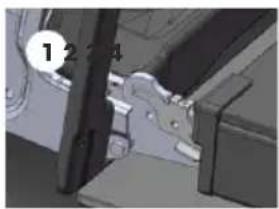
You can remove the oven door for better access to the oven when cleaning. Proceed as follows to remove the door:
① Open the door fully.
② Lift up and turn the latch A situated on each of the two hinges.
③ Grip the door on the two external sides and close it approximately 3/4 way.
④ Pull the door up towards you, lifting it out of the oven frame.
⑤ To replace the door, repeat the above steps in reverse order.
natural_image
Mechanical assembly diagram showing a bracket and mounting bracket (no text or symbols visible)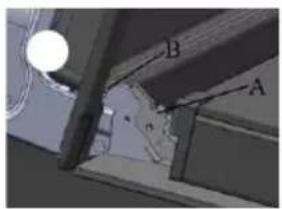
natural_image
Technical diagram showing a mechanical assembly with labeled components A and B (no readable text or symbols beyond labels)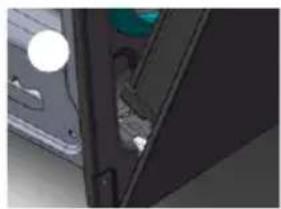
natural_image
Close-up of a mechanical component with a green handle and circular features (no visible text or symbols)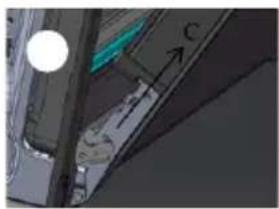
natural_image
Close-up of a mechanical component with a circular light source and dimension lines (no visible text or symbols)CLEANING & MAINTENANCE
How to Dismantle the Oven Door for Cleaning
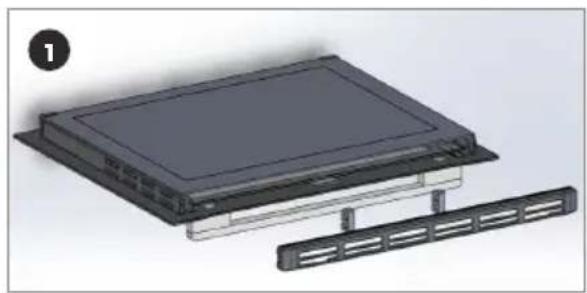
You can remove the inner door glass for better cleaning. Proceed as follows to remove the inner door glass:
① Remove the cap on top of the door by unscrewing the 2 screws on the left and right sides.
② Gently slide out the inner pane of glass.
③ Clean the glass with an appropriate cleaner. Dry thoroughly and place on a soft surface.
④ Now you can also clean the inside of the outer glass.
⑤ Use the reverse procedure to re-assemble the door glass.
natural_image
3D rendering of a device with a rectangular panel and a separate rack (no text or symbols visible)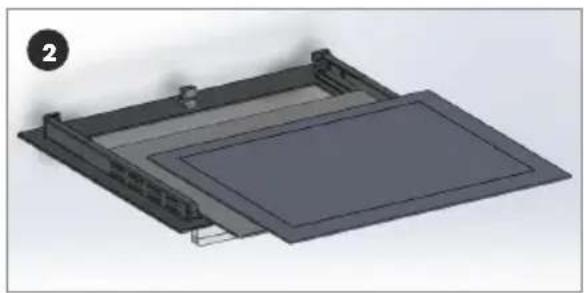
natural_image
3D mechanical assembly diagram showing a rectangular frame with internal components and mounting brackets (no text or symbols)CLEANING & MAINTENANCE
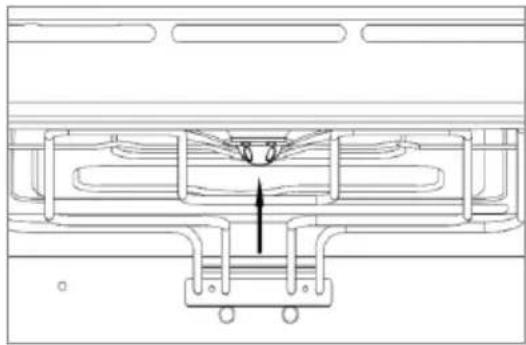
Replacing the Oven Lamps
⚠ Warning! Ensure that the appliance is switched off before replacing the lamp to avoid the possibility of electric shock. Remove the glass cover of the lamp-holder.
Remove the lamp and replace with a lamp resistant to high temperatures (300°C) with the following characteristics:
• Voltage: 220-240V
- Wattage: 25W
- Type: G9
① Note: Replacement lamps are available from Glen Dimplex.
Replace the glass cover and reconnect the oven to the mains power supply.
Replacing the side lamp
① Remove the side racks.
② Take off the protective glass cover.
③ Pull the light bulb down to remove it.
④ After inserting the new bulb, install the glass cover and side racks back to their original position.
natural_image
Technical line drawing of a mechanical assembly with no visible text or symbols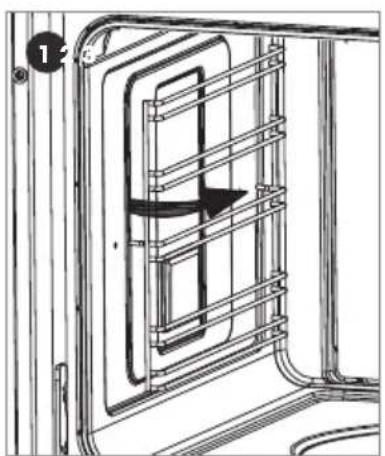
natural_image
Diagram of a train door frame with a directional arrow indicating motion (no text or symbols)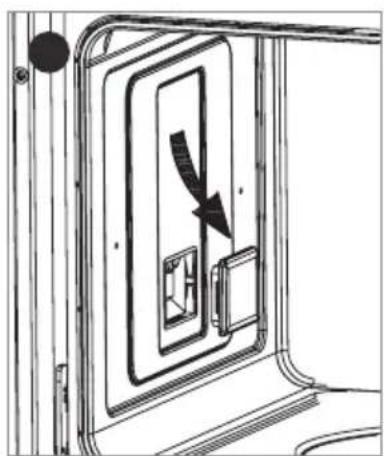
natural_image
Diagram of a door with an arrow indicating direction, showing internal components (no text or symbols)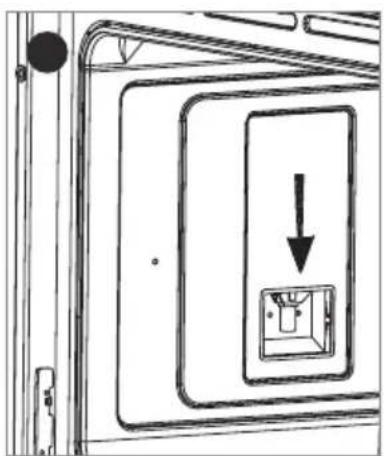
natural_image
Technical line drawing of a door frame with an arrow indicating downward motion (no text or symbols)OVERVIEW
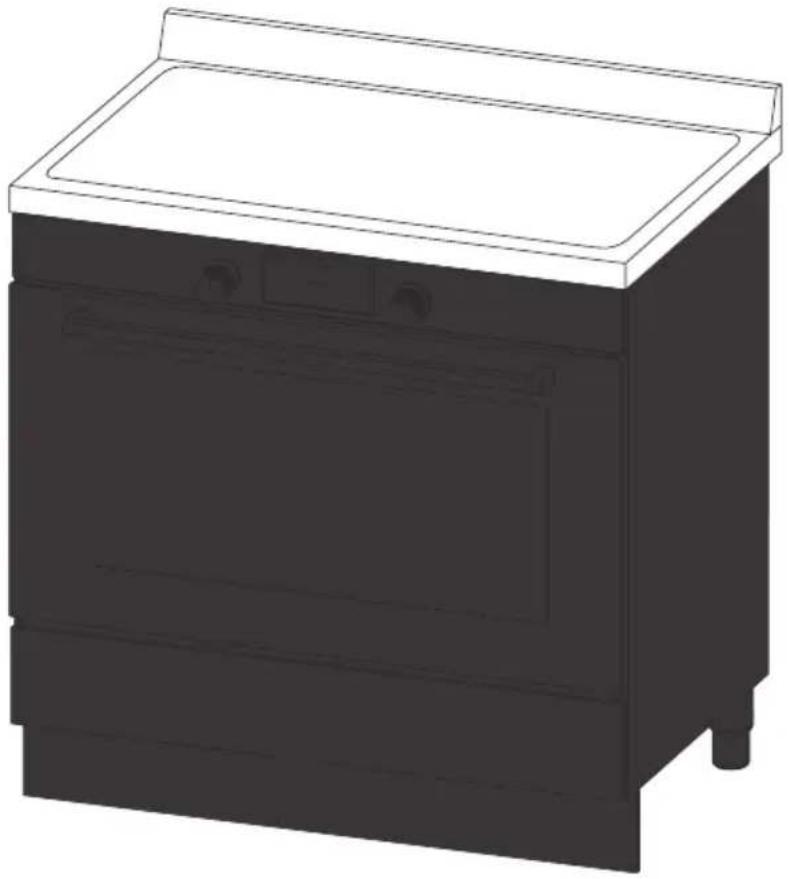
natural_image
Line drawing of a kitchen appliance with a top shelf and side panels (no text or symbols)OVERVIEW 48 - 53
DAILY USE 54 - 60
HINTS & TIPS 61 - 63
TROUBLE SHOOTING 64 - 66
CLEANING & MAINTENANCE 67 - 68
OVERVIEW
Induction Cooking
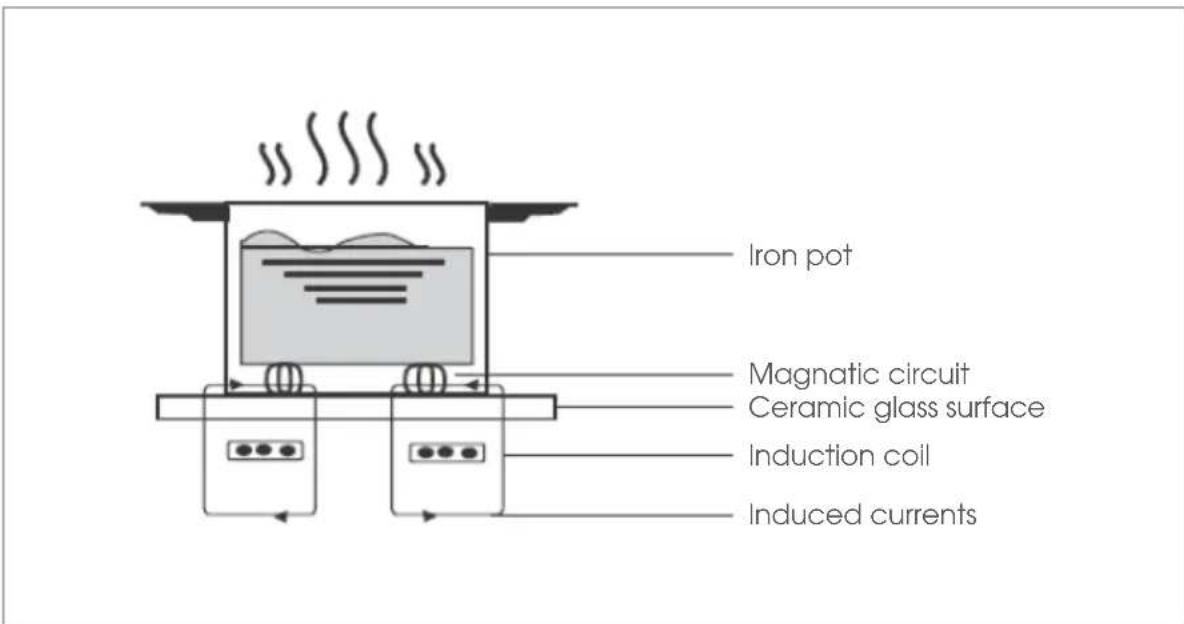
Induction cooking is a safe, advanced, efficient, and economical cooking technology. It works by electromagnetic vibrations generating heat directly in the pan, rather than indirectly through heating the glass surface. The glass becomes hot only because the pan eventually warms it up. This technology has a number of advantages over traditional radiant energy cooking:
• Heat-up times are much faster
- Use is safe as no heating takes place unless a suitable pan is placed on the cooking zone
• As heat is transferred without loss, you save energy
Before Using Your New Hob
① Important! Read this guide, taking special note of the 'Safety Warnings' section.
① Important! Remove any protective film that may still be on your induction hob
OVERVIEW
Using the Touch Controls
flowchart
graph TD
    A["1"] --> B["Power"]
    C["2"] --> D["Lock"]
    E["3"] --> F["Boost"]
    G["4"] --> H["Timer"]
    I["5"] --> J["7"]
    K["6"] --> L["8"]
    M["7"] --> N["1"]
    O["8"] --> P["Timer"]
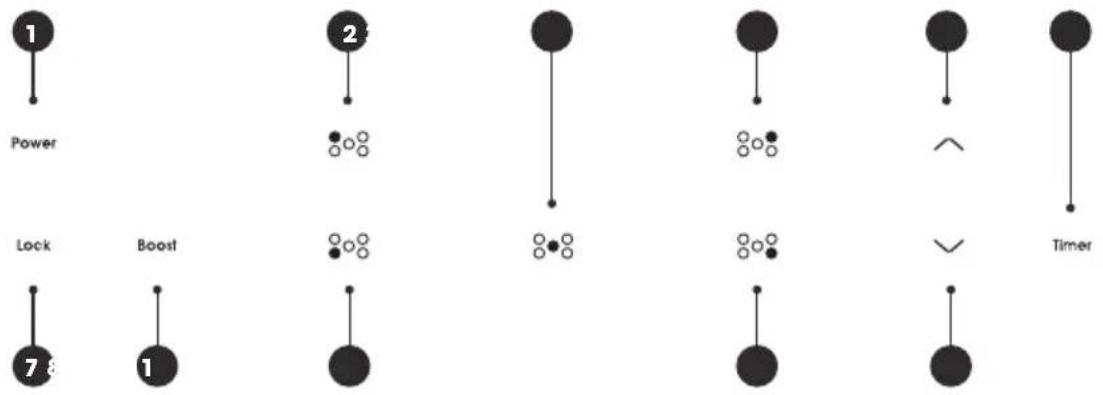
| 1 Power on / off Lock / unlock | 7 |
| 2 Rear left zone Boost | 8 |
| 3 Centre zone Front left zone | 9 |
| 410Rear right zone Front right zone | ○ |
| 511 Increase power level / time Decrease power level / time | |
| 6 Timer control | |
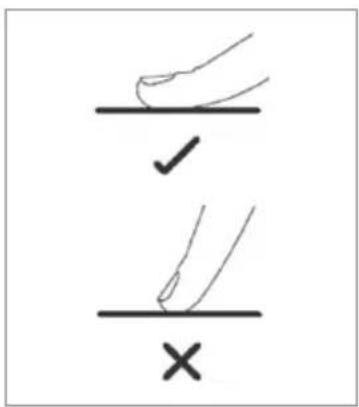
- The controls respond to touch, so you don't need to apply any pressure.
- Use the ball of your finger, not its tip.
- You will hear a beep each time a touch is registered.
• Make sure the controls are always clean, dry, and that there is no object (e.g. a utensil or a cloth) covering them. Even a thin film of water may make the controls difficult to operate.
OVERVIEW
| Zone Location | Size of zone (mm) | Minimum cookware size (mm) | Watts |
| Rear left 160 120 1200 / 1500 | |||
| Rear right 180 140 1800 / 2100 | |||
| Centre 210 160 2300 / 3500 | |||
| Front left 210 160 1800 / 2100 | |||
| Front right 160 120 1200 / 1500 | |||
Choosing the Right Cookware
① Important! The quality of your cookware can affect cooking performance.
Only use cookware with a base suitable for induction cooking. Look for the induction symbol on the packaging or on the bottom of the pan.
| SUITABLE cookware material | UNSUITABLE cookware material |
| Stainless steel: with a magnetic base or coreAluminium and copper: with a magnetic base or coreCast ironSteelEnamelled steel | Pure stainless steelAluminium or copper: without a magnetic baseGlassWoodPorcelainCeramic or earthenware |
OVERVIEW
Magnet test
To check whether your cookware is suitable, carry out a magnet test:
- Move a magnet towards the base of the pan.
If it is attracted, the pan is suitable for induction. - Ensure the attraction is consistent across the base of the pan. If there are gaps, such as an indented manufactures logo, then the performance will be impaired.
If you do not have a magnet
① Put some water in the pan you want to check.
② Follow the steps under 'To start cooking' (on page 54)
③ If U does not flash in the display and the water is heating, the pan is suitable.
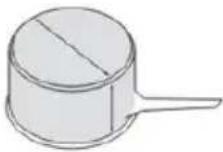 | Quick heating | High content of ferromagnetic material. Heating is consistent across the base and continues up the side of the pan. |
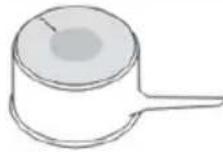 | Average heating | Reduced area of ferromagnetic material. Reduced zone of heating, results in poor cooking performance and slower heating. |
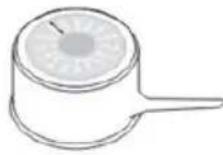 | Slow heating | Very limited area of ferromagnetic material. This type of pot is good for very delicate tasks as heating is very slow. |
OVERVIEW
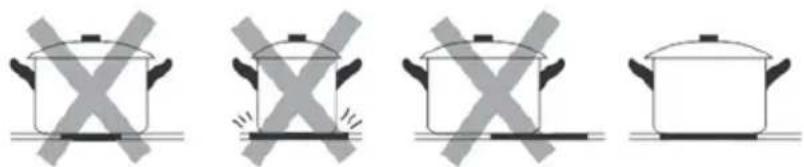
- Do not use cookware with jagged edges or a curved base.
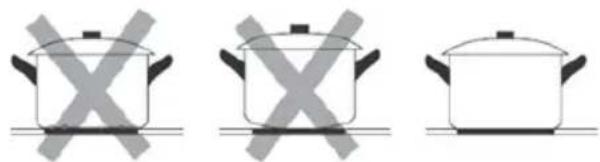
natural_image
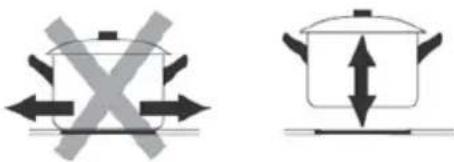
Three identical cooking pots with crossed-out X marks, no text or symbols present• Make sure that the base of your pan is smooth, sits flat against the glass, and is the same size as the cooking zone. Always centre your pan on the cooking zone.
natural_image
Four identical cooking pots with crossed X marks, shown in a row (no text or symbols)• Always lift pans off the ceramic hob — do not slide, or they may scratch the glass,
DAILY USE
To Start Cooking
After power on, the buzzer beeps once, all the indicators light up for 1 second then go out, indicating that the hob has entered the state of standby mode.
① To turn the cooktop on, touch the power button. All the indicators will show
② Place a suitable pan on the cooking zone that you wish to use. Make sure the bottom of the pan and the surface of the cooking zone is clean and dry.
③ Select the corresponding zone on the controls, and an indicator next to it will flash.
④ Select a heat setting by using the or button.
If you don't choose a heat setting within 1 minute, the induction hob will automatically will automatically switch off. You will need to start again at step 1. You can modify the heat setting at any time during cooking.
When You Have Finished Cooking
① Select the zone that you wish to switch off.
② Turn the cooking zone off by adjusting the power level down to 0 using the √button. Make sure the display shows 0.
③ Turn the whole cooktop off by touching the power button.
④ Beware of hot surfaces. H will show in the display of any cooking zones that are still too hot to touch. It will disappear when the surface has cooled down to a safe temperature.
DAILY USE
Using the Boost Function
This feature enables you to sear meat or bring liquid to the boil very quickly. When a cooking zone is set for Boost, it uses more than 100% of the rated power of that particular cooking zone, resulting in a boost of intense heat.
① Important! Boost heats food and liquids very quickly. Do not leave the cooktop unattended when using this feature.
Activate the boost function
① Select the zone required to activative Boost.
② Select and hold Boost until power level indication shows P.
Cancel boost function
① Select the zone with Boost activated
② Select the √ button to cancel the Boost function, and select the required power level using the ∧ or button.
① Note: Boost function can only last for 5 minutes, after that the zone will go to level 9 automatically.
DAILY USE
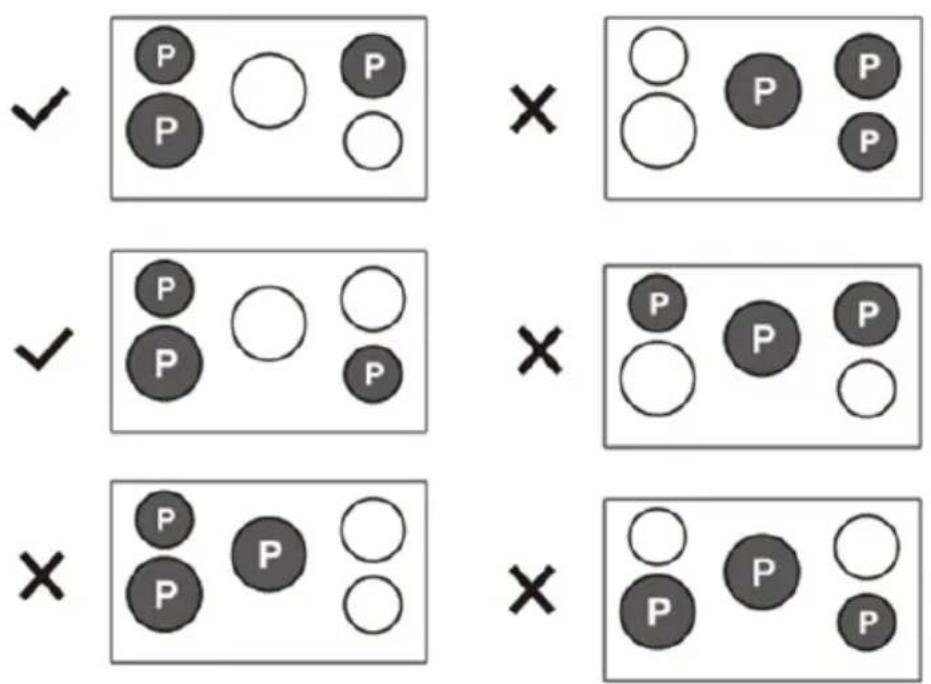
Setting more than one zone to boost
- You can set three cooking zones for Boost at the same time as long as their power doesn't exceed the preset power of 6.0kW.
- The centre zone can be set for Boost alone or with one other zone, to remain within the preset maximum power.
- It is not possible to set all the cooking zones for Boost at the same time.
- When a cooking zone is set for Boost, the other set cooking zones will automatically reduce its power level if it exceeds the preset maximum power.
DAILY USE
Power Management
Induction cooking technology has an embedded power management system which limits the maximum power used. The maximum available power is preset and shared between the cooking zones.
If all the zones are turned on, the power management will not allow all zones to operate at full power but will alternate the power among all zones so the total power will be equal to the preset maximum power of 6.0 kW.
The 4 outer zones or 3 zones including the centre zone, can operate at full power. Once more than these are set, or Power Boost is activated, the power management system activates.
The change in power level will be visible on the power level display for each zone.
The zone that was last set takes priority on the power setting, and the power will reduce one level at a time across the other zones until the power reaches the preset maximum.
DAILY USE
Locking the Cooktop
- You can lock the controls to prevent unintended use (for example children accidentally turning the cooking zones on).
- When the controls are locked, all the controls except the power button are disabled.
To lock the cooktop
Touch the lock button. The timer indicator will show Lo.
To unlock the controls
① Make sure the hob is turned on.
② Select and hold the lock button for 3 seconds.
③ You can now start using your hob.
① Note: When the hob is in lock mode, all the controls are disabled excepting the power button, you can always turn the hob off with the power button in an emergency, but you will need to unlock the hob first when next using.
Residual Heat Warning
When the hob has been operating for some time, there will be some residual heat. Happears to warn you the surface is still too hot to touch.
Auto Shutdown
The safety feature of the hob is auto shut down. This occurs whenever you forget to switch off a cooking zone. The default shutdown times are shown in the table below:
Power level
Default operating time (hour) 8 8 8 4 4 4 2 2 2
DAILY USE
Using the Timer
The time can used in two ways:
① As a minute minder: In this case, the timer will not turn any cooking zone off when the set time is up.
② As a cut-off timer: To turn one or more cooking zones off after time is up.
(i) Note: The timer can be set for up to 99 minutes.
Using the timer as a minute minder
① Make sure the cooktop is turned on, and the zone selection key is not activated (zone indication —is not blinking).
① Note: The minute minder can be set before or after setting the power level.
② Touch timer button, 00 will show in the timer display and 0 will blink.
③ Set the time by using the ↗ or button.
④ Touch the timer button again, then 0 will flash.
⑤ Set the time by touching the ↗ or button. For example, 95 minutes will show.
⑥ When the time is set, it will begin to count down immediately. The display will show the remaining time.
⑦ The buzzer will beep for 30 seconds and the timer shows — when the timer is finished.
DAILY USE
Using the timer to switch off one or more cooking zones
① Select the zone that you want to set the timer for.
② Touch the timer button and 00 will show in the timer display and the 0 will flash.
③ Set the time by touching the ↗ or button.
④ Touch the timer button again, the 0 will flash.
⑤ Set the time by touching the or buttons. For example, 95 minutes will show.
⑥ When the time is set, it will begin to count down immediately. The display will show the remaining time.
① Note: There will be a red dot in the right bottom corner of the power level indication, indicating that zone is selected.
⑦ When the timer expires, the corresponding cooking zone will switch off automatically.
① Note: Other cooking zones will keep operating if they are on.
If the timer is set on more than one zone
① When you set the timer for several cooking zones, red dots of the relevant cooking zones are indicated. The timer display shows the shortest timer and the dot of the corresponding zone blinks.
② Once the countdown timer expires, the corresponding zone will switch off. Then it will show the next shortest timer and the dot of the corresponding zone will flash.
① Note: To see the remaining time of any set zone, select the zone and the corresponding timer will be displayed in the timer indicator.
Canceling the timer
① Select the zone that you want to cancel the timer for.
② Select the timer button, the indicator will flash
③ Touch the √button to set the timer to 00, and cancel the timer.
HINTS & TIPS
Cooking Guidelines
Take care when frying as the oil and fat heat up very quickly, particularly if you're using Power Boost. At extremely high temperatures oil and fat will ignite spontaneously and this presents a serious fire risk.
Cooking Tips
- When food comes to the boil, reduce the power setting.
- Using a lid will reduce cooking times and save energy by retaining the heat.
- Minimise the amount of liquid or fat to reduce cooking times.
- Start cooking on a high setting and reduce the setting when the food has heated through.
Simmering, cooking rice
- Simmering occurs below boiling point, at around 85°C, when bubbles are just rising occasionally to the surface of the cooking liquid. It is the key to delicious soups and tender stews because the flavours develop without overcooking the food. You should also cook egg-based and flourthickened sauces below boiling point.
- Some tasks, including cooking rice by the absorption method, may require a setting higher than the lowest setting to ensure the food is cooked properly in the time recommended.
Searing steak
To cook juicy flavoursome steaks:
① Stand the meat at room temperature for about 20 minutes before cooking.
② Heat up a heavy-based frying pan.
③ Brush both sides of the steak with oil. Drizzle a small amount of oil into the hot pan and then lower the meat onto the hot pan.
Turn the steak only once during cooking. The exact cooking time will depend on the thickness of the steak and how cooked you want it. Times may vary from about 2 – 8 minutes per side. Press the steak to gauge how cooked it is – the firmer it feels the more 'well done' it will be.
Leave the steak to rest on a warm plate for a few minutes to allow it to relax and become tender before serving.
HINTS & TIPS
For stir-frying
① Choose a ceramic compatible flat-based wok or a large frying pan.
② Have all the ingredients and equipment ready. Stir-frying should be quick. If cooking large quantities, cook the food in several smaller batches.
③ Preheat the pan briefly and add two tablespoons of oil.
④ Cook any meat first, put it aside and keep warm.
⑤ Stir-fry the vegetables. When they are hot but still crisp, turn the cooking zone to a lower setting, return the meat to the pan and add your sauce.
⑥ Stir the ingredients gently to make sure they are heated through.
⑦ Serve immediately.
HINTS & TIPS
Heat Settings
| Heat setting Suitability | |
| 1 - 2 | Delicate warming for small amounts of foodMelting chocolate, butter, and foods that burn quicklyGentle simmeringSlow warming |
| 3 -4 | ReheatingRapid simmeringCooking rice |
| 5 - 6 • Pancakes | |
| 7 - 8 | SauteingCooking pasta |
| 9 | Stir-fryingSearingBringing soup to the boil |
| Boost • Boiling water | |
TROUBLE SHOOTING
| Problem Possible causes What to do | ||
| The cooktop cannot be turned on | No power Make sure the cooktop is connected to the power supply and that it is switched on | |
| The touch controls are unresponsive | The controls are locked Unlock the controls. See section ‘using your ceramic cooktop’ for instructions | |
| The touch controls are difficult to operate | There may be a slight film of water over the controls or you may be using the tip of your finger when touching the controls | Make sure the touch control area is dry and use the ball of your finger when touching the controls |
| The glass is being scratched | Rough-edged cookware | Use cookware with flat and smooth bases. See ‘choosing the right cookware’ |
| Unsuitable, abrasive scourer or cleaning products being used | See ‘care and cleaning’ | |
| Some pans make crackling or click noises | This may be caused by the construction of your cookware (layers of different metals vibrating differently) | This is normal for cookware and does not indicate a fault |
| The induction hob makes a low humming noise when used on a high heat setting | This is caused by the technology of induction cooking | The is normal, but the noise should quieten down or disappear completely when you decrease the heat setting |
TROUBLE SHOOTING
| Problem Possible causes What to do | ||
| Fan noises coming from the induction hob | A cooling fan built into your induction hob has come on to prevent the electronics from overheating. It may continue to run even after you've turned the induction hob off | This is normal and needs no action. Do not switch the power to the induction hob off a the wall while the fan is running |
| Pans do not become hot and appears in the display | The induction hob cannot detect the pan because it is not suitable for induction cooking | Use cookware suitable for induction cooking. See section 'choosing the right cookware' |
| The induction hob cannot detect the pan because it is too small for the cooking zone or not properly centered on it | Centre the pan and make sure that its base matches the size of the cooking zone | |
| The induction hob or a cooking zone has turned itself off unexpectedly, a tone sounds and an error code is displayed (typically alternating with one or two digits in the cooking timer display) | Technical fault Please note down the error | letters and numbers, switch the power to the induction hob off at the wall, and contact a qualified technician |
TROUBLE SHOOTING
Cooktop Failure Display and Inspection
If an abnormality comes up, the induction hob will enter the protective state automatically and display corresponding protective codes:
| Problem Possible cause What to do | ||
| E4 / E5 Temperature sensor failure Please contact the manufacturer | ||
| E7 / E8 | Temperature sensor of the IGBT failure | Please contact the manufacturer |
| E2 / E3 Abnormal supply voltage | Please inspect if the power supply is normal. Power on after the power supply is normal | |
| E6 / E9 | Bad induction hob heat radiation | Please restart after the induction hob cools down. |
The above are the judgment and inspection of common failures.
⚠ Warning! Please do not disassemble the unit by yourself to avoid any dangers and damages to the induction hob.
CLEANING & MAINTENANCE
| What How Important | ||
| Everyday soiling on glass (fingerprints, marks, stains left by food or non-sugary spillovers) | 1 Switch the power to the cooktop off | When the power to the cooktop is switched off, there will be no 'hot surface' indication but the cooking zone may still be hot! Take extreme care |
| 2 Apply a cooktop cleaner while the glass is still warm (but not hot!) | Never leave cleanign residue on the cooktop. The glass may become stained | |
| 3 Rinse and wipe dry with a clean cloth or paper towel | Heavy-duty scourers, some nylon scourers and harsh / abrasive cleaning agents may scratch the glass. Always read the label to check if your cleaner or scourer is suitable | |
| 4 Switch the power to the cooktop back on | ||
| Boil overs, melts, and hot sugary spills on the glass | Remove these immediately with a fish slice, palette knife or razor blade scraper suitable for ceramic glass cooktops, but be aware of hot cooking surfaces | Remove stains left by melts and sugary foods or spillovers as soon as possible. If left to cool on the glass, they may be difficult to remove or even permantely dmage the glass surface |
| 1 Switch the power to the cooktop off at the wall | ||
| 2 Hold the blade or utensil at a 30° angle and scrape the soiling or spill to a cook area of the cooktop | Cut hazard! When the safety cover us retracted, the blade in a scraper is razor sharp. Use with extreme care and always store safely and out of reach of children | |
| 3 Clean the soiling or spill up with a dish cloth or paper towel | ||
| 4 Follow steps 2 to 4 for 'everyday soiling on glass' above | ||
CLEANING & MAINTENANCE
| What How Important | ||
| Spillovers on the touch controls | 1 Switch the power to the cooktop off | The cooktop may beep and turn itself off, and the touch controls may not function while there is liquid on them |
| 2 Soak up the spill | ||
| 3 Wipe the touch control area with a clean, damp sponge or cloth | ||
| 4 Wipe the area completely dry with a paper towel | Make sure you wipe the touch control area dry before turning the cooktop back on | |
| 5 Switch the power to the cooktop back on | ||
PRODUCT INFORMATION
| Model number(s): | EFS9010AINDB (Dark stainless) |
| Voltage & frequency: | 220 - 240V ~ / 50 - 60Hz |
| Usable volume: | 133L |
| Total volume: | 148L |
| Output power: | 9800W |
| Net weight (kg): | 71.0 |
| Gross weight (kg): | 86.0 |
| Product dimensions (mm): | 900 (w) x 900 - 945 (h) x 600 (d) |
MANUFACTURER GUARANTEE
This warranty is provided in Australia by Glen Dimplex Australia Pty Limited ABN 69 118 275 460 (Phone number 1300 556 816) and in New Zealand by Glen Dimplex New Zealand Limited NZBN 9429000069823 (Phone number 09 274 8265) in respect of the Euromaid product.
1. Euromaid Express Warranty
Subject to the exclusions below, we warrant that the product will not have any electrical or mechanical breakdowns within:
In the case of Euromaid products used for personal, domestic or household purposes, a period of 2 years from the date the product is purchased as a brand-new product from a retailer located in Australia / New Zealand.
b The warranty period may be extended by an additional 3 years (5 years total) if the appliance is registered on the Euromaid website (listed below) within 90 days following the date of original purchase.
Australia: euromaid.com.au New Zealand: euromaid.co.nz
In the case of Euromaid products used for purposes other than personal, domestic or household purposes (including business or commercial use), a period of 90 days from the date the product is purchased as a brand-new product from a retailer located in Australia / New Zealand. Euromaid products are designed and intended for domestic use only; and
(d) All warranty repairs must be carried out by Glen Dimplex or their nominated service agent.
① Note: warranty periods detailed above may vary in line with agreements with select retail and builder partners and may differ between Australia and New Zealand.
The benefits conferred by this express warranty are in addition to the Consumer Guarantees referred to in section 3 and any other statutory rights you may have under the Australian / New Zealand Consumer Law and/or other applicable laws.
MANUFACTURER GUARANTEE
2. Warranty Exclusions
This express warranty does not apply where:
The product has been installed, used or operated otherwise than in accordance with the product manual or other similar documentation provided to you with the product;
The product requires repairs due to damage resulting from accident, misuse, incorrect installation, insect or vermin infestation, improper liquid spillage, cleaning or maintenance, unauthorised modification, use on an incorrect voltage, power surges and dips, voltage supply problems, tampering or unauthorised repairs by any persons, use of defective or incompatible accessories or exposure to abnormally corrosive conditions, events independent of human control which occurred after the goods left the control of Glen Dimplex;
The repair relates to the replacement of consumable parts such as fuses and bulbs or any other parts of the product which require routine replacement;
d You are unable to provide us with reasonable proof of purchase for the product;
The breakdown occurs after the expiry of the express warranty period set out in section 1 or;
The product was not purchased in Australia / New Zealand as a brand-new product.
3. Consumer Guarantees
Our goods come with guarantees that cannot be excluded under the Australian / New Zealand Consumer Law. You are entitled to a replacement or refund for a major failure and for compensation for any other reasonably foreseeable loss or damage. You are also entitled to have the goods repaired or replaced if the goods fail to be of acceptable quality and the failure does not amount to a major failure.
MANUFACTURER GUARANTEE
4. How to Make a Claim
You may make a claim under this warranty through our website, contacting our customer care line or via email. Contact details for Glen Dimplex Australia and New Zealand can be found at the end of this document.
To make a valid claim under this warranty, you must:
Lodge the claim with us as soon as possible and no later than 14 days after you first become aware of the breakdown;
b Provide us with the product serial number;
Provide us with reasonable proof of purchase for the product. This can take the form of a store receipt, new home handover form or other payment receipt documentation; and
If required by us, provide us (or any person nominated by us) with access to the premises at which the product is located at times nominated by us (so that we can inspect the product).
5. Warranty Claims
If you make a valid claim under this warranty and none of the exclusions set out in section 2 apply, we will, at our election, either repair the product or replace the product with a product of identical specification (or where the product is superseded or no longer in stock, with a product of as close a specification as possible).
Goods presented for repair may be replaced by refurbished goods of the same type rather than being repaired. Refurbished parts may be used to repair the goods. Products are designed and supplied for normal domestic use. We will not be liable to you under this warranty for business loss or damage of any kind whatsoever.
Contact our Customer Care Team
Glen Dimplex Australia Pty Ltd
Ph: 1300 556 816
customer.care.ha@glendimplex.com.au
www.glendimplex.com.au
Glen Dimplex New Zealand Ltd
Ph: 09 274 8265
nztechserv@glendimplex.co.nz
www.glendimplex.co.nz
NOTES
NOTES
READ THE INSTRUCTION BOOKLET BEFORE INSTALLING & USING THE APPLIANCE.
The manufacturer will not be responsible for any damage to property or to persons caused by incorrect installation or improper use of the appliance. The manufacturer is not responsible for any inaccuracies, due to printing or transcription errors, contained in this manual. In addition, the appearance of the figures reported is also purely indicative.
The manufacturer reserves the right to make changes to its products when considered necessary and useful, without affecting the essential safety and operating characteristics. Glen Dimplex constantly seeks ways to improve the specifications and designs of their products. Whilst every effort is made to produce up to date literature, this document should not be regarded as an infallible guide. Actual product only should be used to derive cut out sizes.
All appliances must be installed by a qualified person/s with adherence to the relevant electrical, plumbing and building codes, with compliance being issued as required by state or national legislation.
Additionally, all upright cookers must have the anti-tilt device installed correctly in adherence to the relevant standards by a licenced installer.
For maximum effectiveness and efficiency all rangehoods should be installed with the use of ductwork, by a licenced installer with adherence to the relevant state and national building codes and regulations.
All Glen Dimplex appliances are for Domestic use only, and must be installed by a licenced installer into Domestic Applications only, without exception and to the required Authorities guidelines. Any installation outside of this will VOID warranty. Alfresco areas are not a Domestic application.
Euromaid
Distributed by
Glen Dimplex Australia Pty Ltd
Ph: 1300 556 816
customer.care.ha@glendimplex.com.au
www.glendimplex.com.au
Glen Dimplex New Zealand Ltd
Ph: 09 274 8265
nztechserv@glendimplex.co.nz
www.glendimplex.co.nz
For service advice, please contact the Customer Care Centre by phone or email above.
For full terms and conditions, or to register your product warranty, please visit our website.
Euromaid
euromaid.com.au | euromaid.co.nz
- 90cm Induction
- Freestanding Cooker
- Installation
- Customer Care
- For further details please contact our Customer Care Team
- Australia
- New Zealand
- CONTENTS
- GENERAL INFORMATION
- SAFETY INFORMATION 6 - 11
- PRODUCT OVERVIEW 12 - 15
- INSTALLATION 16 - 25
- PRODUCT INFORMATION 69
- MANUFACTURERS GURANTEE 70 - 72
- OVEN
- OVERVIEW 26 - 29
- DAILY USE 30 - 36
- HINTS & TIPS 37 - 43
- CLEANING & MAINTENANCE 44 - 47
- COOKTOP
- SAFETY INFORMATION
- Avoid the following:
- Authorised personnel must be contracted to:
- Glen Dimplex Service Department must be contacted:
- General Warnings
- Oven Specific Warnings
- Cooktop Specific Warnings
- Environment Protection
- Packaging Materials
- PRODUCT OVERVIEW
- Control Panel
- Oven and Accessories
- Dimensions and Installation Features
- Freestanding Oven Clearances
- Important Notes
- Overhead clearances
- Rear and side clearances
- Installing the range on a plinth
- Levelling the Feet
- Fitting the Safety Stabiliser Chain
- A Fitting the chain
- B If you can't fit the chain
- Electrical Connection
- Connection of the Cable to the Mains
- Ventilation
- Combustible Surfaces
- OVERVIEW
- Cooking Modes
- Grill
- Maxi Grill
- Fan Grill
- Bake
- Fan Assist
- Air Fry
- Fan Forced
- Defrost
- Light
- Easy Steam / Steam assisted cooking
- How to use
- DAILY USE
- Positioning the Oven Trays & Shelves
- Telescopic Rails
- How to Use Your Oven
- To operate the oven
- Touch Control Digital Timer
- Setting the time when power is first connected
- Adjusting the time
- Manual operation setting
- Automatic setting
- Semi-automatic setting
- A Start cooking now and set cooking time
- B Start cooking now and set the finish time
- Timer
- The oven light
- Cooling ventilation
- HINTS & TIPS
- Cooking Advice
- Preheating
- Multi shelf cooking
- Using the grill
- Using fan grill
- Baking cakes
- Cooking pizza
- Cooking fish and meat
- CLEANING & MAINTENANCE
- How to Remove the Oven Door
- How to Dismantle the Oven Door for Cleaning
- Replacing the Oven Lamps
- Replacing the side lamp
- Induction Cooking
- Before Using Your New Hob
- Using the Touch Controls
- Choosing the Right Cookware
- Magnet test
- If you do not have a magnet
- To Start Cooking
- When You Have Finished Cooking
- Using the Boost Function
- Activate the boost function
- Cancel boost function
- Setting more than one zone to boost
- Power Management
- Locking the Cooktop
- To lock the cooktop
- To unlock the controls
- Residual Heat Warning
- Auto Shutdown
- Using the Timer
- Using the timer as a minute minder
- Using the timer to switch off one or more cooking zones
- If the timer is set on more than one zone
- Canceling the timer
- Cooking Guidelines
- Cooking Tips
- Simmering, cooking rice
- Searing steak
- For stir-frying
- Heat Settings
- TROUBLE SHOOTING
- Cooktop Failure Display and Inspection
- PRODUCT INFORMATION
- MANUFACTURER GUARANTEE
- Euromaid Express Warranty
- Warranty Exclusions
- Consumer Guarantees
- How to Make a Claim
- Warranty Claims
- Contact our Customer Care Team
- Glen Dimplex Australia Pty Ltd
- Glen Dimplex New Zealand Ltd
- NOTES
- READ THE INSTRUCTION BOOKLET BEFORE INSTALLING & USING THE APPLIANCE.
- Euromaid
- Distributed by
Brand : Euromaid
Model : EFS9010AINDB
Category : Cooker