
MPG Sekira 500P - Computer Case MSI - Free user manual and instructions
Find the device manual for free MPG Sekira 500P MSI in PDF.


| Product Type | Mid-Tower Computer Case |
| Brand | MSI |
| Model | MPG Sekira 500P |
| Dimensions (L x W x H) | 500 x 225 x 500 mm |
| Weight | 11.5 kg |
| Motherboard Support | E-ATX, ATX, Micro-ATX, Mini-ITX |
| Material | Steel, Tempered Glass, Plastic |
| Front I/O Ports | 2x USB 3.2 Gen 1, 1x USB 3.2 Gen 2 Type-C, 1x HD Audio |
| Drive Bays | 2x 3.5", 4x 2.5" (or combos) |
| Expansion Slots | 7 |
| Max GPU Length | 380 mm |
| Max CPU Cooler Height | 170 mm |
| Max PSU Length | 220 mm (with HDD cage) |
| Cooling Support (Front) | 3x 120mm or 3x 140mm fans / 360mm radiator |
| Cooling Support (Top) | 3x 120mm or 2x 140mm fans / 360mm radiator |
| Cooling Support (Rear) | 1x 120mm fan / 120mm radiator |
| Pre-installed Fans | 1x 120mm rear fan |
| Included Accessories | Screws, cable ties, user manual |
| Maintenance | Removable dust filters (top, front, bottom); tempered glass side panel easy to remove |
| Cleaning | Use soft dry cloth for glass; clean dust filters with vacuum or rinse |
| Safety | Tempered glass panel: avoid impact; sharp edges inside case; handle with care |
| Spare Parts & Repairability | Contact MSI support for replacements; standard components (fans, filters) widely available |
| General Information | Gaming-oriented case with ARGB lighting support via MSI Mystic Light |
Frequently Asked Questions - MPG Sekira 500P MSI
User questions about MPG Sekira 500P MSI
0 question about this device. Answer the ones you know or ask your own.
Ask a new question about this device
Download the instructions for your Computer Case in PDF format for free! Find your manual MPG Sekira 500P - MSI and take your electronic device back in hand. On this page are published all the documents necessary for the use of your device. MPG Sekira 500P by MSI.
USER MANUAL MPG Sekira 500P MSI

natural_image
Technical line drawing of a desktop computer tower case showing internal components like CPU socket and fan (no text or labels)
ARGB Fan Included
內含ARGB風扇

Tool-Less Tempered Glass
無螺絲與強化玻璃側板
| Case Dimensions | 530(D) x 232(W) x 545.5(H) mm/ 20.9(D) x 9.1(W) x 21.5(H) inch | |||
| Motherboard Support | E-ATX/ ATX / mATX / Mini-ITX | |||
| Radiator Support | 120 / 140 / 240 / 280 / 360 | |||
| Driver Bays | ||||
| 3.5" Included | 4 6 6 | |||
| 2.5" Included | 3 3 3 | |||
| IO Port | ||||
| USB 3.2 Gen1 | 4 4 2 | |||
| USB 2.0 | 0 0 2 | |||
| USB 3.2 Gen 2 (Type C) | 1 1 1 | |||
| Audio / Mic | ● | ● | ● | |
| LED SW Button | ● | ● | ● | |
| Fan | ||||
| Fan Support | Top 3 | 3 3 | ||
| Front 3 | 3 3 | |||
| Rear 1 | 1 1 | |||
| Pre-Installed Fans | Top | 2 x 200mm ARGB Fan | — | — |
| Front | 1 x 200mm ARGB Fan1 x 200mm Black Fan | 2 x 200mm Black Fan 3 x | 120mm Black Fan | |
| Rear 1 | x 120mm*ARGB fan 1 x 120mm | Black Fan 1 x 120mm Black | Fan | |
| Front Panel LED | ||||
| Sync with MB | 1 to 8 ARGB Hub included | — | — | |
| Color | ARGB | — | — | |
| Item 項目 | Name 名稱/ Q'ty 數量 | Used for 用途 |
| Screw #6-32 6.5mm x 3 | Motherboard Stud主機板螺柱 | |
| Screw #6-32 6mm x 6 | Power Supply電源供應器安裝使用 | |
| Screw #6-32 6mm x 8 | Motherboard/ 2.5" HDD主機板/ 2.5" 硬碟安裝使用 | |
| Screw M3 5mm x 21 | Motherboard/ Hard Drive CoverVertical Graphics Card Holder/Extractable Radiator Bracket主機板/ 硬碟擋板/ 水冷架安裝直立顯示卡支架安裝使用 | |
| 6-32 x 8mm x12 | 3.5" HDD3.5" 硬碟安裝使用 | |
| 6-32 x 9 x 1.5mm x 8 | Extractable Radiator Bracket水冷架安裝使用 | |
 | Cable ties x 4 | Cable Management整線使用 |
 | Hard Drive Cover x 1 | Hard Drive Cover硬碟擋板 |
| [S6A5] | Vertical Graphics Card Holder x 1 | Display Graphics Card直立顯示卡支架安裝使用 |
HDD Installation/ 硬碟安裝方式

natural_image
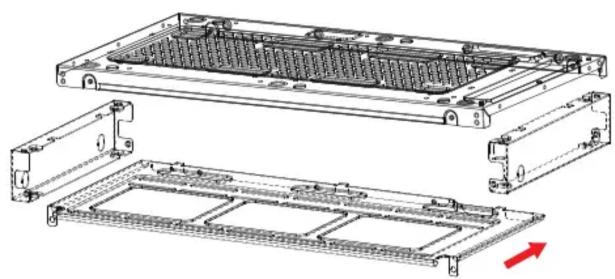
Technical line drawing of a server rack with internal components and a separate view showing a red arrow indicating a component (no text or symbols present)Extractable Radiator Bracket/ 水冷滑軌設計
natural_image
Technical line drawing of a mechanical housing assembly with internal components and mounting brackets (no text or symbols)(MPG SEKIRA 500X / 500G Only)
-
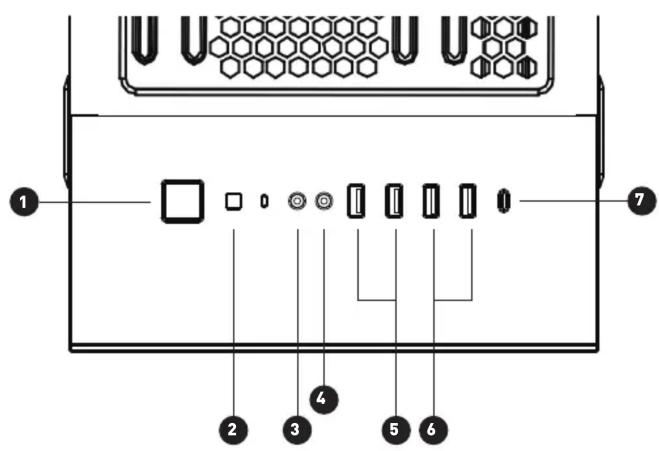
Power ON/OFF / 電源開關
-
LED Control / LED控制鍵
-
MIC / 音訊輸入
-
Audio / 音訊輸出
-
USB3.0
-
USB2.0 (Only SEKARI 500P) 7. Type-C
*Keep pressing the LED button for three seconds, and then users can control the lighting effects via syncing with the motherboard by MSI mystic light app.
*長按三秒前置面板上的LED按鍵,即可透過MSI mystic light 調整多種炫光模式。
(MPG SEKIRA 500X only)
Vertical Graphics Card Holder / 直立顯示卡支架

natural_image
Diagram of a multi-layered storage or rack system with red directional arrows indicating flow or movement (no text or symbols present)Specifications are subject to change without notice.
規格若有變更,恕不另行通知
Brand : MSI
Model : MPG Sekira 500P
Category : Computer Case