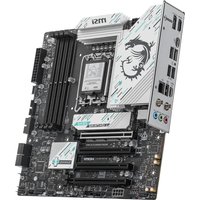
MAG A520M BAZOOKA WIFI - Motherboard MSI - Free user manual and instructions
Find the device manual for free MAG A520M BAZOOKA WIFI MSI in PDF.


Pick your language and provide your email: we'll send you a specifically translated version.
| Product Type | Micro-ATX Motherboard |
| Brand | MSI |
| Model | MAG A520M BAZOOKA WIFI |
| Chipset | AMD A520 |
| CPU Socket | AMD AM4 |
| Supported CPUs | AMD Ryzen 5000, 4000 and 3000 series desktop processors |
| Memory Type | DDR4 SDRAM |
| Memory Slots | 4 x DIMM, dual channel |
| Maximum Memory | 128GB |
| Expansion Slots | 1 x PCIe 4.0 x16, 1 x PCIe 3.0 x1 |
| Storage Interfaces | 4 x SATA 6Gb/s, 1 x M.2 (PCIe 3.0 x4) |
| USB Ports (Rear) | 2 x USB 3.2 Gen 1 Type-A, 4 x USB 2.0 Type-A |
| Wireless Networking | 802.11ac Wi-Fi 5 module |
| Bluetooth | Bluetooth 4.2 |
| Ethernet | 1 x Realtek RTL8111H Gigabit LAN |
| Audio | Realtek ALC887 codec, 7.1-channel HD audio |
| Dimensions | 244mm x 244mm (Micro-ATX) |
| Weight | Approximately 1.2 kg |
| Power Connectors | 24-pin ATX, 8-pin CPU |
| Operating Temperature | 0°C to 40°C |
| Maintenance and Cleaning | Use a dry, soft cloth to clean the board; avoid liquid cleaners and solvents. |
| Safety Precautions | Handle with care to prevent electrostatic discharge; keep away from water and excessive humidity. |
| Spare Parts and Repairability | Included SATA cables, I/O shield, and manual; CMOS battery is user-replaceable. |
Frequently Asked Questions - MAG A520M BAZOOKA WIFI MSI
Which processors are compatible with the MSI MAG A520M BAZOOKA WIFI?
The motherboard supports AMD Ryzen 5000, 4000, and 3000 series desktop processors with the AM4 socket. Ensure your CPU is on the supported list and update the BIOS if necessary for newer models.
How many RAM slots and what maximum memory does it support?
It has four DDR4 DIMM slots supporting dual-channel architecture. The maximum capacity is 128GB, with speeds up to 4866 MHz (overclocked) depending on the CPU.
Does this motherboard have built-in Wi-Fi and Bluetooth?
Yes, it includes an 802.11ac Wi-Fi 5 module and Bluetooth 4.2 for wireless connectivity. An external antenna is included in the box.
How do I update the BIOS on this board?
Download the latest BIOS from MSI's official website. Use the M-FLASH utility in the BIOS setup, or use MSI Center within Windows. Follow the instructions carefully to avoid interruption.
Is the M.2 slot compatible with NVMe SSDs?
Yes, the M.2 slot supports both PCIe 3.0 x4 and SATA M.2 SSDs, so you can install a fast NVMe drive for system and applications.
What are the exact dimensions and form factor?
It is a Micro-ATX form factor board measuring 244mm x 244mm. It fits most standard mATX cases, and some ATX cases with compatible mounting points.
How many SATA ports are available for storage?
There are 4 SATA 6Gb/s ports provided by the chipset. They support RAID 0, 1, and 10 configurations with compatible AMD CPUs.
Does it support PCIe 4.0 for graphics cards?
The primary PCIe x16 slot operates at PCIe 4.0 bandwidth, which is ideal for modern graphics cards. Note that the chipset's own PCIe lanes are 3.0.
What memory speed should I choose for optimal performance?
For most Ryzen processors, a DDR4 speed of 3200-3600 MHz is recommended. This matches the memory controller's sweet spot and provides excellent balanced performance.
How do I install a graphics card safely?
First, insert the card into the PCIe x16 slot until it clicks. Secure it with the bracket screw. Then connect the required power cables from your PSU to the graphics card. Ensure your power supply has sufficient wattage and appropriate connectors.
User questions about MAG A520M BAZOOKA WIFI MSI
0 question about this device. Answer the ones you know or ask your own.
Ask a new question about this device
No questions yet. Be the first to ask one.
Download the instructions for your Motherboard in PDF format for free! Find your manual MAG A520M BAZOOKA WIFI - MSI and take your electronic device back in hand. On this page are published all the documents necessary for the use of your device. MAG A520M BAZOOKA WIFI by MSI.
USER MANUAL MAG A520M BAZOOKA WIFI MSI
Manual assistant
Powered by Anthropic
Waiting for your message
Product information
Brand : MSI
Model : MAG A520M BAZOOKA WIFI
Category : Motherboard