
AUD-EXT-100 - AV Extension Crestron - Free user manual and instructions
Find the device manual for free AUD-EXT-100 Crestron in PDF.


| Product Type | Audio Extender |
| Brand | Crestron |
| Model | AUD-EXT-100 |
| Category | AV Extension |
| Dimensions (W x H x D) | 4.2 in x 1.1 in x 2.8 in (107 mm x 28 mm x 71 mm) |
| Weight | 0.5 lb (227 g) |
| Power Supply | 12V DC, 500 mA (included) |
| Power Consumption | 6 W typical |
| Audio Input | 1x Balanced analog (RCA or terminal block) |
| Audio Output | 1x Balanced analog (RCA or terminal block) |
| Transmission Medium | CAT5e/6 UTP cable |
| Maximum Distance | 300 ft (90 m) over CAT5e |
| Frequency Response | 20 Hz – 20 kHz |
| Signal-to-Noise Ratio | >90 dB |
| Supported Audio Formats | Uncompressed stereo analog |
| Mounting | Surface mount or rack shelf |
| Operating Temperature | 32°F to 104°F (0°C to 40°C) |
| Humidity | 10% to 90% (non-condensing) |
| Maintenance | Clean with a soft, dry cloth. Do not use liquids. |
| Safety | Use only the supplied power adapter. Disconnect before cleaning. |
| Spare Parts & Repairability | No user-serviceable parts. Contact Crestron for service. |
| General Information | Designed for professional AV installations to extend analog audio signals over long distances. |
Frequently Asked Questions - AUD-EXT-100 Crestron
User questions about AUD-EXT-100 Crestron
0 question about this device. Answer the ones you know or ask your own.
Ask a new question about this device
Download the instructions for your AV Extension in PDF format for free! Find your manual AUD-EXT-100 - Crestron and take your electronic device back in hand. On this page are published all the documents necessary for the use of your device. AUD-EXT-100 by Crestron.
USER MANUAL AUD-EXT-100 Crestron
The Crestron® AUD-EXT Series provides a solution for extending analog or digital (S/PDIF) audio signals (depending on model) up to 2000 ft (610 m) over CAT5 cable. It is ideal for any application that requires connecting a remotely located source to a receiver or audio distribution system.
There are three different AUD-EXT models, each providing different connectivity options. Refer to the following table for details.
| MODEL | DESCRIPTION |
| AUD-EXT-100 | (1) Unbalanced stereo signal; 2000 ft (610 m) max |
| AUD-EXT-200 | (2) Unbalanced stereo signals; 2000 ft (610 m) max |
| AUD-EXT-201 | (1) Unbalanced stereo signal and (2) S/PDIF signals; 600 ft (183 m) max* |
* If using only the unbalanced connection, the maximum length is 2000 ft (610 m).
Each audio extender is comprised of one transmitter and one receiver. Each component can be mounted discretely in the back of an equipment rack or on any suitable flat surface. Linking the two components requires just one run of high quality CAT5 cable (sold separately). Crestron offers a full line of rugged cables and installation tools for a complete solution.

Application Drawing
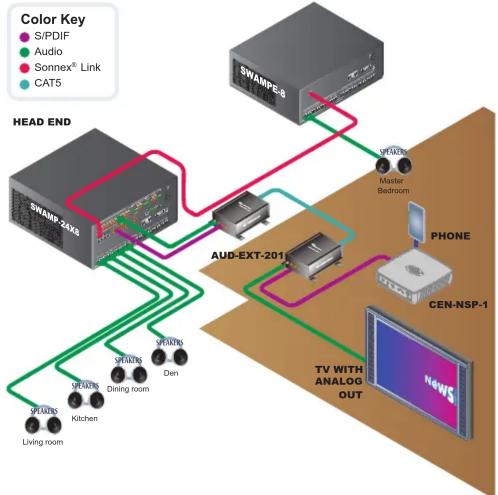
flowchart
graph TD
    A["HEAD END"] -->|S/PDIF| B["SWAMP-23X8"]
    A -->|Audio| C["AUD-EXT-2011"]
    A -->|Sonnex Link| D["SWAMP-8"]
    A -->|CAT5| E["Master Bedroom"]
    B --> F["TV WITH ANALOG OUT"]
    C --> F
    D --> F
    E --> F
    F --> G["CEN-NSP-1"]
    G --> H["PHONE"]
    H --> I["TV WITH ANALOG OUT"]
    I --> J["Living room"]
    I --> K["Kitchen"]
    I --> L["Dining room"]
    I --> M["Den"]

Dimensions

NOTE: Transmitters and receivers share similar dimensions.

Connectors
| CONNECTOR DESCRIPTION | |
| AUDIO IN (Transmitter) | Consists of one or more analog or S/PDIF inputs. Connects to audio source(s). For details, refer to table in section 1. |
| Analog | (2) RCA female comprising (1) unbalanced stereo input;Input impedance: 10 kΩ; Maximum input level: 2 Vrms |
| S/PDIF | (1) RCA female S/PDIF coaxial digital audio input;Input impedance: 75 Ω |
| AUDIO OUT (Transmitter) | (1) 8-wire RJ-45 female connector; Connects to AUDIO IN on receiver. |
| AUDIO IN (Receiver) | (1) 8-wire RJ-45 female connector; Connects to AUDIO OUT on transmitter. |
| AUDIO OUT (Receiver) | Consists of one or more analog or S/PDIF outputs. Connects to receiver inputs(s). For details, refer to table in section 1. |
| Analog | (2) RCA female comprising (1) unbalanced stereo output;Output impedance: typical 100 Ω; Maximum output level: 2 Vrms |
| S/PDIF | (1) RCA female S/PDIF coaxial digital audio output;Output impedance: 75 Ω |
AUD-EXT Series
Audio Over CAT5 Extenders
5
Hardware Hookup

flowchart
graph TD
    A["From Audio Source"] --> B["Transmitter"]
    B --> C["SWAMP-24X8"]
    C --> D["Receiver"]
    D --> E["Data Bus"]
    style A fill:#f9f,stroke:#333
    style B fill:#ccf,stroke:#333
    style C fill:#cfc,stroke:#333
    style D fill:#fcc,stroke:#333
When connecting the devices, please observe the following:
- When connecting the transmitter to the receiver, Crestron recommends using Crestron CRESCAT-IM (sold separately) or high-quality CAT5 twisted-pair cable.
- Do not connect to a DigitalMedia™ network or device, or to any other network or device.
NOTE: All cables and connectors are sold separately.
6
Specifications
| SPECIFICATION DETAILS | |
| AUDIO | |
| Bandwidth | 20–20,000 Hz |
| Signal-to-Noise Ratio | >100 dB |
| Total Harmonic Distortion + Noise | < 0.1%, 20 Hz, 2 Vrms |
| Crosstalk | <-70 dB |
| Power Requirements | None |
| Environmental | |
| Temperature | 41° to 122° F (5° to 50°C) |
| Humidity | 10% to 90% RH (non-condensing) |
| Available Models | |
| AUD-EXT-100 | (1) Unbalanced stereo signal; 2000 ft (610 m) max |
| AUD-EXT-200 | (2) Unbalanced stereo signals; 2000 ft (610 m) max |
| AUD-EXT-201 | (1) Unbalanced stereo signal and (2) S/PDIF signals; 600 ft (183 m) max* |
* If using only the unbalanced connection, the maximum length is 2000 ft (610 m).

Troubleshooting
Further Inquiries
To locate specific information or resolve questions after reviewing this guide, contact Crestron's True Blue Support at 1-888-CRESTRON [1-888-273-7876] or, for assistance within a particular geographic region, refer to the listing of Crestron worldwide offices at www.crestron.com/offices.
To post a question about Crestron products, log onto Crestron's Online Help at www.crestron.com/onlinehelp. First-time users must establish a user account to fully benefit from all available features.
Future Updates
As Crestron improves functions, adds new features, and extends the capabilities of the AUD-EXT Series, additional information may be made available as manual updates. These updates are solely electronic and serve as intermediary supplements prior to the release of a complete technical documentation revision.
Check the Crestron website periodically for manual update availability and its relevance. Updates are identified as an "Addendum" in the Download column.
The specific patents that cover Crestron products are listed at patents.crestron.com.
Crestron, the Crestron logo, DigitalMedia, and Sonnex are trademarks or registered trademarks of Crestron Electronics, Inc. in the United States and/or other countries. Other trademarks, registered trademarks, and trade names may be used in this document to refer to either the entities claiming the marks and names or their products. Crestron disclaims any proprietary interest in the marks and names of others. Crestron is not responsible for errors in typography or photography.
This document was written by the Technical Publications department at Crestron. © 2014 Crestron Electronics, Inc.
Brand : Crestron
Model : AUD-EXT-100
Category : AV Extension