
UT667 - Video camera Uni-T - Free user manual and instructions
Find the device manual for free UT667 Uni-T in PDF.


Pick your language and provide your email: we'll send you a specifically translated version.
| Product Type | Thermal Imaging Camera |
| Brand | Uni-T |
| Model | UT667 |
| Dimensions (approx.) | 210 x 80 x 100 mm |
| Weight (approx.) | 520 g |
| Power Supply | Rechargeable Li-ion battery (3.7V, 2600mAh) |
| Display | 3.5-inch TFT LCD |
| Infrared Resolution | 320 x 240 pixels |
| Temperature Range | -20°C to 550°C |
| Accuracy | ±2°C or ±2% |
| Field of View | 35° x 26° |
| Emissivity | Adjustable from 0.01 to 1.00 |
| Main Functions | Thermal imaging, visual camera, temperature measurement, image/video capture, palettes, spot meter, area analysis |
| Storage | microSD card up to 32GB |
| Interface | USB-C, HDMI output |
| Protection Rating | IP54 |
| Cleaning | Wipe with soft, dry cloth. Avoid solvents. |
| Safety Warnings | Do not disassemble. Avoid laser exposure. Use only specified charger. |
| Spare Parts / Repairability | Battery replaceable; service by authorized center. |
| General Information | User manual available in PDF. Ensure firmware is updated. |
Frequently Asked Questions - UT667 Uni-T
How do I turn on the UT667 thermal camera?
Press and hold the power button (located on the top side) for about 3 seconds until the display lights up.
What is the battery life of the UT667?
The rechargeable Li-ion battery provides approximately 4 hours of continuous use under normal conditions.
How do I change the temperature measurement unit?
Go to Settings menu, select Temperature Unit, and switch between °C and °F as desired.
Can I capture both thermal and visual images?
Yes, the UT667 supports dual-stream mode. Press the capture button to save a thermal image, or use the mode button to switch to visual camera.
How do I adjust emissivity?
Navigate to Settings > Emissivity and use the arrow keys to set the value between 0.01 and 1.00. Consult the manual for typical emissivity of materials.
Why is the image blurry or not focusing?
Clean the lens with a soft cloth. If still blurry, perform a manual focus adjustment using the focus ring around the lens.
Does the UT667 have a laser pointer?
Yes, it has a laser pointer for targeting. Use it carefully and avoid pointing at eyes.
How do I transfer images to a computer?
Connect the camera to your PC via USB-C cable. The device will appear as a mass storage drive. Alternatively, remove the microSD card and use a card reader.
What should I do if the camera does not turn on?
Check if the battery is charged. Try charging for at least 1 hour. If still not working, perform a reset by removing and reinserting the battery.
How do I update the firmware?
Download the latest firmware from the Uni-T website. Copy the .bin file to a microSD card, insert it into the camera, and select Firmware Update in the settings menu.
User questions about UT667 Uni-T
0 question about this device. Answer the ones you know or ask your own.
Ask a new question about this device
No questions yet. Be the first to ask one.
Download the instructions for your Video camera in PDF format for free! Find your manual UT667 - Uni-T and take your electronic device back in hand. On this page are published all the documents necessary for the use of your device. UT667 by Uni-T.
USER MANUAL UT667 Uni-T
Industrial BorescopeUser Manual UT687-5mUT687-10mPlease read the User Manual carefully before your using! UT687-5mUT687-10mPlease read the User Manual carefully before your using! | PREFACETHank you for purchasing the new Industrial Borescope. In order to use this product safety and correctly, please read this manual thoroughlyAfter reading this manual, it is recommended to keep the manual at an easily accessible place, preferably close to the device, for future reference.LIMITED WARRANTY AND LIABILITYUni-Trend guarantees that the product is free from any deficit in material and workmanship within one year from the purchase date. This warranty does not apply to damages caused by accident, negligence, misuse, modification, contamination and improper handling. The dealer shall not be entitled to give any other warranty on behalf of Uni-Trend. If you need warranty service within the warranty period, please contact authorized service center or send the product back with problem description.This warranty is the only compensation you can obtain. Uni-Trend will not be responsible for any special, indirect, incidental or subsequent damage or loss caused by any reason or speculation. As some areas or countries do not allow limitations or implied warranties and incidental or subsequent damage, the above limitation of liability and stipulation may not apply to you.Safety & MaintenanceDo not hit the Lens violently. Do not pull the cables so hard.Be careful to use the device in somewhere rough and uneven, and avoid scratching the waterproof layer of probe.The Lens probe is not made from heat-resistant materials, so please cool down the temperature of engine to be normal when inspect it.-2- | Keep the Lens and device clean and dry when not using, to avoid contacting any oil contaminations or other corrosives.The product is not suitable for users who are limited in body health, sensory ability or spirit ability.Do not let children contact and operate the device.Do not disassemble the device randomly and contact sellers for maintenance service if any damaged.The product is for industrial borescope use, and not suitable for medical use or body check.BatteryPlease charge the device via the home charger meets safety requirements (5V=1A).The device is supported to be used in the charging process.When the device is not used for a long time, charge it at least once every three months, to avoid unrecoverable damage caused by over-discharge.-3- | Functions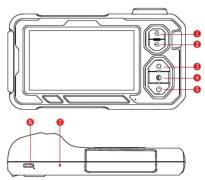 Zoom In (1.0-1.5-2.0x, in cycle)Rotate Images/Switch Lens (180" image notation, Dual-Lens: long press to switch fronthole Lens.)Light Brightness Loop (0-60-80-100%, in cycle)Black-White/Color Mode (In cycle)POWER Button (Long press 2-3s to power on/off)Charging Interface (Support the Type-C charging)RESET Button (Reset when in the conditions of freezing image output or machine crash)-4- Zoom In (1.0-1.5-2.0x, in cycle)Rotate Images/Switch Lens (180" image notation, Dual-Lens: long press to switch fronthole Lens.)Light Brightness Loop (0-60-80-100%, in cycle)Black-White/Color Mode (In cycle)POWER Button (Long press 2-3s to power on/off)Charging Interface (Support the Type-C charging)RESET Button (Reset when in the conditions of freezing image output or machine crash)-4- |
Charging Guideline 1. Charge the device via the Type-C adapter (5V=1A), and fast charge is not supported.2. During the charging, LED lights up in solid red.3. When it is fully charged, LED lights up in solid green. (Please charge the device via the Type-C cable.)FAQ1) The image output is freezing upCheck the battery status of device, or restart the device.2) Unclear imagingThe optimum imaging focus is 2cm-10cm, please align the device with the target, or use a clean alcohol cloth to wipe the front-end of Lens.3) ChargePlease charge the device via the charger (5V=1A), and fast charge is not supported.-5- 1. Charge the device via the Type-C adapter (5V=1A), and fast charge is not supported.2. During the charging, LED lights up in solid red.3. When it is fully charged, LED lights up in solid green. (Please charge the device via the Type-C cable.)FAQ1) The image output is freezing upCheck the battery status of device, or restart the device.2) Unclear imagingThe optimum imaging focus is 2cm-10cm, please align the device with the target, or use a clean alcohol cloth to wipe the front-end of Lens.3) ChargePlease charge the device via the charger (5V=1A), and fast charge is not supported.-5- | 4) Lens overheatedThe Lens overheat phenomenon is commonly seen, especially in the highest LED brightness of Lens, but without affecting the normal use or service life.Accessory Installation GuidelineAccessories: Fixed Buckle *3, Hook*1, Magnet*1, Side Mirror*1 Installation Diagram Installation Diagram -6- -6- | SpecificationModels UT667 UT667-5m UT667-10mSystem Screen Size 4.3"PS LCDSystem Languages EnglishScreen Pixels 1289*720Basic Functions Screen rotation, Black-white images, Color conversion, Image zoom-in and zoom-outHose Hose Material The hardware with aviation plug can be changedHole Lens Hole Diameter 1mm 5mm 10mLight Sensor Chip CMOSField of View (FOV) 70"Depth of Field (DOF) 20-100mmAdjustable LED 4xRating, 8 LEDsPixels 300kIP Rating 9xP Battery 5 xV/2000mAhBattery Life 5hWorking Conditions Lens Temperature 0°C-66°CWorking Temperature 0°C-64°CHumidity 190V/3h, No condensationAccessories List: Large Screen Industrial Borescope*, Type-C Cable*, Gift Box*, User Manual*, Blaster Tray*, Hook*, Side Mirror*, Magnet*, Fixed Buckle*3.The manual is subject to change without prior noticeDue to different batches, the materials and details of actual products may be slightly different from the graphic information, please refer to the actual product received. Experimental data provided in the page is from internal laboratory of UNI-T, but it should not be a reference for customer to place orders. Any questions, please contact the customer service, thanks! |  UNI-TUNI-TREND TECHNOLOGY (CHINA) CO., LTD.No.6, Gong Ye Bei 1st Road,Songshan Lake National High-Tech Industrial Development Zone, Dangguan City,Guangdong Province, ChinaTel: (66-769) 8572 3888http://www.uni-thend.com UNI-TUNI-TREND TECHNOLOGY (CHINA) CO., LTD.No.6, Gong Ye Bei 1st Road,Songshan Lake National High-Tech Industrial Development Zone, Dangguan City,Guangdong Province, ChinaTel: (66-769) 8572 3888http://www.uni-thend.com |
UNI-T.
Table of contents
Click a title to access it
Manual assistant
Powered by Anthropic
Waiting for your message
Product information
Brand : Uni-T
Model : UT667
Category : Video camera