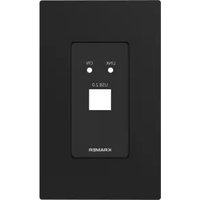
Kramer WP-2UT - Wall switch

WP-2UT - Wall switch Kramer - Free user manual and instructions

Find the device manual for free WP-2UT Kramer in PDF.

📄 1 pages English EN Download 💬 AI Question 10 questions ⚙️ Specs
Notice Kramer WP-2UT - page 1
Pick your language and provide your email: we'll send you a specifically translated version.
Product Type Video/Audio Interface
Model WP-2UT
Brand Kramer
Inputs 2x HDMI
Outputs 1x HDMI
Dimensions (H x W x D) 1.7" x 3.5" x 1.2"
Weight 0.2 kg
Power Supply Passive (no external power required)
Mounting Wall plate
Material Metal
Color Black
Supported Resolutions Up to 4K@60Hz
Audio Support PCM 2.0
Compliance HDCP 2.2
Operating Temperature 32°F to 104°F
Cleaning Wipe with a dry cloth

Frequently Asked Questions - WP-2UT Kramer

What is the Kramer WP-2UT used for?
The Kramer WP-2UT is a wall plate interface designed to simplify video and audio signal distribution. It connects two HDMI sources to a single display, with support for resolutions up to 4K@60Hz.
How do I connect the WP-2UT?
Mount the wall plate in a standard junction box. Connect HDMI sources to the two input ports, then connect the output port to your display using an HDMI cable. The unit is passive and does not require external power.
Does it support HDMI 2.0?
Yes, the WP-2UT supports HDMI 2.0 with HDCP 2.2 compliance, allowing 4K resolution at 60Hz.
Can I use it with older HDMI devices?
Yes, it is backward compatible with earlier HDMI versions, though maximum supported resolution may be limited by the oldest device in the chain.
Does the WP-2UT require power?
No, the WP-2UT is a passive device. It draws power from the HDMI sources and does not need an external power supply.
What is the maximum cable length supported?
For 4K signals, we recommend using high-speed HDMI cables up to 15 feet (4.5 meters). Longer runs may require an active HDMI extender.
How do I switch between inputs?
The WP-2UT features automatic input switching based on the last connected active source. There is no manual button; it detects the active signal automatically.
Can I wall-mount it in a standard electrical box?
Yes, the WP-2UT is designed to fit a standard single-gang junction box. It includes mounting ears and screws for secure installation.
What video resolutions are supported?
It supports resolutions from 480p up to 4K@60Hz (3840x2160). It also supports 3D video formats.
Is there a warranty?
Kramer offers a 7-year warranty on the WP-2UT. For warranty claims, contact your local Kramer dealer.

User questions about WP-2UT Kramer

0 question about this device. Answer the ones you know or ask your own.

Ask a new question about this device

The email remains private: it is only used to notify you if someone responds to your question.

No questions yet. Be the first to ask one.

Download the instructions for your Wall switch in PDF format for free! Find your manual WP-2UT - Kramer and take your electronic device back in hand. On this page are published all the documents necessary for the use of your device. WP-2UT by Kramer.

USER MANUAL WP-2UT Kramer

Scan for full manual

WP-2UT US PANEL SET Quick Start Guide

This guide helps you install and use your WP-2UT US PANEL SET for the first time.

Go to www.kramerav.com/downloads/WP-2UT

Step 1: Check what's in the box

1 US-D faceplate, 1 US-D frame bracket and 1 US-D frame

1 Quick start guide

Step 2: Install the WP-2UT US PANEL SET

After mounting the device (see www.kramerav.com/downloads/WP-2UT) mount the faceplates (US) and frames as shown in the illustrations below:

Device Bracket Faceplate Frame Bracket Frame

Kramer WP-2UT - Step 2: Install the WP-2UT US PANEL SET - 2

DECORA® design or similar frames are included in US-D models.

DECORA® is a registered trademark of Leviton Manufacturing Co., Inc.

We recommend that you use any of the following standard 1 Gang in-wall junction boxes (or their equivalent):

• US-D: 1 Gang US electrical junction boxes.
Manual assistant
Powered by Anthropic
Waiting for your message
Product information

Brand : Kramer

Model : WP-2UT

Category : Wall switch