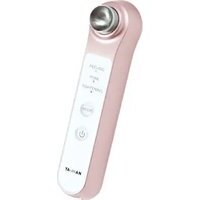
Circle Peeling Pro - Care device YA-MAN - Free user manual and instructions
Find the device manual for free Circle Peeling Pro YA-MAN in PDF.


| Product Type | Facial Peeling Device |
| Brand | YA-MAN |
| Model | Circle Peeling Pro |
| Dimensions | Approx. 130 x 80 x 50 mm (5.1 x 3.1 x 2.0 in) |
| Weight | Approx. 200 g (7.0 oz) |
| Power Supply | Rechargeable lithium-ion battery, USB charging (5V, 1A) |
| Battery Life | Approx. 60 minutes per full charge |
| Main Functions | Exfoliation, Deep Cleansing, Iontophoresis, Microcurrent |
| Number of Modes | 4 (Peel, Clean, Ion+, Microcurrent) |
| Peeling Head Material | Medical-grade silicone with fine tips |
| Water Resistance | IPX4 (splash resistant, not submersible) |
| Maintenance & Cleaning | Wipe device with damp cloth; rinse peeling head under running water after each use; replace head every 3 months |
| Safety Features | Auto shut-off after 5 minutes, low battery indicator, overcharge protection |
| Spare Parts Available | Replacement peeling heads, USB charging cable |
| Repairability | Battery replacement by authorized service center only |
| General Information | Designed in Japan, suitable for all skin types, dermatologist-tested |
Frequently Asked Questions - Circle Peeling Pro YA-MAN
User questions about Circle Peeling Pro YA-MAN
0 question about this device. Answer the ones you know or ask your own.
Ask a new question about this device
Download the instructions for your Care device in PDF format for free! Find your manual Circle Peeling Pro - YA-MAN and take your electronic device back in hand. On this page are published all the documents necessary for the use of your device. Circle Peeling Pro by YA-MAN.
USER MANUAL Circle Peeling Pro YA-MAN
A pioneer in the field of household beauty appliances
YA-MAN
User's Manual
Household beauty device
Pore-targeting sonic facial device
Circle peeling pro tool
HDS-30
To retain
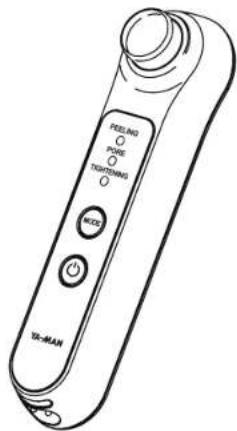
Table of contents
Safety precautions 1
Names of parts 6
Before using 7
How to use 9
Once you are finished 13
What to do in certain situations 15
After-sales service 17
●Product specifications 18
Thank you for purchasing a YA-MAN product.
● Carefully read this User's Manual to properly and safely utilize the device.
●After reading the contents hereof, make sure to store this User's Manual in an accessible location.
● Make sure to include this User's Manual if you are transferring ownership of the device to another person.
Safety precautions
- Carefully read these "Safety precautions" before properly utilizing the device.
- Sensibly utilize the device in accordance with the prescribed steps.
- If an abnormality arises, immediately discontinue the use of the device and arrange to have the device repaired.
- DO NOT utilize the device in a defective state as doing so could cause physical harm to the user.
• The precautionary points outlined here consist of important information relating to safety and should therefore be properly observed by the user. - In order to expressly indicate the magnitude of the hazard and harm that could be caused and the degree of urgency applicable to each case, precautions have been classified as follows according to the foreseeable outcomes of a failure to properly operate the device: Danger, Warning, and Attention.
●Classifications of precautions
| Danger | By failing to properly operate the device according to this type of precaution, it is expected that a hazard that could cause the death or serious injury of an individual will imminently arise. | |
| Warning | By failing to properly operate the device according to this type of precaution, a hazard that could cause the death or serious injury of an individual might conceivably arise. | |
| Attention | The failure to properly operate the device according to this type of precaution could conceivably cause an injury to an individual or property damage (*) to occur. |
* "Property damage" refers to expanded damage affecting a dwelling, household belongings, or domestic animals and pets.
Symbols
| Indicates that the user should refrain from engaging in the action in question. | |
| Indicates that the user must engage in the action in question. | |
| Indicates that a precautionary point must be expressed for the matter in question. |

Danger
Use of the device could cause an electronic medical device to malfunction.
◆Persons utilizing electronic medical devices
• Pacemaker or other implanted electronic medical device;
• Artificial heart-lung machine or other electronic life-support medical device;
• Electrocardiograph or other worn electronic medical device.

Prohibited
The following persons should not utilize the device.

Prohibited
The following persons should not utilize the device.
Use of the device could cause an accident or other problems.
- Person receiving treatment from a doctor, person undergoing growth, or a person suffering from an acute disease;
- Person suffering from tuberculosis, a fever, high blood pressure, or a communicable disease;
- Person suffering from cancer, a blood disorder, a disease of an internal organ, a skin disease, or allergies;
- A person suffering from atopic dermatitis or other skin problems or extreme fatigue;
• A person with sensitive or weak skin, who is in a poor state of fitness, or who is intoxicated;
• A person who is pregnant, menstruating, lactating, or taking medication that induces drowsiness;
• A person with unhealthy skin blemishes caused by physical irritation or who is undergoing dental treatment;
• A person suffering from pain and inflammation caused by an extreme sunburn;
- A person who is a long-term user of a steroid-based hormonal drug or who suffers from telangiectasia due to an impairment of liver function.
DO NOT use the device on various sites as indicated below and outside of specified sites on the face.
Failure to comply may cause an accident or certain problems to occur.
- Any site of a cut, any site where cosmetic surgery has been
performed, anywhere inside the mouth, around the pubic region, any mucous membrane, or any site covered by acne;
- Any site where the skin has suppurated and become inflamed or any site where the skin is itchy or flushed;
- Any swollen mole or viral wart, the Adam's apple, or an eyeball;
• An eyelid or around the eye.
If you are uncertain as to whether it is safe to use the device, consult with a physician prior to use.

Must comply
Use in an operating voltage range of between 100 and 240 V. (free
repairs only in Japan).
Make sure that the AC
adapter is fully inserted
into an electrical outlet.
May cause a fire, electric
shock, or malfunction.

Prohibited
DO NOT place the device in a fire, heat the device, or recharge, use, or leave the device in a
high-temperature setting.
The device features a
The device features a built-in rechargeable battery. May generate heat, ignite, or explode.

Non-intended uses prohibited
DO NOT use for purposes not stated in the User's Manual.
May cause an injury or the unit to malfunction.

Disassembly prohibited
DO NOT disassemble, repair, or modify the device yourself.
May cause a fire, electric shock, or injury.
Contact the seller from which you purchased the device for advice on repairing the device

Warning

Careless or reckless use prohibited
DO NOT damage, rupture, modify, excessively bend, pull, twist, or bundle the electric power cord.
Placing a heavy object on or pinching the electric power cord could damage the cord or cause a fire or electric shock.

Disconnecting the plug
When disconnecting the AC adapter from an outlet, pull it out while holding onto the plug.
May cause an electric shock, short circuit, or fire.

Disconnecting the AC adapter
When cleaning the device, make sure to turn it off and disconnect the AC adapter from the outlet. May cause an electric shock, short circuit, or fire.

Ignition precaution
DO NOT use or leave the device near fire, in direct sunlight, or in a dusty location. Do not bring the device close to a heater. May generate heat, ignite, or explode.

Prohibited
DO NOT drop or immerse the device in water or bring the device near water.
DO NOT use or store the AC adapter in a bathroom or other high-humidity location.
May cause an electric shock, short circuit, or fire.

Use of a damaged cord or plug prohibited
DO NOT use the device if the AC adapter is damaged or if the plug is loose.
May cause an electric shock, short circuit, or fire. Contact the seller from which you purchased the device for advice on repairing the device.

Disconnecting the AC adapter
When not in use, make sure to turn the device off and disconnect the AC adapter from the outlet. DO NOT disconnect with wet hands.
May cause an electric shock, short circuit, or fire.

Disconnecting the AC adapter
In the unlikely event that an abnormality arises, turn the device off and immediately disconnect the AC adapter.
DO NOT use the device if smoke, an abnormal noise, or an odor is detected or if it is otherwise operating in an abnormal state.

Overloading an electric circuit prohibited
Always use the dedicated AC adapter with the device. Directly plug the AC adapter into a wall
outlet and DO NOT overload an electric circuit.
May cause an electric shock, short circuit, or fire.

Use when heat is generated prohibited
Discontinue using the device if it emits an abnormal odor or generates unusual heat.
May cause the device to become damaged or to ignite.

Warning

User restrictions
Keep away from children and do not allow children to use the device.
May cause an accident or injury.

User restrictions
DO NOT allow persons who are unable to express their intentions on their own to use the device.
Use by physically disabled persons on an unattended basis should be avoided. May cause an accident or injury.

Dropping prohibited
DO NOT place the device in an unstable location. DO NOT drop or strike the device.
May cause a malfunctioning of the device.
An injury may also be caused if the device is dropped on a foot or other exposed body part.

Attention

Must comply
Immediately discontinue using the device if you feel tired or a skin abnormality arises during use.
See a physician if either of these conditions persists the following day.

Must comply
Refrain from keeping the device in a stationary position over a single site. Treat your skin while keeping the device
constantly in motion.
Treating your skin by keeping the device in a stationary position may cause skin damage.

Must comply
Use the device for the recommended duration.
Excessive use may cause skin damage.

Must comply
Do not forcefully rub the skin with the device.
May cause skin damage.

Must comply
If you perceive a pinprick sensation of pain on the surface of your skin, shift the location of use.
Alternatively, use with gel or water.
Continued use while feeling pain may cause skin damage.


Must comply
To ensure that there is always some gel or water between the head of the device and your skin, replenish with additional gel or water from time to time.
Continued use while feeling pain may cause skin damage.

Attention

Prohibited
If you have sensitive skin, DO NOT use the device more than one time over the same location when using the device for a single mode during a single session.
Excessive peeling may cause skin damage.

Prohibited
Make sure to perform a pre-test before using the device for the first time.
May cause an accident or injury.

Prohibited
Do not bring the device into contact with another beauty device or electronic appliance while the device is left in a
powered-on state.
May cause an injury or a malfunctioning of the device

Prohibited
DO NOT use the device on pets.
May cause an injury.

Prohibited
DO NOT use with any substance other than cosmetic products (excluding cosmetics not appropriate for use) and water.
May cause skin problems or a malfunctioning of the device.
• Oil-based cosmetics, scrubs, and exfoliants, and invigorating skin lotions

Prohibited
DO NOT use the device if there is still gel or water on your hands.
May cause an inadvertent accident if the device were to slip out of your hand or a malfunctioning of the device if gel or water were to seep into a gap between the main body and a button.

Prohibited
DO NOT wipe the device with alcohol, thinner, benzene, nail-polish remover, or any other solvent.
May cause damage to the front of the device.
Names of parts
●Main body

●Accessory
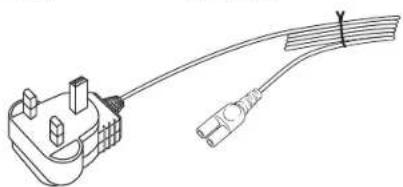
natural_image
Line drawing of a cable with a connector and terminal block (no text or symbols)Before using
●Switching modes
There are three different treatment modes. Each time you press the Mode button while the device is on, the mode will be switched as follows.
* See pages 10 through 13 for the different methods by which treatments can be undertaken.
To turn off the device while the device is in use, hold down the power button (for approximately 3 seconds).
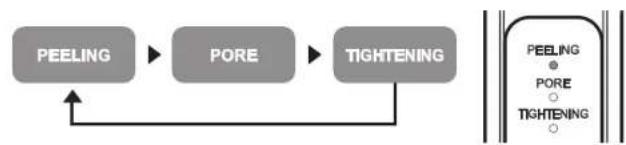
flowchart
graph LR
    A["PEELING"] --> B["PORE"]
    B --> C["TIGHTENING"]
    C --> A
Pre-testing on skin
When using the device or a cosmetic product for the first time, always test for compatibility to ensure that no skin problems will occur.
1 Clean your skin.
Wash the inside of your arm with soap and water and wipe dry with a towel.
2 Apply a cosmetic product (oil-free gel or skin lotion or water) on the inside of your arm and use the device for approximately 1 minute in the PORE mode.
- Do not rub the pre-tested site.
3 Use the device after verifying that no skin abnormality (redness or burning sensation) has occurred within 24 hours of the pre-test.
- Make sure to perform a pre-test in order to prevent skin problems from occurring.
- If a rash, reddening, itch, stinging sensation, or other abnormality occurs at the pre-testing site, immediately stop the pre-test and wash off the cosmetic product or skin lotion being tested.
- Do not use the device if a skin abnormality is perceived.
How to charge
Charge the battery when using the device for the first time or when the remaining charge on the battery is getting low.
- When charging the battery for the first time after purchasing the device, use the device only after the battery is fully charged.
- When using the device for the first time or when the device has not been used for an extended period of time, it is possible that you will be unable to use the device for very long even with a full charge.
1 Insert the adapter plug into the adapter plug insertion port on the device.
2 Insert the AC adapter into a wall outlet.
- The charge light on the device will turn on to indicate that the charging process has begun. The light will turn off when the battery is fully charged.
- The charging time will vary depending on the amount of the remaining charge on the battery and the usage environment.
3 After the battery is fully charged, disconnect the AC adapter from the wall outlet.


●Charge times
| Charge time | Operating time |
| Approx. 2-3 hours | Approx. 30 minutes |
* Usage environment: Room temperature of approximately 25 °C.
* Operating time as measured immediately after a full charge is achieved.
* The charging time may vary depending on the amount of the remaining charge on the battery and the usage environment.
How to use
●Rule of thumb for usage
* Use the device approximately once or twice per week.
It is recommended that you use the device for up to 5 minutes once a day. Excessive use will adversely affect the skin and cause problems.
Basic instructions for using the device
●Treatment
1 Remove makeup and wash your face.
* Clean your skin by removing oil and dirt.
* If you wish to use the device with cleansing gel, you do not need to remove your makeup.
2 Check to make sure that your skin is free of acne, rashes, and other abnormalities.
* Do not use the device on sites where the condition of the skin is abnormal
* If you perceive a skin abnormality, immediately stop using the device and see a physician.
* Do not use around the eyes or ears.
3 Hold down the power button (for approximately 3 seconds) to turn on the device.

Perform a pre-test before using the device for the first time. (See page 7.)
Do not forcefully rub the skin with the device.
To ensure that there is always some gel or water between the head of the device and your skin, replenish with additional gel or water from time to time during use.
Using the device on dry skin may cause damage to the skin.
Refrain from keeping the head in a stationary position over a single site. Treat your skin while keeping the device constantly in motion.
Treating your skin by keeping the device in a stationary position may cause skin damage.
DO NOT use with any substance other than cosmetic products (excluding cosmetics not appropriate for use) and water. May cause skin problems or a malfunctioning of the device.
Waterproof feature
- The device is rated at IPX4 for waterproof performance (equivalent to JIS waterproof performance).
* The device is not perfectly waterproof. DO NOT immerse underwater or expose directly to running water for 3 or more continuous minutes.
How to use the different modes
PEELING
Recommended usage time: 2 minutes
Remove old keratin from the surface of skin with ultrasonic waves.
Use all across your face.
1 Remove makeup before using the device and properly apply gel to your skin.
2 Gently press the device up against your skin and slowly move it in the directions indicated by the arrows.
* Refrain from keeping the device in a stationary position over a single site. Treat your skin while keeping the device constantly in motion.
* Do not go over the same site multiple times. Shift the head position each time you bring it in contact with your skin.
• After using the device, suitably apply a cosmetic product to condition your skin.
How to move the device

Sites where the device should not be used
* Move the device in the directions indicated by the arrows.
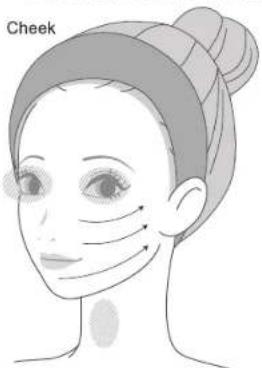
Forehead and nose

●Points to keep in mind when using the device
Apply more gel on your skin when it becomes depleted. • Using the device after you warm up your face with a steaming hot towel or right after a bath when your skin is still warm is effective. Use of the device in conjunction with a facial steamer is also recommended.
PORE
Recommended usage time: 1 minute
The device removes dirt from pores with ultrasonic waves and ion cleansing. Use around your nostrils and on your chin, between the eyebrows, and other sites where your pores may be a concern.
1 Remove makeup before using the device and properly apply gel to your skin.
2 Gently press the device up against sites where pores are a concern and move it in a spiral pattern. Try to draw about five small circles at each site.
* Refrain from keeping the device in a stationary position over a single site. Treat your skin while keeping the device constantly in motion.
* Do not go over the same site multiple times. Shift the head position each time you bring it in contact with your skin.
- When using the device, make sure that you maintain contact with the grip electrode.
- Ionization treatment is enabled by firmly clutching the grip electrode.

5
How to move the device
Sites where the device should not be used
* Move the device in the directions indicated by the arrows.
Around the mouth and alongside the nose

natural_image
Simple line drawing of a human face with abstract circular patterns and arrows, no text or symbols present.Nose and forehead

natural_image
Line drawing of a human face with abstract patterns and small circular marks (no text or symbols)TIGHTENING
Recommended usage time: 2 minutes
Tighten your skin with ultrasonic waves and electro-stimulation.
Use all across your face.
1 Generously apply thick facial lotion, milky lotion, gel, or any other acceptable skincare cosmetic product to clear skin.
11 YA-MAN
2 Gently press the device up against your skin and slowly move it in the directions indicated by the arrows.
* Refrain from keeping the device in a stationary position over a single site. Treat your skin while keeping the device constantly in motion.
* Do not go over the same site multiple times. Shift the head position each time you bring it in contact with your skin.
- When using the device, make sure that you maintain contact with the grip electrode.
- Engage in electro-stimulation by firmly clutching the grip electrode.
• After using the device, suitably apply a milky lotion or cream to condition your skin.
How to move the device

Sites where the device should not be used
* Move the device in the directions indicated by the arrows.
Entire face

Move the device according to steps ① to ④ in sequential order.
How to use the device by combining modes
Facial cleansing
Clean your entire face.
Peeling mode
Apply gel or a suitable alternative to your skin and press the device across your entire face.
Pore mode
Apply gel or a suitable alternative to your skin and apply the device to sites where your pores may be a concern.
Tightening mode
Apply a skincare cosmetic product to your skin and press the device across your entire face.
* Use of the device in conjunction with a facial steamer is also recommended for the Peeling mode and Pore mode.
* If you wish to use the device with cleansing gel, you should begin with the Peeling mode.
Once you are finished
How to clean
Clean the device after each use to keep it clean.

Warning
When cleaning the device, make sure to turn it off. May cause an electric shock, short circuit, or fire.
1 Verify that the device is off.
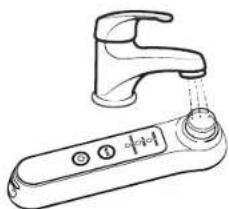
2 Rinse the head under running water.
- Make sure to properly wash off any gel, water, cream, or lotion that you used with the device. - DO NOT immerse the device in water. Immersion may cause a malfunctioning of the device.
natural_image
Line drawing of a kitchen faucet with a digital control panel (no text or symbols)3 Use a towel or dry cloth to wipe off dirt from the surface of the device and moisture from the head and other parts of the device.
DO NOT use an alkaline solution, alcohol, thinner, benzene, nail-polish remover, or any other solvent.

How to store
● If you will not be using the device for an extended period of time, clean the device before putting it away.
●Properly wipe off any water remaining on the device or head before putting the device away.
- When the device is not in use, turn it off and disconnect the AC adapter from the outlet before putting the device away.
●Do not leave the device near fire, in direct sunlight, or in a bathroom or other high humidity/temperature location. Store the device in a clean, well-ventilated location
- Keep away from children.
Maintenance and inspections
- When using the device again after a prolonged period of non-use, verify before use that the device operates normally and safely.
- If the device is malfunctioning, go to page 15 (Troubleshooting) and attempt to address the situation yourself before arranging to have the device repaired.
- If the device is malfunctioning or damaged, contact the seller from which you purchased the device for advice on repairing the device.
What to do in certain situations
Troubleshooting
If the device appears to be operating abnormally during use, check to determine whether any of the following conditions apply.

flowchart
graph TD
    A["Does not turn on"] --> B["You did not hold down the power button (for 3 seconds)."]
    B --> C["AC adapter is connected"]
    C --> D["The battery has not been charged."]
    D --> E["The battery is not sufficiently charged."]
    E --> F["The rechargeable battery needs to be replaced."]
    F --> G["Charging process does not start"]
    G --> H["Your skin is dry"]
    H --> I["You are rubbing your skin too forcefully."]
    I --> J["You are not in contact with the grip electrode."]
    J --> K["The site where you wish to use the device is not wet."]
    K --> L["Perception differs by individual."]
    L --> M["Ultrasonic waves are weak"]
    M --> N["There is no residual charge in the battery."]
    N --> O["All mode-indicator lights are on"]
    O --> P["The battery is not sufficiently charged."]
    P --> Q["Charge the battery (page 8)."]
    Q --> R["Charge the battery (page 8)."]
    S["Hold down the power button (for approximately 3 seconds) to turn on the device."] --> T["Remove AC adapter"]
    T --> U["Charge the battery (page 8)."]
    U --> V["Contact the seller from which you purchased the device."]
    V --> W["Connect the AC adapter to a wall outlet (page 8)."]
    W --> X["Apply some gel to your skin."]
    X --> Y["Move the device gently across your skin."]
    Y --> Z["Use the device by firmly clutching the grip electrode."]
    Z --> AA["Generously moisten the site with gel or water."]
    AA --> AB["Bring the entire surface of the head into contact with your skin."]
Frequently asked questions
| Q | A |
| What is the reason for applying gel to the peeling site? | Gel is applied to enable ultrasonic waves and ions to be directly and uniformly imparted. DO NOT use the device on dry skin. |
| What is the recommended duration and frequency of use? | Use the device around once or twice a week. Try to use the device no more than 5 minutes once a day.These are only recommendations. Use the device in a manner most suitable for your own skin.DO NOT use the device for 10 or more minutes on any given site.If you perceive a skin abnormality, immediately stop using the device.If you have sensitive skin, DO NOT use the device 2 or more times over the same location when using the device for a single mode during a single session |
| My skin turns red. What is happening? | Forcefully rubbing your skin with the head of the device can cause damage to your skin. Move the head so that it gently glides over the skin. To ensure that there is always some gel or water between the head of the device and your skin, replenish with additional gel or water from time to time when using the device. |
| The device is not easy to move. What can I do? | The head will not glide smoothly across your skin if there is an insufficient amount of gel or cosmetic product on your skin. To improve the gliding action, use the device after generously applying gel or a cosmetic product to your skin. |
| How should I clean and store the device? | After washing the head with water, wipe any residual water off the device and the surface of the head with a dry cloth before putting the device away. (Refrain from immersing the device in water.)Do not store the device in a hot, humid location. |
| Can I use the device in the bathroom? | While you can use the device in the bathroom, you should exercise care since you cannot expose the device continuously for an extended period of time to a strong flow of water or immerse the device in water. |
| Is it normal to feel a stinging sensation on my skin? | Depending on the individual, a weak electrical current may stimulate the skin in a manner that can be felt. If you have gotten sunburnt or are suffering from a skin abnormality, stop using the device and see a physician or avoid using the device until the given condition clears up. |
| Can I use the device over makeup? | If you wish to use the device over makeup, you should use the device in conjunction with a cleansing gel. |
| Can I only use the device with gel? | Use the device with water-soluble gel. Avoid using a scrub or any other invigorating product. The following cosmetic products should also be avoided as they may cause skin problems or a malfunctioning of the device.Oil-based cosmetics, scrubs and exfoliants, and invigorating skin lotions |
After-sales service
Rechargeable battery
●The rechargeable battery is an expendable component (not covered by the product warranty).
- If the device no longer operates for more than a short period of time even after the battery has been recharged, the battery may have reached the end of its service life. (The battery is expected to last about 200 charges per year.)
- If you wish to replace the battery, consult your local agent.
Disposing of the device
- If you wish to dispose of the device, proceed in accordance with applicable local government rules governing the sorting of waste products.
●The device uses a lithium-ion battery.

Li-ion
●Product specifications
| Input rating | 5.0 VDC 0.8 A |
| Power consumption | Approx. 3 W (when charging) |
| Time to charge | Approx. 2-3 hours*May vary depending on the usage environment. |
| Outside dimensions | Approx. W 43 × D 40 × H 169 (mm) |
| Mass | Main body: 150 g |
| Materials | Main body: ABS resin, polycarbonate, stainless steel |
| Country of manufacture | Japan |
| Accessory | 1 AC adapter |


- YA-MAN
- User's Manual
- Table of contents
- Safety precautions
- Danger
- The following persons should not utilize the device.
- DO NOT use the device on various sites as indicated below and outside of specified sites on the face.
- Warning
- Attention
- Names of parts
- Before using
- ●Switching modes
- Pre-testing on skin
- How to charge
- How to use
- ●Rule of thumb for usage
- Basic instructions for using the device
- ●Treatment
- Waterproof feature
- How to use the different modes
- PEELING
- Remove old keratin from the surface of skin with ultrasonic waves.
- ●Points to keep in mind when using the device
- PORE
- How to move the device
- TIGHTENING
- How to use the device by combining modes
- Facial cleansing
- Peeling mode
- Pore mode
- Tightening mode
- Once you are finished
- How to clean
- Verify that the device is off.
- Rinse the head under running water.
- Use a towel or dry cloth to wipe off dirt from the surface of the device and moisture from the head and other parts of the device.
- How to store
- Maintenance and inspections
- What to do in certain situations
- Troubleshooting
- After-sales service
- Rechargeable battery
- Disposing of the device
Brand : YA-MAN
Model : Circle Peeling Pro
Category : Care device