BOM4.1.2 - Subwoofer OSD Audio - Free user manual and instructions
Find the device manual for free BOM4.1.2 OSD Audio in PDF.


| Product Type | Powered Subwoofer |
| Driver Size | 12 inches |
| Amplifier Power (RMS) | 200 Watts |
| Peak Power | 400 Watts |
| Frequency Response | 20 Hz - 200 Hz |
| Impedance | 8 Ohms |
| Enclosure Type | Bass-Reflex (Ported) |
| Dimensions (H x W x D) | 18.5 x 18.5 x 19.2 inches |
| Weight | 42 lbs |
| Power Supply | 120V AC, 60Hz |
| Inputs | Line-Level (RCA), Speaker-Level |
| Controls | Volume, Crossover, Phase Switch |
| Auto Power On/Off | Yes |
| Grille | Removable Cloth Grille |
| Cabinet Material | MDF with Black Vinyl Finish |
| Recommended Use | Home Theater, Music |
Frequently Asked Questions - BOM4.1.2 OSD Audio
User questions about BOM4.1.2 OSD Audio
0 question about this device. Answer the ones you know or ask your own.
Ask a new question about this device
Download the instructions for your Subwoofer in PDF format for free! Find your manual BOM4.1.2 - OSD Audio and take your electronic device back in hand. On this page are published all the documents necessary for the use of your device. BOM4.1.2 by OSD Audio.
USER MANUAL BOM4.1.2 OSD Audio
Basic Setup of the BOM4.1.2
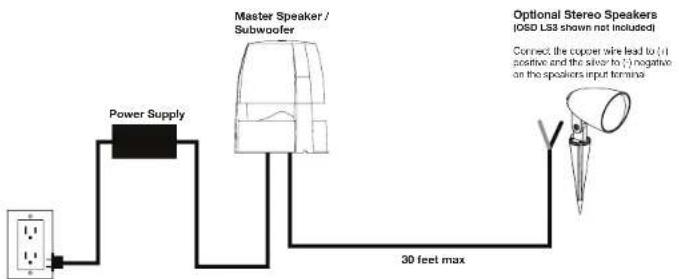
1.) The master speaker needs to be located near an AC outlet where you can connect the power supply to the master speaker in order to provide the electrical current needed for the internal power amplifier and bluetooth receiver.
2.) The optional stereo speakers should be placed 8-12 feet apart from one another and must be connected within 30 feet of the master speaker to ensure maximum performance.
3.) Connect at least one pair of optional 8 ohm stereo speakers such as the OSD LS3 Landscape Speakers to the BOM4.1.2 master speaker for full range sound and no more than two pairs (4 speakers) total.
"State of the art" Bluetooth operation connects to any Bluetooth enabled device
Sync to Bluetooth enabled devices like smart phones and tablets
Bluetooth Range 30-75 feet line of sight
Range may vary: Distances, both unobstructed and obstructed, may differ depending on the device you are syncing up to the BOM4.1.2
System Diagram
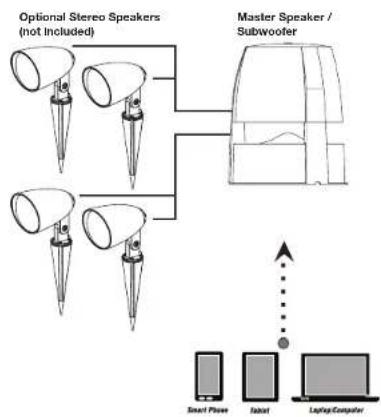
flowchart
graph TD
    A["Optional Stereo Speakers (not Included)"] --> B["Master Speaker / Subwoofer"]
    C["Smart Phase"] --> D["Laptop"]
    E["Tobot"] --> F["Laptop Computer"]
Make sure both your Bluetooth device and the BOM speaker is turned on.
To pair two Bluetooth enabled devices, both the Bluetooth device and the speakers must be turned on and fully powered or fully charged. Bluetooth controls are typically found in the device's Setting or Connections menu. The speakers will output a Bluetooth Sync code that will be received by the Bluetooth device. Settings such as volume, mute, etc., will be controlled directly from your Bluetooth phone, tablet or other device.
Only one connection at a time:
The speakers will sync with only one device at a time. You must disconnect the current device before syncing to another.
Bluetooth
Brand : OSD Audio
Model : BOM4.1.2
Category : Subwoofer