USER MANUAL IC1206 Khind
natural_image
Abstract grayscale illustration of a human silhouette over Earth and a globe, no text or symbols present
- Induction Cooker / 电磁炉/Periuk Induksi
Instruction Manual/说明指示书/Buku Panduan
Please read this manual carefully before operating this product. Keep this manual handy for further reference. 请在使用此产品前,详读此说明书。并将之收藏以作日后参考。
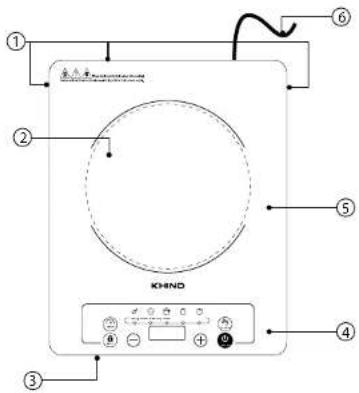
Parts Identification
① Air Outlet
② Cooking Zone
③ Air Inlet
4 Control Panel
5 Crystal Plate
6 Power Cord
Accessories

Control Panel

flowchart
graph TD
    A["Pre-Set / Timer Button"] --> B["Lock Button"]
    B --> C[""-” Button "+” Button"]
    C --> D["LED Screen Display"]
    D --> E["Function Button (Stir-Fry→Hot Pot→Water→Soup→Steam)"]
    E --> F["ON/OFF ButtonPower / Temp / Timer /"]
* Picture is for illustration purpose only.
2 EN EN
Specifications
| Model | IC1206 |
| Voltage | 220 - 240V~ 50/60Hz |
| Power | 2000W |
| Cooking Pot Capacity | 3 Litres |
| Net Weight | 1.9kg |
| Product Dimension (LxWxH) | 290 x 360 x 65mm |
| Pot Dimension (LxWxH) | 360 x 275 x 120mm |
* Specifications are subject to change without prior notice.
Caution
Read this Instruction Manual before using appliance.
- Please use high quality power socket (13A or above). It is advisable not to share the power outlet with electrical appliances with high power, such as an air conditioner, electrical stoves, and etc to avoid fire caused by overloading the socket.
- Do Not MODIFY this appliance.
- Do not leave appliance unattended when connected to AC mains.
- If the supply cord is damaged, it must be replaced by the manufacturer, its service agent or similarly qualified persons in order to avoid a hazard.
- Do not use this appliance in damp conditions. Do not place the induction cooker near a gas stove, kerosene stove, gas cooker, in any space with an open fire, or in an environment with high temperature.
- This appliance is intended for household use only. Not intended for outdoor, industrial or commercial use.
- Always place this appliance on a flat and stable surface. Do not put the appliance on any metal platforms (such as iron, stainless steel, aluminium).
- To avoid hazards, do not insert any foreign objects, such as iron wire, nor block the air ventilation opening or entry port during cooking operations.
- Do not operate this appliance on carpets or table cloth as they may obstruct air flow to the inlets and exhaust.
- When using the induction cooker, place it horizontally and allow at least 10 cm of free space between the sides and the back of the induction cooker and the wall. Do not use the induction cooker in narrow spaces. Please keep the ventilation opening free, to release heat.
- Do not place small metal articles like knives, spoons, forks, lids, aluminium foils etc on the surface of this appliance because they can be heated up and may cause injuries. Do not place a non-metallic metal pad likes paper, cloth, or other unsuitable articles onto the induction cooker heating plate to avoid hazards.
- Do not heat-up or cook canned food in its original condition. Always open and take out food from the can before cooking or heating.
- Cardiac pacemaker users must consult a doctor before using this appliance.
- This appliance is not intended for use by persons (including children) with reduced physical, sensory or mental capabilities, or lack of experience and knowledge, unless they have been given supervision or instruction concerning use of the appliance by a person responsible for their safety.
Children should be supervised to ensure that they do not play with the appliance.
- The appliance is not intended to be operated by means of an external timer or separate remote-control system.
- Do not plug in the appliance or operate the control panel with wet hands.
- Please turn off and unplug the appliance when not in use. Make sure the power is off before pulling out the plug and do not pull the cord.
- With any indication of damage or malfunction, please stop using the appliance immediately to avoid hazards. Take it to the authorized service center for repair. Do not attempt to repair or change any parts by yourself.
3
Caution
WARNING: Please put the pot to be heated on the heating area of the induction cooker. Do not heat an empty pot on the heating area.
WARNING: Avoid causing impacts on the heating plate. It may damage the plate. If cracking is found on the cooker plate, turn off the appliance to avoid any electric shock that might occur.
WARNING: Do not switch off the main power supply on the wall socket immediately after cooking, wait for at least 30 seconds to cool down the appliance by the cooling fan.
CAUTION: The temperature of accessible surfaces may be high when the appliance operates.
CAUTION: The black crystal plate is hot after used, please do not touch with hand!
CAUTION: Keep the main cord out of the reach of children. Do not let the main cord hang over the edge of the table or worktop on which the appliance stands.

Hot Surface

Caution

Do not touch with your hand
Cleaning & Maintenance
- Please turn off and unplug the appliance before cleaning or maintenance, wait until the crystal plate surface of the induction cooker had been cooled down.
- Never immerse the appliance into the water or other liquids. Do not rinse it under the tap.
- Clean the surface of the appliance with a dry cloth. Do not use scouring pads, abrasive cleaning agents or corrosive solvent to clean the appliance.
- Black Crystal Plate: When it is dirty, wipe it with a soft damp cloth and if necessary, with some mild cleaning agent.
- Appliance's Body and Control Panel: Wipe with a soft damp cloth. For the oil stains, use a damp cloth with some mild cleaning agent to clean it.
- Air Intake/ Air Outlet Vent surface: Get rid of the dust with a cotton stick. Oil stains can be removed by using toothbrush with mild cleaning agents.
- When the appliance is not in use for a prolonged period, please turn it off, unplug it, pack it well, and store it in dry cool place.
Important Notice
Please do not switch off the main power supply after each usage.
This unit is equipped with a cooling fan which automatically starts once the unit stops operating in order to prevent damage on major components.
Cooking Vessels Requirement
a. Cooking vessels must be induction cooker ready. They must be made from ferrous (metal) materials such as stainless steel or paint coated metal containers.
Important Notice
b. Non-ferrous cooking vessels such as ceramic, glass, aluminium or any other non-magnetic utensils are not suitable for this appliance. If these cooking vessels are used, the appliance will emit a series of beeps, then automatically shut down.
c. Non suitable cooking vessels are plastic pots, ceramic pots, pottery, pyrex, glass pots, aluminium, copper, or any other non-magnetic utensils etc.
d. The base of the cooking vessels must be at least 12cm in diameter.
e. The base of the cooking vessels if concave or convex in design must not be 2mm away from surface of appliance.
f. Stainless steel double layer pots with compound encased bottoms are not suitable. Refer to pot manufacturer. Always look for induction ready logo etched in pots.
Boil-Dry Protection
a. When there is no water in the pot or the pot being heated up to dry state, the appliance will produce a series of beeps and shut off automatically. An error code (E6) will appear on the display. To re-set the function to normal again, please press the Power Button to re-set to "On" state. Please make sure the pot is not empty when you start the cooking function.
Pot Movement Protection
b. If the pot is removed from the appliance during cooking, the appliance will emit a series of beeps before shutting down automatically, an error code "E0" will appear on the display.
Usable Pans
Steel or cast iron, enameled iron, stainless steel, flat-bottom pans/pots with diameter from 12 to 26 cm.

Enameled Iron Pot

Enameled Iron Pot

Cast Iron Iron Pot Deep-Fry Pan Pan

eep-Fry Pan

Stainless Steel Pot

Iron Plateiron or
Non-usable Pans
Heat-resistant glass, ceramic container, copper, aluminium pans/pots. Rounded-bottom pans/pots with bottom measuring less than 12 cm.

Rounded Bottom Pot

Aluminium Copper Pot

Bottom Measuring Less than 12cm

Pot with Stands

Ceramic Pot Heat-Resistant Glass Pot
How To Use How To Use
Control Panel Details
| Control Panel Button | How to use |
| On / Off | 1. Use to either switch ON or OFF the power of the appliance.2. To switch on the appliance, a beep sound will be emitted after pressing "ON/OFF" and enter into standby mode displaying "ON".3. When encounter the following circumstances, beep sound will be emitted, error code "E0" is displayed, and the appliance will turn off automatically after 1 minute:(a) If the cooking vessel is not compatible.(b) No cooking vessel on top of the cooking zone surface.(c) Remove the cooking vessel from cooking zone surface while the appliance is operating. |
| Function | 1. After the appliance is ON, press the "FUNCTION" to select the desired cooking functions. The appliance will enter working mode.2. The LED screen display will correspond to the selected cooking function: Stir-Fry →Hot Pot →Water Soup Steam"Stir-Fry" Cooking Function- LED screen display default temperature 240°C.- Press "+" or "-" Button to adjust the temperature.- Appliance will be turned off after the default time 10 minutes is over. Press "Pre-Set / Timer" button to adjust the timer from 1 minute to 4 hours."Hot Pot" Cooking Function- LED screen display default power 1400W.- Press "+" or "-" Button to adjust the power.- Appliance will be turned off after the default time 10 minutes is over. Press "Pre-Set / Timer" button to adjust the timer from 1 minute to 4 hours."Water" / "Soup" / "Steam" Cooking Function- LED screen display default power:"Water" -2000W; "Soup" -2000W; "Steam" -1600W-Power adjustment is not allowed.- Appliance will be turned off after the default time 10 minutes is over. Press "Pre-Set / Timer" button to adjust the timer from 1 minute to 4 hours. |
| + / - | 1. After selecting cooking function, press "+" or "-" Button to adjust the power / temperature / timer "+" To increase the power / temperature / timer to a higher level."-" To decrease the power / temperature / timer to a lower level. Power - from 200W to 2000WTemperature - from 60°C to 240°CCooking Time - from 0:01 to 4:00 |
| Pre-Set / Timer | 1. Pre-Set - This function is used to command the appliance to start cooking food at a later timer. Press "Pre-Set/Timer" Button and "+" or "-" Button to set the desired delayed cooking time before pressing "Function" Button to select desired cooking function. Pre-Set Time adjustment from 1 minute to 24 hours. |
| 2. Timer - This function is used to command the appliance to start cooking food immediately. Press "Function" Button to select desired cooking function before pressing the "Pre-Set/Timer" Button and "-" Button to set the desired cooking time. Cooking Time adjustment from 1 minute to 4 hours.Note : Each press of "+" / "-" Button will increase / decrease cooking time by 1 minute, press-hold will increase /decrease cooking time by 10 minutes.3. After selected the desired time duration, the number will be shown on the LED screen. The appliance will start counting down. |
| Child Lock 1. Press "Lock", | LED will display "L", all buttons will be locked except "OFF" button.2. To unlock, press and hold the "Lock" again for 2 seconds.Note : If "Lock" Button had been activated during operation, please remember to unlock it before pressing "ON / OFF" button to turn off the appliance. |
Troubleshooting
| Error Code | Possible Reasons Solutions | |
| E0 | Without cooking vessel or incompatible cooking vessel is used. | Please cooking vessel, choose the suitable cookware. |
| E1 | IGBT sensor open circuit / short circuit. | Contact Khind Service Centre, or Authorized Service Centre. |
| E2 | IGBT over heat. | Contact Khind Service Centre, or Authorized Service Centre. |
| E3 | Voltage over than 270V. | Wait until the power supply back to normal. |
| E4 | Voltage lower than 90V. | Wait until the power supply back to normal. |
| E5 | Surface plate sensor open / short circuit. | Contact Khind Service Centre, or Authorized Service Centre. |
| E6 | Surface plate over heat. | Disconnect power, wait until the cooker cool down. |
零件名称


