
TSN400A - Video camera Elmo - Free user manual and instructions
Find the device manual for free TSN400A Elmo in PDF.


| Product Type | Document Camera / Video Camera |
| Brand | Elmo |
| Model | TSN400A |
| Image Sensor | 1/3" CMOS |
| Resolution | 1920 x 1080 (Full HD) |
| Frame Rate | 30 fps |
| Optical Zoom | 12x |
| Digital Zoom | 8x |
| Focus | Auto / Manual |
| Image Capture | Still image capture |
| Video Output | HDMI, VGA, Composite |
| Computer Interface | USB 2.0 |
| Lighting | Built-in LED lights |
| Dimensions (W x D x H) | 10.5 x 8.0 x 6.0 inches |
| Weight | 4.5 lbs (2.0 kg) |
| Power Supply | AC 100-240V, 50/60Hz |
| Power Consumption | 15W |
| Storage | SD card slot |
| Compatibility | Windows, Mac |
| Warranty | 1 year limited |
| Accessories Included | Power adapter, USB cable, HDMI cable, user manual |
| Maintenance | Clean lens with dry cloth; avoid moisture |
| Safety | Use only specified power adapter; do not disassemble |
| Repair / Spare Parts | Contact authorized service center |
| General | Designed for presentations and documentation |
Frequently Asked Questions - TSN400A Elmo
User questions about TSN400A Elmo
0 question about this device. Answer the ones you know or ask your own.
Ask a new question about this device
Download the instructions for your Video camera in PDF format for free! Find your manual TSN400A - Elmo and take your electronic device back in hand. On this page are published all the documents necessary for the use of your device. TSN400A by Elmo.
USER MANUAL TSN400A Elmo
The lightning flash with arrowhead symbol, within an equilateral triangle, is intended to alert the user to the presence of uninsulated "dangerous voltage" within the product's enclosure that may be of sufficient magnitude to constitute a risk of electric shock to persons.

The exclamation point within an equilateral triangle is intended to alert the user to the presence of important operating and maintenance (servicing) instructions in the literature accompanying the appliance.
CAUTION
- Do not use any power supply other than specified.
WARNING:
TO REDUCE THE RISK OF FIRE OR ELECTRIC SHOCK, DO NOT EXPOSE THIS APPLIANCE TO RAIN OR MOISTURE.
* The CAUTION label, shown on the left, is attached on the top of camera.
INFORMATION
This equipment has been tested and found to comply with the limits for Class A digital device, pursuant to Part 15 of the FCC Rules. These limits are desinged to provide reasonable protection against harmful interference when the equipment is operated in a commercial environment. This equipment generates, use, and can radiate radio frequency energy and, if not installed and used in accordance with the instruction manual, may cause harmful interference to radio communications. Operation of this equipment in a residential area is likely to cause harmful interference in which cause the user will be required to correct the interference at his own expense.
USER-INSTALLER CAUTION: Your authority to operate this FCC verified equipment could be voided if you make changes or modifications not expressly approved by the party responsible for compliance to Part of the FCC Rules.
IMPORTANT SAFEGUARDS
1. Read Instructions
All the safety and operating instructions should be read before the appliance is operated.
2. Retain Instructions
The safety instructions and instruction manual should be retained for future reference.
3. Heed Warnings
All warnings on the appliance and in the instruction manual should be adhered to.
4. Follow Instructions
All operating and use instructions should be followed.
5. Cleaning
Disconnect this video product from the power supply before cleaning.
6. Attachments
Do not use attachments not recommended by the video product manufacturer as they may cause hazards.
7. Water and Moisture
Do not use this video product near water — for example, near a bath tub, wash bowl, kitchen sink, or laundry tub, in a wet basement, or near a swimming pool and the like.
8. Accessories
Do not place this video product on an unstable cart, stand, tripod, bracket, or table. The video product may fall, causing serious injury to a child or adult, and serious damage to the appliance. Use only with stand, tripod bracket, or table recommended by the manufacturer, or sold with the video product. Any mounting of the appliance should follow the manufacturer's instructions, and should use a mounting accessory recommended by the manufacturer.
9. Ventilation
This video product should never be placed near or over a radiator or heat register. This video product should not be placed in a built-in installation such as a bookcase or rack unless proper ventilation is provided or the manufacturer's instructions have been adhered to.
10. Power Sources
This video product should be operated only from the type of power source indicated on the marking label. If you are not sure of the type of power supply to your location, consult your appliance dealer or local power company.
11. Power-Cord Protection
Power-supply cords should be routed so that they are not likely to be walked on or pinched by items placed upon or against them, paying particular attention to cords at plugs, screws, and the point where they exit from the appliance.
12. Lightning
For added protection for this video product during a lightning storm, or when it is left unattended and unused for long periods of time, unplug it from the wall outlet and disconnect the power supply and cable system. This will prevent damage to the video product due to lightning and power-line surges.
13. Overloading
Do not overload power supply and extension cords as this can result in a risk of fire or electric shock.
14. Object and Liquid Entry
Never push objects of any kind into this video product through openings as they may touch dangerous voltage points or short-out parts that could result in a fire or electrical shock. Never spill liquid of kind on the video product.
15. Servicing
Do not attempt to service this video product yourself as opening or removing covers may expose you to dangerous voltage or other hazards. Refer all servicing to qualified service personnel.
16. Damage Requiring Service
Disconnect this video product from the power supply and refer servicing to qualified service personnel under the following conditions.
a. When the power-supply cord or plug is damaged.
b. If liquid has been spilled, or objects have fallen into the video product.
c. If the video product has been exposed to rain or water.
d. If the video product does not operate normally by following the operating instructions in the instruction manual. Adjust only those controls that are covered by the instruction manual as an improper adjustment of other controls may result in damage and will often require extensive work by a qualified technician to restore the video product to its normal operation.
e. If the video product has been dropped or the cabinet has been damaged.
f. When the video product exhibits a distinct change in performance — this indicates a need for service.
17. Replacement Parts
When replacement parts are required, be sure the service technician has used replacement parts specified by the manufacturer or that have the same characteristics as the original part. Unauthorized substitutions may result in fire, electric shock or other hazards.
18. Safety Check
Upon completion of any service or repairs to this video product ask the service technician to perform safety checks to determine that the video product is in proper operating condition.
PART NAMES AND FUNCTIONS
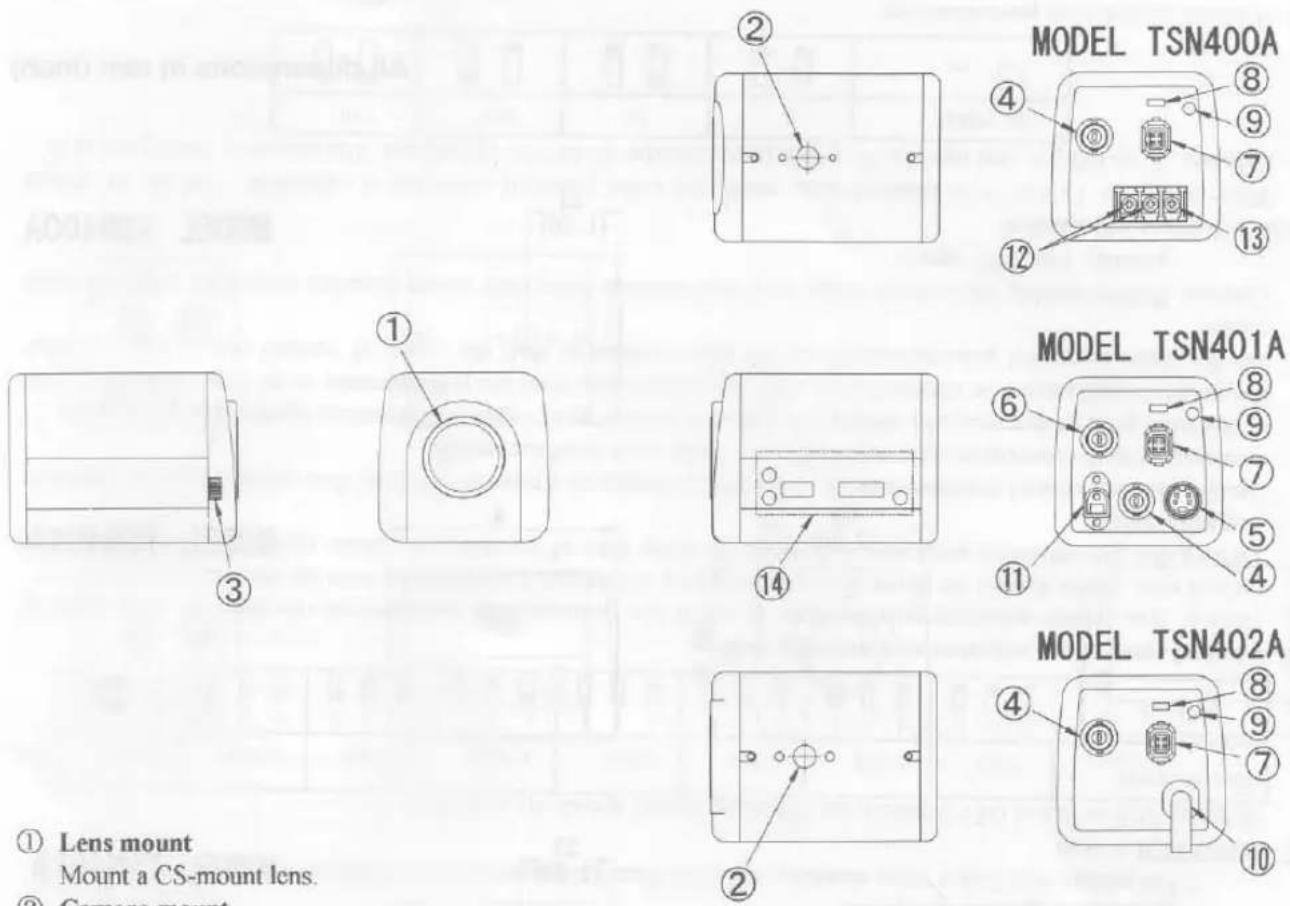
① Lens mount
Mount a CS-mount lens.
② Camera mount
For mounting a camera on wall, housing, etc.
③ Focusing knob
For fine-adjustment of the lens back-focus.
④ VIDEO OUT terminal
Connect this to a monitor TV, etc. (BNC connector)
⑤ S-VIDEO OUT terminal
Connect to a VCR with S-video terminal. (Mini DIN4P jack)
⑥ EXT. SYNC. terminal
For controlling the camera with external sync. (BNC connector)
⑦ IRIS terminal
Connect when an automatic iris lens is used.
⑧ AUTO IRIS switch
When a DC driven type auto iris lens is used, set this switch to DC position.
When a video feedback type auto iris lens is used, set this switch to VIDEO position.
⑨ ALC LEVEL
Adjust video output level, when AUTO IRIS switch is DC position.
⑩ Power cord
Connect this to AC 120V power supply.
⑪ DC power terminal
Connect this to DC 12V Class 2 power supply.
⑫ AC power terminal
Connect this to AC 24V Class 2 power supply.
⑬ Ground terminal
Connect this to the ground wire of the power supply cord.
⑭ Camera control switches
Refer to "CAMERA CONTROLS." on page 5.
HOW TO CONNECT
- Before connection, make sure that power of all units are OFF and cords are unplugged.
- Mount a lens onto the camera. Refer to "HOW TO USE" for usable lens.
- Connect video terminal of the camera and the video input terminal of a monitor TV, etc. with a 75 Ω coaxial cable.
- Connect the power terminal of the camera to a power supply.
Caution: Installation should be made by a qualified service personnel and should conform to all local codes.
Lens, coaxial cable for video signal and power supply are not supplied with a camera.
HOW TO USE
- TSN400A: Turn on the unit by connecting the power cord of AC 24V power supply.
TSN401A : Turn on the unit by connecting the power cord of DC 12V power supply.
TSN402A : Connect the power cord to AC 120V and turn the power ON.
- Adjust the iris and focus of the lens so that optimum image may be obtained.
* Usable lenses
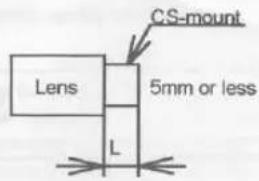
CS-mount lenses, whose length "L" (in the illustration) from the bearing surface of the mount is 5mm or less if protruded, shall be used.
* Using the zoom lens (adjustment of the back focus)
The camera is set at the standard back focus position when shipped from factory. Depending on types of zoom lenses, however, slight readjustment may be necessary.
Adjust the lens back-focus by turning the focusing knob in either direction as per the illustration, referring to the following instructions.
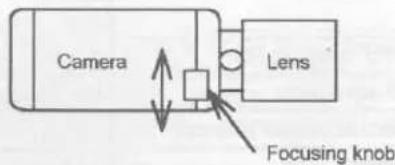
① Place an object at any fixed distance and set the focus ring of the zoom lens to be used with.
② Set the zoom lens to fully TELE position and obtain the best focus position by turning the focus ring of the zoom lens.
③ Then set the zoom lens to fully WIDE position and obtain the best focus position by turning the focusing knob as well.
④ Repeat the procedures② and③ until focus remains in constant among the zooming range.
Note: When weight of the lens is more than 1kg (2.2lbs), the camera should be supported on the lens rather than to rely on camera mounting screw.
Adjust the back-focus only in case of necessity.
* Using an auto iris lens
When a DC driven type auto iris lens is used, set AUTO IRIS switch to DC position, and connect the plug of the lens (for iris terminal) to the IRIS terminal on the back of the camera.
When a video feedback type auto iris lens is used, set AUTO IRIS switch to VIDEO position, and connect the plug of the lens (for iris terminal) to the IRIS terminal on the back of the camera.
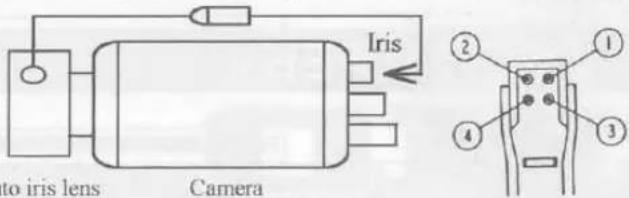
Auto iris lens Camera Plug for IRIS terminal (CHUOMUSEN E4-191J-100)
Soldering side
- Before your use of the camera at AES (Automatic Electronic Shutter) mode.
* When using an auto-iris lens, set the AES switch at OFF
(The AES switch is set at OFF when shipped from factory.)
* The AES mode may increase smears on monitors, which is caused by characteristics of CCD and is not defect.
Set the AES switch at OFF in case smears appear excessively.
IRIS terminal
| DC position | VIDEO position | |
| 1 | Control - | +9V iris power (50mA Max.) |
| 2 | Control + | GND |
| 3 | Drive + | 0.8Vp-p auto iris video signal |
| 4 | Drive - (GND) | GND |
LINE-LOCK CONTROL (TSN400A/TSN402A)
Matching the vertical synchronization with the power frequency is called the line-lock.
When two or more cameras are switched by the video switcher for monitoring a monitor TV, the vertical sync. phase can be locked with the power frequency, and a stable vertical sync. is obtained without being disturbed at the time of switching

flowchart
graph LR
    A["CAMERA 1"] -->|Video output| B["Video switcher"]
    C["CAMERA 2"] -->|Video output| B
    B -->|Video input| D["Monitor TV"]
    B --> E{To AC 24V power supply (TSN400A)}
    B --> F{To AC 120V power supply (TSN402A)}
Caution:
- The camera is synchronized to the power frequency of 60Hz ± 0.5Hz covering a normal fluctuation of the power frequency. The camera may not compensate for large fluctuation caused from the power generated by an engine generator, etc.
- It takes about 10 seconds or more to obtain a stable synchronization after the power is turned on. This is necessary to stabilize the camera against the power noise.
INT./EXT. SYNCHRONOUS CONTROL (TSN401A)
TSN401A is capable of internal/external synchronous controls with automatic change-over.
(a) Internal Synchronous Control

flowchart
graph LR
    A["CAMERA"] --> B["To Monitor TV"]
    A --> C["To DC 12V power supply"]
(b) External Synchronous Control by VBS
The internal sync. mode automatically changes to the external sync. mode when the VBS signal from an external control unit is input to 'EXT SYNC' BNC terminal on the back of the camera.
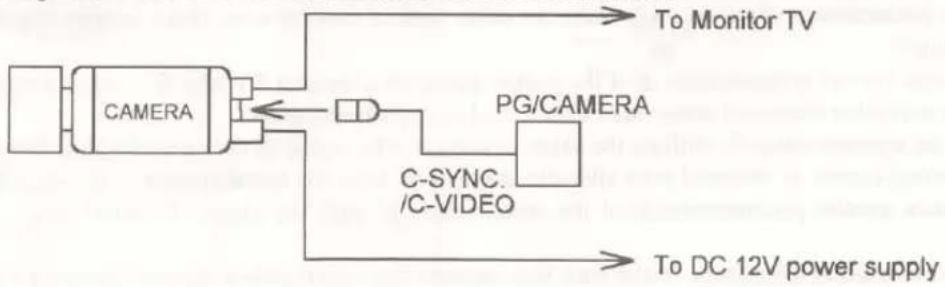
flowchart
graph LR
    A["CAMERA"] --> B["PG/CAMERA"]
    B --> C["To Monitor TV"]
    B --> D["C-SYNC /C-VIDEO"]
    D --> E["To DC 12V power supply"]
*Conditions for the input of external synchronization
VBS (75 Ω unbalanced)
Limits of frequency deviation
Within ± 50ppm against the NTSC standard system.
(Horizontal frequency approx. 15.7335kHz\~15.7350kHz)
In case of synchronous use of more than two cameras, Horizontal phase and Sub-carrier(SC) phase can be adjusted to match the images from respective cameras, if necessary.
CAMERA CONTROLS
By adjusting the switches/potentiometers provided on the side panel, the control functions are available.
① White balance selector
Manual or Automatic white balance modes are selectable. With the setting at AUTO position, the camera automatically adjusts to the color temperature and adjusts the white balance. The camera is factory-set at AUTO position. For manual adjustment, set to MANU position.
② White balance adjustment potentiometer
With the white balance selector at MANU position, turn the R (Red) and B (Blue) potentiometers to manually obtain a white image on monitor screen.
③ SENS-UP switch
To increase the sensitivity, set this switch to ON position.
④ BLC (Back Light Control) switch
In case the back lighting is too bright to shoot the main object clearly, set this switch to ON position.
⑤ AGC switch (TSN401A only)
In case of necessity, set the AGC switch to ON position.
⑥ AES switch
[Electronic shutter] The camera is factory-set at the AES switch OFF and 1/60 sec. shutter speed.
For shooting fast-moving objects, the various electronic shutter speeds are available by changing per the table mentioned below.
[AES (Automatic Electronic Shutter)] By setting the AES switch to ON, the Automatic Electronic Shutter mode (1/60 \~ 1/10,000 sec) is available.
Note: In electronic shutter mode;
* Sufficient brightness is required.
* The picture will flicker when shooting under the illumination produced by fluorescent lamp.
⑦ SHUTTER switch
With the AES switch at OFF position, the following shutter speeds are available.
| Shutter speed(sec.) | 1/60 | 1/125 | 1/250 | 1/500 | 1/1000 | 1/2000 | 1/4000 | 1/10000 |
| Setting | 1 2 3 | 1 2 3 | 1 2 3 | 1 2 3 | 1 2 3 | 1 2 3 | 1 2 3 | 1 2 3 |
Vertical sync. phase adjustment potentiometer
Vertical sync. phase adjusting potentiometer is set at the position fully counterclockwise that the delay time of vertical sync. phase against the phase of power frequency is shortest, when shipped from the factory.
Turning this potentiometer clockwise will make the delay time of vertical sync. phase against the phase of power frequency longer.
Use the function control potentiometer ⑧ if the picture image on a monitor TV may flow when using the camera in combination with other camera(s) controlled by the Line-Lock synchronization.
In this case, get a proper image by shifting the phase of vertical sync. signal of the camera against that of the other.
If a proper image cannot be obtained even after this adjustment, reset the potentiometer to its original position, and use the function control potentiometer ^⑧ of the other camera to shift the phase of vertical sync. signal of other camera.
Caution: Before making adjustment, make sure that cameras have their power supplies connected with the same polarity. (not 180° apart)
⑨⑩ SC-phase adjustment
When using the TSN401A at external sync. mode, the color phase of video out is adjustable. Set the SC-phase switches ⑨ as follows, and turn the SC-phase potentiometer ⑩ for fine adjustment. The camera is factory-set at 0°.
| SC-PHASE | 0° | 90° | 180° | 270° |
| Setting |
⑪ H-phase adjustment potentiometer
When using the TSN401A at external sync. mode, adjust the H-phase by turning the potentiometer ⑪, observing the waveforms of external sync. signal and camera output video signal.
PRECAUTIONS FOR USE AND INSTALLATION
*Never aim the camera at the sun.
Never aim or point the camera at the sun even if you are not shooting.
*Do not shoot intense light.
Strong light such as a spot light on the image plane will cause blooming or smear. When strong light comes into the image plane, vertical stripes may appear on it. However, this does not mean that the camera is defect.
*Take precautions when handling a camera.
Do not drop your camera, or give it a strong shock or vibration, or it will incur a malfunction.
*Do not touch internal parts.
Be sure not to touch the internal parts. That will be cause of accident.
*Do not let the camera get wet.
Install the camera at the place where it will not get wet.
Should it gets wet, turn off the power immediately and contact your dealer.
*Install your camera where no video noise appears.
When camera cables have been laid near electric wires or television receivers, a noise may interfere the image.
If that happened, relocate cables or reinstall equipment.
*Check the ambient temperature and humidity.
Picture quality will be deteriorated or parts inside will become defective in the temperature hotter or colder than that indicates in the specifications.
Therefore avoid using the camera in such circumstances. Precautions shall also be taken when using it in a high humidity.
*Should you notice any trouble.
If any trouble occurs while you are using the camera, turn off the camera and contact your dealer.
If you continue to use the camera when there is something wrong with it, the trouble may become much worse.
*The socket-outlet shall be installed near the equipment and shall be easily accessible.
SPECIFICATIONS
| Model | TSN400A | TSN401A | TSN402A |
| Power source | AC24V±10%60Hz ± 0.5Hz | DC12V (DC11V-16V) | AC120V±10%60Hz ± 0.5Hz |
| Power consumption | Approx. 5.0W | Approx. 4.3W | Approx. 5.8W |
| Pick-up device | 1/3" Color interline-transfer CCD | ||
| Effective picture element | 768(H)×494(V) | ||
| Scanning area | 4.88mm(H)×3.66mm(V) | ||
| Scanning system | 2:1 interlaced | ||
| Scanning frequency (H) (V) | 15.75kHz 60Hz | 15.734kHz 59.94Hz | 15.75kHz 60Hz |
| Sync. system | Line-lock | Internal/External(automatic change-over) | Line-lock |
| Resolution | 470 TV lines (Horizontal) 350 TV lines (Vertical) | ||
| S/N ratio | More than 48dB | ||
| Recommended illumination | 110 lx (F1.2 under incandescent lamp) | ||
| Minimum illumination | 2.2 lx (F1.2 under incandescent lamp. w/Sens-up ON) | ||
| AGC | Built into camera circuitry (TSN401A: ON/OFF switch provided, Factory-set at OFF.) | ||
| Sens-up | Provided (Factory-set at OFF) | ||
| White balance | Auto/Manual (Factory-set at AUTO) | ||
| Backlight control | Provided (Factory-set at OFF) | ||
| AES(Automatic Electronic Shutter) | Provided (Factory-set at OFF) | ||
| Electronic shutter | 1/60, 1/125, 1/250, 1/500, 1/1000, 1/2000, 1/4000, 1/10000 sec. | ||
| Output signal | VBS 1.0 Vp-p, 75 Ω, NTSC compatible | ||
| Y/C signal | — | S-VIDEO terminal | — |
| External sync. terminal | — | BNC VBS 1.0Vp-p 75 Ω | — |
| Auto-iris terminal | 4P (DC/Video) | ||
| Power terminal | 3P terminal | Coaxial DC jack | Power cord |
| Lens mount | CS | ||
| Ambient temperature | -10°C ~ +50°C (14°F ~ 122°F) | ||
| Ambient humidity | 30% ~ 90% | ||
| Dimensions | 60(W)×60(H)×80(D)mm(2.4×2.4×3.1 inches) | 60(W)×60(H)×80(D)mm(2.4×2.4×3.1 inches) | 60(W)×60(H)×140(D)mm(2.4×2.4×5.5 inches) |
| Weight | 300 grm (0.66 lbs) | 300 grm (0.66 lbs) | 700 grm (1.54 lbs) |
Note: Weight and dimensions are approximate.
Design and specifications are subject to change without prior notice.
PROFILE
All dimensions in mm (inch)
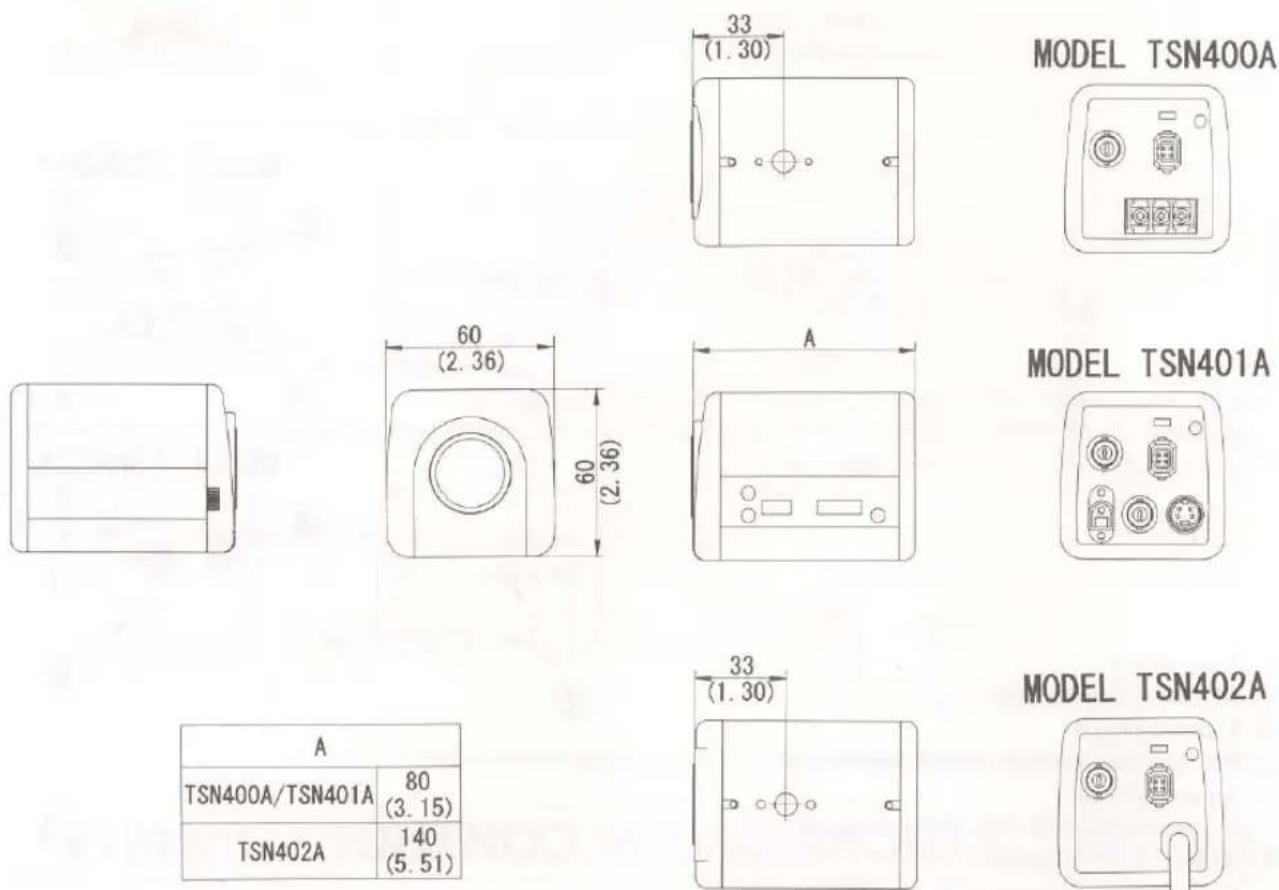
| A | |
| TSN400A/TSN401A | 80(3.15) |
| TSN402A | 140(5.51) |
ELMO CO., LTD.
6-14, Meizen-cho, Mizuho-ku, Nagoya, 467 Japan
Elmo Mfg. Corp.
70 New Hyde Park Road,
New Hyde Park, NY 11040-9980,
U.S.A.
Tel. 516-775-3200
Fax. 516-775-3297
21720 Nordhoff St.,
Chatsworth, CA 91311-5826,
U.S.A.
Tel. 818-346-4500
Fax. 818-998-4186
Elmo Canada Mfg. Corp.
44 West Drive Brampton,
Ontario, L6T 3T6,
Canada
Tel. 905-453-7880
Fax. 905-453-2391
Elmo (Europe) G.m.b.H.
Karl-Rudolf-Str. 178
40215 Dusseldorf,
Germany
Tel. 0211-376051-53
Fax. 0211-376630
6X1NFKA02 D
Printed in Japan (A)
- CAUTION
- WARNING:
- INFORMATION
- IMPORTANT SAFEGUARDS
- Read Instructions
- Retain Instructions
- Heed Warnings
- Follow Instructions
- Cleaning
- Attachments
- Water and Moisture
- Accessories
- Ventilation
- Power Sources
- Power-Cord Protection
- Lightning
- Overloading
- Object and Liquid Entry
- Servicing
- Damage Requiring Service
- Replacement Parts
- Safety Check
- PART NAMES AND FUNCTIONS
- HOW TO CONNECT
- HOW TO USE
- LINE-LOCK CONTROL (TSN400A/TSN402A)
- Caution:
- INT./EXT. SYNCHRONOUS CONTROL (TSN401A)
- CAMERA CONTROLS
- PRECAUTIONS FOR USE AND INSTALLATION
- PROFILE
- ELMO CO., LTD.
Brand : Elmo
Model : TSN400A
Category : Video camera