Veretos BC-01 - Uncategorized Getac - Free user manual and instructions
Find the device manual for free Veretos BC-01 Getac in PDF.


| Product Type | Battery Charger |
| Brand | Getac |
| Model | Veretos BC-01 |
| Color | Black |
| Input Voltage | 100-240V AC, 50/60Hz |
| Output Voltage | 19V DC |
| Output Current | 2.1A |
| Compatibility | Getac rugged devices |
| Protection Features | Overcharge, short circuit, overcurrent |
| LED Indicators | Charging status (red/green) |
| Operating Temperature | 0°C to 40°C |
| Storage Temperature | -20°C to 60°C |
| Dimensions | 150 x 80 x 30 mm |
| Weight | 200 g |
| Power Cord Length | 1.2 m |
| Input Connector | IEC C13 |
| Output Connector | DC barrel jack (5.5 mm OD) |
| Certifications | CE, FCC, RoHS |
| Included Accessories | Power cord, user manual |
| Cleaning Instructions | Wipe with a dry cloth; do not use liquids |
| Safety Warnings | Do not expose to water or excessive heat |
Frequently Asked Questions - Veretos BC-01 Getac
User questions about Veretos BC-01 Getac
0 question about this device. Answer the ones you know or ask your own.
Ask a new question about this device
Download the instructions for your Uncategorized in PDF format for free! Find your manual Veretos BC-01 - Getac and take your electronic device back in hand. On this page are published all the documents necessary for the use of your device. Veretos BC-01 by Getac.
USER MANUAL Veretos BC-01 Getac
TRADEMARKS All brand and product names are trademarks or registered trademarks of their respective owners. NOTE The information in this manual is subject to change without notice. Depending on the model you purchased, the appearance of your computer may not be exactly the same as those shown in this guide.
-Before You Begin 1
-Getting the Body-worn camera Running 1
-Charge the Battery 2....
-Taking a Look 2
- Wearing.the.Body-worn.camera.3...
-Basic Operation....4
-Offloading the Video file 5
- Indication/Notification....5
-Getac One (1) Year Limited Warranty 6
-FCC Class B Notice 10
Before you Begin
For complete information of the product, refer to the User Manual (in PDF format) which you can download the latest one by accessing the Getac web link at http://us.getac.com/support/manuals.html
Getting the Body-worn camera Running
Unpacking
| Getac Veretos Body-worn camera BC-01 | |
| BC-01 Camera | Adapter(US) |
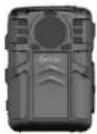 | 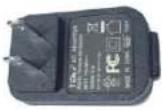 |
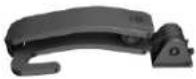
| USB cable | Chest Clip |
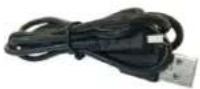 | 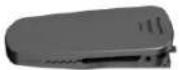 |
| Epaulette Clip | NOTE |
 | This packing list applies to standard models. Select models may have different items. |
Charge the Battery
Before use, the BC-01 must be fully charged.
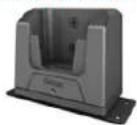
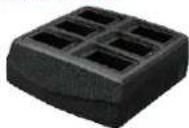
Using the VD-01(single dock) or MD-01(masterdock) to dock the BWC will be recommend for securely battery charging and footage offload.
The Battery Charge Indicator on the BC-01 glows red to indicate that charging is in progress. When the battery is 95% fully charged, the Battery Charge Indicator glows green. It takes approximately 6 hours to fully charge the battery pack in room temperature.
Note: For safety concern, the BC-01 camera will automatically suspend the charging whenever cell temperature is out of 0\~50°C.
Taking a Look at the Tablet PC
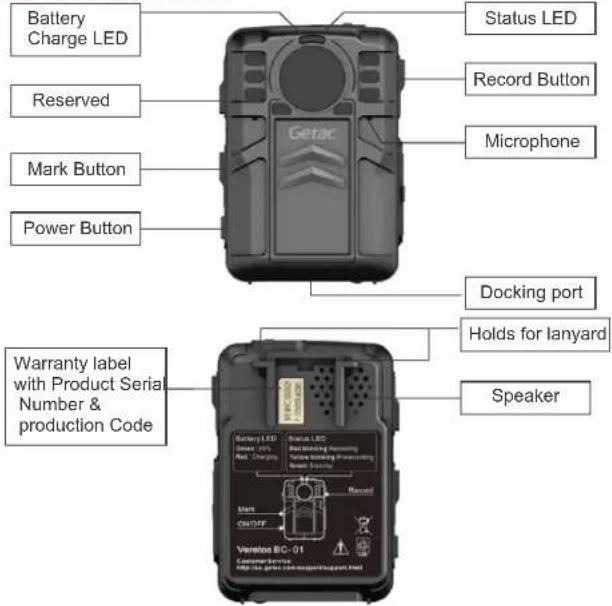
-02
Wearing the Body-worn camera
- Choice the position you prefer to wearing camera: Chest or near shoulder.
- Install the clip on BC-01 camera: Chest Clip or Epaulette Clip.
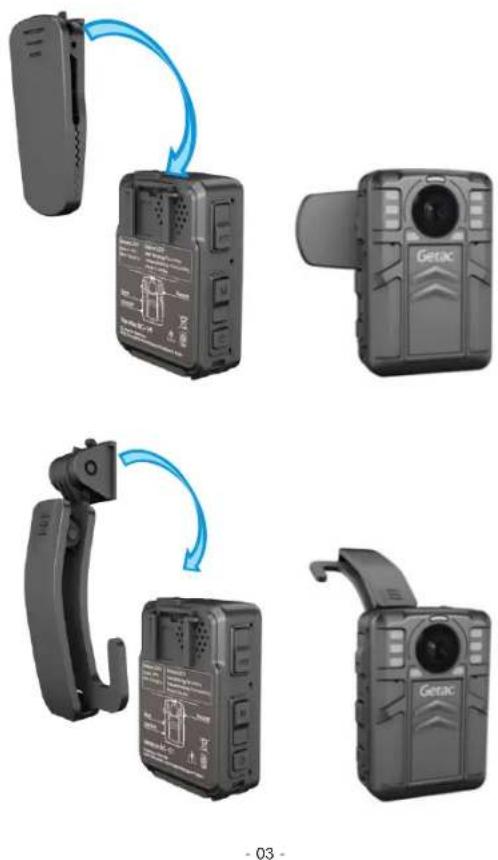
- Utilize the clip to secure and mount the BC-01 on Chest or near shoulder.

natural_image
Two identical grayscale silhouettes of a uniformed person with camera patches, no text or symbols visible.Basic Operation

Turning On the Camera
In power off state, short press ⏻ for 1 sec, after the voice notification of "Buffer mode", BC-01 will into the pre-recording mode. The status LED will turn yellow blinking.

Turning Off the Camera
In Pre-cording mode or Record Mode, long press ⏻ for 5 sec, BC-01 will power-off.

Reset the Camera
Whenever long press ⏻ for 8 sec, BC-01 will automatically reset and turn off.

Recording video
In Power-off/Record/Buffer mode, short press 📁 for 1 sec, after voice notification of "Recording", the BC-01 will start shooting video and the status LED shows Red blinking.

Stop Recording video
During the recording/covert-recording mode, long press 📁 for 3 sec, BC-01 will stop recording and back to Buffer/Record mode.

BookMark the video
During the recording/covert-recording mode, short press M for 1 sec, the moment of video will be bookmarked and status LED turns yellow.

Covert Recording video
In Recording, long press M for 3 sec, BC-01 will into covert recording mode, the LEDs/Beep/Voice will be off & mute. Or Buffer/Record mode, long press M + 📄 for 3 sec, BC-01 will into covert recording mode, the LEDs/Beep/Voice will be off & mute.
Offloading Video and Sync with Veretos system
- Make sure your BC-01 have registration on Veretos video management system, or contact Getac sales representative for registration.
- With a Veretos Masterdock/Client software, docking the BWC to Getac masterdock MD-01 for automatically footage offload & import, or dock the BWC to single dock VD-01 for manually offload & import.
- Detail please refer the user manual of Veretos Software user manual.
Indication/Notification
| User indication | State/Mode | Charging LED | Status LED | Beep | Voice | |
| Standby/Recording State | Power-Off state | off | off | off | goodbye * 1 | |
| Power-On/standby | off | green | off | record mode * 1 | ||
| Recording | off | red blinking | off | recording * 1 | ||
| Pre-recording | off | yellow blinking | off buffer | mode * 1 | ||
| Battery Low(< 10min) | off | Beep *1 per minutes | off | |||
| Covert recording mode | off | off | off | off | ||
| Storage full | off off | red | Den * 2 by press “Record” | |||
| Bookmark video | off | yellow+ red blinking | Beep*2; | off | ||
| USB Link State | Battery Charging only | red | Beep*3; | off | ||
| Battery Charging & Data-offloa ding | red red | off off | ||||
| USB connect success | yellow | off | Connected*1 | |||
| Battery >95% | green | off off | ||||
| Ready to Go | green | offoff | ||||
| Charging/battery fa | gree blinking | off | off | |||
| Location Indication | green blinking | off | Remove*1 per 5 sec | |||
Getac One (1) Year Limited Warranty
Getac's warranty obligations for this hardware product are limited to the terms set forth below:
Getac, Inc. warrants this Getac-branded rugged computer or mobile device against defects in materials and workmanship under normal use for a period of ONE (1) YEAR from the date of purchase by the original-end-user purchaser ("Warranty Period"). This warranty only applies to products sold by Getac or its Authorized Distributors or Dealers and only where the products are used and serviced within North America or its Authorized Service Providers! territories. Warranty coverage only applies to service carriedout by a Getac Authorized Service Provider.
If a hardware defect arises and a valid claim is received within the Warranty Period, at its option and to the extent permitted by law, Getac will either repair the defect at no charge, using new or refurbished replacement parts, or exchange the product with a product that is new or which has been manufactured from new or serviceable used parts and is at least functionally equivalent to the original product. A replacement product or part, including a user installable part that has been installed in accordance with instructions provided by Getac, assumes the remaining warranty of the original product or ninety (90) days from the date of replacement or repair, whichever provides longer coverage for you. When a product or part is exchanged, any replacement product becomes your property and the replaced item becomes Getacs property. Parts provided by Getac in fulfilment of its warranty obligation must be used in products for which warranty service is claimed.
Exclusions and Limitations
This Limited Warranty applies only to Getac-branded hardware products manufactured by or for Getac that can be identified by the "Getac" trademark, trade name, or logo affixed to them. The Limited Warranty does not apply to any non-Getac hardware products, co-branded hardware products (whether or not displaying a "powered by Getac" trademark, trade name, or logo affixed to them) or any software, even if packaged or sold with Getac hardware. Manufacturers, suppliers, or publishers, other than Getac, may provide their own warranties to the end user purchaser, but Getac, in so far as permitted by law, providestheir products "as is". Software distributed by Getac with or without the Getac brand name (including, but not limited to systemsoftware) is not covered under this Limited Warranty. Refer to the licensing agreement accompanying thesoftware for details of your rights with respect to its use. Getac does not warrant that the operation of theproduct will be uninterrupted or error-free. Getac is not responsible for damage arising from failure to follow instructions relating to the product's use. Batteries supplied with the product are covered under the warranty for one (1) year from date of purchase.A battery furnished under the warranty is covered for the remaining period of the one year warranty onthe original battery or ninety (90) days from the date of replacement or repair, whichever provides longercoverage for you.
This warranty does not apply to:
(a) loss or theft;
(b) fire;
(c) submersion;
(d) acts of god;
(e) acts of war;
(f) virus-inflicted damage;
(g) intentional misuse or abuse;
(h) improper maintenance or modification by
anyone other than Getac or a GetacAuthorized Service Provider;
(i) a product or part that has been modified toalter functionality or capability without thewritten permission of Getac;
(j) a product on which any Getac serial numberhas been removed or defaced;
(k) data recovery from hard drive failure;
(I) All consumable items; such as screen protectionfilms, logo badges, labels, cleaning cloths, carry cases, manuals, cables, straps, belts, holsters, tethers, and harnesses and any otheroptions and accessories not listed above orcovered under a separate warranty.
(m)damage caused by operating the productoutside the permitted or intended usesdescribed by Getac;
(n) to cosmetic damage that does not affect the functionality of the system, including but not limited to scratches, dents and numerals, letters, icons and symbols silkscreened ontounit keycaps and numerals, letters, icons and symbols silkscreened onto unit cabinet; or
(o) damage which occurs in shipment.
THIS PRODUCT IS NOT INTENDED FOR USE AS OR PART OF NUCLEAR EQUIPMENT/SYSTEMS, AIR TRAFFIC CONTROLEQUIPMENT/SYSTEMS, OR AIRCRAFT COCKPIT EQUIPMENT/SYSTEMS, OR ANY OTHER SYSTEMS THAT REQUIREFAIL-SAFE PERFORMANCE. GETAC WILL NOT BE RESPONSIBLE FOR ANY LIABILITY RESULTING FROM THE USE OF THIS PRODUCT ARISING OUT OF THE FOREGOING USES. AIRCRAFT COCKPIT EQUIPMENT/SYSTEMS include class 2Electronic Flight Bag (EFB) Systems and Class 1 EFB Systems when used during critical phases of flight (e.g., duringtake-off and landing) and/or mounted onto the aircraft. Class 1 EFB Systems and 2 EFB Systems are defined by FAA:AC (Advisory Circular) 120-76A or JAA: JAA TGL (Temporary Guidance Leaflets) No. 36. TO THE EXTENT PERMITTED BY LAW, THIS WARRANTY AND REMEDIES SET FORTH ABOVE ARE EXCLUSIVE AND INLIEU OF ALL OTHER WARRANTIES, REMEDIES AND CONDITIONS, WHETHER ORAL OR WRITTEN, STATUTORY, EXPRESS OR IMPLIED. AS PERMITTED BY APPLICABLE LAW, GETAC SPECIFICALLY DISCLAIMS ANY AND ALL STATUTORY OR IMPLIED WARRANTIES, INCLUDING, WITHOUT LIMITATION, WARRANTIES OF MERCHANTABILITY, FITNESS FOR A PARTICULAR PURPOSE AND WARRANTIES AGAINST HIDDEN OR LATENT DEFECTS. IF GETAC CANNOTLAWFULLY DISCLAIM STATUTORY OR IMPLIED WARRANTIES THEN TO THE EXTENT PERMITTED BY LAW, ALL SUCH WARRANTIES SHALL BE LIMITED IN DURATION TO THE DURATION OF THIS EXPRESS WARRANTY AND TO REPAIROR REPLACEMENT SERVICE AS DETERMINED BY GETAC IN ITS SOLE DISCRETION.
No Getac reseller, agent, oremmployee is authorized to make any modification, extension, or addition to this warranty. If any term is held to be illegal or unenforceable, the legality or enforceability of the remaining terms shall not be affected or impaired.
EXCEPT AS PROVIDED IN THIS WARRANTY AND TO THE EXTENT PERMITTED BY LAW, GETAC IS NOT RESPONSIBLE FOR DIRECT, SPECIAL, INCIDENTAL OR CONSEQUENTIAL DAMAGES RESULTING FROM ANY BREACH OF WARRANTY OR CONDITION, OR UNDER ANY OTHER LEGAL THEORY, INCLUDING BUT NOT LIMITED TO LOSS OF USE; LOSS OF REVENUE; LOSS OF ACTUAL OR ANTICIPATED PROFITS (INCLUDING LOSS OF PROFITS ON CONTRACTS); LOSS OF THE USE OF MONEY; LOSS OF ANTICIPATED SAVINGS; LOSS OF BUSINESS; LOSS OF OPPORTUNITY; LOSS OF GOODWILL; LOSS OF REPUTATION; LOSS OF, DAMAGE TO OR CORRUPTION OF DATA; OR ANY INDIRECT OR CONSEQUENTIAL LOSS OR DAMAGE HOWSOEVER CAUSED INCLUDING THE REPLACEMENT OF EQUIPMENT AND PROPERTY, ANY COSTS OF RECOVERING, PROGRAMMING, OR REPRODUCING ANY PROGRAM OR DATA STORED OR USED WITHGETAC PRODUCTS AND ANY FAILURE TO MAINTAIN THE CONFIDENTIALITY OF DATA STORED ON THE PRODUCT. THE FOREGOING LIMITATION SHALL NOT APPLY TO DEATH OR PERSONAL INJURY CLAIMS, OR ANY STATUTORY LIABILITY FOR INTENTIONAL AND GROSS NEGLIGENCE ACTS AND/OR OMISSIONS. GETAC DISCLAIMS ANY REPRESENTATION THAT IT WILL BE ABLE TO REPAIR ANY PRODUCT UNDER THIS WARRANTY OR MAKE A PRODUCT EXCHANGE WITHOUT RISK TO OR LOSS OF THE PROGRAMS OR DATA.
Obtaining Warranty Service
Please access and review the online help resources at www.getac.com before requesting warranty service. If the product is still not functioning properly after making use of these resources, please contact a Getac representative at (949) 681-2950. A Getac representative will help determine whether your product requires service and, if it does, will inform you how Getac will provide it.
Getac will provide warranty service on products that are tendered or presented for service during the warranty period, as permitted by law. In accordance with applicable law, Getacmay require that you furnish proof of purchase and/or comply with registration requirements before receiving warranty service. You may be responsible for shipping and handling charges to obtain service under this warranty.
In any instance in which Getac issues a Return Material authorization Number (RMA #), Getac must receive theproduct(s) for repair prior to the expiration of the warranty period in order for the repair(s) to be covered by thelimited warranty service.
If your product is capable of storing data or software programs, you should make periodic backup copies of the data and programs contained on the product's hard drive or other storage media to protect your data and as aprecaution against possible operational failures. Before you deliver your product for warranty service, it is your responsibility to keep a separate backup copy of the system software, application software and data, and disable any security passwords. You will be responsible for reinstalling all such software, data and passwords. Getac and its authorized service providers are not liable for any damage to or loss of any programs, data or other information stored on any media, or other non-Getac product or part not covered by this warranty. Recovery and reinstallation of system and application software and user data are not covered under this limited warranty.
FCC Class B Notice
This device complies with Part 15 of the FCC Rules. Operation is subject to the following two conditions:
-
This device may not cause harmful interference.
-
This device must accept any interference received, including interference that may cause undesired operation.
Note: This equipment has been tested and found to comply with the limits for a Class B digital device, pursuant to Part 15 of the FCC Rules. These limits are designed to provide reasonable protection against harmful interference in a residential installation. This equipment generates, uses and can radiate radio frequency energy and, if not installed and used in accordance with the instructions, may cause harmful interference to radio communications. However, there is no guarantee that interference will not occur in a particular installation. If this equipment does cause harmful interference to radio or television reception, which can be determined by turning the equipment off and on, the user is encouraged to try to correct the interference by one or more of the following measures:
- Reorient or relocate the receiving antenna.
- Increase the separation between the equipment and receiver.
- Connect the equipment into an outlet on a circuit different from that to which the receiver is connected.
- Consult the dealer or an experienced radio/television technician for help. Modifications: Any modifications made to this device that are not approved by Getac may void the authority granted to the user by the FCC to operate this equipment.
Trademarks are property of their respective owners. (c) 2015 Getac Technology Corporation. All rights reserved.