IV-456R - Vacuum Cleaner Imarflex - Free user manual and instructions
Find the device manual for free IV-456R Imarflex in PDF.


| Product Type | Vacuum Cleaner |
| Brand | Imarflex |
| Model | IV-456R |
| Type | Canister Vacuum Cleaner |
| Dimensions (L x W x H) | 400 x 300 x 250 mm |
| Weight | 5.5 kg |
| Power Source | Corded Electric |
| Power Consumption | 1200 W |
| Dust Capacity | 2.0 L |
| Filtration System | HEPA Filter |
| Cord Length | 5 m |
| Noise Level | 78 dB |
| Suction Power Control | Mechanical Slide Switch |
| Attachments Included | Floor Nozzle, Crevice Tool, Brush Tool |
| Floor Type | Hardwood, Carpet, Tile |
| Dust Bag Type | Disposable Paper Bag |
| Filter Maintenance | Clean HEPA filter monthly; replace annually |
| Safety Features | Thermal Overload Protection |
| Spare Parts Available | Filter, Dust Bag, Hose |
| Warranty | 1 Year |
| Color | Red/Black |
| Ideal Use | Household Cleaning |
Frequently Asked Questions - IV-456R Imarflex
User questions about IV-456R Imarflex
0 question about this device. Answer the ones you know or ask your own.
Ask a new question about this device
Download the instructions for your Vacuum Cleaner in PDF format for free! Find your manual IV-456R - Imarflex and take your electronic device back in hand. On this page are published all the documents necessary for the use of your device. IV-456R by Imarflex.
USER MANUAL IV-456R Imarflex
natural_image
Close-up of a mechanical component with a textured surface and a logo (no readable text or symbols)FLEXIBLE
MOTORIZED BRUSH
RECHARGEABLE
2200mAh
LI-ION BATTERY
MAX USAGE TIME

40mins.
HEPA
FILTER
w/STAINLESS STEEL COVER
3 SUCTION MODES
- Low • Medium • High
9.5K
SUCTION
POWER
600ml
DUST
CAPACITY
natural_image
Exterior view of a modern black and silver compact vacuum cleaner (no visible text or symbols)IV-456R
SPECIFICATION:
MODEL NO : IV-456R
CHARGER RATED VOLTAGE : INPUT 100V-230Va.c. \~ 60Hz
OUTPUT DC 26V 0.5A
BATTERY CAPACITY : 2200mAh
USAGE TIME : Max 40 mins
SUCTION POWER : 9.5kpa
NOISE LEVEL : ≤80dB(A)
CAPACITY : 600ml
BOX DIMENSION : 735x325x150mm
UNIT DIMENSION : 270x260x1100mm
When using electrical appliances, basic safety precautions should always be followed, including the following:
-
Read all instructions carefully.
-
Before using the unit, check if the voltage indicated corresponds with the convenience outlet (230Va.c.).
-
Do not use any appliance with a damaged cord or plug. If the cord is damaged it should be replaced with the same type and size or bring the unit to the nearest Imarflex Authorized Service Center.
-
Do not use two-way socket with another appliance.
-
Do not use the Vacuum Cleaner near gas stove, electric stove or fire place.
-
To protect against electric shock, do not immerse the unit in water.
-
Children should be supervised to ensure that they do not play with the appliance.
-
This appliance is not intended to use by persons (including children) with reduced physical, sensory or mental capabilities, lack of experience or knowledge, unless they have been given supervision or instruction concerning the use of the appliances by a person responsible for their safety.
-
Do not use the Vacuum Cleaner other than its intended use.
-
If the carpet has been recently shampooed, ensure that it has completely dry before vacuuming.
-
Always unplug the vacuum cleaner from the convenience outlet before cleaning or changing parts.
-
Do not pull the cable in unplugging the unit, hold the charger instead.
-
Never use another accessory not included with the unit.
-
Avoid sharp objects that can get stuck in and block the hose.
-
Never pick up inflammable or corrosive liquids such as petrol or other volatile substance.
-
Be sure that the Dust Container and Filters are attached when using the vacuum.
-
Never use the unit in sucking Flammable liquids, chemicals, and cigarette butts.
-
Never leave the dust in the Container for a long time.
-
Do not use it outdoors.
-
Save this instruction for future reference.
DESCRIPTION OF PARTS:

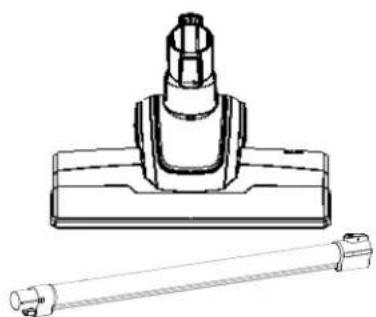
ATTACHED ACCESSORIES:
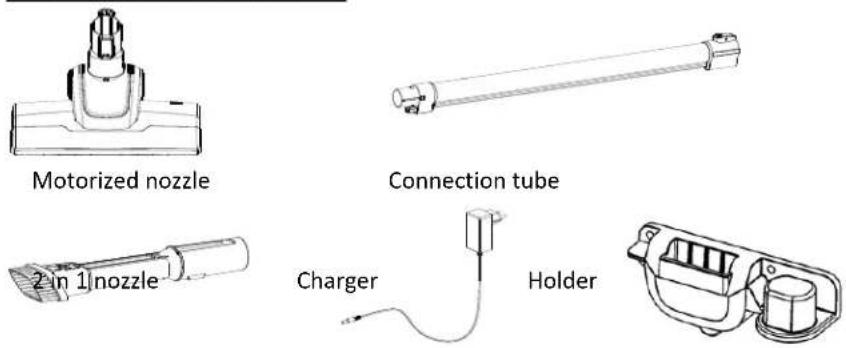
ASSEMBLY INSTRUCTION
Please carefully read "ATTENTION" before assembly :
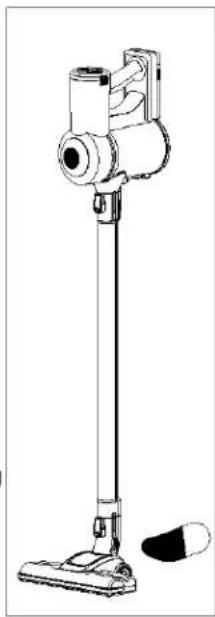
This product can't stand itself, please apply body part onto holder which is on the connection tube.

natural_image
Three-step diagram showing a vacuum cleaner's height, side-mounted device, and base mount (no text or labels)PRODUCT ASSEMBLY
- connect the motorized brush and the connection tube until the button is locked;
- Insert the body into the connection tube until the button is locked;
- Hang the assembled vacuum cleaner and a 2 in 1 nozzle on the holder.
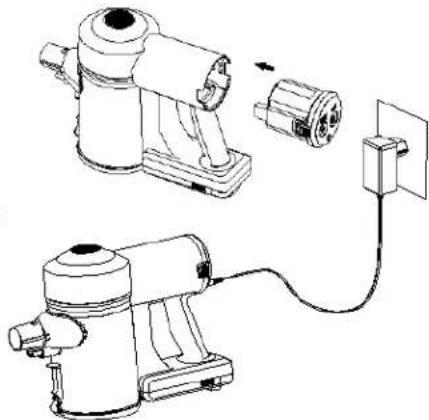
VACCUMM CLEANER CHARGING
BATTERY ASSEMBLY:
Same as illustration: have battery pack locked into cleaner body.
BATTERY CHARGING:
- Make sure that the product is powered off, plug the adapter charging head into the charging port behind the console (Battery pack can be charged separately) and plug the adapter into a 100-240V to 50/60Hz power outlet.
- When charging the battery, the 3 charging indicators will be light in turn, and the indicator lights up to show the current charge. When the charge is complete, all 3 lights are on for 3 minutes and then turned off.
WARNING: Do not turn on the product and do not try removing battery during its charging!
ATEENTION
Only within 0^ C-- 45^ C can charging be allowed, over heating or over cold could prolong the charging time or even damage the battery
Normal charging takes 4-5 hours, please charge fully and use the product until the battery is fully discharged for 1-
3 times when you initiate using it so that the battery can be fully activated.
If this product will not be used for a long time, please charge and discharge this product once every 3 months
natural_image
Technical line drawing of a manual air purifier with attached power outlet (no text or symbols)USED AS STICK VACUUM CLEANER
Step on the motorized brush and tilt the product backward, switch on the product and move it back and forward to start your cleaning (You may use 1pc of tube only or 2pcs tubes connected together).
- Step on the motorized brush and tilt the appliance backward;
- Press the power button to turn on the power supply;
- Press the adjustment button to adjust the flow;
- Move back and forth and start cleaning.
ATTENTION:
By default, the vacuum cleaner is in normal mode when turned on. Switch to high-performance mode by pressing adjustment button one time. Switch to economic mode by pressing adjustment button two time. Press the adjustment button again to switch back to normal mode. Turn off the product by press the power button again. When the battery is empty, the vacuum cleaner turns off itself and the three power indicators on the battery pack flash at the same time. Please charge it in time. The motorized roller rolls in very high speed, to avoid damage to cleaning surface, do not stay cleaning in same spot too long. The motorized nozzle has over heating protection function which can cut off the power to nozzle when blockage or like hair twirling occurs. Please turn off the product, unblock and clean the nozzle. Do not use the product until it cools down.
natural_image
Line drawing of a vacuum cleaner with handle and base (no text or symbols)USED AS HANDHELD VACUUM CLEANER
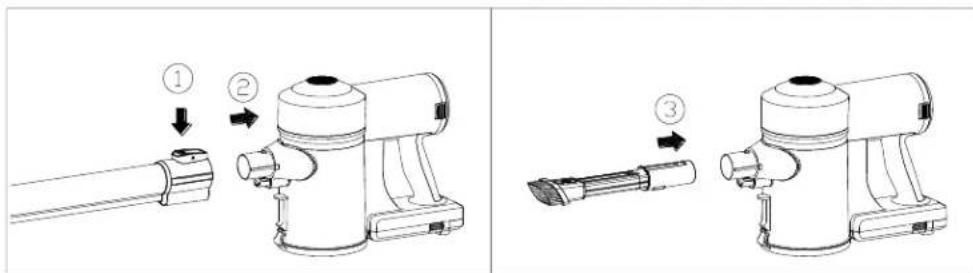
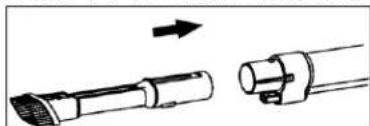
① Press the button on the connection tube ;
② Separate the body and connection tubes (place the ground brush and connection tube properly) ;
③ Using a 2 in 1 nozzle : Insert the hand-held vacuum cleaner snort as shown.
Or use the connection tube as shown before connecting the 2 in 1 nozzle
natural_image
Diagram showing two mechanical components with an arrow indicating direction (no text or symbols)④ Press the power switch to start the machine.
CLEANING AND MAINTENANCE
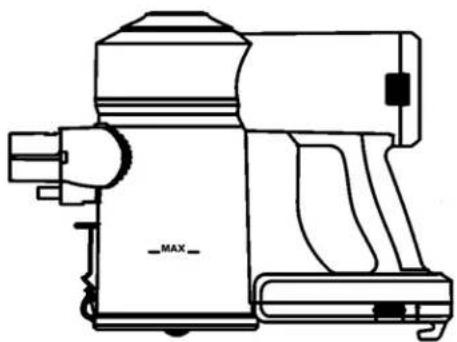
EMPTY THE DUST
Attention
Please empty the dust when it reaches "MAX" level on dustbin
natural_image
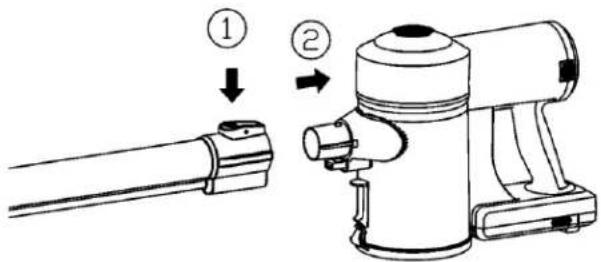
Line drawing of a portable radio or megaphone device with no visible text or symbols- Turn off the power and press the connection tube button to separate the vacuum cleaner as shown.
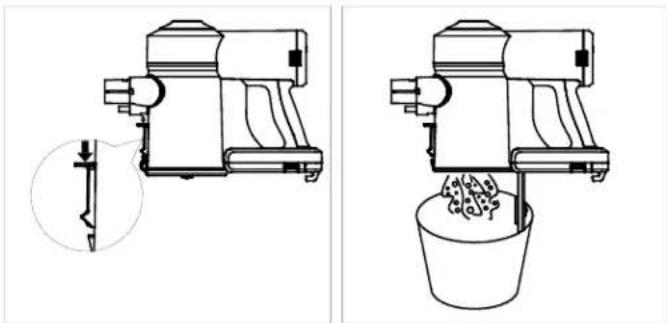
- Gently shake to empty the dust in the dustbin, close the bottom cover and lock.
natural_image
Technical line drawings of a mechanical device and a bucket, showing internal components and assembly (no text or symbols)CLEAN THE DUSTBIN SYSTEM
To maximize the cleaning performance, it's suggested to clean the filtration system after every 4-6 times of using.

- Turn off the power, press the bottom switch and empty the dust;
- Hold the bottom of the filter assembly, rotate and remove the filter assembly in the direction shown;
- Remove the filter cotton from the upper part of the filter assembly;
- Clean the filter cotton assembly, filter and dustbin and dry ;
- Reassemble all parts correctly in reverse order.
*The wrong assembly will reduce suction and even damage the motor! *
Attention :
① before assembly back, make sure that all parts after cleaning are completely dry, otherwise do not us.
② The dustbin is not available for water flushing to prevent liquid from entering the interior of the host, and can be wiped with a slightly damp soft cloth. Do not use until it gets completely dry WARNING: DONOTUSE PRODUCT WITHOUT FILTRATION
Clean up the motorized brush

-
Turn off the power and release the motorized brush.
-
Turn the button on the bottom of nozzle by coin to "6" position.
- Open the roller fixing cover.
- Lift up one side of the roller and take it out.
- Along the groove on the roller, cut off twirled hair or blockage by scissors or knife.
-
Place back the cleaned roller.
-
Cover the fixing cover and turn the button back to " 🔍" position .
UNBLOCK
① This product has protection function. When the roller brush is stuck by the winding and will automatically cut off the power to the motorized brush. Please turn off the product and unblock roller immediately. (Please refer to 6.3)
② When the machine duct is blocked, the protection device will cut off all power, check and clean the motorized brush, connection tube or host air duct, remove the blockage and cool down for a period of time can be used again.
natural_image
Technical line drawing of a mechanical component with a cylindrical shaft and flange (no text or symbols)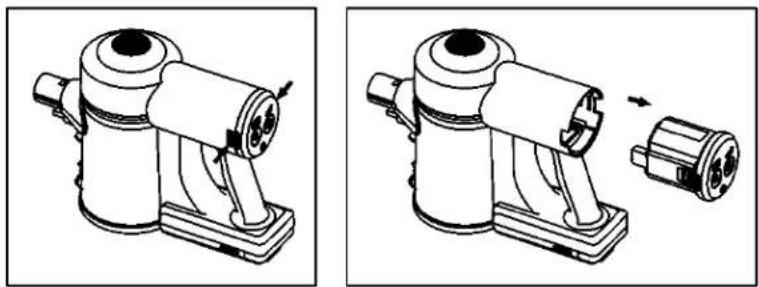
REPLACE THE BATTERY PACK
- Turn off the power.
- Press the release button left and right of the battery pack, remove the battery pack.

natural_image
Technical line drawing of a mechanical device with an exploded view showing internal components (no text or symbols)- Insert the new battery pack into the body until the button is locked.
ATTENTION:
Must use original battery pack and charger
Do not use battery pack for other purpose
PROBLEM SOLVING
There are some simple problems in the process of use that can be resolved by reference to the following methods
| Problem | Possible causes | Solving |
| Product cannot start | ●Running out of power | ●Referring to “battery charging” instruction, charge the battery |
| No suction or weak suction | ●Dustbin is full of dust●Filtering is not correctly assembled or dust blocked the HEPA●Nozzle and/or tubes blocked | ●Empty the dust●Assembly the filtering again or clean/replace filtering●Referring to “unblock” instruction, unblock the nozzle and/or tube |
| Nozzle roller does not rotate | ●Roller blocked, protection function works | ●Referring to “unblock” instruction, unblock the nozzle |
| Using time shorter | ●Battery not fully charged●Battery aging | ●Referring to “Battery charging” instruction, charge the battery●Purchase original battery Pack from manufacturer |
WARNING: FOR SOLVING OTHER PROBLEMS OR REPLACEMENT, PLEASE ALWAYS RESORT TO PREFESSIONALS SPECIFIED, ANY UNAUTHORIZED REPAIRING ARE NOT COVERED BY WARRANTY
REMINDER: Please do not forget to fill up and send the warranty card with a copy of the receipt to our email address imarflexfb@evergoodinc.com
Distributed by: Xelframe Enterprises Inc.
Unit 711 IPI Buendia Tower Condo., 501 Gil Puyat Ave, Pasay
Made in China
- FLEXIBLE
- MOTORIZED BRUSH
- RECHARGEABLE
- 2200mAh
- LI-ION BATTERY
- HEPA
- FILTER
- w/STAINLESS STEEL COVER
- SUCTION MODES
- 9.5K
- SUCTION
- 600ml
- DUST
- SPECIFICATION:
- ASSEMBLY INSTRUCTION
- PRODUCT ASSEMBLY
- VACCUMM CLEANER CHARGING
- BATTERY ASSEMBLY:
- BATTERY CHARGING:
- ATEENTION
- USED AS STICK VACUUM CLEANER
- ATTENTION:
- USED AS HANDHELD VACUUM CLEANER
- CLEANING AND MAINTENANCE
- CLEAN THE DUSTBIN SYSTEM
- Attention :
- UNBLOCK
- REPLACE THE BATTERY PACK
- PROBLEM SOLVING
Brand : Imarflex
Model : IV-456R
Category : Vacuum Cleaner