
86BM66AE - Monitor HISENSE - Free user manual and instructions
Find the device manual for free 86BM66AE HISENSE in PDF.


| Product Type | Monitor |
| Screen Size | 86 inches |
| Resolution | 3840 x 2160 (4K UHD) |
| Aspect Ratio | 16:9 |
| Brightness | 350 cd/m² |
| Contrast Ratio | 4000:1 |
| Refresh Rate | 60 Hz |
| Viewing Angle | 178° horizontal / 178° vertical |
| Connectivity | 3x HDMI, 2x USB, 1x DisplayPort, Audio Out |
| Power Consumption | 250 W (typical) |
| Standby Power | < 0.5 W |
| Dimensions (W x H x D) | 192.8 x 109.8 x 8.7 cm (without stand) |
| Weight | 45 kg (without stand) |
| VESA Mount | 400 x 400 mm |
| Built-in Speakers | 2 x 10 W |
| Operating Temperature | 0°C to 40°C |
| Safety Compliance | CE, FCC, RoHS |
| Cleaning Instructions | Use soft dry cloth; avoid chemicals |
| Spare Parts Available | Power cord, remote control (batteries not included) |
Frequently Asked Questions - 86BM66AE HISENSE
User questions about 86BM66AE HISENSE
0 question about this device. Answer the ones you know or ask your own.
Ask a new question about this device
Download the instructions for your Monitor in PDF format for free! Find your manual 86BM66AE - HISENSE and take your electronic device back in hand. On this page are published all the documents necessary for the use of your device. 86BM66AE by HISENSE.
USER MANUAL 86BM66AE HISENSE
Read the manual carefully and ensure you have fully understood its contents before operating this device for the first time.

Declaration
Any content and service accessed through this device, while only intended for individual non-commercial use, shall be the property of the applicable third party and subject to protection by regulations and laws on copyright, patent, trademark and other intellectual property rights. No part of such content and service may be modified, duplicated, published, uploaded, distributed, translated, marketed, or used to make and distribute products derived from it without the prior permission of the content owner or service provider.
You acknowledge and agree explicitly that you will solely bear the risk associated with the use of this device, and further you will solely bear any risk related to satisfactory quality, performance and accuracy for any content and service accessed through this device. To the maximum extent permitted by applicable law, this device and any third party's content and service is provided as it is without any guarantee, express or implied.
Manufacturer hereby declare explicitly that Manufacturer shall not be held liable for any guarantee and conditions, express or implied, related to this device and any content and service, including but not limited to warranty on marketability, satisfactory quality, fitness for a particular purpose, accuracy, quiet use and non-violation of any third party's rights; to the maximum extent permitted by applicable law, Manufacturer gives no guarantee on the accuracy, validity, timeliness, legitimacy and completeness of any content or service provided through this device, or the fitness of such device, content or service for your particular requirement, or the protection from interruption and error during operation of such device, content or service; to the maximum extent permitted by applicable law, in any case, including fault or neglect, Manufacturer shall not be held liable for legal actions or indemnity obligation arising from any consequence as a result of or related to any information loaded in this device or use of such device, content or service by you or any third party.
Any content and service provided as it is together with this device shall be the property of the applicable third party, therefore Manufacturer gives no declaration or warranty on modification, suspension, cancellation, termination or abortion thereof, and shall not be held liable for legal actions or indemnity obligation arising thereof.
Manufacturer reserves the rights to restrict the use or access of certain content or service. As the content and service are transmitted through third party's network and transmission facilities, Manufacturer undertakes no customer service thereof or the obligation for such customer service.
【Statement】
- The pictures and instructions in this user manual are for reference only, and may be different from the actual product. Please subject to the actual product. (This statement is throughout this User Manual)
• Quality upgrades, product design and specifications are subject to change without notice. - The software content service applicable to this product depends on the third party provider, and some software may not be used due to network, region, service cycle and other problems, which has nothing to do with the product quality. Please contact the third party provider for relevant details.

Important Safety Precautions

This symbol alerts user about the presence of a dangerous voltage not isolated inside the product which can be sufficiently powerful to constitute a risk of electrocution.

This symbol alerts user about the presence of important operating instructions and maintenance in the document enclosed in the package.

ATTENTION
RISK OF SHOCK ELECTRIC

Do not open the back cover. In no case the user is allowed to operate inside the device.
Only a qualified technician is entitled to operate.

AC voltage: This symbol indicates that the rated voltage marked with the symbol is AC voltage.

DC voltage: This symbol indicates that the rated voltage marked with the symbol is DC voltage.

Class I product: This symbol indicates that it requires a safety connection of protective earthing (ground).
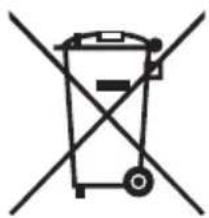
Disposal of Used Electrical & Electronic Equipment
natural_image
Simple line drawing of a trash bin with two crossed lines indicating no waste or prohibition (no text or symbols)
Packaging and electrical goods should be recycled appropriately, and not treated as household waste. Please dispose of this equipment at your applicable collection point for the recycling of electrical & electronic equipment waste. By ensuring the correct disposal of this product, you will help prevent potentially hazardous to the environment and to human health, which could otherwise be caused by unsuitable waste handling of this product. The recycling of materials will help conserve natural resources. Please do not therefore dispose of your old electrical and electronic equipment with your household waste. For more detailed information about recycling of this product, please contact your local city office, your household waste disposal service or the shop where you purchased the product.
Safeguards
Please read the following safeguards for your device and retain for future reference. Always follow all warnings and instructions marked on the device.
- A note about safety and operating instructions
Read and follow all safety and operating instructions, and retain them safely for future reference.
- Heed Warnings
Adhere to all warnings on the appliance and in the operating instructions.
- Cleaning
Unplug the device from the wall outlet before cleaning. Do not use liquid, abrasive, or aerosol cleaners. Cleaners can permanently damage the cabinet and screen. Use a lightly dampened cloth for cleaning.
- Water and Moisture
Avoid dripping or splashing of liquids onto the product. Objects filled with liquids, such as vases, should not be placed on the product.
- Ventilation
Slots and openings in the cabinet are provided for ventilation, to ensure reliable operation of the device and to protect it from overheating. Do not cover the ventilation openings in the cabinet and never place the set in a confined space such as built-in cabinet unless proper ventilation is provided. Leave a minimum 10cm gap all around the unit.
- Power Source
This device should be operated only from the type of power source indicated on the marking label. If you are not sure of the type of power supplied to your home, consult your appliance dealer or local power company.
- Power-Cord Protection
Power- supply cords should be routed so that they are not likely to be walked on or pinched by items placed upon or against them, paying particular attention to cords at plug, wall outlets, and the point where they exit from the device. MAIN plug is used as the disconnect device, the disconnect device shall remain readily operable.
- Lightning
For added protection for this device during a lightning storm, or when it is left unattended and unused for long periods of time, unplug it from the wall outlet and disconnect the cable system. This will prevent damage to the device due to lightning or power-line surge.
9. Overloading
Do not overload wall outlets and extension cords as this can result in a risk of fire or electric shock.
10. Object and Liquid Entry
Never push objects of any kind into this device through openings as they may touch dangerous voltage points or short-out parts that could result in fire or electric shock. Never spill liquid of any kind on or into the device.
11. Servicing
Do not attempt to service this device yourself as opening or removing covers may expose you to dangerous voltage or other hazards. Refer all servicing to qualified service personnel.
12. Damage Requiring Service
Unplug the device from the wall outlet and refer servicing to qualified service personnel under the following conditions:
(a) When the power - supply cord or plug is damaged.
(b) If liquid has been spilled, or objects have fallen into the device.
(c) If the device has been exposed to rain or water.
(d) If the device does not operate normally by following the operating instructions. Adjust only those controls that are covered by the operating instructions as an improper adjustment of other controls may result in damage and will often require extensive work by a qualified technician to restore the device to its normal operation.
(e) If the device has been dropped or the cabinet has been damaged.
(f) When the device exhibits a distinct change in performance - this indicates a need for service.
13. Replacement Parts
When replacement parts are required, be sure the service technician has used replacement parts specified by the manufacturer or have the same characteristics as the original part. Unauthorized substitutions may result in fire, electric shock or other hazards.
14. Safety Check
Upon completion of any service or repair to the device, ask the service technician to perform safety checks to determine that the device is in safe operating condition.
15. Heat
The product should be situated away from heat sources such as radiators, heat registers, stoves, or other products (including amplifiers) that produce heat.
16. Fire
The product should be situated away from naked flame sources such as lighted candle.
17. Off-gassing
The device smells of plastic is normal and will dissipate over time.

Incorrect replacement of the battery may lead to the risk, including the replacement of another similar or the same type. Do not expose batteries to heat such as sun or fire or something like that.

The device should not be exposed to dripping and spraying and it cannot be placed under objects filled with liquids.

Main plug is used as the disconnect device, the disconnect device shall remain ready for operating.

Apparatus with CLASS I construction shall be connected to a MAINS socket outlet with a protective earthing connection.

Start Guide
Precautions for Installation
As shown in the figure below, leave a ventilation space around the device.
When mounted on the wall:
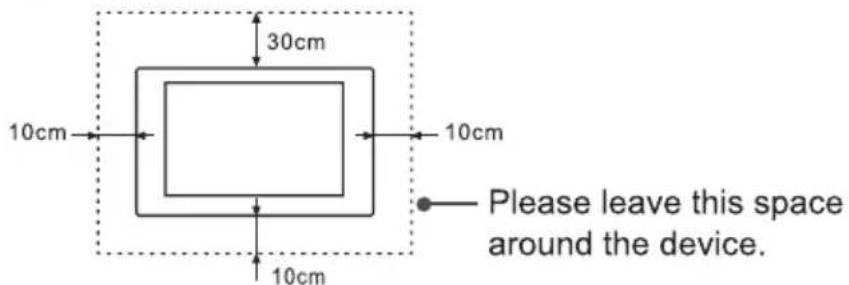
- Do not install the device as shown below.
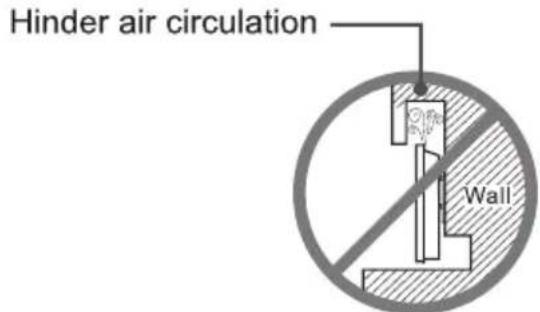
Insufficient ventilation will overheat the device and may cause damage to the device and even fire.

CONTENTS
Contents 1
Accessories List....2
Wall Mount (Optional) 2
Remote Control 4
Control Panel 6
Terminal Introduction 7
Initial Startup....9
System Menu....10
Serial Protocol 11
Miscellaneous....14
Specifications 15
EU Declaration of Conformity (DoC) 17
UK Declaration of conformity (DoC) 18
① Accessories List
Remote Control × 1
Battery × 2
Power Cord× 1
User Manual of the Device × 1
Logo Bracket × 1
Wall Mount Spacer × 4
RJ45 to RS232 converter cable × 1
Wall Mount Screw × 4
EU Energy Efficiency Lable × 1 (Optional)
UK Energy Efficiency Lable × 1 (Optional)
2
Wall Mount (Optional)
- Before installing the wall-mount bracket, first place the machine on a secure and clean desktop with soft protective cloth. Confirm that the desktop is solid and reliable since the machine is heavy.
- Remove the wall-mount screws in the wall-mount holes of the rear shell. (Ignore this step in the absence of wall-mount screws.)
- To avoid damage of the machine, please install the wall mount strictly in the sequence of rollers, wall-mount bracket and wall-mount screws.
- Before hanging the machine, please confirm that the wall-mount bracket is installed securely without looseness.
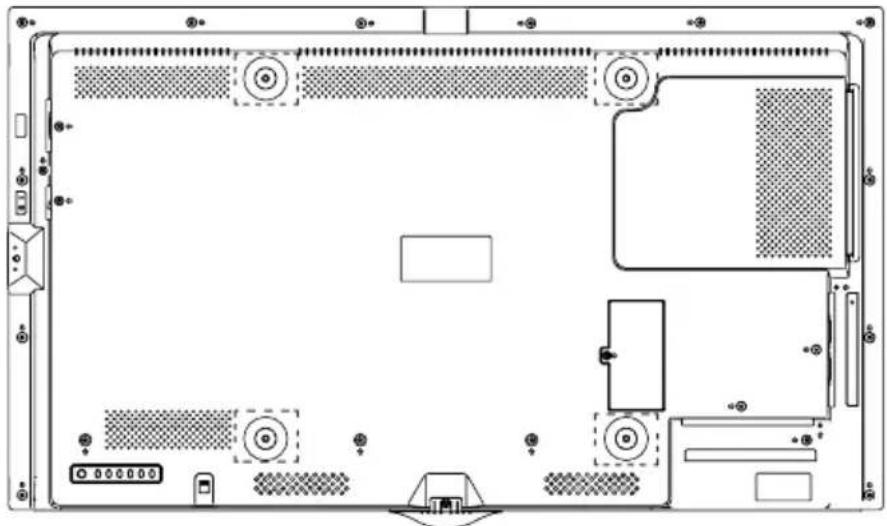
| Model | VESA wall mount standard (mm) | Diameter of wall-mount screw (mm) |
| 43BM66AE | 400×400 | M6 |
natural_image
Top-down schematic of a computer monitor chassis showing front panel, rear panel, and internal components (no text or labels)Warning:
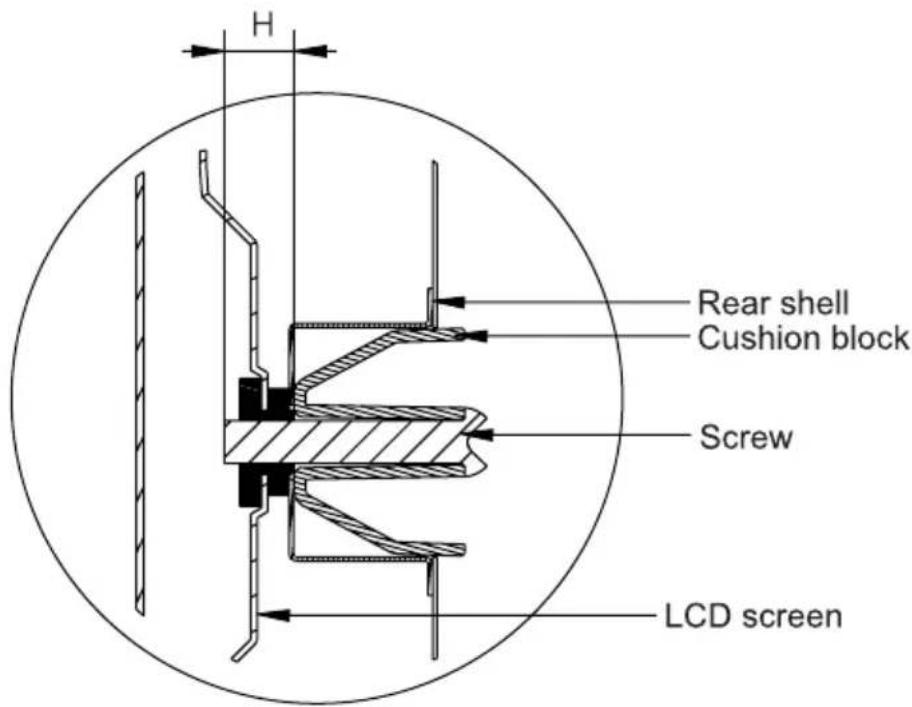
- At the four wall-mounting positions shown in the figure, the screw installation depth H should be 6-10mm from the bottom of sunken pit in the rear shell.
[Note]
- Only the installation specification of the wall mount is described here; the appearance of rear shell is for schematic purpose only.
- The screw installation depth in the wall-mount holes of the rear shell is 6-10mm; overlong screws will cause irreparable damage to the equipment.
- If the intactness of the machine cannot be guaranteed during wall mounting, please contact professional installation personnel or technical support personnel.
- This wall mount is suitable for concrete and brick walls. For plank and plasterboard walls, special reinforcement is required instead of directly using the wall mount. Ensure that a single expansion bolt fixed in the wall can bear over 1/3 of the overall weight of the machine.
![HISENSE 86BM66AE - [Note] - 1](/content/2026/05/1044348/images/1fc689195a1fcdf958aadbf62352bd9487518ce43eace3a0d37616dd033602d6.jpg)
Remote Control
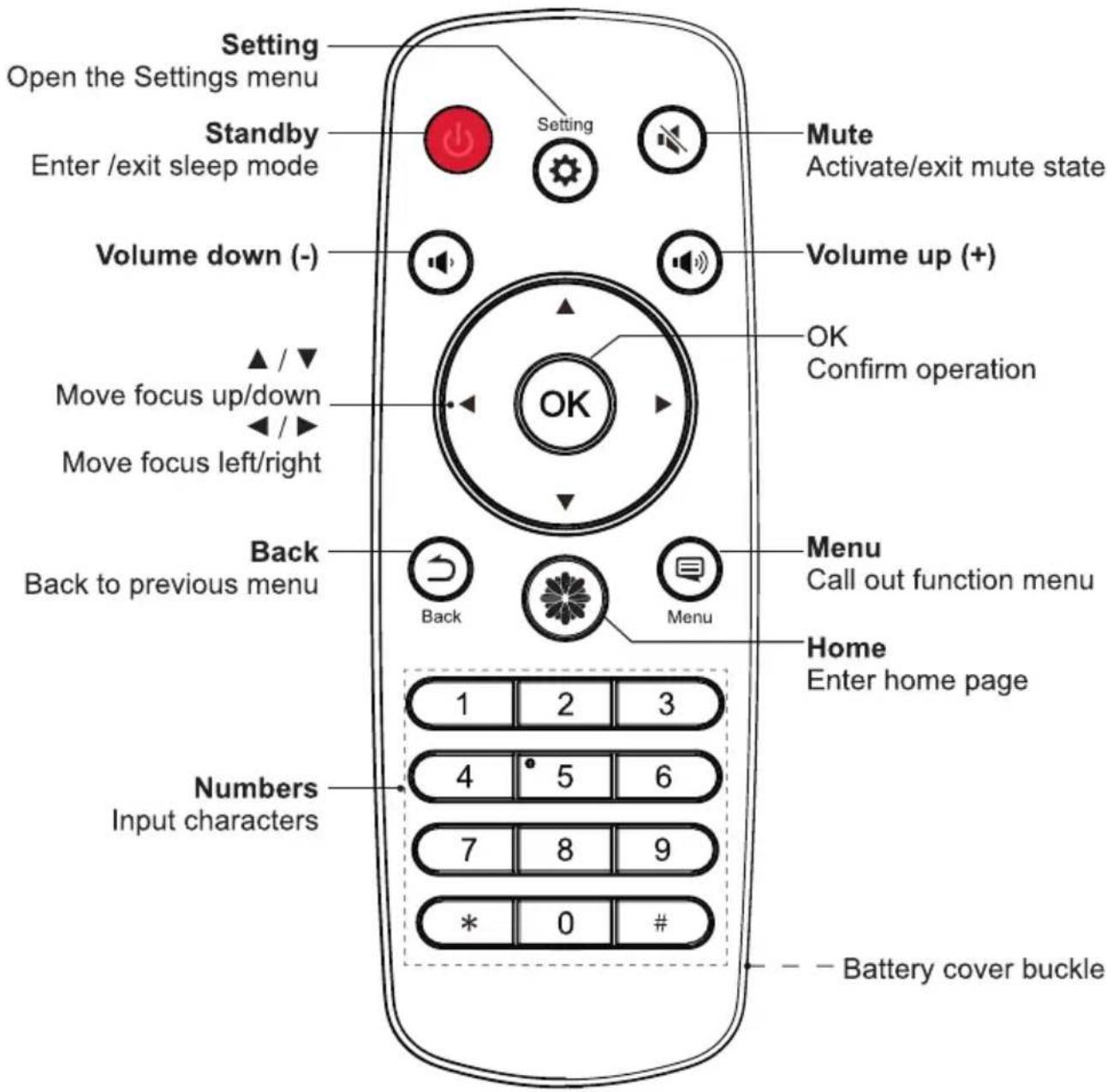
[Note]
- When the remote control is locked, press LEFT>OK>LEFT to unlock it.
Warning: Operation of this equipment in a residential environment could cause radio interference.
Battery replacement method
- Disconnect the battery cover from the remote control at the battery cover buckle and open the battery cover.
- Insert two AAA 1.5V alkaline batteries. Note that the positive (+) and negative (-) terminals of the batteries must match the positive (+) and negative (-) terminals in the battery case.
- Close the battery cover from top to bottom until it is fully aligned with the remote control.
Precautions
- If the remote control is not working properly, is unstable, or can't control the device, please replace the batteries.
- If you do not use the remote control for a long time or the battery is exhausted, remove the battery. (Waste battery pollute the environment and must be handled properly.)
- In order to achieve the best remote control effect, please point the black launch window on the back of the remote control at the indicator light of the device.
Effective range
- Remote control distance: The distance from the front of the remote control is valid within 8m.
- Remote control angle: With the remote control receiving window of the device as the apex, the angle in horizontal direction at the distance of 6 ~m is at least ± 30^ , and the angle in vertical direction is at least ± 15^ .

Control Panel
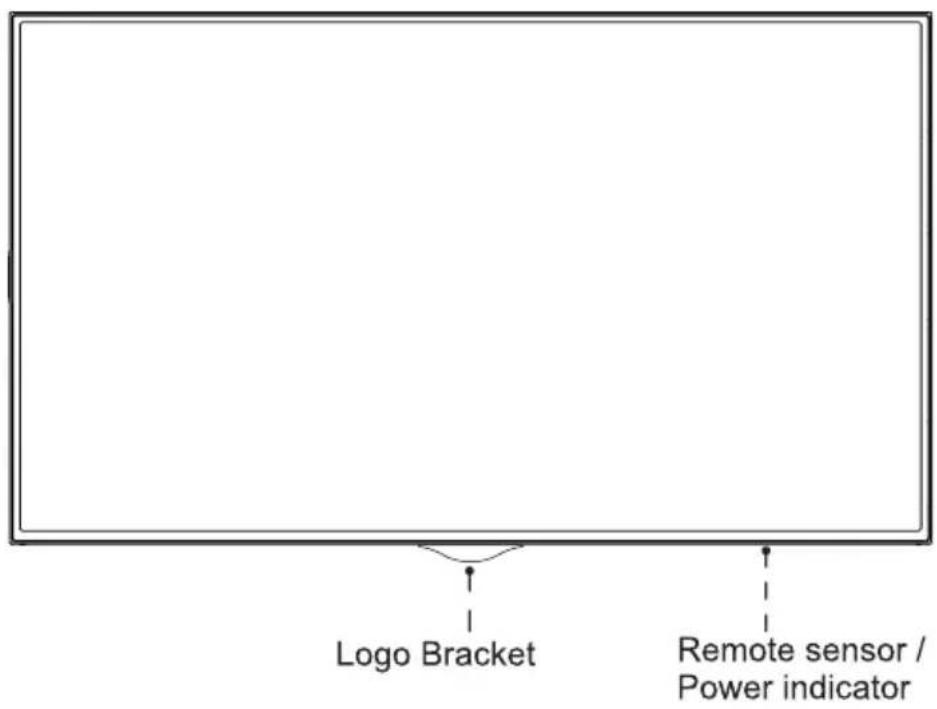
| Name/Operation | Function |
| Remote receiver | Receive signals transmitted by the remote control via this window. |
| Indicator | When the machine is on, the indicator light is blue; when it enters sleep mode, the indicator light is red. |
[Note]
• The appearance is subject to the actual product.
- Since power outage and system processing takes some time, DO NOT power on and off the machine in rapid succession; otherwise the machine may work abnormally.
![HISENSE 86BM66AE - [Note] - 1](/content/2026/05/1044348/images/202b34d2e7f1b99c6de94c8eac668bcc4af4ab4eae27168f5c3934a9ea232808.jpg)
Terminal Introduction
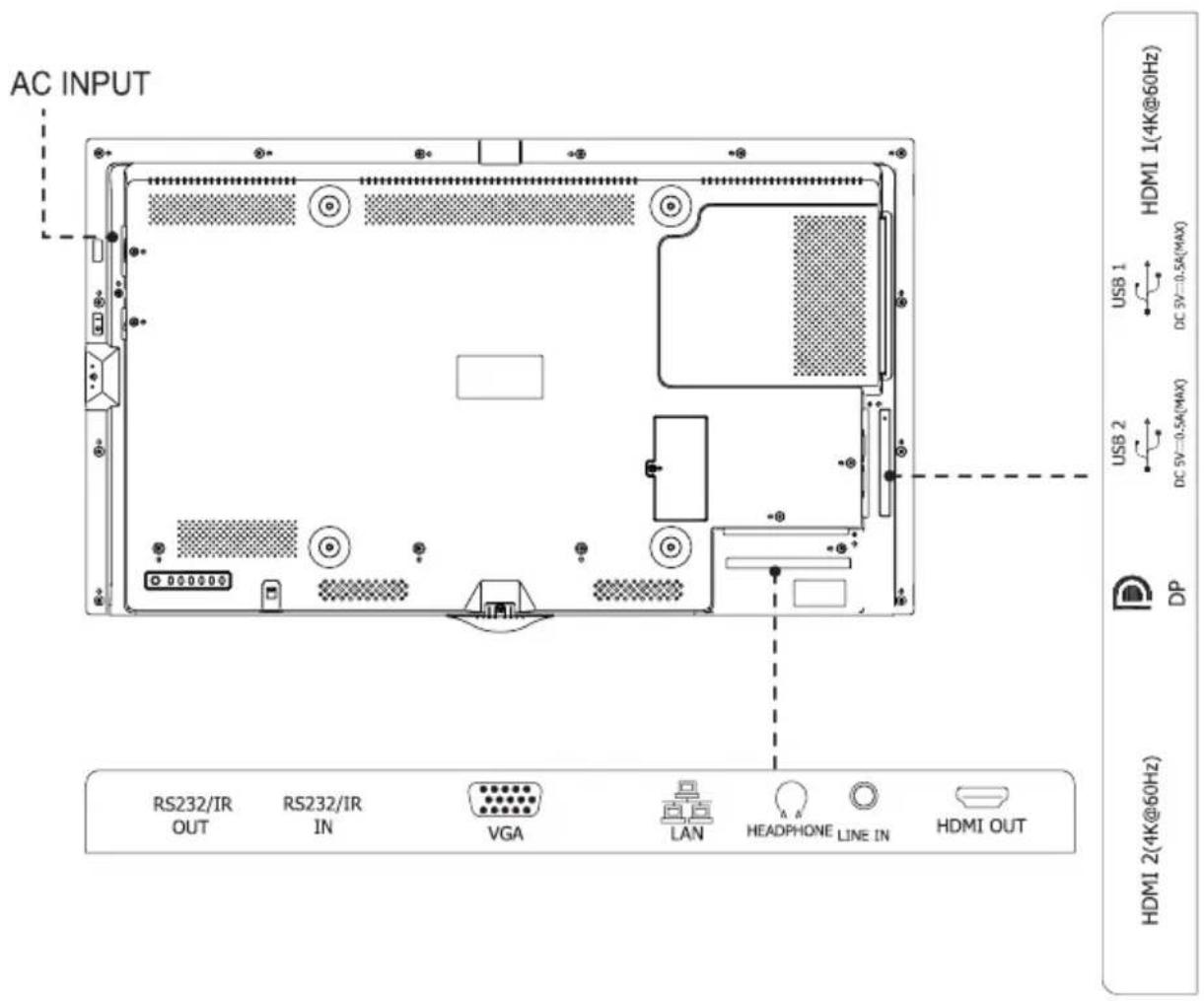
[Note]
- The rear view is for reference only, please subject to the actual product.
• RS232 port: It is for serial communication control of the machine. - It is possible that some external devices cannot be connected to the machine due to individual difference. In such case, please replace the signal line with a suitable one or add an adapter cable matching the port.
| Port Name | Function descriptionunction |
| HDMI | It can be used to connect an external device with HDMI port, such as STB, player, or PC with HDMI output. |
| USB | USB standard port is provided with this machine; it can also be used to connect a standard USB device, such as hard disk drive and USB flash drive. |
| DP | It can be used to connect an external device with DP port. |
| HDMI OUT | When HDMI2 or DP has signal input, HDMI OUT can output HDMI2 or DP input signals; it can be used to connect other display device with HDMI port. |
| LINE IN | Input VGA audio analog signals. |
| HEADPHONE | It can be used to connect a headphone. |
| LAN | It can be used to connect a network cables so as to access the Internet. |
| VGA | It can be used to connect a PC or other external device with a VGA port. |
| RS232/IR IN | It is the input port of the serial communication command, and the port of IR IN. |
| RS232/IR OUT | It is the output port of the serial communication command, and the port of IR OUT. |
[Note]
- The rear view is for reference only, subject to the actual product.
- It is possible that some external devices cannot be connected to the machine due to individual difference. In such case, please replace the signal line with a suitable one or add an adapter cable matching the port.
6 Initial Startup
1 Startup/Shutdown
- Connect the power cord of the machine to a 100-240V AC power outlet.
• Gently press the power switch I O of the machine toward I to turn on the machine. - In power-on state, press the STANDBY key ⏻ on the remote control; the machine will enter sleep mode. To watch normally, simply press again the STANDBY key ⏻ on the remote control.
• To shut down the machine, press the power switch i o again toward o.
[Note]
• After shutdown under AC power supply, there should be an interval of at least 5s before restart to prevent abnormality of the machine.
2 Adjust Local Settings
Use of the setting function can satisfy your different needs and allow you to fully enjoy the audiovisual effect brought by the machine.
You can adjust image and sound, set network connection and perform other operations from here.
- In menus at different levels, you can perform the following operations using the remote control:
Press the arrow keys to select each option
Press the OK key to confirm operation or enter the sub-menu
Press the LEFT/RIGHT key to adjust values
Press the UP/DOWN key to adjust options
- Press the key to go back to the previous menu.

System Menu
1 To open the System menu:
Press the ⚙️ SETTING key to enter the Setting interface, then select the System menu.
2 Menu introduction:
• Time Settings: Set the local time.
- Language: The default language is English. The menu display language can be switched between Chinese and English.
- Multi Screen Display: Set the Startup Delay. The range is 0 to 255, 0 indicates no startup delay, and a range of 1 to 255 indicates the delay in seconds. The function of multi screen display can be realized by setting the matching values of splicing rows and columns with the horizontal proportion and vertical proportion. The position are set from left to right and from top to bottom. Set the Edge Masking, and default is off.
• ID Set: Set the machine ID between 1\~255.
- Net Start System: The default state is OFF. When it is OFF, the machine cannot be woken up; when it is ON, the machine can be woken up via network.
- New Signal Input: Set the on/off of the new signal input of the machine. When it is On, the machine will automatically switch to the corresponding channel when it detects new signal input.
[Notes] This function is not applicable for some signal sources.
- Signal Backup: Main/standby signals can be set. When the main signal does not work, can automatically switch to the standby signal.

Serial Protocol
Serial Port State: When the serial port is open, the machine can receive serial port commands sent by the external controller. See the table below for the specific command protocol:
①. Baud rate: 9600
②. Control part: PC→TV
③. Response part: TV→PC
| Protocol Header | Length | Command Code | BoardID | Data | Check | Protocol End | Remark | ||||||||||||||
| Source Selection | DP | PC to TV | DD | FF | 00 | 07 | C1 | 08 | 00 | 00 | XX | 16 | XX | BB | CC | Under Data, the first XX is the equipment number; the second XX is the check digit | |||||
| TV to PC | AB | AB | 00 | 07 | C1 | 08 | 00 | 00 | XX | 16 | XX | CD | CD | ||||||||
| VGA | PC to TV | DD | FF | 00 | 07 | C1 | 08 | 00 | 00 | XX | 17 | XX | BB | CC | |||||||
| TV to PC | AB | AB | 00 | 07 | C1 | 08 | 00 | 00 | XX | 17 | XX | CD | CD | ||||||||
| HDMI1 | PC to TV | DD | FF | 00 | 07 | C1 | 08 | 00 | 00 | XX | 0E | XX | BB | CC | |||||||
| TV to PC | AB | AB | 00 | 07 | C1 | 08 | 00 | 00 | XX | 0E | XX | CD | CD | ||||||||
| HDMI2 | PC to TV | DD | FF | 00 | 07 | C1 | 08 | 00 | 00 | XX | 0F | XX | BB | CC | |||||||
| TV to PC | AB | AB | 00 | 07 | C1 | 08 | 00 | 00 | XX | 0F | XX | CD | CD | ||||||||
| ON/OFF | OFF, PC to TV | DD | FF | 00 | 08 | C1 | 15 | 00 | 00 | XX | AA | AA | XX | BB | CC | ||||||
| TV to PC | AB | AB | 00 | 08 | C1 | 15 | 00 | 00 | XX | AA | AA | XX | CD | CD | |||||||
| ON, PC to TV | DD | FF | 00 | 08 | C1 | 15 | 00 | 00 | XX | BB | BB | XX | BB | CC | |||||||
| TV to PC | AB | AB | 00 | 08 | C1 | 15 | 00 | 00 | XX | BB | BB | XX | CD | CD | |||||||
| Mute control | OFF, PC to TV | DD | FF | 00 | 07 | C1 | 26 | 00 | 00 | XX | 00 | XX | BB | CC | |||||||
| TV to PC | AB | AB | 00 | 07 | C1 | 26 | 00 | 00 | XX | 00 | XX | CD | CD | ||||||||
| ON, PC to TV | DD | FF | 00 | 07 | C1 | 26 | 00 | 00 | XX | 01 | XX | BB | CC | ||||||||
| TV to PC | AB | AB | 00 | 07 | C1 | 26 | 00 | 00 | XX | 01 | XX | CD | CD | ||||||||
| Set volume | PC to TV | DD | FF | 00 | 07 | C1 | 27 | 00 | 00 | XX | XX | XX | BB | CC | Under Data, the first XX is the equipment number; the second XX is the set value of volume; the third XX is the check digit | ||||||
| TV to PC | AB | AB | 00 | 07 | C1 | 27 | 00 | 00 | XX | XX | XX | CD | CD | ||||||||
| Query function | PC to TV | DD | FF | 00 | 06 | C1 | 28 | 00 | 00 | XX | XX | BB | CC | Under Data, the first XX is the equipment number; the second XX is the check digit | |||||||
| TV to PC | AB | AB | 00 | 0C | C1 | 28 | 00 | 00 | XX | XX | XX | XX | XX | XX | XX | XX | CD | CD | Under data, the first XX is the equipment number; the second XX is the value of volume (valid in power-on state); the third XX and the fourth XX together represent the current source (05 05--HDMI1;05 04--HDMI2;05 03-DP;08 01--VGA; valid in power-on state); the fifth XX represents the power-on/off state (00 is the power-on state; FF is the power-off state); the sixth XX represents the mute state (01 is the muted state; 00 is the unmuted state; valid in power-on state); the seventh XX represents the signal presence/absence state (00 means signal is absent; 01 means signal is present, valid in power-on state); the eighth XX is the check digit | ||
[Note]
- BoardID ranges from 01 to FF, supporting networking of 255 machines. 00 is the broadcast address; commands sent from this ID will be executed by all machines but will not be returned.
- For commands received by all TV terminals, when they are returned to PC, the start code should be changed to AB AB and the end code to CD CD.
- Precautions for control terminal programming: For the startup command, after the startup action is executed, AB AB 00 08 C1 15 00 00 XX BB BB XX CD CD will be returned (the meaning of XX is described in the above table); if the startup command is not received, it should be resent. Upon startup of the TV, the PC will receive AB AB 00 08 C1 15 00 00 XX BB BB XX CD CD again, and then it can send a control command to the TV. If no correct command is returned after any command is sent, there should be an interval of over 500ms before resending the command.
- When the TV is in sleep mode, only the startup command and the query command are supported.
- Check digit: XOR values of length, command code, BoardID, data.
![HISENSE 86BM66AE - [Note] - 1](/content/2026/05/1044348/images/a010264ff2132a088b87472dd4ecd3d92ddd34d7c923aec13f6c298d0b4c8cad.jpg)
Miscellaneous
1 Troubleshooting
Before preparation for repair, please check the following table to see if the cause of problem you are encountering can be found.
If the problem still exits when you confirm that you are operating the product in strict accordance with the this manual, you can consider contacting professional service personnel for repair.
| Symptom | Solution |
| No sound or image | ·Check whether the power cord is connected to a wall outlet and whether the outlet is energized.·Check whether the power key is pressed.·Check the volume setting or whether it is muted. |
| Sound and image interference | ·Try finding out the electrical appliance affecting the machine, and keep it away from the machine.·Try inserting the power plug of the machine to another power outlet. |
| Blurred or snowy screen, image distortion | ·Check the position and connection of signal line. |
| Malfunction of remote control | ·Replace the batteries in the remote control.·After removing the batteries, press any key several times, and then install new batteries.·Check the battery contacts.·Check whether any obstruction exists between the display screen and the remote control.·Check whether the anode and cathode of batteries are correctly installed. |
2 Related Instructions
HDMI®
HDMI, HDMI High-Definition Multimedia Interface, and the HDMI Logo are trademarks or registered trademarks of HDMI Licensing Administrator, Inc. in the United States and other countries.
[Statement]
- The pictures and descriptions in this manual are for reference only, please subject to our available products. (This statement is valid throughout this manual)
- Quality upgrade, product design and specification are subject to change without prior notice.
- The software content services applying to this product depend on the third-party provider. It is possible that partial software cannot be used due to network, region, service period or other problems, which has nothing to do with the product quality. Please contact the third-party provider for relevant details.
![HISENSE 86BM66AE - [Statement] - 1](/content/2026/05/1044348/images/dddc06cc5fe7a0ba10c76863fd3082529292fe685b38c8422e13002970c914e3.jpg)
Specifications
| Product name | Digital Signage | |
| Model | 43BM66AE | |
| Size(mm) (W×H×D)excluding base | 968×556×58.5 | |
| Weight(kg) excluding base | 13.5 | |
| Visual picture diagonal size(cm) | 108 | |
| Power supply | 100-240V~50/60Hz 1.5A | |
| Wireless LAN Module specifications | Model | W2NM2510 |
| Frequency Range | 2.4~2.4835GHz | |
| Output Power(Max.) | 2.4~2.4835GHz 17.5dBm | |
| Display resolution | 3840×2160 | |
| Sound power | 9W+9W | |
| Executive standard | Q/0202RSR 615 | |
| Environmental conditions | Operating temperature: 0°C~40°COperating humidity: 10%~80%RHAtmospheric pressure: 86kPa~106kPa | |
| Signal Formats Supported by DP Port | |
| RGB/60Hz | 640×480, 800×600, 1024×768, 1280×720, 1280×1024, 1360×768, 1366×768, 1440×900, 1600×900, 1920×1080 |
| YUV/50Hz | 576p, 720p, 1080i, 1080p |
| YUV/60Hz | 480p, 720p, 1080i, 1080p |
| YUV/24Hz 25Hz 30Hz | 1080p, 3840×2160 |
| Signal Formats Supported by HDMI Port | |
| RGB/60Hz | 640×480, 800×600, 1024×768, 1280×720, 1280×1024, 1360×768, 1366×768, 1440×900, 1600×900, 1920×1080 |
| YUV/50Hz | 576i, 576p, 720p, 1080i, 1080p |
| YUV/60Hz | 480i, 480p, 720p, 1080i, 1080p |
| YUV/24Hz 25Hz 30Hz | 1080p, 3840×2160 |
| YUV/24Hz | 4096×2160 |
| YUV444/50Hz 60Hz | 3840×2160 |
| Computer Signal Formats Supported by VGA Port | |||
| Resolution | Refresh Rate | Resolution | Refresh Rate |
| 640×480 | 60Hz | 1360×768 | 60Hz |
| 800×600 | 60Hz | 1366×768 | 60Hz |
| 1024×768 | 60Hz | 1440×900 | 60Hz |
| 1280×720 | 60Hz | 1920×1080 | 60Hz |
| 1280×1024 | 60Hz | ||
The table below lists the supported video formats:
| Container Format | Video Decoding | Video Decoding | |||
| Type | Resolution (max.) | Bit rate (max.) | Frame rate (max.) | ||
| .mkv .mp4 .mov | AV1 | 4096×2160 | 100Mbps | 60fps | Dolby Audio, MPEG1 (Layer1,2,3) |
| .avi .mpg .ts | MPEG2 | 1920×1080 | 40Mbps | 120fps | Dolby Audio, MPEG1 (Layer1,2,3) |
| .ts .mkv .avi .mp4 .flv | H.264 | 3840×2160 | 135Mbps | 60fps | Dolby Audio, AAC, MPEG1 (Layer1,2,3) |
| .avi .mpg .mov | MPEG4 | 1920×1080 | 40Mbps | 120fps | Dolby Audio, MPEG1 (Layer1,2,3) |
| .ts .mkv .mp4 | H.265 | 3840×2160 | 100Mbps | 60fps | Dolby Audio, AAC, MPEG1 (Layer1,2,3) |
Dolby Audio: Support Dolby Digital and Dolby Digital Plus.
[Note] Since video production tools are nonuniform, it cannot be guaranteed that the machine supports all listed formats.
EU Declaration of Conformity (DoC)
Unique identification of this DoC: hisense-10
We, Declare under our sole responsibility that the product:
Product Name: Digital Signage
Trade Name: Hisense
Model: 43BM66AE
To which this declaration relates is in conformity with the essential requirements and other relevant requirements of the radio equipment directive (2014/53/EU), Ecodesign Directive (2009/125/EC) & Commission Regulation(EU)2019/2021, RoHS Directive (2011/65/EU). The product is in conformity with the following standards and /or other normative documents:
Health & Safety (Art. 3(1)(a)): EN IEC62311:2020 EN62368-1:2014+A11:2017 EMC(Art.3(1)(b)): EN 55032: 2015+A11:2020 EN 55035: 2017+A11:2020 EN IEC 61000-3-2:2019 EN 61000-3-3: 2013+A1:2019 ETSI EN 301 489-1 V2.2.3 ETSI EN 301 489-17 V3.2.4
Spectrum(Art.3(2)): EN300328 V2.2.2 ErP: Transitional Methods - (EU) 2019/2021. RoHS: EN IEC 63000:2018 Software*: 43.V0000.BM66.AE.00.01W.L0908
*The company reserves the right to install updated Software versions to improve the performance of the appliance.
Place and date of issue (of this DoC): QingDao 2021/09/10
Signed by or for the manufacturer: Hisense Commercial Display Co., Ltd.
Address: No. 218, Qianwangang Road, Economic& Technology Development Zone, Qingdao, China
Title: Product manager
Name (in print): Yangli
Yang Li
EPREL Registration Information
| Model identifier | Eprel registration number |
| 43BM66AE | 945536 |
UK Declaration of conformity (DoC)
Unique identification of this DoC:hisense-11
We, Declare under our sole responsibility that the product:
Product Name: Digital Signage
Trade Name: Hisense
Model: 43BM66AE
To which this declaration relates is in conformity with the essential requirements and other relevant requirements of the Radio Equipment Regulations 2017, The Ecodesign for Energy-Related Products Regulations 2010, Ecodesign for Energy-related Products and Energy Information Regulations 2021 (with respect to Ecodesign Requirements for Electronic Displays) & The Restriction of the Use of Certain Hazardous Substances in Electrical and Electronic Equipment Regulations 2012. The product is in conformity with the following standards and/or other normative documents:
Health & Safety (Art. 3(1)(a)): EN IEC62311:2020 EN62368-1:2014+A11:2017
EMC(Art.3(1)(b)): EN 55032: 2015+A11:2020
EN 55035: 2017+A11:2020
EN IEC 61000-3-2:2019
EN 61000-3-3: 2013+A1:2019
ETSI EN 301 489-1 V2.2.3
ETSI EN 301 489-17 V3.2.4
Spectrum(Art.3(2)): EN300328 V2.2.2
ErP: Transitional Methods - (EU) 2019/2021.
RoHS: EN IEC 63000:2018
Software*: 43.V0000.BM66.AE.00.01W.L0908
* The company reserves the right to install updated Software versions to improve the performance of the appliance.
Place and date of issue (of this DoC): QingDao 2021/09/10
Signed by or for the manufacturer: Hisense Commercial Display Co., Ltd.
Address: No. 218, Qianwangang Road, Economic& Technology Development Zone, Qingdao, China
Title: Product manager
UK Local Representative
Hisense UK Limited
Unit 2, Meadow Court, Millshaw, Leeds, LS11 8LZ
(+44) 1133 956930
service@hisense.co.uk
Name (in print): Yangli
Yang Li
- Declaration
- 【Statement】
- Important Safety Precautions
- ATTENTION
- Disposal of Used Electrical & Electronic Equipment
- Safeguards
- Overloading
- Object and Liquid Entry
- Servicing
- Damage Requiring Service
- Replacement Parts
- Safety Check
- Heat
- Fire
- Off-gassing
- Start Guide
- Precautions for Installation
- CONTENTS
- ① Accessories List
- 2
- Wall Mount (Optional)
- Warning:
- [Note]
- Remote Control
- Battery replacement method
- Precautions
- Effective range
- Control Panel
- Terminal Introduction
- Initial Startup
- Startup/Shutdown
- Adjust Local Settings
- System Menu
- Serial Protocol
- Miscellaneous
- Troubleshooting
- Related Instructions
- HDMI®
- [Statement]
- Specifications
- EU Declaration of Conformity (DoC)
- UK Declaration of conformity (DoC)
Brand : HISENSE
Model : 86BM66AE
Category : Monitor