
MI-10201 - Table Mount-It! - Free user manual and instructions
Find the device manual for free MI-10201 Mount-It! in PDF.


| Product Type | Table |
| Brand | Mount-It! |
| Model | MI-10201 |
| Dimensions (approx.) | 47.2 x 23.6 x 29.5 in (120 x 60 x 75 cm) |
| Weight | 33 lb (15 kg) |
| Material | Steel frame, MDF top |
| Color | Black |
| Maximum Load Capacity | 110 lb (50 kg) |
| Power Supply | None (manual operation) |
| Adjustable Height | No |
| Assembly Required | Yes |
| Warranty | 1 year limited |
| Cleaning Instruction | Wipe with a damp cloth; avoid harsh chemicals |
| Recommended Use | Office or home workspace |
| Package Contents | Table top, legs, screws, assembly tools, manual |
| Manuals Included | User manual |
| Country of Origin | China |
| Safety Certification | Indoor use only |
| Spare Parts Availability | Contact manufacturer |
| Repairability | Moderate (standard tools required) |
Frequently Asked Questions - MI-10201 Mount-It!
User questions about MI-10201 Mount-It!
0 question about this device. Answer the ones you know or ask your own.
Ask a new question about this device
Download the instructions for your Table in PDF format for free! Find your manual MI-10201 - Mount-It! and take your electronic device back in hand. On this page are published all the documents necessary for the use of your device. MI-10201 by Mount-It!.
USER MANUAL MI-10201 Mount-It!
Healthy Ergo Study Desk & Chair
ASSEMBLY INSTRUCTIONS
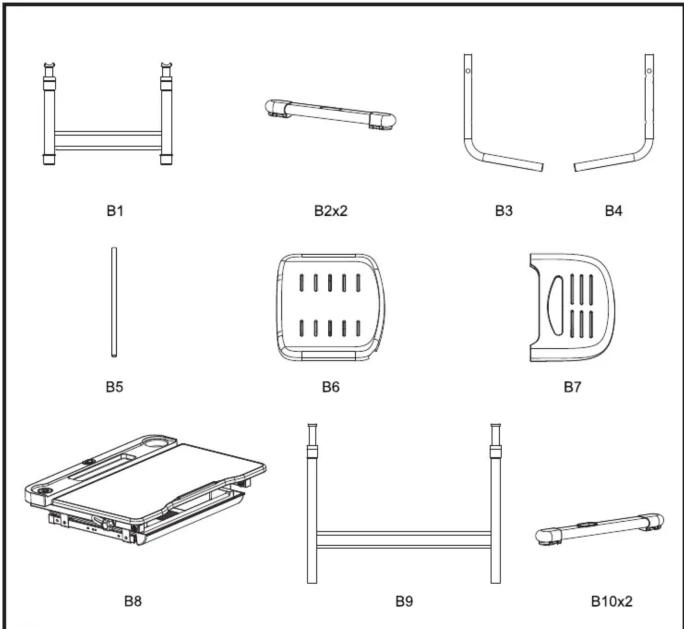

CHAIR ASSEMBLY INSTRUCTIONS

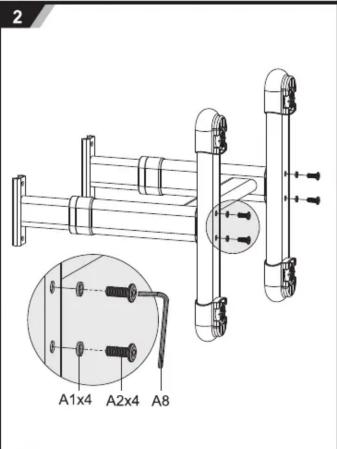

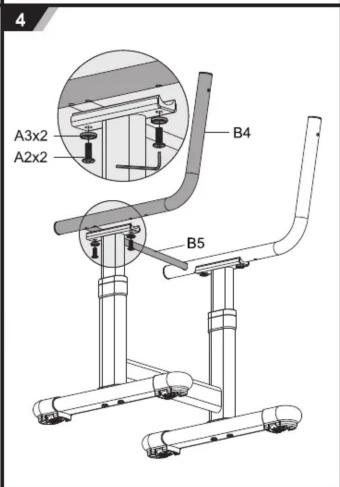


natural_image
Line drawing of a school desk chair with an inset detail showing a side view labeled A5x2 (no text or symbols on the chair itself)
natural_image
Line drawing of a small office chair with adjustable armrest and a close-up inset showing the interior detail (no text or symbols)DESK ASSEMBLY INSTRUCTIONS
9

10
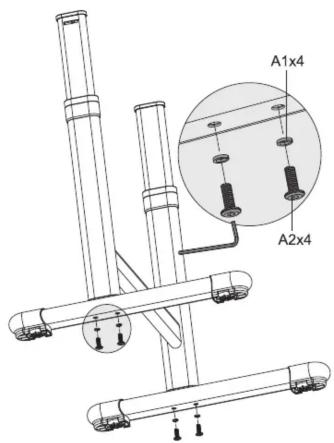
11

12

natural_image
Technical line drawing of a mechanical device with a hand operating a switch labeled A7 (no text or symbols present)13

natural_image
Technical line drawing of a school desk with adjustable legs and a close-up inset showing internal components (no text or symbols)14

HEIGHT ADJUSTMENT

How to lift up
Desk and chair can be adjusted higher by direct pulling up. Step on the support bar with one foot and pull up desk/chair to the height needed.
How to lower down
Pull up to the max height and slowly lower down to the min height. Pull up again to the height needed.


Brand : Mount-It!
Model : MI-10201
Category : Table