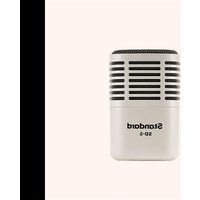
Standard SD-5 - Microphone Universal Audio - Free user manual and instructions
Find the device manual for free Standard SD-5 Universal Audio in PDF.


| Product Type | Dynamic Microphone |
| Brand | Universal Audio |
| Model | Standard SD-5 |
| Polar Pattern | Cardioid |
| Frequency Response | 50 Hz – 15 kHz |
| Impedance | 600 ohms |
| Sensitivity | -54 dBV/Pa |
| Connector | XLR-3M |
| Phantom Power Required | No (dynamic) |
| Dimensions (L x D) | 185 mm x 50 mm |
| Weight | 320 g |
| Finish | Matte black |
| Included Accessories | Stand adapter, carrying pouch |
| Primary Applications | Live vocals, podcasting, broadcasting |
| Handling Noise Rejection | Excellent (internal shock mount) |
| Cleaning Instructions | Wipe grille with dry cloth; avoid moisture |
| Storage | Store in dry place at room temperature |
| Warranty | 2 years limited |
| Spare Parts Availability | Grille and capsule replaceable via authorized service |
| Compliance | RoHS, CE |
Frequently Asked Questions - Standard SD-5 Universal Audio
User questions about Standard SD-5 Universal Audio
0 question about this device. Answer the ones you know or ask your own.
Ask a new question about this device
Download the instructions for your Microphone in PDF format for free! Find your manual Standard SD-5 - Universal Audio and take your electronic device back in hand. On this page are published all the documents necessary for the use of your device. Standard SD-5 by Universal Audio.
USER MANUAL Standard SD-5 Universal Audio
Standard Dynamic Microphone with Microsphere
USER GUIDE

Congratulations Get Hemisphere Specifications
Your new SD-5 Standard Dynamic Microphone with Hemisphere Mic Modeling is designed to deliver years of uncompromising sonic performance.
The SD-5 is a professional dynamic studio microphone suitable for a wide range of audio applications. With its supercardioid polar pattern and extended low frequency response, the SD-5 is perfect for capturing kick drums, bass guitar amps, and other high SPL sources.
Your SD-5 includes Hemisphere mic modeling, giving you a collection of the greatest mics ever made.
Follow these steps to get your Hemisphere Mic Collection plug-in:
1 On your computer, visit uaudio.com/mics/hemisphere
2 Download, install, and open the UA Connect application.
3 Click the + Add Hardware button in the app and enter the serial number, which can be found on the package or the XLR connector, then download your plug-in.
For complete documentation and support, please visit help.uaudio.com
Type
Dynamic
Polar Pattern
Supercardioid
Sensitivity
-64 dB (0 dB = 1V/Pa @ 1 kHz)
Frequency Range
20 Hz - 15 kHz
Output Impedance
50 Ohms
Output Connector
3-pin XLRM

Used electrical and electronic equipment should not be mixed with general household waste. Please dispose in accordance with local regulations.


Brand : Universal Audio
Model : Standard SD-5
Category : Microphone