TDI - Uncategorized AEA - Free user manual and instructions
Find the device manual for free TDI AEA in PDF.


| Product Type | Portable Electronic Device |
| Brand | AEA |
| Model | TDI |
| Dimensions (Approx.) | 150 x 80 x 30 mm |
| Weight (Approx.) | 200 g |
| Power Supply | 2 x AAA batteries (1.5V) |
| Display Type | LCD screen |
| Main Function | Measurement and display of data |
| Operating Temperature | 0°C to 40°C |
| Storage Temperature | -10°C to 60°C |
| Material | ABS Plastic |
| Color | Black/Gray |
| Auto Power Off | After 5 minutes of inactivity |
| Low Battery Indicator | Yes |
| Included Accessories | User manual, batteries (not included) |
| Languages Supported (Manual) | English |
| Certifications | CE, RoHS |
| Maintenance | Clean with a soft, dry cloth |
| Safety Precautions | Do not expose to water or extreme temperatures |
| Spare Parts Availability | Available from manufacturer |
Frequently Asked Questions - TDI AEA
User questions about TDI AEA
0 question about this device. Answer the ones you know or ask your own.
Ask a new question about this device
Download the instructions for your Uncategorized in PDF format for free! Find your manual TDI - AEA and take your electronic device back in hand. On this page are published all the documents necessary for the use of your device. TDI by AEA.
USER MANUAL TDI AEA
AEA Philosophy in a DI
Thank you for choosing the AEA TDI phantom-powered direct box. Your Active TDI is an indispensable tool for both live and studio use, and we hope this box helps you in capturing many wonderful sonic experiences.
TDI Overview
As with all DI boxes, the role of the phantom-powered TDI is to facilitate impedance matching and a drop in level. The TDI works by using an ultra-low-noise JFET to buffer the high impedance of your instrument-level signal. The JFET then drives a super-clean step-down transformer which balances the signal. There is a THRU jack paralleled to the input jack. The TDI allows for outstanding sonic performance while minimizing distortion, noise interference, and signal degradation from long cable runs. The TDI can handle extremely high input levels without clipping. Its durable steel chassis can withstand the toughest live or studio environments. The Phantom-Powered TDI pairs great with passive instruments (guitars, basses, piezo pickups, etc.), but, with its 20 dB pad, can flawlessly handle speaker level signals or active instruments such as synths as well. As with all AEA electronics, this circuit was designed by Fred Forssell.
Application
The straight-forward design of the TDI makes set-up and usage simple. Power for the TDI is supplied with standard 48V to the XLR output.
Simply plug the 1/4" cable from your instrument into the INPUT jack of the TDI, and connect the OUTPUT via XLR to the next device in your signal chain (preamp, PA, audio interface, etc.), then engage phantom power. Optionally, you can also use the THRU-put to send your instrument signal to other instrument-level sources (such as an amplifiers). The through-put feature is also useful for simultaneous wet/dry signal tracking.
Usage Guidelines
- To avoid loud pops while engaging phantom power to the unit, be sure all volume levels in your signal chain are muted.
- While the steel chassis does shield the transformer from most electro-magnetic interference, it is always a good idea to avoid placing the unit near power amps whenever possible.
- If you experience hum after connection, try engaging the "GROUND LIFT" switch on the back of the TDI. If hum continues, try removing or powering off other devices in the same power circuit.
- For hotter sound sources, you may want to consider using the PAD function for a -20dB attenuation.
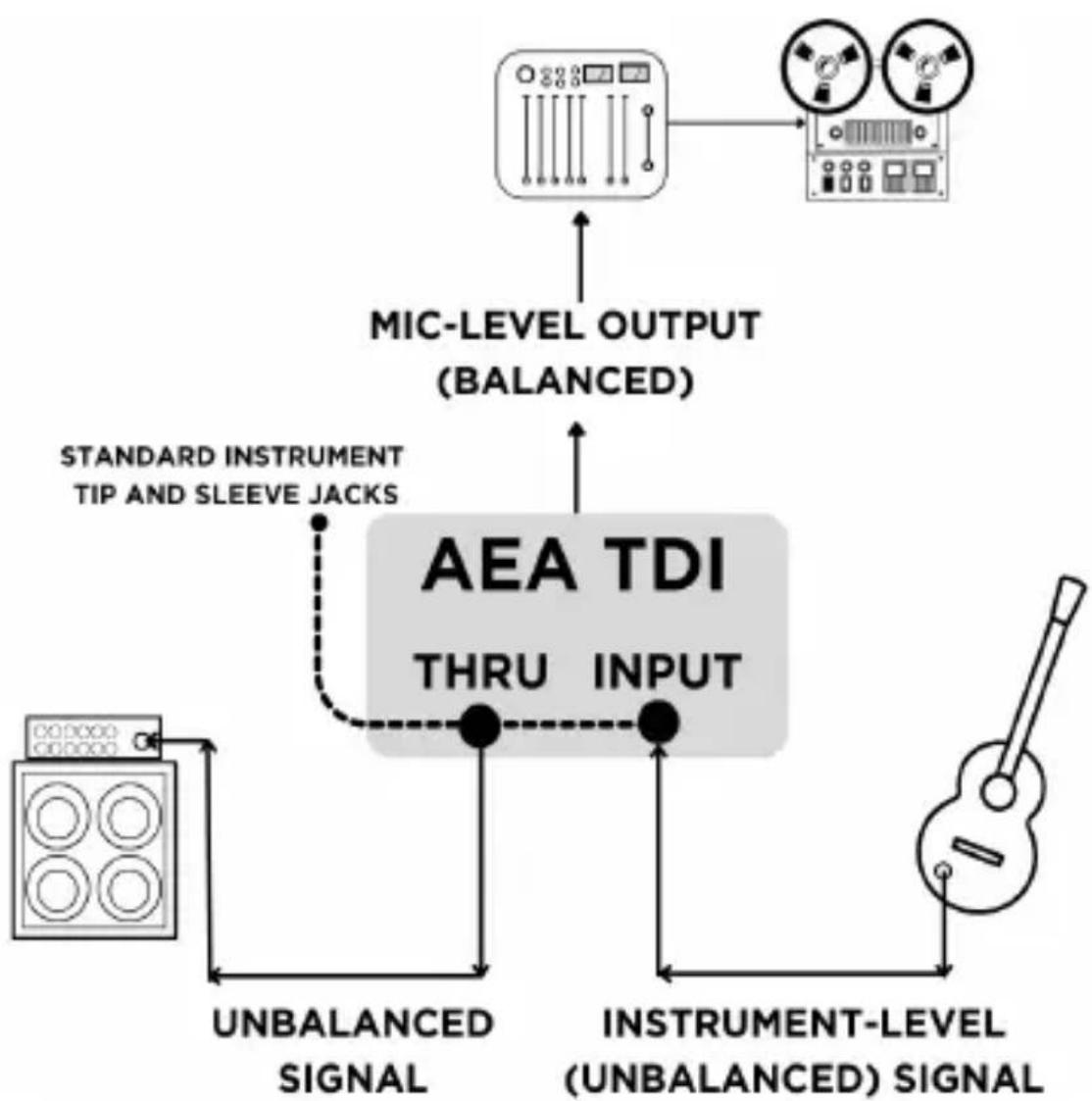
flowchart
graph TD
    A["Microlevel Input"] --> B["MIC-LEVEL OUTPUT (BALANCED)"]
    B --> C["Standard Instrument Tip and Sleeve Jacks"]
    C --> D["AEA TDI THRU INPUT"]
    D --> E["INSTRUMENT-LEVEL (UNBALANCED) SIGNAL"]
    E --> F["Unbalanced Signal"]
    F --> G["Instrument Level Signal"]
    G --> H["Audio Icon"]
Technical Specifications
Noise Floor (22 Hz - 22 kHz, unweighted): Better than
-114 dBu
Frequency Response: -0.5 dB: <10 Hz - 50 kHz
-3 dB: <10 Hz - 120 kHz
THD+N: (22 Hz - 22 kHz): 1 kHz, 0 dBu input: 0.0020%
Input Impedance: Instrument: 10 MΩ
With Pad: 55 kΩ
Balanced XLR Output
Output Impedance: <50 Ω balanced output
Output level (pad out): Input level minus 20 dB
Output level (pad in): Input level minus 40 dB
Pad: -20 dB
Power Consumption: Phantom Power, +48VDC,
less than 8 ~mA
Output XLR Polarity: Pin 2 high
Dimensions: 5.1" X 3.0" X 2.0"
Weight: 1lb 3oz (\~539 g)
WARRANTY
Your AEA TDI comes with a one-year limited warranty on parts and labor, shipping not included. Registering your product with AEA will extend the warranty to a full three years. Scan the QR code to register.

text_image
QR code image containing encoded data with a central logoSUPPORT
If you encounter any problems with your TDI or have questions regarding specific applications, please contact our customer support team at support@ribbonmics.com. To contact us by phone, please call +1-626-798-9128 from 9:00 a.m.- 5:00 p.m. PST Monday-Friday. AEA's repair center is located at 1029 N. Allen Ave, Pasadena, CA 91104, U.S.A.