Murda Melodies - Audio software Slate Digital - Free user manual and instructions
Find the device manual for free Murda Melodies Slate Digital in PDF.


| Product Type | Virtual Instrument / Sample Library |
| Brand | Slate Digital |
| Model | Murda Melodies |
| Category | Hip-Hop & Trap Sample Library |
| Software Format | Standalone sampler plugin |
| Plugin Formats | VST2, VST3, AU, AAX (64-bit) |
| Platform Compatibility | Windows 7+ and macOS 10.12+ |
| Sample Rate Support | 44.1 kHz, 48 kHz |
| Bit Depth | 24-bit |
| Content Overview | 50+ melodies, 200+ loops, 500+ one-shot samples |
| Genre Focus | Hip-hop, Trap, R&B |
| License Type | Single-user license |
| Installation Method | Download via Slate Digital installer |
| Product Registration | Required via Slate Digital account |
| Updates | Free updates for current version |
| Supported DAWs | Ableton Live, FL Studio, Logic Pro, Pro Tools, Cubase, etc. |
| Documentation | PDF user manual included |
| Customer Support | Online ticket system and knowledge base |
Frequently Asked Questions - Murda Melodies Slate Digital
User questions about Murda Melodies Slate Digital
0 question about this device. Answer the ones you know or ask your own.
Ask a new question about this device
Download the instructions for your Audio software in PDF format for free! Find your manual Murda Melodies - Slate Digital and take your electronic device back in hand. On this page are published all the documents necessary for the use of your device. Murda Melodies by Slate Digital.
USER MANUAL Murda Melodies Slate Digital
natural_image
Close-up of a futuristic electronic device with red LED lighting and black components, labeled 'WOBBLE' at bottom (no readable text beyond branding)Created by Murda Beatz & the Slate Digital Team Developed by the Kilohearts Team
INTRODUCTION 4
REQUIREMENTS 5
macOS 5
Windows 5
iLOK 5
OVERVIEW 6
8 Warping FX Knobs 7
Spread Knobs 7
Pitch Spreading Module 7
High-Pass & Low-Pass Filters 8
Wobble Sliders 8
Amount Knob 8
Input & Output Sliders 8
Preset Browser 9
Undo / Redo 10
Snapshots
Tooltips 10
KEYBOARD SHORTCUTS LIST 11
iLOK PROTECTION 11
INTRODUCTION
Congratulations! You just scored Murda Melodies—an incredible new plugin created by legendary Hip-Hop producer Murda Beatz and Slate Digital to warp your melodies beyond recognition & create one-of-a-kind beats. This unique plugin gives you the power to transform your melodies from everyday stock sounds to unforgettable, jaw-dropping sounds in seconds.
We started by deconstructing the types of processing chains Murda uses in his hits to create that high-energy, multilayered sound he's known for all over the world. We created an intuitive interface with 8 effects knobs that work together to create a sonic palette capable of producing hundreds of thousands of sounds.
Each of the 8 effects knobs activates a meticulously-crafted processing chain. And when you start blending them together in unique combinations, the magic really begins.
You also get a powerful pitch shifter module for total control of your pitch shifting across a massive 4 octaves. The spread knob keeps your melodies mono-compatible to make sure they cut through on everything from phone speakers to a nightclub system. You get perfectly tuned filters to shape your sound to perfection, and a wobble slider to add a wide range of warble, wow & flutter effects.
All this is wrapped in a simple, easy-to-use interface designed to get you creating killer sounds in seconds. We can't wait to hear what you create with Murda Melodies!
REQUIREMENTS
macOS
• macOS 10.14, 10.15 or 11
• Intel Processor, 4GB RAM
• VST2, VST3, AU or AAX 64-bit host
Windows
- Windows 8 or 10
• Intel or AMD Processor, 4GB RAM
• VST2, VST3 or AAX 64-bit host
iLOK
A free iLok account is required to use our plugins.
All Access Pass members can use either iLok Cloud or an iLok 2 or 3 USB dongle.
Perpetual users need to have a physical 1ok 2 or 3 dongle to use Slate Digital plugins.
More information about if ok, if ok Cloud and if ok USB dongles is available here.
OVERVIEW
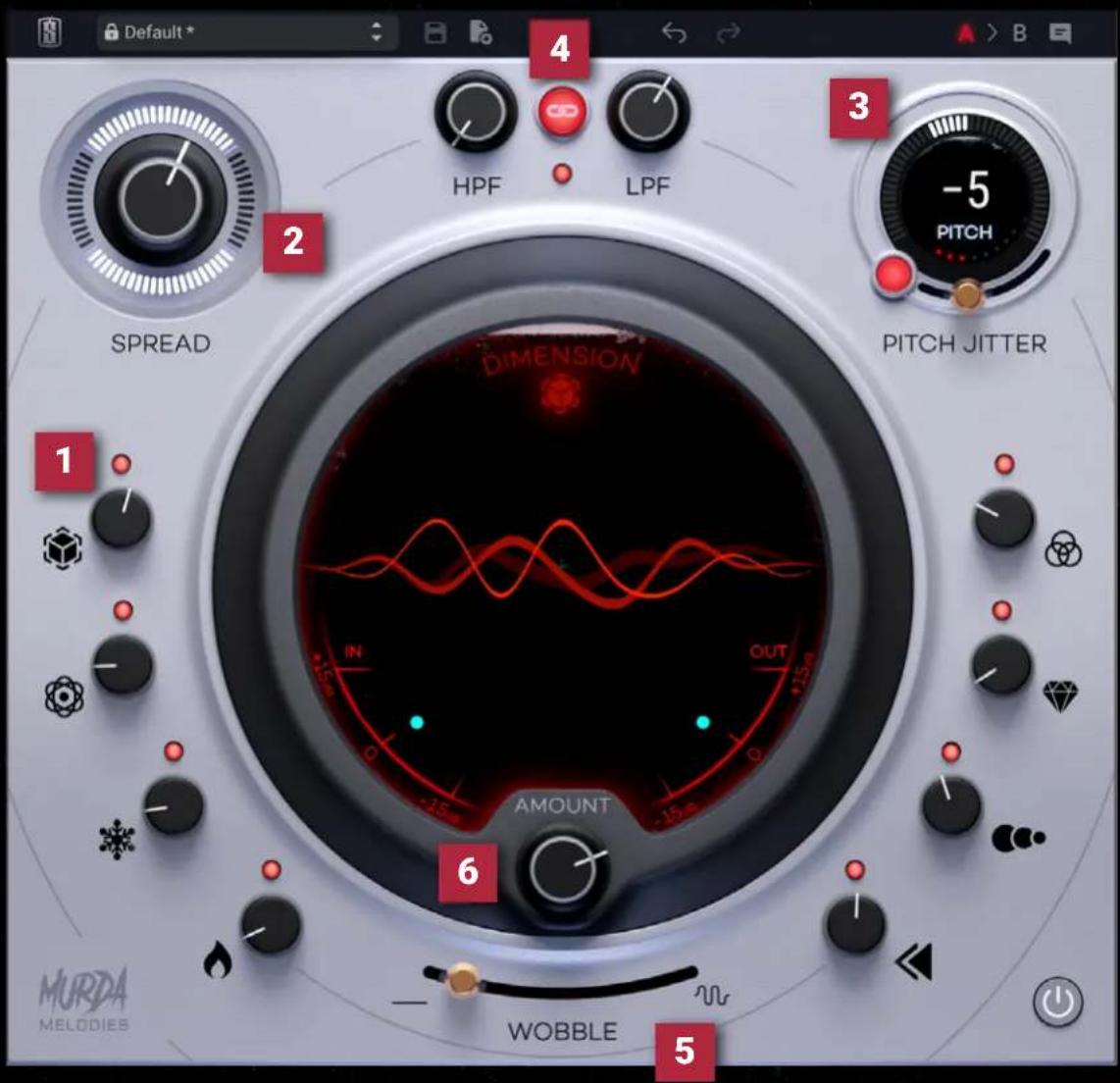
Murda Melodies consists of the following primary controls
1
8 warping FX knobs
2
Spread knob for mono-compatible stereo image enhancement
3
Pitch shifting module with 4 octave range
4 pass and Lowpass filters
5 Wobble slider for warble, wow, and flutter effects
6 Amount to adjust the global warp intensity
8 WARPING FX KNOBS
These controls are the primary warping effects used to control your sound.
Dimension - Lifts the signal and creates a massive sense of space
Motion - Adds rhythmic modulation to add energy to your beats
Ice - Creates a long shimmery reverb
Heat - Inject rich, warm saturation in your tracks
Ensemble - Modulation effect to thicken your tone
Clarity - Increases articulation and clarity of the high frequencies
Rhythm - Adds a 18 note bpm-synced delay effect
Reverse Adds a 12 note bpm synced reverse effect
The small red LED above each knob can be used to bypass each individual effect.
SPREAD KNOBS
Spread increases the stereo width of your signal in a mono-compatible way.
PITCH SPREADING MODULE
Shift the pitch of your signal over a whopping 4 octaves—from 24 semitones to 124 semitones.
You can also enable "Pitch Jitter" to emulate a lower-fidelity pitch shifter. Control the quality of the pitch shifter by adjusting the slider when the "Pitch Jitter" button is ON.
HIGH-PASS & LOW-PASS FILTERS
High-Pass and Low-Pass filters are located at the top of the interface, and they include a LINK button that allows you to adjust them simultaneously for easy tweaking. Simply set each filter knob where you'd like, turn on LINK, and adjust one of the knobs to move them simultaneously.
WOBBLE SLIDERS
The Wobble Slider at the bottom of the interface allows you to apply warble, wow, and flutter effects in a single slider. Push the slider to the right to increase the intensity of the wobble.
AMOUNT KNOB
The amount knob at the bottom of the circular display controls the intensity of the warping effect. Try creating unique effects by adjusting both the Pitch Shifter and Amount Knob to blend pitch shifted and dry signals. (Note that the High-Pass and Low-Pass filters are not controlled by the Amount Knob.)
INPUT & OUTPUT SLIDERS
Inside the circular display, there are two trim sliders for IN and OUT gain. Use these to adjust the overall input level coming into the processor and overall output trim level.
PRESET BROWSER
The Preset system in Murda Melodies allows you to easily access Factory presets, or save and recall your own presets.
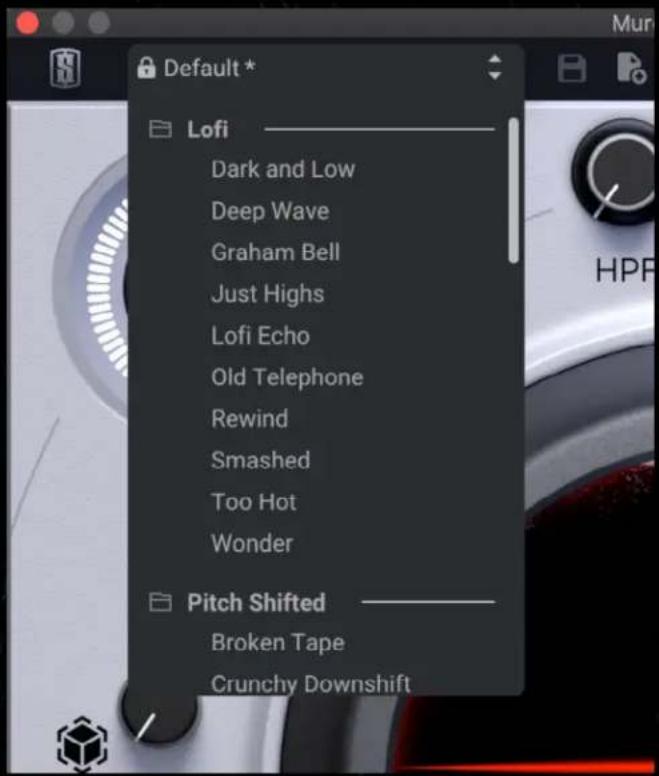
To access the list of presets, click on the Preset Field Dropdown. Click on a preset to load it.
Alternatively, you can use the up and down arrows on the right side of the Preset Field Dropdown to flip through the presets.
When you save your own User Presets, a User Presets section will appear.
To delete a User Preset, hover over the preset you wish to delete and click the Trash Bin icon. Murda Melodies will then ask you to confirm that you would like to delete the preset.
The SAVE button is active when a User Preset is loaded. Clicking on the SAVE button will save the current settings of Murda Meodies to the User Preset that is currently loaded. This provides an easy way to quickly update User Preset settings.
The NEW PRESET button allows you to create a new User Preset. It will store the current settings of Murda Melodies into a new User Preset.
UNDO / REDO
The Undo / Redo arrows in the top bar allow you to undo and redo your adjustments of the main controls of Murde Melodies.
SNAPSHOTS
The A > B Snapshots feature allows you to store two different settings of Murca Melodies and instantly A/B between the two settings. This is particularly useful when trying multiple different settings out on a source and judging which you prefer.
By default, Murda Melodies is in the "A" snapshot. Simply set Murda Melodies to the first setting you would like to test. Then, click on the "B" snapshot. The controls will reset to default, and you can set new settings of Murda Melodies to test.
Then, simply click on "A" and "B" to flip back and forth between the settings instantly.
The arrow in the middle of the snapshots copies the settings from your currently loaded snapshot to the other snapshot.
TOOLTIPS
Turn on Tooltips and hover over any of the controls of Murda Melodies to learn more about what they do.
KEYBOARD SHORTCUTS LIST
| Feature Mac Windows | ||
| Fine adjustments | + DragOr Right Click + Drag | Ctrl + DragOr Right Click + Drag |
| Reset value to default Opt + Clickor Double-click | Clickor Double-click | Alt + ClickOr Double-click |
| Edit values Double-click then | Enter Double-click then Enter |
iLOK PROTECTION
An i Lok license is required to use Murda Melodies. As a member of the All Access Pass, you can use i Lok Cloud or move the license to your i Lok 2 or 3 dongle. If you purchase a perpetual license of Murda Melodies, you must use an i Lok 2 or 3 dongle. Murda Melodies will not function without a valid license.