PR-WP-412 - Processor AMX - Free user manual and instructions
Find the device manual for free PR-WP-412 AMX in PDF.


| Brand | AMX |
| Model | PR-WP-412 |
| Type of Product | Digital Media Processor |
| Dimensions (W x H x D) | 17.4 in x 1.7 in x 5.2 in (442 mm x 43 mm x 132 mm) |
| Weight | 3.5 lb (1.6 kg) |
| Power Supply | 100-240 V AC, 50/60 Hz, 15 W |
| Processor Type | ARM Cortex-A9 |
| Memory | 1 GB RAM, 512 MB Flash |
| Control Interfaces | Ethernet, RS-232, IR, Relay |
| Audio Processing | Dolby Digital, DTS, PCM |
| Video Formats | HDMI 2.0, HDCP 2.2, 4K60 4:4:4 |
| Network Connectivity | 10/100/1000 Ethernet, Wi-Fi (optional) |
| Operating Temperature | 32°F to 104°F (0°C to 40°C) |
| Mounting | 1U Rackmount |
| Functions | AV routing, scaling, multi-room distribution, control system integration |
| Maintenance and Cleaning | Wipe with dry cloth; avoid liquids |
| Safety Compliance | CE, FCC, RoHS |
| Spare Parts and Repairability | Contact AMX support for authorized service |
| Warranty | 2 years limited |
Frequently Asked Questions - PR-WP-412 AMX
User questions about PR-WP-412 AMX
0 question about this device. Answer the ones you know or ask your own.
Ask a new question about this device
Download the instructions for your Processor in PDF format for free! Find your manual PR-WP-412 - AMX and take your electronic device back in hand. On this page are published all the documents necessary for the use of your device. PR-WP-412 by AMX.
USER MANUAL PR-WP-412 AMX
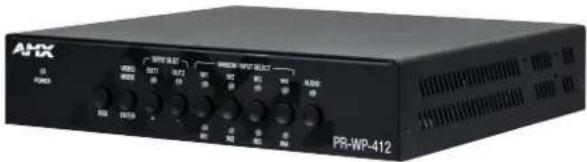
This guide pertains to the PR-WP-412 Precis 4x1:2 4K60 Windowing Processor. The purpose of this document is to illustrate how the device is to be installed and set up in its simplest configuration by a trained technician.
What's in the box
The following items are included with the PR-WP-412:
• [1] 12V/3A DC Power Adapter
• [1] US Pins
• [1] EU Pins
• [1] UK Pins
• [1] AU Pins
• [3] 3-Pin Terminal Blocks
• [4] Rubber Feet
Power
Active power requirements:
• Voltage, DC: 12V/3A
• Power consumption (max): 22.6W
Environmental Requirements
The environmental requirements for the PR-WP-412 are as follows:
- Operating Temperature: 32^ F (0°C) to 104^ F (40°C)
- Storage Temperature: -4^ (-20°C) to 140^ (60°C)
- Operating Humidity: 5% to 90% (RH (non-condensing))
• Storage Humidity: 5% to 90% (RH (non-condensing))
Installation
- Attach the proper cables from HDMI video source (such as a PC, Blu-ray player, game console, satellite/cable box, media server, etc.) to HDMI Input 1 on the 4x1:2 HDMI windowing processor. Continue for HDMI Inputs 2-4.
- Attach the proper cables from the HDMI matrix switcher HDMI Output ports to displays, projectors or other sink devices.
- If required, connect an AV receiver, amplifier or other audio device to the audio output port on the PR-WP-412.
- Power on PR-WP-412 using the correct DC power cable (supplied in the box) that meets your location's requirements.
Switching Operation
PR-WP-412 supports Matrix Switching, Picture-In-Picture (PiP), 3-Stack, and Quad modes. Modes can be selected with the VIDEO MODE button on the front panel, API commands, or via the on-board web interface.
Matrix Switching Mode:
In Matrix Switching mode, the PR-WP-412 operates as a 4x2 matrix switcher. To make a switch when in Matrix Switching mode:
-
Press the appropriate OUTPUT SELECT button(s). The currently selected output(s) and the routed input will be indicated by status LEDs.
-
Press the desired INPUT SELECT button to finish switching.
Windowing Processor Modes:
When in any of the Windowing Processor modes, the PR-WP-412 will transmit the same signal on both outputs. PiP, 3-Stack, and Quad are the preset windowing modes accessible using the front panel. Custom window configurations can be created using API commands or the on-board web interface. To route an input to a window of the selected preset windowing mode:
- Press the appropriate WINDOW SELECT button. The selected window and routed input will be indicated by status LEDs.
- Subsequent presses of the same WINDOW SELECT button will change the input routed to that window.
Mounting Options (Rack Trays and Mounting Brackets)
The PR-WP-412 can be mounted using V Style Surface Mounting Brackets, V Style Single Module Pole Mounting Kit, or the NMX-VRK V-Style Rack Shelf. For details, see www.amx.com.
Identify the IP address of the PR-WP-412
Press the OSD button to enter the main menu, and then press the ENTER button once to enter the "NETWORK STATUS" page. Finally, the current IP address will be presented on the displays connected to the HDMI OUT ports.
Additional Documentation
Additional documentation for this device is available at www.amx.com. Refer to the Instruction Manual - PR-WP-412 for additional details on installing, upgrading, and controlling the PR-WP-412. You can also view the Important Safety Instructions through the website.
See the Important Safety Instructions, available to view or download from the www.amx.com.
Brand : AMX
Model : PR-WP-412
Category : Processor