Pro Maestro 2.0 - Massage device Osaki - Free user manual and instructions
Find the device manual for free Pro Maestro 2.0 Osaki in PDF.


User questions about Pro Maestro 2.0 Osaki
0 question about this device. Answer the ones you know or ask your own.
Ask a new question about this device
Download the instructions for your Massage device in PDF format for free! Find your manual Pro Maestro 2.0 - Osaki and take your electronic device back in hand. On this page are published all the documents necessary for the use of your device. Pro Maestro 2.0 by Osaki.
USER MANUAL Pro Maestro 2.0 Osaki
natural_image
Modern massage chair with black and silver design, no visible text or symbols


Osaki
User Manual
All information is correct at the time of print
Contents
Important safety instructions 4
Product parts 9
Before use.... 11
The controller instructions ...... 15
Operation guide 16
After massage 22
Cleaning and maintenance 23
Q & A 24
Troubleshooting 25
Specification 27
Important safety instructions
Must be followed
These safety instructions must be strictly followed in use to avoid personal injuries and property damage are as follows:
All the safety instructions are described in compliance with degrees of the injuries or damage as a result of wrong use.
| Warning | Actions tending to cause serious injuries or death |
| Caution | Actions tending to cause minor injuries or property damage |
■ Pay attention to the symbols before safety instructions (an example is given below).

Actions that must be absolutely forbidden

Actions that must be done
Warning
 Must be followed Must be followed | ● Before using the product, persons who are being treated or have any of the following symptoms should consult a physician.(1) Any person with a pacemaker of medical device can not use this product. The chair produces an electronic jamming;(2) Patients with malignant tumors;(3) Patients with heart disease;(4) Persons proved to be unable to identify temperatures;(5) Pregnant persons or women who have just had childbirth;(6) Persons with perceptual disturbance because of diabetes or another serious peripheral circulation disturbance;(7) Osteoporosis patients, spinal fracture patients, or persons with acute painful diseases such as sprains or muscle strains;Otherwise accidents or physical discomfort may happen. | (8) Persons with injuries in the massaged parts;(9) Person with higher or lower body temperature, fever, inflammation, cold symptoms, high blood pressure or any poor health conditions must consult with a physician to obtain permission to use;(10) Do not sleep in this chair;(11) Any one with spinal or nerve conditions(12) Persons with protrusion of intervertebral disc; |
| ● If you feel any unusual physical discomfort during usage of the chair immediately stop using the chair and contact your physician. If there is abnormal discomfort after using the chair, contact your physician and refrain from using the chair unless recommended by your physician. | ||
| ● Before operating or adjusting the the chair, be sure that there is no obstructions, pets or persons near, in front and below to avoid serious injury and damage.Otherwise accidents or physical discomfort may happen. | ||
| ● Before using the chair, lift up the backrest pad and inspect the middle cover that massage rollers travel up and down on. Be sure the nylon cover which is replaceable by halipping signs of damage or tears, to avoid from damaging the roller head, physical injury and electrical shock. | ||
| ● When using the chair for the first time, it is recommended that you select the "Demo" mode.● Do not massage for more than 30 minutes each time.● Do not massage a single part for more than 5 minutes.If any of these instructions are not followed, you may suffer serious injury. | ||
| ● After using the chair, it is recommended that the chair is unplugged from the power outlet to avoid any surges caused by outages. It is HIGHLY ADVISED TO ALWAYS USE A SURGE PROTECTOR. It will also prevent minors and unauthorized people using the chair, avoid potential injury. | ||
| ● Follow the regulations about use of the socket and the wiring devices.● Use a 110V, 60Hz power supply.(Do not use the product in a foreign country or connect it with a transformer without permission.)If not followed it may lead to electrical shock, electrical product failure and overheating causing a fire. | ||
| ● Make sure the power cable is firmly plugged into the outlet to prevent power surges, shorts, and electrical shocks. Electrical shocks may cause overheating and fires. | ||
| ● Remove such dirt as dust on the power plug at regular intervals.Otherwise fires caused by poor insulation due to factors such as moisture may happen. (Wipe the power plug with dry cloth.) | ||
 | ||
| Must be followed | ● In the case of any abnormality or fault, stop the product immediately and pull out the power plug to avoid smoke, fires and electric shocks.Abnormality and fault examples● If the chair is plugged into the power outlet and the power switch is in the "ON" position, and the chair is not responding after activating the chair by the remote.When the chair is turn off but still operating.● If you detect any burning smell or abnormal sounds.● If you see any deformed parts of the upholstery that seemed to have melted due to over heating→In any of these listed issues have occurred STOP using the product and unplug from the power outlet. Have the product inspected by an authorized service center. | |
| Forbidden | ● Do any cushions or obstructions between the backrest pad and the backrest. This may lead to damaging the mechanism and personal injury. | |
| ● When moving or handling the chair, be sure to grab from its frame and the recommended grabbing points. Otherwise the chair may break or causing serious injury. | ||
| ● People with the following health issues should NOT use this product:Persons for whom massage is forbidden by doctors, such as persons with thrombosis, serious aneurysm, acute venous aneurysm, various skin inflammations (such as subcutaneous tissue inflammation) or various skin infections.Otherwise it may aggravate or cause serious injury. | ||
| ● Anyone waist or lower back health issues should NOT use this product:● Persons with acute lumbago, protrusion of intervertebral disc, or displacement of a lumbar vertebra; Otherwise it may aggravate or cause serious injury. | ||
| ● Do not put hands, arms or feet into the backrest's fabrics of traveling sections of the massage wheels.● Children should not use the product. Keep them from playing on the product or climbing onto the Lower Leg/Foot massage section, the seat, the backrest or the armrests.● Do not climb onto the backrest or the armrests.● Do not apply additional pressure leaning back on the backrest. Do sit on the chair when not being used for massage.● Keep your head from reachable areas of the backrest and the back cover.● Person under age or physically unable to sit in the chair and operate by their own a strength should not use this product or without supervision. Anyone physically weak must consult with their doctor.● When massaging the neck area, be attentive to the intensity of the massage to make sure that it is not applying to much pressure which may aggravate neck muscles or nerves. If unusual pain is experienced | ||
| ● Do not damage the power line or the power plug.(Do not damage, machine, forcedly bend, twist or prolong the power line or the power plug, or place the power line or the power plug close to a heater, or tie or bind any heavy objects on the power line or the power plug.)A damaged power line or power plug may result in electric shocks, short circuit faults or fires. Please consult the shop from which you bought the product or a designated authorized service center about maintenance method of the power line or the power plug. | ||
| ● When using the Warm massage wheels, avoid longtime contact with the skin in one position.Otherwise you may get low-heat burns.*Even if the temperature is relatively lower (40 °C~ 60 °C), low-heat burns may happen after longtime contact with skin (in spite of no obvious hot or painful feeling). | ||
| Wet-hand operation forbidden | ● Do not insert or pull out the power plug with wet hands.Otherwise electric shocks may happen. | |
| Disassembly forbidden | ● Do not refit, disassemble or repair the product without permission.Otherwise fires, abnormal movements or personal injuries may happen. | |
| Caution | ||
| Must be followed | The following persons (even if they are physically healthy at present) should consult a physician before using the product.(1) Persons with muscular atrophy due to aging or below normal weight;(2) Persons feeling lumbago (pain in the muscles and joints of the lower back) because of bone or viscus problems;(3) Persons receptive to suffering sprains or bruising easily;(4) Persons with carsickness or seasickness (motion sickness) who received a heart operation or another vascular operation;If not addressed properly may lead to serious injury.Before sitting on the product, make sure there is no foreign objects between any two parts of the chair.(Make sure there is no foreign objects on the back cover, the backrest, the seat surface, the Lower Leg/Foot massage section or inside surface of the back cushion.)Otherwise accidents,injuries,or product faults caused by clamping of hands,feet, or other articles.Before sitting on the seat, make sure the massage wheels are in the retracted positions.If you want to leave the seat during the massage, stop the product first.When the Lower Leg/Foot massage section is not retracting after the massage, retract the footrest by manually retracting itwith the remote button.Otherwise accidentson injuriesmay happen.When pulling out the power plug, do not pull from the power line but grab from the headof the plug to prevent damage and injury . Otherwise an electricshock or circuitfault may happen.Before moving the product, be sure the legrest and the backrest are in the default position. The backrest up and the Iegrest down.Otherwise injuries may happen.When moving the product by pulley, moving dolly lay a mats on the floor to avoid markings or damage to the floor. Do not roll the chair on engineered wood floors or soft woods.Otherwise marks and damage may be lefton the floor.Keep the safety lock key.Keep children our of reach from children. Do not let children tamper with the remote control.Otherwise children may cause accidentson suffer injuries by eatingit or playing withit.Before moving the product by dollyor the wheels of th chair, remove the obstructions close to it and in its path. If lifting use the recommended lifting points along the steel frame.Otherwise accidentson injuriesmay happen because of turn over of the product.If any symptom such as skin inflammation, itching or swelling when using, stop the using the product immediately and consult a physician.Otherwise accidents or physical discomfort may occur. | |
| Forbidden | Do not use the product and other devices at the same time, such as heating blankets, and other electronic devices.Otherwise accidents or physical discomfort may happen.Do not place your hands, arms, feet and other part of the bodycept for the neck between the roller massage heads. The rollers may squeeze the body parts extremely tightly causing injury.Do not put the knees between the in calf massager. This may cause serious injury.Do not fall asleep while using the product. Do not use the product after drinking alcohol. If air in the filling the air bag on the seat is not completely discharged, do not stand or jump on the seat or put things on it.Otherwise accidents or injuries may happen. | |
  | ||
 Forbidden Forbidden | ● Do not put hands or feet between footrest and seat base.● Do not put hands or feet between footrest and side panel.● Do not put hands or feet between seat base and side panel.● Do not put hands or feet between upper and lower part of the footrest.● Do not put hands or feet in the gap of seat base.● Do not put pets on the massage chair.● Do not pull out the power plug or turn OFF the power switch suddenly during massage. otherwise injuries may happen. | |
| ● Do not stand or sit on the back cover. Otherwise personal injuries due to the product toppling may occur. | ||
| ● Do not stand or sit on the armrests. Otherwise personal injuries may happen. | ||
| ● Do not stand or sit on the Lower Leg/Foot massage section or the footrest. Otherwise accidents or injuries due to rotation of front of the footrest or turnover of the product may happen. If bottom of the Lower Leg/Foot massage section runs into the floor, the floor may be damaged. | ||
| ● Do not drag or push the product after it is installed. Otherwise the floor may be damaged. | ||
| ● Do not move the product while there is a person on it. Otherwise, accidents, or injuries may happen due to a toppling of the product. | ||
| ● Do not use the product on heating devices such as electric blankets. Otherwise fires may happen. | ||
| ● Do not put the remote controller on the product. Otherwise the product may be damaged. | ||
| ● If thee is any foreign objects between the backrest and the backrest pad, stop using the chair and turn off. Remove the foreign object and make sure the chair is operating properly before using again Otherwise product faults or personal injuries may happen. | ||
 Wet-hand contact forbidden Wet-hand contact forbidden | ● Do not place this chair in or near the bathroom or any location with high humidity. This will destroy the circuits and electrical components of the massage chair. | |
 Product wetting forbidden Product wetting forbidden |  ● Do not allow for contact with any liquids aerosol sprays. Otherwise electric shocks, short circuit, or product faults may happen. ● Do not allow for contact with any liquids aerosol sprays. Otherwise electric shocks, short circuit, or product faults may happen. | |
 Pull out the power plug Pull out the power plug | ● Before cleaning or maintaining the product, pull out the power plug first. Otherwise electric shocks or injuries may happen. | |
| ● In the case of a power failure, pull out the power plug at once. It is highly recommended to plug chair into a surge protector to protect the chair from shorting during outages. | ||
| ● When the product is not used, pull out the power plug. Otherwise electric leakage fires may happen because of insulation aging caused by dust and moisture. | ||
Grounding instructions
The product must be grounded to reduce the electric shock hazard because of functional faults of the product.
The product has a power line with a grounding conductor and a grounding plug. The grounding plug must be inserted into an appropriate socket that has been correctly installed and grounded in full compliance with the local code and decree.

Caution
- If the grounding conductor is not correctly connected, electric shocks may happen. If you are not sure about correctness of the grounding, have it inspected by a professional electrician. Even if the grounding plug provided with the product does not match with the socket you have, do not refit it by yourself but ask a professional electrician to install an appropriate socket.
● The product has a grounding plug. Make sure the product is connected with a socket matching with shape of the grounding plug.
● Do not connect the product to a multi-plug. - If the power plug is damage, it must be replaced by a special plug available from Osaki or an authorize agent.
Product Parts
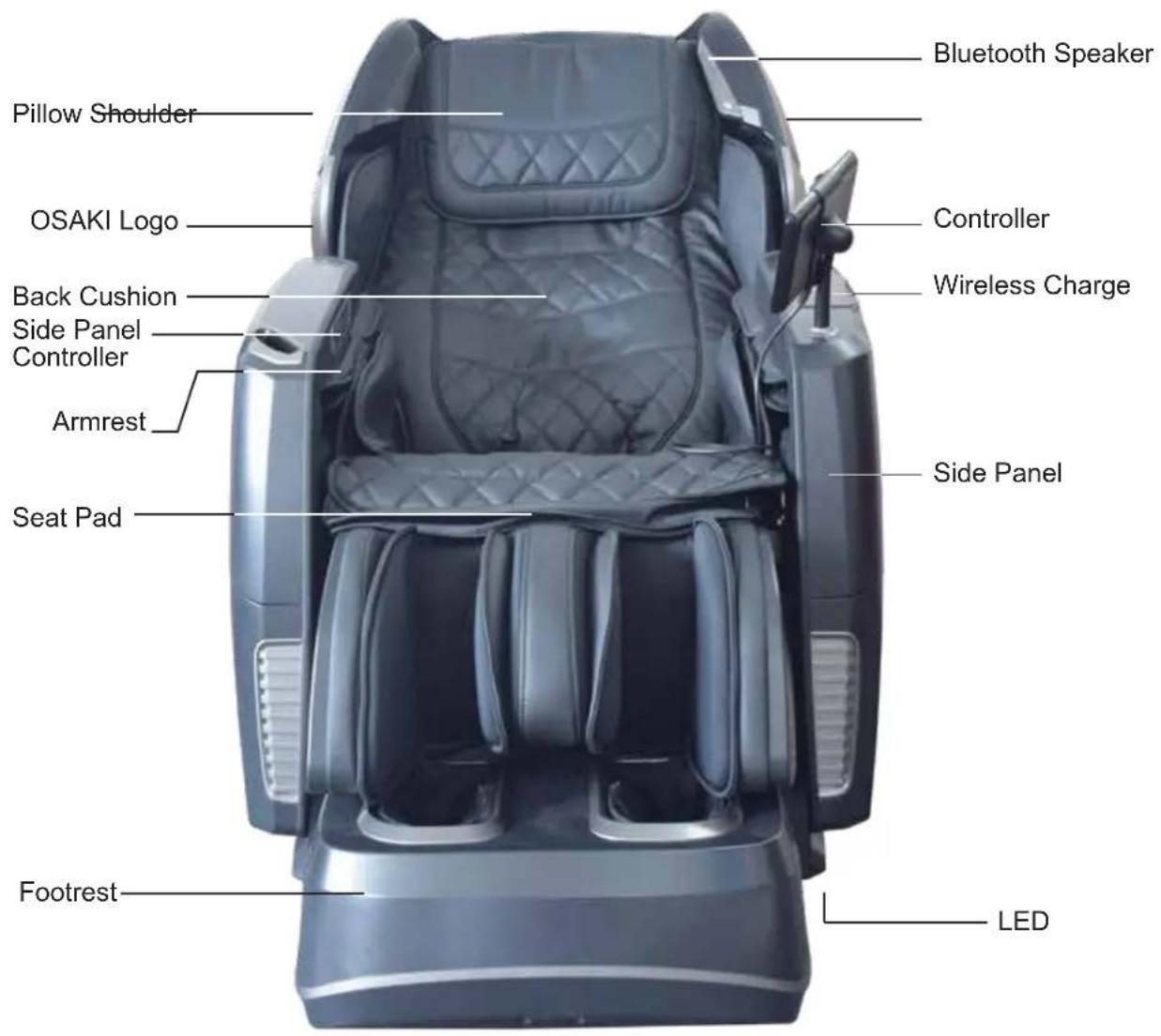
EN9
Product Parts
Air Bags Massage Position
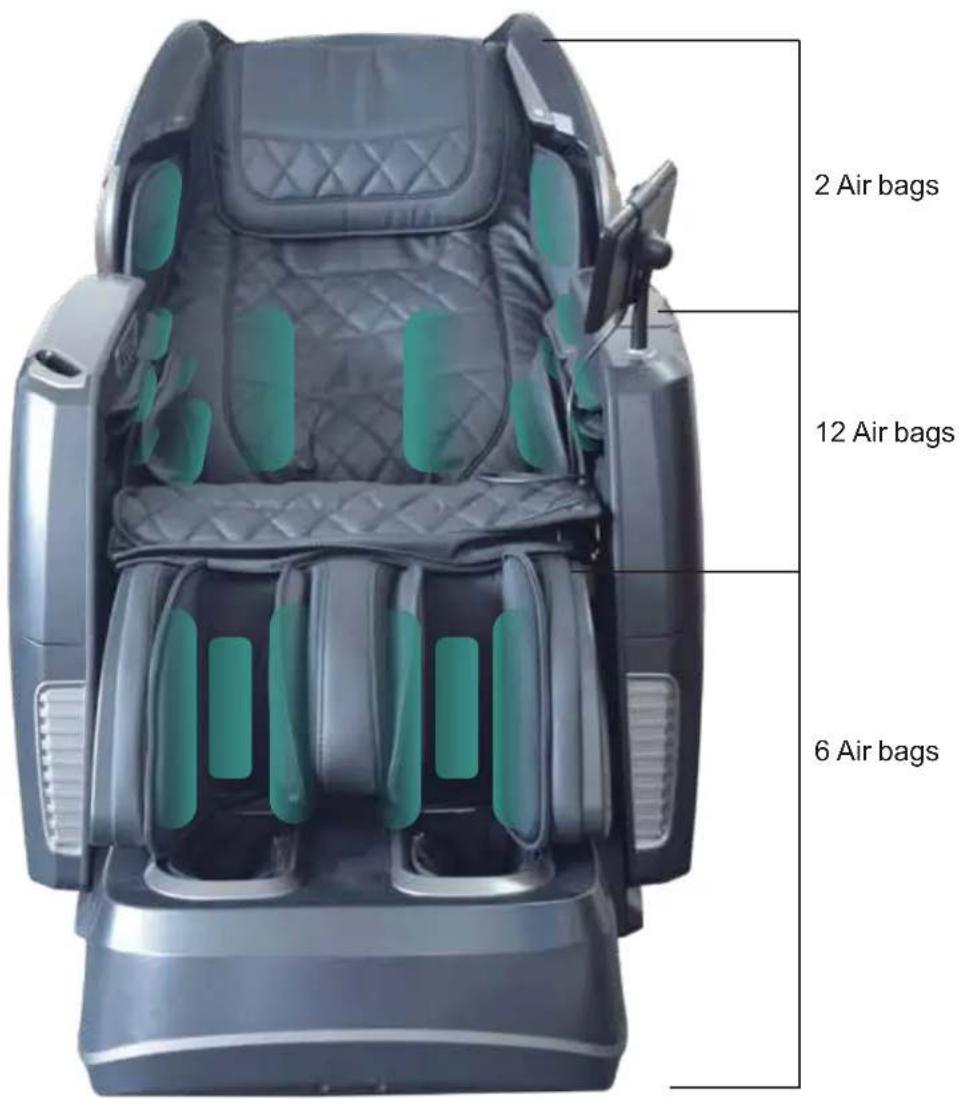
EN10
Before use
1 Before use (installation position)
Make sure there is enough space to recline the chair and for the user to get in and out of the chair freely. PLEASE MAKE SURE TO USE A MAT OR RUG UNDER CHAIR IF YOU PLACED ON TOP OF A HARD SURFACE LIKE HARWOOD AND CERAMIC FLOORS.
Mat Footrest's area Product's are in in contact with contact with the floor the floor
- Do not expose the product to direct sunlight or a high-temperature place (e.g., in front of heating equipment or by a window where sunlight can cause the synthetic leather fade, melt or crack.)
Place a mat below the product to avoid floor damage. The mat should cover the product's area in contact with the floor and the footrest's area in contact with the floor (minimum dimensions: 63"x31.5"). See the figure. - Install the product close to a power socket.
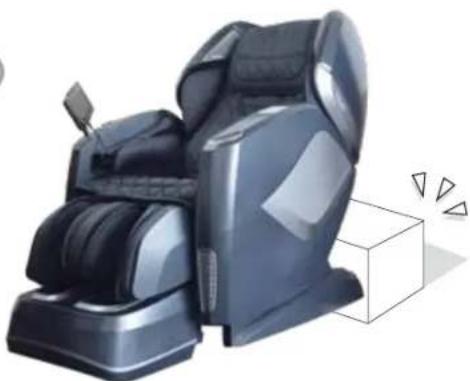
2 Check the space around the product.
Make sure there is no person, pet or other object close to the product.
natural_image
Modern massage chair with black upholstery and side-mounted buttons, next to a white cube with motion arrows (no text or symbols visible)EN11
3 Make sure there is no foreign matter in the seams of the product.
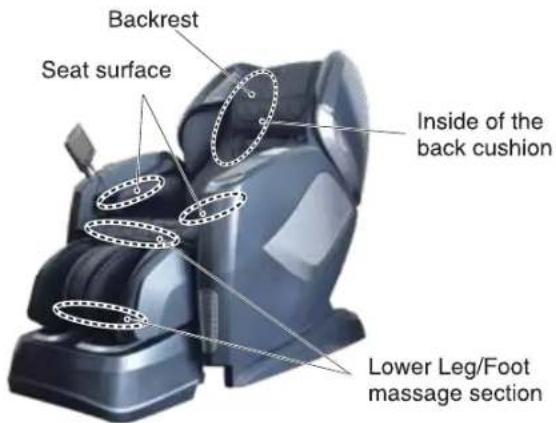

Caution
- Do not put hands or feet between footrest and seat base.
- Do not put hands or feet between footrest and side panel.
- Do not put hands or feet between seat base and side panel.
- Do not put hands or feet between upper and lower part of the footrest.
- Do not put hands or feet in the gap of seat base.
otherwise injuries may happen.
1 Inspect the power line and power plug

Warning
- Inspect the power cord of dirt or dust that may have collected. Be sure the cord is kept clean and with NO visible damage.
Otherwise the lint and dust may lead to an electrical fire. Wipe down the plug with dry cloth.
- Do not damage the power line or the power plug. Do not bend or twist the power cord any reason. Do not place the power cable under heavy objects such as the chair itself. Keep the power cord away from any heating source such as the heater vents, motors and anything that may generate heat.
A damaged power line or power plug may result in electric shocks, short circuits, or fires.
Please consult the shop you bought the product or an authorized service center about maintenance method of the power line or the power plug.
natural_image
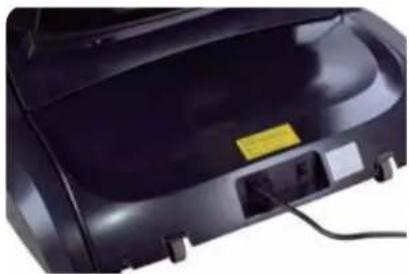
Close-up of a black industrial device with attached power connector and cable (no visible text or symbols)Do not be entangled by the power line.
Push the interface into the power input jack till the end.
5 Power on the product
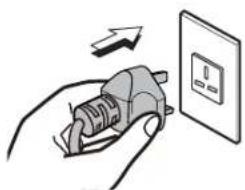
1 Insert the power plug into the power socket.
2 Turn the switch to the "I" (ON) position to activate the chair.

Warning
- Be sure the power cord is firmly and completely inserted into the power outlet. Otherwise electrical shocks or fires may occur because of overheating or power shorts.
- Abide by the regulations on use of the socket and the wiring devices strictly.
- Use a 110-120V\~,50/60Hz power supply. (Do not use the product in a foreign country or connect it with a transformer without permission.) Otherwise electric shocks, product faults or fires because of overeat may happen.
- Do not insert or pull out the power plug with wet hands. Otherwise an electric shock may happen.
1
natural_image
Illustration of a hand inserting a plug into an electrical outlet (no text or symbols)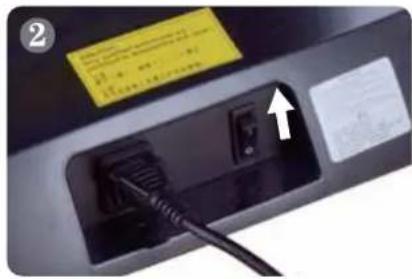
natural_image
Close-up of a black electronic device with a cable inserted, showing internal components and a yellow label (no readable text or symbols)Before use (Continued)
6 Make sure the massage wheels are retracted
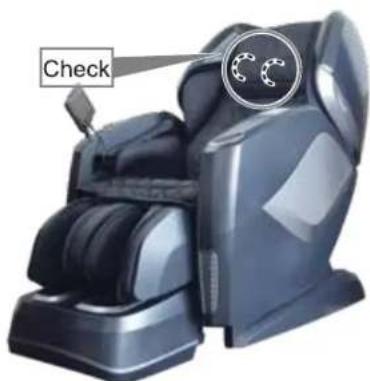
If the rollers are not at the top of the backrest in the retracted position, press "ON" button to bring back to the default position.

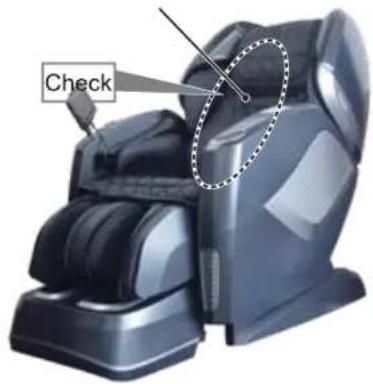
Make sure the fabric is not damaged nor cracked
Inspect the synthetic leather portian in which the massaging rollers travel along the backrest. Be sure there is no damage or unusual ware.

Warning
● Before use, raise the back cushion and check whether fabrics lining pointedout in the figure are undamaged.
(Even if the fabric is slightly damaged, stop the product immediately, pull out the power plug and send notify the manufacturer for a replacement cover.)
If the product is used when there is fabric damage, you may get in jured or get an electric shock.
The controller instructions
Power switch on the top of controller
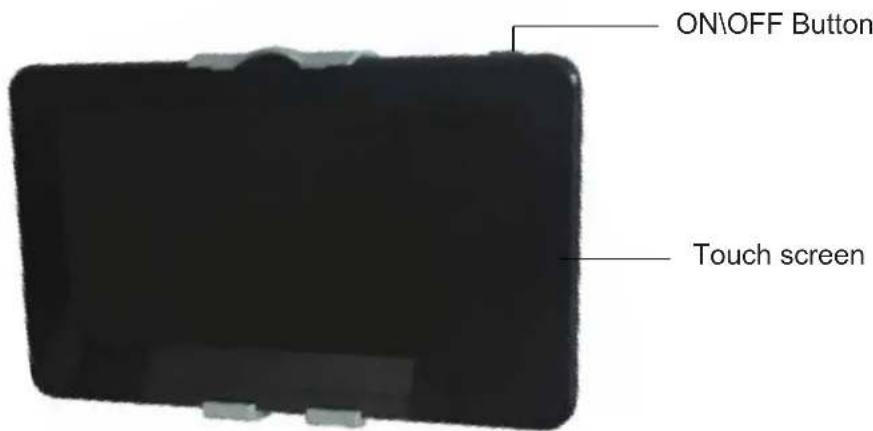
- Power switch on the top of controller
- ON/OFF button
- Press this button to start massage chair. Touch any massage function icon to start massage.
-
Press this button again to turn off the massage chair, massage chair will return to its original position.
-
Touch screen:
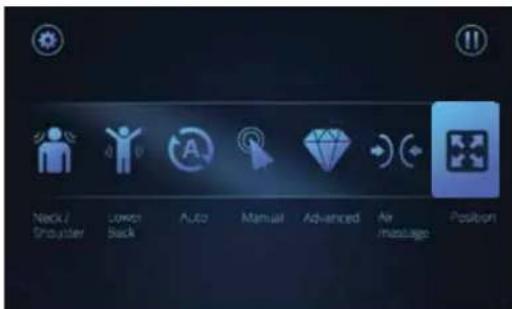
● There are 7 functions in the middle of the screen for user to select.
- Setting is on the top left corner.
- Pause is on the top right corner.
Position:
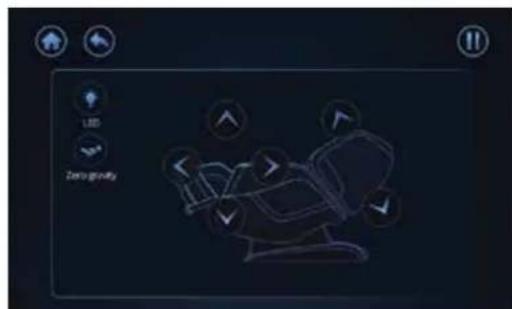
1.User can adjust backrest/footrest incline/recline by touching the icon when the desire position is reached, touch the icon again to stop the

- The button for the legrest allows you to extend or retract the length of the legtest.
- Zero gravity: Touch this icon to active the Zero gravity position, press the button again to return to idle position.
- Touch LED icon can controll the logo lamp under the side panels.
Note: Zero gravity icon is NOT controllable in the massage programs with angle adjustment.
Operation guide
1. Neck & Shoulder
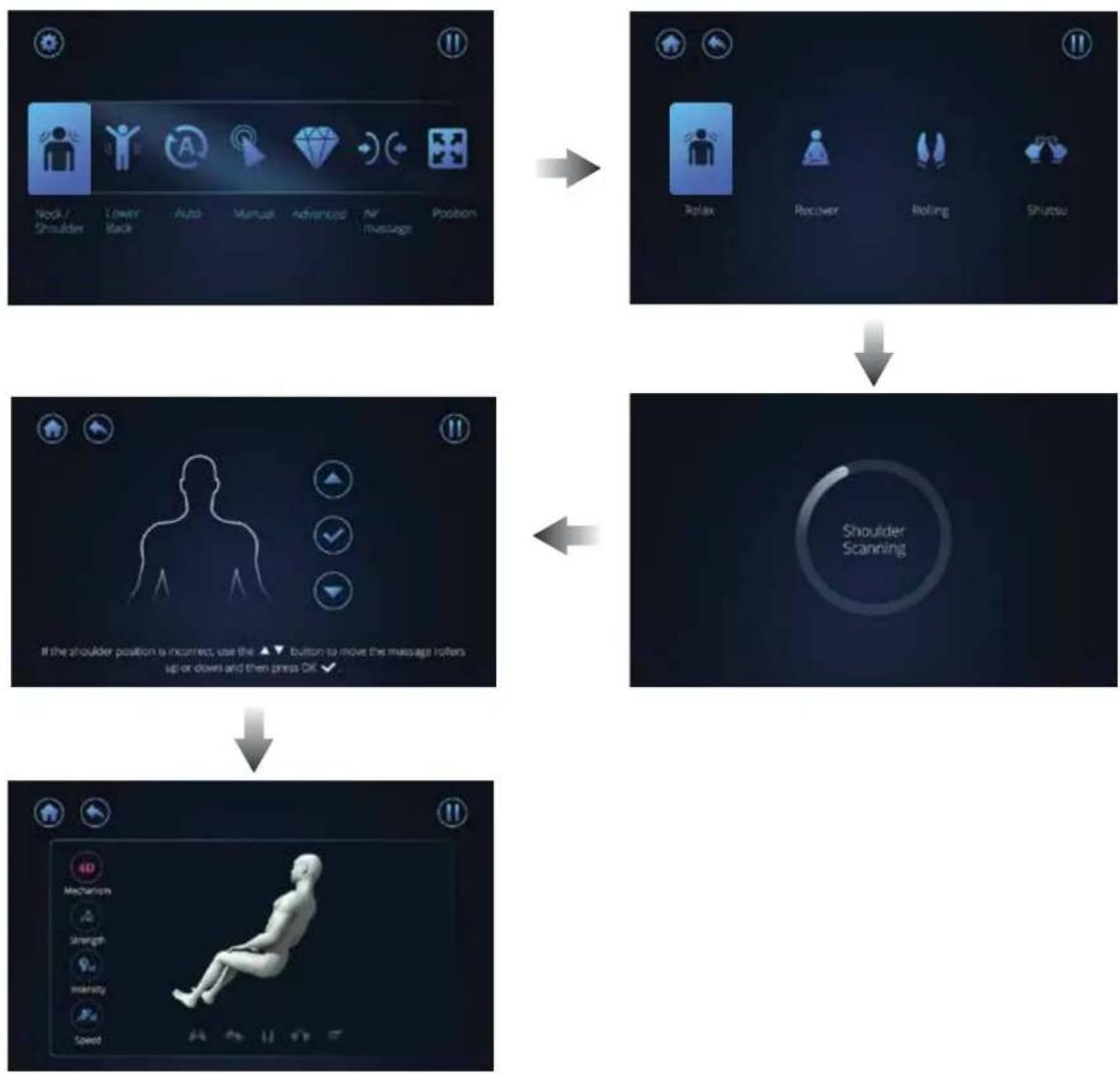
- Touch this icon, the screen will change to the page [Neck & Shoulder]
- There are 4 auto massage programs, if 1 of 4 auto program is activated, chair will automatically perform a shoulder hight scan. The screen will that the [Shoulder scanning] is being conducted.
- The roller will go to shoulder adjustment automatically, user can manually adjust the shoulder hight position right after the scan is complete and just before the program initiates. There is a 3 sec. window to make the adjustment.
flowchart
graph TD
    A["Position"] --> B["Recover"]
    B --> C["Rolling"]
    C --> D["Shutter"]
    A --> E["Position"]
    E --> F["Shoulder Scanning"]
    F --> G["Action: Is incorrect, use the ▲ button to move the message rollers up or down and then press OK ✓"]
    G --> H["Action: Is ready, use the ▲ button to move the message rollers up or down and then press OK ✓"]
2. Lower back
- Touch this icon, the screen will change to the page [Lower back]
- There are 4 auto massage programs. Select 1 of 4 auto program to start the preset program.
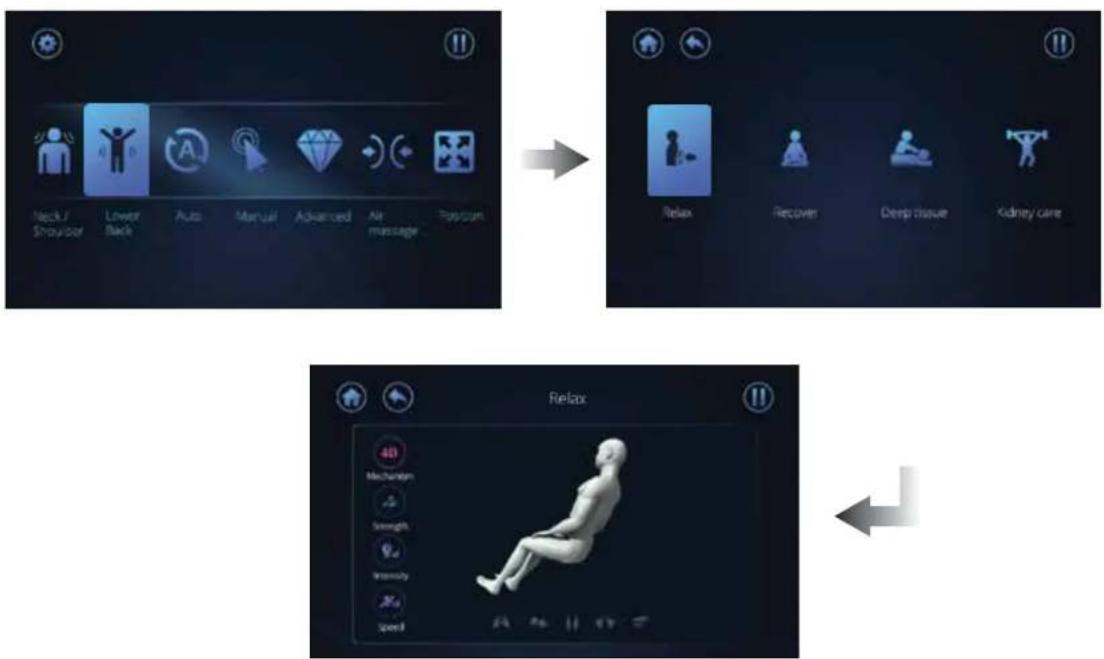
flowchart
graph TD
    A["Neck/Shoulder"] --> B["Lower Back"]
    B --> C["Auto"]
    C --> D["Manual"]
    D --> E["Advanced"]
    E --> F["Air massage"]
    F --> G["Postpartum"]

    H["Relax"] --> I["Recover"]
    I --> J["Deep tissue"]
    J --> K["Kidney care"]

    L["Relax"] --> M["4D Mechanism"]
    M --> N["Slightness"]
    N --> O["Intensity"]
    O --> P["Speed"]
3. Auto
- Touch this icon, the screen will change to the [Auto] page.
- There are 8 auto massage programs. Select 1 of 8 auto programs to start your preset programmed massage.
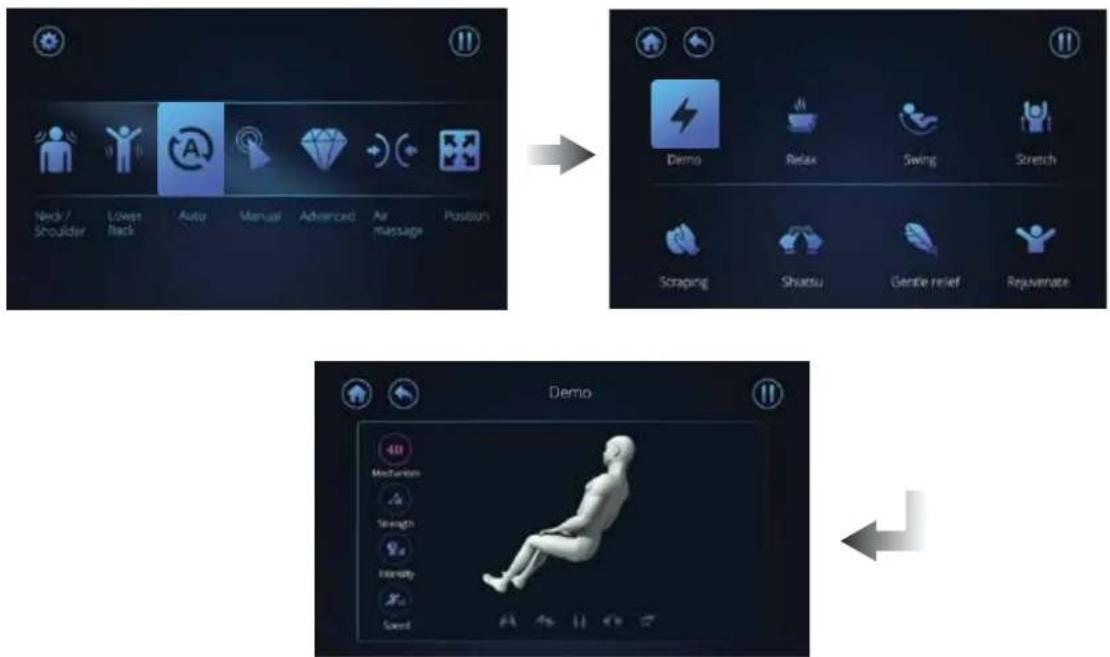
flowchart
graph TD
    A["Neck / Shoulder"] --> B["Lower Back"]
    B --> C["Auto"]
    C --> D["Manual"]
    D --> E["Advanced"]
    E --> F["Air Massage"]
    F --> G["Position"]

    H["Demo"] --> I["Relax"]
    I --> J["Swing"]
    J --> K["Stretch"]
    K --> L["Scraping"]
    L --> M["Shuatsu"]
    M --> N["Gentle relief"]
    N --> O["Rejuvenate"]

    P["Demo"] --> Q["Mechanism"]
    Q --> R["Strength"]
    R --> S["Intensity"]
    S --> T["Sword"]
EN17
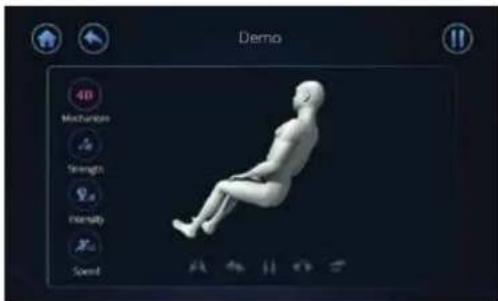
NOTE:
(1) 4D Intensity:
● There are 8 different levels available for adjustment to suit various massage strength.
- In Auto programs, users can adjust 4D intensity instead of Strength and Speed. Strength and Speed will be locked for better massage experience.
(2) Air Intensity :
● There are 5 different levels available for adjustment.
After switching to other pages, click the name of the top massage program to return to the adjustment interface.
4. Manual
- Touch this icon, the screen will change to the [Manual] page.
● There are 4 programs for different part massage areas of massage for the back. - User can select the program preferred, then the auto program will start.
● Kneading/Tapping/Shiatsu has two kinds of massage techniques for selection.
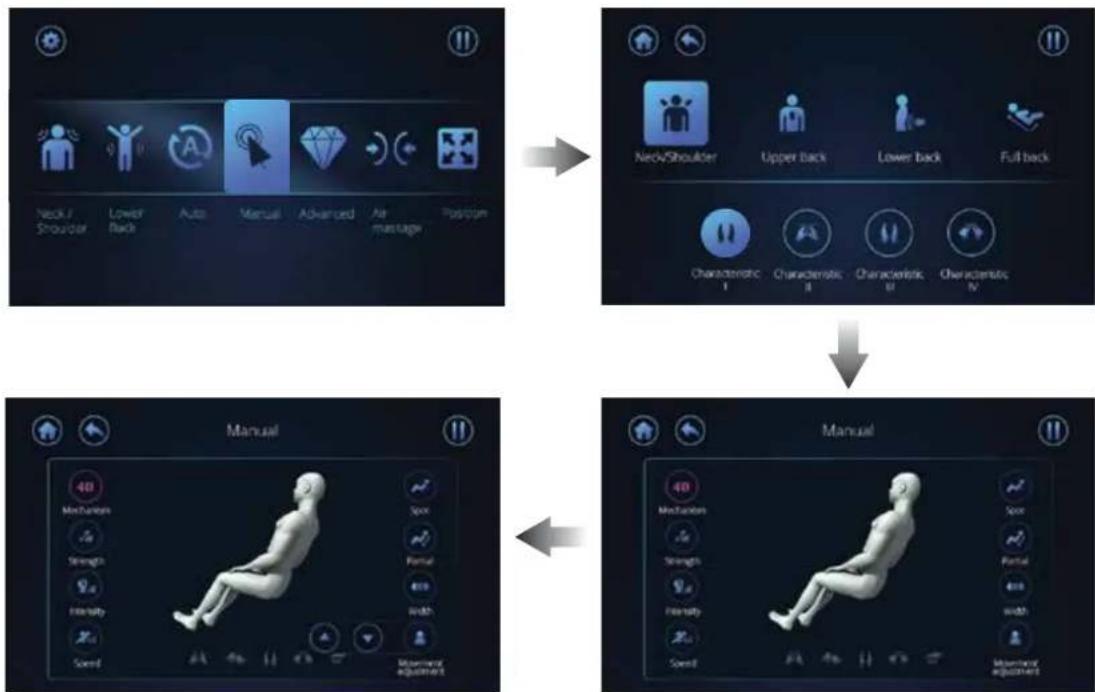
flowchart
graph TD
    A["Device 1: Neck/Shoulder"] --> B["Device 2: Neck/Shoulder"]
    B --> C["Device 3: Upper back"]
    C --> D["Device 4: Lower back"]
    D --> E["Device 5: Full back"]
    F["Manual: Mechanism, Strength, Intensity, Speed"] --> G["Manual: Mechanism, Speed, Strength, Intensity, Speed"]
    G --> H["Device 6: Manual"]
EN18
NOTE:
(1) 4D Intensity:
- There are 8 different levels for the 4D intensity.
- In massage mode, the intensity will set to default.
(2) Intensity / strength / speed:
● There are 5 different levels for adjustment.
(3) Upward / downward:
- When pressing the [Spot] button, it will freeze the massage rollers from moving up or down, concentrating the massage at that point.
- In order to change the spot location simply press the up or down icon.
(4) Roller width:
- The width of the massage can be adjusted for tapping, shiatsu, rolling. Press the left and right arrow icons.
(5) Spot:
- The spot massage allow user to select spot for any part on the back.
- Touch the icon once to activate spot massage at the desired location.
- Touch again to stop the function.
(6) Partial:
● The partial massage allow user to select a region(1/4 of the back).
- Touch the icon once to activate partial massage.
- Touch again to stop the function.
5. Advance
- When pressing [Advanced], the screen will change to the [Advance] screen.
● There are 4 advance programs to select from. - User can select the program preferred, then the program will start.
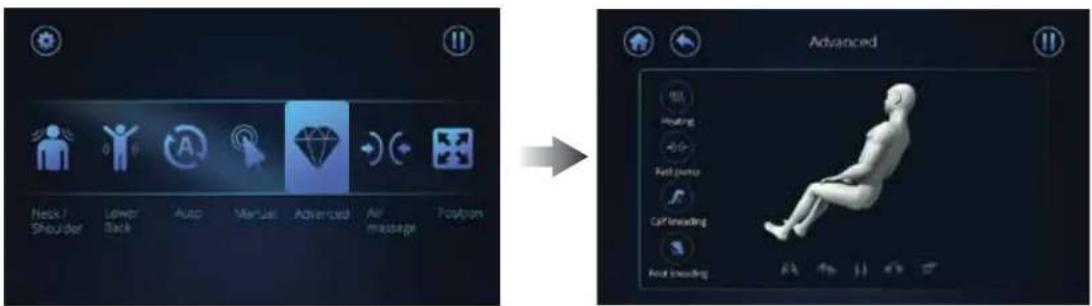
NOTE:
- Heating:
The heated rollers will automatic activate in the auto program. Touch this icon to turn off the roller heat. Touch again to activate it.
- Fast pump:
To dispaly the various airbag massage program on the arms and waist select the [air massage] to select the region and intensity.
- Calf kneading:
When selecting [calf] you can control the speed of the kneading.
- Foot kneading:
The footrest is equipped to knead (rollers) and compress(mechanical).
6. Air massage
- Touch the [Air massage] icon and the screen will change to the screen to [Air massage] menu.
● There are 4 programs to select from. - To start the massage select a program.
● There are 5 different levels of air intensity available for adjustment.
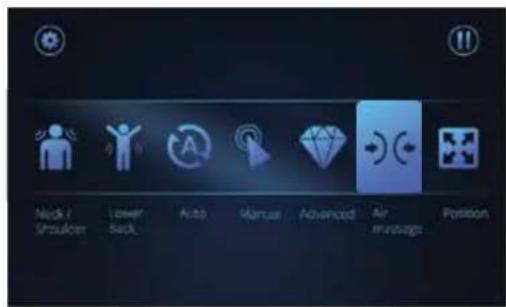
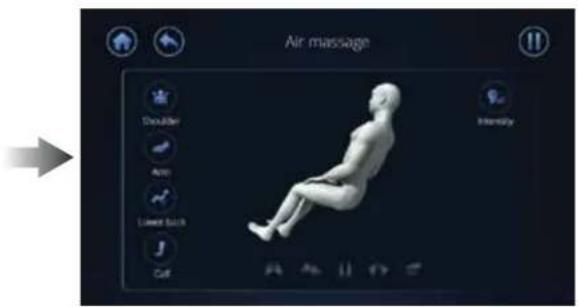
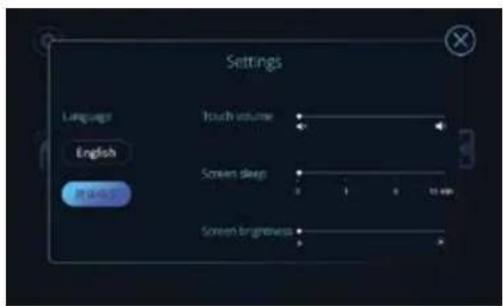
7. Setting
- Touch the [Setting] icon on the top right corner, the screen will change to the [Setting] menu.
- User can select the language/ Touch volume / Screen sleep/ Screen brightness in this page.
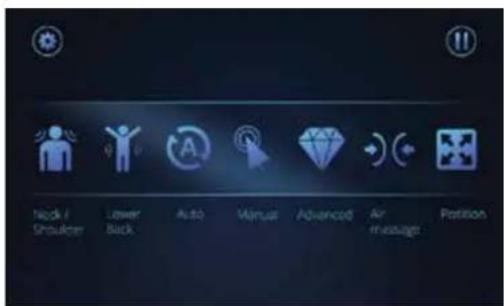

Control Buttons on the side panel
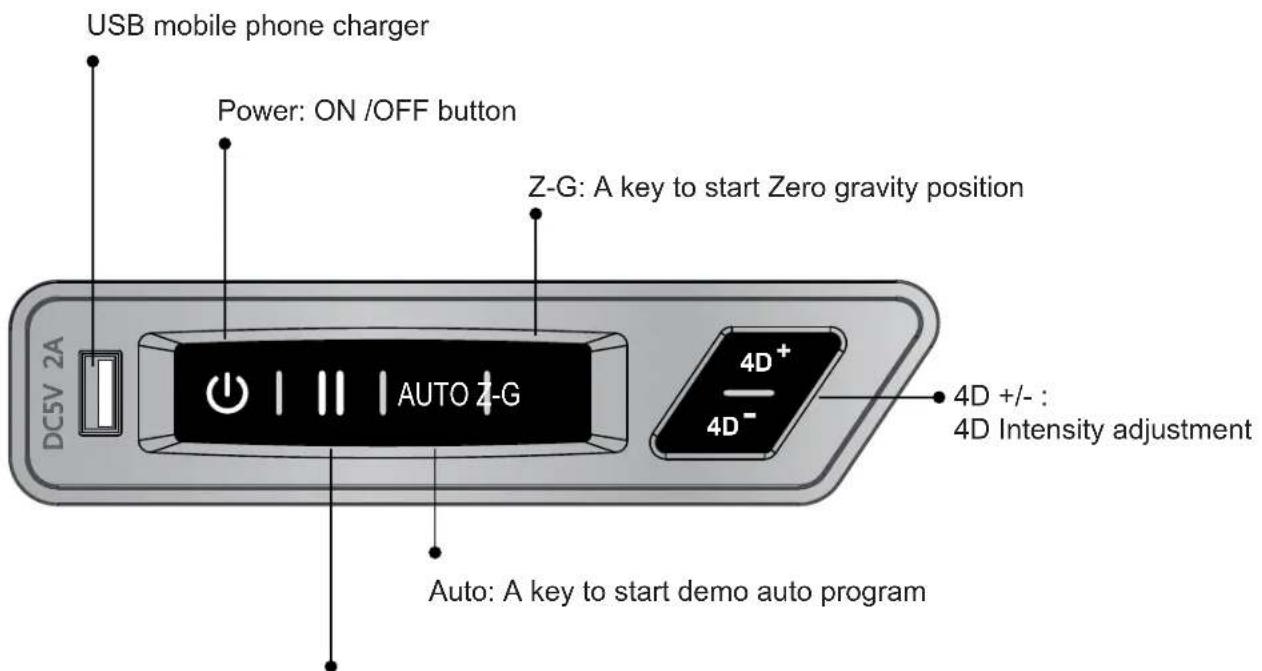
Pause: Massage function pause/start button
After massage
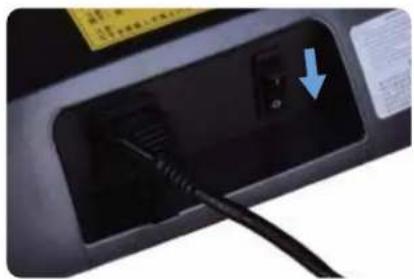
1 Turn off the power switch on the controller.
2 Pull the power switch to "O" position.
3 Pull out the power plug.
natural_image
Close-up of a black electrical plug socket with a blue arrow pointing to a small component (no visible text or symbols)Warning
- After using, it is recommended to put the power switch to the OFF position and pull out the power plug; otherwise accidents and injuries by playing with them by children may happen.
Cleaning and maintenance
Cleaning of the synthetic leather
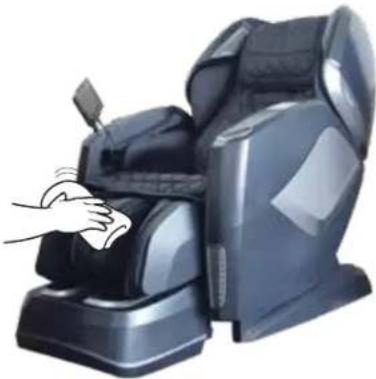
Wipe the synthetic leather with a soft dry cloth.
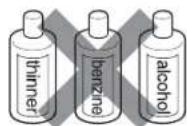
- Do not clean the product with solutions containing chemicals such as thinners, gasonline and alcohol.
- Be sure that leather cleaner will not harm the synthetic leather by reading the label.
- If the synthetic leather is very dirty, wipe it with the method below.
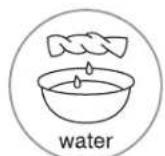
① Wet a soft cloth into water or 3% to 5% neutral detergent containing hot water and wring it out.
② Be sure the soft cloth is well wrung out till there is NO water dripping from the cloth.
③ Wipe surface of the synthetic leather with the soft cloth.
④ Be sure to rinse out the cloth multiple times when wiping down.
⑤ Have the synthetic leather dry naturally. Do not use dryer.
- If it is difficult to remove the stains on the synthetic leather, try soak a piece of melamine foam into a neutral detergent to wipe down several times.
- Do not dry the surface by a hair dryer.
Surface of the synthetic leather may fade or discolor if an unappropriate detergent is used. Test the cleaning solution in small section prior to fully applying.
- Do clean the hard plastic parts with any alcohol, thinner or benzine based agents. This may cause discoloring or removal of the color all together.

natural_image
Illustration of a hand cleaning a black massage chair (no text or symbols visible)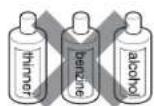
Cleaning of the plastic parts
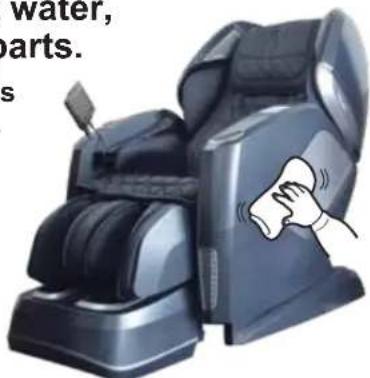
1 Put a piece of soft cloth into water mixed with a neutral detergent contained hot water, wring it out and wipe the plastic parts.
- Do not clean the product with chemicals such as thinners, gasoline and alcohol.
2 Wipe down with a mircofiber or soft cloth wrung out in clean water.
- Be sure the cloth is well wrung out with no water dripping, leaving the cloth damp.
natural_image
Illustration of a modern massage chair with a hand cleaning it, no text or symbols visible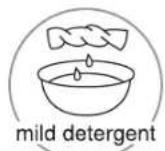
3 Have the plastic parts dry naturally.
Questions and answers (Q&A)

Can someone with a medical condition or disease use this product?

They must consult with their physicians before using the product.
Massage can aggravate or worsen muscle injuries, bone disease, spinal abnormalities, skin disease and kill ones with medical devices implanted in their body.

Is there a restriction body height and weight to use this chair?

The recommended min. Height is 4'9" with a max. height of 6'4". The max. weight capacity is 260 lbs.
If the user is shorter or taller than the height range, the will not fit comfortably fit in the chair and may even cause injury. The maximum weight limit must be followed to avoid damaging the chair and also possibly seriously injuring yourself while using the device. The limits are in place for the users safety.
For a taller person with knee bending when using the product:
Tilt the backrest and lower the Lower Leg/Foot massager to the down position, elongating the length from top to bottom.
For a short person difficult to touch the foot massage section:
Raise the backrest and raise the legrest to shorten the distance from the top to bottom.

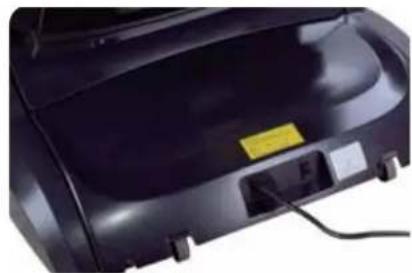
Where is serial number of the product?

It is located at behind the backrest at the back of the chair by the power cord.
natural_image
Close-up of a black industrial device with visible components and wiring (no text or symbols)
When I use the chair it makes noise.

It is part of the normal function of the chair.
The chair is equipped with a air pump and multiple motors. The sounds are part of chair when being operated.

How long should I use the massage chair each day?

20 minutes per day with no medical conditions.
For the 1st week of using the chair, use only for 20 minutes at most assuming the user is in good medical condition. If there is any discomfort stop using and consult with your doctor. The first few days of using you may experience mild soreness. Be sure to monitor the pain levels and if the soreness does no diminish after after the following day consult with your doctor before using again. BE SURE TO DRINK PLENTY OF WATER AFTER EACH MASSAGE.
Troubleshooting
If an issue occurs, inspect and trouble shoot according to the corresponding method below.
If the problem is not resolved, contact the manufacturer for further instructions or service.
Fault
The massage wheels stop during use
(The product beeps and all icons and buttons on the remote controller flicker and then go out.)
The product cannot tilt, or the footrest cannot be raised or lowered
(The product beeps, the running light on the remote controller go out and the product stops)
The massage wheels cannot reach the shoulders or the neck
The left and right massage wheels have different heights (intensities)
The chair is not functioning (massaging).
● Upper body (the neck to the waist) massage
● Lower leg/foot massage
The roller heads are still warm after turning off the heat. Is the product is damaged.
The power line or the power plug is abnormally warm to hot.
Cause and elimination method
As a safety protocol the massage heads will stop if pressure/weight load has exceeded its limit.
To avoid potentially over heating or damaging the massage mechanism the chair is designed to automatically shut off if over strained or over heated. The remote will flash a few times and then shut off as a safety measure. If this has occurred turn off the power switch from the back, allow for 30 sec. And power back on. If the weight capacity of 260 lbs is not exceeded, unplug from the outlet and notify the manufacturer.
This product will stop upon any obstruction or a too large of a force preventing from operating.
If all screen and buttons are flickering and the backrest or the footrest has stopped, turn off the power supply and turn back on 10 seconds. Be sure there are no obstructions in the way of the footrest or the backrest rolling mechanism.
If your head is not properly placed against the backrest during the computer body scan, it may result in an incorrect reading, causing the rollers to start a lower position causing the massage to be inaccurate. If this occurs turn off the power from the remote and start over again to get a proper reading.
This is a normal function of the massage mechanism as it programmed to massage alternating locations from the right side during certain intervals of the program.
The power line is disconnected.
The power switch is not turned on.
- If no program is selected after turning, the chair will pause and shut down. Turn off and restart.
Because the roller heads heat up it will take some time for the residual heat to dissipate.
- If the massage heads are mildly warm, the rollers may be admitting heat created by the friction from the massage.
To avoid accidents, contact an authorized service center.
If above solution are not applicable, kindly refer to "Product Warranty Card" and contact service Center.
Troubleshooting (Continued)
Expected sounds and feelings when using the massage chair.
You will hear or have the following feelings when using the product. These not defective indicators but a normal function of the chair.
- When chair extends or retracts you will hear gears moving an clicking.
● A rubbing sound will be mildly heard when the massage heads are activated. - When the massage heads are tapping you may hear a mild clicking sound.
- Friction sounds will be experienced as the rollers are activated.
As the rollers move up and down the motor produce a sound.
As the rollers are activated you will hear spinning of belts rotating. - Motor sounds will be experienced.
- As the massage heads are squeezing, a mild squeaking sound will heard.
- When sitting in the chair as the roller heads are tapping and rolling a mild squeaking sound may be produced from the joints.
● Common joints that may squeak would be from the side panels - Friction sound between the massage wheels and the fabric.
- Motors will be heard from the pump when the airbags deflate.
● While the airbags are activated you will hear air valves alternating. When the legrest is moving, you will hear mild squeak and a motor operating.
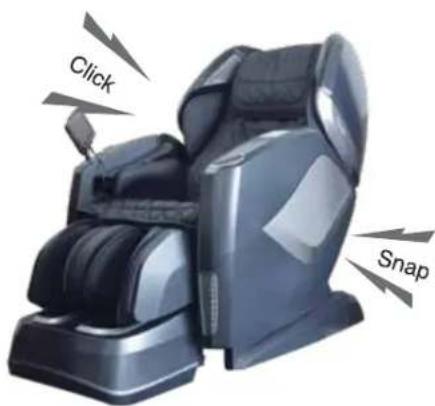
If the sound is loud, it is also possible that the product has failed.
In this case, have the product inspected and repaired by an authorized service center.

Warning
- Do not refit, disassemble or repair the product without permission. Otherwise fires, abnormal movements or personal injuries may happen.

Warning
- In the case of any abnormality or fault, stop the product immediately and pull out the power plug to avoid fuming, fires and electric shocks.
- The product fails to work after the power switch is turned to the ON position;
- When the power cable is moved the chair will turn off and on.
- In use, the product gives off a burning smell or an abnormal sound;
The product is uphoThe product is upholstery is deformed or abnormally hot.
If any of these symptoms occur, have the product inspected and repaired by an authorized service center immediately.
Specifications
| Model | Osaki Pro Maestro 2.0 | |
| Rate Voltage | 110 -120V 60Hz | |
| Power | 250W | |
| Working time | 15min | |
| Guide | L Shape 52.8" | |
| 4D Massage Roller | Forward distance | 8 level Approx 3.9" |
| Strength | 5 level | |
| Speed | 5 level | |
| Airbag | Intensity 5 level | |
| Angle Adjustment | Backrest | Approx 128°- 155° (Ground Angle) |
| Footrest | Approx 9°- 75° (Wall Angle) | |
| size | Upright | 61.1"x31.9"x48.1" |
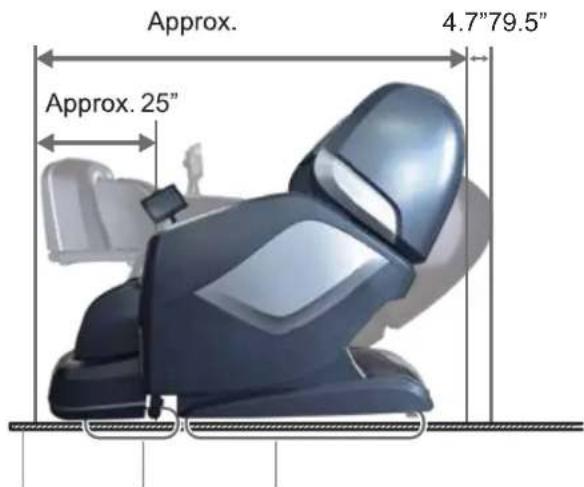
| Reclined | 79.5"x31.9"x46.9" | |
| Extension of Footrest Approx 7.1" | ||
| Dimensions of Packing (L*W*H) | BOX1: 57.9"x30.0"x40.2"BOX2: 41.8"x13.8"x29.2"BOX3: 22.9"x19.7"x20.9" | |
| N.W./ G.W. | BOX1: 163.0/191.8 lbsBOX2: 35.3/46.3 lbsBOX3: 46.3/52.9 lbs | |
| Weight of Chair | Approx 244.6 lbs | |
| Usage Condition | Environment temperature :32°F ~95°F | |
| Contrasting humidity :20-80RH | ||
| Storage Condition | Storage temperature :23°F ~95°F | |
| Storage humidity :20-80RH | ||
| Maximum body weight of user | 260 lbs | |
FCC Radiation Exposure Statement
FCC Radiation Exposure Statement: (mobile device)
This equipment complies with FCC radiation exposure limits set forth for an uncontrolled environment. In order to avoid the possibility of exceeding the FCC radio frequency exposure limits, Human proximity to the antenna shall not be less than 20cm (8 inches) during normal operation.
FCC STATEMENT
- This device complies with Part 15 of the FCC Rules. Operation is subject to the following two conditions:
(1) This device may not cause harmful interference, and
(2) This device must accept any interference received, including interference that may cause undesired operation. - Changes or modifications not expressly approved by the party responsible for compliance could void the user's authority to operate the equipment.
This equipment has been tested and found to comply with the limits for a Class B digital device, pursuant to part 15 of the FCC Rules. These limits are designed to provide reasonable protection against harmful interference in a residential installation. This equipment generates, uses and can radiate radio frequency energy and, if not installed and used in accordance with the instructions, may cause harmful interference to radio communications. However, there is no guarantee that interference will not occur in a particular installation. If this equipment does cause harmful interference to radio or television reception, which can be determined by turning the equipment off and on, the user is encouraged to try to correct the interference by one or more of the following measures:
—Reorient or relocate the receiving antenna.
—Increase the separation between the equipment and receiver.
—Connect the equipment into an outlet on a circuit different from that to which the receiver is connected.
--- Consult the dealer or an experienced radio/ TV technician for help.
Industry Canada Notice
This device complies with Industry Canada licence-exempt RSS standard(s).
- Operation is subject to the following two conditions:
(1) this device may not cause interference, and
(2) this device must accept any interference, including interference that may cause undesired operation of the device.
- Changes or modifications not expressly approved by the party responsible for compliance could void the user's authority to operate the equipment.