
NS-HBTSS116 - Loudspeaker INSIGNIA - Free user manual and instructions
Find the device manual for free NS-HBTSS116 INSIGNIA in PDF.


| Product Type | Portable Bluetooth Speaker |
| Model | NS-HBTSS116 |
| Brand | Insignia |
| Dimensions (W x H x D) | Approx. 6.5 x 2.5 x 2.5 inches |
| Weight | Approx. 0.5 lbs (225 g) |
| Power Source | Built-in rechargeable lithium-ion battery, USB charging (DC 5V) |
| Battery Life | Up to 6 hours at moderate volume |
| Charging Time | Approx. 2-3 hours |
| Wireless Range | Up to 33 ft (10 meters) via Bluetooth |
| Bluetooth Version | Bluetooth 4.2 |
| Speaker Type | Single full-range driver with passive radiator |
| Output Power | 3W RMS |
| Frequency Response | 100 Hz – 20 kHz |
| Main Functions | Bluetooth music streaming, hands-free calling, play/pause, volume control, track skip |
| Controls | Power, Play/Pause, Volume +/-, Bluetooth pairing button, built-in microphone |
| Care and Cleaning | Wipe with a dry soft cloth; do not use harsh chemicals or immerse in water |
| Safety Precautions | Do not expose to extreme temperatures, moisture, or direct sunlight. Keep away from children. Do not disassemble. |
| Certifications | FCC, CE, RoHS |
| Spare Parts and Repairability | No user-serviceable parts. Contact Insignia customer support for service or replacement. |
| Package Contents | Speaker, USB charging cable, quick start guide |
Frequently Asked Questions - NS-HBTSS116 INSIGNIA
User questions about NS-HBTSS116 INSIGNIA
0 question about this device. Answer the ones you know or ask your own.
Ask a new question about this device
Download the instructions for your Loudspeaker in PDF format for free! Find your manual NS-HBTSS116 - INSIGNIA and take your electronic device back in hand. On this page are published all the documents necessary for the use of your device. NS-HBTSS116 by INSIGNIA.
USER MANUAL NS-HBTSS116 INSIGNIA
- Speakers (2)
• 4.9 ft. (1.5 m) 3.5 mm audio cable
• 4.9 ft. (1.5 m) RCA cable - 6.6 ft. (2 m) speaker wire
- Remote control with batteries
- Quick Setup Guide
FEATURES
- Wirelessly stream from any Bluetooth device
• Volume, treble, and bass controls on the side panel
• NFC for easy Bluetooth pairing
• Highly efficient, energy saving design for low power consumption

FIND YOUR USER GUIDE ONLINE!
Go to www.insigniaproducts.com, then click
Support & Service.
Enter NS-HBTSS116 in the box under Monus
Firmware, Drivers & Product Information, then click ▶
Before using your new product, please read these instructions to prevent any damage.
OVERVIEW
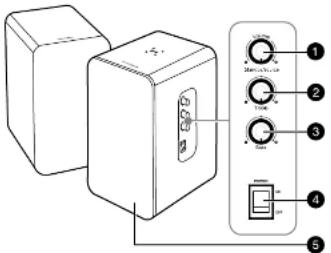
| # | ITEM | DESCRIPTION |
| 1 | Volume Standby/Source knob | Press repeatedly to cycle through the available modes (AUX [default], RCA, and Bluetooth).Hold down knob to put your speakers in standby mode or to resume the last mode that was played.Turn clockwise to increase the volume and turn counterclockwise to decrease the volume. |
| 2 | Turbic knob | Adjusts the treble level. |
| 3 | Bass knob | Adjusts the bass level. |
| 4 | On/Off switch | Turns the power on or off. |
| 5 | LTD Indicator | Indicates the mode [Standby, AUX, and RCA] and pairing status of the speakers. |
广力云智慧零售收银系统
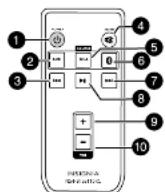
| # | ITEM | DESCRIPTION |
| 1 | POWER | Press to turn on/off standby mode. |
| 2 | AUX | Press to enter AUX mode. The green LED indicator light blinks slowly. |
| 3 | Previous ↔ | Press to select the previous song while in Bluetooth mode. |
| 4 | MUTE | Press to mute or unmute the sound. |
| 5 | RCA | Press to enter RCA mode. The green LED indicator lights solid. |
| 6 | Bluetooth button | Press to enter Bluetooth mode. The LED indicator blinks blue. |
| 7 | Next ➕ | Press to select the next song while in Bluetooth mode. |
| 8 | Play/Pause ➕ | Press to play/pause while in Bluetooth mode. |
| 9 | VOL 1 | Press to turn the volume up. |
| 10 | VOL - | Press to turn the volume down. |
Connect the power cable
Plug the power cable into a power outlet or surge protector.
Connect the speakers
Speakers are connected using the speaker wire that is provided. Connect the red wire to the red (+) terminals and the white wire to the black (-) terminals. Use enough wire to position the speakers where you want them.
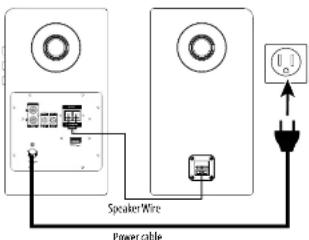
TURNING YOUR SPEAKER ON AND OFF
Toggle the ON/OFF switch on the side of your speaker to the ON position. The LED indicator blinks. Press the Volume Standby/source knob repeatedly to cycle through the available modes (AUX, RCA, and Bluetooth), or press the button on the remote control to select the mode you want.
| LED indicator | MODE |
| Blinks green | AUX mode |
| Solid green | RCA mode |
| Blinks blue | Bluetooth pairing mode |
| Solid blue | Bluetooth is paired |
| Solid red | Standby mode |
CONNECTING WITH BLUETOOTH
1 Make sure that your Bluetooth device is turned on and within 33 feet (10 meters) of your speaker.
2 Press the Volume Standby/source knob on the side of your speaker to cycle to Bluetooth mode or press the Bluetooth button on the remote control to enter Bluetooth mode. Your speaker enters pairing mode and the LED indicator blinks blue.
3 Turn on your Bluetooth device and turn on Bluetooth. Set your device to pairing mode, then select NS-HBTSS116. See the instructions that came with your Bluetooth device for information about pairing.
4 If you are asked for a password, enter 0000. When pairing is complete, the LED indicator lights solid blue.
5 To disconnect from the paired Bluetooth device, press and hold Ⓐ (Bluetooth button) on your remote control for three seconds. Your speaker disconnects from the Bluetooth device and enters pairing mode again.
RECONNECTING TO A PAIRED DEVICE
When your speaker is not paired to a device, the LED blinks blue slowly.
| Your speaker loses the Bluetooth connection if you... | To reconnect... |
| Turn off your speaker or put in standby/AUX/RCA mode | Turn on your speaker and cycle to Bluetooth mode. Your speaker searches for the last connected Bluetooth device and connects. |
| Move the Bluetooth device out of range. | Make sure that your Bluetooth device is within 33 feet of your speaker. |
| Turn off your Bluetooth device. | Turn on your Bluetooth device, then make sure that Bluetooth is turned on. |
| Turn off Bluetooth on your Bluetooth device. | Turn on Bluetooth on your Bluetooth device. |
| Connect your Bluetooth device to another Bluetooth device. | Disconnect your Bluetooth device from the other Bluetooth device, then set your device to pairing mode. Select NS-HBTSS116 on your Bluetooth device. |
PAIRING A BLUETOOTH DEVICE
SUPPORTING NFC
If your Bluetooth device supports Near Field
Communication (NFC), make sure that the NFC feature is active. Touch the NFC area of your Bluetooth device to the top of your NS-HBTSS116 speaker to automatically pair.
Note: If your phone has NFC support but it is running an OS below Android 4.1, you need to download an NFC Bluetooth app from Google Play or a similar online store.
LISTENING TO MUSIC
1 Make sure that the speaker is paired with your Bluetooth device (the LED indicator is solid blue).
2 Begin playback on your Bluetooth device.
3 Adjust the volume on your speaker by rotating the Volume Standby/source knob, or pressing the + or - buttons on your remote control or your Bluetooth device.
Note: Use the controls on your Bluetooth device or on the remote control to control playback.
USING AN RCA OR AUX CABLE
1 Insert one end of an audio cable (RCA or AUX cable) into the input port(s) on the back of your speaker and the other end into the output port(s) of your sound source device (such as a PC, DVD, TV, or MP3 player).
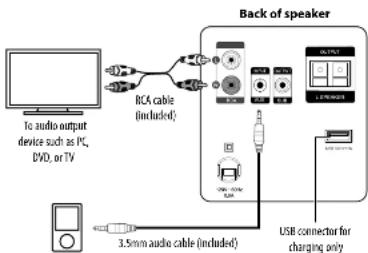
flowchart
graph TD
    A["To audio output device such as PC, DVD, or TV"] --> B["RCA cable (included)"]
    B --> C["Back of speaker"]
    C --> D["USB connector for charging only"]
    D --> E["3.5mm audio cable (included)"]
    E --> F["USB connector to switch"]
    F --> G["1.28W/20Hz"]
    G --> H["Switch"]
    H --> I["Output"]
To audio output device such as a CD, MP3, or digital music player
2 Press the Volume Standby/source knob or press the AUX button on the remote control to enter AUX mode. The LED indicator blinks green.
OR
Press the Volume Standby/source knob or press the RCA button on the remote control to enter RCA mode. The LED Indicator lights solid green.
3 Start playback on the sound source device.
4 Turn the Volume Standby/source knob or press + and - on your remote control to adjust the volume.
5 Control playback using the controls on the sound source device. Note: The USB connector is for charging only, not for audio input.
TROUBLESHOOTING
No power
- Make sure that your speaker is plugged in. - Make sure that your speaker is turned on.
No sound or low volume
- If your sound source is a Bluetooth device, make sure that your Bluetooth device is turned on, Bluetooth is turned on, and NS-HBTSS116 is selected.
• Turn up the volume on your speaker.
- Turn up the volume on your sound source device.
- Make sure that your sound source device volume is not turned to 0 or speaker is not muted.
- Make sure that your speaker is not paired to another Bluetooth device.
- Make sure that your Bluetooth device is not paired to another Bluetooth device.
Cannot establish Bluetooth connection
- Shorten the distance between your speaker and your Bluetooth device.
- Turn your devices off, then on. Re-pair your speaker and your Bluetooth device.
- Make sure that your speaker is not paired to another Bluetooth device.
- Make sure that your speaker and Bluetooth device are both in pairing mode.
- Make sure that your Bluetooth device is not connected to any other device.
- Make sure that you have selected NS-HBTSS116 on your Bluetooth device.
My Bluetooth device keeps unpairing
- Shorten the distance between your speaker and your Bluetooth device.
- If the battery on your Bluetooth device is low, recharge the battery.
"NS-HBTSS116" does not appear on my Bluetooth device
- Shorten the distance between your speaker and your Bluetooth device.
- Put your speaker into pairing mode, then refresh your list of Bluetooth devices. For more information, see the documentation that came with your Bluetooth device.
IMPORTANT SAFETY INSTRUCTIONS
-
Read these instructions – All the safety and operating instructions should be read before this product is operated.
-
Keep these instructions - The safety and operating instructions should be retained for future reference.
-
Need all warnings - All warnings on the appliance and in the operating instructions should be adhered to.
-
Follow all instructions – All operating and use instructions should be followed.
-
Do not use this apparatus near water – The appliance should not be used near water or moisture – for example, in a wet basement or near a swimming pool, and the like.
-
Clean only with dry cloth.
-
Do not block any ventilation openings. Install in accordance with the manufacture's instructions.
-
Do not install near any heat sources such as radiators, heat registers, stoves, or other apparatus (including amplifiers) that produce heat.
-
Do not defeat the safety purpose of the polarized or grounding plug. A polarized plug has two blades with one wider than the other. A grounding plug has two blades and a third grounding prong. The wide blade or the third prong is provided for your safety. If the provided plug does not fit into your outlet, consult an electrician for replacement of the obsolete outlet.
-
Protect the power cord from being walked on or pinched particularly at the plugs, convenience receptacles, and at the point where they exit from the apparatus.
-
Only use attachments/accessories specified by the manufacturer.
-
Use along with the cart, stand, tripod, bracket, or table specified by
the manufacturer, or sold with the apparatus. When a cart or rack is used, use caution when moving the cart/apparatus combination to avoid injury from tip-over.
-
Unplug the apparatus during lightning storms or when unused for long periods of time.
-
Refer all servicing to qualified personnel. Servicing is required when the apparatus has been damaged in any way, such as power supply cord or plug is damaged, liquid has been spilled or objects have fallen into the apparatus has been exposed to rain or moisture, does not operate normally, or has been dropped.
- Never expose the product to fire as this could result in personal injury
- Do not store the product in an extremely cold or warm environment. - Never dismantle the product.
- Never let children play with the product
- Do not expose the product to dampness or moisture.
• The product should not be exposed to dripping or splashing.
-
Do not install this equipment in a confined or building-in space such as a book case or similar unit, and remain a well ventilation conditions. The ventilation should not be impeded by covering the ventilation openings with items such as newspaper, table cloths, curtains etc.
-
WARNING: To reduce the risk of fire or electric shock, do not expose this apparatus to rain or moisture. The apparatus shall not be exposed to dripping or splashing and that objects filled with liquids, such as vases, shall not be placed on apparatus.
-
WARNING: The mains plug is used as disconnect device, the disconnect device shall remain readily operable.
-
This equipment is a Class II or double insulated electrical appliance. It has been designed in such a way that it does not require a safety
connection to electrical earth
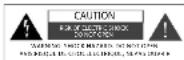
- This lightning flash with arrowhead symbol within an equilateral triangle is intended to alert the user to the presence of non-insulated "dangerous voltage" within the product's enclosure that may be of sufficient magnitude to constitute a risk of electric shock.
- Warning: To reduce the risk of electric shock, do not remove cover (or back) as there are no user-serviceable parts inside. Refer servicing to qualified personnel.
- The exclamation point within an equilateral triangle is intended to alert the use to the presence of important operating and maintenance instructions in the literature accompanying the appliance.
-
The equipment shall be used at maximum 95 °F (35 °C) ambient temperature.
-
The battery (battery or batteries of battery pack) shall not be exposed to excessive heat such as sunshine, fire or the like.

DO NOT INGEST BATTERY, CHEMICAL BURN HAZARD
[The remote control supplied with] This product contains a coin/button cell battery. If the coin/button cell battery is swallowed, it can cause severe internal hums in just two hours and can lead to death.
Keep new and used batteries away from children. If the battery compartment does not close securely, stop using the product and keep it away from children.
If you think batteries might have been swallowed or placed inside any part of the body, seek immediate medical attention.
LEGAL NOTICES
This device complies with Part 15 of the FCC Rules. Operation is subject to the following two conditions: (1) this device may not cause harmful interference, and (2) this device must accept any interference received, including interference that may cause undesired operation.
FCC Caution:
Changes or modifications not expressly approved by the party responsible for compliance could void the user's authority to operate the equipment.
FCC Statement:
This equipment has been tested and found to comply with the limits for a Class B digital device, pursuant to part 15 of the FCC Rules. These limits are designed to provide reasonable protection against harmful interference in a residential installation. This equipment generates, uses, and can radiate radio frequency energy and, if not installed and used in accordance with the instructions, may cause harmful interference to radio communications. However, there is no guarantee that interference will not occur in a particular installation. If this equipment does cause harmful interference to radio or television reception, which can be determined by turning the equipment off and on, the user is encouraged to try to correct the interference by one or more of the following measures:
• Reorient or relocate the receiving antenna.
• Increase the separation between the equipment and receiver.
- Connect the equipment into an outlet on a circuit different from that to which the receiver is connected.
- Consult the dealer or an experienced radio/TV technician for help.
RSS-102 Statement:
This equipment complies with IC RSS-102 RF exposure limits set forth for an uncontrolled environment. This equipment should be installed and operated with a minimum distance of 20 cm between the radiator and your body.
Industry Canada Compliance
IC Statement
This device complies with Industry Canada's licence-exempt RSSs. Operation is subject to the following two conditions:
(1) This device may not cause interference; and
(2) This device must accept any interference, including interference that may cause undesired operation of the device.
RF Exposure Statement
To maintain compliance with the FCC's RF Exposure guidelines. This equipment should be installed and operated with a minimum distance of 20 cm between the radiator and your body. Use only the supplied antenna.
ONE-YEAR LIMITED WARRANTY
Visit www.insigniaproducts.com for details.
CONTACT INSIGNIA:
For customer service, call 1-877-467-4289 (U.S. and Canada) or 01-800-926-3000 (Mexico)
www.insigniaproducts.com
BOKANA is a trademark of Beetlay and its affiliated companies
7601 Pam Ace South, Dshfeld, MN 55423 U.S.A. n7601 first day. All rights reserved.
VS ENGLISH 21-0353
- FEATURES
- CONNECTING WITH BLUETOOTH
- RECONNECTING TO A PAIRED DEVICE
- PAIRING A BLUETOOTH DEVICE
- LISTENING TO MUSIC
- USING AN RCA OR AUX CABLE
- TROUBLESHOOTING
- No power
- Cannot establish Bluetooth connection
- My Bluetooth device keeps unpairing
- "NS-HBTSS116" does not appear on my Bluetooth device
- IMPORTANT SAFETY INSTRUCTIONS
- DO NOT INGEST BATTERY, CHEMICAL BURN HAZARD
- LEGAL NOTICES
- FCC Caution:
- RSS-102 Statement:
- Industry Canada Compliance
- IC Statement
- RF Exposure Statement
- ONE-YEAR LIMITED WARRANTY
- CONTACT INSIGNIA:
Brand : INSIGNIA
Model : NS-HBTSS116
Category : Loudspeaker