Roll 61 - Keyboard DNA - Free user manual and instructions
Find the device manual for free Roll 61 DNA in PDF.


| Product type | Keyboard |
| Brand | DNA |
| Model | Roll 61 |
| Number of keys | 61 |
| Layout | Compact |
| Connectivity | USB wired |
| Dimensions (W x D x H) | 29.5 x 11.5 x 3 cm |
| Weight | 480 g |
| Power source | USB bus power |
| Backlight | No |
| Switch type | Membrane |
| Compatible operating systems | Windows, macOS, Linux |
| Multimedia keys | Fn combination |
| Material | Plastic |
| Cable length | 1.5 m |
| Cleaning instructions | Wipe with a soft, damp cloth; do not use solvents |
| Safety precautions | Avoid liquid spills; unplug before cleaning |
| Repairability | Not user-serviceable; consult professional |
| Spare parts availability | Contact manufacturer |
Frequently Asked Questions - Roll 61 DNA
User questions about Roll 61 DNA
0 question about this device. Answer the ones you know or ask your own.
Ask a new question about this device
Download the instructions for your Keyboard in PDF format for free! Find your manual Roll 61 - DNA and take your electronic device back in hand. On this page are published all the documents necessary for the use of your device. Roll 61 by DNA.
USER MANUAL Roll 61 DNA
natural_image
Black and white Hand Roll Piano with coiled keyboard and control panel (no visible text or symbols)USER MANUAL
INSTRUKCJA OBSŁUGI
ENGLISH
This Instruction Manual provides a detailed overview of the Electronic Roll-Up Keyboard, its functions, features, as well as safe operation. Using this product for any purpose outside the scope of this instruction manual may void the product warranty.
Read all directions carefully and keep this manual as reference.
Safety Precautions
When finished using the keyboard, be sure to disconnect the USB power cable and turn off the power with the Power button on the front of the unit.
Do not shift the keyboard or place it on an uneven surface during use for optimal experience.
Prevent the keyboard from coming in contact with any sharp objects. Any rips or tears may cause the product to malfunction or cause permanent damage.
When storing, roll the keyboard up gently. Excessive or forcible bending of the keys may damage the product and void the warranty.
Do not pull or twist the connection area between the keys and the control box to prevent damage.
Avoid exposing the product to strong electromagnetic waves.
Do not disassemble, attempt to disassemble or modify the product in any way, as this may void the warranty.
Handle with care and avoid any drops or impacts.
Avoid exposing the product to environments with excessive moisture, humidity, or dust/dirt.
PRODUCT OVERVIEW
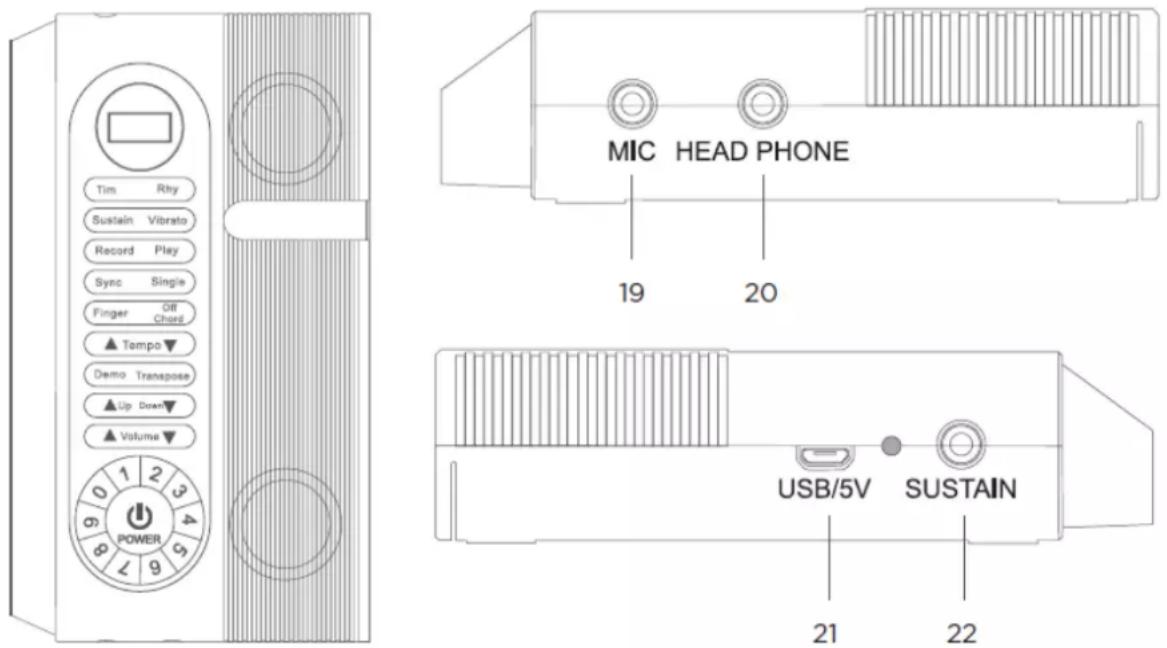
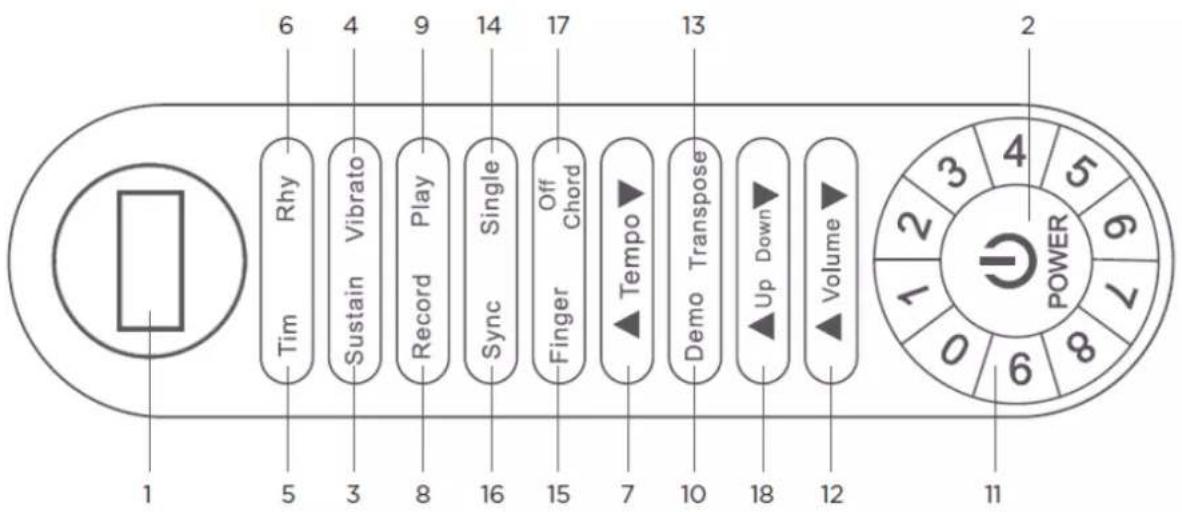
| Number | Label | Functions | |
| 1 | LED Display | Displays current setting | |
| 2 | Power | Power button | |
| 3 | Sustain | Press this button to turn the Sustain ON or OFF (to simulate foot pedal sustained notes) | |
| 4 | Vibrato | Press this button to turn the Vibrato ON or OFF | |
| 5 | Tim | Press this button and the Up or Down buttons to cycle through the different tones. Or, press the TIM button and choose a tone using the Number buttons located around the Power button. Find a list of the tones available using the Tone Directory in this manual | |
| 6 | Rhy | Press this button and the Up or Down buttons to cycle through the different rhythms. Or, press the RHY button and choose a tone using the Number buttons located around the Power button. Find a list of the rhythms available using the Rhythm Directory in this manual. | |
| 7 | Tempo | Adjusts the tempo of rhythm and demo songs by using the Tempo up or down arrow buttons. | |
| 8 | Record | Press this button to record (“REC” will be displayed when recording. “FUL” will be displayed when recording memory is full) | |
| 9 | Play | Press this button to playback recording | |
| 10 | Demo | Press this button to play demo songs. Cycle through the different demo songs by using the Up or Down buttons. Press the Demo button again to stop demo song from playing | |
| 11 | Number | Press Number buttons to select a specific tone or rhythm. Check the Tone and Rhythm Directory to find the number | |
| associated with an individual tone or rhythm. | |||
| 12 | Volume | Adjusts the volume up or down. | |
| 13 | Transpose | Press the Transpose button and then the Up or Down buttons and play a key. The note you play will either be increased or decreased by one interval every time an Up or Down button is pressed. | |
| 14 | Single | Model S3088 | When a rhythm is playing, press the Single button and a single key, from A0 to F #3, to play chord rhythm accompaniment . (A0 - F #3) spans 34 keys, including black keys. Starting at the left of the keyboard and counting up, Single chord accompaniment can be activated using keys 1 - 34. |
| Model S3061 | When a rhythm is playing, press the Single button and a single key, from k1 to K19, to play chord rhythm accompaniment . (K1 - K19) spans 19 keys, including black keys. Starting at the left of the keyboard and counting up, Single chord accompaniment can be activated using keys 1 - 19. | ||
| 15 | Finger | Model S3088 | When a Rhythm is playing, press this button; then press three keys from C1 to A2 to activate Chord Rhythm accompaniment. (C1 - A2) spans 22 keys, including black keys. Starting at the left of the keyboard and counting up, Fingered Chord accompaniment can be activated using keys 4 - 25. |
| 15 | Finger | Model S3061 | When a Rhythm is playing, press this button; then press three keys from K1-19 to activate Chord Rhythm accompaniment. (K1 - K19) spans 19 keys, including black keys. Starting at the left of the keyboard and counting up, Fingered Chord accompaniment can be activated using keys 1-19. |
| 16 | Sync | Press this button to activate automatic rhythm accompaniment. Use the Up and Down buttons to change rhythm. | |
| 17 | Off Chord | Press this button to stop Single/Finger Chord function. | |
| 18 | Up and Down | Press this button to select Tone, Rhythm and Demo song. | |
| 19 | MIC | The connection port for a microphone | |
| 20 | Headphone | The connection port for external speaker or headphone | |
| 21 | USB/DC 5V | Power supply connection | |
| 22 | Power Indicator | LED light on diagram above will turn on (red) during charging and turn off when fully charged | |
Using the Roll-Up Piano
To charge, connect the USB power cable to the input on the keyboard and plug the other end directly into a computer or an outlet using a USB wall adapter (not included).
To record songs played on the keyboard, recording software is needed. To use the keyboard to record songs on a computer, plug the USB power cable into a USB port on a computer.
Press the Power button until the keyboard turns on. Once it is on, you can connect headphones, external speakers or use the Volume buttons to adjust the built-in speakers.
To play along to a demo song, press the Demo button and cycle through the different options.
Press the Demo button again to stop the song
To play along with a rhythm, press the Rhy button to cycle through the different rhythms listed in the Piano Rhythm Directory. Press the Rhy button again to stop the rhythm.
To record yourself playing, press the Record button. Press the Play button to playback the recording.
To change the tone of the keyboard, press the Tim button to cycle through the different options listed in the Keyboard Tone Directory.
Troubleshooting
When the battery level is low, the keyboard may not work properly. To correct this, charge the battery or connect to a power source.
If the keyboard is not working properly, turn it off by using the Power button, disconnect it from the power supply (if plugged in), and wait approximately 5-10 seconds before reconnecting it to a power supply and turn the keyboard back on. This will restore the default settings.
If the keyboard begins emitting a buzzing noise, make sure there are no other electronic devices nearby that could be causing interference. Check that the keyboard is on a smooth, level surface.
Sound quality issues may occur when used in a room that experiences a dramatic change in temperature or a fluctuation in humidity levels. If this happens, make sure the keyboard is on a level surface and try the functions again. If the issue still persists, relocate to another room with more stable environmental conditions.
Care & Maintenance
Wipe the keyboard down with a soft, dry cloth to clean. Do not submerge in water or use detergents.
After use, store in a cool, dry place.
Avoid exposure to high temperatures, moisture, or high levels of humidity.
Specifications
Power: DC 5V
Speakers: Built-in high quality speaker system
Battery: Built-in Lithium-Ion
Battery capacity: 2000mAh
Tone: 128 options
Demo Songs: 15 options
Rhythm: 128 options
Piano Tone Directory
| NO | Tone | NO | Tone | NO | Tone |
| 000 | Acoustic Grand piano | 001 | Bright Acoustic Piano | 002 | Electric Grand Piano |
| 003 | Honky-tonk Piano | 004 | Rhodes Piano | 005 | Chorused Piano |
| 006 | Harpsichord | 007 | Clavichord | 008 | Celesta |
| 009 | Glockenspiel | 010 | Music box | 011 | Vibraphone |
| 012 | Marimba | 013 | Xylophone | 014 | Tubular Bells |
| 015 | Santur | 016 | Hammond Organ | 017 | Percussive Organ |
| 018 | Rock Organ | 019 | Church Organ | 020 | Reed Organ |
| 021 | Accordion | 022 | Harmonica | 023 | Tango Accordion |
| 024 | Acoustic Guitar (nylon) | 025 | Acoustic Guitar (steel) | 026 | Electric Guitar (jazz) |
| 027 | Electric Guitar (clean) | 028 | Electric Guitar (muted) | 029 | Overdriven Guitar |
| 030 | Distortion Guitar | 031 | Guitar Harmonics | 032 | Acoustic Bass |
| 033 | Electric Bass (finger) | 034 | Electric Bass (pick) | 035 | Fretless Bass |
| 036 | Slap Bass 1 | 037 | Slap Bass 2 | 038 | Synth Bass 1 |
| 039 | Synth Bass 2 | 040 | Violin | 041 | Viola |
| 042 | Cello | 043 | Contrabass | 044 | Tremolo Strings |
| 045 | Pizzicato Strings | 046 | Orchestral | 047 | Timpani |
| 048 | String Ensemble 1 | 049 | String Ensemble 2 | 050 | Synth Strings 1 |
| 051 | Synth Strings 2 | 052 | Choir Aahs | 053 | Voice Oohs |
| 054 | Synth Voice | 055 | Orchestra Hit | 056 | Trumpet |
| NO | Tone | NO | Tone | NO | Tone |
| 057 | Trombone | 058 | Tuba | 059 | Muted Trumpet |
| 060 | French Horn | 061 | Brass Section | 062 | Synth Brass 1 |
| 063 | Synth Brass 2 | 064 | Soprano Sax | 065 | Alto Sax |
| 066 | Tenor Sax | 067 | Baritone Sax | 068 | Oboe |
| 069 | English Horn | 070 | Bassoon | 071 | Clarinet |
| 072 | Piccolo | 073 | Flute | 074 | Recorder |
| 075 | Pan Flute | 076 | Bottle Blow | 077 | Shakuhachi |
| 078 | Whistle | 079 | Ocarina | 080 | Lead 1 (square) |
| 081 | Lead 2 (sawtooth) | 082 | Lead 3 (caliope lead) | 083 | Lead 4 (chiff lead) |
| 084 | Lead 5 (charang) | 085 | Lead 6 (voice) | 086 | Lead 7 (fifths) |
| 087 | Lead 8 (bass + lead) | 088 | Pad 1 (new age) | 089 | Pad 2 (warm) |
| 090 | Pad 3 (polysynth) | 091 | Pad 4 (choir) | 092 | Pad 5 (bowed) |
| 093 | Pad 6 (metallic) | 094 | Pad 7 (halo) | 095 | Pad 8 (sweep) |
| 096 | FX 1 (rain) | 097 | FX 2 (soundtrack) | 098 | FX 3 (crystal) |
| 099 | FX 4 (atmosphere) | 100 | FX 5 (brightness) | 101 | FX 6 (goblins) |
| 102 | FX 7 (echoes) | 103 | FX 8 (sci-fi) | 104 | Sitar |
| 105 | Banjo | 106 | Shamisen | 107 | Koto |
| 108 | Kalimba | 109 | Bagpipe | 110 | Fiddle |
| 111 | Shanai | 112 | Tinkle Bell | 113 | Swing Dance Bell |
| 114 | Steel Drums | 115 | Woodblock | 116 | Taiko Drum |
| 117 | Melodic Tom | 118 | Synth Drum | 119 | Reverse Cymbal |
| 120 | Guitar Fret Noise | 121 | Breath Noise | 122 | Seashore |
| 123 | Bird Tweet | 124 | Telephone Ring | 125 | Helicopter |
| 126 | Applause | 127 | Gunshot |
Keyboard Rhythm Directory
| NO | Rhythm | NO | Rhythm | NO | Rhythm |
| 000 | Beguineswing | 001 | Beguin1 | 002 | Beguine2 |
| 003 | Pophit | 004 | Pop | 005 | Popmalay |
| 006 | Bossanova | 007 | Disco1 | 008 | Disco2 |
| 009 | Bluegrassdisco | 010 | Waltzl1 | 011 | Waltzl2 |
| 012 | Trueballadwaltz | 013 | Bossawaltz | 014 | Easywaltz |
| 015 | Shufflewaltz | 016 | Reggaewaltz | 017 | Rhumbawaltz |
| 018 | March1 | 019 | March2 | 020 | Rhumba1 |
| 021 | Rhumba2 | 022 | Slow1 | 023 | Slow2 |
| 024 | Discocha | 025 | Guaracha | 026 | Charl |
| 027 | Samba1 | 028 | Samba2 | 029 | Ubminimal |
| 030 | 18Bit | 031 | 28Bit | 032 | 16Bit1 |
| 033 | 16Bit2 | 034 | Ballad16T | 035 | Country16T |
| 036 | Tango1 | 037 | Tango2 | 038 | Polka1 |
| 039 | Polka2 | 040 | Popswing | 041 | Easyswing |
| 042 | Softswing | 043 | Rock1 | 044 | Rock2 |
| 045 | Rock3 | 046 | Airyrock | 047 | Heartrock |
| 048 | Rock&roll | 049 | Urban | 050 | Ballad |
| 051 | Jazzballad | 052 | C.ballad | 053 | J.ballad |
| 054 | 60Slowballad | 055 | PianoBallad | 056 | 50Sballad |
| 057 | Snakebase | 058 | Happyblues | 059 | Oldblues |
| 060 | Bluegras | 061 | Boodie1 | 062 | Boodie2 |
| 063 | Boodie3 | 064 | Shuffle1 | 065 | Shuffle2 |
| 066 | Dreamshuffle | 067 | Countryshuffle | 068 | Quickshuffle |
| 069 | Reggaeshuffle | 070 | R&B | 071 | Reggae |
| 072 | Reggae | 073 | Reggae | 074 | Salsa1 |
| 075 | Salsa2 | 076 | Salsa3 | 077 | Tecno1 |
| 078 | Tecno2 | 079 | Funky1 | 080 | Funky2 |
| 081 | Dixie1 | 082 | Dixie2 | 083 | Foxtrot1 |
| 084 | Foxtrot2 | 085 | R.roll1 | 086 | R.roll 2 |
| 087 | Fastbeat | 088 | Quickbeat | 089 | Smoothbeat |
| 090 | Squarebeat | 091 | Eurobeat | 092 | Alphadance |
| 093 | Betadance | 094 | Dreamdance | 095 | Dance1 |
| 096 | Dance2 | 097 | Dance3 | 098 | Rap |
| 099 | Thevillage | 100 | Countryshuffle | 101 | Electrickeys |
| 102 | Darkkeys | 103 | Easywalk | 104 | Destiny |
| 105 | Comedy | 106 | Drive | 107 | Liquidnova |
| 108 | Klindustrialfolk | 109 | Slowpure | 110 | SimpleJam |
| 111 | Synthethix | 112 | Feel | 113 | Accelerate |
| 114 | Beachnight | 115 | Irish | 116 | Tarantella |
| 117 | Bigband | 118 | Dandut | 119 | Fusion |
| 120 | Horse | 121 | Keron | 122 | Latin |
| 123 | Mambo | 124 | Newage | 125 | Slowrc |
| 126 | Soul | 127 | Twist |
Demo Songs Directory
| NO | Name | NO | Name |
| 1 | Beer barrel polka | 2 | Spanish bullfighter |
| 3 | Rain in the rhythm | 4 | Winter Sonata |
| 5 | Annie's song | 6 | Go home |
| 7 | Choi Wan chase the moon | 8 | Rafsky march |
| 9 | Haruno | 10 | Dream wedding |
| 11 | A bit of a dream | 12 | Secret garden |
| 13 | Green sleeves | 14 | Nutcracker dance |
| 15 | the blue Danube |
WARNING! THE DEVICE MUST NOT BE DISPOSED OF WITH HOUSEHOLD WASTE.

This symbol indicates that this product must not be disposed of with household waste, according to the EU and your national law. In order to prevent potential damage to the environment or health, the used product must be recycled. In accordance with current legislation, unusable electrical and electronic devices must be collected separately at the designated facilities for recycling, acting on the basis of applicable environmental standards.
Information about used electrical and electronic equipment
The main goal of European and national law regulations is to reduce the amount of waste produced from used electrical and electronic equipment, to ensure an appropriate level of collection, recovery and recycling of used equipment, and to increase public awareness of its harmfulness to the environment, at each stage of use of electrical and electronic equipment. Therefore, it should be pointed out that households play a key role in contributing to reuse and recovery, including recycling of used equipment. The user of electrical and electronic equipment – intended for households – is obliged to return it to authorized collector after its use. However, it should be remembered that products classified as electrical or electronic equipment should be disposed of at authorized collection points.

Brand : DNA
Model : Roll 61
Category : Keyboard