
PHUD19 - Car accessory Pyle - Free user manual and instructions
Find the device manual for free PHUD19 Pyle in PDF.


| Product Type | Car Stereo Receiver with Digital Display |
| Model | Pyle PHUD19 |
| Dimensions | Approx. 7 x 2.5 x 6.5 inches (Standard 1-DIN) |
| Weight | 1.5 lbs |
| Power Supply | 12V DC, compatible with most vehicles |
| Max Power Output | 4 x 50 Watts (200W peak) |
| Display Type | Digital LCD with multi-color illumination |
| Supported Media | AM/FM radio, USB, SD card, AUX input |
| Wireless Connectivity | Bluetooth for hands-free calling and audio streaming |
| Audio Formats | MP3, WMA, WAV (USB/SD) |
| Equalizer Settings | Preset EQ modes and custom bass/treble control |
| Remote Control | Included wireless remote |
| Front Panel | Removable for theft prevention |
| Installation | Standard DIN slot, includes mounting kit |
| Inputs | AUX 3.5mm, USB, SD card slot, RCA preamp outputs |
| Safety Features | Overcurrent protection, reverse polarity protection |
| Maintenance & Cleaning | Wipe with soft dry cloth; avoid liquids and solvents |
| Spare Parts & Repairability | Fuses and mounting accessories available; contact Pyle support |
| Certifications | CE, FCC compliant |
Frequently Asked Questions - PHUD19 Pyle
User questions about PHUD19 Pyle
0 question about this device. Answer the ones you know or ask your own.
Ask a new question about this device
Download the instructions for your Car accessory in PDF format for free! Find your manual PHUD19 - Pyle and take your electronic device back in hand. On this page are published all the documents necessary for the use of your device. PHUD19 by Pyle.
USER MANUAL PHUD19 Pyle

natural_image
Five black-and-white symbols: five stars, one starburst, two clover, one plus sign, and one heart (no text or labels)
Vehicle Speed & GPS Compass HUD Monitor System
TO ENSURE YOUR UNIT IS SET UP AND FUNCTIONING PROPERLY IT IS CRUCIAL YOU READ AND FOLLOW THIS USER MANUAL'S SET UP PROCEDURES.
Introduction
The unit is designed to display the driving information offering a safer driving experience day to day as well as more importantly at high speeds and during night driving. As it removes the need for the driver to dip their head to view the instrument cluster. Installing this unit correctly will enable you to more effectively monitor your speed, this is helpful for novice drivers as well as experienced drivers in potentially avoiding speeding infringements.
Installation
Put the unit near infront of the dashboard, then connect the USB car charger to car cigarette lighter. Start the engine, the unit will power ON and search the satellite number, the unit will work after few seconds.
Main Functions and Features
- Compatible with all vehicle, easy installation, plug and play
- TFT LCD multi color smart display
- The language can be changed (Chinese or English)
- Multi function display or simple function display can be switched freely
- New Functions: Accelerating competitive mode. Brake performance test
- Rich Contents: Driving speed, voltage, single driving distance, driving direction, altitude, satellite numbers, system local time, driving trip time, over speed alarm, switch freely between kilometers and miles.
Key Functions

- Setting Button: Push left/right, short press/press and hold IN
- Light Sensor
- USB Interface
Setting Button Functions

- Short Press IN: (1) Switch for display mode (2) confirm the menu after entering the menu
- Push Left: (1) Switch for left area functions (2) change the function setting after entering the menu
- Push Right: (1) Switch for right area functions (2) change the function setting after entering the menu
- Long Press IN: After entering the menu and finish the setting, press and hold for 5 seconds to save and exit.
Push Left/Right to switch function
Below are function abbreviations
GPS- The available satellites
VLT-Voltage
DIR- Driving Direction
Sys- Local System Time
TIM- Trip Time
DIS- Single Driving distance
ASL- Altitude
Performance Testing
- Speedup Test
Shows the speed, distance, driving 400m takes time, driving 0-100km takes time
- Brake Test
Brake when the speed is over 60km/h, it will show brake distance and time
Setting Mode
Press and hold IN to enter into the setting mode, push right to choose the menu, and short press IN to confirm. Once setting is done, press and hold to exit.
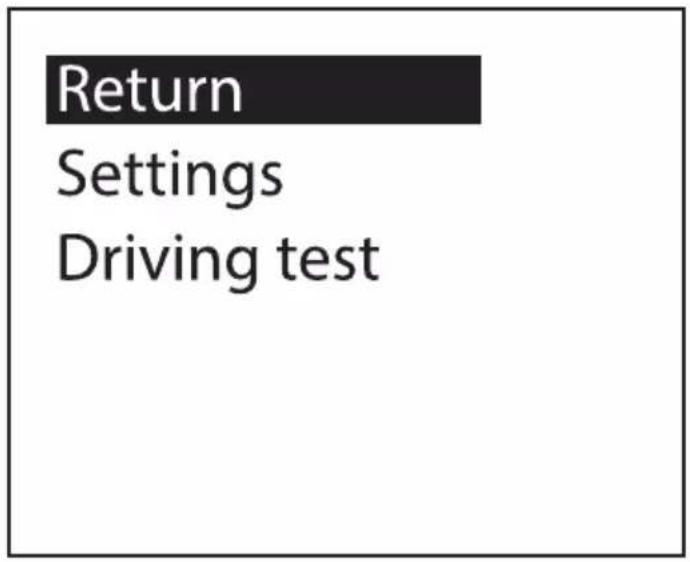


flowchart
graph TD
    A["Driving test"] --> B["Return Speed Up Test Break Test"]
Setting Functions
- Language Set: Please choose your familiar language (EN-English, CN-Simplified Chinese, TW-Traditional Chinese)
- Sound Switch: Turn ON/OFF the buzzer
- Speed Alarm: Default value is 150 (the default value can be changed, push left to decrease, push right to increase)
- BAT Alarm: Default setting is OFF, turn right the setting button to open the BAT Alarm and set the default alarm value.
- Speed Adjust: Adjust the speed according to the dashboard, default value is 107%
- Speed Offset: When the vehicle turns OFF, but the device speed is not 0, then adjust the device Speed Offset value, If the device speed shows 5MPH, then change the device Speed Offset default value at 5
- BAT Adjust: If the battery voltage is different with the vehicle, it can be adjusted.
- Change Color 1: Default color is white (top speed part in default interface)
- Change Color 2: Default color is red (left part in default interface)
- Change Color 3: Default color is green (right part in default interface)
- Brightness: Default is Auto, means Auto brightness adjustment.
• 1-Darkest
• 2 to 8, the brightness will increase
- 8 is the most bright.
- Speed Unit: Default is Mile, can be change to KM
- Power OFF Time: Default power off time is 180s, for Auto start and stop cars, please make the power off time to 180-240s
- Sleep Voltage: Default is OFF, if the device can't auto shut off, please adjust the voltage at 13.2V or higher
- Time Adjust: When the device searched the satellite successfully, adjust the device time as your local time and exit.
- Factory Set: Short press IN to reset in factory settings
Technical Parameters:
Environment Temperature: -40c- + 80c
Atmospheric Pressure: 86-106KPa
Relative Humidity: 10% -95%
Environmental Noise: ≤60dB (a)
(A) Alarm Sound Level: ≥30dB (A)
Working Voltage: 9V \~ 16Vdc (12Vdc / 400mA)
Product Size: 73*68*46(cm)
Product Weight: 50g
Troubleshooting
1. No Power and Display on Screen
Start the car engine; check if the cable line is tight; or connect the USB to the computer to check
2. Inaccurate Time
When the device searched the satellite successfully (The default is New York time), set it to your local time then save and exit.
3. Inaccurate Speed
When the product is powered ON, press and hold IN button to enter into menu option, and right push once switched to setting, then short press in the button to the menu, and right push the button switch to the speed adjust option.
(If the dashboard shows 100, and the device shows the 101, change the default value at 106%)
4. Over Speed Alarm
Default alarm is 150MPH, please refer to setting to change the value.
5. The Device cannot Auto Power OFF
After vehicle turns off, the device still displays the speed, switch the setting to Speed Offset and adjust the value same as the device speed. (If the device shows 5mph after the vehicle turns off, then change the speed offset at 5mph)
6. Wrong Operation Leads to Crash
Reset to factory setting.
PHUD19
Portable Car Heads-Up Display
Vehicle Speed & GPS Compass HUD Monitor System
Features:
- Heads-Up Display System with Vehicle Readout
• 2.6"-inch Digital Multi-Color Smart Display - Mounts onto Dashboard for Driving Info Projection
- Convenient Vehicle Data: Displays Speed & GPS Compass
- New! Speed-Up and Brake Test Feature
- Dual Core Processor Chip for Real-Time Data
- Clear Readout Visibility in Day or Night Time Driving
- Integrated Light Sensors for Automatic Image Balance
• Automatic Sync, Power ON/OFF with Engine Ignition
• *Universal Compatibility for Automobile, Car, Truck, Vehicle - Easy Set-Up: Plug and Play via Car Charging Port
What's in the Box:
- HUD Interface
• Dashboard Housing Mount
• Power Cable Adapter - Manual
Technical Specs:
• Alarm Sound Level: ≥ 30dB
• Power Cord Length: 8.2' Feet
- Working Voltage: 9V \~ 16Vdc (12Vdc / 400mA)
- Unit Dimensions (L x W x H): 2.87"x2.68"1.81" inches
PYLE
PyleUSA.com

natural_image
Illustration of a laptop with a red checkmark on the screen (no text or symbols)VISIT US ONLINE:
Have a question?
Need service or repair?
Want to leave a comment?
PyleUSA.com/ContactUs
PYLE
- TO ENSURE YOUR UNIT IS SET UP AND FUNCTIONING PROPERLY IT IS CRUCIAL YOU READ AND FOLLOW THIS USER MANUAL'S SET UP PROCEDURES.
- Introduction
- Installation
- Main Functions and Features
- Key Functions
- Setting Button Functions
- Push Left/Right to switch function
- Below are function abbreviations
- Performance Testing
- - Speedup Test
- - Brake Test
- Setting Mode
- Setting Functions
- Technical Parameters:
- Troubleshooting
- No Power and Display on Screen
- Inaccurate Time
- Inaccurate Speed
- Over Speed Alarm
- The Device cannot Auto Power OFF
- Wrong Operation Leads to Crash
- PHUD19
- Portable Car Heads-Up Display
- Features:
- What's in the Box:
- Technical Specs:
- PYLE
- PyleUSA.com
Brand : Pyle
Model : PHUD19
Category : Car accessory