
PZ-Deluxe - Guitar Radial Engineering - Free user manual and instructions
Find the device manual for free PZ-Deluxe Radial Engineering in PDF.


| Product Type | Stereo Acoustic Guitar Preamp / Direct Box |
| Dimensions (W x D x H) | 5.5 x 4.5 x 2.0 inches (140 x 114 x 51 mm) |
| Weight | 1.2 lbs (0.54 kg) |
| Power Supply | 9V battery or 48V phantom power via XLR |
| Inputs | 2 x 1/4" TS (input 1 & 2), 1 x 1/4" TRS (Aux Input) |
| Outputs | 2 x XLR (balanced), 1 x 1/4" TRS (unbalanced), 1 x 1/4" TRS (tuner out) |
| Battery Life | Approximately 20 hours (9V alkaline) |
| Frequency Response | 20 Hz – 20 kHz (±0.5 dB) |
| Total Harmonic Distortion | < 0.02% (typical) |
| Signal-to-Noise Ratio | > 90 dB |
| Input Impedance | 10 MΩ (piezo optimized) |
| Output Impedance | 600 Ω balanced, 1 kΩ unbalanced |
| Controls | Volume, Blend (for channel 1/2), EQ: Bass, Mid, Treble, Notch Filter Frequency, Notch Filter Level, Phase Invert |
| Special Features | Variable notch filter (40 Hz – 400 Hz), 180° phase invert, 3-band EQ, dual channel blend, mute switch, effects loop |
| Construction | Steel chassis with baked enamel finish, book-matched design |
| Accessories Included | Quick start guide, 9V battery, rubber feet, Velcro mounting pad |
| Warranty | 3 years (transferable) |
| Repairability | Modular design; user-replaceable battery, accessible jacks |
| Maintenance | Wipe with dry cloth; avoid solvents; store in dry place |
| Safety | Use only with 9V battery or phantom power; do not expose to moisture |
Frequently Asked Questions - PZ-Deluxe Radial Engineering
User questions about PZ-Deluxe Radial Engineering
0 question about this device. Answer the ones you know or ask your own.
Ask a new question about this device
Download the instructions for your Guitar in PDF format for free! Find your manual PZ-Deluxe - Radial Engineering and take your electronic device back in hand. On this page are published all the documents necessary for the use of your device. PZ-Deluxe by Radial Engineering.
USER MANUAL PZ-Deluxe Radial Engineering
Table of Contents Page
Overview....1
Feature set 2
Making connections....4
Getting started setting up the PZ-Deluxe ....5
Adding a stage amp....6
Adding effect pedals....7
Block diagram....8
Specifications 9
Radial Limited Warranty ....Back Cover
Congratulations and thank you for purchasing the PZ-Deluxe. It is without question one of the finest sounding acoustic instrument preamps ever made. And with the convenience of being in a pedal format, you can easily use it live or in the studio and get great results!
But as with any good product, getting to know it is essential. And the best way to do this is to read this short manual. You will find that like most Radial products, the PZ-Deluxe is straight forward and easy to use but as you delve in deeper, you will notice some little extras that may not be immediately visible. So take the time to give this a read... it will save you time later. If by chance you do not find everything you need, please visit the FAQ on the PZ-Deluxe web pages. This is where we post questions from people like you and helpful updates. Then, if you do not get the answers you need, feel free to send us an email at support@radialeng.com and we will do our very best to get back to you within short order.
OVERVIEW
The Radial PZ-Deluxe is an instrument Preamp. It has been optimized to deliver the pure sound of your instrument no matter what kind of pickup you have. And just like a high quality mic preamplifier, it is designed to do so without introducing noise or artefact.
flowchart
graph LR
    A["½" INSTRUMENT INPUT"] --> B["SWITCHABLE PZB HIGH IMPEDANCE PIEZO BUFFER"]
    C["½" TUNER OUTPUT"] --> B
    B --> D["LOW-CUT FILTER"]
    D --> E["SEMI-PARAMETERIC EQ"]
    E --> F["BOOST FOOTSWITCH AND BOOST LEVEL CONTROL"]
    F --> G["½" HIGH IMPEDANCE OUTPUT"]
    F --> H["XLR LOW IMPEDANCE DIRECT BOX OUTPUT"]
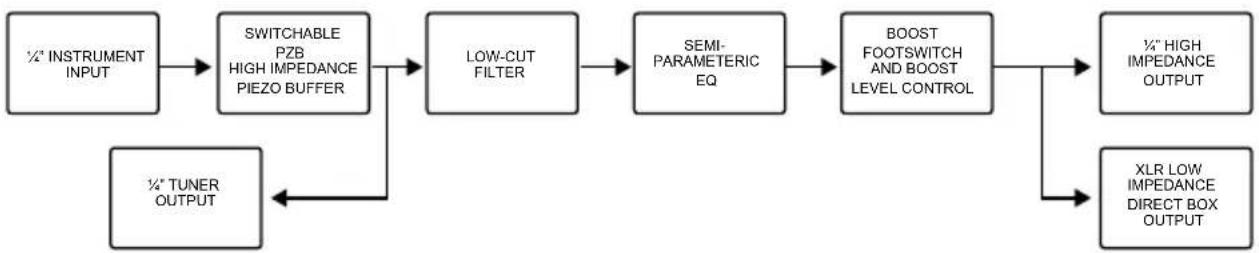
Following the block diagram, you can see how the signal flows from the input all the way to the outputs. The signal enters the PZ-Deluxe using a standard 14 ” instrument input connector. A special PZB circuit may be switched in that is designed specifically for piezo electric transducers. When engaged, this recessed switch increases the input sensitivity and subsequent gain and elevates the impedance to 10 meg-ohms. This helps warm up the tone of a piezo and smooths out the peaks that are often problematic. When using the PZ-Deluxe with a magnetic pickup or an acoustic instrument with a built-in battery powered preamp (active) the PZB is generally not used.
The signal then goes to the EQ section where it can be tailored to suit. This 3-band semi-parametric EQ is equipped with separate bass, mid and high frequency controls. These are very powerful - so use sparingly for best results. The mid is also equipped with a variable frequency control. This enables you to find an offending frequency and dial it out. This is particularly effective at reducing feedback when playing on loud stages. There is also a 3-position low-cut switch that is very helpful at eliminating resonance, another major cause of feedback.
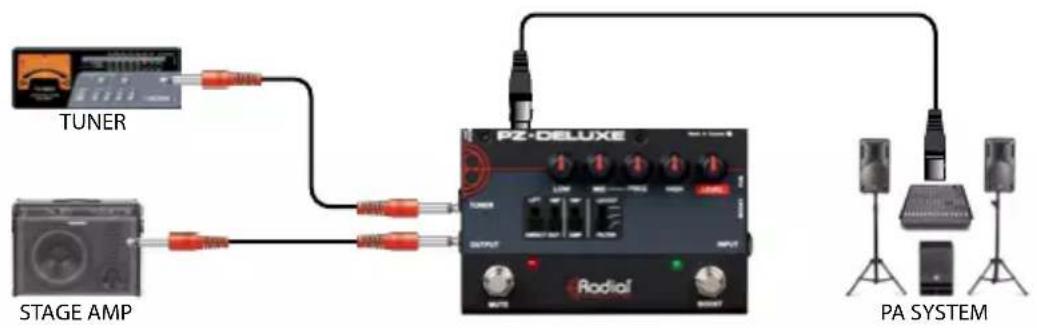
The PZ-Deluxe is equipped with several outputs: the on-stage guitar amp out lets you set up your own personal monitoring system on stage; the tuner out is used for quiet on-stage tuning; and an XLR balanced direct box out is used to feed the instrument signal to the PA system.
flowchart
graph TD
    A["TUNER"] --> B["PG"]
    C["STAGE AMP"] --> D["PG"]
    B --> E["PZ-DELUXE"]
    D --> E
    E --> F["PA SYSTEM"]
    style A fill:#f9f,stroke:#333
    style C fill:#f9f,stroke:#333
    style E fill:#ccf,stroke:#333
    style F fill:#ccf,stroke:#333
Typical Setup
FEATURE SET
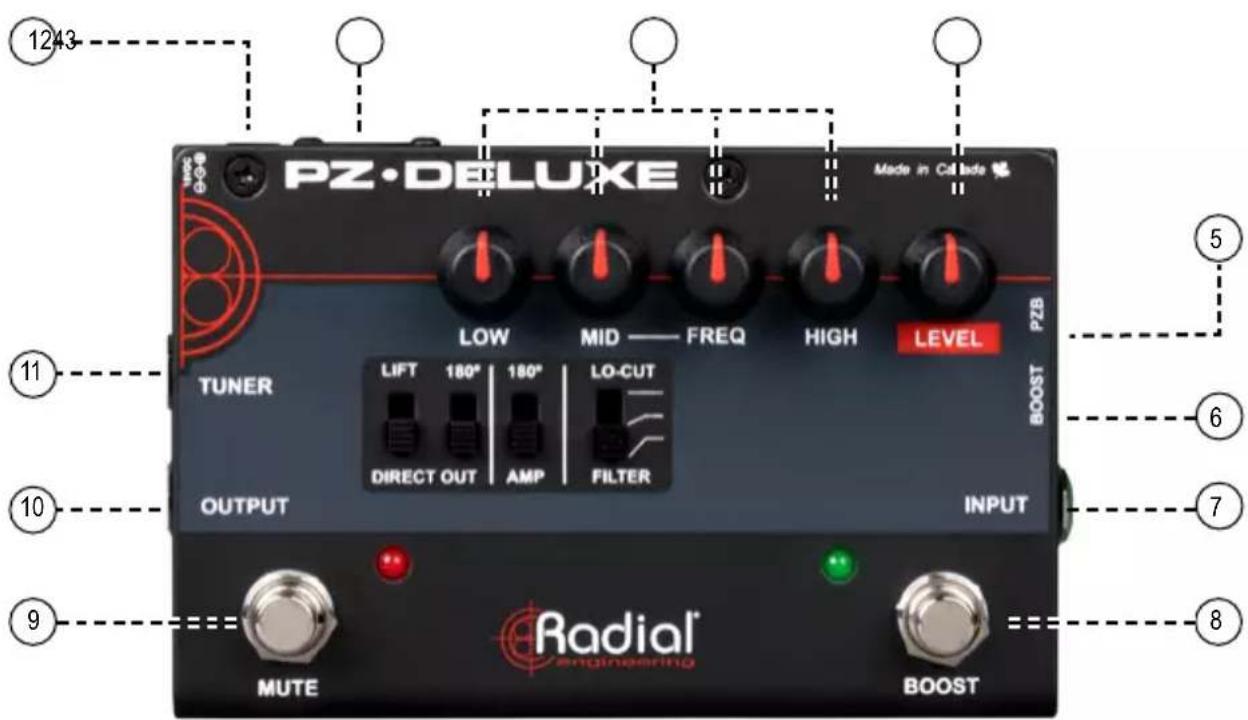
- POWER SUPPLY: Connection for the included 15V (400mA) external power supply.
- DI OUT: Built-in Radial direct box sends balanced mic-level output to the PA system. This allows long runs without adding noise.
- THREE BAND EQ: Semi-parametric equalizer with separate high and low shelving with a variable mid-frequency for optimal tone shaping.
- LEVEL: Fully adjustable control sets the PZ-Deluxe overall volume level for both the 14 " OUTPUT and the LOW-Z DI OUT.
- PZB: Extra gain stage adds more drive and elevates the input impedance to optimize the PZ-Deluxe for use with piezo transducers.
- BOOST ADJUST: Recessed 'set & forget' control adjusts the level of signal boost when the BOOST footswitch is depressed for soloing.
- INPUT: 14 " instrument input is set to normal for active and magnetic pickups or optimized for piezo pickups by depressing the recessed the PZB switch.
- BOOST: Footswitch lets you increase the level for solos. Fully variable 'set & forget' gain adjustment on side panel (item number 6).
FEATURE SET
-
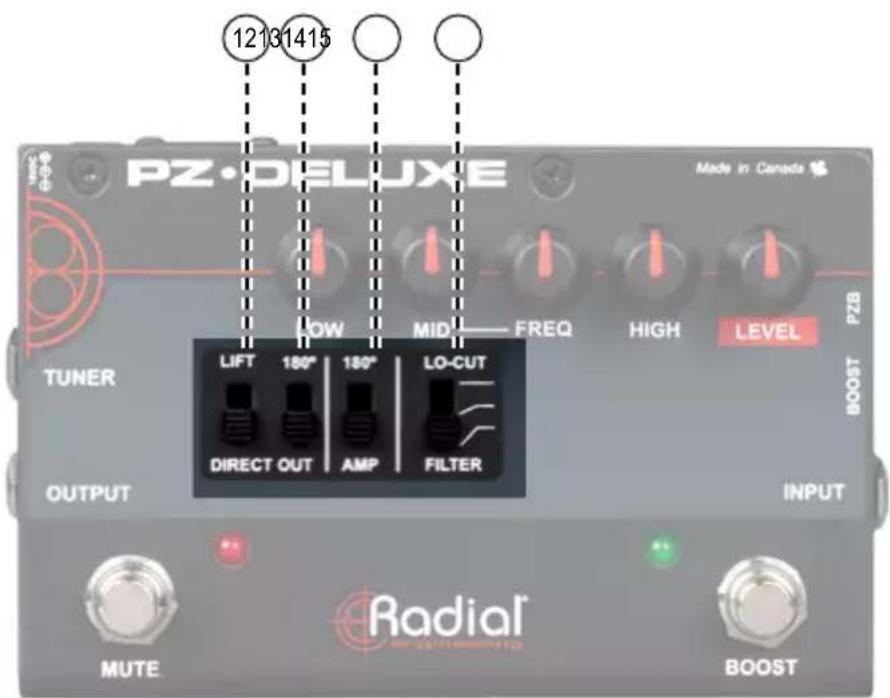
MUTE: Footswitch mutes the 14 " stage amp OUTPUT and LOW-Z DI OUT to allow silent on-stage tuning and instrument changes.
-
AMP OUT: Separate 14 " guitar amp output is used to feed the artist's on-stage amplifier or in-ear monitoring system.
-
TUNER OUT: Separately buffered tuner output is always on to allow on the fly adjustments.
-
LIFT: Lifts pin-1 (ground) on the XLR output to help eliminate hum and buzz caused by ground loops.
-
180° (DIRECT OUT): Phase inverter reverses the polarity of the signal going to the PA system to help eliminate acoustic hot-spots on stage that can cause feedback.
-
180° (AMP OUTPUT): Phase inverter reverses the polarity of the signal going to the 14 " stage amp OUTPUT and DI-OUT to help eliminate acoustic hot-spots on stage that can cause feedback.
-
LO-CUT FILTER: Three position high-pass filter cuts low frequencies to reduce resonance which can often cause feedback on stage.
MAKING CONNECTIONS
Before making any connections, always ensure your audio system is either turned down or turned off in order to protect more sensitive components from damage due to plug-in transients. There is no power switch on the PZ-Deluxe. You simply connect the included 15VDC power supply and it automatically turns on.
Amp & PA system
Although you can start with either the 14 " guitar amp output or the XLR DI-OUT, we suggest setting up the PZ-Deluxe using the DI-OUT connected to the PA system first as this is often more critical in a live situation than an instrument amplifier. Connect the DI-OUT to your PA system using a standard XLR cable. The PZ-Deluxe is wired to the AES standard with pin-1 ground, pin-2 hot (+) and pin-3 cold (-).

flowchart
graph LR
    A["PA SYSTEM"] --> B["STAGE AMP"]
    B --> C["PZ-DELUXE"]
    C --> D["Output"]
    D --> E["Radioist"]
    E --> F["Handheld"]
    G["Handheld"] --> C
    H["Handheld"] --> C
Instruments and Pickups
Connecting to the PZ-Deluxe is made using a standard 14 " guitar cable. The recessed set & forget PZB switch should be set for the type of instrument pickups you are connecting.
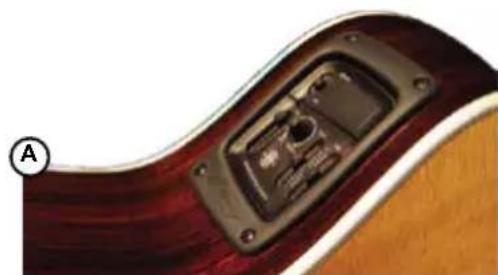
If your instrument is equipped with an active pickup system (battery powered) Ⓐ you do not need the extra boost that the PZB will produce. Most magnetic pickups do not need an extra boost either Ⓑ. For these pickup systems make sure the PZB booster switch is in the outward position (off).
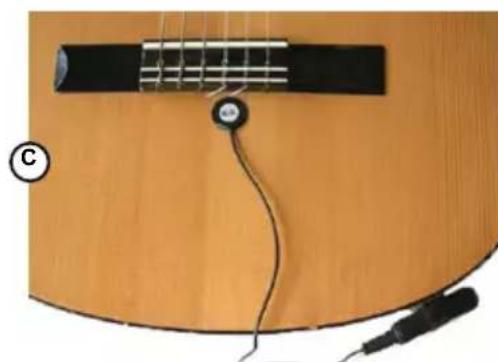
If you are connecting a piezo transducer directly to the PZ-Deluxe without any form of preamp or battery powered buffer in between the PZB booster would be engaged Ⓒ. Setting the PZB switch to the inward position (on) increases the sensitivity and output level and raises the input impedance to better suit piezo transducers.
natural_image
Close-up of a guitar fretboard with black plastic components and a circular button, no visible text or symbolsAcoustic-Electric with on-board preamp

natural_image
Close-up of an acoustic guitar fretboard with visible strings and key holes (no text or symbols)Magnetic pickup in sound hole
natural_image
Close-up of a guitar fretboard with strings and cord, no visible text or symbolsPiezo transducer without preamp
GETTING STARTED
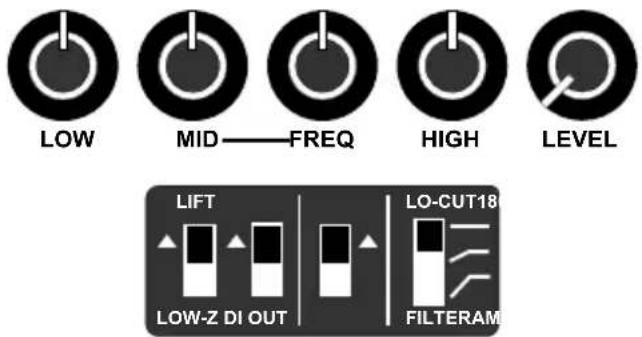
Set your controls in the start position with all knobs at 12 o'clock except for the level control which is set to 7 o'clock or minimum. Make sure the BOOST and MUTE footswitches are not engaged (LEDs off). Set the high pass filter to the up position (flat) and the two 180^ phase switches to the down (in phase) position.
Test at a low level
Turn on your PA and bring up the volume. Always test at low levels as this will reduce possibility of equipment damage should a problem occur. Slowly increase the LEVEL control on the PZ-Deluxe until you can hear sound. If you hear hum or buzz try toggling the ground LIFT switch. If the sound is distorted ensure the PZB switch is in the correct position for the type of pickup you are connecting.
The 3-band semi-parametric EQ
The PZ-Deluxe is equipped with a very powerful 3-band EQ that is used to shape your tone and eliminate feedback. It is very powerful therefore small changes can have a dramatic effect. Start by setting the controls to the 12 o'clock position. The low and high frequency controls are straight ahead while the MID/FREQ controls require some explanation. This type of EQ is known as a semi-parametric whereby it has a fixed-Q, a sweepable center-frequency and variable cut/boost gain control. To hear the effect, turn the MID control to 3 o'clock and then rotate the FREQ control to hear what is happening. This will accentuate frequencies as you sweep the control, allowing you to find a frequency that may sound harsh to your ears. Once you have found the offending frequency, roll back the MID control to around 11 o'clock and listen. The more you experiment the more control you will have over your sound.
The low-cut filter
Another handy feature is the low-cut or high pass filter. A high pass filter does exactly that, it cuts the lows to allow the high frequencies to pass. This three position switch lets you reduce unwanted resonance by simply moving the switch from the flat position downward. The middle position has a moderate cut while the bottom position cuts more bass. As a general rule, the smaller the instrument, the more cut you will apply. Cutting the bass helps eliminate resonant feedback that can cause the top or the instrument to vibrate. Smaller instruments vibrate at a higher frequency, thus are often better served with a higher cut-off point.
| Acoustic Bass Flat (bypass) | 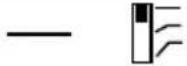 |
| Acoustic Guitar Low-mid-cut | 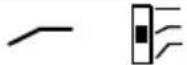 |
| Violin / Mandolin Low-cut | 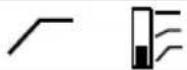 |
ADDING YOUR STAGE AMP
You can now connect your stage amp to the PZ-Deluxe. This separately buffered output is used to provide you with a personal monitor system that you can control for your on-stage sound. Turn up the volume and listen. Now, you will have sound coming from both the PA and your stage amp. For fun, try switching the 180° phase switch at the DI-OUT. This will change the phase relationship between the PA and your amp which will cause the tone to change. When sound is coming from two different sources such as a PA and stage amp, some frequencies will combine together to create peaks while others will cancel out to create dips. This is known as comb-filtering. The peaks can often cause feedback so reversing the polarity (or the phase) will cause these offending frequencies to cancel which in turn can eliminate feedback. You can also reverse the phase going to the stage amp to see if this helps. Keep in mind that the two 180° phase reverse switch are in series.
GROUND LIFT
When connecting the PZ-Deluxe to your amp and the PA at the same time, you can encounter noise in the form of buzz or hum. This is caused by what is commonly known as a ground loop. Ground loops occur when the audio ground path and the electrical ground path interact. Using the LIFT switch to disconnect the ground between the PZ-Deluxe and the PA can often eliminate this type of noise.
POWER BOOSTER
The PZ-Deluxe is equipped with a BOOST footswitch that lets you increase your output level for soloing. The boost gain is determined by a recessed BOOST 'set & forget' level control on the side. Engage the BOOST footswitch (LED on) and use a screwdriver or guitar pick to adjust the boost level. Once you have found the boost level that works for you, it can be activated anytime simply by depressing the BOOST footswitch. When you do, the LED will go on. Hit it again and the boost will turn off.
TUNER & MUTE
The other footswitch on the PZ-Deluxe is a mute. This is designed to turn off all of the outputs except for the one labelled tuner. This ‘always on’ output is designed to allow you to monitor your tuning at all times and by depressing the footswitch, mute the signal going to your amp and PA should you need to do a quick adjustment.
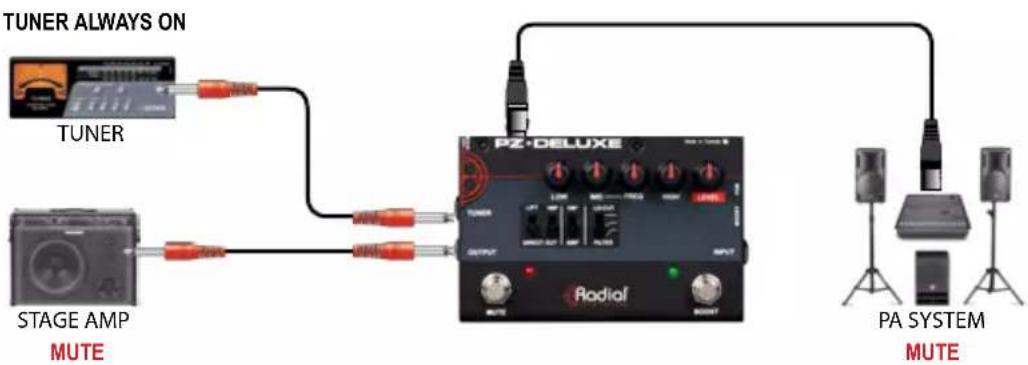
flowchart
graph LR
    A["TUNER ALWAYS ON"] --> B["STAGE AMP MUTE"]
    B --> C["PZ-DELUXE"]
    C --> D["PA SYSTEM MUTE"]
    D --> E["Ground"]
    style A fill:#f9f,stroke:#333
    style B fill:#ccf,stroke:#333
    style C fill:#cfc,stroke:#333
    style D fill:#fcc,stroke:#333
Depressing the MUTE footswitch turns off the 14 " OUTPUT and the DI-OUT allowing for silent tuning or instrument changes.
ADDING EFFECTS
When incorporating high-Z effect pedals you can either place them before or after the PZ-Deluxe. The major difference is how the XLR DI-OUT will be affected. For example, if you place effect pedals between the PZ-Deluxe 14 " OUTPUT and your stage amp the DI-OUT will not be affected. Only the clean instrument signal will be sent to the PA.
This is a good setup for larger stages and halls. For example, a reverb effect might sound great coming out of your stage amp but the same instrument/reverb mix may not sound right through the PA, especially if the hall has it's own acoustic issues like excessive echo. Also to consider is the on-stage monitor mix. You may enjoy hearing your instrument with reverb but the other players may be able to hear your instrument better without reverb in their floor monitor speakers. Connecting effect pedals after the PZ-Deluxe will allow the most flexibility for the PA and monitor systems.
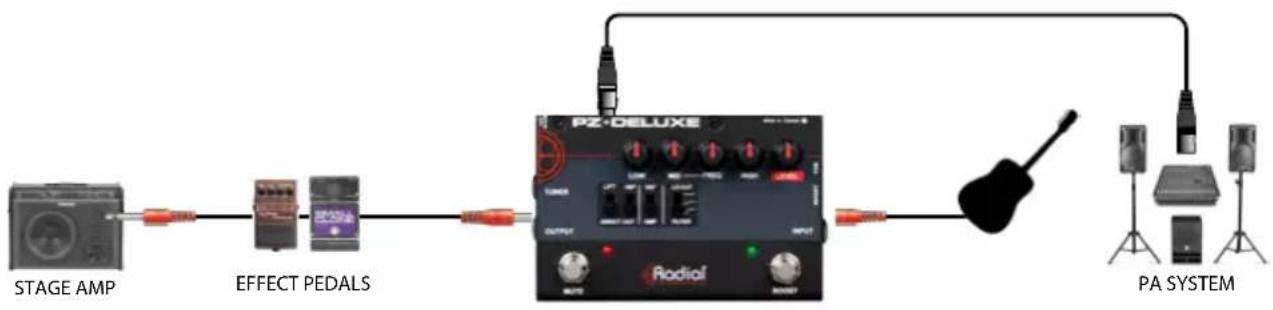
flowchart
graph LR
    A["STAGE AMP"] --> B["EFFECT PEDALS"]
    B --> C["PZ-DELUXE"]
    C --> D["PA SYSTEM"]
    C --> E["DALE"]
    C --> F["DALE"]
    C --> G["DALE"]
    C --> H["DALE"]
    C --> I["DALE"]
Placing effect pedals between your guitar's output and the PZ-Deluxe INPUT will affect both the 1/4" stage amp OUTPUT and the DI-OUT. In this case your stage amp and the PA system will both be colored by the effects. This could be a good setup for small halls where you are operating your own PA system from the stage without an instrument amp.

flowchart
graph LR
    A["STAGE AMP"] --> B["Reduction Head"]
    B --> C["Radiois"]
    C --> D["Effect Pedals"]
    D --> E["PA SYSTEM"]
    E --> F["Speaker with antenna"]
    E --> G["Speaker with microphone"]
    E --> H["Speaker with stand"]
    C --> I["Radiois"]
    I --> J["PEX-DELUXE"]
Try both setups and decide which works best for your performance situation. One thing to consider with this setup is the type of pickup your instrument uses. If your instrument uses a piezo transducer it will need a direct connection to the PZ-Deluxe's PZB high impedance piezo buffer in order to sound best. This would preclude using effect pedals ahead of the PZ-Deluxe with a piezo pickup.
BLOCK DIAGRAM
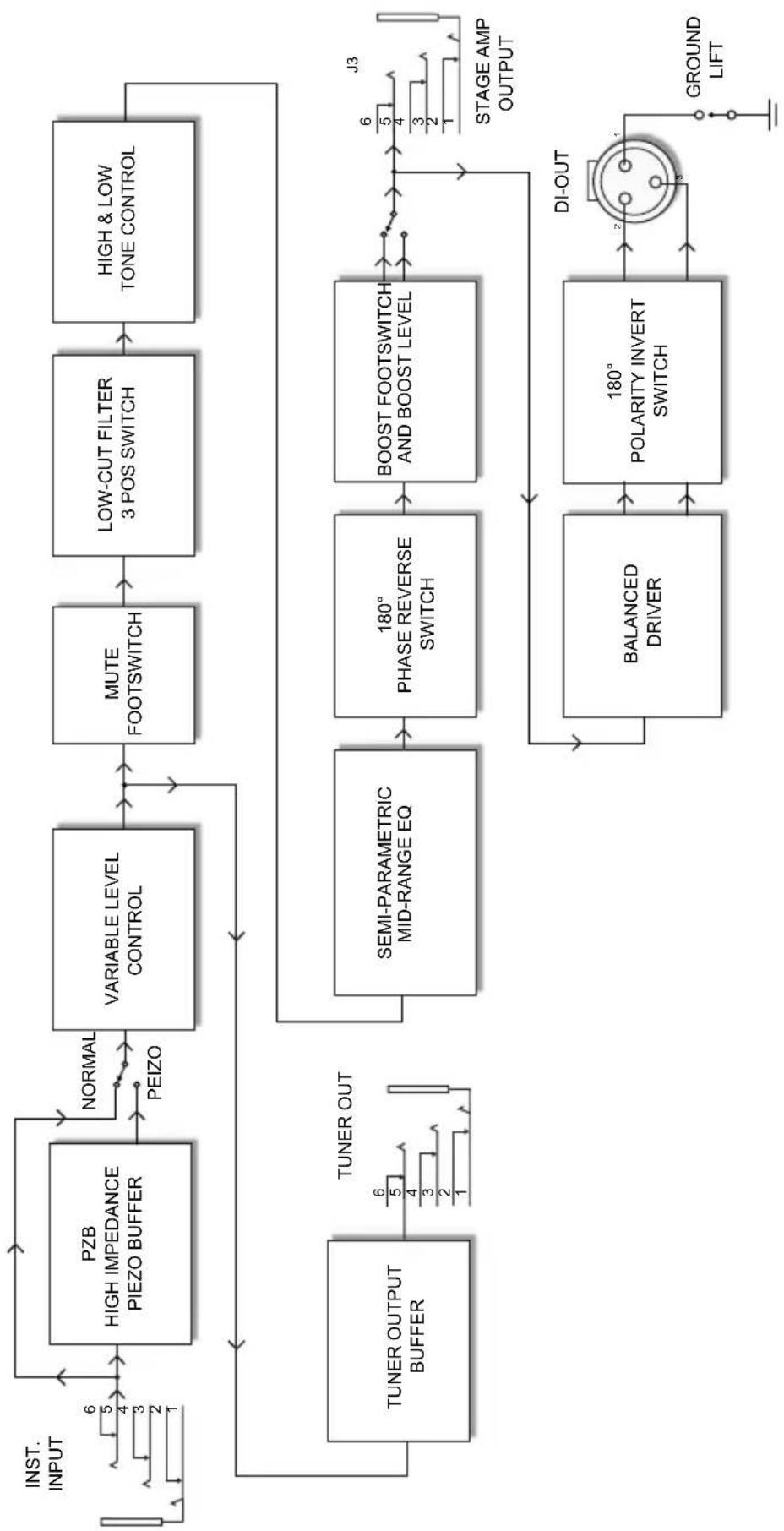
flowchart
graph TD
    A["INST. INPUT"] --> B["PZB HIGH IMPEDANCE PIEZO BUFFER"]
    B --> C["NORMAL PEIZO"]
    C --> D["VARIABLE LEVEL CONTROL"]
    D --> E["MUTE FOOTSWITCH"]
    E --> F["LOW-CUT FILTER 3 POS SWITCH"]
    F --> G["HIGH & LOW TONE CONTROL"]
    G --> H["TUNER OUTPUT BUFFER"]
    H --> I["TUNER OUT"]
    I --> J["SEMI-PARAMETRIC MID-RANGE EQ"]
    J --> K["180° PHASE REVERSE SWITCH"]
    K --> L["BOOST FOOTSWITCH AND BOOST LEVEL"]
    L --> M["J3 STAGE AMP OUTPUT"]
    M --> N["BALANCED DRIVER"]
    N --> O["180° POLARITY INVERT SWITCH"]
    O --> P["DI-OUT"]
    P --> Q["GROUND LIFT"]
SPECIFICATIONS
Frequency response.... 20Hz \~ 20kHz (+/- 3dB)
Dynamic range 105dB
Total harmonic distortion.... 0.02%
Noise -92dBu
Equivalent Input Noise....-108dBu
Gain - 1/4" input to XLR Out....+5dB
Gain - Boost On....+13dB
Gain - PZB....+10dB
Input Impedance - PZB Off.... 6.8K Ohms
Input Impedance - PZB On.... 10M Ohms
Output Impedance - XLR Output.... 600 Ohms nominal
Power Requirement.... 15VDC 400mA (center pin positive)
THREE YEAR TRANSFERABLE LIMITED WARRANTY
RADIAL ENGINEERING LTD. ("Radial") warrants this product to be free from defects in material and workmanship and will remedy any such defects free of charge according to the terms of this warranty. Radial will repair or replace (at its option) any defective component(s) of this product (excluding finish and wear and tear on components under normal use) for a period of three (3) years from the original date of purchase. In the event that a particular product is no longer available, Radial reserves the right to replace the product with a similar product of equal or greater value. In the unlikely event that a defect is uncovered, please call 604-942-1001 or email service@radialeng.com to obtain an RA number (Return Authorization number) before the 3 year warranty period expires. The product must be returned prepaid in the original shipping container (or equivalent) to Radial or to an authorized Radial repair center and you must assume the risk of loss or damage. A copy of the original invoice showing date of purchase and the dealer name must accompany any request for work to be performed under this limited and transferable warranty. This warranty shall not apply if the product has been damaged due to abuse, misuse, misapplication, accident or as a result of service or modification by any other than an authorized Radial repair center.
THERE ARE NO EXPRESSED WARRANTIES OTHER THAN THOSE ON THE FACE HEREOF AND DESCRIBED ABOVE. NO WARRANTIES WHETHER EXPRESSED OR IMPLIED, INCLUDING BUT NOT LIMITED TO, ANY IMPLIED WARRANTIES OF MERCHANTABILITY OR FITNESS FOR A PARTICULAR PURPOSE SHALL EXTEND BEYOND THE RESPECTIVE WARRANTY PERIOD DESCRIBED ABOVE OF THREE YEARS. RADIAL SHALL NOT BE RESPONSIBLE OR LIABLE FOR ANY SPECIAL, INCIDENTAL OR CONSEQUENTIAL DAMAGES OR LOSS ARISING FROM THE USE OF THIS PRODUCT. THIS WARRANTY GIVES YOU SPECIFIC LEGAL RIGHTS, AND YOU MAY ALSO HAVE OTHER RIGHTS, WHICH MAY VARY DEPENDING ON WHERE YOU LIVE AND WHERE THE PRODUCT WAS PURCHASED.

www.radialeng.com
Radial Engineering Ltd. 1845 Kingsway Ave. Port Coquitlam BC V3C 0H3, Canada tel: 604-942-1001 • fax: 604-942-1010 email: info@radialeng.com

- Table of Contents Page
- OVERVIEW
- FEATURE SET
- MAKING CONNECTIONS
- Amp & PA system
- Instruments and Pickups
- GETTING STARTED
- Test at a low level
- The 3-band semi-parametric EQ
- The low-cut filter
- ADDING YOUR STAGE AMP
- GROUND LIFT
- POWER BOOSTER
- TUNER & MUTE
- ADDING EFFECTS
- SPECIFICATIONS
- THREE YEAR TRANSFERABLE LIMITED WARRANTY
- www.radialeng.com
Brand : Radial Engineering
Model : PZ-Deluxe
Category : Guitar