
MMO-AM920MZ - Oven MIDEA - Free user manual and instructions
Find the device manual for free MMO-AM920MZ MIDEA in PDF.


| Product Type | Microwave Oven |
| Brand | Midea |
| Model | MMO-AM920MZ |
| Capacity | 20 L |
| Power Output | 800 W |
| Dimensions (W x D x H) | 440 x 358 x 258 mm |
| Weight | 10.5 kg |
| Voltage / Frequency | 230 V ~ 50 Hz |
| Control Type | Button + Rotary Knob |
| Display | LED Digital |
| Functions | Auto Cook, Defrost, Memory, Clock, Child Lock |
| Turntable | Yes, 245 mm diameter |
| Interior Light | Yes |
| Timer | Up to 95 minutes |
| Door Type | Drop-down with handle |
| Finish | Stainless Steel |
| Energy Efficiency Class | A |
| Noise Level | 60 dB |
| Accessories Included | Glass Turntable, Roller Ring, User Manual |
| Warranty | 2 years |
Frequently Asked Questions - MMO-AM920MZ MIDEA
User questions about MMO-AM920MZ MIDEA
0 question about this device. Answer the ones you know or ask your own.
Ask a new question about this device
Download the instructions for your Oven in PDF format for free! Find your manual MMO-AM920MZ - MIDEA and take your electronic device back in hand. On this page are published all the documents necessary for the use of your device. MMO-AM920MZ by MIDEA.
USER MANUAL MMO-AM920MZ MIDEA
natural_image
Simple line drawing of a microwave oven with no text or symbols微波炉
用户手册
MMO-AM920MZBK)
MMO-AM920MZ(WH)
natural_image
Simple geometric diagram with a rectangle and two labeled points (g and ∽') inside, no text or symbols present.
POPCORN

POTATO

PIZZA

FRZ.VEG.

BEVERAGE

DINNER
POWER
CLOCK
TIMER
TIME
TIME
WEIGHT
COOK
DEFROST
DEFROST
EXPRESS COOK 1-6MIN
1
2
3
4
5
6
7
8
9
STOP
Cancel

MEMORY
START
+30sec.
ECO
功率等级
有 11 个功率等级。
| 等级 功率 显示屏 | ||
| 10 100% PL10 | ||
| 9 90% PL9 | ||
| 8 80% PL8 | ||
| 7 70% PL7 | ||
| 6 60% PL6 | ||
| 5 50% PL5 | ||
| 4 40% PL4 | ||
| 3 30% PL3 | ||
| 2 20% PL2 | ||
| 1 10% PL1 | ||
| 0 0% PL0 | ||
时钟设置
natural_image
Simple line drawing of a garment sleeve with no text or symbols土豆
natural_image
Symbol of a trash bin with crossed lines indicating no waste or discharge, and a solid black rectangle below (no text or labels)make yourself at home

natural_image
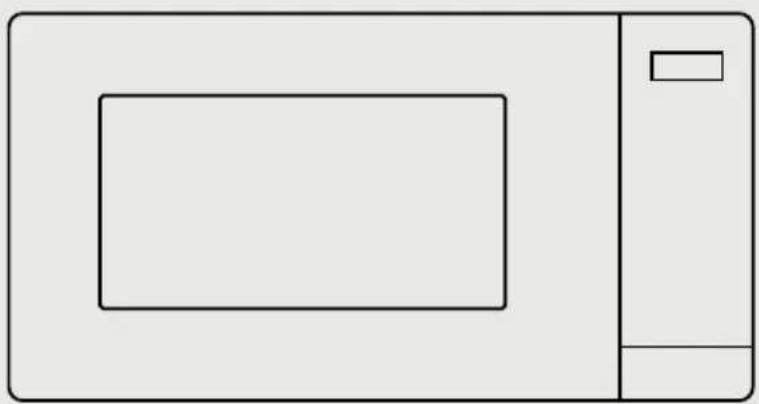
Simple line drawing of a microwave oven with no text or symbolsMICROWAVE OVEN
USER MANUAL
MMO-AM920MZBK)
MMO-AM920MZ(WH)
THANK YOU LETTER
Thank you for choosing Midea! Before using your new Midea product, please read this manual thoroughly to ensure that you know how to operate the features and functions that your new appliance offers in a safe way.
CONTENTS
THANK YOU LETTER 01
SAFETY INSTRUCTIONS 02
SPECIFICATION 1 1
PRODUCT OVERVIEW 12
PRODUCT INSTALLATION 13
OPERATION INSTRUCTIONS 14
CLEANING AND MAINTENANCE 20
TROUBLE SHOOTING 21
TRADEMARKS, COPYRIGHTS AND LEGAL STATEMENT---22
SAFETY INSTRUCTIONS
Intended Use
The following safety guidelines are intended to prevent unforeseen risks or damage from unsafe or incorrect operation of the appliance. Please check the packaging and appliance on arrival to make sure everything is intact to ensure safe operation. If you find any damage, please contact the retailer or dealer. Please note modifications or alterations to the appliance are not allowed for your safety concern. Unintended use may cause hazards and loss of warranty claims.
Explanation of Symbols
 | DangerThis symbol indicates that there are dangers to the life and health of persons due to extremely flammable gas. |
 | Warning of electrical voltageThis symbol indicates that there is a danger to life and health of persons due to voltage. |
 | WarningThe signal word indicates a hazard with a medium level of risk which, if not avoided, may result in death or serious injury. |
 | CautionThe signal word indicates a hazard with a low degree of risk which, if not avoided, may result in minor or moderate injury. |
 | AttentionThe signal word indicates important information (e.g. damage to property), but not danger. |
 | Observe instructionsThis symbol indicates that a service technician should only operate and maintain this appliance in accordance with the operating instructions. |
Read these operating instructions carefully and attentively before using/commissioning the unit and keep them in the immediate vicinity of the installation site or unit for later use!
Precautions To Avoid Possible Exposure To Excessive Microwave Energy
a. Do not attempt to operate this oven with the door open since this can result in harmful exposure to microwave energy. It is important not to break or tamper with the safety interlocks.
b. Do not place any object between the oven front face and the door or allow soil or cleaner residue to accumulate on sealing surfaces.
c. WARNING: If the door or door seals are damaged, the oven must not be operated until it has been repaired by a competent person.
Addendum
If the apparatus is not maintained in a good state of cleanliness, its surface could be degraded and affect the lifespan of the apparatus and lead to a dangerous situation.
Important Safety Instructions
WARNING
To reduce the risk of fire, electric shock, injury to persons or exposure to excessive microwave oven energy when using your appliance, follow basic precautions, including the following:
- Read and follow the specific: "PRECAUTIONS TO AVOID POSSIBLE EXPOSURE TO EXCESSIVE MICROWAVE ENERGY".
- This appliance is not intended for use by persons (including children) with reduced physical, sensory or mental capabilities, or lack of experience and knowledge, unless they have been given supervision or instruction concerning use of the appliance by a person responsible for their safety.
• Children should be supervised to ensure that they do not play with the appliance. - If the supply cord is damaged, it must be replaced by the manufacturer, its service agent or similarly qualified persons in order to avoid a hazard.( For appliance with type Y attachment).
- WARNING: Ensure that the appliance is switched off before replacing the lamp to avoid the possibility of electric shock.
- WARNING: It is hazardous for anyone other than a competent person to carry out any service or repair operation that involves the removal of a cover which gives protection against exposure to microwave energy.
- WARNING: Liquids and other foods must not be heated in sealed containers since they are liable to explode.
- When heating food in plastic or paper containers, keep an eye on the oven due to the possibility of ignition.
- Only use utensils that are suitable for use in microwave ovens.
- If smoke is emitted, switch off or unplug the appliance and keep the door closed in order to stifle any flames.
- Microwave heating of beverages can result in delayed eruptive boiling, therefore care must be taken when handling the container.
- The contents of feeding bottles and baby food jars shall be stirred or shaken and the temperature checked before consumption, in order to avoid burns.
- Eggs in their shell and whole hard-boiled eggs should not be heated in microwave ovens since they may explode, even after microwave heating has ended.
- The oven should be cleaned regularly and any food deposits removed.
- Failure to maintain the oven in a clean condition could lead to deterioration of the surface that could adversely affect the life of the appliance and possibly result in a hazardous situation.
- The appliance must not be installed behind a decorative door in order to avoid overheating. (This is not applicable for appliances with decorative door.)
- Only use the temperature probe recommended for this oven. (for ovens provided with a facility to use a temperature-sensing probe.)
- The microwave oven shall not be placed in a cabinet unless it has been tested in a cabinet.
- The microwave oven must be operated with the decorative door open. (for ovens with a decorative door.)
-
This appliance is intended to be used in household and similar applications such as:
-
staff kitchen areas in shops, offices and other working environments;
- by clients in hotels, motels and other residential type environments;
- farm houses;
-
bed and breakfast type environments.
-
The microwave oven is intended for heating food and beverages. Drying of food or clothing and heating of warming pads, slippers, sponges, damp cloth and similar may lead to risk of injury, ignition or fire.
- Metallic containers for food and beverages are not allowed during microwave cooking.
- The appliance shall not be cleaned with a steam cleaner.
- The appliance is intended to be used freestanding.
- The rear surface of appliances shall be placed against a wall.
READ CAREFULLY AND KEEP FOR FUTURE REFERENCE
To Reduce The Risk Of Injury To Persons Grounding Installation
DANGER
Electric Shock Hazard
Touching some of the internal components can cause serious personal injury or death. Do not disassemble this appliance.
WARNING
Electric Shock Hazard
Improper use of the grounding can result in electric shock.
Do not plug into an outlet until appliance is properly installed and grounded.
This appliance must be grounded. In the event of an electrical short circuit, grounding reduces the risk of electric shock by providing an escape wire for the electric current.
This appliance is equipped with a cord having a grounding wire with a grounding plug. The plug must be plugged into an outlet that is properly installed and grounded.
Consult a qualified electrician or serviceman if the grounding instructions are not completely understood or if doubt exists as to whether the appliance is properly grounded.
If it is necessary to use an extension cord, use only a 3-wire extension cord.
- A short power-supply cord is provided to reduce the risks resulting from becoming entangled in or tripping over a longer cord.
- If a long cord set or extension cord is used:
- The marked electrical rating of the cord set or extension cord should be at least as great as the electrical rating of the appliance.
- The extension cord must be a grounding-type 3-wire cord.
- The long cord should be arranged so that it will not drape over the counter top or tabletop where it can be pulled on by children or tripped over unintentionally.
Utensils
CAUTION
Personal Injury Hazard
It is hazardous for anyone other than a competent person to carry out any service or repair operation that involves the removal of a cover which gives protection against exposure to microwave energy.
See the instructions on "Materials you can use in microwave oven or to be avoided in microwave oven." There may be certain non-metallic utensils that are not safe to use for microwaving. If in doubt, you can test the utensil in question following the procedure below.
Utensil Test:
- Fill a microwave-safe container with 1 cup of cold water (250ml) along with the utensil in question.
- Cook on maximum power for 1 minute.
- Carefully feel the utensil. If the empty utensil is warm, do not use it for microwave cooking.
- Do not exceed 1 minute cooking time.
Materials you can use in microwave oven
| Utensils Remarks | |
| Browning dish | Follow manufacturer's instructions. The bottom of browning dish must be at least 3/16 inch (5mm) above the turntable. Incorrect usage may cause the turntable to break. |
| Dinnerware | Microwave-safe only. Follow manufacturer's instructions. Do not use cracked or chipped dishes. |
| Glass jars | Always remove lid. Use only to heat food until just warm. Most glass jars are not heat resistant and may break. |
| Glassware | Heat-resistant oven glassware only. Make sure there is no metallic trim. Do not use cracked or chipped dishes. |
| Oven cooking bags | Follow manufacturer's instructions. Do not close with metal tie. Make slits to allow steam to escape. |
| Paper plates and cups | Use for short-term cooking/warming only. Do not leave oven unattended while cooking. |
| Paper towels | Use to cover food for reheating and absorbing fat. Use with supervision for a short-term cooking only. |
| Parchment paper | Use as a cover to prevent splattering or a wrap for steaming. |
| Plastic | Microwave-safe only. Follow the manufacturer's instructions. Should be labeled "Microwave Safe". Some plastic containers soften, as the food inside gets hot. "Boiling bags" and tightly closed plastic bags should be slit, pierced or vented as directed by package. |
| Plastic wrap | Microwave-safe only. Use to cover food during cooking to retain moisture. Do not allow plastic wrap to touch food. |
| Thermometers Microwave-safe only (meat and candy thermometers). | |
| Wax paper Use as a cover to prevent splattering and retain moisture. | |
Materials to be avoided in microwave oven
| Utensils Remarks | |
| Aluminum tray | May cause arcing. Transfer food into microwave-safe dish. |
| Food carton with metal handle | May cause arcing. Transfer food into microwave-safe dish. |
| Metal or metal-trimmed utensils | Metal shields the food from microwave energy. Metal trim may cause arcing. |
| Metal twist ties May cause arcing and could cause a fire in the oven. | |
| Paper bags May cause a fire in the oven. | |
| Plastic foam | Plastic foam may melt or contaminate the liquid inside when exposed to high temperature. |
| Wood | Wood will dry out when used in the microwave oven and may split or crack. |
SPECIFICATION
MODEL
MMO-AM920MZ(BK)
MMO-AM920M (WH)Z
RATED VOLTAGE 230 V\~50 Hz
MICROWAVE INPUT 1020W
(In case of any differences between the appliance and the pictures in this manual, the product shall prevail.)
Remove the oven and all materials from the carton and oven cavity. Your oven comes with the following accessories:
Glass tray 1
Turntable ring assembly 1
Instruction Manual 1
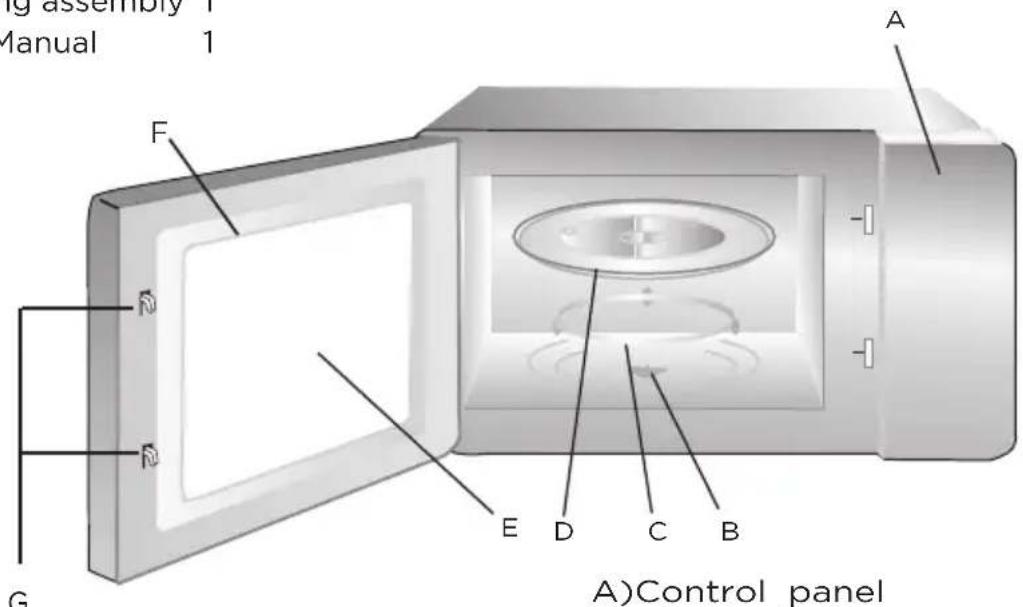
A) Control panel
B) n°table shaft
C) Turntable ring assembly
D) Glass tray
E) Observation window
F) Door assembly
G) Safety interlock system
Turntable Installation
Hub (underside)
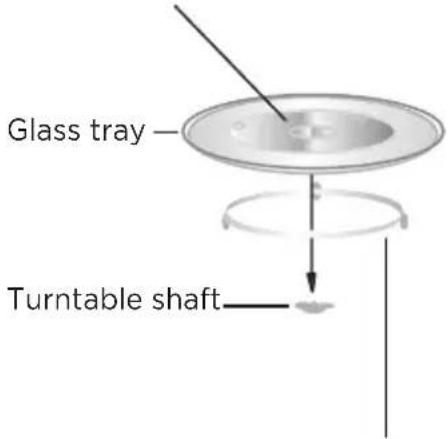
Turntable ring assembly
a. Never place the glass tray upside down. The glass tray should never be restricted.
b. Bothglass tray and turntable ring assembly must always be used during cooking.
c. All food and containers of food are always placed on the glass tray for cooking.
d. Ifglass tray or turntable ring assembly cracks or breaks, contact your nearest authorized service center.
PRODUCT INSTALLATION
Countertop Installation
Remove all packing material and accessories. Examine the oven for any damage such as dents or broken door. Do not install if oven is damaged.
Cabinet: Remove any protective film found on the microwave oven cabinet surface. Do not remove the waveguide cover that is attached to the oven cavity to protect the magnetron.
Installation
- Select a level surface that provide enough open space for the intake and/or outlet vents.

- The minimum installation height is 85cm.
- The rear surface of appliance shall be placed against a wall.
Leave a minimum clearance of 30cm above the oven, a minimum clearance of 20cm is required between the oven and any adjacent walls.
- Do not remove the legs from the bottom of the oven.
- Blocking the intake and/or outlet openings can damage the oven.
- Place the oven as far away from radios and TV as possible. Operation of microwave oven may cause interference to your radio or TV reception.
- Plug your oven into a standard household outlet. Be sure the voltage and the frequency is the same as the voltage and the frequency on the rating label.

WARNING
Do not install oven over a range cooktop or other heat-producing appliance. If installed near or over a heat source, the oven could be damaged and the warranty would be void.
The accessible surface may be hot during operation.
OPERATION INSTRUCTIONS

natural_image
Simple geometric diagram with a rectangle and two labeled points (g and ∪') inside, no text or symbols present.
POPCORN

POTATO

PIZZA

FRZ.VEG.

BEVERAGE

DINNER
POWER
CLOCK
TIMER
TIME
TIME
WEIGHT
COOK
DEFROST
DEFROST
EXPRESS COOK 1-6MIN
1
2
3
4
5
6
7
8
9
STOP
Cancel

MEMORY
START
+30sec.
ECO
Power Level
11 power levels are available.
| Level Power Display | ||
| 10 100% PL10 | ||
| 9 90% PL9 | ||
| 8 80% PL8 | ||
| 7 70% PL7 | ||
| 6 60% PL6 | ||
| 5 50% PL5 | ||
| 4 40% PL4 | ||
| 3 30% PL3 | ||
| 2 20% PL2 | ||
| 1 10% PL1 | ||
| 0 0% PLO |
Clock Setting
- Press "Clock", "00:00" will display.
- Press the number keys and enter the current time.
For example, time is 12:10 now, please press "1,2,1,0" in turn.
- Press "Clock" to finish clock setting.
- If the numbers input are not within the range of 1:00--12:59, the setting will be invalid until valid numbers are input.

NOTE
- In the process of clock setting, if the "STOP/Cancel" button is pressed or if there is no operation within 1 minute, the oven will go back to the former setting automatically.
• If the clock need to be reset, please repeat step 1 to step 3.
Kitchen Timer
- Press "Timer", screen will display 00:00.
- Press the number keys and enter the timer time. (the maximum value is 99:99)
- Press " START/+30SEC." to confirm setting.

NOTE
During kitchen timer, any program can't be set.
Microwave Cook
- Press "Time Cook" once, screen will display "00:00".
-
Press number keys to input the cooking time: the maximum value is 99:99.
-
Press "Power" once, screen will display "PL10". The default power is 100% power. Now you can press number keys to adjust the power level.
-
Press "START/+30SEC." to start cooking.

NOTE
- In the process of setting, if the "STOP/Cancel" button is pressed or if there is no operation within 1 minute, the oven will go back to the former setting automatically.
- If "PLO" selected, the oven will work with fan for no power.
- During microwave cooking, "Power" can be pressed to change the power you need. After pressing "Power", the current power flash for 3 seconds, now you can press number button to change the power. The oven will work with the selected power for the rest time.
Speedy Cooking
- In waiting state, instant cooking at 100% power level can be started by select a cooking time from 1 to 6 minutes by pressing number pads1 to 6. Press " START/+30SEC." to increase the cooking time; the maximum value is 99:99.
- In waiting state, instant cooking at 100% power level with 30 seconds cooking time can be started by pressing "START/+30SEC.". Each press on the same button will increase cooking time by 30 seconds. the maximum value is 99:99.

NOTE
During microwave cooking and time defrost, time can be added by pressing
" START/+30SEC. " button.
Weight Defrost Function
- Press "Weight Defrost", screen will display "dEF1".
- Press number keys to input weight to be defrosted. Input the weight ranged between 100\~2000g.
- If the weight input is not within 100\~2000 g, the input will be invalid.
- Press "START/+30SEC." to start defrosting.
Time Defrost Function
- Press "Time Defrost", screen will display "dEF2".
- Press number pads to input defrosting time. The maximum value is 99:99.
- The default microwave power is power level 3. If you want to change the power level, press "Power" once, and the screen will display "PL 3", then press the number pad of the power level you wanted.
- Press "START/+30SEC." to start defrosting. The remained cooking time will be displayed.
POPCORN
- Press "Popcorn" repeatedly until the number you wish appears in the display, "50", "100" will display in order.
For example, press "Popcorn" once, "50" appears.
- Press "START/+30SEC." to cook, buzzer sounds once. When cooking finish, buzzer sounds five times and then turn back to waiting state.
Important Information About Microwave Popcorn Feature :
- When selecting 100 g of popcorn, it is suggested that you fold down a triangle on each corner of the bag before cooking. Refer to the picture at right.

- If/When the popcorn bag expands and no longer rotates properly, please press STOP/Cancel button once and open the oven door and adjust the bag position to ensure even cooking.

POTATO
- Press "Potato" repeatedly until the number you wish appears in the display, "1", "2", "3" will display in order.
"1"SET : 1 potato (approximate 230 gram)
"2"SETS: 2 potatoes (approximate 460 gram)
"3"SETS: 3 potatoes (approximate 690 gram)
For example, press "Potato" once, "1" appears.
- Press "START/+30SEC." to cook, buzzer sounds once. When cooking finish, buzzer sounds five times and then turn back to waiting state.
FROZEN VEGETABLE
- Press "FRZ. VEG." repeatedly until the number you wish appears in the display, "150", "350", "500" will display in order.
For example, press "FRZ. VEG." once, "150" appears.
- Press "START/+30SEC." to cook, buzzer sounds once. When cooking finish, buzzer sounds five times and then turn back to waiting state.
BEVERAGE
- Press "Beverage" repeatedly until the number you wish appears in the display, "1-","2-", "3-" will display in order. One cup is about 120ml.
For example, press "Beverage" once, "1-" appears.
- Press "START/+30SEC." to cook, buzzer sounds once. When cooking finish, buzzer sounds five times and then turn back to waiting state.
DINNER PLATE
- Press "Dinner" repeatedly until the number you wish appears in the display, "250", "350", "500" will display in order.
For example, press "Dinner" once, "250" appears. - Press "START/+30SEC." to cook, buzzer sounds once. When cooking finish, buzzer sounds five times and then turn back to waiting state.
PIZZA
-
Press" Pizza "repeatedly until the number you wish appears in the display,"100-", "200-", "400-" g will display in order.
For example, press " Pizza " once , "100 ^- " appears. -
Press "START/+30SEC." to cook, buzzer sounds once. When cooking finish, buzzer sounds five times and then turn back to waiting state.
MEMORY FUNCTION
- Press "O/Memory" to choose memory 1-3 procedure. The LED will display 1, 2, 3.
- If the procedure has been set, press "START/+30SEC." to use it. If not, continue to set the procedure. Only one or two stages can be set.
- After finishing the setting, press "START/+30SEC." once to save the procedure and turn back to the waiting states. If press "START/+30SEC." again, it will start cooking.
Example: to set the following procedure as the second memory, that is memory 2. To cook the food with 80% microwave power for 3 minutes and 20 seconds.
The steps are as follow:
- In waiting states, press "O/Memory" twice, the screen displays "2".
- Press "Time Cook" once, then press "3", "2", "0" in order.
- Press "Power" once, "PL10" display, then press "8" and "PL8" displays.
- Press "START/+30SEC." to save the setting. A beep sounds will confirm the setting then turn back to waiting states. If "START/+30SEC." is pressed again, the procedure will be saved as the memory 2 and operated.
- If the electricity is not cut off, the procedure will be saved all the time. If it is, the procedure need to reset.
- If you want to run the saved procedure, in waiting states, press "0/ Memory" twice, screen displays "2", then press "START/+30SEC." to run.
Multi-Stage Cooking
At most 2 stages can be set for cooking. In multi-stage cooking, if one stage is defrosting, then defrosting shall be placed at the first stage automatically.

NOTE
Auto cooking can't work in the multi-stage cooking.
Example: if you want to cook with 80% microwave power for 5 minutes + 60% microwave power for 10 minutes. The cooking steps are as following:
- Press "Time Cook" once, then press "5","0","0" to set the cooking time;
- Press "Power" once, then press "8" to select 80% microwave power.
- Press "Time Cook" once, then press "1","0","0","0" to set the cooking time;
- Press "Power" once, then press "6" to select 60% microwave power.
- Press " START/+30SEC." to start cooking
Inquiring Function
In cooking state, press "Clock", the screen will display clock for three seconds.
Lock Function For Children
You can use this function to prevent children from accidentally turning the oven on.
Lock: In waiting state, press "STOP/Cancel" for 3 seconds, there will be a long "beep" denoting the entering into the children-lock state; meanwhile, screen will display "[::"]".
Lock quitting: In locked state, press "STOP/Cancel" for 3 seconds, there will be a long "beep" denoting that lock is released.
Mute Mode
To activate the mute mode:
In waiting state, press and hold "8" for 3 seconds. A long beep will sound. Then you can press any key without sound.
To deactivate the mute mode:
In mute mode, press and hold "8" for 3 seconds. A long beep will sound.
ECO Function
To enter ECO mode:
In waiting state (the door is closed), press " STOP/CANCEL" once. The screen will turn off. To cancel ECO mode:
In ECO mode, press any key or open the door to wake up the screen.
CLEANING AND MAINTENANCE
Be sure to unplug the appliance from the power supply.
- Clean the cavity of the oven after using with a slightly damp cloth.
- Clean the accessories in the usual way in soapy water.
- The door frame and seal and neighbouring parts must be cleaned carefully with a damp cloth when they are dirty.
- Do not use harsh abrasive cleaners or sharp metal scrapers to clean the oven door glass since they can scratch the surface, which may result in shattering of the glass.
- Cleaning Tip---For easier cleaning of the cavity walls that the food cooked can touch: Place half a lemon in a bowl, add 300ml (1/2 pint) water and heat on 100% microwave power for 10 minutes. Wipe the oven clean using a soft, dry cloth.
TROUBLE SHOOTING
| Normal | |
| Microwave oven interfering TV reception | Radio and TV reception may be interfered when microwave oven operating. It is similar to the interference of small electrical appliances, like mixer, vacuum cleaner, and electric fan. It is normal. |
| Dim oven light | In low power microwave cooking, oven light may become dim. It is normal. |
| Steam accumulating on door, hot air out of vents | In cooking, steam may come out of food. Most will get out from vents. But some may accumulate on cool place like oven door. It is normal. |
| Oven started accidentally with no food in. | It is forbidden to run the unit without any food inside. It is very dangerous. |
| Trouble Possible Cause Remedy | ||
| Oven can not be started. | Power cord is not plugged in tightly. | Unplug. Then plug again after 10 seconds. |
| Fuse blowing or circuit breaker works. | Replace fuse or reset circuit breaker (repaired by professional personnel of our company) | |
| Trouble with outlet. | Test outlet with other electrical appliances. | |
| Oven does not heat. | Door is not closed well. | Close door well. |
natural_image
Symbol of a trash bin crossed with no text or numbers, representing waste sorting or disposal (no text present)According to Waste of Electrical and Electronic Equipment (WEEE) directive, WEEE should be separately collected and treated. If at any time in future you need to dispose of this product please do NOT dispose of this product with household waste. Please send this product to WEEE collecting points where available.
TRADEMARKS, COPYRIGHTS AND LEGAL STATEMENT
Midea logo, word marks, trade name, trade dress and all versions thereof are valuable assets of Midea Group and/or its affiliates (“Midea”), to which Midea owns trademarks, copyrights and other intellectual property rights, and all goodwill derived from using any part of an Midea trademark. Use of Midea trademark for commercial purposes without the prior written consent of Midea may constitute trademark infringement or unfair competition in violation of relevant laws.
This manual is created by Midea and Midea reserves all copyrights thereof. No entity or individual may use, duplicate, modify, distribute in whole or in part this manual, or bundle or sell with other products without the prior written consent of Midea.
All the described functions and instructions were up to date at the time of printing this manual. However, the actual product may vary due to improved functions and designs.

make yourself at home

- 用户手册
- EXPRESS COOK 1-6MIN
- 功率等级
- 时钟设置
- 土豆
- USER MANUAL
- THANK YOU LETTER
- CONTENTS
- SAFETY INSTRUCTIONS
- Intended Use
- Precautions To Avoid Possible Exposure To Excessive Microwave Energy
- Addendum
- Important Safety Instructions
- WARNING
- READ CAREFULLY AND KEEP FOR FUTURE REFERENCE
- To Reduce The Risk Of Injury To Persons Grounding Installation
- DANGER
- Utensils
- CAUTION
- Personal Injury Hazard
- Utensil Test:
- Materials you can use in microwave oven
- Materials to be avoided in microwave oven
- SPECIFICATION
- Turntable Installation
- PRODUCT INSTALLATION
- Countertop Installation
- Installation
- OPERATION INSTRUCTIONS
- Power Level
- Clock Setting
- NOTE
- Kitchen Timer
- Microwave Cook
- Speedy Cooking
- Weight Defrost Function
- Time Defrost Function
- POPCORN
- Important Information About Microwave Popcorn Feature :
- POTATO
- FROZEN VEGETABLE
- BEVERAGE
- DINNER PLATE
- PIZZA
- MEMORY FUNCTION
- Multi-Stage Cooking
- Inquiring Function
- Lock Function For Children
- Mute Mode
- ECO Function
- CLEANING AND MAINTENANCE
- TROUBLE SHOOTING
- TRADEMARKS, COPYRIGHTS AND LEGAL STATEMENT
Brand : MIDEA
Model : MMO-AM920MZ
Category : Oven