SHD07-1042AA - Uncategorized BERNER - Free user manual and instructions
Find the device manual for free SHD07-1042AA BERNER in PDF.


| Product Type | Cordless Drill/Driver |
| Brand | Berner |
| Model | SHD07-1042AA |
| Voltage | 18 V |
| Battery Type | Li-Ion |
| Chuck Type | Keyless, 13 mm (1/2 in) |
| Max Torque | 50 Nm |
| No-Load Speed | 0-1500 RPM |
| Speed Settings | 2-speed gearbox |
| Weight | 1.5 kg (including battery) |
| Dimensions (LxWxH) | 210 x 65 x 190 mm |
| Includes | Drill driver, 2x 2.0 Ah batteries, charger, belt clip, double-ended bit |
| LED Light | Yes, integrated LED for workspace illumination |
| Safety Features | Electric brake, overload protection, soft grip handle |
| Cleaning and Maintenance | Clean with dry cloth; keep vents free of dust; periodically check chuck and gearbox |
| Spare Parts and Repairability | Replacement batteries, chargers, and carbon brushes available; service centers in major cities |
| General Information | Designed for drilling in wood, metal, and plastic; also suitable for screwdriving |
Frequently Asked Questions - SHD07-1042AA BERNER
User questions about SHD07-1042AA BERNER
0 question about this device. Answer the ones you know or ask your own.
Ask a new question about this device
Download the instructions for your Uncategorized in PDF format for free! Find your manual SHD07-1042AA - BERNER and take your electronic device back in hand. On this page are published all the documents necessary for the use of your device. SHD07-1042AA by BERNER.
USER MANUAL SHD07-1042AA BERNER
When the door is open™, BERNER AIR CURTAINS
text_image
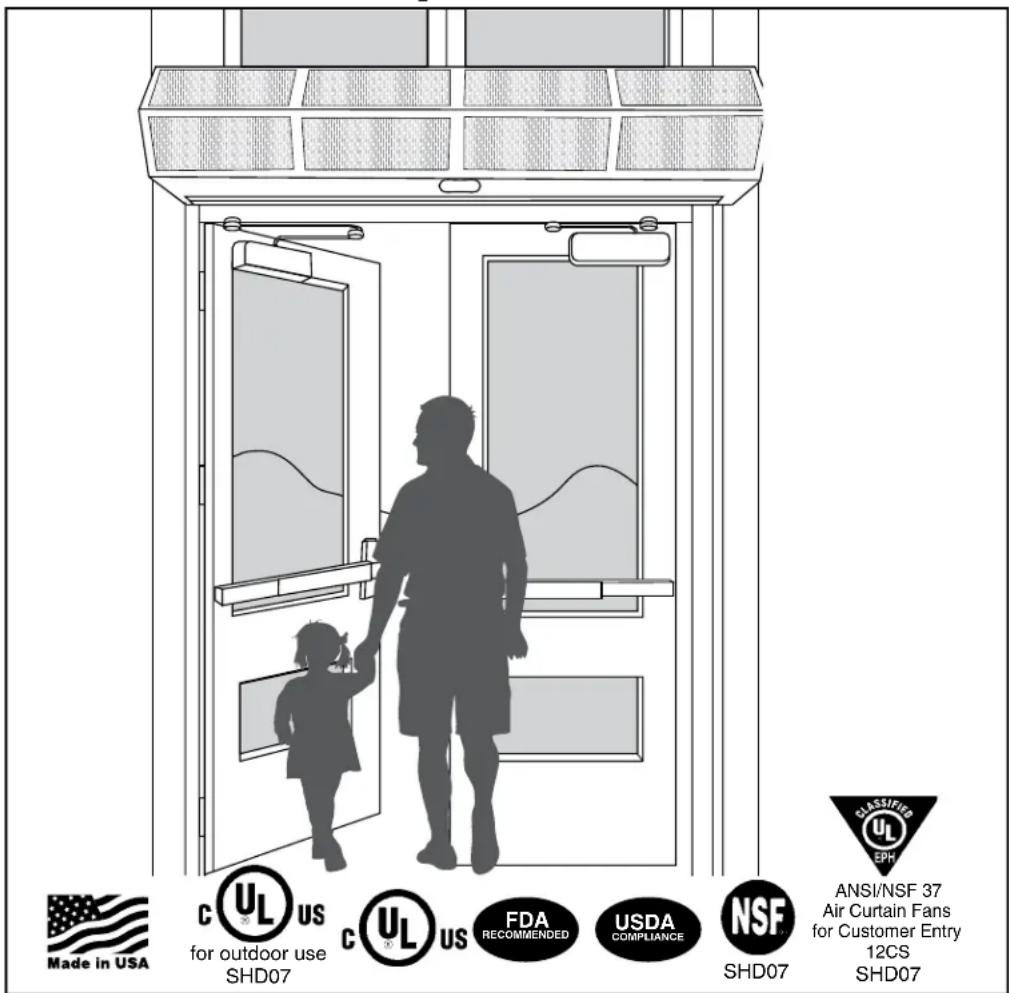
Made in USA C UL US for outdoor use SHD07 C UL US FDA RECOMMENDED USDA COMPLIANCE NSF SHD07 CLASSIFIED UL EPR ANSI/NSF 37 Air Curtain Fans for Customer Entry 12CS SHD07Installation & Maintenance Instructions
TABLE OF CONTENTS
I. UNCRATING....2
II. GENERAL MOUNTING INSTRUCTIONS .... 4
III. WALL MOUNTING 5
IV. SUSPENDED MOUNTING 6
V. ELECTRICAL CONNECTIONS ...... 7
VI. FIELD CONNECTIONS 7
VII. OPERATING INSTRUCTIONS 8
VIII. MAINTENANCE AND CLEANING....9
IX. SERVICE 9
X. TROUBLESHOOTING 10
XI.WARRANTY 12
Thank you for choosing Berner.
Berner International has been saving energy and creating healthy, comfortable environments for our customers for over 60 years. Berner offers unmatched quality, performance, and dependability—not to mention our service. At Berner, we stand behind our products.
READ ALL INSTRUCTIONS BEFORE INSTALLING OR USING AIR CURTAIN
II-123D
June, 2020
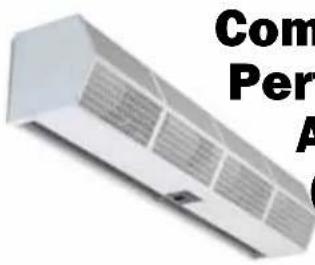
Commercial High Performance 10 Air Curtain (Air Door)
text_image
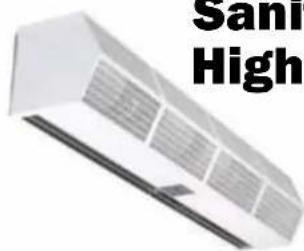
Sanri HighSanitation Certified High Performance 7 Air Curtain (Air Door)
WARNING: TO REDUCE THE RISK OF FIRE, ELECTRIC SHOCK OR INJURY TO PERSONS, OBSERVE THE FOLLOWING:
A. Read all instructions before installing or using this air curtain.
B. Use this unit only in the manner intended by the manufacturer and described in this manual. Any other use not recommended by the manufacturer may cause fire, electric shock, or injury to persons. If you have any questions, contact the manufacturer.
C. Before servicing or cleaning unit, switch power off at service panel and lock the service disconnecting means to prevent power from being switched on accidentally. When the service disconnecting means cannot be locked, securely fasten a prominent warning device, such as a tag, to the service panel.
D. Installation work and electrical wiring must be done by qualified person(s) in accordance with all applicable national and local codes having jurisdiction, including fire-rated construction. See page 7, ELECTRICAL CONNECTIONS (NEC Code ANSI/NFPA No. 70).
E. When cutting or drilling into wall or ceiling, do not damage electrical wiring and other hidden utilities.
F. To reduce the risk of fire, do not store or use gasoline or other flammable vapors and liquids in the vicinity of the air curtain.
G. This air curtain is hot when in use. To avoid burns, do not let bare skin touch hot surfaces. Keep combustible materials, such as furniture, pillows, bedding, papers, clothes, etc. and curtains at least 1 inch from the top, back, front, sides and at least 6 feet from the discharge of the air curtain.
H. Extreme caution is necessary when any air curtain is used by or near children or invalids, and whenever the heater is left operating unattended.
1. Do not operate any air curtain after it malfunctions. Disconnect power at the service panel and have the air curtain inspected by a reputable electrician before reusing.
J. To disconnect the air curtain, turn controls to "off", and turn off power to the air curtain circuit at main disconnect panel.
K. Do not insert or allow foreign objects to enter any ventilation or discharge opening as this may cause an electric shock or fire, or damage the air curtain.
L. To prevent a possible fire, do not block the air intake or discharge of the air curtain in any manner.
M. The air curtain has hot and arcing or sparking parts inside. Do not use it in areas where gasoline, paint, or flammable vapors or liquids are used or stored.
N. This heater may include an audible or visual alarm to warn that parts of the heater are getting excessively hot. If the alarm sounds (or illuminates), immediately turn the heater off and inspect for any objects on or adjacent to the heater that may have blocked the airflow or otherwise caused high temperatures to have occurred. DO NOT OPERATE THE HEATER WITH THE ALARM SOUNDING (OR ILLUMINATING).
I. UNCRATING
Carefully examine the carton(s) for damage. If the carton is damaged, immediately notify the shipping company. Do not delay in filing claim. If the air curtain(s) were shipped on wooden skids, remove protective wood and banding straps securing the carton(s) to the skid. Open the carton(s) and remove all protective packaging.
Immediately verify that the electrical rating nameplate located on the cover matches electrical power supply available. Retain the shipping carton(s) until the air curtain(s) are installed and properly operating.
ACCESSORIES:
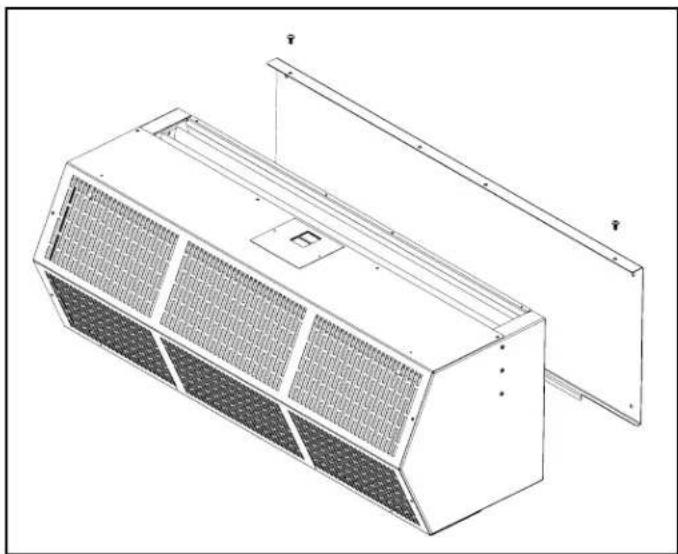
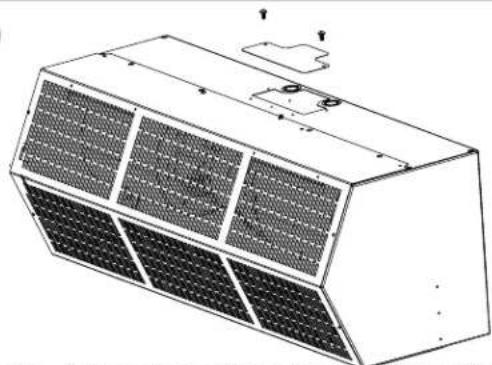
If the air curtain was ordered with a wall mounting plate, remove and save the two (2) locking screws from the back corners and detach the wall mounting plate. See Figure 1.
If the air curtain(s) were ordered with optional electrical accessories, the accessories will be found in the carton containing the air curtain or in a separate carton(s) accompanying the air curtain(s). Check all of the cartons/skids for accessories before discarding.
natural_image
Technical line drawing of a modular air duct or fan assembly (no text or symbols)Figure 1
BERNER AIR CURTAINS
Simple to Install Easy to operate & maintain
1
text_image
4" minimum side clearance from combustible material* 20° EXTERIOR 4" minimum* AIR Discharge Nozzle 6' minimum* Before hanging, check to see what the clearance is above the door. *Electrically Heated Units OnlyFor more information see page 4
2
text_image
Flush Mounting AIR CURTAIN 1" Top of Doorway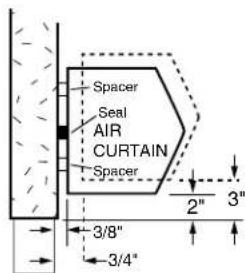
text_image
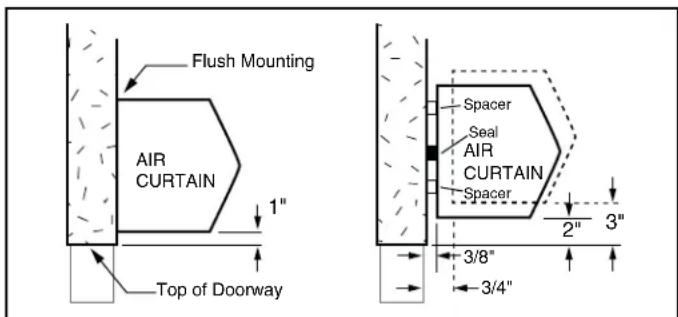
Spacer Seal AIR CURTAIN Spacer 3/8" 3/4"Rule of thumb – If the unit must be mounted higher than 1" above the opening, it must be spaced out from the wall 3/8" for every inch the unit is above the door opening.
For more information see page 4
3
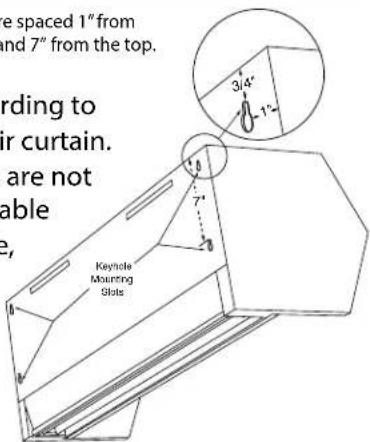
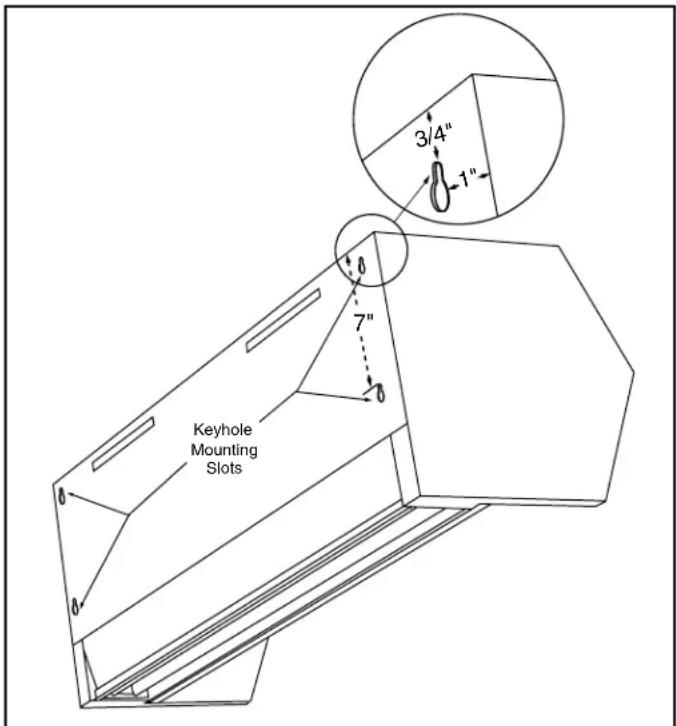
The keyhole slots are spaced 1" from the ends, and 3/4" and 7" from the top.
Mark the wall according to the length of the air curtain. If the keyhole slots are not located where suitable support is available, drill new holes in the back plate where space is available.
text_image
e spaced 1" from and 7" from the top. ording to ir curtain. are not able 2, Keyhole Mounting Slots4
text_image
1/4" Line-up Keyholes on All Screws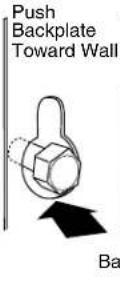
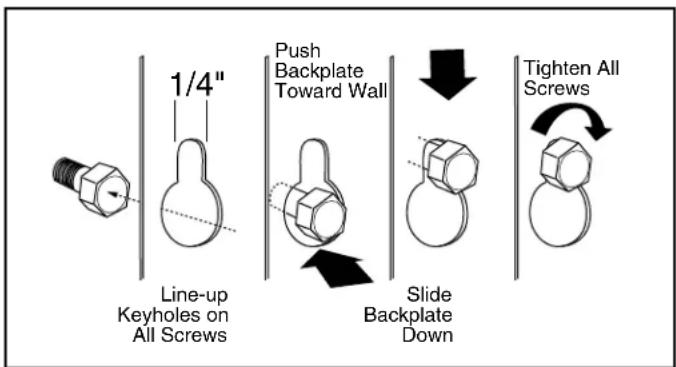
After installing the mounting hardware, lift and slip the air curtain over the mounting hardware by grasping the inlet rings. Tighten the mounting hardware.
For more information see page 5 For more information see page 5
5
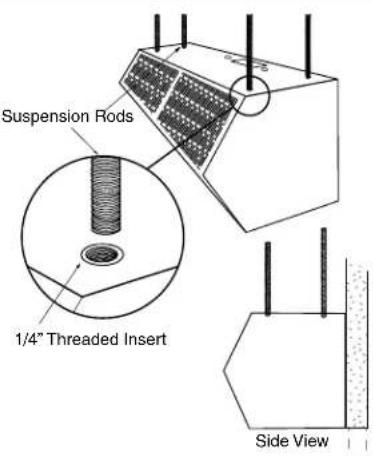
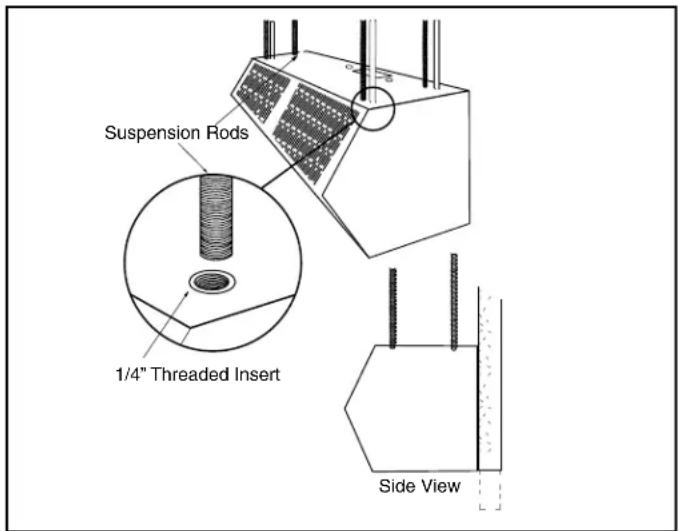
To use threaded rod to hang from the ceiling instead of the wall - use the factory installed threaded inserts.
text_image
Suspension Rods 1/4" Threaded Insert Side View6
natural_image
Technical line drawing of a multi-tiered industrial air duct or duct with grid-patterned panels and mounting brackets (no text or symbols)To wire – follow the wiring diagram (found inside wiring compartment). The controls ship in the same box as the air curtail
For more information see page 6 For more information see page 7
II. MOUNTING INSTRUCTIONS (General)
INDOOR MOUNTING - Environmental/ Insect/ Dust Control OUTDOOR MOUNTING (Unheated Only) - Insect/Dust Control
The Commercial High Performance 10 & the Sanitation Certified High Performance 7 Air Curtains are designed to be an effective barrier against cold drafts in the winter and hot air in the summer, flying insects and airborne contaminants.
To achieve optimum protection, the air curtain should be mounted on the inside of the building, flush to the wall and as close to the top of the door opening as possible. To ensure peak performance, keep the air stream free of obstructions.
The air curtain will not perform properly if negative air pressure exists in the building. Under these conditions, a means for makeup air to the building must be provided so that the air pressure on both sides of the opening is in balance.
Before mounting the air curtain, check the supporting structure to verify that it has sufficient load-carrying capacity to support the weight of the air curtain(s). The mounting hardware (supplied by others) should be capable of supporting a minimum of three (3) times the weight of the air curtain.
See Table 1 or Table 2.
IMPORTANT: A minimum of 4" is required above the top of the air curtain for the installation and removal of the inlet screen and access to electrical compartment.
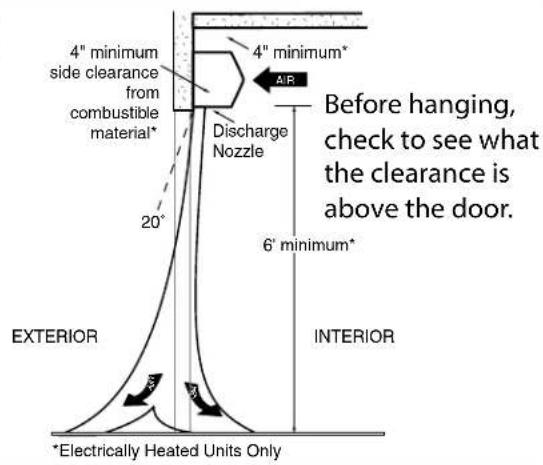
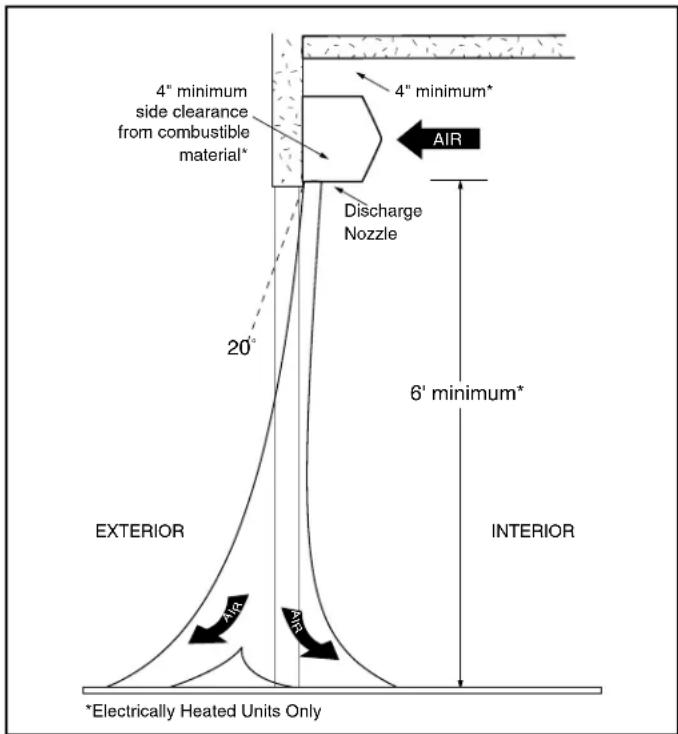
A. When determining the mounting location for the air curtain(s), make sure that nothing interferes with the curtain of air developed when the discharge vanes are directed from 0^ to 20^ toward the door opening. If the air stream strikes any obstruction (the top edge of the doorway, a door opening device, etc.), the effectiveness of the air curtain will be greatly reduced. See Figure 2.
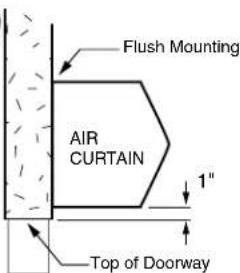
B. For optimum performance, the bottom of the air curtain (discharge nozzle) should be no more than 1" above the top of the door opening with the air curtain(s) mounted flush to the wall. If the air curtain must be mounted higher, it must be spaced out from the wall 3/8" for every inch the air curtain is above the door opening. See
Figure 3. For optimum protection, any void between the air curtain and the wall should be sealed along the full length of the air curtain.
C. Do not block (obstruct) the air intake grill. Insufficient airflow can cause the unit to overheat.
D. Electric heated air curtain(s) shall:
- Have a minimum clearance of at least 4" between the sides and top of the air curtain and any combustible material.
- Have a minimum clearance of at least 6' between the bottom of the air curtain and the floor.
- Be installed Indoors Only.
E. Proceed to either Section III - Wall Mounting or Section IV - Suspended Mounting
text_image
4" minimum side clearance from combustible material* 20° 4" minimum* AIR Discharge Nozzle 6' minimum* EXTERIOR INTERIOR *Electrically Heated Units OnlyFigure 2
| MODEL | Net Weight | MODEL | Net Weight | |
| CHD10 Ambient | CHD10 Electric | SHD07 Ambient | ||
| CHD10-10365 | 052SHD07-103650 | |||
| CHD10-10425 | 255SHD07-104252 | |||
| CHD10-10485 | 356SHD07-104853 | |||
| CHD10-10605 | 463SHD07-206070 | |||
| CHD10-20607 | 096SHD07-207284 | |||
| CHD10-207284 | 104 | SHD |  | |
| CHD10-2084 | 104 | 110 |  | |
| CHD10-2096 | 106 | 112 |  | |
| CHD10-3096 | 120 | 148 |  | |
| CHD10-2108 | 107 | 119 | TABLE 2 - SHD07 Unit Weight | |
| CHD10-3108 | 150 | 156 | ||
| CHD10-2120 | 108 | 126 | ||
| CHD10-3120 | 152 | 159 | ||
TABLE 2 -
SHD07 Unit Weight
TABLE 1 - CHD10 Unit Weight
text_image
Flush Mounting AIR CURTAIN 1" Top of Doorway Spacer Seal AIR CURTAIN Spacer 2" 3" 3/8" 3/4"Figure 3
III. WALL MOUNTING
If a wall mounting plate was ordered with the air curtain, proceed to B. Wall Mounting – using the wall mounting plate (sold separately), otherwise proceed:
A. WALL MOUNTING - without wall mounting plate
- Making sure that the air curtain is centered over the opening, determine the exact mounting location of the air curtain.
NOTE: A minimum of 4" is recommended above the air curtain to provide clearance for installation and removal of the cover housing. - Remove the screen by removing screws from the top, bottom and front of the air curtain, and slide the screen away from the blower assembly.
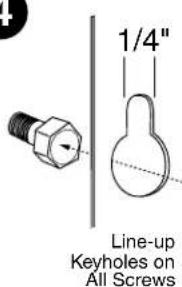
- The air curtain is equipped with four 1/4" keyhole mounting slots on the back of each unit for wall mounting. The slots are spaced 1" from the ends, and 3/4" and 7" from the top. See Figure 4.
- Mark the wall according to the length of the air curtain. The wall must provide sufficient support for the air curtain. If the keyhole slots are not located where suitable support is available, drill new holes in the unit back plate where space is available.
- The mounting hardware (supplied by others) must be capable of supporting a minimum of three times the net weight of the air curtain. See Weight Chart, Table 1 or Table 2.
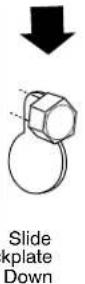
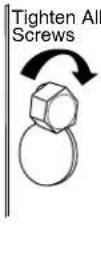
- Keyhole Mounting: Install the mounting hardware (supplied by others), allowing for space to hang the air curtain by not fully tightening. Without touching the blower wheels, lift and slip the air curtain over the mounting hardware by grasping the inlet rings of the blower housing. Tighten the mounting hardware. See Figure 5.
- Drilled Mounting Holes: Lift the air curtain by grasping the inlet rings on the blower housing, without touching the blower wheels, and install the mounting hardware (supplied by others) through the drilled holes.
- Reinstall the screen using hardware removed in Step 2.
- Proceed to Section V - Electrical Connections.
text_image
Keyhole Mounting Slots 7" 0 0 0 3/4" 1"Figure 4
text_image
1/4" Line-up Keyholes on All Screws Push Backplate Toward Wall Slide Backplate Down Tighten All ScrewsFigure 5
B. WALL MOUNTING – using the wall mounting plate (sold separately)
1. PREPARATION
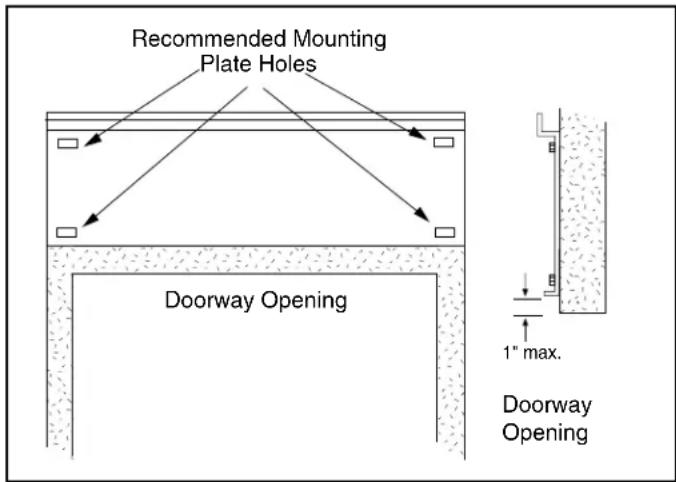
a. Position and center the mounting plate over the door opening. The mounting plate must be positioned with the "Z" lip on top. Drill mounting holes on the mounting plate. See Figure 6.
b. Mark the wall in the center of each mounting plate hole. The wall must provide sufficient support for the air curtain. The mounting hardware (supplied by others) must be capable of supporting a minimum of three times the net weight of the air curtain. See Weight Chart, Table 1 or Table 2. If the location of the marks on the wall do not provide suitable support, mark and drill additional holes.
c. Drill the four holes as marked on the wall and attach the mounting plate with anchors (if used) and the four mounting screws (provided by others).
2. ATTACHING THE AIR CURTAIN TO THE MOUNTING PLATE
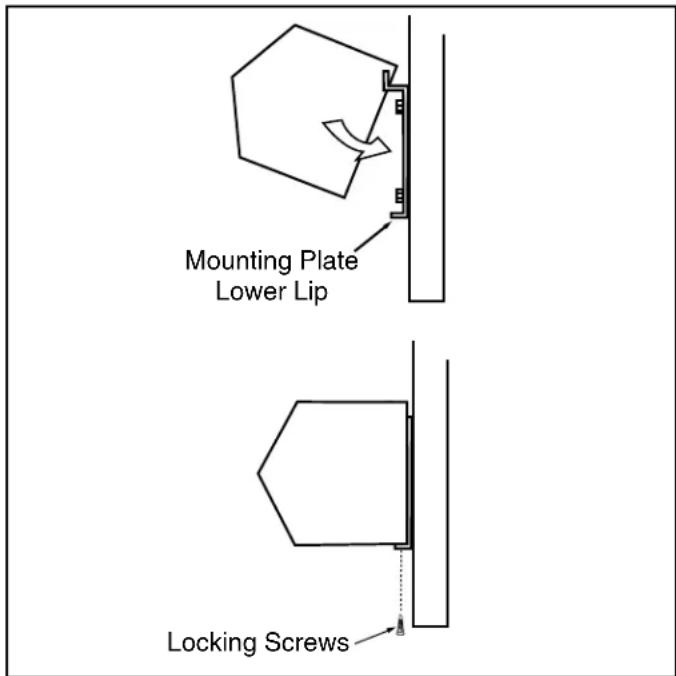
a. Raise the air curtain over the door (air discharge nozzle facing down) and on to the mounting plate. First, tilt the unit upward matching the rectangular openings to the "Z" lip on the mounting plate. See Figure 7.
b. Lower the air curtain into place, allowing it to rest on the lower lip of the mounting plate.
c. After the air curtain is securely attached to the mounting plate, re-install the two (2) locking screws at the bottom corners. See Figure 7.
IV. SUSPENDED MOUNTING
A. For top mounting using suspension rods, four (4) factory installed 1/4" threaded inserts are located in the top of the air curtain. See Figure 8.
B. Install 1/4" threaded rods, or other suitable hardware at a location with sufficient support for the air curtain. The mounting hardware (supplied by others) must be capable of supporting a minimum of three times the net weight of the air curtain. See Weight Chart, Table 1 or Table 2.
C. Attach threaded rods, or other suitable hardware to the top mounted threaded inserts.
D. Proceed to Section V - Electrical Connections
text_image
Recommended Mounting Plate Holes Doorway Opening 1" max. Doorway OpeningFIGURE 6 - Positioning of Mounting Plate
text_image
Mounting Plate Lower Lip Locking ScrewsFIGURE 7
text_image
Suspension Rods 1/4" Threaded Insert Side ViewFIGURE 8 - Suspended Mounting
V. ELECTRICAL CONNECTIONS
All electrical wiring and connections MUST be performed by qualified personnel in accordance with the latest edition of the National Electrical Code ANSI/NFPA No. 70 or, in Canada, the Canadian Electrical Code, Part 1-C.S.A. Standard C22.1 and local codes and regulations.
MAKE SURE THE CORRECT
VOLTAGE AS MARKED ON THE UNIT IS USED.
A. A separate line voltage supply with a suitable branch circuit protection device should be run directly from the main electrical panel to the unit. A disconnect switch for each branch circuit is a required part of this installation. See the voltage label on the unit for circuiting and total electrical load. The wiring diagram is located in the wiring compartment.
B. All field wiring must be copper with a minimum insulation of 60^ C within approved conduit. If any of the wire supplied with the unit must be replaced, it must be replaced with copper wiring with a minimum insulation of 90^ C.
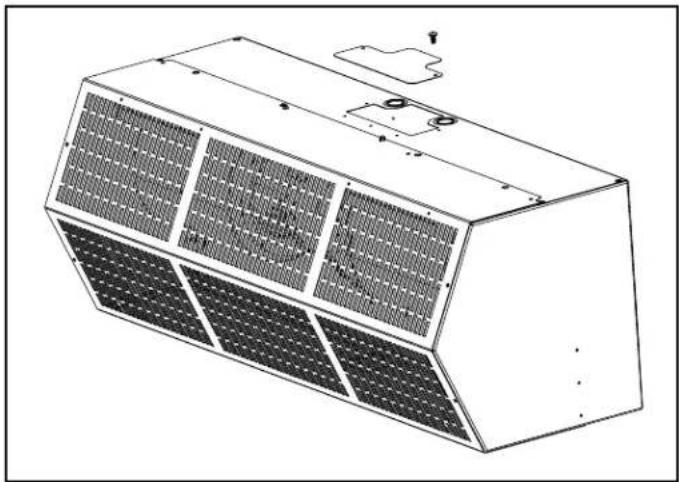
C. Remove the wiring compartment cover on top of the air curtain. See Figure 9.
D. The top of the air curtain has knockouts on each side of the wiring compartment. Remove the required knockout and connect the power supply to the air curtain. Connect all supply and control circuit wires according to the wiring diagram provided.
NOTE: For Electrically heated air curtains provided with the optional remote thermostat, mount and wire the thermostat according to thermostat instructions and wiring diagram.
For Electrically heated air curtains proceed to Section V - Field Connections, otherwise proceed to Section VI - Airflow Adjustments
VI. FIELD CONNECTIONS
A. ELECTRICALLY HEATED MODELS
The heater circuit may be controlled by a remote thermostat, manually through a unit mounted or remote mounted three position - fan only/off/fan with heat switch. Overheating protection is provided by auto reset thermal cutouts built into the blower assembly (see wiring diagram). Proceed to Section VII - Operating Instructions.
natural_image
Technical line drawing of a multi-tiered solar panel array mounted on a rectangular base (no text or symbols)FIGURE 9
VII. OPERATING INSTRUCTIONS
Air curtain operation may be divided into four areas: control package, fan activation, fan speed selection, and heat activation. Depending on the type of controls ordered one or more of the following may be applicable. The air curtain must be properly installed before it is used.
- Control packages control the air curtain's sequence of operation. Unit modes/control packages are built into the unit and may not be changed in the field. Refer to your wiring diagram for specifics about activation connections and sequence of operation.
a. Basic Control Package – The unit is activated by a door or selector switch. Either switch may be line voltage or low voltage (24V).
b. Deluxe Control Package – The unit is activated by a door or selector switch, but has a factory installed time delay allowing the unit to keep running for a period of time after the door closes.
c. Comfort Plus Control Package – Available only on heated units, the unit is activated by a door or selector switch AND a thermostat to provide supplemental heating. NOTE: Not available with 575V motors.
- Unheated air curtains will have the fans activated by a door or selector switch or sensor. The unit may be single speed and require no fan speed selector (On/Off), or may have three fan speeds which require either a unit or remote mounted switch (Off, High, Med, Low).
- Heated air curtains will have fans activated by a door or selector switch or sensor, but may also be activated by the thermostat in Comfort Plus Mode. The unit has three fan speeds which can be set by either a unit or remote mounted switch (Low, Med, High, Off, Low heat, Med Heat, High Heat).
- Heat activation is controlled by either a unit or remote mounted thermostat, and a unit or remote mounted switch.
B. AIR STREAM ADJUSTMENT
- With the air curtain operating and the door in its full open position, check to see that nothing is obstructing the airflow at the discharge nozzle vanes.
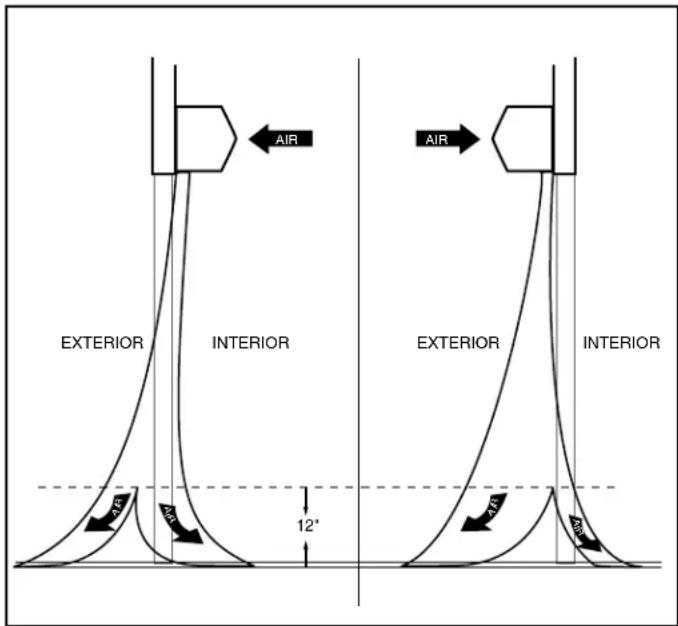
- Find the air stream split location. Hold a handkerchief by its corners, approximately 12" above the floor. Gently move the handkerchief back and forth in the doorway. Make sure the air is being directed to both the inside and the outside. See Figure 10. The split location is indicated where the handkerchief is vertical with minimal or no fluttering.
- The split location should be approximately 3" outside the doorway. If necessary adjust the discharge nozzle vanes by de-energizing the unit, loosening the nozzle vane locking screws and adjusting vanes.
text_image
AIR EXTERIOR INTERIOR AIR 12° AIR EXTERIOR INTERIOR AIRFIGURE 10
VIII. MAINTENANCE & CLEANING
CAUTION: ELECTRIC SHOCK HAZARD Disconnect power whenever servicing unit. More than one disconnect may be required to de-energize unit.
Keep your air curtain operating at peak efficiency by cleaning the blower wheels, motor(s) and intake grill. Buildup of dust on the blower wheels can cause vibration, noise and excessive wear on the motor bearings. The frequency of cleaning will depend on the environment where the unit is operating.
Dirty, dusty or greasy environments could require a cleaning schedule of once every two months. If the environment is not that dirty, the unit(s) should be scheduled for cleaning a minimum of once every (6) months.
A. PERFORMING PREVENTIVE MAINTENANCE
-
Disconnect and lockout power to the unit.
-
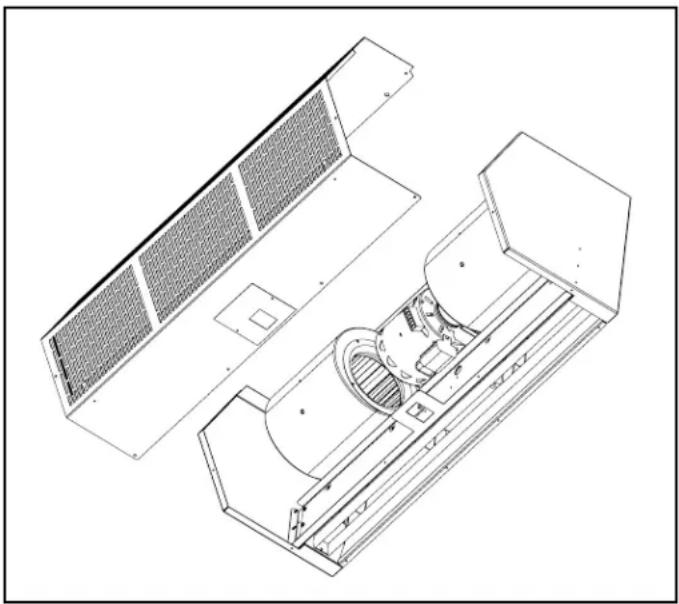
Remove the intake screen by removing the machine screws located around the bottom, front and top of the screen See Figure 11.
- Vacuum and scrape (if necessary) to remove the build-up of dirt and debris. The motor(s) are permanently lubricated and require no additional lubrication. Re-install the cover and intake grill.
- Switch the power on after cleaning.
CAUTION: STAND CLEAR OF THE UNIT OR WEAR SAFETY GOGGLES AS LOOSE DEBRIS MAY BE PRESENT AND MAY EXIT THE NOZZLE.
IX. SERVICE
Any service performed on the air curtain MUST be done by qualified personnel.
Berner air curtains require very little servicing. All parts are easily accessible for periodic inspection and maintenance. Units should be cleaned at least twice a year. Your particular application (the amount of dirt and dust in the air) and location of the unit(s) will determine how often your unit(s) will need to be cleaned and serviced. All motors have permanently lubricated, sealed, sleeve bearings and require no maintenance.
natural_image
Technical line drawing of a mechanical assembly with internal components (no text or symbols)FIGURE 11
X. TROUBLESHOOTING
| SYMPTOMS | CAUSE | REMEDY |
| NO AIRFuse blown/circuit breaker trippedMotor overload trippedFailed switchBroken or fan hub | Electrical Power supply line open (no power)Replace fuse(s)/reset breakerReplace fuse(s)/reset breakerReplace switch | Check power source, check method of control in ON positionInternally protected motor - should reset automatically after cool-down, if not replace motor. |
| UNING/FANS ARE NOT ROTATINGReplace fanShaft rotating inside fanBroken/Loose coupling | Tighten set screws/tighten fan on shaftReplace/Tighten coupling | |
| ELECTRICAL CONTROLS NOT FUNCTIONING WHEN DOOR IS OPENSelector switch is in off positionDoor limit switch not operating | Turn switch to "ON" positionRepair or replace limit switch | |
| MINIMUMBlower motor operates below speedFan rubbing against housing | Air directional discharge vanes misadjustedInadequate intake clearanceProvide adequate space for air curtainImprove voltageFree fan from housingFan wheels clogged with dirt | Adjust vanes to proper position, see instructionsMove air curtain or remove obstructionClean and vacuum fan wheels |
| AIR IS NOT HITTING FLOOR | Air stream too weakAir stream hits obstructionNegative pressure | Adjust nozzle to proper position, adjust motor speed;see installation instructionsRemove obstruction or reposition air curtain (move out 38 " for every 1" up from the door)Relieve negative pressure by providing make-up air |
| UNEVEN AIR | Shaft rotating inside fanOne motor not operating | Tighten set screws/Replace fanRepair or replace motor/Check electrical connections |
| EXCESSIVE AIR MOVEMENT AT DOORWAY | Nozzle not angled out far enoughAir movement too coldPushing air outside buildingSEE AIR IS NOT HITTING FLOOR SYMPTOMS | Adjust nozzle angle to outsideAdd auxiliary heat to overcome wind chillAdjust discharge angle back into building |
| ELECTRICALLY HEATED MODELS | ||
| NO HEAT | Switch turned to "OFF" positionThermostat not set properlyCoils burned out due to lack of airAutomatic reset thermal cutout failed in open positionManual reset thermal cutout trippedDefective switch | Turn switch onChange thermostat settingCorrect airflow problem; replace coilsReplace automatic thermal cutoutReset manual thermal cutoutReplace switch |
| NOT ENOUGH HEAT | Thermostat in wrong location - thermostat too close to dischargeImproper voltageThermostat not set properly | Move thermostat away from air streamSupply proper voltageChange temperature setting |
| TOO MUCH HEAT | Thermostat in wrong locationThermostat not set properlyInsufficient air over coilImproper voltage | Move thermostat closer to air streamChange temperature settingRemove restriction on intakeSupply proper voltage |
XI. WARRANTY
Berner International ("The Company") warrants all new equipment to be free of defects in workmanship and material for a period of five years (5 years) on unheated models and two years (2 years) on heated models from the original date of shipment, provided the equipment has been properly cared for, installed and operated in accordance with the limits specified on the nameplate and The Company's instructions.
The Company will correct by repair or replacement, at its option and expense, any proven defects in said apparatus, subject to the above conditions, provided that immediate written notice of such defects is given to The Company. The warranty does not include any labor incurred for the removal or installation of defective part(s). The Company reserves the right to inspect, or have inspected by a qualified representative, any apparatus at the place of installation before authorizing repair or replacement. Repair or replacement will be made F.O.B. factory with any applicable transportation charges to be borne by the customer. Merchandise not of The Company's manufacture supplied in piece, or in component assemblies, is not covered by the above warranty, but The Company will give the customer the benefit of any adjustment as made with the Manufacturer.
This warranty is void if the apparatus has been tampered with in any way or shows evidence of misuse.
The Company will not assume any expense or liability for repairs made outside its factory without proper written consent from its service manager, nor for any transportation charges on apparatus returned to the factory without written authorization by The Company.
Nothing in the above warranty provisions, however, shall impose any liability or obligation of any type, nature or description upon Berner International if Berner has not received payment in full for the apparatus in question.
THERE ARE NO WARRANTIES WHICH EXTEND BEYOND THE DESCRIPTION ON THE FACE HERE OF INCLUDING THE IMPLIED WARRANTY OF MERCHANTABILITY AND FITNESS FOR A PARTICULAR PURPOSE.
LIMITATION OF DAMAGES
Notwithstanding anything to the contrary above, customer's exclusive remedy for any and all losses or damages resulting from the sale of The Company's equipment under this agreement, including but not limited to, any allegations of breach of warranty, breach of contract, negligence or strict liability, shall be limited, at The Company's option, to either the return of the purchase price or the replacement of the particular equipment for which a claim is made and proved. In no event shall The Company be liable for any special, consequential, incidental or indirect losses or damages from the sale of The Company's equipment under this agreement.
SERIAL NUMBER MODEL NUMBER DATE PURCHASED

text_image
BERNER® AIR CURTAINSSaving energy and creating healthy, comfortable environments
BERNER INTERNATIONAL
New Castle, Pennsylvania
724-658-3551 • 1-800-245-4455 • www.Berner.com
Berner reserves the right to alter specifications without prior notice.
© Copyright 2020 Berner International

MADE IN U.S.A.
