
FDB 2004-E - Sander Fieldmann - Free user manual and instructions
Find the device manual for free FDB 2004-E Fieldmann in PDF.


| Product Type | Random Orbital Sander |
| Brand | Fieldmann |
| Model | FDB 2004-E |
| Power Supply | 230 V ~ 50 Hz |
| Power Consumption | 200 W |
| Orbital Diameter | 2 mm |
| Speed Range (No Load) | 6000 - 12000 rpm |
| Variable Speed | Yes (thumbwheel) |
| Dust Collection | Built-in dust bag + external vacuum adapter |
| Sanding Pad Size | 125 mm (5 in.) |
| Pad Type | Velcro (hook-and-loop) |
| Dimensions (L x W x H) | 260 x 120 x 150 mm |
| Weight | 1.2 kg |
| Cable Length | 2 m |
| Protection Class | II (double insulated) |
| Soft Grip Handle | Yes (ergonomic, non-slip) |
| Accessories Included | Sanding paper (3 pcs), dust bag, vacuum adapter |
| Maintenance | Clean dust filter regularly, replace worn sandpaper |
| Spare Parts Availability | Sandpaper, dust bag, carbon brushes |
| Safety Features | Double insulation, lock-on button, dust extraction |
Frequently Asked Questions - FDB 2004-E Fieldmann
User questions about FDB 2004-E Fieldmann
0 question about this device. Answer the ones you know or ask your own.
Ask a new question about this device
Download the instructions for your Sander in PDF format for free! Find your manual FDB 2004-E - Fieldmann and take your electronic device back in hand. On this page are published all the documents necessary for the use of your device. FDB 2004-E by Fieldmann.
USER MANUAL FDB 2004-E Fieldmann
natural_image
Abstract black and white spiral pattern with no text or symbolsFIELDMANN®
Home & Garden Performance

natural_image
Exterior view of a Fieldmann electric power tool (no text or symbols on the device body)FDB 2004-E
FIG. A & B

FIG. C
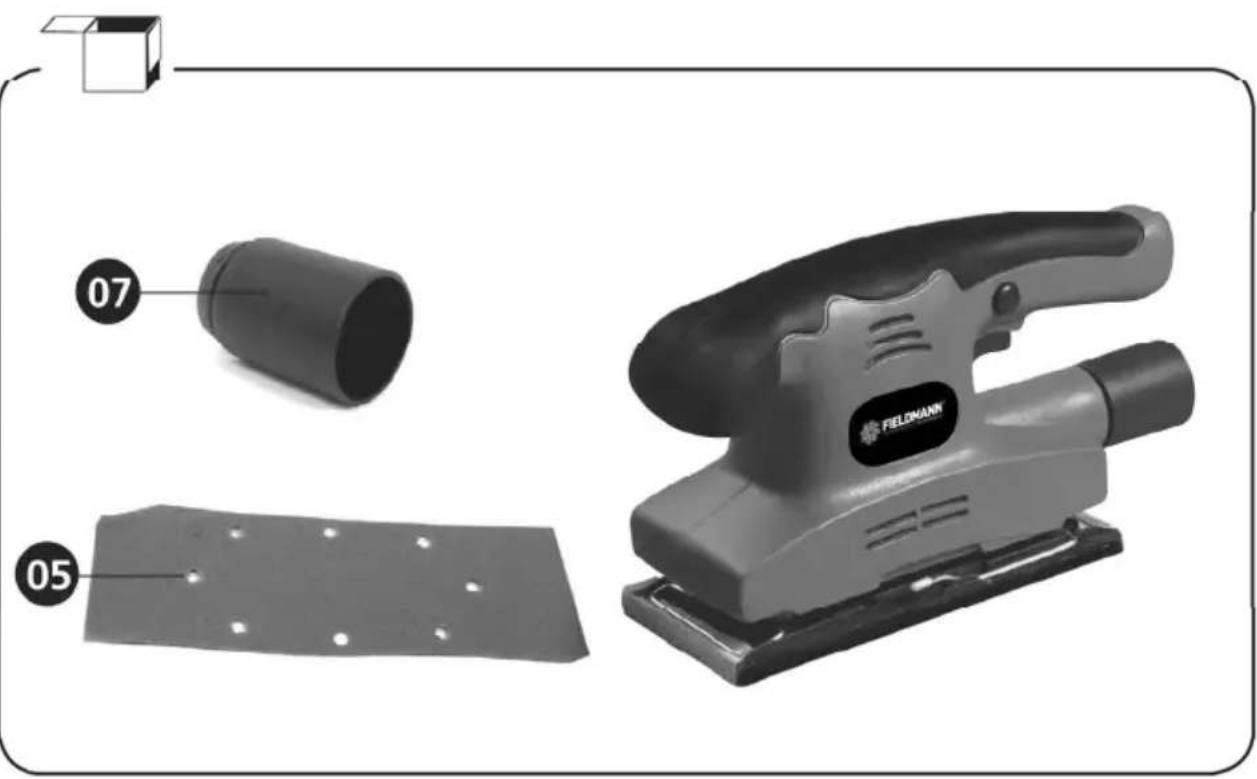
FIG. D

FIG. E

natural_image
Hand using a power tool on a wooden cutting board, with arrows indicating direction (no text or symbols)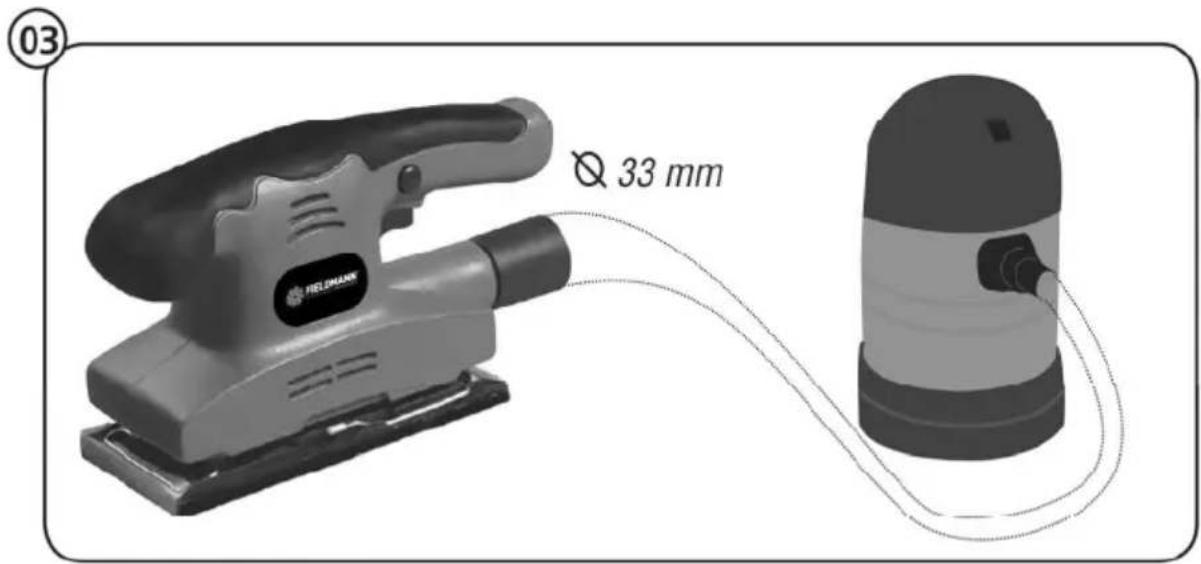
Finishing sander INSTRUCTION MANUAL
Thank you for your purchase of the finishing sander. For your personal safety, read and understand the Instruction Manual before using. Keep the Instruction Manual in a safe place for future reference.
CONTENTS
- GENERAL SAFETY INSTRUCTIONS 8
- SYMBOLS 13
- GENERAL DESCRIPTION 14
- TECHNICAL SPECIFICATIONS 15
- DISPOSAL 17
1. GENERAL SAFETY INSTRUCTIONS
⚠ WARNING! Carefully read the instruction manual before use.
Important safety warnings
* Unpack the product carefully and be sure not to throw away any part of the package before having found all components of the product.
* Keep the product in a dry place out of reach of children.
Read all cautions and instructions. The failure to adhere to warning cautions and instructions may result in an accident, fire and/or a serious injury.
Packaging
The product is placed in a package preventing damage during transport. This package is a raw material therefore it can be handed-over for recycling.
Instructions for use
Before beginning to work with the machine, read the following safety rules and instructions for use. Familiarize with operating elements and the proper use of the device. Keep the manual in a safe place for future reference. We recommend keeping the original package including the inner packaging materials, cash voucher and guarantee card for a period of warranty at minimum. For a case of transportation, pack the machine into the original box from the manufacturer, thus ensuring a maximum protection of the product during a possible transport (e.g. moving or sending into a service station)..

Note: If you hand the machine over to next persons, hand it over together with the manual. Adherence to the attached instructions for use is a precondition for the proper use of the machine. The operation manual includes also instructions for operation, maintenance and repairs.
The manufacturer does not take any responsibility for accidents or damages resulting from the failure to adhere to this manual.
Carefully read, remember and keep these safety instructions
⚠ WARNING! In the use of electric machines and power tools, it is necessary to respect and follow the following safety instructions for the reasons of protection against electric shock, personal injury and danger of fire. The term "power tool" in the instructions below refers both to mains-operated (corded) power tool or battery-operated (cordless) power tool. Save all warnings and instructions for future reference.
Workplace
* Keep the work area clean and well lit. Cluttered or dark areas in the workplace invite accidents. Store power tools that you don't currently use.
Do not operate power tools in environments with danger of occurrence of a fire or explosion, such as in the presence of flammable liquids, gases, or dust. Power tools create sparks which may ignite the dust or fumes.
Keep unauthorised persons, especially children, away from the work area while operating a power tool! Distractions can cause you to lose control over the performed activity. In no event leave your power tool unattended. Keep the equipment away from animals.
Electrical Safety
Power tool plugs must match the mains socket outlet. Never modify the plug in any way. Do not use any adapter plugs with earthed (grounded) power tools. Undamaged plugs and matching outlets will reduce risk of electric shock. Damaged or fouled supply cables increase the risk of electric shock. If the power cord is damaged, it must be replaced by a new power cord which is available at the authorised service centre or the importer.
* Avoid body contact with earthed or grounded surfaces such as pipes, radiators, cooking ranges and refrigerators. There is an increased risk of electric shock if your body is earthed or grounded.
Do not expose power tools to rain or wet conditions. Never touch the power tool with wet hands. Never wash the power tool under running water or immerse it in water.
* Never use the supply cable for other than intended purposes. Never use the cord for carrying or pulling the power tool. Never unplug the plug from the outlet by pulling the cable. Keep electric cables away from sharp or hot objects to prevent mechanical damage.
The power tool was designed to be powered solely by alternating electric current. Always check if the electric voltage matches the information specified in the type label of the power tool.
* Never use power tool with damaged electric cable or plug or which has been dropped or is in any way damaged.
If an extension cord is used, always check whether its technical parameters match the information specified in the type label of the power tool. When operating a power tool outdoors, use an extension cord suitable for outdoor use. If extension drums are used, these must be rolled out to prevent overheating of the cord.
If a power tool is operated in a damp location or outdoors, its operation is only permitted if connected to an electric circuit protected by a residual current device <30 mA. Use of residual current device (RCD) reduces the risk of electric shock.
Hold the power tool by insulated gripping surfaces only as the cutting or drilling tool may contact hidden wiring or its own power cord during operation.
Personal Safety
Be careful, stay alert and watch what you are doing when operating a power tool.
Concentrate on your work. Do not use a power tool while you are tired or under the influence of drugs, alcohol or medication. A moment of inattention while operating power tools may result in serious personal injury. Do not eat, drink and smoke while operating a power tool.
Use personal protective equipment. Always wear eye protection. Use protective equipment corresponding to the type of work you are doing. Protective equipment such as dust mask, non-skid safety shoes, hard hat, or hearing protection used in accordance with the working conditions will reduce the risk of personal injury.
* Prevent unintentional starting. Do not carry the power tool while it is energised or with your finger on the switch or trigger. Ensure the switch or trigger is in the "off" position before connecting to power source. Carrying power tools with your finger on the switch or energising power tools that have the switch on may result in serious injuries.
Remove any adjusting key or wrench before turning the power tool on. An adjusting wrench or a key left attached to a rotating part of the power tool may result in personal injury.
Keep proper footing and balance at all times. Do not overreach. Never overestimate your own capabilities. Never use power tools while you are tired.
* Dress properly. Wear work clothes. Do not wear loose clothing or jewellery. Keep your hair, clothing, gloves and other part of your body away from moving or hot parts of the power tool.
Connect the equipment to dust exhaustion. If the tools are provided for the connection of dust collection or exhaustion devices, ensure these are properly connected and used. Use of such devices can reduce dust-related hazards.
* Fix the work-piece tightly. Use a cabinet clamp or a cramp to fix the work-piece you are about to machine.
* Never use power tools if you are under the influence of alcohol, drugs, medication or other narcotic or addictive substances.
This equipment is not intended for use by persons (including children) with limited physical, sensual or mental capacities or lack of experience or knowledge unless they are supervised or instructed about the use of the equipment by a person responsible for their safety. Children must be supervised to make sure they are not playing with the equipment.
Power Tool Use and Maintenance
Always disconnect the power tool from the mains in case of any problem during the work, before cleaning the power tool or its maintenance, during each transportation and after the completion of the work! Never operate a power tool if it is damaged in any way.
Immediately stop working if the power tool generates abnormal noise or smell.
Do not overload the power tool. The power tool will operate better and safer if it is used at the rate for which it was designed. Use correct power tool which is intended for the given activity. The correct power tool will do the job it was designed for better and safer.
Do not use the power tool if it cannot be safely turned on and off using the control switch. Use of such power tool is dangerous. Defective switches must be repaired by a certified service provider.
* Disconnect the tool from the power source before making any adjustments, changing accessories or maintenance. Such preventive safety measure prevents the risk of starting the power tool accidentally.
Store idle power tools out of the reach of children and unauthorised persons. Power tools can be dangerous in the hands of untrained users. Store the power tools in a dry and safe place.
* Keep the power tool in good condition. Check the adjustment of moving parts and their mobility. Check for any damage to the protective guards or other parts which could affect safe operation of the power tool. If damaged, have the power tool properly repaired before further use. Many accidents are caused by poorly maintained power tools.
* Keep cutting tools sharp and clean. Properly maintained cutting tools with sharp cutting edges facilitate work, reduce the risk of injury and are easier to control. Use of accessories other than those specified in the instructions for use could result in damage to the power tool and cause injuries.
Use the power tool, accessories and tool bits etc. in accordance with these instructions and in the manner intended for the particular type of power tool taking into account the working conditions and the work to be performed. Use of the power tool for purposes other than those the power tool was intended for could result in hazardous situations.
Service
Do not replace parts of the power tool, do not make any repairs or interfere in any way with the construction of the power tool. Have your power tool repaired by qualified repair persons.
* Any repair or modification of the product without our company's authorisation is impermissible (it could cause injury or damage to the user).
* Always have your power tool repaired in a certified service centre. Use only original or recommended replacement parts. This will ensure that your safety and the safety of your power tool is maintained.
2. SYMBOLS

The product complies with the applicable standards and regulations.

Read the Instruction Manual attentively prior to use.

Double-insulated.

Use eyes protective equipment

Use ears protectiove equipment

Wear a breathing mask.
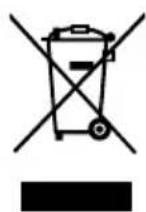
Subjected to recycling
3. GENERAL DESCRIPTION
Sanders are used to sand wood and similar products, painted surfaces, metal, stone, etc. There are sanders of various different shapes in order to do specific jobs:
The vibrating sander recommended for sanding flat surfaces such as doors or furniture. Move the sander slowly and regularly, in the direction of the wood fibres.
DESCRIPTION AND LOCATION OF MACHINE PARTS
FIG. A & B
- On/off switch
- Sanding board
- Dust collector
- Grip handle
- Ventilator intake
CONTENTS OF BOX
FIG.C
Finishing sander
- Sandpaper
- Dust collector
ASSEMBLING THE MACHINE
FIG. D
- Sandpaper fitting
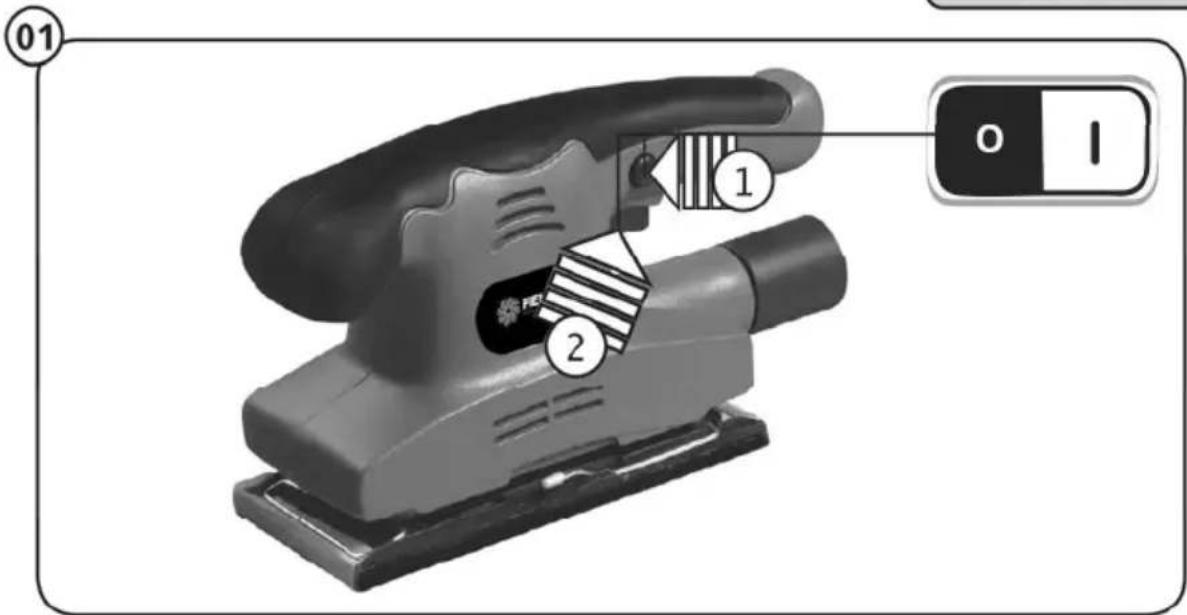
FUNCTIONS OF THE MACHINE
FIG. E
- Start-up of the machine
- Movement to use
- Connection to a vacuum cleaner
REPLACING CONSUMABLES
- Changing sandpaper (FIG D)
- Changing carbons For possible carbon replacement, please contact your dealer.
MAINTENANCE, RECOMMENDATIONS AND ADVICE
- Keep the machine and ventilation intakes dust-free
- Warning, sanding plaster can seriously damage the machine
4. TECHNICAL SPECIFICATIONS
| FINISHING SANDER | |
| Nominal frequency and power | AC230V/50Hz |
| Nominal power: | 150W |
| No-load speed: | 11000rpm |
| Acoustic pressure level: | 83dB(A) |
| Hand/arm vibration level | 2,115 m/s ^2 |
| Acoustic power level | 94dB(A) |
| Insulation class | II |
| Weight | 1.6kg |
Instructions Manual - language version only.
Amendments to text and technical parameters are reserved.
Changes in the text, design and technical specifications may change without prior notice and we reserve the right to make these changes. keep it from turning as the drill bit rotates.
Troubleshooting
Suspected malfunctions are often due to causes the user can fix themselves. Therefore check the product using this section .In most cases the problem can be solved quickly .
WARNING!
Only perform the steps described within these instruction s! All further inspection ,maintenance and repair work must be performed by an authorized service centre or a similarly qualified specialist if you cannot solve the problem yourself !
| Problem | Possible Cause | Solution |
| 1. Product does not start | 1.1 Not connected to power supply1.2 Power cord or plug is defective1.3 Other electrical defect to the product | 1.1 Connect to power supply1.2 Check by a specialist electrician1.3 Check by a specialist electrician |
| 2. Product does not reach full power | 2.1 Extension cord is not suitable for operation with this product.2.2 Power source (e.g. generator) has too low voltage2.3 Air vents are blocked | 2.1 Use a proper extension cord2.2 Connect to another power source2.3 Clean the air vents |
| 3. Unsatisfactory result | 3.1 Disk bit is dull/damaged3.2 Disk bit is not suitable for work piece material | 3.1 Replace with new one3.2 Use proper drill bit |
| 4. Excessive vibration or noise | 4.1 Disk bit is dull/damaged4.2 Bolts/nuts are loose | 4.1 Replace with a new one4.2 Tighten bolts/nuts |
5. DISPOSAL
INSTRUCTIONS AND INFORMATION ON DISPOSAL OF USED PACKAGING
Put any used package material to the place determined by the municipality for waste disposal.
DISPOSAL OF USED ELECTRIC AND ELECTRONIC EQUIPMENT

This symbol on products or accompanying documents means that used electric or electronic products must not be put to ordinary municipal waste. Hand over such products to determined collection points for proper disposal, restoration and recycling. Alternatively, in some countries of the European Union or other European countries you can return your products to your local dealer when you buy an equivalent new product. By dutiful disposal of this product you can preserve precious natural resources and you help prevent any potential adverse effects on the environment and human health which could be the results of wrong waste disposal. Ask your local authority or the nearest collection point for additional details. In case of improper disposal of this waste kind penalties can be imposed in accordance with national regulations.
FOR COMPANIES IN THE EUROPEAN UNION COUNTRIES
Should you want to dispose of electric and electronic devices, ask your dealer or vendor for necessary information.

DISPOSAL IN OTHER COUNTRIES OUTSIDE THE EUROPEAN UNION
Should you want to dispose of this product, ask your local authorities or your dealer for necessary information about disposal method
This product fulfils all basic requirements of the EU directives that apply to it.
Text, design and technical specifications can change without prior notice and we reserve the right for their change.


- FIELDMANN®
- Finishing sander INSTRUCTION MANUAL
- CONTENTS
- GENERAL SAFETY INSTRUCTIONS
- Important safety warnings
- Packaging
- Instructions for use
- Carefully read, remember and keep these safety instructions
- Workplace
- Electrical Safety
- Personal Safety
- Power Tool Use and Maintenance
- Service
- SYMBOLS
- GENERAL DESCRIPTION
- DESCRIPTION AND LOCATION OF MACHINE PARTS
- A & B
- CONTENTS OF BOX
- FIG.C
- ASSEMBLING THE MACHINE
- D
- FUNCTIONS OF THE MACHINE
- E
- REPLACING CONSUMABLES
- MAINTENANCE, RECOMMENDATIONS AND ADVICE
- TECHNICAL SPECIFICATIONS
- Troubleshooting
- WARNING!
- DISPOSAL
- INSTRUCTIONS AND INFORMATION ON DISPOSAL OF USED PACKAGING
- DISPOSAL OF USED ELECTRIC AND ELECTRONIC EQUIPMENT
- FOR COMPANIES IN THE EUROPEAN UNION COUNTRIES
- DISPOSAL IN OTHER COUNTRIES OUTSIDE THE EUROPEAN UNION
Brand : Fieldmann
Model : FDB 2004-E
Category : Sander