
Wi-Fi BackupCamera - Camcorder Rand McNally - Free user manual and instructions
Find the device manual for free Wi-Fi BackupCamera Rand McNally in PDF.


| Product Type | Wi-Fi Backup Camera System |
| Brand | Rand McNally |
| Model | Wi-Fi BackupCamera |
| Connectivity | 2.4 GHz Wi-Fi |
| Video Resolution | 720p HD |
| Night Vision | Infrared LEDs, up to 10 meters |
| Viewing Angle | 120 degrees |
| Water Resistance | IP67 |
| Power Source | 12V DC from vehicle (cigarette lighter or hardwire) or built-in rechargeable battery |
| Installation | License plate mount or surface mount |
| Dimensions (Camera) | 2.5 x 1.8 x 1.2 inches |
| Weight (Camera) | 3.2 oz (91 g) |
| Supported Devices | iOS (iOS 10+) and Android (6.0+) |
| App | Rand McNally Backup Camera App (free) |
| Range | Up to 30 feet (10 m) from vehicle |
| Memory | No internal storage; live view only |
| Additional Features | Adjustable guidelines, mirror/flip image, screenshot capture |
| Maintenance | Clean lens with a soft cloth; avoid abrasive cleaners |
| Safety | Use only as a visual aid; always check surroundings manually |
| Repairability | Contact Rand McNally support for authorized repairs |
Frequently Asked Questions - Wi-Fi BackupCamera Rand McNally
User questions about Wi-Fi BackupCamera Rand McNally
0 question about this device. Answer the ones you know or ask your own.
Ask a new question about this device
Download the instructions for your Camcorder in PDF format for free! Find your manual Wi-Fi BackupCamera - Rand McNally and take your electronic device back in hand. On this page are published all the documents necessary for the use of your device. Wi-Fi BackupCamera by Rand McNally.
USER MANUAL Wi-Fi BackupCamera Rand McNally
Wi-Fi® BackupCamera
User Manual
FCC Compliance Statement
This device complies with part 15 of the FCC rules. Operation is subject to the following two conditions: (1) this device may not cause harmful interference, and (2) this device must accept any interference received, including interference that may cause undesired operation. This equipment has been tested and found to comply with the limits for a Class B digital device, pursuant to part 15 of the FCC rules. These limits are designed to provide reasonable protection against harmful interference in a residential installation. This equipment generates, uses, and can radiate radio frequency energy and may cause harmful interference to radio communications if not installed and used in accordance with the instructions. However, there is no guarantee that interference will not occur in a particular installation. If this equipment does cause harmful interference to radio or television reception, which can be determined by turning the equipment off and on, the user is encouraged to try to correct the interference by one of the following measures:
- Reorient or relocate the receiving antenna.
- Increase the separation between the equipment and the receiver.
- Connect the equipment into an outlet that is on a different circuit from the device.
- Consult the dealer or an experienced radio/TV technician for help.
When using the device, ensure that the antenna of the device is at least 20 cm away from all persons.
IC Compliance Statement
This device complies with Part 15 of the FCC Rules and Industry Canada license-exempt RSS standard(s). Operation is subject to the following two conditions:
- This device may not cause interference, and
- This device must accept any interference, including interference that may cause undesired operation of the device.
This Class B digital apparatus complies with Canadian ICES-003.
IC Caution
Intentional or unintentional changes or modifications to the equipment not expressly approved by Rand McNally could void the user's authority to operate the equipment.
Important information about your backup camera
About installation: Please note the following installation instructions are intended to be used as a general guide. Specific requirements will vary by vehicle type, make, and model. Rand McNally recommends that the backup camera be installed by a qualified vehicle technician. Rand McNally is not responsible for damage caused by the installation.
Rand McNally follows a continuous review process and reserves the right to provide enhancements that may not be reflected in the pictures and specifications in this document. While the information contained herein is believed to be correct when compiled, Rand McNally does not guarantee its accuracy.
Professional installation is recommended to get the most out of your Wireless Backup Camera. Visit randmcnally.com/pro-install to see recommended service providers.
Download the Wireless Backup Cam app
On your OverDryve™ device, go to the Rand McNally Market and download the Wireless Backup Cam app.

natural_image
Blue and black app icon featuring a camera lens and 'RAND M.CNALLY' branding (no additional text or symbols)Box contents
1 Camera with license plate bracket
2 Wi-Fi transmitter with anten
3 3-ft master cable
4 Car charger
5 4 t-tap connectors
6 4 zip ties
7 2 rubber grommets

natural_image
Collection of automotive electrical components including a sensor, wireless device, and wiring (no visible text or symbols)Connect the camera
IMPORTANT: Before installing the backup camera in the vehicle, establish a connection between the camera and the display device.
- Screw the antenna onto the transmitter.
- Plug the white connector at the end of the master cable into the transmitter until it clicks.
- Plug the black and red connectors on the master cable into the matching wires on the vehicle charger.
- Plug the round end of the master cable into the camera cord.
- Plug the charger into the vehicle's power source. A red light on the transmitter indicates power is supplied. When connected, the camera will broadcast a Wi-Fi signal.
- Turn on the compatible display device, such as OverDryve ^TM .
- Open the app. (For download instructions, see page 3.)
Using the app
- The app opens to the Connection page and will search for the camera. This may take several minutes. Make sure Wi-Fi is enabled on the display device.
- When the camera appears in the list, tap Connect.
- The camera image will display on the screen.
Using the app
1 Close: Closes the app.
2 Refresh: This button appears when Wi-Fi interference is detected. Tap to switch to a different channel.
3 Menu: Return to the Connection screen.

Vehicle installation
Once the camera has established a connection to the display device, it's ready for installation in the vehicle. Unplug the pieces of the assembly (camera, master cable, vehicle charger) before continuing. The master cable should remain connected to the transmitter.
- Unscrew the rear license plate.
- Pass the camera cable through to the interior of the vehicle.
NOTE: It may be necessary to drill a 3/8" hole through the metal behind the license plate. Insert the rubber grommets around the hole to shield the cable from the metal.
- Mount the camera to the top of the license plate, with the metal bracket either in front of or behind the license plate, and reattach the license plate with the screws.
Vehicle installation
There are two options for powering the backup camera:
A. Reverse lights—Connecting directly to one of the reverse lights will display the camera view within the app when the vehicle is shifted into reverse.
(NOTE: Professional installation is recommended.
Visit randmcnally.com/pro-install for a list of service providers.)
B. Rear power source—Plugging the vehicle charger into a rear power source in an SUV or similar vehicle provides continuous power to the camera. The camera view will display when the app is opened. This installation does not require any modifications to the vehicle wiring.
Vehicle installation A
Installation A instructions (Reverse lights)
Professional installation recommended.
- Access the vehicle's rear light wiring system.
- Connect the reverse (red) and ground (black) wires on the master cable to the vehicle wires using the T-Tap connectors. If the included master cable contains a spare blue wire for custom installation, please properly insulate it – this wire will not be required for standard installations.
- Plug the round end of the master cable into the camera cord.
- Shift the vehicle into reverse to display the camera.
- If necessary, adjust the camera angle downward to achieve the best view.
Vehicle installation B
Installation B instructions (Rear power source)
- Connect the reverse (red) and ground (black) wires on the master cable to the same color wires on the included vehicle charger cord. Leave the brake (blue) wire unconnected.
- Plug the vehicle charger into the rear power source.
- Plug the round end of the master cable into the camera cord.
- Open the app. The camera displays.
- If necessary, adjust the camera angle downward to achieve the best view.
Warnings, End-User License Agreement, and Warranty
Safe Driving Practices
The backup camera is a valuable safety device. However, the backup camera should always be used in combination with your best judgment and common sense while operating your vehicle in reverse. Never attempt to adjust or handle the backup camera or any of its accessories while driving. Pull over and park in a safe and legal manner before making any adjustments to or handling the backup camera or any of its accessories.
End-User License Agreement
Rand McNally hereby grants you ("User") a single-user non-exclusive, non-transferable license to use the Rand McNally backup camera (hereinafter referred to as the "product" (including software)) for User's own business or personal use and not for resale or sublicensing.
This product and the software incorporated in it and related documentation are furnished under license and may be used only in accordance with this license agreement. Except as permitted by such license, the contents of this product and software may not be disclosed to third parties, copied or duplicated in any form, in whole or in part, without the prior written permission of Rand McNally. This product and software contain proprietary and confidential information of Rand McNally and its licensors. Rand McNally grants User a limited license for use of this product and the software incorporated in the product for its normal operation. By using the product, User acknowledges that the product and software are the property of Rand McNally and its licensors and are protected by U.S. copyright, trademark and patent laws and international treaties.
THE USER MAY NOT:
Copy, loan or otherwise transfer or sublicense the product, its software or content.
Modify, or adapt the product in any way, or decompile, disassemble, reverse engineer or reduce to human readable form the product and software incorporated therein.
Alter, remove or obscure any copyright notice, trademark notice, or proprietary legend from the product, its software or content.
This license will terminate automatically if User fails to comply with any of the terms of this license and User agrees to stop using the product. Rand McNally may revise or update the product and is not obligated to furnish any revisions or updates to User.
WARNING: This product contains chemicals known to the State of California to cause cancer and/or other harm.
Warnings, End-User License Agreement, and Warranty
Warranty
RM Acquisition, LLC d/b/a Rand McNally warrants that the product, and the component parts thereof, will be free of defects in workmanship and materials for a period of one (1) year from the date of purchase. This warranty may be enforced only by the first consumer purchaser ("Customer"), provided that the product is utilized within the U.S.A. or Canada.
Rand McNally will, without charge, repair or replace (with a new or newly reconditioned unit), at its option, defective products or component parts. For repair or replacement of defective products, Customer must contact Rand McNally at 877-446-4863 for return authorization and instructions. Customer will be required to provide proof of date of first Customer purchase, such as a duplicate copy of the original sales receipt, for the warranty to be valid. The Customer must pay any initial shipping charges required to ship the product for warranty service, but the return charges will be at Rand McNally's expense, if the product is repaired or replaced under warranty.
Repairs or replacements have a 90-day warranty. If the product returned is still under its original warranty, then the new warranty is 90 days from the date of repair or replacement or to the end of the original one (1) year warranty, whichever is longer.
This warranty gives the Customer specific rights. Other rights may be available to Customer which vary from state to state.
Exclusions: This limited warranty does not apply: (1) to any product damaged by accident; (2) in the event of misuse or abuse of the product or as a result of unauthorized alterations or repairs; (3) if the serial number has been altered, defaced or removed; or (4) if the owner of the product resides outside of the U.S.A. or Canada.
Caution: Rand McNally disclaims any and all express, implied or statutory warranties, including any implied warranty of merchantability or fitness for a particular purpose. It is the user's responsibility to use this product prudently and in accordance with the product documentation.
RAND MCNALLY AND ITS LICENSORS DO NOT MAKE ANY OTHER WARRANTY OR REPRESENTATION, EITHER EXPRESS OR IMPLIED, WITH RESPECT TO THE PRODUCT, INCLUDING ANY WARRANTY AS TO QUALITY, PERFORMANCE, TITLE OR NON-INFRINGEMENT. IN NO EVENT WILL RAND MCNALLY OR ITS LICENSORS BE LIABLE FOR ANY INDIRECT, SPECIAL, INCIDENTAL, OR CONSEQUENTIAL DAMAGES ARISING OUT OF THE INSTALLATION, USE OR INABILITY TO USE THE PRODUCT, EVEN IF ADVISED OF THE POSSIBILITY OF SUCH DAMAGES.
Some states do not allow limitations on how long an implied warranty lasts and/or do not allow the exclusion or limitation of incidental or consequential damages, so the above limitations may not apply to some consumers.
Wi-Fi is a registered trademark of the Wi-Fi Alliance.
©2016 Rand McNally. All rights reserved. Rand McNally and the Rand McNally globe logo are registered trademarks of RM Acquisition, LLC d/b/a Rand McNally.
Support
www.randmcnally.com/support
800-333-0136

natural_image
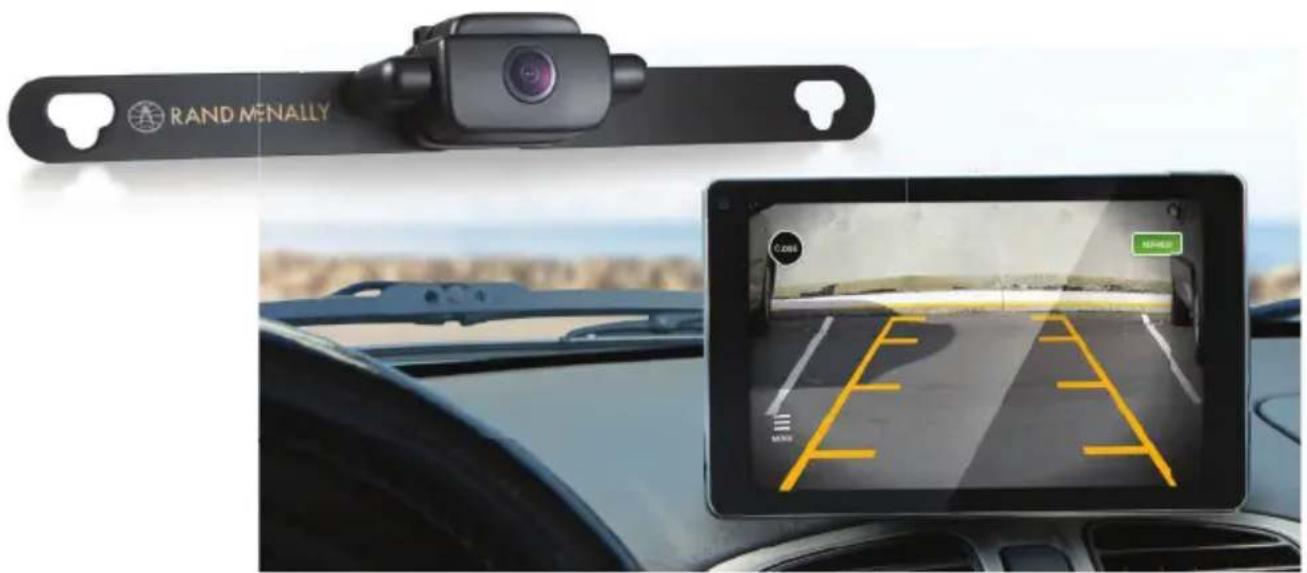
Black Rand MENALLY robotic device with a camera lens, shown on a black bar (no text or symbols on the device itself)BACKUPCAMQSG-071416-v002
- Wi-Fi® BackupCamera
- User Manual
- FCC Compliance Statement
- IC Compliance Statement
- IC Caution
- Important information about your backup camera
- Download the Wireless Backup Cam app
- Box contents
- Connect the camera
- Using the app
- Vehicle installation
- Vehicle installation A
- Installation A instructions (Reverse lights)
- Vehicle installation B
- Installation B instructions (Rear power source)
- Warnings, End-User License Agreement, and Warranty
- Warranty
- Support
Brand : Rand McNally
Model : Wi-Fi BackupCamera
Category : Camcorder