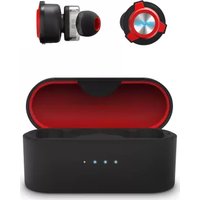
FE 650 - Headphones ENERGY SISTEM - Free user manual and instructions
Find the device manual for free FE 650 ENERGY SISTEM in PDF.


| Product Type | On-ear headphones |
| Model | FE 650 |
| Brand | ENERGY SISTEM |
| Dimensions | 160 x 80 x 180 mm (folded) |
| Weight | 190 g |
| Connectivity | Wired (3.5 mm jack) |
| Cable Length | 1.2 m |
| Driver Size | 40 mm |
| Frequency Response | 20 Hz – 20 kHz |
| Impedance | 32 Ω |
| Sensitivity | 105 dB |
| Controls | Inline volume and call control |
| Microphone | Built-in omnidirectional mic |
| Foldable | Yes |
| Color | Black |
| Warranty | 2 years |
| Safety | Avoid prolonged use at high volume to protect hearing |
| Cleaning | Wipe with a soft, dry cloth |
| Spare Parts | Replacement ear cushions and cables available |
| Repairability | Ear pads and cable user replaceable |
Frequently Asked Questions - FE 650 ENERGY SISTEM
User questions about FE 650 ENERGY SISTEM
0 question about this device. Answer the ones you know or ask your own.
Ask a new question about this device
Download the instructions for your Headphones in PDF format for free! Find your manual FE 650 - ENERGY SISTEM and take your electronic device back in hand. On this page are published all the documents necessary for the use of your device. FE 650 by ENERGY SISTEM.
USER MANUAL FE 650 ENERGY SISTEM
Care and maintenance 3
Warning 4
Safety 4
Features 4
General features 4
Technical specifications 4
Audio 4
Connectivity 4
Microphone 4
Battery 4
Other features 5
Product content 5
General overview 5
Main Functions 6
Switching on and off the device 6
Bluetooth pairing 7
Playback control 7
Call control 7
Gaming mode 7
Lighting modes 7
Charging the battery 7
Restoring factory settings 8
Warranty 8
Declaration of conformity 8

Introduction
- Thank you for trusting our company and buying the new Gaming headset FE 650 True Wireless. We hope you enjoy the product.
- Wireless low latency and dual driver earphones.
• Compete for victory.
Care and maintenance
- Do not expose your Gaming headset FE 650 True Wireless to impacts, dust, humidity or high temperatures.
- Use neither corrosive nor abrasive cleaning products.
- Do not disassemble the device. All repair works should be carried out exclusively by qualified staff of Energy Sistem Technology, S.A.
- Please make sure your Gaming headset FE 650 True Wireless is off when you are not using it. Do not store it with an empty battery for long periods of time.
Warning
Hearing loss
Listening to loud music can cause irreversible hearing loss. To avoid hearing damage, we recommend the following guidelines:
- Do not listen to loud music for long periods of time.
- Turn the volume down on the source device before using the headphones, then gradually increase the volume to a safe volume level.
Safety
For safety reasons and to avoid possible accidents, we recommend the following safety measures:
- Do not use the headphones while driving or carrying out any other activity that requires special attention.
- Keep the product, packaging and accessories out of the reach of children and pets to avoid accidents and choking hazard.
Features
General features
- True Wireless earphones with in-ear design that fit your ears perfectly. Always with you.
- Low Latency (<100 ms) to enjoy sound in perfect sync with onscreen action.
- Listen to any sound effect and experience stunning sound with Dual Driver technology.
- Enjoy versatility and optimal sound quality when chatting thanks to the two MEMS microphones.
- Enjoy your video games, films and music. Forget about running out of battery. Enjoy up to 20 hours of battery life (5 hours every time you charge the earphones and 15 additional hours using the charging case).
- Blue LED light design to stand out when playing video games, listening to music, etc.
- Manage music playback and all chat options using the built-in controls.
• Smartphone, PC and TV compatible.
Technical specifications
Audio
• Frequency response: 20 Hz \~ 20 kHz
- Driver diameter: 6 mm
- Neodymium magnet
• Maximum power: 5 mW
- In-ear design
- Type: dual driver
Connectivity
- Bluetooth 5.0, class 2
• Frequency band: 2.4 GHz
• Maximum output power: < 20.00 dBm - Compatible Bluetooth profiles: HSP / HFP / A2DP / AVRCP
- Up to 10 m distance range
• True Wireless function with auto-pairing - Hands-free function
- Low latency mode
Microphone
• Type: built-in dual MEMS microphone
• Sensitivity: -42 dB ± 3 dB (@1 kHz)
• Frequency range: 100 Hz \~ 10 kHz
Battery
Earbuds:
• Capacity: 50 mAh / 3.7 V
- Type: lithium polymer
- Battery life at medium volume: 5 hours*
- Charging time: 1.5 hours
- Changing method: charging case
?*? This value is approximate. The battery life depends on the selected volume and the type of music.
Charging case:
• Capacity: 500 mAh / 3.7 V
- Type: lithium polymer
• Extra battery life: 15 hours
- Charging time: 1.5 hours
- Charging method: USB Type-C
Other features
- LED light
Product content
• Gaming headset FE 650 True Wireless
- Earbud set
- Charging case
- USB Type-C cable
- Quick guide
Important: We recommend trying out the provided ear tips in different sizes to choose the ones that fit your ears best. Using ear tips that don't fit correctly may have an impact on the perceived sound quality.
General overview
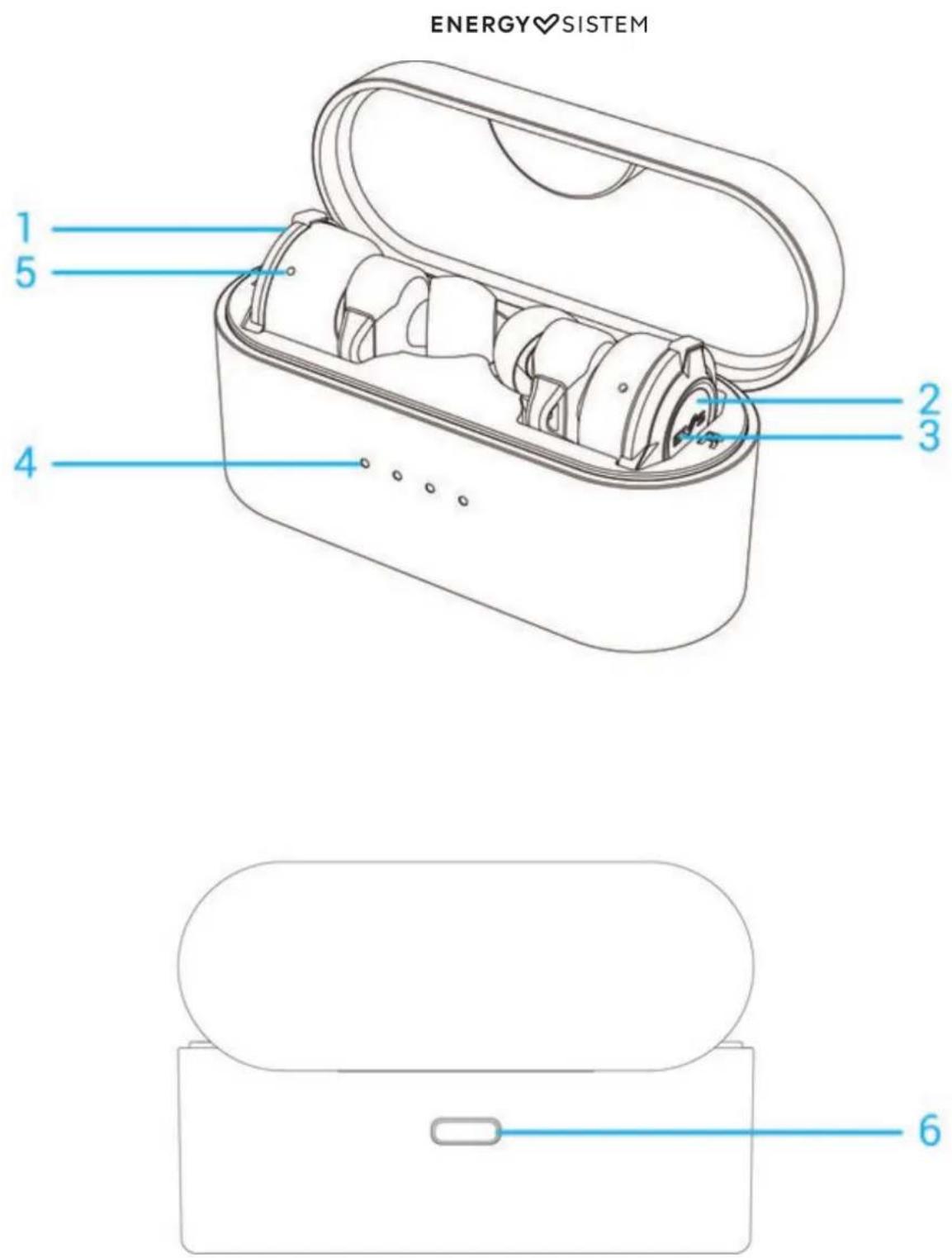
Left multifunction button1.
Right multifunction button2.
LED logo3.
Charging indicator (charging case)4.
LED status indicator5.
USB Type-C charging port6.
Main Functions
Switching on and off the device
To switch on your Gaming headset FE 650 True Wireless, simply take them out of the charging case or press and hold the Right and Left multifunction buttons (2 and 1) for 2 seconds. At this point, the LED status indicator (5) on both
earbuds starts flashing.
To switch off your Gaming headset FE 650 True Wireless, put them back in the charging case or press and hold the Right and Left multifunction buttons (2 and 1) for 5 seconds.
Bluetooth pairing
Switch on your Gaming headset FE 650 True Wireless. At this point, the LED status indicator (5) on the earbuds flashes red and both units pair automatically. Select Gaming headset FE 650 True Wireless from the list of Bluetooth devices on your smartphone or Bluetooth music player and press ?connect?. Both devices will be connected immediately and without codes. You will hear a confirmation sound.
If you previously paired the earbuds with a device, there is no need to repeat the pairing process. Just enable Bluetooth on your music player and switch on your Gaming headset FE 650 True Wireless. They will sync with it automatically.
Playback control
Play/Pause
Press the Right multifunction button (2) or the Left multifunction button (1) twice to pause or resume playback.
Volume +/Volume -
Press the Right multifunction button (2) to turn up the volume or the Left multifunction button (1) to turn it down.
Skipping to the next or previous track
Press and hold for 2 seconds the Right multifunction button (2) to skip to the next track or the Left multifunction button (1) to switch to the previous track during music playback.
Call control
Once the Gaming headset FE 650 True Wireless and your smartphone are synchronized, you can control calls from the earphones.
Answering/Ending a call
To answer an incoming call, press the Right multifunction button (2) or the Left multifunction button (1) twice. Press the same button twice to hang up.
Gaming mode
You can enable low latency (< 100 ms) mode on your Gaming headset FE 650 True Wireless to enjoy sound in perfect sync with onscreen action while gaming. To do so, press the Right multifunction button (2) or the Left multifunction button (1) three times in a row.
Important: The Bluetooth range may be shortened to provide low latency while gaming.
Lighting modes
Switch on or off the light on the Gaming headset FE 650 True Wireless to set the perfect gaming atmosphere. Press the Right multifunction button (2) or the Left multifunction button (1) four times to switch on or off the LED logo (3).
Charging the battery
Earphones
When the battery level of your Gaming headset FE 650 True Wireless is below 10%, you will hear a low battery warning sound. To charge the earphones? battery, put the earbuds back in the charging case. The earphones LED status indicator (5) lights up red and switches off once the charging process is complete.
Charging case
When the battery level of the charging case is below 10%, the first LED of the Charging indicator (charging case) (4) starts flashing. Plug the USB Type-C end of the provided cable into the USB Type-C charging port (6), and the other end
ENERGY♥SISTEM
into a 5 V USB charging device. The LEDs of the Charging indicator (charging case) (4) light up as the battery charges. Once the charging process is complete, all LEDs will glow.
Important: We recommend not leaving neither your Gaming headset FE 650 True Wireless nor the charging case unused for long periods of time with an empty battery. We advise charging the battery at least once a month.
Restoring factory settings
To reset the device to factory settings, follow the steps below:
1- Remove the Gaming headset FE 650 True Wireless from the list of Bluetooth devices on your smartphone or Bluetooth music player.
2- Switch off the earphones.
3- Press and hold the Right and Left multifunction buttons (2) and (1) for 10 seconds. Factory settings will be restored and the earphones will switch off automatically.
4- Switch on the earbuds as usual and repeat the steps to pair your smartphone or Bluetooth player.
Warranty
You can check the warranty terms here
Declaration of conformity
Issuer's name: Energy Sistem Technology, S.A. - CIF: A53107488
Address: C/ Calpe, 1 - 03509 Finestrat, Alicante (Spain)
Tel: +34 966 830 324
We declare under our sole and exclusive responsibility that the product:
Description: wireless earphones
Brand: Energy Sistem
Model: Gaming headset FE 650 True Wireless
Manufacturer: Energy Sistem Technology, S.A.
Manufacturing country: China
referred to in this declaration complies with the essential norms and standards:
EN 300 328 V2.2.2 (2019-07)
EN 301 489-1 V2.2.3 (2019-11)
EN 301 489-17 V3.2.4 (2020-09)
EN 55032:2015/A11:2020
EN 55035:2017/A11:2020
EN IEC 61000-3-2:2019
EN 61000-3-3:2013/A1:2019
EN 62479:2010
EN IEC 62368-1:2020+A11:2020
in conformity with the provisions of the Directive 2014/30/EU of the European Parliament and of the Council of 29th March 2014.
Finestrat, 1st February 2021

Miguel Ángel Aragüez García Innovation and Technology Director
CE

- INTRODUCTION
- CARE AND MAINTENANCE
- WARNING
- HEARING LOSS
- SAFETY
- FEATURES
- GENERAL FEATURES
- TECHNICAL SPECIFICATIONS
- AUDIO
- CONNECTIVITY
- MICROPHONE
- BATTERY
- EARBUDS
- CHARGING CASE
- OTHER FEATURES
- PRODUCT CONTENT
- GENERAL OVERVIEW
- MAIN FUNCTIONS
- SWITCHING ON AND OFF THE DEVICE
- BLUETOOTH PAIRING
- PLAYBACK CONTROL
- CALL CONTROL
- GAMING MODE
- LIGHTING MODES
- CHARGING THE BATTERY
- ENERGY♥SISTEM
- RESTORING FACTORY SETTINGS
- WARRANTY
- DECLARATION OF CONFORMITY
Brand : ENERGY SISTEM
Model : FE 650
Category : Headphones