Model 672 - Cutting machine Chef's Choice - Free user manual and instructions
Find the device manual for free Model 672 Chef's Choice in PDF.


| Product Type | Electric Meat Slicer |
| Brand | Chef's Choice |
| Model | 672 |
| Blade Material | Stainless Steel |
| Blade Diameter | 7.5 inches |
| Motor Power | 150 watts |
| Voltage | 120 V, 60 Hz |
| Adjustable Thickness | 0 to 15 mm |
| Food Carriage | Stainless steel with handle |
| Safety Features | Blade lock, safety switch, non-slip feet |
| Dimensions (L x W x H) | 18 x 14 x 12 inches |
| Weight | 20 lbs |
| Material | Die-cast aluminum and plastic housing |
| Dishwasher Safe Parts | Food carriage and blade (removable) |
| Cleaning | Wipe with damp cloth; blade removable for washing |
| Maintenance | Lubricate blade shaft periodically |
| Included Accessories | Meat holder, blade cover, cleaning brush |
| Warranty | 2 years limited |
| Repairability | Blade and motor replaceable; parts available online |
| Certifications | ETL, UL listed |
Frequently Asked Questions - Model 672 Chef's Choice
User questions about Model 672 Chef's Choice
0 question about this device. Answer the ones you know or ask your own.
Ask a new question about this device
Download the instructions for your Cutting machine in PDF format for free! Find your manual Model 672 - Chef's Choice and take your electronic device back in hand. On this page are published all the documents necessary for the use of your device. Model 672 by Chef's Choice.
USER MANUAL Model 672 Chef's Choice
Professional Electric Food Slicer
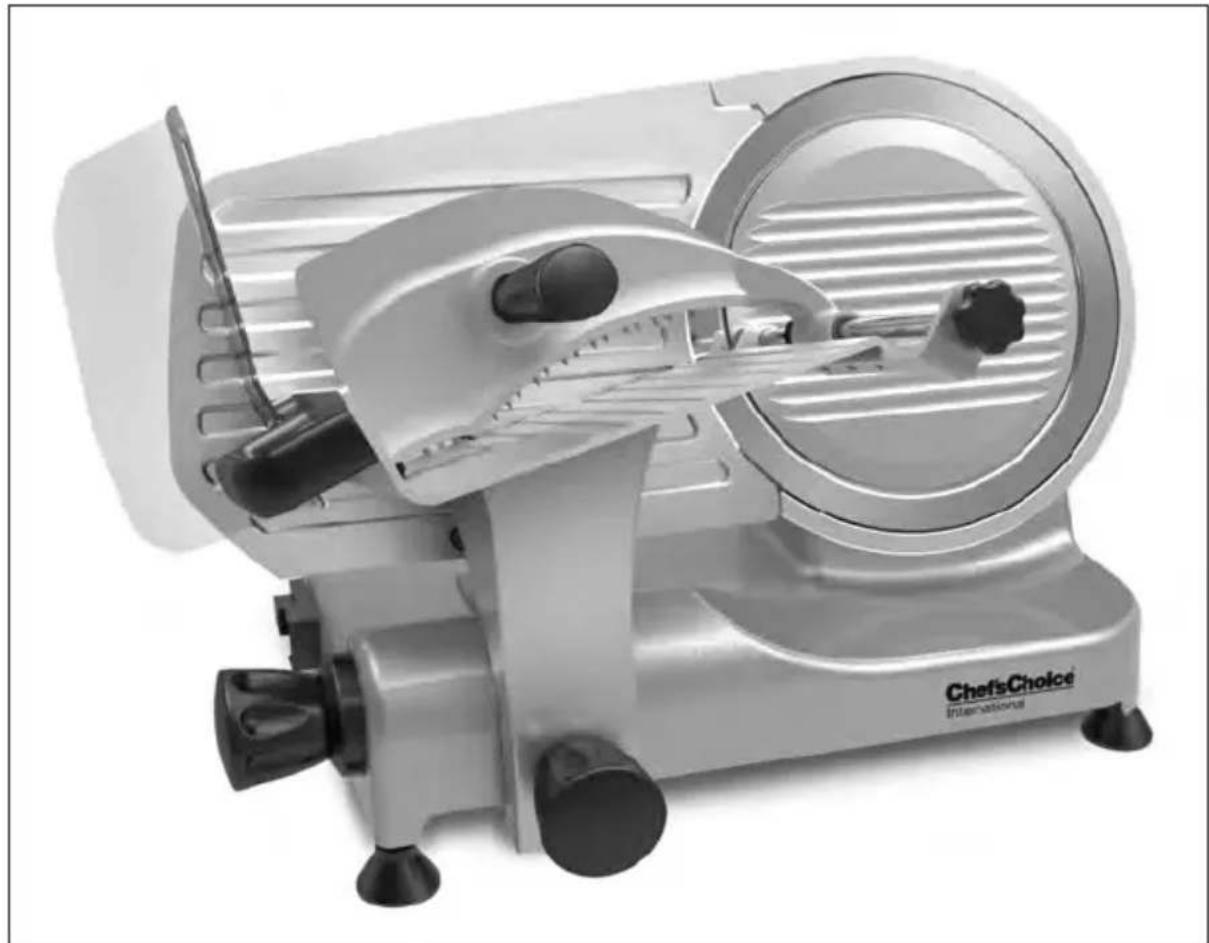
natural_image
Exterior view of a modern outdoor food sale machine (no signage)Model 663/672
IMPORTANT SAFEGUARDS
When using electrical appliances, basic safety precautions should always be followed, including the following:
- Plug cord only into 120V three prong grounded AC outlet. Do not use a 3 to 2 prong adapter.
- Read all instructions carefully before using slicer, to maximize results and to avoid injury.
- To protect against risk of electrical shock, do not immerse power unit in water or other liquid or operate in wet areas.
- When blade is powered, place hands only on recommended push surfaces. Fingers, hand or body contact with the moving blade can result in serious injury. When power is off, touch blade only to remove and clean according to instructions. Do not touch the blade's edge.
- Never operate any motorized appliance when consuming alcohol or taking medication.
- Close supervision is necessary when any appliance is used by or near children, handicapped and infirm.
- Unplug power cord from outlet when not in use, before putting on or taking off parts, before cleaning and before attaching, adjusting or removing the blade sharpener. Do not unplug unit by pulling on cord leads.
- Avoid contacting moving parts. Never feed food by hand. Always use completely assembled slicer with food platform and food grip.
- Do not operate any appliance with a damaged cord or plug or after the appliance malfunctions, or is dropped or damaged in any manner. Return slicer if damaged to the nearest authorized service facility or to EdgeCraft for examination, repair or electrical or mechanical adjustment.
- The use of attachments not recommended or sold by the appliance manufacturer may cause fire, electric shock or injury.
- Do not use outdoors.
- Do not let cord hang over edge of table or counter or touch hot surfaces.
- Blade is very sharp. Handle carefully when cleaning. Avoid contact with cutting edge.
- Do not attempt to cut frozen foods or foods with bones.
- Do not use the slicer if your hands are wet or if you are standing on a wet floor. Do not use the slicer if it is wet or moist.
- Follow instructions when lifting or moving the slicer.
- FOR HOUSEHOLD USE.
SAVE THESE INSTRUCTIONS
Congratulations on your selection of the Chef's Choice® Professional Electric Food Slicer. As an owner of this slicer, you have an easy-to-use commercial quality product for slicing bread, meat, cheese, vegetables and fruits. Its performance will bring new joy to preparing freshly sliced foods directly in your kitchen.
Introduction:
The Chef's Choice® Professional Electric Food Slicer is equipped with a commercial quality fine-edge (non-serrated) blade for slicing a large variety of foods, including meat, cheese, bread, vegetables and fruit. Review Figure 1 and 2 to familiarize yourself with the Slicer and some of its key components.
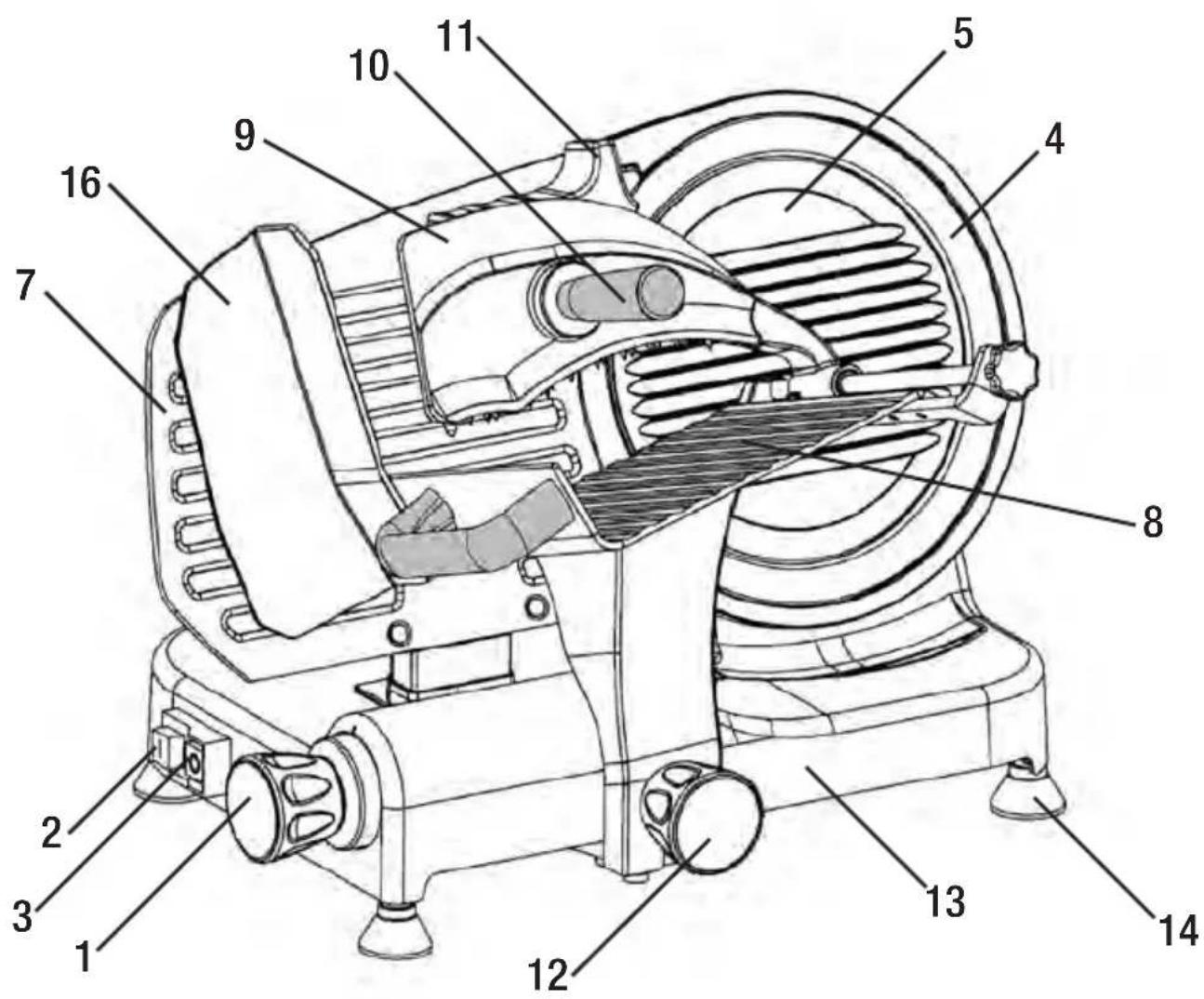
Figure 1. Front view of slicer.
Parts List\*
- Thickness control knob
- On power switch
- Stop switch
- Cutting blade
- Blade guard
- Blade guard screw (shown in Figure 2)
- Thickness control plate
-
Food carriage
-
Food pusher
- Food pusher handle
- Blade sharpener
- Food carriage removal screw (shown in Fig. 6)
- Base
- Feet, non-skid
- Slice deflector (shown in Figure 2)
- Plexiglass guard
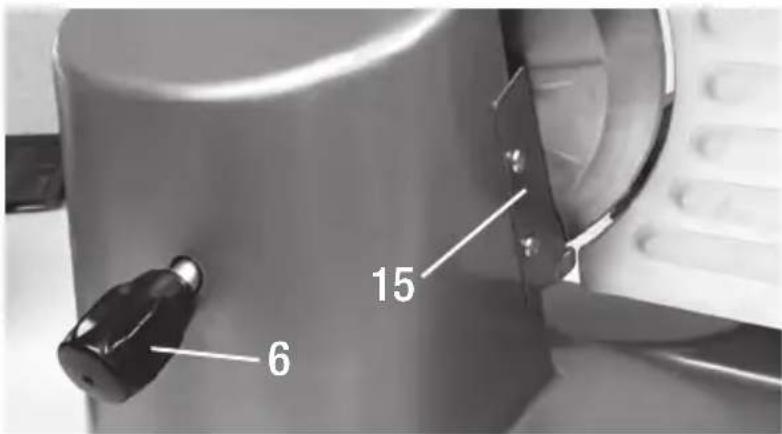
Figure 2. Close up view of the blade guard screw and the slice deflector.
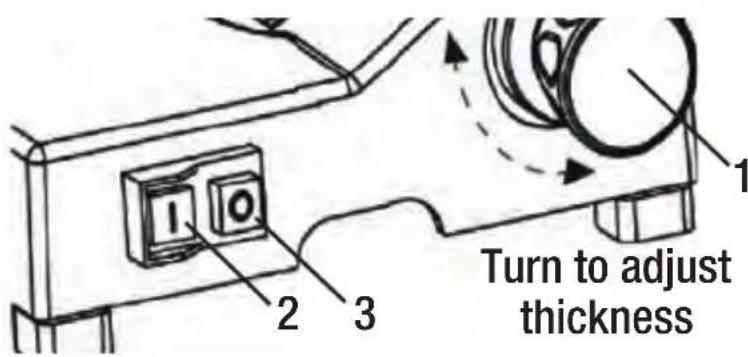
Figure 3. Close up view of Power and Stop Switches.
For Your Safety
- You will note that the slicer is equipped with a plexiglass guard (16) on the food carriage (8). It is very important that it not be removed.
- To minimize accidental contact with the blade when the slicer is not in use or when lifting the slicer, always turn the thickness control knob (1) fully clockwise so that the thickness control plate (7) covers the edge of the blade.
- Slice only foods for which this slicer is designed. Do not attempt to slice frozen food, or materials such as bones, plastic, cardboard, etc.
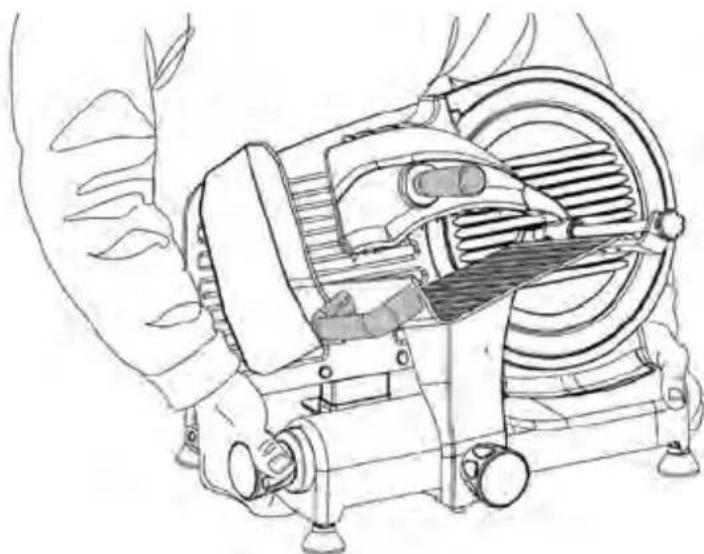
- When lifting the slicer, position the body and hands as shown in Figure 4, to more uniformly distribute the weight of the slicer and to avoid contact with the blade or with lubricated parts. If the slicer is too heavy for you, ask someone to help.
natural_image
Line drawing of a mechanical device with hands operating it, no text or symbols presentFigure 4. Use two hands to lift as shown.
Preparing to Slice
Caution: Avoid personal contact with the blade edge. Serious injury can result.
- Before using the slicer for the first time, we recommend that you clean it thoroughly (see page 9).
- Place assembled slicer on a sturdy, clean and dry surface. Position slicer so food carriage (8) is to your right and thickness control knob (1) is in front of you. Be sure the blade guard (5) is correctly mounted. Thickness control knob should be in the fully clockwise (beyond the "zero") position.
- Place the food on the carriage insuring that it is placed firmly against the back wall of the carriage (8). Hold the food in place with the food pusher (9). For extra large foods, such as briskets or slab bacon, their length may have to be reduced to fit on the carriage, as food should not touch the blade before starting to slice.
Operating the Slicer
- Plug cord only into 120V three prong grounded AC outlet. Do not use a 3 to 2 prong adapter.
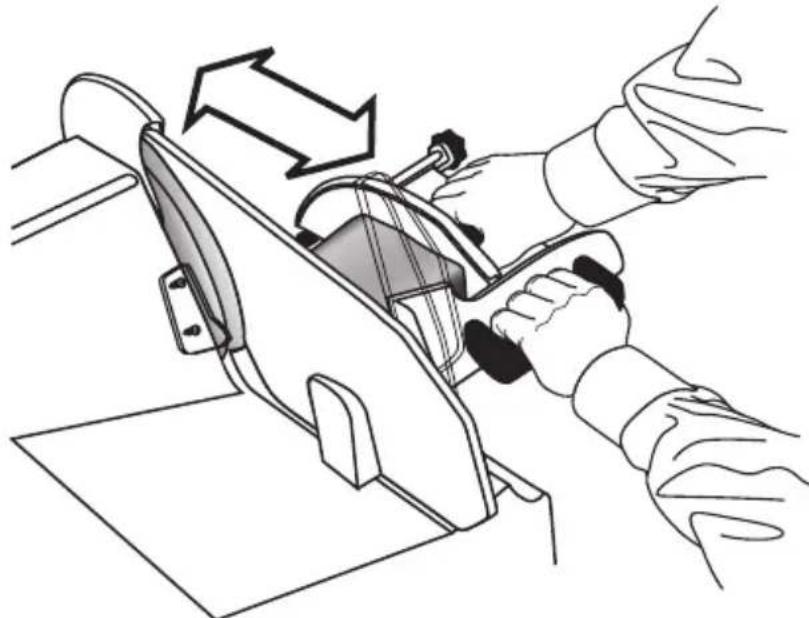
- Hold the long handle of the food pusher (10) as shown in Figure 5.
- To start the blade, turn on the power with your left hand by depressing the Power Switch (2) (see Figure 3.)
- Set the Thickness Control Knob (1) initially to a thin setting. Make a slice and then adjust to your desired thickness.
- Now with the firm grip on the food carriage and light pressure against the food pusher advance the food into contact with the rotating blade by slowly moving the carriage forward (Fig. 5). The food will be sliced and the slices will drop into a tray or plate placed on the slicer base on the opposite side of the blade. If the slice thickness needs to be adjusted, do so by rotating the Thickness Control Knob (1). Rotating the Knob clockwise reduces the slice thickness.
- If you continue slicing until the food loaf is nearly expended, you will find you are unable to cut further. Some food will remain unsliced. Do not attempt to apply excess pressure on the food pusher or to
cut any further! Shut off the power (3), turn the thickness control knob to "zero" and remove the food remainder.
Never try to hold the food by hand when slicing. You can cut yourself seriously. Always use the carriage and food pusher as shown in Figure 5.
- Do not operate the slicer without food on the food carriage.
- When slices become rough, incomplete or frayed and cuttings becomes difficult, it is time to consider resharpening the blade (see the Sharpening Section).
natural_image
Illustration of hands operating a sewing machine with arrows indicating motion (no text or symbols)Figure 5. Keep hands behind guards when slicing.
Hints for Best Results
- To slice meats and cheese wafer thin, chill thoroughly before slicing. For best results advance the food carriage slowly while using steady pressure.
- Meats should be boneless, fruits should be free of seeds.
- Foods with an uneven texture, like fish and uncooked steaks are often difficult to slice. Partially freeze before slicing for more even cuts.
- At canning time, use the slicer to quickly slice cucumbers and onions for attractive pickles... apples for pies... vegetables for the freezer.
- For food dehydrators: You can produce either thick or thin slices for uniform dehydrating.
- Handy for slicing homemade or bakery bread: a great companion for your bread machine. Use extreme caution at all times to avoid contacting the edge of the blade.
Cleaning and Maintenance
Note: Before cleaning, removing the blade or undertaking other maintenance always unplug the cord from the outlet. Never immerse the slicer in water or other liquid.
Cleaning: Slicer parts can be removed as described in the following sections for thorough cleaning. Wash with a soft cloth or sponge and a mild soap or spray cleaner. Rinse and dry.
- Never use steel wool or scouring powder on any parts.
- Do not wash any part of the slicer in dishwasher.
Removing the Food Carriage:
Turn the thickness control knob clockwise until it stops. Turn carriage removal knob (Figure 6) counter-clockwise until it comes off. Carefully pull carriage off threaded stud. Lift off the food carriage with the attached food pusher and wash them in a sink using a mild soap. Do not wash these parts in the dishwasher.
To replace the carriage, follow the above directions in reverse. Make sure the carriage is properly positioned and tightened securely. With proper installation the carriage should not jiggle.
Cleaning the Blade (without removal of blade):
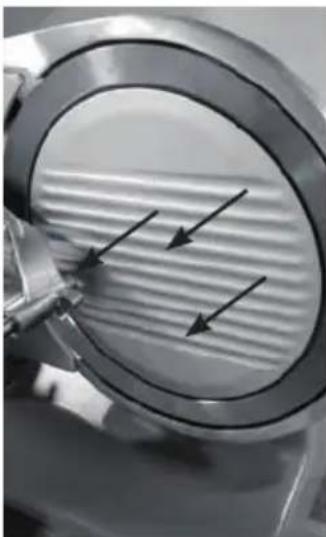
Make sure the thickness control knob is turned fully clockwise so that the thickness control blade “covers” the blade edge. Remove the blade guard (5) by unscrewing the retaining screw on back of motor housing (Figure 7). Clean the guard in the sink or with a spray cleaner.
Now, carefully clean the front of the blade with a moist sponge or cloth. Most – but not all of the back of the blade can similarly be cleaned with a moist sponge or cloth, by carefully rotating the front of the blade by hand (touch only the flat side of the blade, not the edge), to expose additional sections of the blade. For a more thorough cleaning of the blade see the next page.
Cleaning Other Parts of the Slicer:
The slice deflector (15), shown in Figure 2, can be removed with a screwdriver (put screws away for safekeeping) and cleaned in the sink or using a mild spray cleaner. The area behind the slice deflector can be cleaned with a bottle brush.
Removing and Cleaning the Blade
Caution: Extreme care must be used when removing, cleaning or handling the blade to avoid personal injury.
Following extensive use you will want to clean the entire surface of the blade. Small bits of food may in time collect behind the blade and behind the blade guard. The professional forged blade on your Chef'sChoice® Professional Slicer is heavier than conventional stamped blades.
First, with the thickness control knob turned to the full clockwise position, remove the blade guard as described in Cleaning Section on previous page and clean it as suggested.
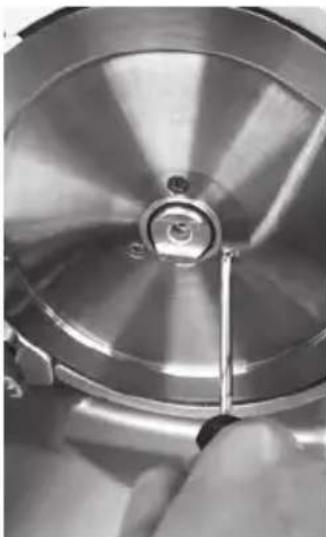
Then to remove the blade, by removing three Phillips head screws.
Remove the three screws that hold the blade to its supporting spindle (see Figure 7c). Using a screwdriver, remove the three screws. Then, carefully remove the blade and set it in the sink or in a sufficiently large wash pan. Never touch the edge of the blade or let it come in contract with any part of your hand or body. Use extreme care to never drop the blade as it can cause serious injury as it falls.
Clean the blade with detergent solution using a long handled bottle or sink brush, using extreme care so that your hands or fingers do not touch the blade edge. Scrub the blade surface well, rinse it and set it aside to dry. If you attempt to dry it with a cloth or paper towel, preferably use a long handled tool to move the cloth or towel over the blade surface.
To remount the blade, position and hold it securely onto the spindle. Insert and fasten fully and securely, the three screws. Replace the blade guard. Be certain that the blade guard is oriented correctly before tightening the screw. Rotate the blade guard until its seats correctly and securely around the blade.
Tighten the thumb screw, on backside of slicer, fingers tight (do not overtighten). If the guard is replaced correctly the blade will rotate freely when the slicer is turned on.
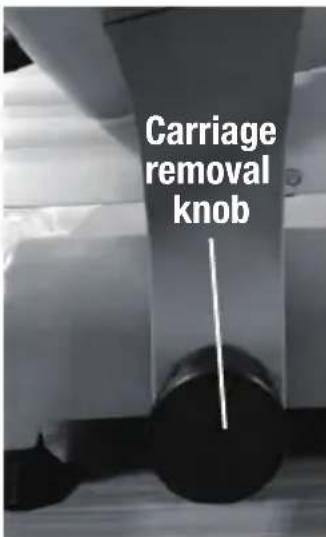
Figure 6. View of underneath food carriage.
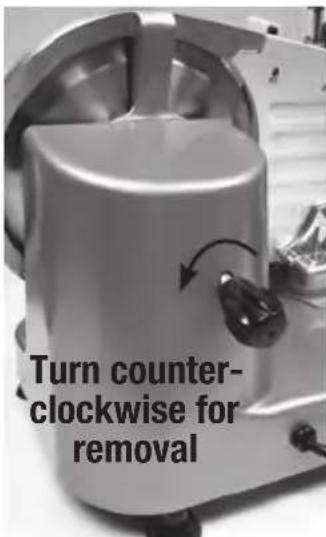
Figure 7a. Turn blade guard knob.
natural_image
Close-up of a metallic mechanical component with internal parallel grooves and three black arrows indicating direction (no text or symbols)Figure 7b. Pull off blade guard.
natural_image
Close-up of a metallic mechanical component with a tool inserted, no visible text or symbolsFigure 7c. Remove retaining screws.
Sharpening the Slicer Blade
As described in subsequent sections, the Chef's Choice® Professional Slicer as delivered includes a detachable sharpener (11) with the Models 663 and 672. These sharpeners have been designed so as to minimize (but not eliminate) the dangers that always exist when working near an exposed blade edge. For your safety the following instructions must be followed very carefully. If you are uncomfortable, seek a mechanic to help you with this. The entire sharpening operation takes only a few minutes and can be done safely with adequate care. Take your time and do not attempt to shortcut any of the steps outlined here. You will find it very satisfying to slice with a sharpener blade.
Using the Detachable Sharpener - Model 663 & Model 672
- Always, first unplug the cord from the power outlet.
- Clean the exposed portion of the slicer blade, as described in the section on cleaning, to remove grease.
- Examine the detachable sharpener (Figure 10) the stone rotates freely.
-
Lift and rotate the food pusher (9) to its upright position and advance the food carriage slightly to insure that the pusher is out of the way and beyond the exposed cutting edge of the blade.
-
Turn the thickness control knob to its full counterclockwise "open" position. This opens the thickness control plate fully and exposes the cutting edge of the blade to its fullest. Use extreme care to avoid contacting the blade edge with your hand or fingers.
-
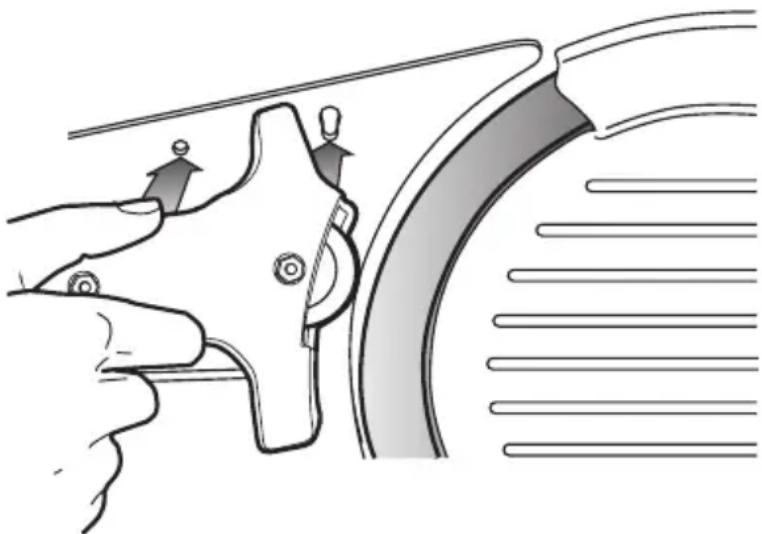
Standing to the left of the slicer, hold the sharpener in your right hand as shown in Figure 10. Insert its mounting pins fully into the holes on the thickness control plate. When fully inserted rotate the forward pin downward until it seats squarely in its respective slot. The sharpening stone should not be contracting the blade at this point.
-
Plug the cord into the power outlet.
-
Standing at the end of the slicer adjacent to the thickness control knob and with the sharpener securely in place, turn on the slicer to start the blade rotating.
natural_image
Illustration of a hand gripping a car wheel with two directional arrows indicating motion (no text or symbols)Figure 10. Attaching the detachable sharpener (7a).
-
Place one hand on the thickness control knob and the other hand away from the blade. Then slowly turn the thickness control knob clockwise until the sharpening stone lightly contacts the rear facet of the rotating blade as shown in Figure 11. You will be able to hear when it first contacts the blade. It will be slightly noisy. Maintain the stone in steady but light contact with the blade edge for 30-40 seconds. Then promptly turn the thickness control knob counterclockwise to full open position in order to move the stone away from its contact with the blade. Turn "off" the power switch and unplug the slicer cord from the power outlet. You have now completed the first step of sharpening the rear facet of the blade. This leaves a light burr along the front face of the blade, which must now be removed in Steps 10 through 14.
-
Keeping the hand and fingers away from the blade, carefully remove the sharpener by rotating the forward retaining pin upward and then lightly pulling the sharpener pins out of the two supporting holes. Place the sharpener on the table.
- Turn the thickness control knob full clockwise, which will close fully the thickness control plate, and "cover" the blade edge.
- Remount the sharpener on the thickness control plate as in Step 6 on page 10 and
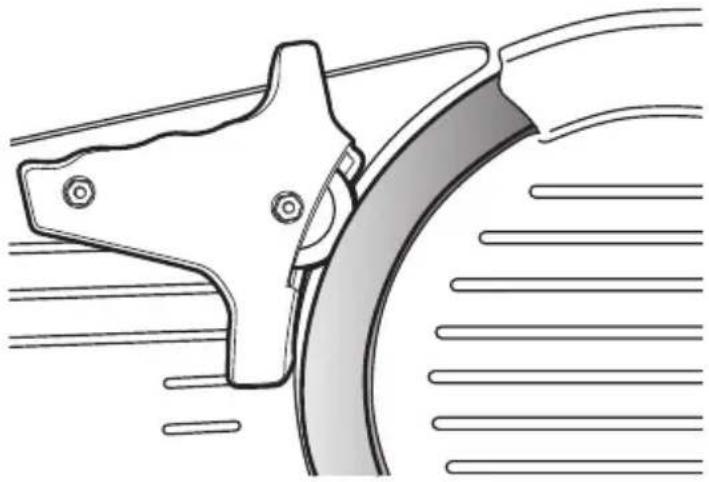
make certain its forward mounting pin is rotated down tightly to seat fully in its slot. The sharpening stone must now be in front of the blade (see Figure 12) but the stone should not at this point be touching the blade edge.
- Insert the plug in power outlet and, with hands clear of the blade, turn on the slicer.
natural_image
Technical line drawing of a mechanical component with no visible text or symbolsFigure 11. Sharpener in position to sharpen rear facet of blade edge.
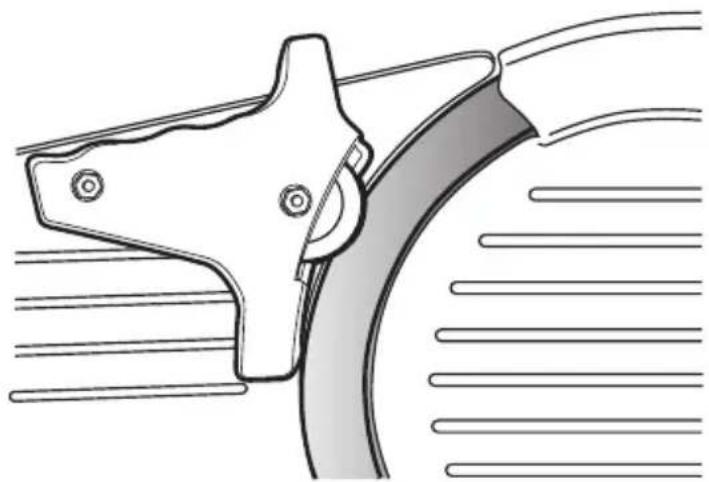
natural_image
Technical line drawing of a mechanical component with no visible text or symbolsFigure 12. Sharpener in position to remove burr from front of blade edge.
- With one hand on the thickness control knob, and other hand away from the blade, slowly turn the Thickness Control Knob counterclockwise until the abrasive stone touches the front edge of the blade. Again you will be able to hear a slight noise when contact is made. Maintain a light contact for only 4-6 seconds to remove the burr, which was created along the edge in Step 9. Promptly turn the thickness control knob clockwise to stop contact of the abrasive wheel with the blade. Your blade is now very sharp.
- Turn off the power switch and unplug the power cord from the outlet.
- Remove the sharpener as in Step 10.
- You may wish to clean the blade as described in the previous “Cleaning the Blade (without removal of blade)” section before cutting food.
- After many sharpenings, when the gap between the blade edge and the thickness control plate (in fully closed position) exceeds 6 mm, the blade must be replaced.
Service
No user-serviceable parts are inside. Refer servicing to qualified personnel.
In the event service is needed, you may return your food slicer to EdgeCraft Corp., where the cost of repair or electrical or mechanical adjustment can be estimated before the repair is undertaken. Please include your return address and a brief description of the problem or damage to the slicer on a separate sheet inside the box.
Send your slicer, insured and postage prepaid to:
EdgeCraft Corporation
825 Southwood Road
Avondale, PA 19311 U.S.A.
Telephone: 800-342-3255
Retain evidence of shipping for your protection.
Limited Warranty: Used with normal care, this EdgeCraft product is guaranteed against defective material and workmanship for a period of one (1) year from the date of original purchase ("Warranty Period"). We will repair or replace, at our option, any product or part that is defective in material or workmanship without charge if the product is returned to us postage prepaid with dated proof of purchase within the Warranty Period. This warranty does not apply to commercial use or any product abuse. ALL IMPLIED WARRANTIES, INCLUDING IMPLIED WARRANTIES OF MERCHANTABILITY AND FITNESS FOR A PARTICULAR PURPOSE, ARE LIMITED TO THE WARRANTY PERIOD. EDGECRAFT CORPORATION SHALL NOT BE LIABLE FOR ANY INCIDENTAL OR CONSEQUENTIAL DAMAGES. Some states do not allow limitations on how long an implied warranty lasts and some states do not allow exclusions or limitation of incidental or consequential damages, so the above limitations or exclusions may not apply to you. This Limited Warranty gives you specific legal rights, and you may also have other rights which vary from state to state.
This product may be covered by one or more EdgeCraft patents and/or patents pending as marked on the product.
Conforms to: UL 982 Certified to CAN/CSA: C22.2#1335.1, 1335.14
© EdgeCraft Corporation 2017 H17
120 volts/60Hertz,250 watts
S663004