
A650USM - Network card / adapter Totolink - Free user manual and instructions
Find the device manual for free A650USM Totolink in PDF.


| Product Type | USB Wi-Fi Adapter |
| Model | A650USM |
| Brand | Totolink |
| Wireless Standards | IEEE 802.11ac, 802.11a/b/g/n |
| Frequency Band | 2.4 GHz / 5 GHz |
| Maximum Speed | 650 Mbps (2.4GHz: 200Mbps, 5GHz: 433Mbps) |
| Interface | USB 3.0 (backward compatible with USB 2.0) |
| Antenna | Internal antenna |
| Security | WPA/WPA2, WPS |
| Dimensions (approx.) | 1.7 x 0.6 x 0.3 inches (4.3 x 1.5 x 0.8 cm) |
| Weight | 0.2 oz (5.7 g) |
| Power Supply | USB bus powered (5V DC) |
| Supported Operating Systems | Windows 10/8/7, macOS, Linux |
| Operating Temperature | 0°C to 40°C (32°F to 104°F) |
| Storage Temperature | -20°C to 70°C (-4°F to 158°F) |
| Humidity | 10% to 90% non-condensing |
| Maintenance & Cleaning | Keep dry, clean with soft cloth, avoid liquids |
| Safety | CE, FCC compliant |
| Spare Parts & Repairability | Not user-serviceable; replace if faulty |
| Package Contents | Adapter, quick installation guide |
Frequently Asked Questions - A650USM Totolink
User questions about A650USM Totolink
0 question about this device. Answer the ones you know or ask your own.
Ask a new question about this device
Download the instructions for your Network card / adapter in PDF format for free! Find your manual A650USM - Totolink and take your electronic device back in hand. On this page are published all the documents necessary for the use of your device. A650USM by Totolink.
USER MANUAL A650USM Totolink
AC650
Wireless Dual Band USB Adapter
Model No. A650USM

433Mbps+200Mbps

Mini Design

MU-MIMO

Pre-installed Driver for Windows

Overview
AC650
Wireless Dual Band USB Adapter
Model No. A650USM
A650USM adopts the Next-GEN AC Wi-Fi technology with MU-MIMO supported to upgrade your Windows®-based laptop or PC to enjoy faster and stronger home Wi-Fi than normal 11ac adapters. Featured by concurrent dual band 633Mbps(2.4G: 200Mbps+5G: 433Mbps), A650USM allows you to choose the optimal Wi-Fi as you can.
With no driver needed for Windows OS, simply plug and play, the USB 2.0 interface is suitable for almost all terminal devices. So it is the perfect solution for users with a MU-MIMO router.

Features
- Complies with IEEE 802.11ac/a/b/g/n standards.
- Up to 633Mbps data rate for Wi-Fi network.
- MU-MIMO technology upgrades your PC/Laptop to enjoy faster Wi-Fi.
- Operates on either 2.4GHz or 5GHz band.
- Supports 5G band with less contention interference, more stable and better performance.
- Supports 64/128-bit WEP, WPA/WPA2 and WPA-PSK/WPA2-PSK encryption.
- Universal USB2.0 interface for high compatibility.
- Supports Windows 10/8/7/XP (32/64-bit).
- Easy to install and configure.


natural_image
Black TOTO LINK USB device with two ports and a blue indicator light (no readable text or symbols beyond branding)
natural_image
Black TOTO Link USB device with two slots, no visible text or symbols on the body
Next-GEN 11AC Performance
Adapting the next generation 11ac standard that brings you high speed Wi-Fi and amazing Internet surfing experience.
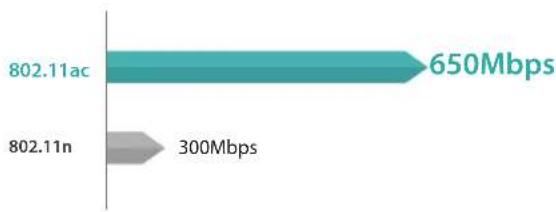
bar
| Category | Value | |---|---| | 802.11ac | 650Mbps | | 802.11n | 300Mbps |
Selectable Dual Band
The 2.4GHz band supports 256QAM for 200Mbps speedy data transfer, while 5GHz 433Mbps is ideal for lag-free HD video streaming and gaming.


Easy to Use
No driver needed for the device installation on Windows OS, simply plug and play, suitable for everyone across the world.


Built-in Antennas
With built-in omni-directional antennas, A650USM supports to receive wireless signals from 360° direction. Meanwhile, comparing with the external antenna, it is more portable for the users, especially convenient for the travelers.
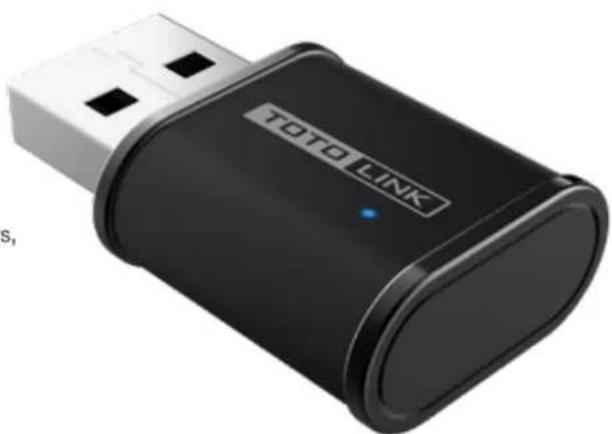
natural_image
Black TOTO LINK USB device with USB port and indicator lights (no readable text or symbols beyond branding)Specification
Hardware
| Interface | - USB 2.0*1 |
| LED Indicator | - 1 *Wireless |
| Dimensions (L x W x H) | - 33mm*20mm*10mm |
| Antenna | - built-in antenna |
Wireless
| StandardsRF FrequencyData RateEIRPWireless SecurityReception Sensitivity | - IEEE 802.11ac, IEEE 802.11a, IEEE 802.11b, IEEE 802.11g, IEEE 802.11n- 2.4GHz/5GHz- 2.4GHz: Up to 200Mbps- 5GHz: Up to 433Mbps< 20dBm- 64/128-bit WEP, WPA/WPA2, WPA-PSK/WPA2-PSK (TKIP/AES)- 2.4G: 11b: <-79dbm;11g: <-68dbm;11n: HT20<-65dbm HT40: <-61dbm- 5G: 11a:<-68dbm;11ac: HT20<-65dbm HT40: <-61dbm HT80: <-51dbm |
Others
| Package Contents | - A650USM Wireless Adapter *1- Quick Installation Guide *1 |
| System Requirement | - Windows 10 (32/64bits), Windows 8 (32/64bits), Windows 7 (32/64bits), Windows XP (32/64bits) |
| Environment | - Operating Temperature: 0 °C ~50 °C (32 °F ~122 °F)- Storage Temperature: -40 °C ~70 °C (-40 °F ~158 °F)- Operating Humidity: 5%~95% non-condensing- Storage Humidity: 5%~95% non-condensing |
ZIONCOM (HK) TECHNOLOGY LIMITED
Copyright ©ZIONCOM (HK) TECHNOLOGY CO., LTD. All Rights Reserved.
Headquarter & R&D Center
7/F, Unit D, 4 Building Shenzhen Software Industry Base, Xuefu Road, Nanshan District, Shenzhen, Guangdong, China
Tel : +86-755-6136-3288 (Ext.867) | FAX : +86-755-6136-3344
Factory
Building A1 & A2 Lantian Technology Park, Xinyu Road, Xinqiao Henggang Block, Shajing Street, Baoan District, Shenzhen, Guangdong, China
Direct Line : +86-755-3686-1188(Ext. 5810) | FAX : +86-755-3686-1133
Brand : Totolink
Model : A650USM
Category : Network card / adapter