WGS-814HP - Network switch Planet - Free user manual and instructions
Find the device manual for free WGS-814HP Planet in PDF.


| Product Type | Gigabit PoE+ Switch |
| Ports | 8 x 10/100/1000BASE-T PoE+ (802.3af/at) + 2 x 1000BASE-X SFP |
| PoE Budget | 150W total |
| Switching Capacity | 20 Gbps |
| Dimensions (W x D x H) | 330 x 200 x 44 mm |
| Weight | 2.5 kg |
| Power Supply | 100-240V AC, 50-60Hz, internal |
| Cooling | Fanless, silent operation |
| Key Functions | VLAN, QoS, IGMP Snooping, Port Mirroring, Loop Detection, Storm Control |
| Management | Web-based GUI, SNMP v1/v2c/v3, CLI via console |
| Standards | IEEE 802.3, 802.3u, 802.3ab, 802.3z, 802.3af, 802.3at, 802.1Q, 802.1p |
| Operating Temperature | 0°C to 50°C |
| Storage Temperature | -40°C to 70°C |
| Humidity | 5% to 90% (non-condensing) |
| LED Indicators | Power, PoE, Link/Activity per port, SFP |
| Safety | CE, FCC Class A, UL listed |
| Maintenance | Clean with dry cloth; no liquid solvents; keep vents free of dust |
| Spare Parts & Repairability | No user-serviceable parts inside; contact Planet support for repairs |
| Warranty | 3 years limited warranty |
Frequently Asked Questions - WGS-814HP Planet
User questions about WGS-814HP Planet
0 question about this device. Answer the ones you know or ask your own.
Ask a new question about this device
Download the instructions for your Network switch in PDF format for free! Find your manual WGS-814HP - Planet and take your electronic device back in hand. On this page are published all the documents necessary for the use of your device. WGS-814HP by Planet.
USER MANUAL WGS-814HP Planet
Thank you for purchasing PLANET 8-port 10/100/1000T Wall-mounted Gigabit Ethernet Switch. The table below shows the models with the number of ports:
| Model Name | 10/100/1000TCopper Ports | 802.3at PoE+Ports | Power Adapter |
| WGS-614HP 6 | 4 DC 54V, 1.33A | ||
| WGS-818HP 6 | 8 DC 54V, 2.4A |
In the following section, unless specified, the term "Wall-mount Gigabit Switch" mentioned in this user's manual refers to the above models.
Open the box of the Wall-mount Gigabit Switch and carefully unpack it. The box should contain the following items:
The Wall-mount Gigabit Switch x | User's Manual x |


-1-
■ WGS-814HP Front View
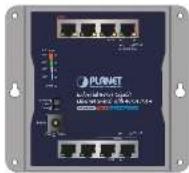
Figure 2-1: WGS-614HP
■ WGS-818HP Front View
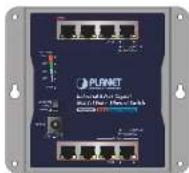
Figure 2-2: WGS-818HP
-3-
| 45 | Ambar | Blinks | To indicate the PoE usage is around 38W to 44W. |
| Lights | To indicate the PoE usage is over 45-watt PoE power budget. | ||
| 60 | Ambar | Blinks | To indicate the PoE usage is around 53W to 59W. |
| Lights | To indicate the PoE usage is at the maximum. |
■ PoE Power Usage of WGS-818HP (Unit: Watt)
| LED | Color | Function | |
| 30 | Amber | Off | To indicate the PoE usage is less than 14kW. |
| Blinks | To indicate the PoE usage is around 15W to 29W. | ||
| Lights | To indicate the PoE usage is over 30-watt PoE power budget. | ||
| 60 | Amber | Blinks | To indicate the PoE usage is around 45W to 59W. |
| Lights | To indicate the PoE usage is over 60-watt PoE power budget. | ||
| 90 | Amber | Blinks | To indicate the PoE usage is around 75W to 89W. |
| Lights | To indicate the PoE usage is over 80-watt PoE power budget. | ||
| 120 | Amber | Blinks | To indicate the PoE usage is around 105W to 119W. |
| Lights | To indicate the PoE usage is at the maximum. | ||
-5
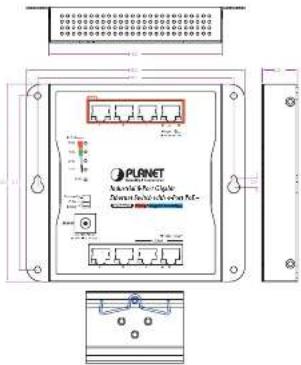
2.4 Physical Dimensions
W × D × H: 148 × 24.2 × 134 mm
-7-
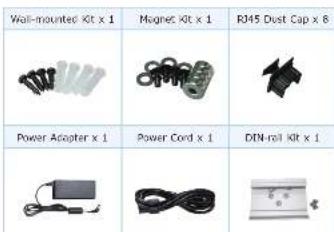
If any item is found missing or damaged, please contact your local resetor for replacement.
2. Hardware Description
2.1 Switch Front View
The front panel of the Wall-mount Gigabit Switch consists of 8 Auto-Sensing 10/100/1000Mbps Ethernet RJ45 Ports. The LED Indicators are also located on the RJ45 ports of the Wall-mount Gigabit Switch.
2
2.2 LED Indicators
■ System and Ports
| LED | Color | Function |
| PWR | Green | Lights to indicate that the switch has power. |
| LNK/ACT | Green | LightsTo indicate the link through that port is successfully established. |
| BillinksTo indicate that the switch is actively sending or receiving data over that port. | ||
| PoE-in-Use | Amber | LightsTo indicate the port is providing DC in-line power. |
| OffTo indicate the connected device is not a PoE powered device (PD). |
■ PoE Power Usage of WGS-814HP (Unit: Watt)
| LFD | Color | Function | |
| 15 | Amber | Off | To indicate the PoE usage is less than 7W. |
| Blinks | To indicate the PoE usage is around 8W to 14W. | ||
| Lights | To indicate the PoE usage is over 15-watt PoE power budget. | ||
| 30 | Amber | Blinks | To indicate the PoE usage is around 23W to 29W. |
| Lights | To indicate the PoE usage is over 30-watt PoE power budget. | ||
-4-
2.3 DIP Switch
The front panel of Wall-mount Gigabit Switch provides one DIP switch for Standard, VLAN and Extend mode selections. The detailed descriptions are shown in the following table.
| DIP Switch Mode | Function |
| Standard | This mode makes the Wall-mount GigabitSwitch operate as a general switch and all ports operate at 10/100/1000Mbps autoregistration. |
| MaximVLAM | This mode makes the Wall-mount GigabitSwitch operate as a VLAN Isolation switch and1. Port 1 to port 6 will isolate respectively.2. Port 1 to port 6 can only communicate with port 7 and port 8 (uplink port). |
| MaximVLAM | This mode makes the Wall-mount GigabitSwitch operate as a VLAN Isolation switch and1. Port 1 to port 6 will isolate respectively.2. Port 1 to port 6 can only communicate with port 7 and port 8 (uplink port).3. 22~25-welt FUE transmit distance of 250m at speed of 10Mbps. |

Please reboot the Wall-mount Gigabit Switch after adjusting the DIP switch.
-5
3. Installation
3.1 Wall-mount Installation
To install the Wall-mount Gigabit Switch on the wall, simply follow the following steps:
Step 1: Place the Wall-mount Gigabit Switch on the wall and mark the four holes with a pencil.
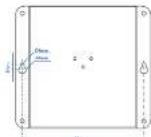
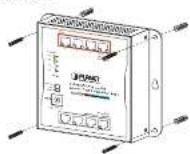
Step 2: Hammer the anchors provided into the four holes and use the four screws to tightly fix the switch onto the wall by screwing them.
·a·
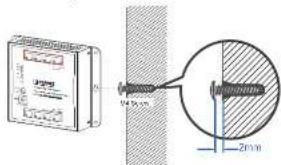
Step 3: Or the switch, shown in the picture below, can be hung on the wall by screwing the two screws leaving a space of 2mm apart after the anchors are hammered in.
3.2 DIN-rail Mounting Installation
The DIN-rail kit is included in the Wall-mount Gigabit Switch package. To hang up the Wall-mount Gigabit Switch, follow the steps below:
Step 1: Screw the DIN-rail bracket on the Wall-mount Gigabit Switch.
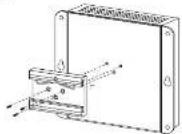
-9-
Step 2: Lightly press the bottom of DIN-rall bracket into the track.
Step 3: Check whether the DIN-rail bracket is tightly on the track.
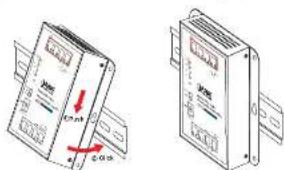
3.3 Magnet Installation
To install the Wall-mount Gigabit Switch on a magnetic surface, simply follow the following diagram:
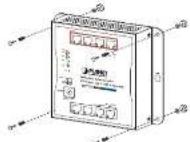
10
4. Customer Support
Thank you for purchasing PLANET products. You can browse our online FAQ resource end User's Manual on PLANET Web site first to check if it could solve your issue. If you need more support information, please contact PLANET switch support team.
PLANET online FAQs:
https://www.planet.com.be/en/support/faq
Switch support team mail address:
Copyright © PLANET Technology Corp. 2022.
Contents are subject to revision without prior notice
PLANET is a registered trademark of PLANET Technology Corp.
All other trademarks belong to their respective owners.
-11-
Appendix: Product Specifications
| Model | WGS-614HP | WGS-618HP |
| Hardware Specifications | ||
| Network Connector | 8-port U43s for 10/100/1000BASE-T Auto-negulation and auto MDS/MDI-X | |
| PoE Inject Port. | 4 | 8 |
| Power Requirements | 48~56V DC, 1.5A max. | 48~56V DC, 3A max. |
| Power Consumption | 70 watts/239 BTU | 137 watts/467 BTU |
| ESD Protection | 4KV DC | |
| Surge Protection | 6KV DC | |
| DIP Switch | Selectable operation modeStandard/VLAN/Extend | |
| Enclosure | IP30 metal | |
| Dimensions | 148 × 21.22 × 134mm (W x D x H) | |
| Weight | 472 g | 474 g |
| Switch Specifications | ||
| MAC Address Toile | 4K MAC address table with auto learning function | |
| Data Buffer | 64kbias | |
| Switch Fabric | 165bps | |
| Switch Throughput | 11.9Mpps/964bytes | |
| Flow Control | Rock pressure for half duplexIEEE 802.3x pause frame for full duplex | |
-12 - 13 -

PLANET

PLANET Networking & Communication
(See Manual)
www.PLANET.com.tw
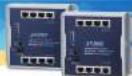
Industrial 8-Port 10/100/1000T Wall-mounted Gigabit Ethernet Switch with 4-/8-Port PoE
WGS-B14HP/WGS-B1BHP
PLANET Technology Corp.
- Mr. No. Mingqun Rd., Xindian Oat., New Taipei City 231, Taiwan
2251 4W2019 061
Monday This decision is probable with State of California
UK CA CE 回
Broms Darles, Nola of Des Dorks His a union required Aom's does not support Liberia's most common. For example, develop, please request the all-advices form to travel remaining the DC source, the source will be Australia power from the power source. In the room of Daring the Broms
| Power over Ethernet | |
| PoE Standard | IEEE 8D2.3sf Power over Ethernet Plus PSEBackward compatible with IEEE 8D2.3sf PoE |
| PoE Type | End span PSE |
| Power Pin Assignment | 1/2(1), 3/6(-) |
| PoE Power Output | Per port: 52V~54V DC, 30 watts (max.) |
| PoE Power Busgot 60 watts | 120 watts |
| Standard Conformance | |
| Standard Compliance | [IEEE 8D2.3 Ethernet[IEEE 8D2.3sf] Full Ethernet[IEEE 8D2.3ab] Gigabit Ethernet[IEEE 8D2.3x] Flow Control[IEEE 8D2.3sf] Power over Ethernet[IEEE 8D2.3sf] Power over Ethernet Plus[IEEE 8D2.3oz] Energy Efficient Ethernet (EEE) |
| Regulatory Compliance | FCC Pert 15 Cass A, CE |
| Environment | |
| Operating | Temperature: -20 ~ 60 degrees CRelative Humidity: 5 ~ 95% (non-condensing) |
| Storage | Temperature: -20 ~ 70 degrees CRelative Humidity: 5 ~ 95% (non-condensing) |
Brand : Planet
Model : WGS-814HP
Category : Network switch