
Badwater - Hi-Fi System Walrus Audio - Free user manual and instructions
Find the device manual for free Badwater Walrus Audio in PDF.


| Product Type | Hi-Fi System |
| Brand | Walrus Audio |
| Model | Badwater |
| Dimensions (W x H x D) | 12 x 3 x 8 inches |
| Weight | 3.2 lbs |
| Power Supply | DC 12V, 500mA |
| Power Consumption | 6W |
| Audio Inputs | RCA (L/R), 3.5mm Aux |
| Audio Outputs | RCA (L/R), Headphone 3.5mm |
| Frequency Response | 20Hz - 20kHz |
| Total Harmonic Distortion | < 0.05% |
| Signal-to-Noise Ratio | > 95dB |
| Equalizer Controls | Bass, Treble, Volume |
| Bluetooth Version | 5.0 |
| Supported Audio Formats | MP3, WAV, FLAC, AAC |
| Maximum Output Power | 2 x 30W RMS |
| Standby Power | < 0.5W |
| Chassis Material | Aluminum |
| Operating Temperature | 0°C to 40°C |
| Safety Certifications | CE, FCC, RoHS |
| Cleaning Instructions | Wipe with dry cloth; avoid liquids |
| Spare Parts Availability | Contact Walrus Audio support |
| Repair Service | Authorized service centers only |
Frequently Asked Questions - Badwater Walrus Audio
User questions about Badwater Walrus Audio
0 question about this device. Answer the ones you know or ask your own.
Ask a new question about this device
Download the instructions for your Hi-Fi System in PDF format for free! Find your manual Badwater - Walrus Audio and take your electronic device back in hand. On this page are published all the documents necessary for the use of your device. Badwater by Walrus Audio.
USER MANUAL Badwater Walrus Audio
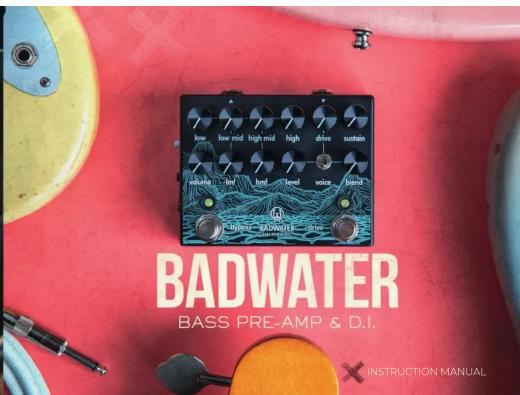
BADWATER
BASS PRE-AMP & D.I.
The Badwater is a bass tone magnification
device sonically highlighting what
bass so crucial to music. The all-in-
one bass pre-amp and DI featu
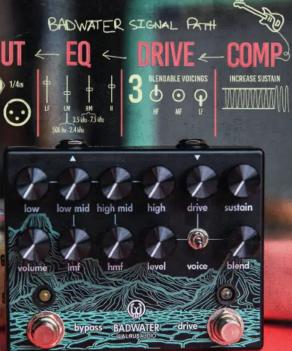
optical compression, overdrive, and a four-band EO section
Enhance your bass rig's
capabilities by dialing
in everything from
warm cleans to grit
chords and punchy
drives to bright and
crisp slap sounds.

Volume: The Vol knob sets the overall output volume of the pedal. The Badwater has quite a bit of volume on tap so the Volume knob will be helpful to find the sweet spot for interacting with the rest of your rig.
Sustain: The internal optical compressor is first in the signal path, and always turned on. The Sustain control lets you add in compression for long sustaining notes and chords while smoothing out your transients. With Sustain at minimum, the compressor will have minimal effect, but as you increase, you will start to hear longer notes and squashed transients.
Low: Allows you to boost or cut low frequencies by +/- 12dB to beef up your signal or tame the low end.
Low Mid & LMF: Allows you to boost or cut by +/-10 dB and sweep from 500 Hz to 2.4 kHz.
High Mid & HMF: Allows you to boost or cut by +/- 10 dB and sweep from 3.5 kHz to 7.5 kHz. High: Allows you to boost or cut high frequencies by +/- 12dB to bring sparkle and clarity or smoothen it out.
Drive: Sets the amount of gain applied to your signal through the drive section: from minimal breakup to driven distortion.
Voice: Lets you select between 3 options for how much low and high frequency content is allowed into the drive section. The top voice allows more HF into the drive, the middle allows a middle range of frequencies into the drive, and the bottom allows the most LF into the drive.
Blend: The Blend knob allows you to blend between your fully clean and fully distorted signal. With this control at minimum, the output is your original fully clean input with no distortion. As you turn the knob
to the right, more distortion is added. At maximum, the output is the fully distorted signal with no clean blended in. Blending the clean and distorted signals can allow you to increase note clarity as the clean and dirty channels run parallel to each other inside of the Badwater.
Level: Adjust the level of the drive section, so when you turn on the drive, you can either boost, cut, or continue playing at unity gain.
Bypass Switch: Turns the entire
Bypass LED: Illuminated when the effect is engaged.
Drive Switch: Turns the drive section of the effect on or off.
Drive LED: Illuminated when the drive section is engaged.
Input Jack: 1/4 inch cable from
Output Jack: 1/4 inch cable to
XLR Jack: Badwater features both 1/4 inch and XLR out options, so you're always ready with a usable bass rig. Use the XLR to connect directly to the front-of-house or use the 1/4 inch out to run to an amp. Both outputs can be run simultaneously for direct and live amp stage monitoring. The Badwater does not accept power from phantom power. Phantom power will be blocked out and will not damage the Badwater, but it is best to avoid turning on phantom power when the unit is connected.
GND Lift: Isolates the GND pin on XLR to help reduce hum if present. Leave out for normal operation.
9v Jack: 9-volt DC, Center Negative, 300mA min.
Brand : Walrus Audio
Model : Badwater
Category : Hi-Fi System