
BUCAM200J - Dash cam JENSEN - Free user manual and instructions
Find the device manual for free BUCAM200J JENSEN in PDF.


| Product Type | Dash Cam |
| Brand | Jensen |
| Model | BUCAM200J |
| Dimensions | Approx. 7.0 x 4.5 x 2.0 cm |
| Weight | Approx. 100 g |
| Power Supply | 12V DC car adapter (cigarette lighter) |
| Battery | Built-in rechargeable Li-ion battery (approx. 200 mAh) |
| Recording Resolution | Full HD 1080p (1920x1080) @ 30fps |
| Lens | Wide angle 170° |
| Storage | Micro SD card up to 32 GB (Class 10 recommended) |
| Loop Recording | Yes, overwrites oldest files when card is full |
| G-Sensor | Built-in, automatically locks footage upon impact |
| Parking Mode | Motion detection recording when car is parked |
| Night Vision | Low light recording with WDR technology |
| Display | 2.0 inch LCD screen |
| Mounting | Suction cup mount on windshield |
| Functions | Recording, playback, menu settings, emergency lock |
| Maintenance | Clean lens with soft cloth; format SD card periodically |
| Safety | Use only supplied charger; avoid extreme temperatures |
| Spare Parts & Repairability | Mount and charger available; device non-user-serviceable |
| General Information | For driving recording and evidence collection |
Frequently Asked Questions - BUCAM200J JENSEN
User questions about BUCAM200J JENSEN
0 question about this device. Answer the ones you know or ask your own.
Ask a new question about this device
Download the instructions for your Dash cam in PDF format for free! Find your manual BUCAM200J - JENSEN and take your electronic device back in hand. On this page are published all the documents necessary for the use of your device. BUCAM200J by JENSEN.
USER MANUAL BUCAM200J JENSEN
BUCAM200 Rear View Camera
What's Inside The Box
- Product Sheet
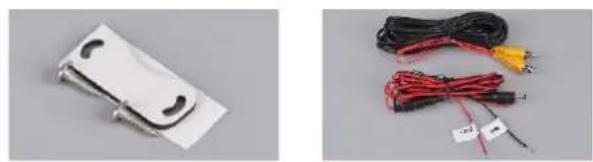
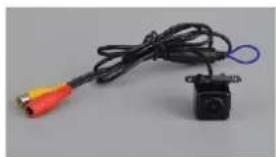
- BUCAM200 Camera w/ Adjustable Mount
- Power Cable w/ Fuse, Video Cable, 2 Mounting Screws and Foam Rubber Mounting Pad
natural_image
Two electronic components: a white plastic clamp and red-wrapped cables with wires (no visible text or symbols)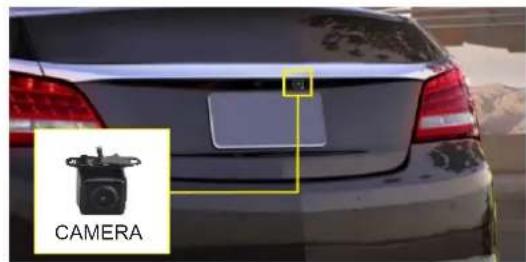
natural_image
Close-up of a black cable with red and orange connectors, attached to a small black camera module (no text or symbols visible)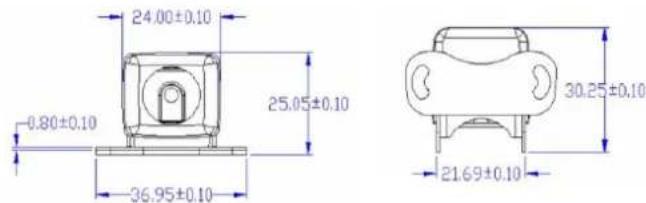
Measurements are in millimeters (mm)
Red: +12VDC Ignition or
Reverse Light
Black: Ground
Fuse: 1 Amp Only
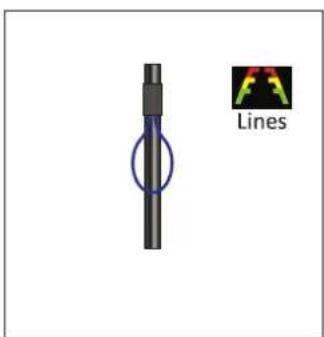
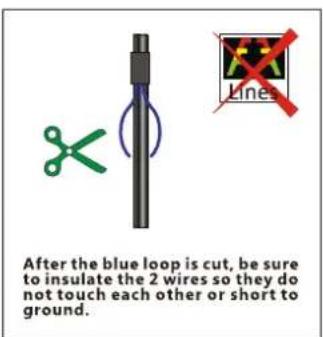
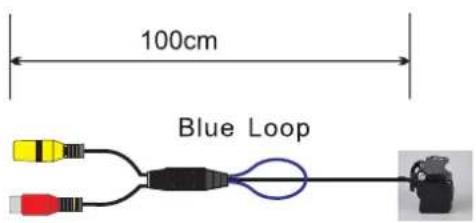
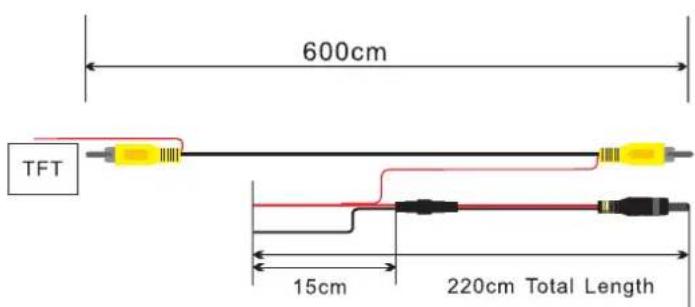
Note: Video cable has a built-in power wire (2 red wires on either end) for ease of installation. Only 1 cable has to be routed during installation.
Camera Specifications
Image Sensor: CMOS, PC7070
Power: 12VDC, Negative Ground
Power Consumption: <1 Watt
Effective Pixels: 640x480
Video Format NTSC
Lux: <0.5
White Balance: Auto
Viewing Angle: 170 Degrees
IP Rating: IP67
Operating Temperature: -15F \~ 160F
Camera Body: Zinc Alloy
Limited One Year Warranty
This warranty gives you specific legal rights. You may also have other rights which vary from state to state.
Dual Electronics Corp. warrants this product to the original purchaser to be free from defects in material and workmanship for a period of 1(one) year from the date of the original purchase.
Dual Electronics Corp. agrees, at our option, during the warranty period, to repair any defect in material or workmanship or to furnish an equal new, renewed or comparable product (whichever is deemed necessary) in exchange without charges, subject to verification of the defect or malfunction and proof of the date of purchase.
Subsequent replacement products are warranted for the balance of the original warranty period.
Who is covered? This warranty is extended to the original retail purchaser for products purchased from an authorized Jensen / Dual or Axxera dealer and used in the U.S.A.
What is covered? This warranty covers all defects in material and workmanship in this product. The following are not covered: software, installation/removal costs, damage resulting from accident, misuse, abuse, neglect, product modification, improper installation, incorrect
line voltage, unauthorized repair or failure to follow instructions supplied with the product, or damage occurring during return shipment of the product. Specific license conditions and copyright notices for the software can be found via www.dualav.com.
What to do?
-
Before you call for service, check the troubleshooting guide in your owner's manual. A slight adjustment of any custom controls may save you a service call.
-
If you require service during the warranty period, you must carefullypack the product (preferably in the original package) and ship it by prepaid transportation with a copy of
the original receipt from the retailer to an authorized service center.
-
Please describe your problem in writing and include your name, a return UPS shipping address (P.O.Box not acceptable), and a daytime phone number with your shipment.
-
For more information and for the location of the nearest authorized service center please contact us by one of the following methods:
• Call us toll-free at 1-866-382-5476
• E-mail us at cs@.dualav.com
Exclusion of Certain Damages: This warranty is exclusive and in lieu of any and all other warranties, expressed or implied, including without limitation the implied warranties of merchantability and fitness for a particular purpose and any obligation, liability, right, claim or remedy in contract or tort, whether or not arising
from the company's negligence, actual or imputed. No person or representative is authorized to assume, for the company, any other liability in connection with the sale of this product. In no event shall the company be liable for indirect, incidental or consequential damages.

Brand : JENSEN
Model : BUCAM200J
Category : Dash cam