
TC500 - Storage ADATA - Free user manual and instructions
Find the device manual for free TC500 ADATA in PDF.


| Product Type | External Storage Drive |
| Brand | ADATA |
| Model | TC500 |
| Capacity | Up to 2TB (varies by model) |
| Interface | USB 3.2 Gen1 (USB 3.0 compatible) |
| Read Speed | Up to 450 MB/s |
| Write Speed | Up to 400 MB/s |
| Dimensions (L x W x H) | Approx. 100 x 60 x 15 mm (3.9 x 2.4 x 0.6 in) |
| Weight | Approx. 100 g (3.5 oz) |
| Material | Aluminum alloy casing with plastic finish |
| Color | Black / Silver (depending on variant) |
| Power Supply | USB bus-powered (no external adapter required) |
| Operating Temperature | 0°C to 45°C (32°F to 113°F) |
| Storage Temperature | -20°C to 65°C (-4°F to 149°F) |
| Compatibility | PC, Mac, Linux, Xbox, PlayStation |
| Supported OS | Windows 7/8/10/11, macOS 10.10+, Linux kernel 2.6+ |
| Security | None built-in; optional software encryption available |
| Special Features | Durable shock-resistant design, plug-and-play, no driver needed |
| Package Contents | ADATA TC500 drive, USB cable, quick start guide |
| Warranty | Limited 2-year warranty |
| Maintenance & Cleaning | Wipe with a dry soft cloth; avoid liquids |
| Spare Parts & Repairability | Not user-serviceable; contact ADATA support for repairs |
Frequently Asked Questions - TC500 ADATA
User questions about TC500 ADATA
0 question about this device. Answer the ones you know or ask your own.
Ask a new question about this device
Download the instructions for your Storage in PDF format for free! Find your manual TC500 - ADATA and take your electronic device back in hand. On this page are published all the documents necessary for the use of your device. TC500 by ADATA.
USER MANUAL TC500 ADATA
Specifications
Product: AI Voice Translator
Model TC500
nensions: 4.78^2.41^0.52ir
Weight: 0.25lb
Touch Screen: 3.1in capacitive screen;
800*480p
CPU: MTK6739 Quad-Core 1.5GHz
ROM: 8GB
Microphone: Active Noise Reduction Dual Microphone
Speaker:
High-fidelity loudspeaker with
two-chamber high power amplifier
Support typeC audio output connector
Supported Frequency:
2G GSM(B2,B3,B5,B8)
3G TDSCDMA(B34,B39)
3G WCDMA(B1,B2,B5,B8)
4G TDD_LTE(B38,B39,B40,B41)
4G FDD_LTE(B1,B2,B3,B5,B7,B8,B17,B20)
Battery Capacity:
2200mAh
14°F-104°F
<70%
3.5V, 4.2V
10.25% in the Box
Translation of Transfers
First Pin #1, Use Manual #1, Used #1
Ejecti M 1 Oso Manad 1 Eanyaro 1
Operation Guide
How to connect network?
- Connect Wi-Fi

Slide left to the menu page > click 'Settings' button > enable WiFi connection > select the wireless network to be connected to > enter the correct password to connect.
2.Insert SIM Card

Note: Only Micro-SIM card is available for our Device. Any other non-standard card may cause the broken of SIM card slot or the device can't recognize the card. After inserting SIM card and restart the device, you can use SIM Card network service.
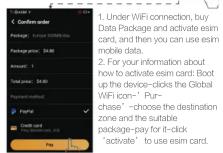
- Use device self-contain eSIM Card

How to Switch Between Languages?
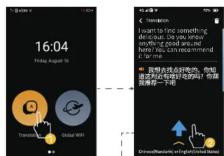
Enter translation interface
Enter translation interface

Slide upward to show
chats upward to show inter-translation
languages

Click national flag t
enter language list

Click to select language
Two-Way Translation:
It supports two-way translation between the selected two languages.
How to translate?

Press to speak

Release to translate
One Click Translation:
Device can automatically judge the inter-translation language which means if you say one language, it will translate another language automatically.
It will translate another language automatically.
How to share hotspot to a


How to use voice assistant Euri?

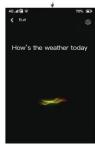
Click to enter Euri
main interface

Click the icon to
wake up Euri
Languages:
Euri only supports 2 languages: Chinese / English now.
Euri's skills:
You can use Euri to inquire the weather, turn on hotspot, convert exchange rate etc. Searching for food and entertainments and using navigation etc. will be available gradually.
Usage Scenario

Far-field Recognition:
Our device support far-field recognition
(0–40in recognition distance).
Ambient Noise Cancellation:
The translator can reduce the surrounding noise effectively under noisy environments.
Precautions
1- Please upgrade the firmware using the official methods if needed.
2- The signal may be weak or even no signal at airport, expressway, port, etc. Please restart the device to reconnect the network after leaving those places.
3- Please don't watch video online, download video, software or other high-traffic operations online when using hotspot overseas.
4- Do not use it outdoors in lightning storms.
5- Keep it out of reach of children.
6- Please use the battery, the charger and other accessories supplied by ADATA AI Voice Translator.
7- Do not make the device undergo the co
damage
8- The device is not waterproof, so please keep it away from any liquids.
9- Power off the device before boarding or near gas station.
10-Please charge the device in a well-ventilated environment and keep it away from flammable and explosive materials.
*Please use the device according to above instructions, otherwise we will not bear any responsibility, please acknowledge.
Declaration
FC
FCC Declaration of Conformity
FCC ID: 3401X-T1
This device complies with part 15 of the FCC Rules.
Operation is subject to the following two conditions: (1) This device may not cause harmful interference.
(1) This device may not cause harmful interference and (2) this device must accept any interference
received, including interference that may cause
Unsecured operation
First step: Click the menu.
Second step: Click Settings
Third step: Click View the FCC ID?
CE
CE Declaration of Conformity
This product compiles with the Council's RTTE Directive 99/5/EC The CE mark is used to demonstrate compliance with this directive.
Declaration of conformity
He boy, one then an angling tan medical technology co. LTD declares that this Langcoo Genesis is in
compliance with the essential requirements and other
relevant provisions of Directive 2014/53/EU.
Use the Langogo Canada in the environment with the temperature between -10℃ and 40℃.
Risk of explosion if battery is replaced by an incorrect
type. Dispose of used batteries according to the
Instructions. The participant
The product shall only be so connected to a USB interface of version 1USB2.
SAR: The device complies with RF specifications when
the device used at 5mm from your body.
Brand : ADATA
Model : TC500
Category : Storage