
BT8385-190 - Audiovisual support B-Tech - Free user manual and instructions
Find the device manual for free BT8385-190 B-Tech in PDF.


| Product Type | TV Wall Mount |
| Model | BT8385-190 |
| Brand | B-Tech |
| VESA Compatibility | Up to 400x400 mm |
| Max TV Weight | 50 kg (110 lbs) |
| Screen Size | 32" - 65" |
| Tilt Adjustment | +5° / -15° |
| Swivel | ±90° |
| Extension | Up to 500 mm |
| Material | Cold-rolled Steel |
| Mounting Type | Single Stud or Solid Wall |
| Dimensions (HxWxD) | 430 x 270 x 85 mm (folded) |
| Weight | 4.5 kg |
| Color | Black |
| Included Hardware | Bolts, spacers, and wall anchors |
| Cable Management | Yes, with cover plates |
| Warranty | 10 years |
Frequently Asked Questions - BT8385-190 B-Tech
User questions about BT8385-190 B-Tech
0 question about this device. Answer the ones you know or ask your own.
Ask a new question about this device
Download the instructions for your Audiovisual support in PDF format for free! Find your manual BT8385-190 - B-Tech and take your electronic device back in hand. On this page are published all the documents necessary for the use of your device. BT8385-190 by B-Tech.
USER MANUAL BT8385-190 B-Tech
INSTALLATION SAFETY INSTRUCTIONS

CAUTION: This product is intended for use only with the maximum weights indicated. Use with equipment heavier than the maximum indicated may result in instability causing possible injury.
B-Tech AV Mounts, it's distributors and dealers are not responsible for damage or injury caused by improper installation, improper use, modifications, installations over the specified weight capacity and/or failure to observe these safety instructions. In such cases, any warranty will expire.
It is recommended that this product should only be installed by a qualified professional / installer.
B-Tech AV Mounts does not claim any liability for any difficulties that may arise from the interpretation contained in these instructions. Failure to mount this product correctly may lead to serious injury and/or death.
Please check carefully to make sure there are no missing or defective parts - defective parts must never be used. In the event of missing and/or defective parts, or technical questions, please contact an authorised dealer.
Pay careful attention to where this product is located, some locations are not suitable for installation. For indoor use only. It is recommended that periodic inspections of the product are made as frequently as possible to ensure that safety is maintained.
Please keep these instructions for future reference.
INSTALLATION INSTRUCTIONS
1. FIX REAR COVER TO COLUMN (OPTIONAL)
Place item 2 into the back of item 1.
Use items 5 & 6 at the top and bottom of the column slot to secure rear cover.

2. ATTACH END CAP
Fix item 3 onto the top of item 1 using item 4.
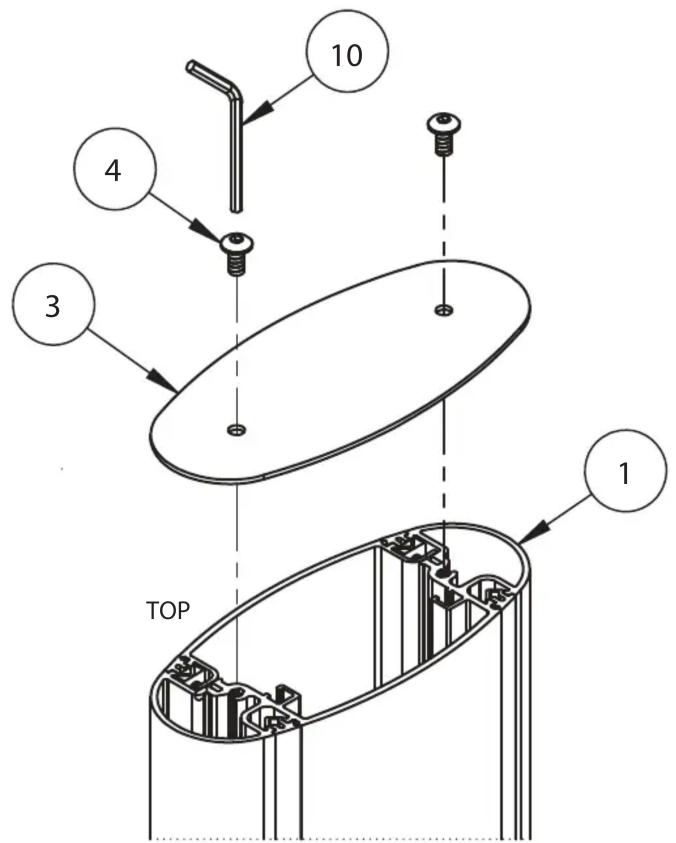
3. ATTACH COVER STRIPS
After display has been mounted to installation cut item 8 down to size and insert into the front and back of item 1.

natural_image
Technical diagram of a mechanical assembly with vertical rods and a base plate, showing motion arrows (no text or symbols)BT8385-190
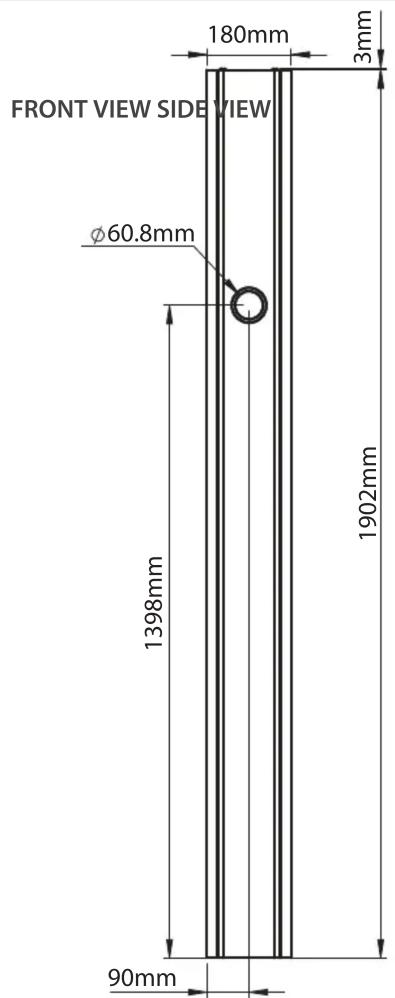
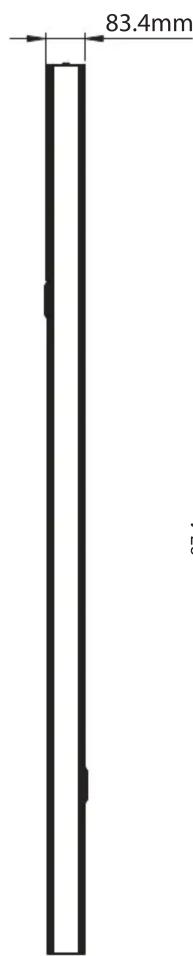
1.9M COLUMN
PRODUCT DIMENSIONS


CONTACT:
info@btechavmounts.com
©2019 B-Tech International Design & Manufacturing Ltd. All rights reserved.
B-Tech AV Mounts is a division of B-Tech International Design & Manufacturing Ltd.
B-Tech AV Mounts, the B-Tech logo and Mode-AL are registered trade marks.
All other brands and product names are trademarks of their respective owners.
Photographs are for illustrative purposes only. E&OE.
AMA-BT8385-190-V1-1119-104 MADE IN VIETNAM

Brand : B-Tech
Model : BT8385-190
Category : Audiovisual support