VR Headset - Helmet HOMIDO - Free user manual and instructions
Find the device manual for free VR Headset HOMIDO in PDF.


| Product Type | Virtual Reality Headset |
| Brand | Homido |
| Model | VR Headset |
| Dimensions | 180 x 120 x 90 mm |
| Weight | 300 g |
| Material | Plastic, Foam Padding, Elastic Strap |
| Compatibility | Smartphones 4.7 to 6.0 inches |
| Field of View | 90 degrees |
| Lens Type | Aspherical, Adjustable Focal Length |
| IPD Adjustment | Yes, Sliding Mechanism |
| Controls | Touchpad, Confirmation Button |
| Power | Passive (No Battery Required) |
| Color | Black/White |
| Included Accessories | Cleaning Cloth, Head Strap |
| Cleaning Instructions | Wipe with a soft, dry cloth. Do not use liquids. |
| Safety Warnings | Do not use while driving or walking. Remove if discomfort occurs. |
| Storage | Keep in a cool, dry place away from direct sunlight. |
| Repair & Spare Parts | Contact Homido support for replacement cushions or straps. |
Frequently Asked Questions - VR Headset HOMIDO
User questions about VR Headset HOMIDO
0 question about this device. Answer the ones you know or ask your own.
Ask a new question about this device
Download the instructions for your Helmet in PDF format for free! Find your manual VR Headset - HOMIDO and take your electronic device back in hand. On this page are published all the documents necessary for the use of your device. VR Headset by HOMIDO.
USER MANUAL VR Headset HOMIDO
- 1 carry case
-
3 lens cones
-
1 cleaning cloth
- 1 strap
START
1. DOWNLOADING THE APPLICATIONS
iPhone / Android : Download "Homido Center" from Google Play or the App Store
Once you have installed Homido Center, the app will let you access all other apps and games available for Homido. Choose the apps you want (the app only needs to be installed once)

2. ADJUSTING THE LENSES
- Choosing the right lens cone
Short cone : for short sighted people
Medium cone: for people with normal vision
Long cone : for long-sighted people
- Insert the lens in the cone
- Clip the cone to the interior of the headset
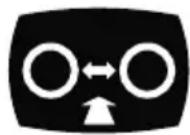
3. START THE SMARTPHONE
On the smartphone : start a film or an app.
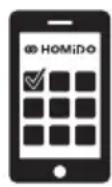
- open the front clip with one hand
- insert the smartphone with the other hand
- position the smartphone correctly: exactly in the middle, not too high, nor too low, nor crookedly.
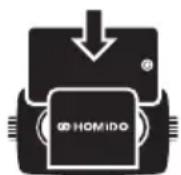
5. ADJUST THE HEADSET TO FIT YOUR HEAD
- Eye-lens distance : if you think that the lenses are too close to your eyes you can adjust their positions using the side wheels. Turn the two wheels at the same time.
- Distance between eyes: use the top-wheel to adjust the distance between the eyes to get the clearest possible image.
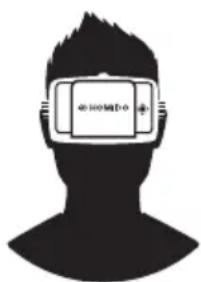
- Use the optional strap to distribute the weight around your head.
natural_image
Silhouette of a person's head with a rectangular device on the forehead (no text or symbols visible)HOW IS HOMIDO USED?
1. WATCHING MOVIES
- Watch a 3D film

The film must be in Side-By-Side (SBS) format. You can download 3D SBS films from the Web and watch them on your phone using your normal video player.
Or by streaming them from Youtube for example (search: "side by side 3D")
- Watch a standard film
Android: use "Side-By-Side Video Player". Download from Google Play. Iphone: use "Homido Player". Download from the App Store

- Watch 360° videos
Iphone: use Homido Player.
Android: use "Kolor Eyes – 360° video player", or "VR player". Download from Google Play. You can also watch your own 360° videos or download them from the Internet.
2. PLAYING GAMES
Android/Iphone: use "Homido Center". Download from
Google Play / App Store. Homido Center will give you a list of all Homido-compatible applications. It can also save all Homido apps in a single location once they have been installed.
3. AUGMENTED REALITY AND OTHER APPLICATIONS...
More information and Tutorials about: www.homido.com/tutorials
CAUTION
This device is not a toy. Keep away from children under 12.
Prolonged use may cause fatigue. Use moderately.
This device may cause epileptic episodes in some people.
Make sure the smartphone is correctly inserted in the device.
Use the device in a safe environment. Use of the device may cause a loss of balance, make sure that the environment is safe and secure before putting the headset on.
Do not use while driving a vehicle.
Do not use while playing sports.
Do not expose the device to high temperatures.
Do not expose the lenses to the sun's rays.