PMX44T - Turntable Pyle - Free user manual and instructions
Find the device manual for free PMX44T Pyle in PDF.


| Product Type | 6-Channel Audio Mixer with USB Interface |
| Brand | Pyle |
| Model | PMX44T |
| Channels | 6 |
| Input Channels | 2 Mic (XLR/6.35mm combo), 2 Stereo (RCA), MP3 (USB), Bluetooth |
| Output Channels | Main L/R (6.35mm), Phones (3.5mm) |
| Equalizer | 2-band: HIGH (12 kHz, ±15 dB), LOW (80 Hz, ±15 dB) |
| Phantom Power | +48V (switchable) |
| Power Supply | DC 5V/1A via USB Type-A (adapter included) |
| Power Consumption | 5W |
| Frequency Response | 20 Hz - 20 kHz (±1 dB) |
| Total Harmonic Distortion | < 0.5% @ +4 dBu |
| Bluetooth | Built-in for wireless music streaming |
| DSP Effects | 16 digital effects (Hall, Room, Delay, Ping-Pong, etc.) |
| MP3 Player | Built-in with LED display, supports USB drive playback |
| USB Sound Card | USB 2.0 Type-A for PC recording and playback |
| Dimensions (L x W x H) | 7.68" x 7.09" x 2.4" (195 x 180 x 61 mm) |
| Weight | Approx. 1.5 lbs (0.68 kg) |
| Construction Material | Engineered ABS plastic |
| Cleaning Instructions | Use a dry, soft cloth; avoid solvents, thinners, or chemical wipes |
| Safety Precautions | Avoid dust, vibration, extreme temperatures; power on amplifier last |
| Included Accessories | Mixer console, power adapter |
Frequently Asked Questions - PMX44T Pyle
User questions about PMX44T Pyle
0 question about this device. Answer the ones you know or ask your own.
Ask a new question about this device
Download the instructions for your Turntable in PDF format for free! Find your manual PMX44T - Pyle and take your electronic device back in hand. On this page are published all the documents necessary for the use of your device. PMX44T by Pyle.
USER MANUAL PMX44T Pyle
Need service or repair?
Want to leave a comment?
PyleUSA.com/ContactUs

Questions? Issues?
We are here to help!
Phone: (1) 718-535-1800
Email: support@pyleusa.com
PYLE
PyleUSA.com


☆□○※▲▲□■■×☆※※■※●□○□叠※!☆◆※□★□
DC 5V Power Supply USB Interface Mixer with Wireless BT and DSP Sound Effects
USER MANUAL
For the best results and the satisfaction from your new unit, please read this manual thoroughly, and retain it for future reference.
- Do not use the device in the vicinity of a TV, radio, stereo equipment, mobile phone, or other electric devices. Otherwise, the device, TV, or radio may generate noise.
- In order to prevent the possibility of panel disfiguration, unstable operation, or damage to the internal components. Do not expose the device to excessive dust or vibration, or extreme cold or heat (such as in direct sunlight, near a heater, or in a car during the day).
- Do not place vinyl, plastic or rubber objects on the device, since this might discolor the panel.
- When cleaning the device, use a dry and soft cloth. Do not use paint thinners, solvents, cleaning fluids, or chemical impregnated wiping cloths.
- Condensation can occur in the device due to rapid, drastic changes in ambient temperature when the device is moved from one location to another, or air conditioner is turned on or off. For example, using the device while condensation is present can cause damage. If there is reason to believe that condensation might have occurred, leave the device for several hours without turning on the power until the condensation has completely dried out.
- Avoid setting all controls to their maximum. Depending on the condition of the connected devices, doing so may cause feedback and may damage the speakers.
- When turning on the power in your audio system, always turn on the power amplifier LAST, to avoid speaker damage. When turning the power off, the power amplifier should be turned off FIRST for the same reason.
PRECAUTIONS WHEN USING THE USB 2.0 AND 5V DC TERMINALS
When connecting the USB2.0 connector to computer, please must abide by following points. If not, it may cause computer crash, breakdown, or losing data. If the computer or mixer crash, please restart the application software or computer operating system, or disconnect the mixer, then power on again.
- Use an USB cable. USB 3.0 cable cannot be used.
- Before connecting the computer to the USB 2.0 terminal, exit from any power-saving mode of the computer (such as suspend, sleep, standby).
FUNCTION AND INTRODUCTION
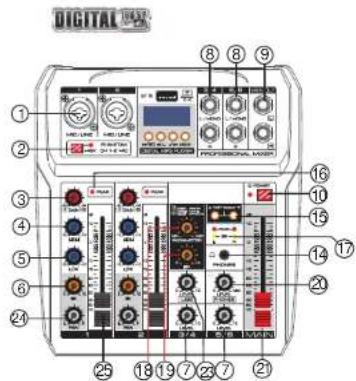
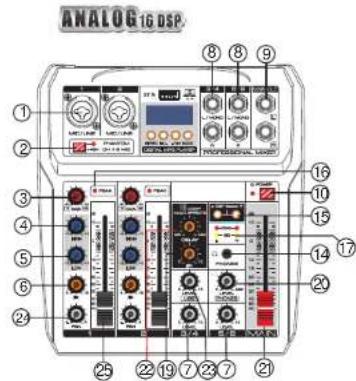
- [MIC/LINE] Mono input, connect the microphone, musical instrument or audio device (CD player and so on) to the device. The sockets are supporting both XLR and UNBALANCED 1/4"PLUG.

ALANCED 1/4" PLUG
- [+48V PHANTOM] Button/LED, when the button is turned on, the LED light is on, provide DC+48V phantom power to XLR plug on MIC mono input. Please turn on this button when using the condenser microphone which is powered by a phantom power.
- [GAIN] Controller, determines the basic volume of each channel, adjust them for the maximum volume performance, when the volume gets too loud, the [PEAK] LED indicator light will keep flashing.
- [HIGH] Treble tone controller, adjust the controller to enhance or attenuate for 15dB at 12 KHz.
- [LOW] Bass tone controller, adjust the controller to enhance or attenuate for 15dB at 80Hz.
- [FX] Controller, adjust the signal level from the channel to the reverberation line. Please note, the single level will vary with the different setting of the channel attenuator. If using the stereo channel, will mix the signals from L and R channels, then, send it to reverberation line.
- [LEVEL] Controller, adjust to balance the volume of each channels.
-
Stereo channel input, if only connect to L/(MONO) socket, the mixer will send out the same mono signal to L and R outputs.
-
[MAIN] Output, connect the active speaker or amplifier.
- [POWER] Power control switch.
- Converting switch for "stereo channel" and "USB signal".
- [TAPE/CD] TAPE/CD signal input.
- [UNBAL5/6] Stereo input.
- [PHONES] Connect an 3.5mm earphone, the socket is supporting stereo phone plug.
- [DSP Select] Press UP or DOWN button to select from 16 DSP.
- [PEAK] LED indicator light, when the volume of input signal or volume after adjusting equalizer is too High, the LED indicator light will keep flashing, please rotate the [GAIN] CONTROLLER counterclockwise to turn down the volume.
- [Output Level Indicator] This is a stereo signal level indicator configured with green LED lights (SIG) at the bottom and red LED lights (Peak) at the top for both the left channel side and the right channel side. Flashing green LED lights indicate normal input signals. When the red LED lights are flashing, the MAIN output signal level may need to be lowered by adjusting the monitor output level control knob.
- [PARAMETER] Control the parameter of the sound effect.
- [FX LEVEL] Effects return to level controller, adjust the volume of effect.
- [PHONES LEVEL] Earphone controller, adjust the volume of earphone.
- [MAIN LEVEL] Fader, adjust the overall volume from [MAIN] output signal.
- [DELAY] Controller, adjust the depth of the reverberation.
- [USB LEVEL] Controller, adjust the volume of USB channel.
- [PAN Control] The PAN control determines the position of the channel signal within the stereo image. When working with subgroups, you can use the PAN control to assign the signal to just one output, which gives you additional flexibility in recording situations.
- [CHANNEL FADER] Adjusts the level of the channel signal. Use these faders to adjust the balance between the various channels.
MP3 OPERATING INSTRUCTIONS
1. WIRELESS BT CONNECTION
a. Press the "MODE" button in order to select the Wireless BT mode, after the success of the selection, the Wireless BT icon on display is flashing, and display BT.
b. Open the Wireless BT for pairing, after the success of the pairing, there will be a sound prompt.
2. BUTTON FUNCTION
a. "▶//REC" button, press first time to pause the playing song, press again to continue playing.
b. "◀/-" button, short press to play the previous song, long press to reduce the input volume.
c. "→/+" button, short press to play the next song, long press to increase the input volume.
d. [MODE] Selecting button, switching the functional model, select USB, REC, BT in order.
a. Press the "MODE" key to select the REC state.
b. Press the "▶/REC" button to start recording, the LED screen shows the recording time, Press the "▶/REC" button again to pause the recording.
c. Press the "MODE" key back out the recording.
4. COMPUTER SOUND CARD
When connect the computer data cable, it will enter the PC playing states automatically (The computer will install the driver automatically at the first connection, need to wait until the installation finish, to play or record)
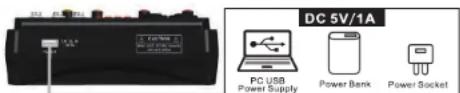
USB FOR DATA TRANSFER, RECORD AND POWER SUPPLY
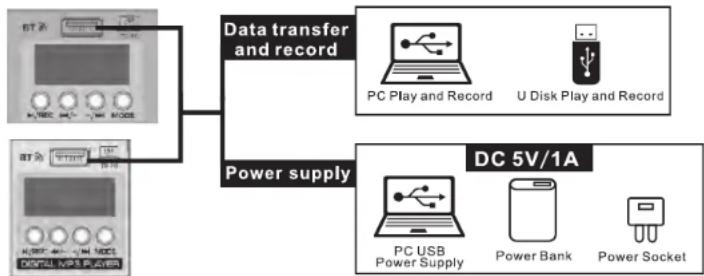
flowchart
graph TD
    A["计算机"] --> B["Data transfer and record"]
    C["电脑"] --> B
    B --> D["PC Play and Record"]
    B --> E["U Disk Play and Record"]
    F["DC 5V/1A"] --> G["PC USB Power Supply"]
    F --> H["Power Bank"]
    F --> I["Power Socket"]
USB FOR POWER SUPPLY ONLY
Connected with PC USB port, Power bank or power socket to supply power to mixer. It must meet the following requirements:
Output voltage: 4.8V to 5.2V
Output current: 1A or even more
| LIST OF 16 DIGITAL EFFECTS(FOR SOME MODELS): | |
| 01 | HALL1 |
| 02 | HALL2 |
| 03 | ROOM1 |
| 04 | ROOM2 |
| 05 | REVERB+DELAY |
| 06 | 125MS DELAY |
| 07 | 175MS DELAY |
| 08 | 225MS DELAY |
| 09 | 285MS DELAY |
| 10 | 560MS DELAY |
| 11 | 860MS DELAY |
| 12 | 1000MS DELAY |
| 13 | 1400MS DELAY |
| 14 | 800MS PINGPONG DELAY |
| 15 | 1000MS PINGPONG DELAY |
| 16 | 1400MS PINGPONG DELAY |
| GENERAL SPECIFICATIONS | ||
| Frequency Response | 20Hz-20KHz ±1dB+4dBμ@1KHz | |
| Total Harmonic Distortion | < 0.5% @+4dBμ (22Hz -22KHz) | |
| Channel | 6-CH | |
| Input Channels | MIC | 2(XLR+6.35Jack) |
| STEREO | 2(3-4/5-6) | |
| MP3 | 1 | |
| USB Sound Card | 2.0Type-A | |
| Bluetooth | 1 | |
| Output Channels | Main OUT | L/R(6.35Jack) |
| Phones OUT | 1(3.5Jack) | |
| Input Channel Function | EQ/2-band | HIGH: Gain/±15dB、Frequency :12KHz shelvingLOW: Gain/±15dB、Frequency : 80Hz shelving |
| Peak LED | LED turns on when post EQ signal reaches 3dB below clipping level | |
| Phantom Power Voltage | +48V | |
| Power Input | EXT.DC IN:5V-1A/2.0Type-A | |
| Power Consumption | 5W | |
Features:
- Six-Channel Audio Mixer with Built-in USB Interface
• Combines Traditional Sound Card and Mixer Function
• Built-in Wireless BT for Music Streaming
• Built-in MP3 Player with LED Display
• Built-in DSP Sound Effects Processor - Connects USB to PC to Play & Record Music
- Connects USB to PC or Power Bank for Power Supply
- Convenience for Mobile Audio Connection & Outdoor Guitar while Playing & Singing
• Exquisite Plastic Chassis
• Mic/Stereo/MP3/USB Sound Card/Wireless BT Input Channels
• Main/Phones Output Channels - Ultra-Low Noise Design with High Headroom
- Clipping LED Indicators for Left and Right Channel
- Smooth Rotary-Style Faders for Mic/USB/Line/Master Controls
• 1 XLR / 1/4" Jack Combo Mic Input
• 2 RCA Stereo Inputs
What's in the Box:
• (1) Mixer Console
• (1) Power Adapter
Technical Specs:
• Power Output: +15V/0.3A -15V/0.2A +48V/0.05A
• Power Supply: 120-240V, (DC 5V/1A Power Adapter)
• Power Consumption: 5W
• Construction Material: Engineered ABS
• Phantom Power Voltage: +48V
• Frequency Response: 20Hz-20KHz
• Total Harmonic Distortion: <0.5%@+4dBu
- Product Dimension (L x W x H): 7.68" x 7.09" x 2.4"-inches
Brand : Pyle
Model : PMX44T
Category : Turntable