HTS-E01 - Tourniquet de contrôle d'accès Dormakaba - Free user manual and instructions
Find the device manual for free HTS-E01 Dormakaba in PDF.


| Product Type | Electronic Door Lock |
| Brand | Dormakaba |
| Model | HTS-E01 |
| Dimensions (WxHxD) | 120 x 80 x 40 mm |
| Weight | 300 g |
| Power Supply | 4 x AA batteries (6V DC) |
| Battery Life | Up to 12 months |
| Low Battery Warning | LED indicator and beeps |
| Unlocking Methods | RFID card, PIN code, mechanical key override |
| User Capacity | Up to 100 users |
| Communication Protocol | Wiegand 26-bit |
| Operating Temperature | -10°C to 60°C |
| Ingress Protection | IP54 |
| Material | Zinc alloy, stainless steel |
| Finish | Brushed stainless steel |
| Security Features | Anti-tamper alarm, encrypted transmission |
| Maintenance | Clean with soft damp cloth; avoid solvents |
| Spare Parts | Battery cover, mounting screws, RFID cards |
| Repairability | Field replaceable batteries and card reader module |
Frequently Asked Questions - HTS-E01 Dormakaba
User questions about HTS-E01 Dormakaba
0 question about this device. Answer the ones you know or ask your own.
Ask a new question about this device
Download the instructions for your Tourniquet de contrôle d'accès in PDF format for free! Find your manual HTS-E01 - Dormakaba and take your electronic device back in hand. On this page are published all the documents necessary for the use of your device. HTS-E01 by Dormakaba.
USER MANUAL HTS-E01 Dormakaba
| Standard units HTS-E01 | |
| Construction | |
| Material AISI 304 stainless steel. | |
| Side barrier elements Made of AISI 304 stainless steel tubing ∅1-7/8" (∅48 mm), mitered. | |
| Rotating units With tubular column ∅5-1/2" (∅140 mm) made of AISI 304 stainless steel. | |
| Locking system, drive and toothed clutch installed in tubular column. | |
| Finish Stainless steel satin finish. | |
| Function Power assist; servo-positioning drive/electrically controlled in 2 directions. | |
| Electrical equipment Control unit in external switch cabinet: H 11-1/8" × W 6-5/8" × D 4-1/2" (H 283 mm × W 168 mm × D 115 mm). | |
| Power supply 110 - 230 VAC, 50/60 Hz, 253 VA. | |
| In case of power failure both directions free | |
| Standby power consumption 15 VA. | |
| Installation Finished floor. | |
| Suitable for outdoor installation. | |
| Protection classes Housing IP43, components conducting supply voltage IP54. | |
HTS-E01 elevation drawings
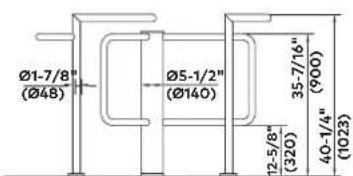
Note
Dimensions are shown as inches followed by millimeters; for example, 1" (25).

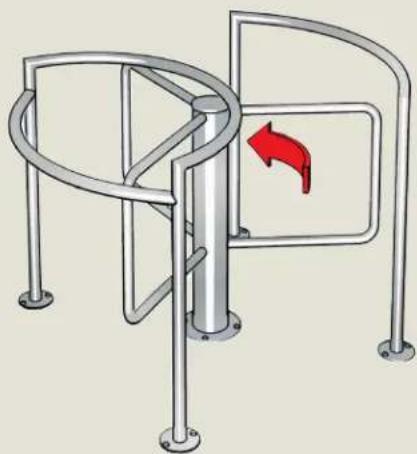
natural_image
Diagram of a metal gate with a right-handled switch mechanism, showing no text or symbols.HTS-E01
Installation examples
Guiding elements

Column

Options
Function
| Barrier elements with glass panel. |
Electrical equipment
| Installation preparation with adapter or mounting plate. | ○ |
| Consoles with adapter made of plastic or aluminium (also available in stainless steel for an additional charge). | ○ |
| Operating panels and frames or surface mount housing. | ○ |
- optional
Brand : Dormakaba
Model : HTS-E01
Category : Tourniquet de contrôle d'accès