
A62 - Mobile Phone SIEMENS - Free user manual and instructions
Find the device manual for free A62 SIEMENS in PDF.


| Product Type | Mobile Phone |
| Brand | Siemens |
| Model | A62 |
| Dimensions | 100.7 x 44.7 x 19.3 mm |
| Weight | 75 g |
| Battery Type | Li-Ion 700 mAh |
| Talk Time | 100-300 min |
| Standby Time | 60-250 h |
| Charging Time | 2 h |
| Operating Temperature | -10°C to 55°C |
| GSM Frequency Bands | GSM 900/1800/1900 MHz |
| SAR Value | 0.490 W/kg (head) |
| Display | Not specified |
| SIM Card | 3V SIM |
| Memory | Phonebook with groups, SMS storage |
| Connectivity | GPRS |
| Key Features | SMS, Phonebook, Profiles, Call divert, Direct call, T9 text input, Handsfree, Conference call |
| Security | PIN, PIN2, phone code, PUK, SIM barring, Direct call, This SIM only |
| Special Profiles | Aircraft mode, Car Kit, Headset, Normal, Quiet, Noisy |
| Warranty | 24 months for device, 6 months for wear parts (EU) |
Frequently Asked Questions - A62 SIEMENS
User questions about A62 SIEMENS
0 question about this device. Answer the ones you know or ask your own.
Ask a new question about this device
Download the instructions for your Mobile Phone in PDF format for free! Find your manual A62 - SIEMENS and take your electronic device back in hand. On this page are published all the documents necessary for the use of your device. A62 by SIEMENS.
USER MANUAL A62 SIEMENS
Overview of the phone
① Display indicators
Signal strength/GPRS/battery level.
② Soft keys
Press the soft key to call up the function that is displayed as Text or icon on the grey fields above the key.
③ Call key
Dial displayed phone number or name, accept calls. In standby mode: Display the last calls.
④ On/Off/End key
- Switched off: press and hold to switch on.
- During a conversation or in an application: press briefly to finish.
- In menus: press briefly to go back a level. Press and hold to return to standby mode.
- Instand by mode: switch off phone.
⑤ Navi-key
In lists and menus
Scroll up and down.
Function call.
Back a menu level.
During a call
Open call menu.
In standby mode
Open Phonebook.
Open menu.
GPRS info.
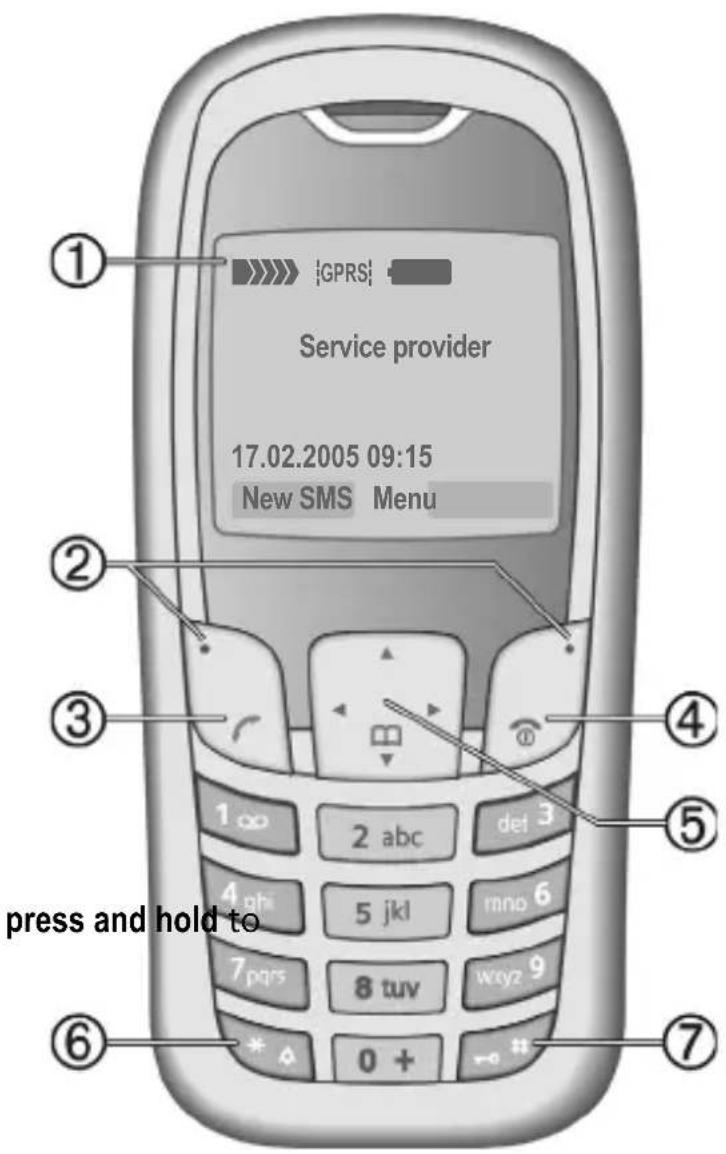
⑥ * Press and hold
- In standby mode: switch on/off all signal tones (except alarm).
- For incoming calls: only switch off ring tones.
⑦ # Press and hold
In standby mode: switch key lock on/off.
Getting started
Using the SIM card/battery
Your phone's display is delivered with a protective film. Remove this film before getting started. The service provider supplies you with a SIM card on which all the important data for your account is stored. If the SIM card is credit card-sized, snap out the smaller segment and trim any rough edges.
Remove the battery cover upwards ①.

natural_image
Diagram of a smartphone with a black arrow indicating rotation or movement, no text or symbols presentInsert SIM card ② and push it fully into the locating slot (make sure the angled corner is in the correct position ③). Then push the retaining catch over the top of the SIM card ④.
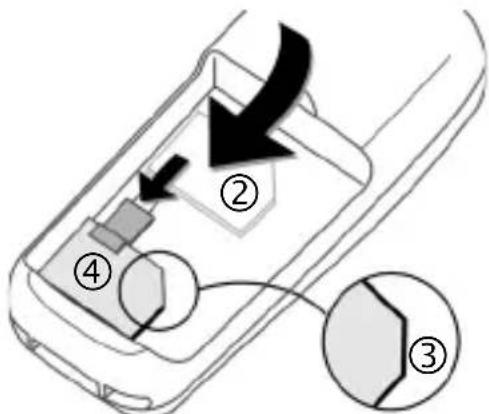
Insert the battery sideways into the phone ⑤, then press downwards ⑥ until it engages.

To remove, press the retaining tab ⑦ then lift the battery out.
Insert the battery cover by the tabs at the bottom ⑧, then press downwards ⑨, until it engages.

Always switch off phone before removing the battery!
Only 3 V SIM cards are supported. Please contact your service provider if you have an older card.
Charging the battery
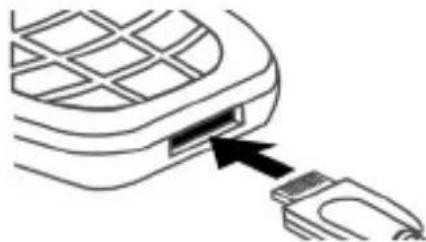
The battery is not supplied fully charged. Plug the charger cable into the bottom of the phone, plug the power supply unit into a mains power socket and charge for at least two hours.
natural_image
Line drawing of a mobile phone with an attached USB port (no text or symbols)Charging time
The charging time is 2 hours. Ambient temperature of 5 °C to 40 °C (icon flashes as a warning when 5 °C above/below this).
Switch on/off, PIN entry
Switch on/off
Press and hold On/Off/End key 📞 to switch on or off.
Enter PIN
The SIM card can be protected with a 4–8 digit PIN. Enter the PIN code using the number keys (the display shows a series of asterisks, if you make a mistake press Clear). Confirm your input with OK. Logging on to the network will take a few seconds.
First time switching on phone, the time and date must be set.
Standby mode
When the name of the service provider/logo appears on the display, the phone is in standby mode and ready for use.
Press and hold the On/Off/End key to return to standby mode from any menu option.
Security
The phone and SIM card are protected against misuse by several security codes. Keep these confidential numbers in a safe place where you can access them again if required.
Menu → Security → Codes → Select a function.
PIN control
The PIN is usually requested each time the phone is switched on. You can deactivate this feature but you risk unauthorised use of the phone. Some service providers do not permit deactivation of the control.
Change PIN
You can change the PIN to any 4–8 digit number you may find easier to remember.
Change PIN2
(Displayed only if PIN2 is available.) Proceed as with Change PIN.
Change phonecode
You define and enter the phone code (4–8 digits) when calling a phone code protected function (e.g. Direct call, p. 5) for the first time. It is then valid for all protected functions. If it is entered incorrectly three times the phone is locked. Contact the Siemens Service.
Clear SIM card barring
If the PIN is entered incorrectly three times, the SIM card is barred. Enter the PUK (MASTER PIN) provided by your service provider with the SIM card. If the PUK (MASTER PIN) has been lost, please contact your service provider.
Prevent accidental activation
Even if PIN use is deactivated confirmation is required to switch on the phone. This prevents accidental activation of the phone, e.g. when you are carrying it in a bag or when you are travelling in an aircraft.
After pressing and holding the On/Off/End key 📋 select OK to switch on the phone or abort the operation with any key except OK.
Making a phone call
Dialling with number keys
The phone must be switched on (standby mode). Enter the number (always with prefix, if necessary with the international dialling code). Press Clear to clear the last digit, press and hold to clear the entire phone number. To dial press the key.
End call
Press the End key 📞 briefly. Press this key even if the person on the other end of the line has hung up first.
Set volume
Use the scroll key ⬆ to start adjusting the volume during conversation. Set volume with ⬆.
Redial previous numbers
To redial the phone number last called, press the Call key twice. To redial other numbers that were dialled previously, pick out the required phone number from the list with ⬆, then press to dial.
When a number is busy
For automatically dialling the phone number for up to 15 minutes at increasing intervals, press Auto dial. For phone ringing when the busy number is free, press Call back (💡!). Press Prompt and a beep will remind you to redial the dis-payed phone number after 15 minutes.
Accept call
The phone must be switched on (standby mode). An incoming call will interrupt any other use of the phone.
Press Answer or ↗.
If the phone number has been transmitted by the network, it is displayed. If the number and the name are stored in the Phonebook, the corresponding name is displayed instead. If set, an animation can be displayed instead of the bell icon.
Reject call
Reject or 📞 press briefly.
Swapping between 2 calls

Make a new connection during a call with menu → Hold → (dial new phone number, also from Phonebook: ). With Swap you can swap back and forth between both calls.
Additional costs will be incurred for the 2nd phone connection.
Conference Ⓧ!
Make a new connection during a call with menu → Hold → (dial a new phone number).
With menu → Conference you can join the held call. Repeat this procedure until all participants are linked together (up to 5 participants).
All calls in the conference are ended simultaneously when the End key 🔒 is pressed.
Additional costs will be incurred for every additional phone connection.
Handsfree
You can put the phone down during a call. You can then hear the caller via the loudspeaker. Press Handsfr. and Yes to activate handsfree function. Press Handsfr. to switch off.
Warning!
Please make sure you have accepted the call before holding the phone to your ear. This will prevent a loud ring tone from damaging your hearing!
Call menu
Several functions are only available during a call:
menu → Select a function.
Direct call
The phone can be locked, so it's only possible to dial a defined number.
Switch on
Menu → Security → Direct call
Press Select and enter phone code. When first prompted you define and enter the phone code (4–8 digits). Please do not forget this code! Confirm input with OK and press Change. Select phone number from the Phonebook or enter a new one. With OK confirm ON.
Use
Press and hold the right soft key
□ to dial.
Switch off
Press and hold # and enter phone code. Confirm input with OK and press Change. With OK confirm OFF.
Phonebook
Open Phonebook (in standby mode)
select
Number: Always enter phone number with an area dialling code.
Name: Enter first name or surname.
Group: Organise entries in groups, select with Change.
Location: Select location: SIM (SIM card), Mobile (phone memory) or Protected SIM (special SIM card).
Record no.: This is automatically assigned to the entry. Change with Change.
Press Save to store the new entry.
Text entry
Press number key repeatedly until the required letter appears. The cursor advances after a short delay. Example:
2 Press once for a, twice for b etc. Press and hold to write the number.
Ä, ä, 1–9 Umlauts and numbers are displayed after the relevant letters.
Clear Press briefly to delete the letter before the cursor, press and hold to delete the whole word.
Move the cursor (forwards/back).
# Press briefly: Switch between: abc, Abc, ABC, T9abc, T9Abc, T9ABC, 123. Status indicator in the top line of the display. Press and hold: All input modes are displayed.
* Press briefly: Select special characters. Press and hold: Open input menu.
Press once/repeatedly: ., ? ! ' " 0 - () @ / : _ + \~ &
Press and hold: Writes 0.
1 Writes blank. Press twice = skip line.
Call/search for an entry
Open Phonebook ⬇, select name by typing first letter or scroll and dial with ↗.
Call with record no.
A record number is automatically assigned to every new entry in the Phonebook.
Enter record number (in standby mode) → # → ↗
Edit entry
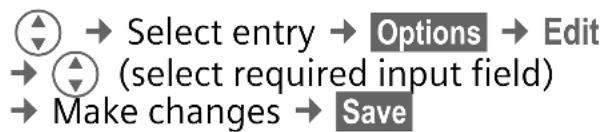
flowchart
graph TD
    A["Start"] --> B["Select entry"]
    B --> C["Options"]
    C --> D["Edit"]
    D --> E["(select required input field)"]
    E --> F["Make changes"]
    F --> G["Save"]
Assign picture
If a picture is assigned to an entry, this picture is displayed for the appropriate call.

flowchart
graph LR
    A[" radio"] --> B[" select entry "]
    B --> C[" Options "]
    C --> D[" Picture "]
    D --> E[" Select picture "]
    E --> F[" Open "]
    F --> G[" Select "]
Groups
If there are many Phonebook entries it is best to assign them to a group, e.g.: Family, Friends, VIP
A special ring tone can sound and/or a symbol can be displayed if the phone number of a call is registered in a group.
Select a group

All entries of the selected group are displayed.
Change group assignment
You can assign a Phonebook entry to a group when you enter it.

flowchart
graph LR
    A["Open Phonebook"] --> B["Select entry"]
    B --> C["Edit"]
    C --> D["(scroll to group)"]
    D --> E["Change"]
    E --> F["Select a new group"]
    F --> G["Save"]
Group call tones
You can assign different ringtones to groups.

flowchart
graph TD
    A["Menu"] --> B["Group calls"]
    B --> C["Select a group"]
    C --> D["Select"]
    D --> E["Select ring tone"]
Messages (SMS)
Read messages
A new message is indicated on the display with ☒. Press the left soft key to read the message. Scroll through the message line by line with ⏻.
Reply Functions for a direct reply.
Inbox/outbox/archive

The list of saved messages is shown.
Compose a message

The SMS is sent to the service centre for transmission.
SMS to group
Write text → Options → Send → Group select group members and send SMS.
Picture&sound
Insert pictures/sounds in the message text.
Write text → Options → Picture&sound → Select picture/sound. The picture/sound is inserted in the SMS.
Text menu
Options Open the text menu.
Write text fragments

flowchart
graph TD
    A["Menu"] --> B["Envelope"]
    B --> C["Predef. texts"]
    C --> D["Options"]
    D --> E["<New entry>"]
    E --> F["(write textfragment)"]
    F --> G["Save"]
Use text fragments

flowchart
graph LR
    A["(write message text)"] --> B["Options"]
    C["Predef. texts"] --> D["(select text fragment from the list)"]
    D --> E["Select"]
The text fragment is inserted into the text to the left of the cursor.
Text entry with T9
T9 deduces the correct word from the individual key entries by making comparisons with an extensive dictionary. Write a word and finish it without looking at the display. Simply press the keys where the relevant letter is located once. If several options are found in the dictionary the most probably is displayed first. For further options please press the right softkey.
T9® Text Input is licensed under one or more of the following: U.S. Pat. Nos. 5,818,437, 5,953,541, 5,187,480, 5,945,928 and 6,011,554; Canadian Pat. No. 1,331,057; United Kingdom Pat. No. 2238414B; Hong Kong Standard Pat. No. HK0940329; Republic of Singapore Pat. No. 51383; Euro.Pat. No. 0 842 463 (96927260.8) DE/DK, FI, FR, IT, NL, PT, ES, SE, GB; and additional patents are pending worldwide.
Profiles
Menu →
Three profiles are standard with default settings, they can be changed however: Normal envi., Quiet environ., Noisy environ., Car Kit (only with an original Siemens handsfree Car kit), Headset (only with an original Siemens headset).
You can set two personal profiles (
The special profile Aircraft mode cannot be changed.
Activate
Select default profile or personal profile: ⬆ → Activate.
Change setting
Select profile → Options → Change sett.
The list of available functions is displayed.
Aircraft mode
The phone will automatically switch off if you select this profile. Even the alarm tone is deactivated. An alarm is only shown on the display. It is not possible to modify this profile.
The next time you switch on the phone the default profile will be activated.
Setup
Display
Menu → 📋 → Display → Select a function.
Language
Set the language of the display text.
"Automatic" will set the language of your home service provider. Reset to this language in standby status:
* #0000#
Screensaver
The screensaver shows a picture on the display as soon as a period that can be set by you has elapsed. The function is ended by an incoming call or by pressing any key.
Call setup
Menu → 📋 → Call setup → Select a function.
Hide ID
When switched off, the display of the calling party shows your phone number (dependent on service provider). To suppress this display, you can activate the "Hide ID" mode.
Call waiting ⚙!
If you are registered for this service, you can check whether it is set and you can activate/deactivate it with Call waiting.
Any to answer
Incoming calls can be accepted by pressing any key(except for 📞).
Minute beep
During the call, you will hear a beep after each minute as a reminder of the time elapsed. The receipt does not hear the beep.
Divert
You can set the conditions for which calls are diverted to your mailbox or other numbers.
Menu → Divert → Select a function.
Set up call divert (example)
All calls Ⓧ!
All calls are diverted. Ⓜ is shown in the top line of the display in standby mode.
Unanswered calls Ⓤ!
Includes Unanswered, Not reachable, No reply, Busy.
Select → Set → (Enter the phone number to which the call should be diverted) → OK
After a short pause, the setting is confirmed by the network.
Status check
After a short pause the current information is shown.
Condition set. Not set.
? Display, if status is unknown (e.g. on a new SIM card).
Clear all Ⓤ!
All set diversions are cleared.
Clock
Menu → Clock → Select a function.
Security
Menu → Security → Select a function.
Direct call
Only one phone number can be dialled. Press and hold the right soft key.
This SIM only Ⓤ!
Your phone is prevented from being used with a different SIM card.
Only 0 !
Restrict calls to SIM-protected numbers in the Phonebook.
Last 10 only
Limit calls to call list of "dialled numbers".
Barrings 🔊!
Network barring restricts the use of your SIM card.
All outgoing: Outgoing calls, except emergency 999 calls, are blocked.
Outgo internat: Only national calls can be made.
Out.int.x home: International calls are not permitted, except for calls to your home country.
All incoming calls: The phone is blocked from receiving all incoming calls.
When roaming: You do not receive any calls outside your home network.
Status check: Query the status of your barrings.
Clear all: Clear all barrings. Password protected!
Phone identity
The phone identity number (IMEI) is displayed.
Factory settings
The phone is reset to the default values (does not apply to SIM card and network settings).
Alternative input in standby mode:
*#9999#
Network
Menu → 📋 → Network → Select a function.
Line ⚙!
Two independent phone numbers have to be registered.
Network info
The list of GSM networks currently available is displayed.
Auto network
If activated, the next network is dialled in the order of your "preferred networks".
Choose network
The network search is restarted.
Preferred network
Set the service providers you prefer when you leave your home network.
Fast search
Speed up network reconnection.
Ring tones
Menu → Select a function.
Set the tones to match your needs.
Ringer setting
Activate/deactivate the ring tone or reduce it to a short beep.
Silent alert
Activate/deactivate the silent alert (functions in addition to ringer).
Volume
Set the same volume for all ring tones.

Set volume.

Confirm.
Calls, Group calls, Other calls, Alarm clock, Messages
The ring tones for the stated types of call/functions can be set separately.
More tones...
Call screening Ⓧ!
Only calls from numbers that are in the Phonebook or in a predefined group are signalled audibly or by silent alert. Other calls are only displayed.
Key tones
Set acoustic key acknowledge:
Click or Tone or Silent
Minute beep
During the call, you will hear a beep once a minute as a reminder.
Info tones
Set service and alarm tones.
Customer Care
We offer fast, individual advice! You have several options:
Our online support on the Internet:
www.siemens.com/ mobilephonescustomercare
We can be reached any time, any place. You are given 24 hour support on all aspects of our products. Here you will find an interactive fault-finding system, a compilation of the most frequently asked questions and answers, plus user guides and current software updates to download.
When calling customer service, please have ready your receipt and the phone identity number (IMEI, to display press *#06#), the software version (to display, press *#06#, then
More) and if available, your Siemens Service customer number.
You can also get personal advice about our range of products on our Premium Hotline:
United Kingdom 0906 9597500
(0.75 £ per minute)
Qualified Siemens employees are waiting to offer you expert information about our products and installation.
In some countries repair and replace services are impossible where the products are not sold through our authorised dealers.
If repair work is necessary, please contact one of our service centres:
Abu Dhabi 0 26 42 38 00
Argentina 0 80 08 88 98 78
Australia....13 00 66 53 66
Austria....05 17 07 50 04
Bahrain 40 42 34
Bangladesh....0 17 52 74 47
Belgium....0 78 15 22 21
Bolivia 0 21 21 41 14
Bosnia Herzegovina....0 33 27 66 49
Brazil....0 80 07 07 12 48
Brunei 02 43 08 01
Bulgaria....02 73 94 88
Cambodia 12 80 05 00
Canada 1888770211
China 02138984777
Croatia 0 16 10 53 81
Czech Republic....2 33 03 27 27
Denmark 35 25 86 00
Dubai 0 43 96 64 33
Egypt....0 23 33 41 11
Estonia.... 06 30 47 97
Finland 09 22 94 37 00
France....01 56 38 42 00
Germany * 0 90 01 00 77 00
Greece 80 11 11 11 16
Hong Kong.... 28 61 11 18
Hungary 06 14 71 24 44
Iceland 5113000
India 22 24 98 70 00 Extn: 70 40
Indonesia 0 21 46 82 60 81
Ireland....18 50 77 72 77
Italy 02 24 36 44 00
Ivory Coast.... 05 02 02 59
Jordan....0 64 39 86 42
Kenya....2723717
Kuwait 2454178
Latvia 7 50 11 18
Lebanon.... 01 44 30 43
Libya 02 13 50 28 82
Lithuania 8 52 74 20 10
Luxembourg.... 43 84 33 99
Macedonia 02 13 14 84
Malaysia....+60377124304
Malta ....+ 35 32 14 94 06 32
Mauritius 2 11 62 13
Mexico 01 80 07 11 00 03
Morocco 22 66 92 09
Netherlands 0 90 03 33 31 00
New Zealand....08 00 57 43 63
Nigeria 0 14 50 05 00
Norway 22 70 84 00
Oman 79 10 12
Pakistan 02 15 66 22 00
Paraguay 800102004
Philippines 0 27 57 11 18
Poland....08 01 30 00 30
Portugal 8 08 20 15 21
Qatar....04 32 20 10
Romania 02 12 04 60 00
Russia....8 80 02 00 10 10
Saudi Arabia 0 22 26 00 43
Serbia 01 13 07 00 80
Singapore 62 27 11 18
Slovak Republic 02 59 68 22 66
Slovenia....0 14 74 63 36
South Africa 08 60 10 11 57
Spain....9 02 11 50 61
Sweden....0 87 50 99 11
Switzerland 08 48 21 20 00
Taiwan 02 23 96 10 06
Thailand....0 27 22 11 18
Tunisia 71 86 19 02
Turkey....0 21 65 79 71 00
Ukraine 8 80 05 01 00 00
United Arab Emirates....0 43 66 03 86
United Kingdom 0 87 05 33 44 11
USA 1888770211
Vietnam....84 89 20 24 64
Zimbabwe 04 36 94 24
Product data
Declaration of conformity
Siemens Information and Communication mobile hereby declares that the phone described in this user guide is in compliance with the essential requirements and other relevant provisions of European Directive 1999/5/EC (R&TTE).
The declaration of conformity (DoC) concerned has been signed. Please call the company hotline if you require a copy of the original, or go to:
www.siemens.com/mobiledocs
CE 0682
Technical data
GSM class: 4 (2 watt)
Frequency range: 880–960 MHz
GSM class: 1 (1 watt)
Frequency range: 1,710–1,880 MHz
GSM class: 1 (1 watt)
Frequency range: 1,850–1,990 MHz
Weight: 75 g
Dimensions: 100.7 × 44.7 × 19.3 mm
(73 ccm)
Li-Ion battery: 700 mAh
Operating temperature: -10 °C to 55 °C
Standby time: 60 h–250 h
Talk time: 100 min–300 min
SIM card: 3.0 V
Battery quality statement
The capacity of your mobile phone battery will reduce each time it is charged/emptied. Storage at too high or low temperatures will also result in a gradual capacity loss. As a result the operating time of your mobile phone may be considerably reduced, even after a full recharge of the battery. Regardless of this, the battery has been designed and manufactured so that it can be recharged and used for six months after the purchase of your mobile phone. After six months, if the battery is clearly suffering from loss of performance, we recommend that your replace it. Please buy only Siemens original batteries.
Care and maintenance
Your phone has been designed and manufactured to the highest of standards and should be treated with great care. The suggestions below will help you to enjoy your phone for many years.
- Protect your phone from moisture and humidity! Precipitation, humidity and liquids contain minerals that will corrode electronic circuits. Should your phone nonetheless become wet, disconnect it immediately from any power supply, remove the battery and leave the open phone to dry at room temperature!
- Do not use or store the phone in dusty, dirty areas. Its moving parts may become damaged.
-
Do not store your phone in hot areas. High temperatures can shorten the life of electronic devices, damage batteries and warp or melt certain plastics.
-
Do not store your phone in cold areas. When the phone warms up again (to its normal ambient temperature), moisture can form inside the phone, which may damage electronic circuit boards.
- Do not drop, knock or shake your phone. Rough handling can damage internal circuit boards!
- Do not use harsh chemicals, cleaning solvents, or strong detergents to clean the phone!
The suggestions given above apply equally to your phone, battery, charger and all accessories. If any of these parts are not working properly, take them to your nearest qualified service outlet. The personnel there will assist you and, if necessary, repair the device.
Guarantee certificate
United Kingdom
Without prejudice to any claim the user (customer) may have in relation to the dealer or retailer, the customer shall be granted a manufacturer's Guarantee under the conditions set out below:
- In the case of new devices and their components exhibiting defects resulting from manufacturing and/or material faults within 24 months of purchase, Siemens shall, at its own option and free of charge, either replace the device with another device reflecting the current state of the art, or repair the said device. In respect of parts subject to wear and tear (including but not limited to, batteries, keypads, casings, small parts on casings, protective coverings where included in the scope of delivery), this warranty shall be valid for six months from the date of purchase.
- This Guarantee shall be invalid if the device defect is attributable to improper treatment and/or failure to comply with information contained in the user manuals.
-
This Guarantee shall not apply to or extend to services performed by the authorised dealer or the customer themselves (e.g. installation, configuration, software downloads). User manuals and any software supplied on a separate data medium shall be excluded from the Guarantee.
-
The purchase receipt, together with the date of purchase, shall be required as evidence for invoking the Guarantee. Claims under the Guarantee must be submitted within two months of the Guarantee default becoming evident.
- Ownership of devices or components replaced by and returned to Siemens shall vest in Siemens.
- This Guarantee shall apply to new devices purchased in the European Union. For Products sold in the United Kingdom the Guarantee is issued by Siemens plc, Siemens House, Oldbury, Bracknell, Berkshire, RG12 8FZ.
- Any other claims resulting out of or in connection with the device shall be excluded from this Guarantee. Nothing in this Guarantee shall attempt to limit or exclude a Customers Statutory Rights, nor the manufacturer's liability for death or personal injury resulting from its negligence.
- The duration of the Guarantee shall not be extended by services rendered under the terms of the Guarantee.
- Insofar as no Guarantee default exists, Siemens reserves the right to charge the customer for replacement or repair.
- The above provisions does not imply a change in the burden of proof to the detriment of the customer.
To invoke this Guarantee, please contact the Siemens telephone service. The relevant number is to be found in the accompanying user guide.
Ireland
Without prejudice to any claim the user (customer) may have in relation to the dealer or retailer, the customer shall be granted a manufacturer's Guarantee under the conditions set out below:
- In the case of new devices and their components exhibiting defects resulting from manufacturing and/or material faults within 24 months of purchase, Siemens shall, at its own option and free of charge, either replace the device with another device reflecting the current state of the art, or repair the said device. In respect of parts subject to wear and tear (including but not limited to, batteries, keypads, casings, small parts on casings, protective coverings where included in the scope of delivery), this warranty shall be valid for six months from the date of purchase.
- This Guarantee shall be invalid if the device defect is attributable to improper care or use and/or failure to comply with information contained in the user manuals. In particular claims under the Guarantee cannot be made if:
• Repairs or other work done by persons not authorised by Siemens.
- The device is opened (this is classed as third party intervention)
- Components on the printed circuit board are manipulated
• The software is manipulated
- Defects or damage caused by dropping, breaking, lightning or ingress of moisture. This also applies if defects or damage was caused by mechanical, chemical, radio interference or thermal factors (e.g.: microwave, sauna etc.)
• Devices fitted with accessories not authorised by Siemens
- This Guarantee shall not apply to or extend to services performed by the authorised dealer or the customer themselves (e.g. installation, configuration, software downloads). User manuals and any software supplied on a separate data medium shall be excluded from the Guarantee.
- The purchase receipt, together with the date of purchase, shall be required as evidence for invoking the Guarantee. Claims under the Guarantee must be submitted within two months of the Guarantee default becoming evident.
- Ownership of devices or components replaced by and returned to Siemens shall vest in Siemens.
- This Guarantee shall apply to new devices purchased in the European Union. For Products sold in the Republic of Ireland the Guarantee is issued by Siemens Ireland Limited, Ballymoss Road, Sandyford Industrial Estate, Dublin 18 – The Republic of Ireland.
- Any other claims resulting out of or in connection with the device shall be excluded from this Guarantee. Nothing in this Guarantee shall attempt to limit or exclude a Customers Statutory Rights, nor the manufacturer's liability for death or personal injury resulting from its negligence.
-
The duration of the Guarantee shall not be extended by services rendered under the terms of the Guarantee.
-
Insofar as no Guarantee default exists, Siemens reserves the right to charge the customer for replacement or repair.
- The above provisions does not imply a change in the burden of proof to the detriment of the customer.
To invoke this Guarantee, please contact the Siemens helpdesk on 1850 777 277. This number is also to be found in the accompanying user guide.
SAR
European Union (RTTE)
INFORMATION ON RF EXPOSURE/SPECIFIC ABSORPTION RATE (SAR)
THIS MOBILE PHONE MEETS THE LIMITS SET BY THE EU (1999/519/EC) FOR PROTECTION OF THE HEALTH OF THE PUBLIC FROM THE EFFECTS OF EXPOSURE TO ELECTROMAGNETIC FIELDS
These limits are part of comprehensive recommendations for the protection of the public. The recommendations were developed and confirmed by independent scientific organisations through periodic and thorough evaluation of scientific studies*. The limits include a substantial safety margin designed to assure the safety of all persons, regardless of age and health.
Before radio equipment may be placed on the market, compliance with the European laws and the respective technical limit requirements must be demonstrated. Only then the CE mark may be affixed**. The limit for mobile phones recommended by the Council of the European Union employs a unit of measurement known as the Specific Absorption Rate, or SAR. This SAR limit is 2.0 W/kg***. This corresponds with the requirements of the International Commission for Non-Ionizing Radiation Protection ICNIRP and was adopted into the European Norm for Mobile Radio Equipment EN 50360. The SAR of mobile phones is determined in accordance with the European Norm EN 50361. This involves measuring the maximum value in all frequency bands of the mobile phone with the phone transmitting at its highest power level. The actual SAR level of the phone during normal operation may be well below the maxi-
mum value. This is because the phone is designed to operate at multiple power levels so as to use only the power required to reach the network. In general, the closer you are to a base station, the lower the power output.
The highest SAR value for this model phone when tested for compliance against the norm is 0.490 W/kg****.
The SAR information can also be found on the Siemens web site at
www.siemens.com/mobilephones
While there may be differences between the SAR levels of various phones and at various positions, all Siemens products meet the legal requirements.
* The World Health Organization (WHO, CH-1211 Geneva 27, Switzerland) states that present scientific information does not indicate the need for any special precautions for use of mobile phones.
Further information:
www.who.int/peh-emf, www.mmfai.org, www.siemens.com/mobilephones
** The CE mark confirms that the product is in compliance with the legal requirements of the European Union as a prerequisite for the placing on the market and the free movement of goods within the European internal market.
*** averaged over 10 g body tissue.
**** SAR values may vary depending on national requirements and frequency bands. SAR information for different regions can be found at
www.siemens.com/mobilephones
International (ICNIRP)
INFORMATION ON RF EXPOSURE/SPECIFIC ABSORPTION RATE (SAR)
THIS MOBILE PHONE MEETS THE LIMITS FOR PROTECTION OF THE HEALTH OF THE PUBLIC FROM THE EFFECTS OF EXPOSURE TO ELECTROMAGNETIC FIELDS
Your mobile phone is a radio transmitter and receiver. It is designed and manufactured not to exceed the limits for exposure to radio frequency (RF) energy recommended by international guidelines from the International Commission on Non-Ionizing Radiation Protection (ICNIRP). These limits are part of comprehensive guidelines for the protection of the public and establish permitted levels of RF energy for the population. The guidelines were confirmed by independent scientific organisations through periodic and thorough evaluation of scientific studies*. The limits include a substantial safety margin designed to assure the safety of all persons, regardless of age and health.
The exposure limit for mobile phones employs a unit of measurement known as the Specific Absorption Rate, or SAR. The SAR limit stated in the international guidelines is 2.0 W/kg**. Tests for SAR are conducted in all frequency bands using standard operating positions with the phone transmitting at its highest power level. The actual SAR level of the phone during operation can be well below the maximum value. This is because the phone is designed to operate at multiple power levels so as to use only the power required to reach the network. In general, the closer you are to a base station, the lower the power output.
The highest SAR value for this model phone when tested for use at the ear is 0.490 W/kg***.
SAR information can also be found at www.siemens.com/mobilephones
While there may be differences between the SAR levels of various phones and at various positions, they all meet the international guidelines for safe RF exposure.
* The World Health Organization (WHO, CH-1211 Geneva 27, Switzerland) states that present scientific information does not indicate the need for any special precautions for use of mobile phones.
Further information:
www.who.int/peh-emf, www.mmfai.org, www.siemens.com/mobilephones
** averaged over 10 g of tissue.
*** SAR values may vary depending on national requirements and frequency bands. information for different regions can be found at www.siemens.com/mobilephones
Safety precautions
Information for parents
Please read the operating instructions and safety precautions carefully before use. Explain the content and the hazards associated with using the phone to your children.

Remember to comply with legal requirements and local restrictions when using the phone. For example in aeroplanes, petrol stations, hospitals or while driving.

Mobile phones can interfere with the functioning of medical devices such as hearing aids or pacemakers. Keep at least 20 cm/9 inches between phone and pacemaker. When using the mobile phone hold it to the ear which is further away from the pacemaker. For more information consult your doctor.
Small parts such as the SIM card, sealing stop, lens ring and lens cap can be dismantled and swallowed by small children. The phone must therefore be stored out of the reach of small children.
The mains voltage specified on the power supply unit (V) must not be exceeded. Otherwise the charging device may be destroyed. The power supply must be plugged into an easily accessible AC mains power socket when charging the battery. The only way to turn off the charging device after charging the battery is to unplug it.
Only use original Siemens batteries (100 % mercury-free) and – charging devices. Otherwise you risk serious damage to health and property. The battery could explode, for instance.
The ringtone, info tones and hands-free talking are reproduced through the loudspeaker. Do not hold the phone to your ear when it rings or when you have switched on the handsfree function. Otherwise you risk serious permanent damage to your hearing.

You may only open the phone to replace the battery (100 % mercury-free), faceplate, keypad or SIM card. You must not open the battery under any circumstances. All other changes to this device are strictly prohibited and will invalidate the guarantee.
Important

Please dispose of unwanted batteries and phones as permitted by the laws in your country.

The phone may cause interference in the vicinity of TV sets, radios and PCs.

Use only Siemens original accessories. This will avoid potential risks to health or property and ensure compliance with all relevant regulations.
Improper use will invalidate the guarantee! These safety instructions also apply to Siemens original accessories.
- Overview of the phone
- In lists and menus
- During a call
- In standby mode
- Getting started
- Using the SIM card/battery
- Charging the battery
- Charging time
- Switch on/off, PIN entry
- Switch on/off
- Enter PIN
- Standby mode
- Security
- PIN control
- Change PIN
- Change PIN2
- Change phonecode
- Clear SIM card barring
- Prevent accidental activation
- Making a phone call
- Dialling with number keys
- End call
- Set volume
- Redial previous numbers
- When a number is busy
- Accept call
- Reject call
- Swapping between 2 calls
- Conference Ⓧ!
- Handsfree
- Warning!
- Call menu
- Direct call
- Switch on
- Use
- Switch off
- Phonebook
- Text entry
- Call/search for an entry
- Call with record no.
- Edit entry
- Assign picture
- Groups
- Select a group
- Change group assignment
- Group call tones
- Messages (SMS)
- Read messages
- Inbox/outbox/archive
- Compose a message
- SMS to group
- Picture&sound
- Text menu
- Write text fragments
- Use text fragments
- Text entry with T9
- Profiles
- Menu →
- Activate
- Change setting
- Aircraft mode
- Setup
- Display
- Language
- Screensaver
- Call setup
- Hide ID
- Call waiting ⚙!
- Any to answer
- Minute beep
- Divert
- Set up call divert (example)
- All calls Ⓧ!
- Unanswered calls Ⓤ!
- Status check
- Clear all Ⓤ!
- Clock
- This SIM only Ⓤ!
- Only 0 !
- Last 10 only
- Barrings 🔊!
- Phone identity
- Factory settings
- Network
- Line ⚙!
- Network info
- Auto network
- Choose network
- Preferred network
- Fast search
- Ring tones
- Ringer setting
- Silent alert
- Volume
- Calls, Group calls, Other calls, Alarm clock, Messages
- More tones...
- Call screening Ⓧ!
- Key tones
- Info tones
- Customer Care
- www.siemens.com/ mobilephonescustomercare
- Product data
- Declaration of conformity
- Technical data
- Battery quality statement
- Care and maintenance
- Guarantee certificate
- United Kingdom
- Ireland
- SAR
- European Union (RTTE)
- INFORMATION ON RF EXPOSURE/SPECIFIC ABSORPTION RATE (SAR)
- www.siemens.com/mobilephones
- www.who.int/peh-emf, www.mmfai.org, www.siemens.com/mobilephones
- International (ICNIRP)
- SAR information can also be found at www.siemens.com/mobilephones
- Safety precautions
- Information for parents
- Important
Brand : SIEMENS
Model : A62
Category : Mobile Phone