
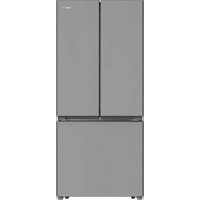
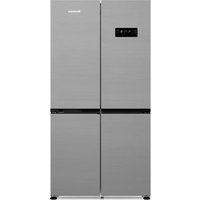
KFD 9952 XDA - Refrigerator BLOMBERG - Free user manual and instructions
Find the device manual for free KFD 9952 XDA BLOMBERG in PDF.


| Type de produit | Réfrigérateur |
| Marque | Blomberg |
| Modèle | KFD 9952 XDA |
| Dimensions (HxLxP) | 1850 x 700 x 650 mm |
| Poids | 75 kg |
| Capacité totale nette | 350 L |
| Capacité réfrigérateur | 250 L |
| Capacité congélateur | 100 L |
| Classe climatique | SN-T |
| Classe énergétique | A++ |
| Consommation annuelle d'énergie | 250 kWh |
| Type de dégivrage | No Frost |
| Éclairage intérieur | LED |
| Compartiment à légumes | Oui, avec contrôle d'humidité |
| Réglage de la température | Électronique |
| Affichage numérique | Oui |
| Matériau des étagères | Verre trempé |
| Matériau des balconnets | Plastique robuste |
| Garantie | 2 ans |
| Réparabilité (indice estimé) | 7.5/10 |
| Pièces détachées | Disponibles auprès du fabricant |
| Manuel utilisateur | Inclus en PDF |
Frequently Asked Questions - KFD 9952 XDA BLOMBERG
User questions about KFD 9952 XDA BLOMBERG
0 question about this device. Answer the ones you know or ask your own.
Ask a new question about this device
Download the instructions for your Refrigerator in PDF format for free! Find your manual KFD 9952 XDA - BLOMBERG and take your electronic device back in hand. On this page are published all the documents necessary for the use of your device. KFD 9952 XDA by BLOMBERG.
USER MANUAL KFD 9952 XDA BLOMBERG
Please read this manual first!
Dear Customer,
We hope that your product, which has been produced in modern plants and checked under the most meticulous quality control procedures, will provide you an effective service.
For this, we recommend you to carefully read the entire manual of your product before using it and keep it at hand for future references.
This manual
- Will help you use your appliance in a fast and safe way.
- Read the manual before installing and operating your product.
- Follow the instructions, especially those for safety.
- Keep the manual in an easily accessible place as you may need it later.
- Besides, read also the other documents provided with your product.
Please note that this manual may be valid for other models as well.
Symbols and their descriptions
This instruction manual contains the following symbols:
i Important information or useful usage tips.
⚠ Warning against dangerous conditions for life and property.
⚠ Warning against electric voltage.
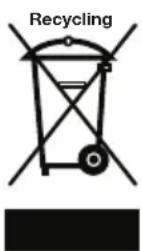
This product is supplied with the selective sorting symbol for waste electrical and electronic equipment (WEEE).
This means that this product must be handled pursuant to European Directive 2002/96/EC in order to be recycled or dismantled to minimise its impact on the environment. For further information, please contact your local or regional authorities.
Electronic products not included in the selective sorting process are potentially dangerous for the environment and human health due to the presence of hazardous substances.
1 The refrigerator 3
2 Important Safety Warnings 4
Intended use 4
General safety 4
Child safety 6
HCA Warning 6
Things to be done for energy saving .. 6
3 Installation 7
Points to be considered when re-transporting your refrigerator .... 7
Before operating your refrigerator .....7
Electric connection 8
Disposing of the packaging 8
Disposing of your old refrigerator ..... 8
Placing and Installation 9
Floor balance adjustment .....9
Adjusting the gap between the upper door ....10
Installing Water Filter 11
Connection of the Water Pipe to the Refrigerator ....11
Connection of Water Hose to the Jug 12
Connection of the Water Pipe to the Cold Water Mains Line 13
Prior to first use of Water Dispenser .15
Using the water spring .....16
Spillage Tray 16
4 Preparation 17
5 Using your refrigerator 18
Indicator Panel 18
Door Open Alarm: 20
Things to do to have the filter usage time calculated automatically ..... 21
Egg tray 22
Sliding Body Shelves 22
Chiller compartment 22
Crisper 23
Movable Middle Section 24
Blue light 24
Telescopic Drawer 25
Dual cooling system: 25
Ice maker 26
Ice box 26
Freezing fresh food 27
Recommendations for preservation of frozen food ....27
Placing the food 28
Deep-freeze information 28
6 Maintenance and cleaning 29
Protection of plastic surfaces ..... 29
7 Recommended solutions for the problems 30
1 The refrigerator
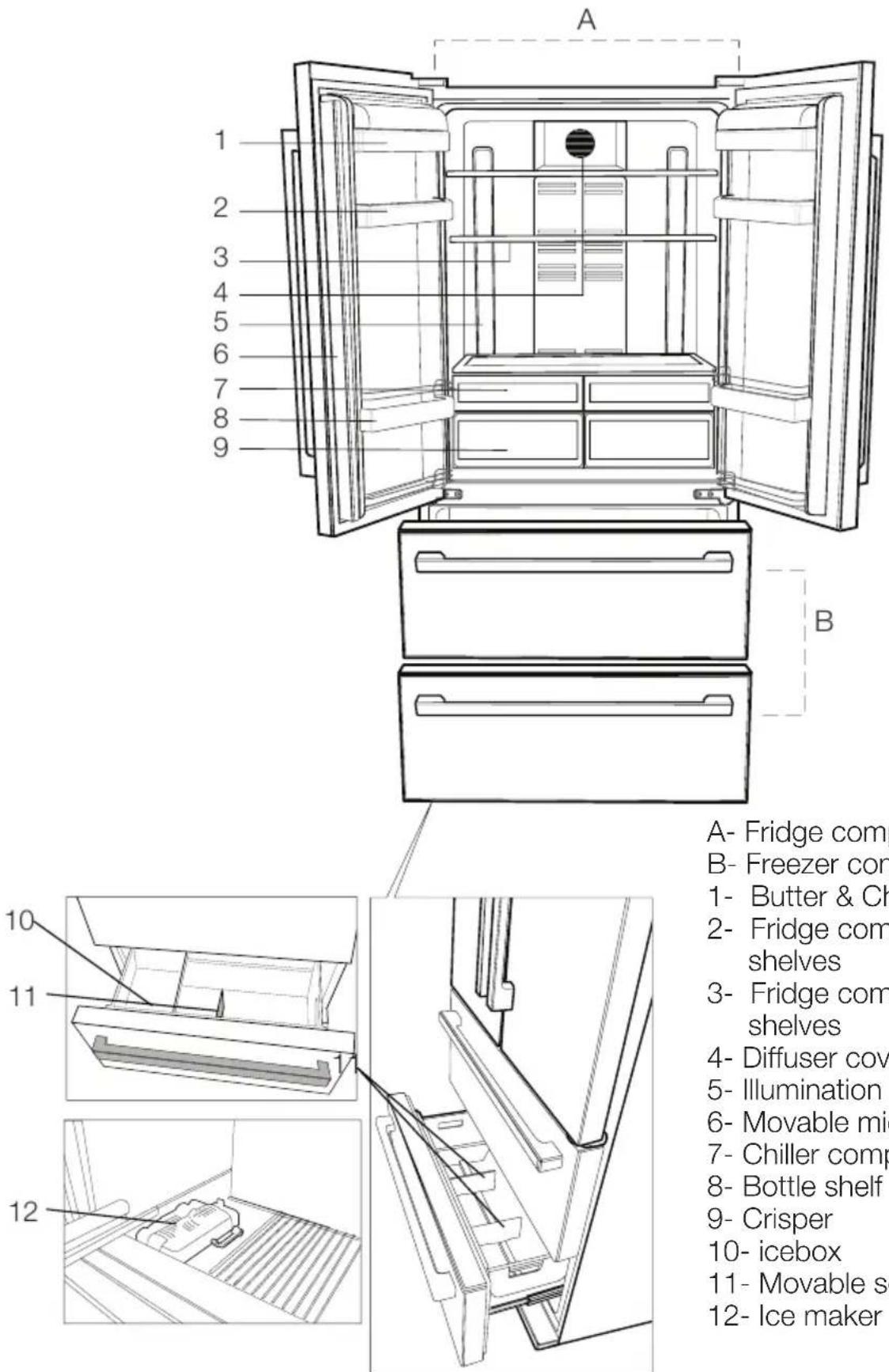
Figures that take place in this instruction manual are schematic and may not correspond exactly with your product. If the subject parts are not included in the product you have purchased, then it is valid for other models.
2 Important Safety Warnings
Please review the following information. If these are not followed, personal injury or material damage may occur. Otherwise, all warranty and reliability commitments will become invalid.
The usage life of the unit you purchased is 10 years. This is the period for keeping the spare parts required for the unit to operate as described.
Intended use
- This appliance is intended to be used in household and similar applications such as
- staff kitchen areas in shops, offices and other working environments;
- farm houses and by clients in hotels, motels and other residential type environments;
- bed and breakfast type environments;
- catering and similar non-retail applications.
- It should not be used outdoors. It is not appropriate to use it outdoor even if the place is covered with a roof.
General safety
- When you want to dispose/scrap the product, we recommend you to consult the authorized service in order to learn the required information and authorized bodies.
- Consult your authorized service for all your questions and problems related to the refrigerator. Do not intervene or let someone intervene to the refrigerator without notifying the authorized services.
-
Do not eat cone ice cream and ice cubes immediately after you take them out of the freezer compartment! (This may cause frostbite in your mouth.)
-
Do not put bottled and canned liquid beverages in the freezer compartment. Otherwise, these may burst.
- Do not touch frozen food by hand; they may stick to your hand.
- Vapor and vaporized cleaning materials should never be used in cleaning and defrosting processes of your refrigerator. In such cases, the vapor might get in contact with the electrical parts and cause short circuit or electric shock.
- Never use the parts on your refrigerator such as the door as a means of support or step.
- Do not use electrical devices inside the refrigerator.
- Do not damage the cooling circuit, where the refrigerant is circulating, with drilling or cutting tools. The refrigerant that might blow out when the gas channels of the evaporator, pipe extensions or surface coatings are punctured may cause skin irritations and eye injuries.
- Do not cover or block the ventilation holes on your refrigerator with any material.
- Repairs of the electrical appliances must only be made by qualified persons. Repairs performed by incompetent persons may create a risk for the user.
- In case of any failure or during a maintenance or repair work, disconnect your refrigerator's mains supply by either turning off the relevant fuse or unplugging your appliance.
- Do not pull by the cable when pulling off the plug.
- Place the beverage with higher proofs tightly closed and vertically.
- Do not store explosive substances such as aerosol cans with a flammable propellant in this appliance.
- Do not use mechanical devices or other means to accelerate the defrosting process, others than those recommended by the manufacturer.
- This appliance is not intended for use by persons (including children) with reduced physical, sensory or mental capabilities, or lack of experience and knowledge, unless they have been given supervision or instruction concerning use of the appliance by a person responsible for their safety.
- Do not operate a damaged refrigerator. Consult your service if you have any doubts.
- Electrical safety of your refrigerator shall be guaranteed only if the earth system in your house complies with standards.
- Exposing the product to rain, snow, sun and wind is dangerous with respect to electrical safety.
- Contact the authorized service when there is a power cable damage and etc. so that it will not create a danger for you.
- Never plug the refrigerator into the wall outlet during installation. Otherwise, risk of death or serious injury may arise.
- This refrigerator is designed solely for storing food. It should not be used for any other purposes.
- The label that describes the technical specification of the product is located on the inner left part of the refrigerator.
- Do not hook up the refrigerator to electronic energy saving systems as it may damage the product.
- If the refrigerator has blue light do not look at the blue light through optical devices.
- If the power supply is disconnected in manually controlled refrigerators please wait for at least 5 minutes before reconnecting the power.
- This product manual should be passed to the next owner of the refrigerator if the owner changes.
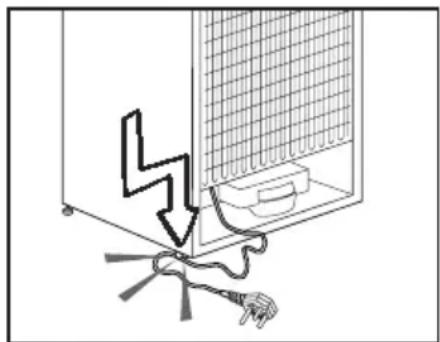
- When moving the refrigerator make sure that you do not damage the power cord. In order to prevent fire the power cord should not be twisted. Heavy objects should not be placed on the power cord. When the refrigerator is being plugged do not handle the power outlet with wet hands.
natural_image
Diagram showing a mechanical or electrical component with a lightning bolt and wiring, no text or symbols present- Do not plug the refrigerator if the electric outlet is loose.
- Do not splash water directly on the outer or inner parts of the refrigerator due to safety.
- Do not spray inflammable materials such as propane gas etc near refrigerator due to the risk of fire and explosion.
- Do not place objects filled with water on top of the refrigerator as it may result in electric shock or fire.
- Do not overload the refrigerator with excess food. The excess food may fall when the door is opened resulting in injuring you or damaging the refrigerator. Do not place objects on top of the refrigerator as the objects may fall when opening or closing the refrigerator door.
- Materials that require certain temperature conditions such as
vaccine, temperature sensitive medicines, scientific materials etc should not be kept in refrigerator.
- If refrigerator will not be operated for an extended period of time it should be unplugged. A problem in electrical cable insulation may result in fire.
- The tip of the electric plug should be cleaned regularly otherwise it may cause fire.
- The refrigerator may move when the adjustable feet is not positioned firmly on the floor. Using the adjustable feet you can unsure that the refrigerator is positioned firmly on the floor.
- If the refrigerator has door handle do not pull the refrigerator via door handles when moving the product as it may disconnect the handle from the refrigerator.
- If you must operate your appliance adjacent to another refrigerator or freezer, the distance between the appliances must be at least 8 cm. Otherwise condensation may occur on the side walls facing each other.
- Water mains pressure must not be below 1 bar. Water mains pressure must not be above 8 bars.
- Use only drinkable potable water.
Child safety
- If the door has a lock, the key should be kept away from reach of children.
- Children should be supervised to ensure that they do not play with the appliance
HCA Warning
If your product is equipped with a cooling system that contains
R600a:
This gas is flammable. Therefore, pay attention to not damaging the cooling system and piping during usage and transportation. In the event of damage, keep your product away from potential fire sources that can cause the product catch a fire and ventilate the room in which the unit is placed.
Ignore the warning if your product is equipped with a cooling system that contains R134a.
You can see the gas used in production of your product on the rating plate that is located on the left inner part of it.
Never dispose the product in fire.
Things to be done for energy saving
- Do not leave the doors of your refrigerator open for a long time.
- Do not put hot food or drinks in your refrigerator.
- Do not overload your refrigerator so that the air circulation inside of it is not prevented.
- Do not install your refrigerator under direct sunlight or near heat emitting appliances such as ovens, dishwashers or radiators.
- Pay attention to keep your food in closed containers.
- Maximum amount of food can be put in your refrigerator's freezer compartment when the freezer compartment shelf or drawer is removed. Declared energy consumption value of your refrigerator was determined when the freezer compartment shelf or drawer was removed and under maximum amount of food load. There is no risk in using a shelf or drawer according to the shapes and sizes of the foods to be frozen.
3 Installation
i Please remember that the manufacturer shall not be held liable if the information given in the instruction manual is not observed.
Points to be considered when re-transporting your refrigerator
- Your refrigerator must be emptied and cleaned prior to any transportation.
- Shelves, accessories, crisper and etc. in your refrigerator must be fastened securely by adhesive tape against any jolt before repackaging.
- Packaging must be tied with thick tapes and strong ropes and the rules of transportation printed on the package must be followed.
i Always remember...
Every recycled material is an indispensable source for the nature and for our national resources.
If you wish to contribute to recycling the packaging materials, you can get further information from the environmental bodies or local authorities.
Before operating your refrigerator
Before starting to use your refrigerator check the following:
-
Is the interior of the refrigerator dry and can the air circulate freely in the rear of it?
-
You can install the 2 plastic wedges as illustrated in the figure. Plastic wedges will provide the required distance between your refrigerator and the wall in order to allow the air circulation. (The illustrated figure is only an example and does not match exactly with your product.)
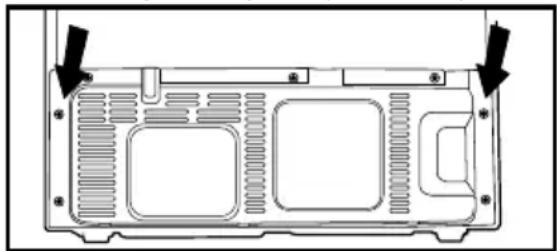
natural_image
Technical diagram of a computer chassis back panel with mounting holes and ventilation slots (no text or labels)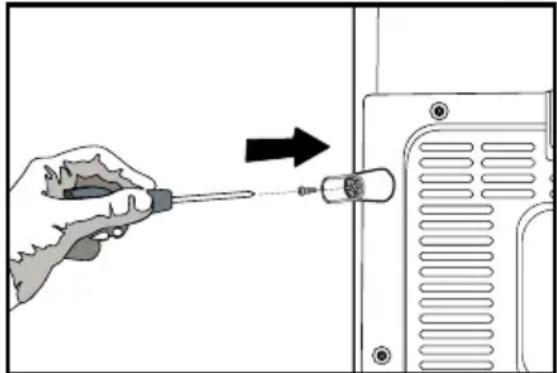
natural_image
Illustration of a hand using a screwdriver to adjust or install a component, with no visible text or symbols.- Clean the interior of the refrigerator as recommended in the “Maintenance and cleaning” section.
- Plug the refrigerator into the wall outlet. When the door is open the respective interior light will come on.
- You will hear a noise as the compressor starts up. The liquid and gases sealed within the refrigeration system may also give rise to noise, even if the compressor is not running and this is quite normal.
- Front edges of the refrigerator may feel warm. This is normal. These areas are designed to be warm to avoid condensation.
Electric connection
Connect your refrigerator to a grounded socket which is being protected by a fuse with the appropriate capacity.
Important:
The connection must be in compliance with national regulations.
The power cable plug must be easily accessible after installation.
The specified voltage must be equal to your mains voltage.
⚠️ Extension cables and multiway plugs must not be used for connection.
A damaged power cable must be replaced by a qualified electrician.
The appliance must not be operated before it is repaired! There is danger of electric shock!
⚠ Warning against electric voltage.
Disposing of the packaging
⚠ The packing materials may be dangerous for children. Keep the packing materials out of the reach of children or dispose them of by classifying them in accordance with the waste instructions. Do not dispose them of along with the normal household waste.
The packing of your refrigerator is produced from recyclable materials.
Disposing of your old refrigerator
Dispose of your old machine without giving any harm to the environment.
⚠️ You may consult your authorized dealer or waste collection center of your municipality about the disposal of your refrigerator.
⚠️ Before disposing of your refrigerator, cut out the electric plug and, if there are any locks on the door, make them inoperable in order to protect children against any danger.
Placing and Installation
⚠ Caution: Never plug the refrigerator into the wall outlet during installation. Otherwise, risk of death or serious injury may arise.
⚠️ If the entrance door of the room where the refrigerator will be installed is not wide enough for the refrigerator to pass through, than call the authorized service to have them remove the doors of your refrigerator and pass it sideways through the door.
- Install your refrigerator to a place that allows ease of use.
- Keep your refrigerator away from heat sources, humid places and direct sunlight.
- There must be appropriate air ventilation around your refrigerator in order to achieve an efficient operation.
If the refrigerator is to be placed in a recess in the wall, there must be at least 5 cm distance with the ceiling and at least 5 cm with the wall.
If the floor is covered with a carpet, your product must be elevated 2.5 cm from the floor.
- Place your refrigerator on an even floor surface to prevent jolts.
- Do not keep your refrigerator in ambient temperatures under 10^ C.
Floor balance adjustment
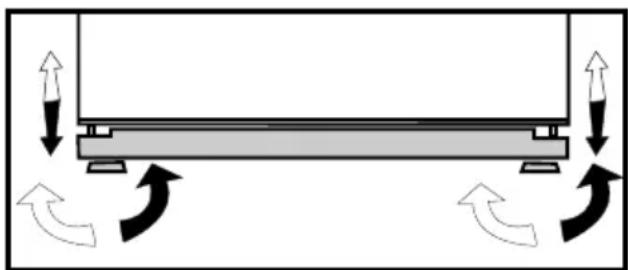
⚠️ If your refrigerator is unbalanced; 1- Ventilation cover is removed by unscrewing its screws as illustrated in the figure before the procedure. You can balance your refrigerator by turning the front legs of it as illustrated in the figure. The corner where the leg exists is lowered when you turn in the direction of black arrow and raised when you turn in the opposite direction. Taking help from someone to slightly lift the refrigerator will facilitate this process.
2. After the balance issue is remedied, install back the ventilation cover and fasten the screws.

natural_image
Diagram showing a mechanical or structural component with directional arrows indicating motion or force, no text or symbols present.- Remove the screws fastening the lower ventilation cover using a Philips screwdriver.
Adjusting the gap between the upper door

natural_image
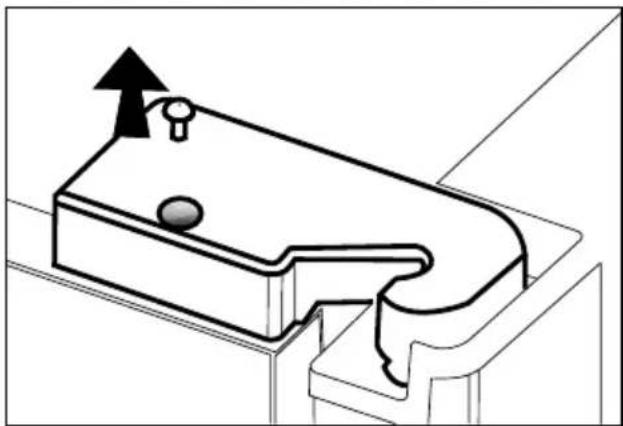
Simple line drawing of a refrigerator with double doors and side drawers (no text or symbols)You can adjust the gap between the fridge compartment doors as illustrated in the figures.
Door shelves should be empty when adjusting the door height.
natural_image
Technical line drawing of a mechanical component with an upward arrow indicating motion (no text or symbols)Using a screwdriver, remove the screw of upper hinge cover of the door you want to adjust.
natural_image
Technical line drawing of a mechanical component with mounting holes and internal channels (no text or symbols)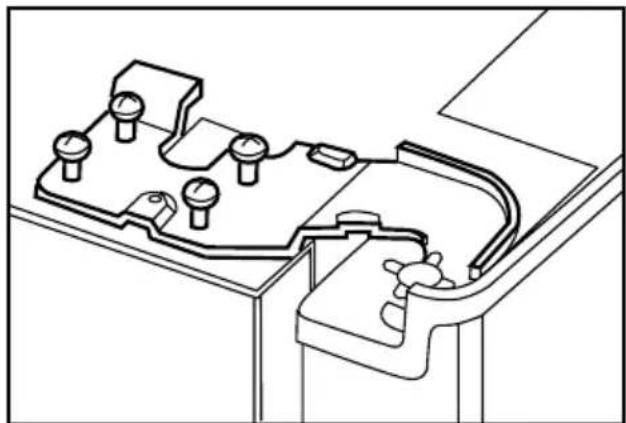
natural_image
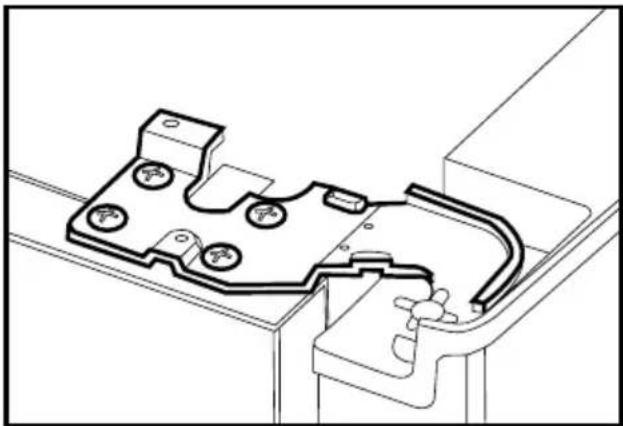
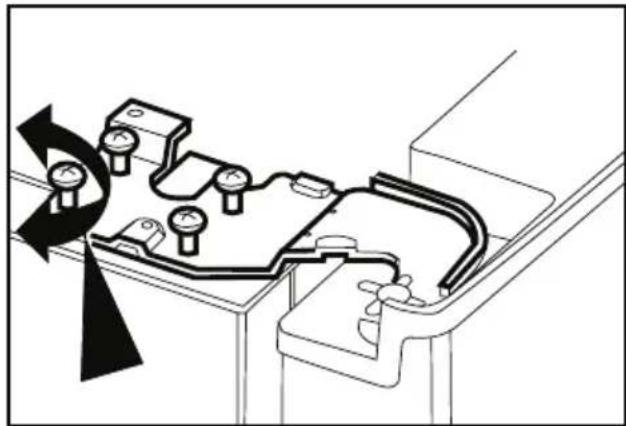
Technical line drawing of a mechanical component with multiple ports and mounting brackets (no text or symbols)i Adjust the door appropriately as you desire by loosing the screws.
Fix the door you have adjusted by tightening the screws without changing the position of the door.
natural_image
Technical diagram of a mechanical assembly with rotating components and directional arrows indicating motion (no text or symbols)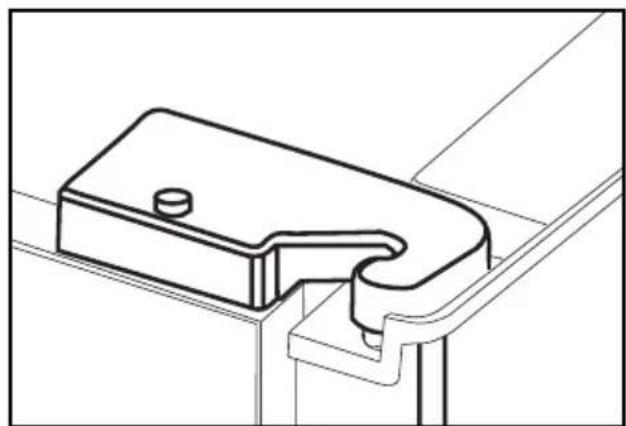
natural_image
Technical line drawing of a mechanical bracket or clamp component (no text or symbols)i Replace the hinge cover and fix with the screw.
Installing Water Filter (in some models) Two different water sources may be connected to the refrigerator for water supply: the mains cold water supply and water in a jug. Installation Requirements
A pump should be used for jug water usage.
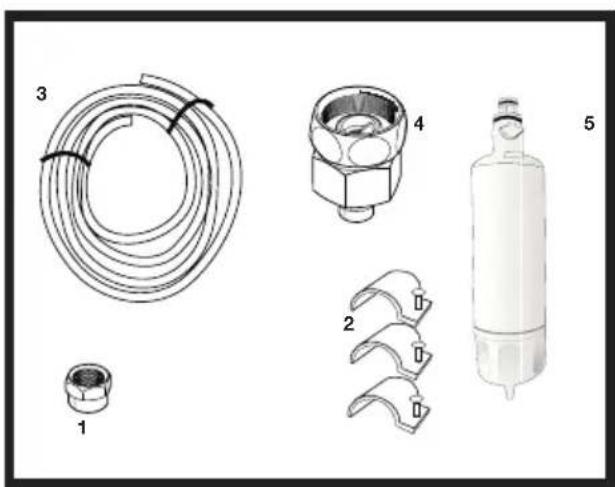
Check that the parts stated below are supplied with your appliance.
- Union for connection of the water pipe to the rear of the appliance. (If it does not fit, provide it from the nearest authorized service.)
- 2 pieces of pipe clips (In case required to secure the water pipe)
Note: Since the following parts are not required in use with a jug, they may not be found in the product you purchased.
- 5-meter long water pipe (1/4 inch in diameter)
- Cold mains water valve with mesh filter (Tap Adapter)
- Water Filter or externally connectable filter to be fitted to the bracket inside the fridge compartment.
Place where the external filter is going to be fitted should be determined first. (Applies to the filter being
natural_image
Technical line drawings of five different mechanical components or parts, including coiled tubing, a housing, and a cylindrical device (no text or symbols present)used outside the refrigerator.) Then, determine the distance between the filter and the refrigerator and required hose lengths from the filter to the refrigerator water inlet.
Water filter must be hold upright as shown in the figure. It is important to properly attach the filter to water inlet and water outlet points.
After attaching the filter, do not use first 3-4 glasses of water.
Connection of the Water Pipe to the Refrigerator
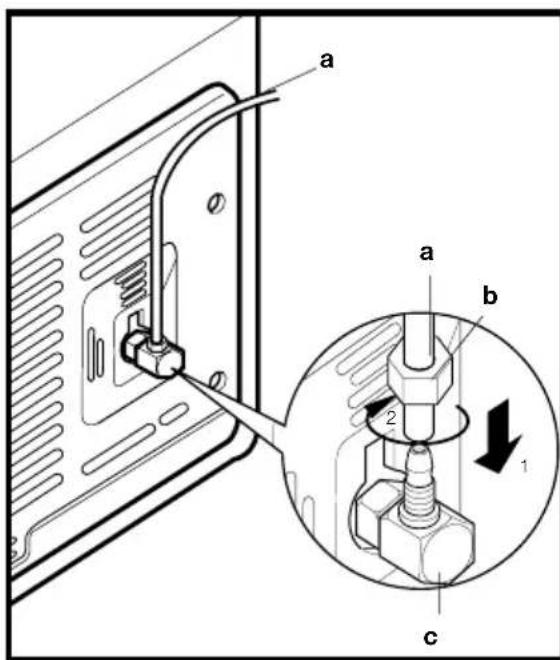
- After installing the union onto the water pipe, insert the water pipe to the refrigerator inlet valve by pressing downwards firmly.
- Fix union as seen in the opposite figure, by squeezing by hand on the refrigerator inlet valve.
(a- Water Pipe, b-Union, c-Valve)
Note 1: You should not need to tighten the union with a tool to achieve water tight assembly. In case of a leak use a spanner or a pair of pliers to tighten the union.
Connection of Water Hose to the Jug
(in some models)
To connect water to the refrigerator from a jug, a pump is needed. Follow the instructions below after connecting one end of the water pipe coming out of the pump to the refrigerator as described on the previous page.
- Finish the connection by pushing the other end of the water pipe into the water pipe inlet of the pump as shown in the figure.
- Put and fix the pump hose into the jug as shown in the figure.
- After completing the connection, plug in and run the pump.
To provide an efficient operation of the pump, wait for 2-3 minutes after starting the pump.
i You may refer to the user manual of the pump while making the water connection.
There is no need to use water filter in case a jug is used.
i Pump must be used when jug will be used.

natural_image
Line drawing of hands using a tool to adjust or install a component, no text or symbols present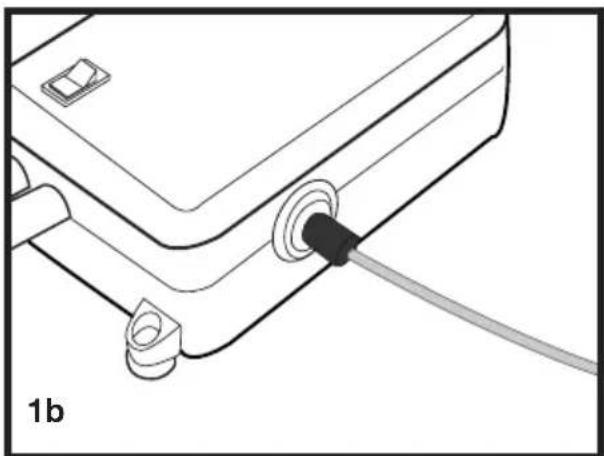
natural_image
Line drawing of a mechanical or electronic component with a black connector and a cable, labeled '1b' (no text or symbols on the diagram itself)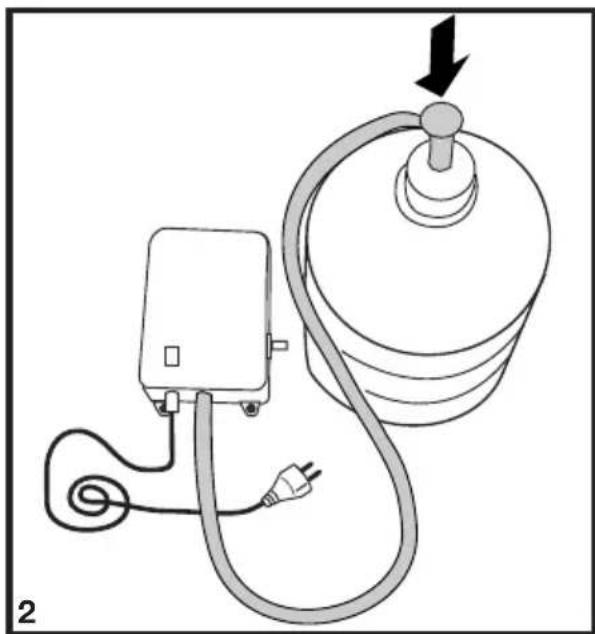
natural_image
Diagram of a medical or electrical device with a bulb, plug, and cable (no text or symbols)Connection of the Water Pipe to the Cold Water Mains Line
(in some models)
If you want to use your refrigerator by connecting it to the cold water mains line,
you will have to connect a standard 1/2" valve connection fitting to the cold water supply in your house. In case this valve is not present or in case you are not sure, consult a qualified plumber.
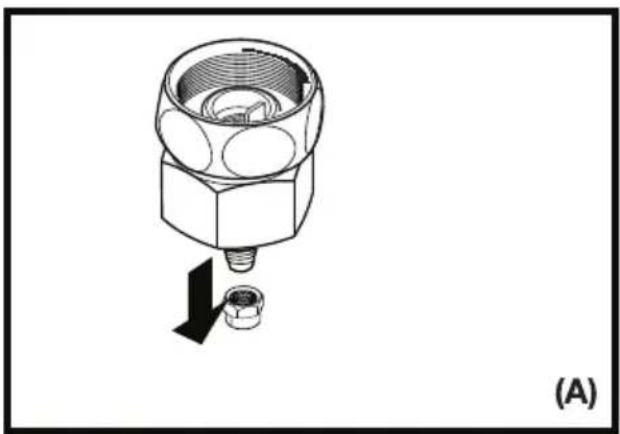
- Separate the union from the tap adaptor. (Figure A)
- Install the tap adaptor to 1/2" valve fitting as shown in the figure. (Figure B)
- After inserting the water pipe to the union, install it to the tap adaptor and insert to the tap as shown in the figure. (Figure C)
- Tighten the union manually. In case of a leak use a spanner or a pair of pliers to tighten the union.
⚠ Caution: Secure the water pipe to suitable points by means of the pipe clips supplied to avoid any damage or displacement or accidental disconnection.
⚠ Caution: After turning on the water valve, make sure that there is no leakage at both connection points of the water pipe. In case of a leak, turn off the valve immediately and tighten all joints again using a spanner or a pair of pliers.
natural_image
Technical diagram of a mechanical component with a downward arrow indicating force or movement (no text or symbols present)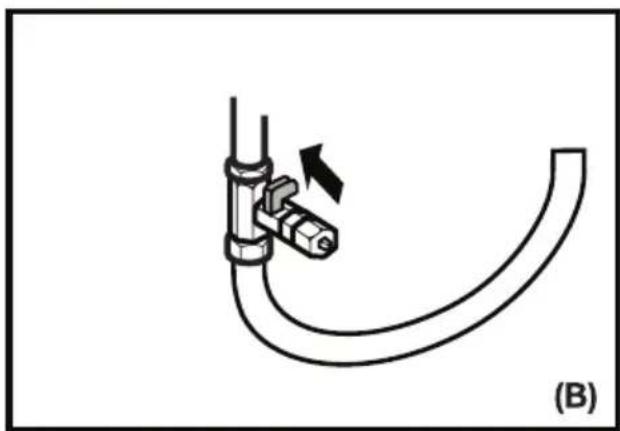
natural_image
Diagram of a pipe fitting with a valve and directional arrow, labeled (B), showing no text or symbols beyond the label.
natural_image
Diagram showing a mechanical assembly with a bolt and connector, no text or symbols present⚠ Caution: Make sure that standard 1/2" valve fitting fed by cold mains water supply is available and is turned off fully.
To fit the water filter follow the instructions below referring to figures supplied:
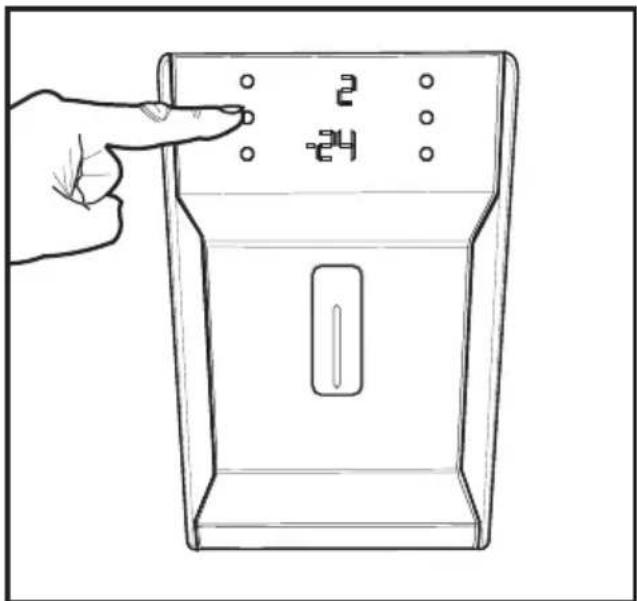
- Press ice cancel button on the display.
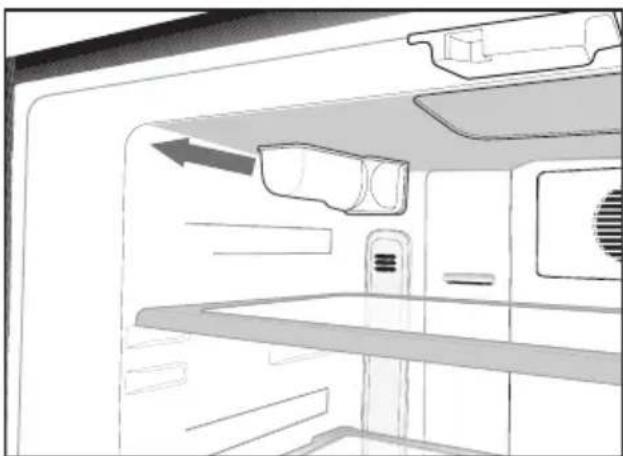
- Remove the filter cover in the fridge compartment by pulling it forward.
natural_image
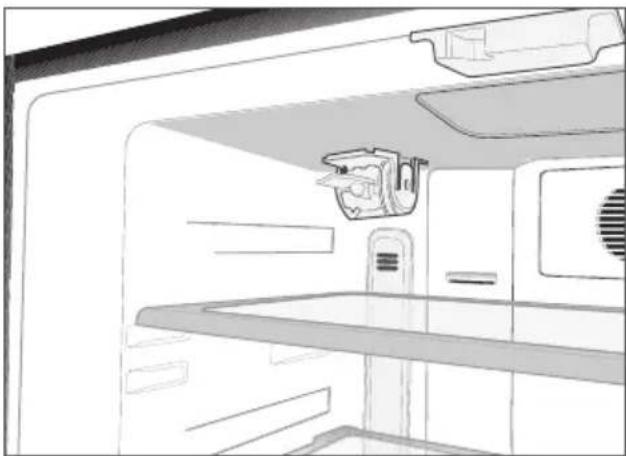
Interior view of a refrigerator with air ducts and ventilation system (no text or symbols visible)- Take out the water filter by-pass cover by rotating it downwards.
natural_image
Line drawing of a refrigerator interior showing front and rear compartments (no text or symbols)
natural_image
Line drawing of a refrigerator interior showing front shelves and overhead appliances (no text or symbols)⚠ Caution: Make sure that the “Ice off” mode is active before taking out the by-pass cover.
Note: It is normal that a few drops of water drip after the cover has been taken out.
- Remove the lid on top of the water filter to place it as shown in the figure and turn upwards to lock it.
- Press ice cancel button on the display again to exit from this mode. Water filter should be replaced every 6 months.
If you want to have the filter change time calculated automatically and receive a warning at the end of usage time, please read "Calculating the Filter Usage Time Automatically" section.
The water filter must be removed as shown in the figure when it is going to be replaced or when it will no longer be used and by-pass cover must be attached. It must be made sure that Ice Off mode is active before taking it out.
⚠ Caution: Water filter cleans some foreign particles in the water. It does not purify water from microorganisms.
⚠ Caution: Ice Off button must always be pressed during replacement of the water filter or installing the by-pass cover.

natural_image
Line drawing of a kitchen appliance with a cylindrical tool inserted into the door (no text or symbols)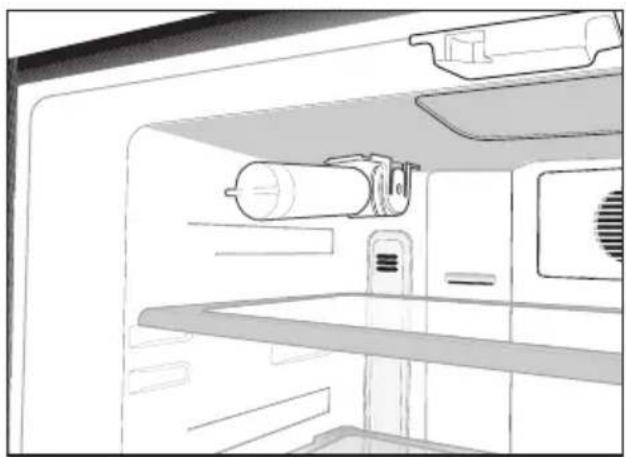
natural_image
Line drawing of a refrigerator interior showing storage tanks and appliances (no text or symbols)Prior to first use of Water Dispenser
i Water mains pressure must not be below 1 bar.
i Water mains pressure must not be above 8 bars.
i Pumps must be used in case the supply water pressure drops below 1 bar or if a jug is going to be used.
i Water system of the refrigerator must be connected to the cold water line. It must not be connected to hot water line.
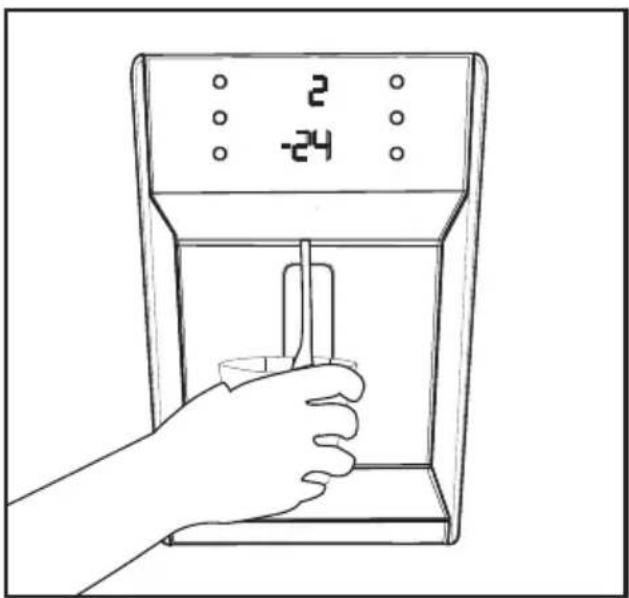
No water may be obtained in the initial operation of the refrigerator. This is caused by the air in the system. To discharge air from the system, press Dispenser latch for periods of 1 minute until water comes from the Dispenser. Water flow may be irregular in the beginning. Irregular water flow will be normalized after the air in the system is discharged.
At the initial startup of the refrigerator approx.12 hours must pass before cold water can be obtained.
i Water mains pressure must be between 1-8 bars for the operation of Ice/Water Dispenser smoothly. For this, check that 1 glass of water (100 cc) can be filled in 10 seconds.
i The first 10 glasses of water should not be consumed.
i Approximately the first 30 cubes of ice to be obtained from the Ice Dispenser must not be used.
i Always use the water filter when a jug is not being used.
Using the water spring
Warnings
It is normal for the first few glasses of water taken from the dispenser to be warm.
In cases where the water dispenser has not been used frequently, sufficient amount of water must be drained from the dispenser to get fresh water.
Spillage Tray
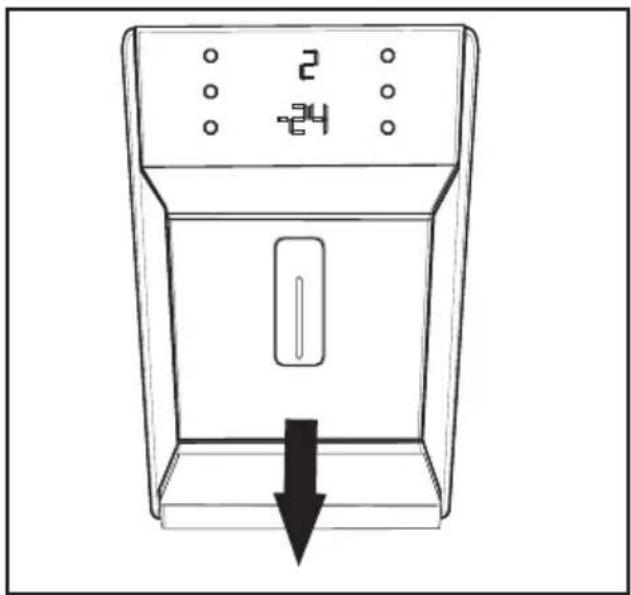
Water drops that drip during use, accumulates in the spillage tray. You can remove spillage tray by pulling it to yourself or pressing on its edge (depending on the model). You can remove the water with a sponge or a soft cloth.
natural_image
Line drawing of a refrigerator with a downward arrow indicating a drop or decrease (no text or symbols)4 Preparation
Your refrigerator should be installed at least 30 cm away from heat sources such as hobs, ovens, central heater and stoves and at least 5 cm away from electrical ovens and should not be located under direct sunlight.
The ambient temperature of the room where you install your refrigerator should at least be 10^ C. Operating your refrigerator under cooler conditions than this is not recommended with regard to its efficiency.
i Please make sure that the interior of your refrigerator is cleaned thoroughly.
If two refrigerators are to be installed side by side, there should be at least 2 cm distance between them.
When you operate your refrigerator for the first time, please observe the following instructions during the initial six hours.
- The door should not be opened frequently.
- It must be operated empty without any food in it.
- Do not unplug your refrigerator. If a power failure occurs out of your control, please see the warnings in the “Recommended solutions for the problems” section.
i Original packaging and foam materials should be kept for future transportations or moving.
5 Using your refrigerator
Indicator Panel
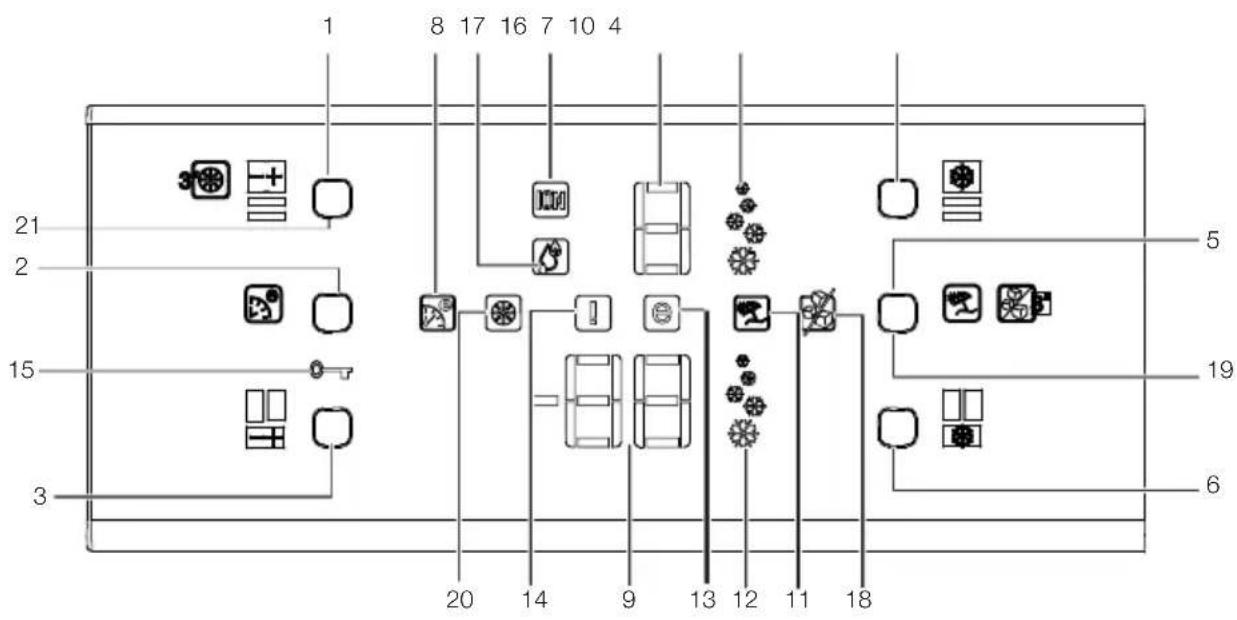
This touch-control indicator panel allows you to set the temperature without opening the door of your refrigerator. Just touch the relevant button with your finger to set the temperature.
flowchart
graph TD
    A["1"] --> B["2"]
    B --> C["3"]
    C --> D["4"]
    D --> E["5"]
    E --> F["6"]
    F --> G["7"]
    G --> H["8"]
    H --> I["9"]
    I --> J["10"]
    J --> K["11"]
    K --> L["12"]
    L --> M["13"]
    M --> N["14"]
    N --> O["15"]
    O --> P["16"]
    P --> Q["17"]
    Q --> R["18"]
    R --> S["19"]
    S --> T["20"]
    T --> U["21"]
- Fridge Compartment Temperature Setting Button
- Eco-Ekstra Button
- Freezer Compartment Temperature Setting Button
- Quick Cool Button
- Vacation Function Button
- Fast Freeze Button
- Fridge Compartment Temperature Indicator
- Eco Extra Function Indicator
- Freezer Compartment Temperature Indicator
-
Quick Cool Function Indicator
-
Vacation Function Indicator
- Quick Freeze Function Indicator
- Economy Mode Indicator
- Error Status Indicator
- Key Lock Indicator
- Ionizer Indicator Light
- Humidity Indicator
- Ice Machine OFF indicator
- Ice Machine ON/OFF Button
- Change Filter Warning Indicator
21.Filter Status Reset Button
Figures that take place in this instruction manual are schematic and may not correspond exactly with your product. If the subject parts are not included in the product you have purchased, then it is valid for other models.
1- Fridge Compartment Temperature Setting Button
Press this button to set the temperature of the fridge compartment to 8, 6, 4, 2, 8... respectively. Press this button to set the desired temperature for the Fridge Compartment.
2- Eco-Ekstra Button
Press this button briefly to activate the Eco Extra function.
3- Freezer Compartment Temperature Setting Button
Press this button to set the temperature of the freezer compartment to -18, -20, -22, -24, -18... respectively. Press this button to set the desired temperature for the Freezer Compartment.
4. Quick CoolButton
Press this button briefly to activate the Quick Cool function. Press this button again to deactivate the selected function.
5- Vacation Button
Press this button briefly to activate the Vacation function. To stop ice formation, press the same button for 3 seconds.
6- Fast Freeze Button
Press this button briefly to activate the Fast Freeze function. Press this button again to deactivate the selected function.
7- Fridge Compartment Temperature Indicator
Indicates the temperature set for Fridge Compartment.
8- Eco Extra Function Indicator
Indicates that the Eco Extra function is active. If this function is active, your refrigerator will automatically detect the least usage periods and energy-efficient cooling will be performed during those times. Economy indicator will be active while energy-efficient cooling is performed.
9- Freezer Compartment Temperature Indicator
It indicates the temperature set for Freezer Compartment.
10- Quick Cool Function Indicator Indicates that the Quick Cool function is active. Use this function when you place fresh food into the fridge compartment or when you need to cool your food quickly. When this function is active, your refrigerator will run for 2 hours without stopping. Press the relevant button again to deactivate this function.
11- Vacation Function Indicator Indicates that the vacation function is active. If this function is active, “- -” appears on the indicator of the fridge compartment and no cooling is performed in the fridge compartment. Other compartments will be cooled in accordance with the temperature set for them.
Press the relevant button again to deactivate this function.
12- Quick Freeze Function Indicator
Indicates that the Quick Freezer function is active. Use this function when you place fresh food into the freezer compartment or when you need ice. When this function is active, your refrigerator will run for 6 hours without stopping.
Press the relevant button again to deactivate this function.
13- Economy Mode Indicator
Indicates that the refrigerator is running in energy-efficient mode. This indicator will be active if the Freezer Compartment temperature is set to -18 or the energy efficient cooling is being performed due to Eco-Extra function.
14- Error Status Indicator
If your refrigerator does not cool adequately or if there is a sensor failure, this indicator will be activated. When this indicator is active, Freezer Compartment Temperature indicator will display “E” and Fridge Compartment Temperature Indicator will display numbers such as “1,2,3...”. These numbers on the indicator provides information about the error to the service personnel.
15- Key Lock Indicator
Use this function if you do not want your refrigerator temperature setting changed. Press Eco Extra Button and Freezer Compartment Temperature Setting Button simultaneously for a long time (3 sec) to activate this feature.
Press the relevant buttons again to deactivate this function.
16- Ionizer Indicator Light
Indicator light lights up continuously. This light indicates that your refrigerator is protected against the bacteria.
17- Humidity Indicator
Indicator light lights up continuously. This light indicates that the food kept in the refrigerator is preserved for a long time under ideal humidity.
18-Ice Machine OFF Indicator
If you do not want to get ice from the refrigerator, you need to use this function. You may use this function by pressing the ice machine ON/OFF button for 3 seconds.
19-Ice Machine ON/OFF Button
To stop ice formation, ice machine ON/OFF button is pressed for 3 seconds. When ice cancel is selected, no water will be sent to the ice box. Despite this, some ice may be left over in the ice box which may be taken from there. To restart ice formation, ice machine ON/OFF button has to be pressed for 3 seconds.
20- Change Filter Warning Indicator
When the filter usage time has elapsed, change filter warning indicator starts to illuminate.
21-Filter Status Reset Button
Filter of your refrigerator must be replaced every 6 months. Your refrigerator calculates this time automatically and the filter change waning indicator illuminates when the filter usage time has elapsed. Press filter status reset button for 3 seconds to allow the refrigerator to calculate the new filter time automatically after changing the filter.
Door Open Alarm:
When the door of the fridge compartment remains open for 1 minute, an audible Door Open Alarm will be activated and heard. Just press any button on the indicator or close the open door to silence the alarm.
Things to do to have the filter usage time calculated automatically
(For products connected to the mains water line and equipped with filter)
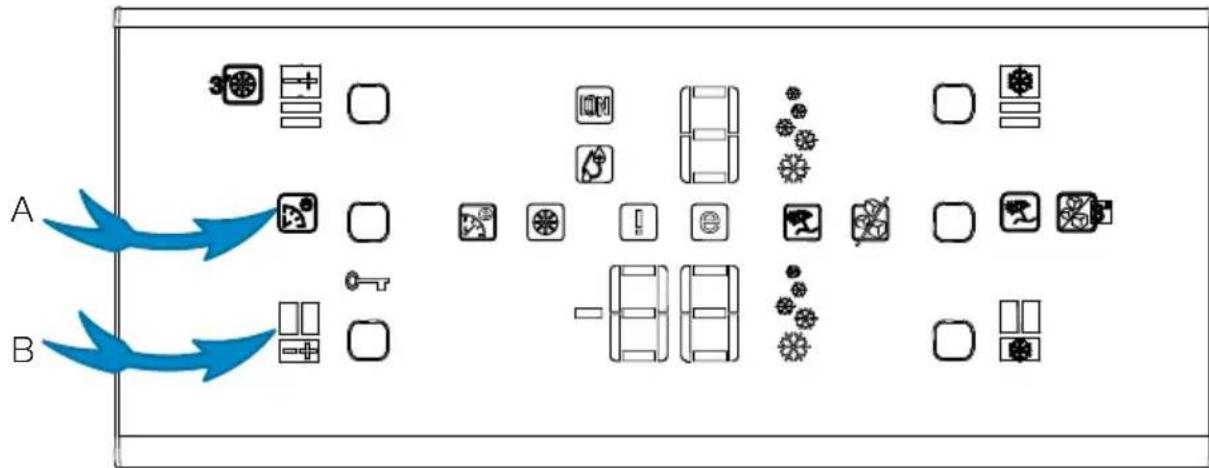
1- After plugging the refrigerator in, press A and B buttons together to activate the key lock.
flowchart
graph TD
    A["Start"] --> B{Action}
    B --> C["Car"]
    B --> D["Wheel"]
    B --> E["Shake"]
    B --> F["Balance"]
    B --> G["Truck"]
    B --> H["Wheel"]
    B --> I["Shake"]
    B --> J["Balance"]
    B --> K["Truck"]
    style A fill:#f9f,stroke:#333
    style B fill:#bbf,stroke:#333
2- Then press Eco-Extra (1), Fridge Compartment Temperature Setting (2), Quick Cool (3) and Freezer Compartment Temperature Setting (4) buttons respectively.
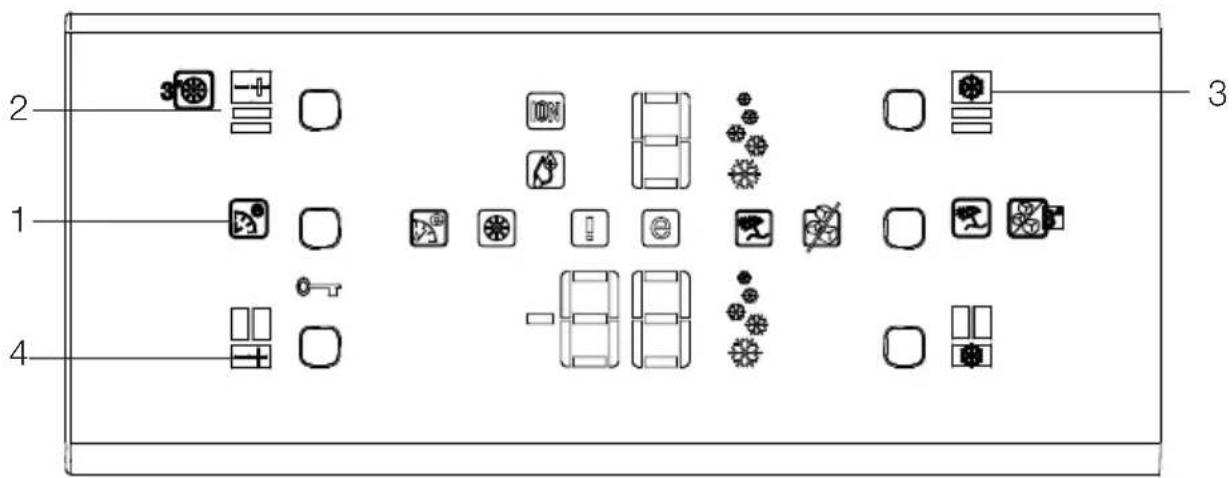
If button configuration is pressed in the correct order, key lock symbol will go off, buzzer will be activated shortly, and Filter change warning indicator illuminates. Press filter status reset button (Item 21 in display descriptions) after changing the filter to have the filter usage time calculated automatically.
i If the filter usage time is being calculated automatically, filter change warning indicator will illuminate in a few seconds after the product is plugged in.
Automatic filter usage time calculation is not active with factory settings. It must be activated in products equipped with a filter.
i Repeat the same procedure in products whose automatic filter usage time calculation is activated in order to deactivate the filter usage time calculation.
Egg tray
You can install the egg holder to the desired door or body shelf.
Never store the egg holder in the freezer compartment
Sliding Body Shelves
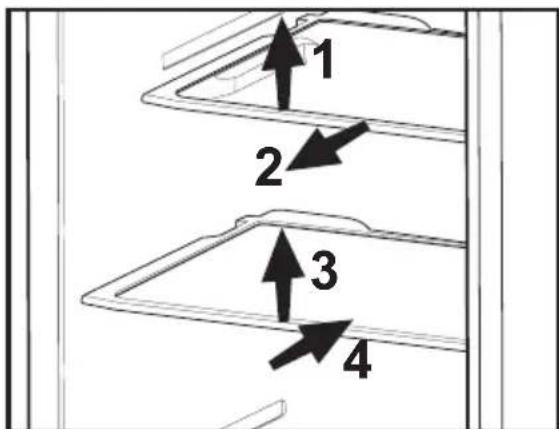
Sliding body shelves can be pulled by slightly lifting up from the front and moved back and forth. They come to a stop point when pulled towards front to allow you reach the foods placed at the back of the shelf; when it is pulled after slightly lifted upwards at the second stop point, the body shelf will be released.
The shelf should be hold tightly from the bottom as well in order to prevent it from tipping over. The body shelf is placed on the rails at the sides of the refrigerator body by bringing it to one lower or one upper level.
The body shelf should be pushed backwards to seat it completely.
Chiller compartment
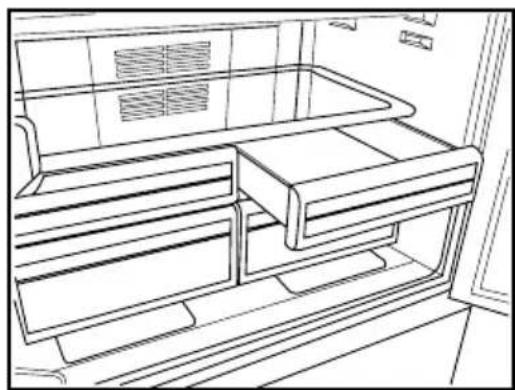
Chiller compartments enable the foods to be frozen become ready for freezing. You can also use these compartments to store your food at a temperature a few degrees below the fridge compartment.
You can increase the inner volume of your refrigerator by removing any of the chiller compartments. To do this, pull the compartment towards yourself; the compartment will lean against the stopper and stop. This compartment will be released when you lift it about 1 cm and pull it towards yourself.
natural_image
Line drawing of an open refrigerator interior showing internal compartments and ventilation grilles (no text or symbols)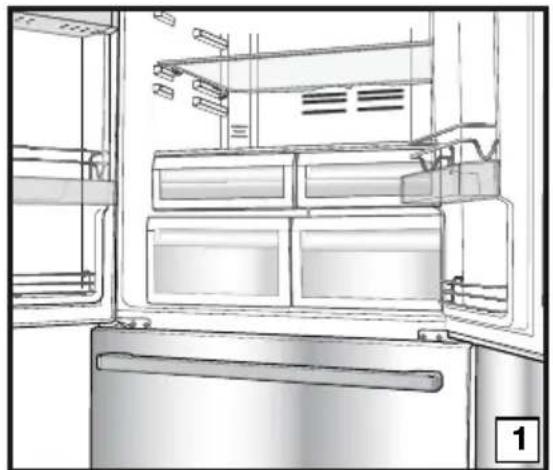
natural_image
Line drawing of an open refrigerator with visible doors, shelves, and doorways (no text or symbols)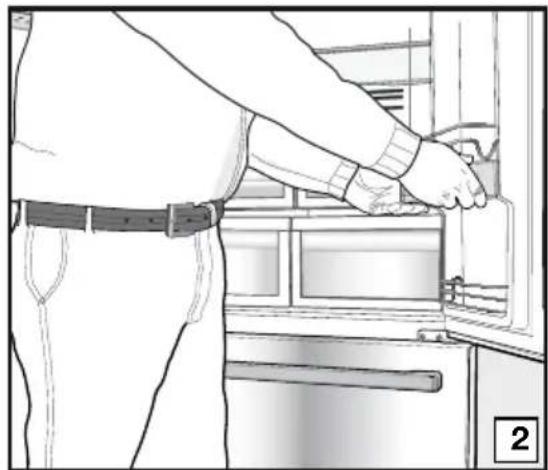
natural_image
Line drawing of a person installing or adjusting a door panel in an appliance (no text or symbols visible)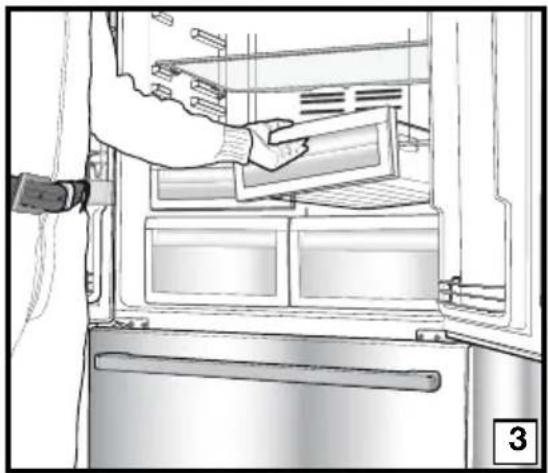
natural_image
Line drawing of a refrigerator interior showing hand placement on the door (no text or symbols)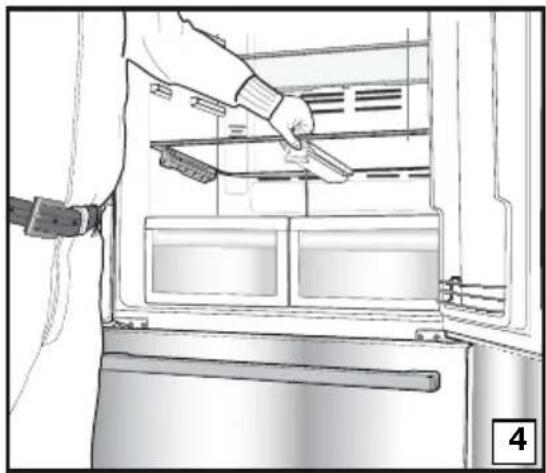
natural_image
Interior view of a refrigerator showing a hand holding a kitchen utensil, with no visible text or symbols.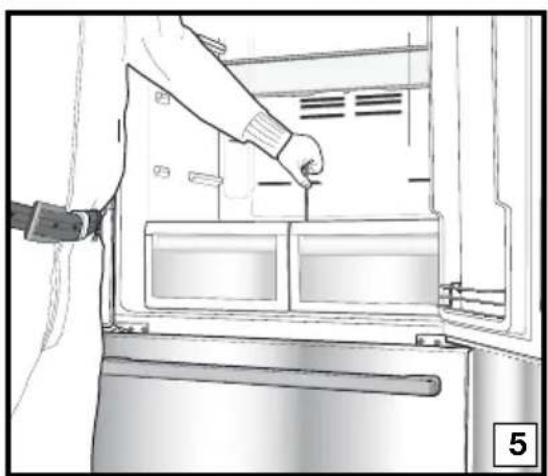
natural_image
Line drawing of a person inserting a component into a refrigerator (no text or symbols visible)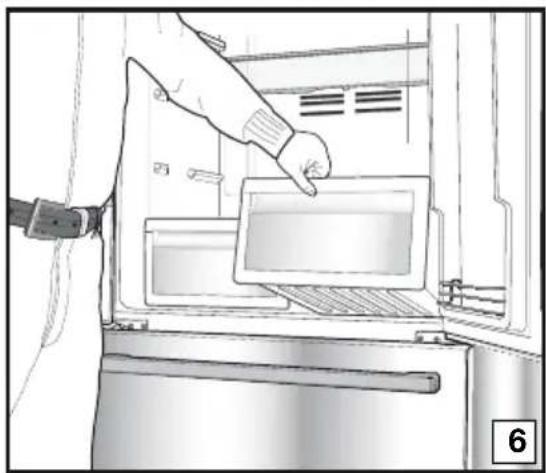
natural_image
Illustration of a hand inserting a tray into an oven with a door, showing no text or symbols.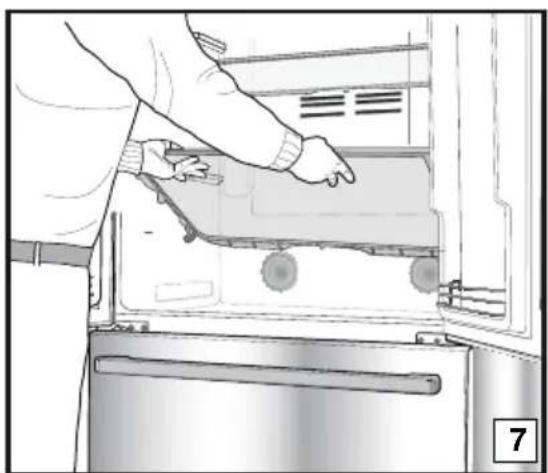
natural_image
Person opening a refrigerator with visible door and drawer (no text or symbols)Crisper
Crisper of your refrigerator is designed specially to keep your vegetables freshly without loosing their humidity. For this purpose, cool air circulation occurs around the crisper in general. Remove the door shelves that align with the crisper before removing the crispers. You can remove the crispers as illustrated in the figure.
Movable Middle Section
Movable middle section is intended to prevent the cold air inside your refrigerator from escaping outside.
1- Sealing is provided when the gaskets on the door presses on the surface of the movable middle section while the fridge compartment doors are closed.
2- Another reason that your refrigerator is equipped with a movable middle section is that it increases the net volume of the fridge compartment. Standard middle sections occupy some non-usable volume in the refrigerator.
3- Movable middle section is closed when the left door of the fridge compartment is closed.
4- It must not be opened manually. It moves under the guidance of the plastic part on the body while the door is closed.
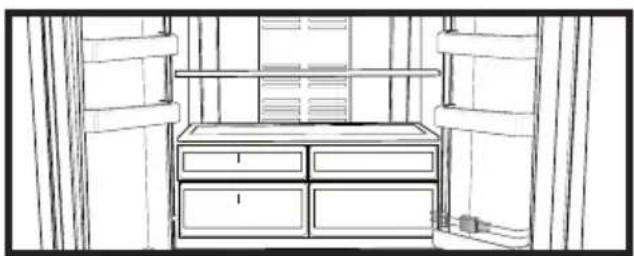
Blue light
Foodstuff stored in the crispers that are enlightened with a blue light continue their photosynthesis by means of the wavelength effect of blue light and thus, preserve their freshness and increase their vitamin content.
natural_image
Line drawing of a cabinet interior with drawers and storage racks (no text or symbols)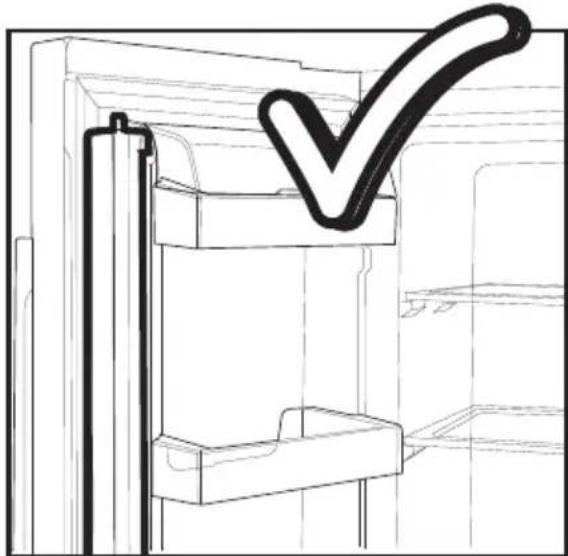
natural_image
Line drawing of a refrigerator interior with a checkmark overlay (no text or symbols)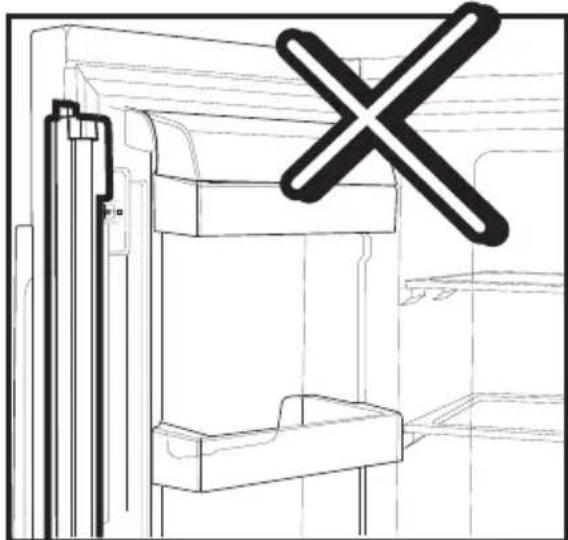
natural_image
Technical line drawing of a mechanical assembly with a cross symbol overlay (no text or labels)Telescopic Drawer
Pay attention not to squeeze any parts of your body such as hands, feet and etc. between the movable parts while the drawer is in use in order to avoid any injury.
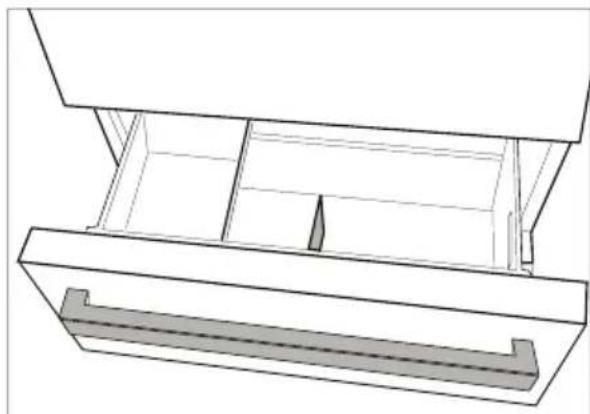
You can remove the partition in the drawer as illustrated when you want to clean it.
You can remove the drawers only for cleaning. It is not possible to group the drawers in their places after loading them with food when they are removed.
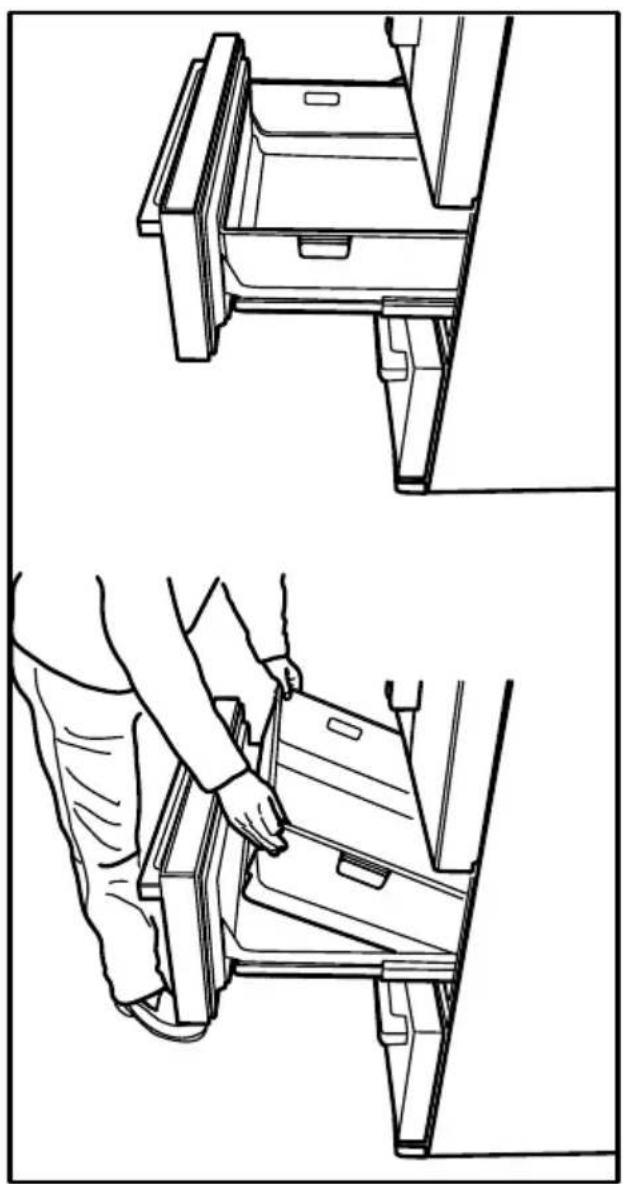
natural_image
Technical line drawings showing two views of a vehicle door frame being adjusted for installation (no text or symbols present)Dual cooling system:
Your refrigerator is equipped with two separate cooling systems to cool the fresh food compartment and freezer compartment. Thus, air in the fresh food compartment and freezer compartment do not get mixed. Thanks to these two separate cooling systems, cooling speed is much higher then other refrigerators. Odours in the compartments do not get mixed. Also additional power saving is provided since the defrosting is performed individually.
Ice maker
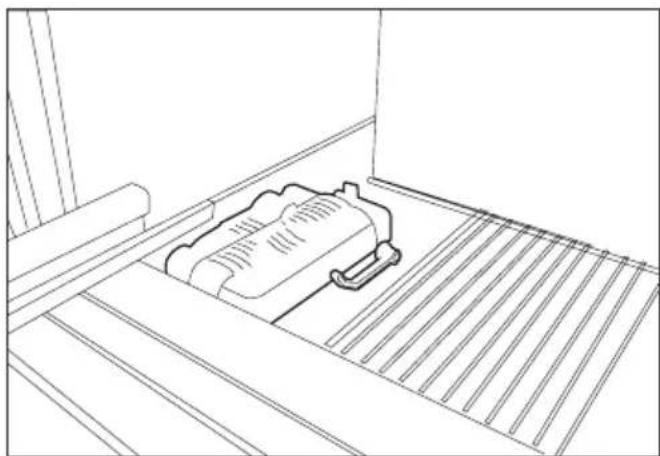
natural_image
Line drawing of a mechanical component placed on a slatted platform (no text or symbols)The ice machine is nonremovable. There must be ice container at the bottom of the ice machine.
Ice box
natural_image
Technical line drawing of a mechanical assembly with no visible text or symbolsPlease read the warnings carefully on the ice container. The ice container is used for ice collection poured ice machine. Do not put water in it to make ice as it may break. The ice container is not used for storing foods.
Warning: Do not change the location of the ice container.
| Freezer Compartment Adjustment | Fridge Compartment Adjustment | Explanations |
| -18°C 4°C This is the normal recommended | setting. | |
| -20,-22 or -24°C 4°C | These settings are recommended when the ambient temperature exceeds 30°C. | |
| Quick Freeze | 4°C | Use when you wish to freeze your food in a short time. Your refrigerator will return to its previous mode when the process is over. |
| -18°C or colder 2°C | If you think that your fridge compartment is not cold enough because of the hot conditions or frequent opening and closing of the door. | |
| -18°C or colder Quick Fridge | You can use it when your fridge compartment is overloaded or if you wish to cool down your food rapidly. It is recommended that you activate quick fridge function 4-8 hours before placing the food. | |
Freezing fresh food
- It must be preferred to wrap or cover the food before placing them in the refrigerator.
- Hot food must cool down to the room temperature before putting them in the refrigerator.
- The foodstuff that you want to freeze must be fresh and in good quality.
- Foodstuff must be divided into portions according to the family's daily or meal based consumption needs.
- The foodstuff must be packaged in an airtight manner to prevent them from drying even if they are going to be kept for a short time.
- Materials to be used for packaging must be tear-proof and resistant to cold, humidity, odor, oils and acids and they must also be airtight. Moreover, they must be well closed and they must be made from easy-to-use materials that are suitable for deep freeze usage.
- Frozen food must be used immediately after they are thawed and they should never be re-frozen.
-
Please observe the following instructions to obtain the best results.
-
Do not freeze too large quantities of food at one time. The quality of the food is best preserved when it is frozen right through to the core as quickly as possible.
- Placing warm food into the freezer compartment causes the cooling system to operate continuously until the food is frozen solid.
- Take special care not to mix already frozen food and fresh food.
Recommendations for preservation of frozen food
- Prepacked commercially frozen food should be stored in accordance with the frozen food manufacturer's instructions for a * (star) frozen food storage compartment.
-
To ensure that the high quality achieved by the frozen food manufacturer and the food retailer is maintained, the following should be remembered:
-
Put packages in the freezer as quickly as possible after purchase.
- Ensure that contents are labeled and dated.
- Do not exceed "Use By", "Best Before" dates on the packaging.
Defrosting
The freezer compartment defrosts automatically.
Placing the food
| Freezer compartment shelves | Various frozen food such as meat, fish, ice cream, vegetables and etc. |
| Egg tray Egg | |
| Fridge compartment shelves | Food in pans, covered plates and closed containers |
| Fridge compartment door shelves | Small and packaged food or drinks (such as milk, fruit juice and beer) |
| Crisper Vegetables and fruits | |
| Freshzone compartment | Delicatessen products (cheese, butter, salami and etc.) |
Deep-freeze information
Food must be frozen as rapidly as possible when they are put in a refrigerator in order to keep them in good quality.
The TSE norm requires (according to certain measurement conditions) the refrigerator to freeze at least 4.5 kg of foodstuff at 32^ C ambient temperature to -18^ C or lower within 24 hours for every 100-liters of freezer volume. It is possible to keep the food for a long time only at -18^ C or lower temperatures.
You can keep the freshness of food for many months (at -18^ C or lower temperatures in the deep freeze).
WARNING!
- Foodstuff must be divided into portions according to the family’s daily or meal based consumption needs.
- Foodstuff must be packaged in an airtight manner to prevent them from drying even if they are going to be kept for a short time.
Materials necessary for packaging:
- Cold resistant adhesive tape
- Self adhesive label
- Rubber rings
- Pen
Materials to be used for packaging the foodstuff must be tear-proof and resistant to cold, humidity, odor, oils and acids.
Foodstuff to be frozen should not be allowed to come in contact with the previously frozen items to prevent their partial thawing.
Frozen food must be used immediately after they are thawed and they should never be re-frozen.
6 Maintenance and cleaning
⚠️ Never use gasoline, benzene or similar substances for cleaning purposes.
⚠️ We recommend that you unplug the appliance before cleaning.
⚠️ Never use any sharp abrasive instrument, soap, household cleaner, detergent and wax polish for cleaning.
Use lukewarm water to clean the cabinet of your refrigerator and wipe it dry.
Use a damp cloth wrung out in a solution of one teaspoon of bicarbonate of soda to one pint of water to clean the interior and wipe it dry.
⚠️ Make sure that no water enters the lamp housing and other electrical items.
⚠️ If your refrigerator is not going to be used for a long period of time, unplug the power cable, remove all food, clean it and leave the door ajar.
Check door seals regularly to ensure they are clean and free from food particles.
⚠️ To remove door racks, remove all the contents and then simply push the door rack upwards from the base.
Protection of plastic surfaces
Do not put the liquid oils or oil-cooked meals in your refrigerator in unsealed containers as they damage the plastic surfaces of your refrigerator. In case of spilling or smearing oil on the plastic surfaces, clean and rinse the relevant part of the surface at once with warm water.
7 Recommended solutions for the problems
Please review this list before calling the service. It might save you time and money. This list includes frequent complaints that are not arising from defective workmanship or material usage. Some of the features described here may not exist in your product.
| The refrigerator does not operate. |
| Is the refrigerator properly plugged in? Insert the plug to the wall socket.Is the fuse of the socket which your refrigerator is connected to or the main fuse blown out? Check the fuse. |
| Condensation on the side wall of the fridge compartment (MULTIZONE, COOL CONTROL and FLEXI ZONE). |
| Very cold ambient conditions. Frequent opening and closing of the door. Highly humid ambient conditions. Storage of food containing liquid in open containers.Leaving the door ajar. Switching the thermostat to a colder degree.Decreasing the time the door left open or using it less frequently.Covering the food stored in open containers with a suitable material.Wipe the condensation using a dry cloth and check if it persists. |
| Compressor is not running |
| Protective thermic of the compressor will blow out during sudden power failures or plug-out plug-ins as the refrigerant pressure in the cooling system of the refrigerator has not been balanced yet. Your refrigerator will start running approximately after 6 minutes. Please call the service if the refrigerator does not startup at the end of this period.The fridge is in defrost cycle. This is normal for a full-automatically defrosting refrigerator. Defrosting cycle occurs periodically.Your refrigerator is not plugged into the socket. Make sure that the plug is properly fit into the socket.Are the temperature adjustments correctly made?Power might be cut off. |
| The fridge is running frequently or for a long time. |
| Your new product may be wider than the previous one. This is quite normal.Large refrigerators operate for a longer period of time.The ambient room temperature may be high. This is quite normal.The refrigerator might have been plugged in recently or might have been loaded with food. Cooling down of the refrigerator completely may last for a couple of hours longer.Large amounts of hot food might have been put in the refrigerator recently. Hot food causes longer running of the refrigerator until they reach the safe storage temperature.Doors might have been opened frequently or left ajar for a long time. The warm air that has entered into the refrigerator causes the refrigerator to run for longer periods. Open the doors less frequently.Freezer or fridge compartment door might have been left ajar. Check if the doors are tightly closed.The refrigerator is adjusted to a very low temperature. Adjust the refrigerator temperature to a warmer degree and wait until the temperature is achieved.Door seal of the fridge or freezer may be soiled, worn out, broken or not properly seated. Clean or replace the seal. Damaged/broken seal causes the refrigerator to run for a longer period of time in order to maintain the current temperature. |
| Freezer temperature is very low while the fridge temperature is sufficient. |
| The freezer temperature is adjusted to a very low temperature. Adjust the freezer temperature to a warmer degree and check. |
| Fridge temperature is very low while the freezer temperature is sufficient. |
| The fridge temperature might have been adjusted to a very low temperature. Adjust the fridge temperature to a warmer degree and check. |
| Food kept in the fridge compartment drawers are freezing. |
| The fridge temperature might have been adjusted to a very low temperature. Adjust the fridge temperature to a warmer degree and check. |
| Temperature in the fridge or freezer is very high. |
| The fridge temperature might have been adjusted to a very high degree. Fridge adjustment has an effect on the temperature of the freezer. Change the temperature of the fridge or freezer until the fridge or freezer temperature reaches to a sufficient level.Doors might have been opened frequently or left ajar for a long time; open them less frequently.Door might have been left ajar; close the door completely.Large amount of hot food might have been put in the refrigerator recently. Wait until the fridge or freezer reaches the desired temperature.The refrigerator might have been plugged in recently. Cooling down of the refrigerator completely takes time. |
| The operation noise increases when the refrigerator is running. |
| The operating performance of the refrigerator may change due to the changes in the ambient temperature. It is normal and not a fault. |
| Vibrations or noise. |
| The floor is not even or it is weak. The refrigerator rocks when moved slowly.Make sure that the floor is strong enough to carry the refrigerator, and level.The noise may be caused by the items put onto the refrigerator. Items on top of the refrigerator should be removed. |
| There are noises coming from the refrigerator like liquid spilling or spraying. |
| Liquid and gas flows happen in accordance with the operating principles of your refrigerator. It is normal and not a fault. |
| There is a noise like wind blowing. |
| Fans are used in order to cool the refrigerator. It is normal and not a fault. |
| Condensation on the inner walls of refrigerator. |
| Hot and humid weather increases icing and condensation. It is normal and not a fault.Doors might have been left ajar; make sure that the doors are closed fully.Doors might have been opened frequently or left ajar for a long time; open them less frequently. |
| Humidity occurs on the outside of the refrigerator or between the doors. |
| There might be humidity in the air; this is quite normal in humid weather. When the humidity is less, condensation will disappear. |
| Bad odor inside the refrigerator. |
| Inside of the refrigerator must be cleaned. Clean the inside of the refrigerator with a sponge, lukewarm water or carbonated water.Some containers or package materials might cause the smell. Use a different container or different brand packaging material. |
| The door is not closing. |
| Food packages may prevent the door's closing. Replace the packages that are obstructing the door.The refrigerator is not completely upright on the floor and rocking when slightly moved. Adjust the elevation screws.The floor is not level or strong. Make sure that the floor is level and capable to carry the refrigerator. |
| Crispers are stuck. |
| The food might be touching the ceiling of the drawer. Rearrange food in the drawer. |
natural_image
Diagram showing a lightning bolt striking a wall-mounted device with wires and a plug, no text or symbols presentnatural_image
Diagram of a computer monitor rear panel with mounting holes and ventilation slots (no text or labels)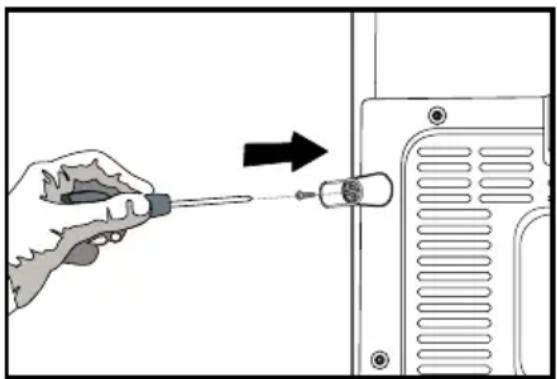
natural_image
Illustration of a hand using a screwdriver to adjust a component on a device (no text or symbols visible)natural_image
Diagram showing bidirectional arrows and curved arrows on a rectangular object, no text or symbols presentnatural_image
Line drawing of a double-door refrigerator with double doors and side drawers, no text or symbols presentnatural_image
Technical diagram of a mechanical component with an upward arrow indicating motion or force (no text or symbols present)natural_image
Technical line drawing of a mechanical component with mounting holes and internal channels (no text or symbols)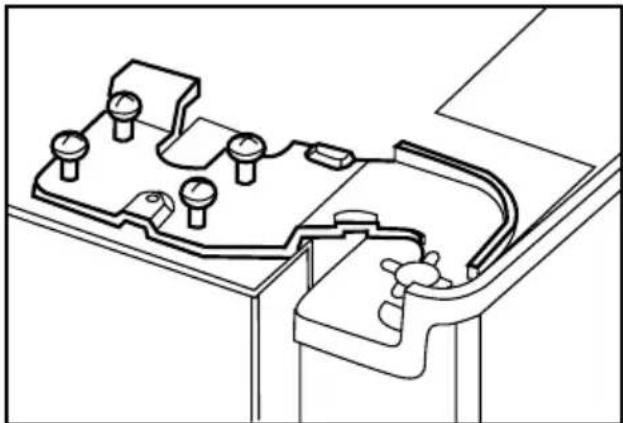
natural_image
Technical line drawing of a mechanical component with mounting holes and internal channels (no text or symbols)natural_image
Pure mechanical diagram showing a valve assembly with pressure gauges and adjustment arrows (no text or symbols)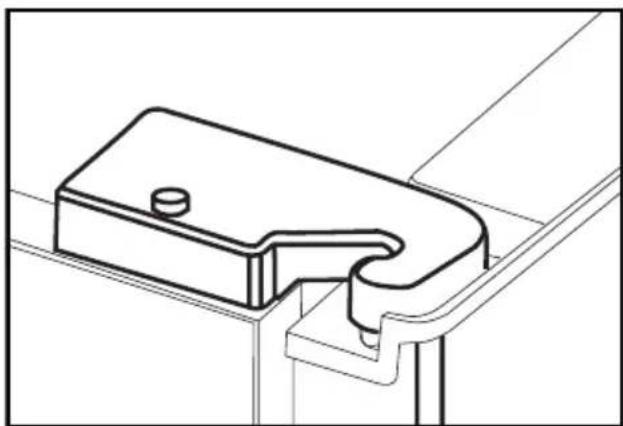
natural_image
Technical line drawing of a mechanical bracket or clamp assembly (no text or symbols)natural_image
Illustration of five different mechanical components or parts, including coiled tubing, a connector, and a cylindrical device (no text or symbols present)natural_image
Line drawing of a hand inserting a plug into a device component (no text or symbols)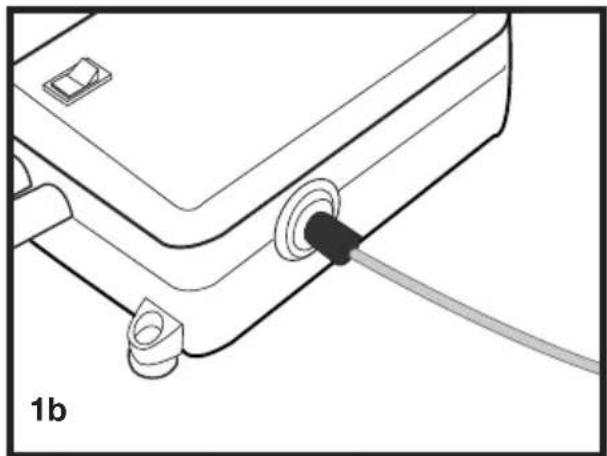
natural_image
Line drawing of a mechanical or electronic component with a black connector and a cable, labeled '1b' (no text or symbols on the diagram itself)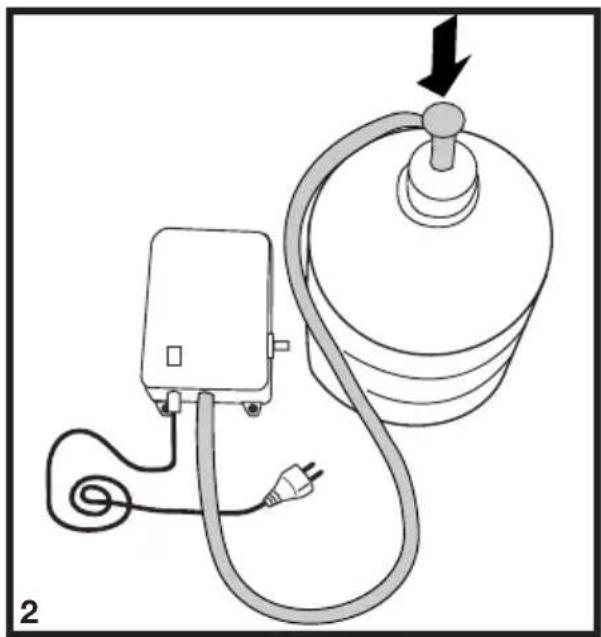
natural_image
Diagram of a medical or electrical device with a bulb, plug, and cable (no text or symbols)natural_image
Technical illustration of a mechanical component with a downward arrow indicating force or movement (no text or symbols present)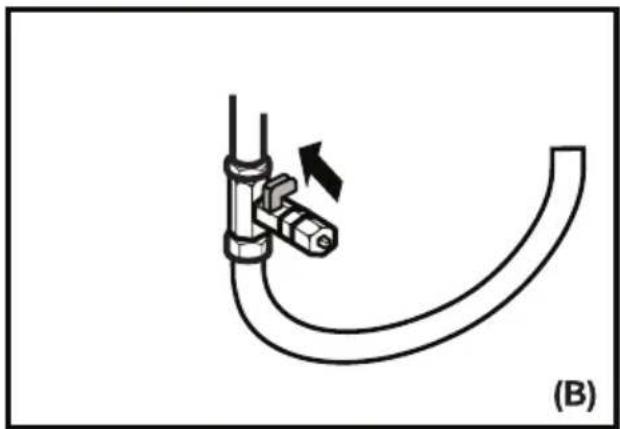
natural_image
Diagram of a pipe fitting with a valve and directional arrow, labeled (B), showing no text or symbols beyond the label.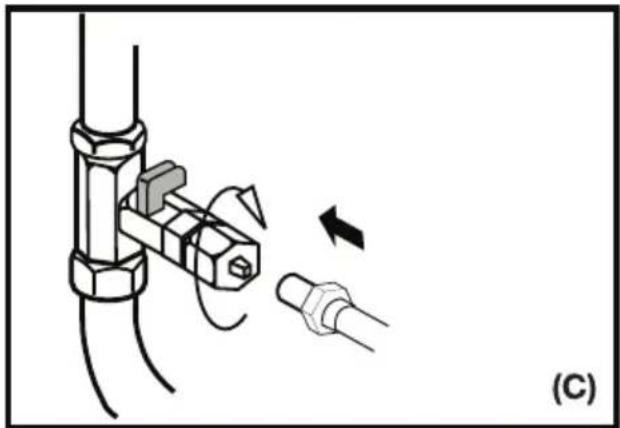
natural_image
Diagram showing a mechanical assembly with a bolt and connector, no text or symbols presentnatural_image
Interior view of a refrigerator with air ducts and ventilation system (no text or symbols visible)natural_image
Interior view of a kitchen appliance with shelves and appliances (no visible text or symbols)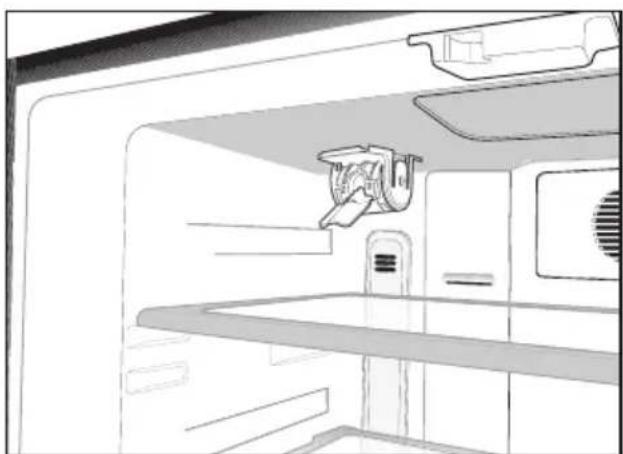
natural_image
Line drawing of a kitchen appliance interior showing front shelf, door, and ceiling (no text or symbols)natural_image
Line drawing of a refrigerator interior showing a hand holding a cylindrical device (no text or symbols)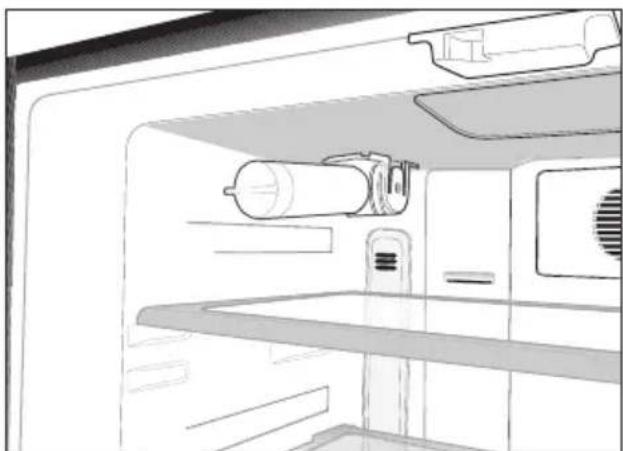
natural_image
Line drawing of a refrigerator interior showing the door, shelf, and ceiling (no text or symbols)natural_image
Line drawing of a hand inserting a plug into a device with a digital display (no text or symbols)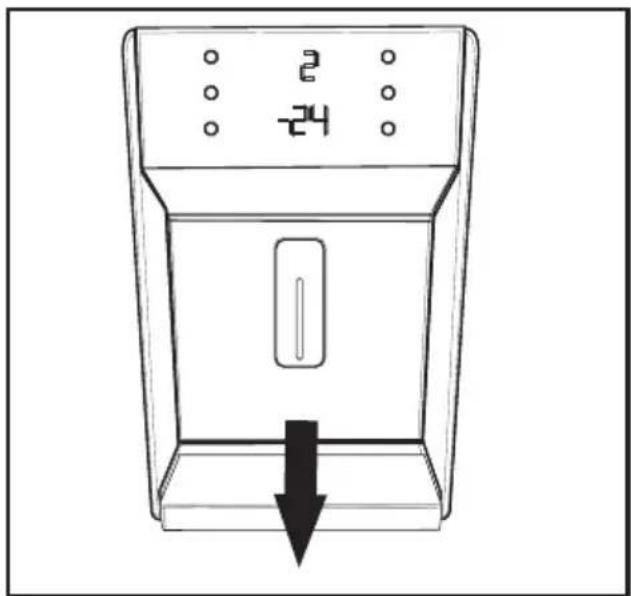
natural_image
Line drawing of a device with a downward arrow indicating a drop or decrease, no text or symbols present.4 Vorbereitung
natural_image
Line drawing of an open refrigerator interior showing internal compartments and ventilation grilles (no text or symbols)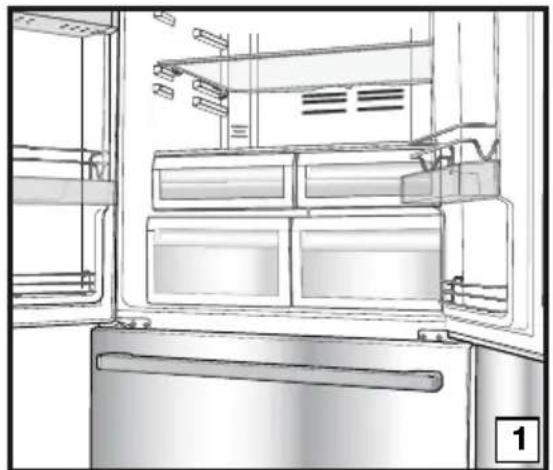
natural_image
Line drawing of an open refrigerator with visible doors, shelves, and doorways (no text or symbols)
natural_image
Line drawing of a person installing or adjusting a door panel inside a kitchen appliance (no text or symbols)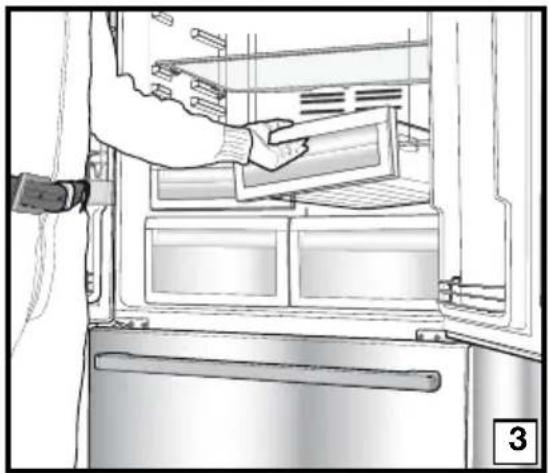
natural_image
Line drawing of a refrigerator interior showing hand placement on the door (no text or symbols)
natural_image
Interior view of a refrigerator showing a hand holding a kitchen utensil, with no visible text or symbols.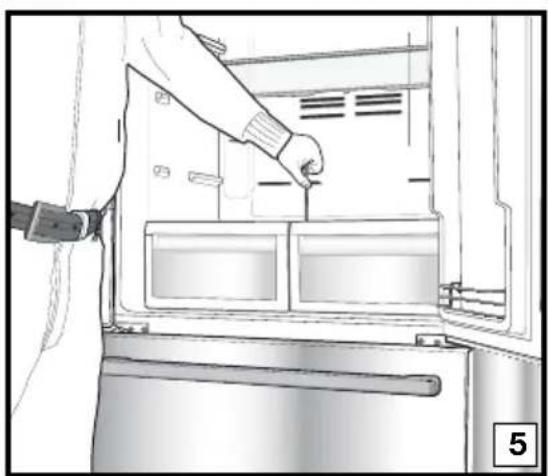
natural_image
Line drawing of a person inserting a component into a refrigerator (no text or symbols visible)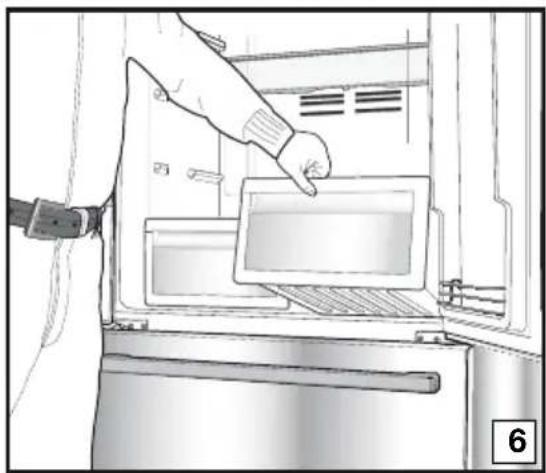
natural_image
Line drawing of a hand inserting a tray into an oven (no text or symbols)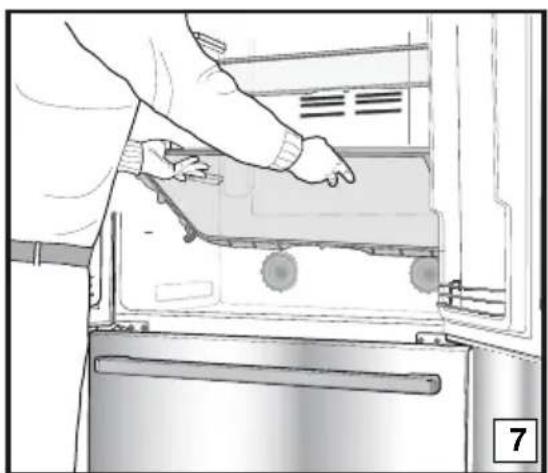
natural_image
Person opening a refrigerator with visible door, handle, and scroll wheel (no text or symbols)Gemüsefach
natural_image
Technical line drawing of a refrigerator interior with a checkmark symbol (no text or labels)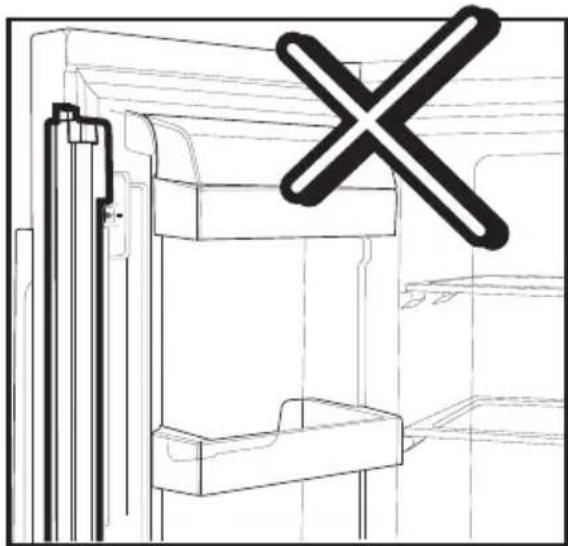
natural_image
Technical line drawing of a mechanical assembly with a cross symbol overlay (no text or labels)
natural_image
Line drawing of a cabinet interior with drawers and storage shelves (no text or symbols)Teleskopschublade
natural_image
Technical line drawings showing two views of a mechanical device with hands adjusting parts (no text or symbols present)natural_image
Line drawing of a mechanical component placed on a slatted base (no text or symbols)Eisfach
natural_image
Technical line drawing of a mechanical assembly with internal components (no text or symbols)
natural_image
Diagram showing a lightning bolt striking a wall-mounted device with wires and connectors (no text or symbols)natural_image
Technical diagram of a computer monitor rear panel showing internal compartments and mounting points (no text or labels)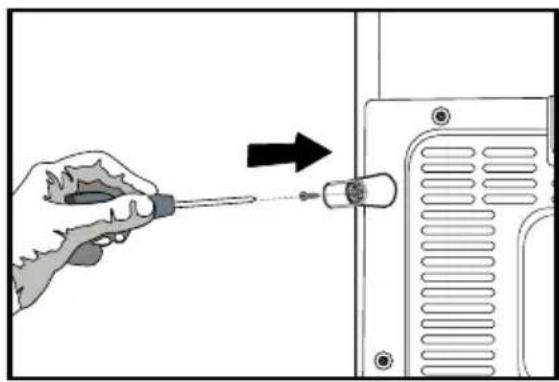
natural_image
Illustration of a hand using a screwdriver to adjust or install a component, with an arrow indicating the process (no text or symbols present)natural_image
Diagram showing a mechanical or structural component with directional arrows indicating motion, no text or symbols present.natural_image
Technical line drawing of a mechanical component with multiple ports and mounting brackets (no text or symbols)natural_image
Technical diagram of a mechanical assembly with rotating components and a curved arrow indicating motion (no text or symbols)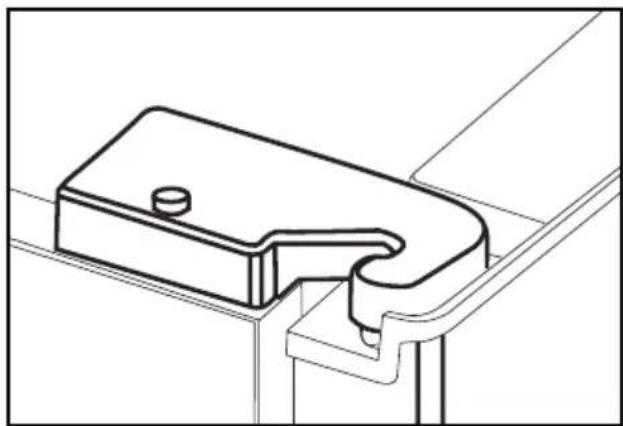
natural_image
Technical line drawing of a mechanical bracket or bracket component (no text or symbols)natural_image
Simple line drawing of a double-door refrigerator with no text or symbolsnatural_image
Technical line drawing of a mechanical component with an upward arrow indicating motion (no text or symbols)natural_image
Technical line drawing of a mechanical component with mounting holes and internal channels (no text or symbols)natural_image
Technical line drawings of a mechanical component assembly, including coiled tubing, a connector, and a cylindrical device (no text or symbols)natural_image
Line drawing of a hand inserting a plug into a device component (no text or symbols)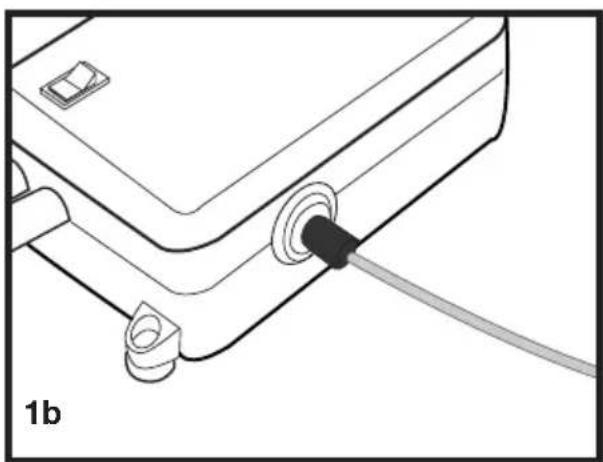
natural_image
Line drawing of a mechanical or electronic component with a black cable inserted into a housing (no text or symbols)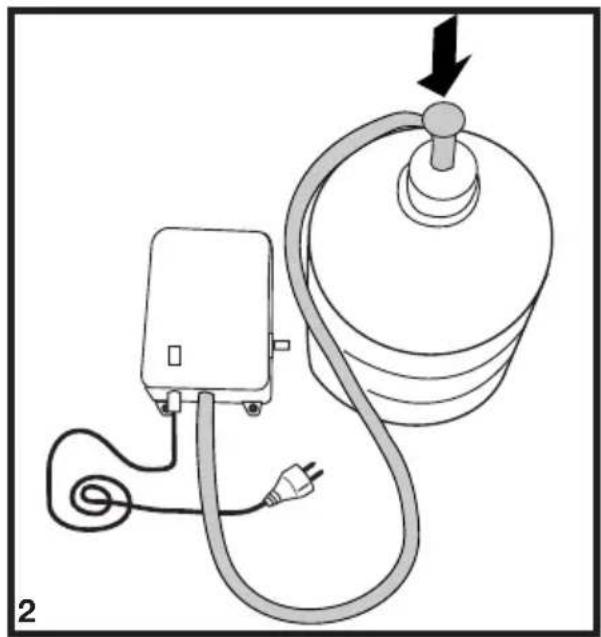
natural_image
Diagram of a medical or electrical device with a bulb, plug, and cable (no text or symbols)
natural_image
Technical illustration of a mechanical component with a downward arrow indicating force or movement (no text or symbols present)
natural_image
Diagram of a pipe fitting with a valve and directional arrow, labeled (B), showing no text or symbols beyond the label.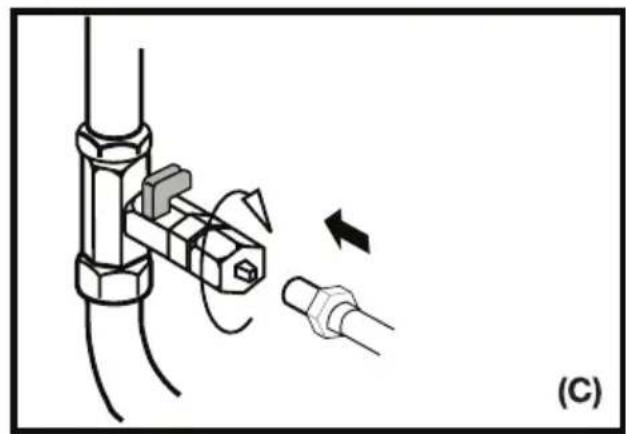
natural_image
Diagram showing a mechanical assembly with a bolt and pipe connection, no text or symbols presentnatural_image
Line drawing of a kitchen appliance interior showing shelves, doors, and a kitchen fixture (no text or symbols)
natural_image
Interior view of a kitchen appliance with a shower unit and sink (no text or symbols visible)natural_image
Line drawing of a hand pointing at a device panel with display indicators (no text or symbols)natural_image
Interior view of a vehicle cabin with ventilation ducts and storage tanks (no text or symbols visible)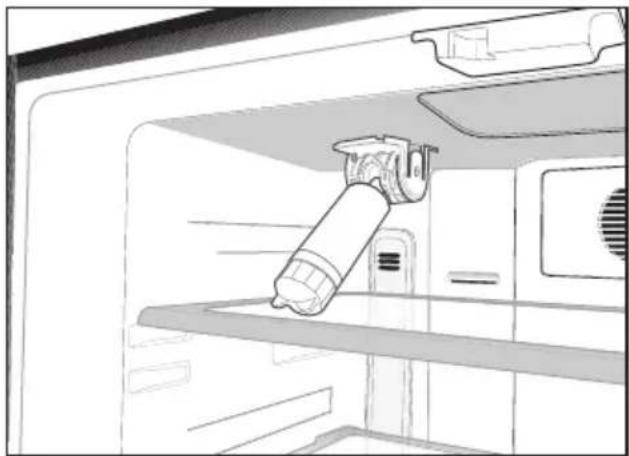
natural_image
Line drawing of a refrigerator interior showing a hand holding a cylindrical device (no text or symbols)
natural_image
Line drawing of a refrigerator interior showing shelves, doors, and appliances (no text or symbols)فعال است.
natural_image
Line drawing of a refrigerator with digital display and downward arrow (no text or symbols)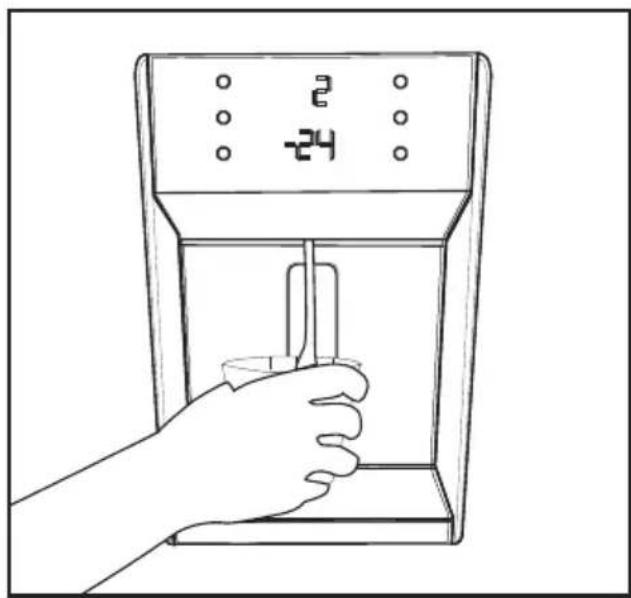
natural_image
Line drawing of a hand inserting a device into a control panel (no text or symbols)natural_image
Line drawing of a refrigerator interior showing seating arrangement and ventilation slots (no text or symbols)سینی تخم مرغ
natural_image
Line drawing of an open refrigerator with visible doors, shelves, and doorways (no text or symbols)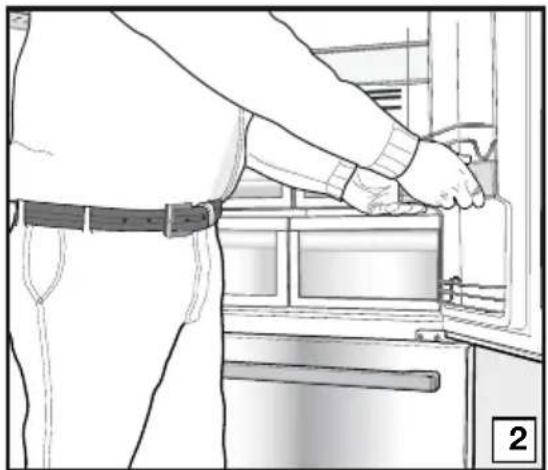
natural_image
Line drawing of a person installing or adjusting a door panel in an appliance (no text or symbols visible)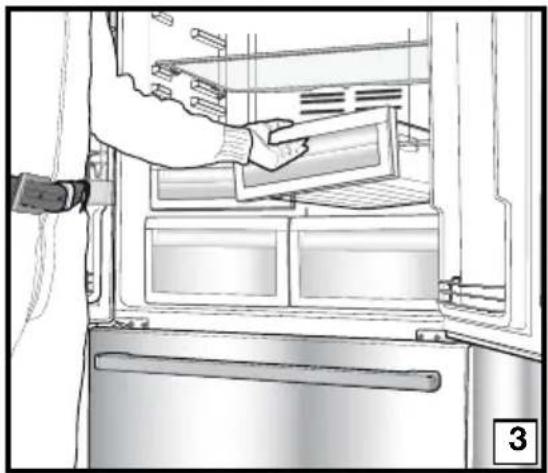
natural_image
Line drawing of a refrigerator interior showing hand placement on the door (no text or symbols)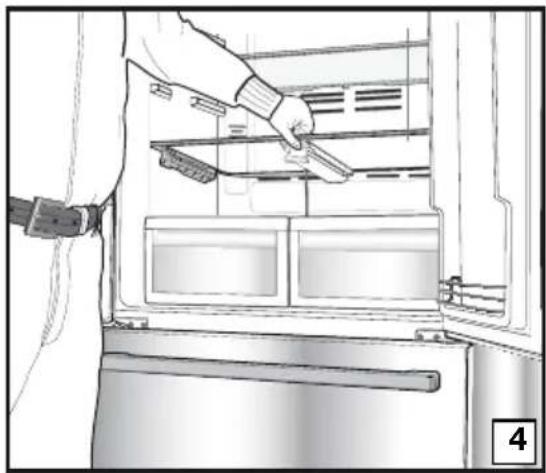
natural_image
Interior view of a refrigerator showing a hand holding a kitchen utensil, with no visible text or symbols.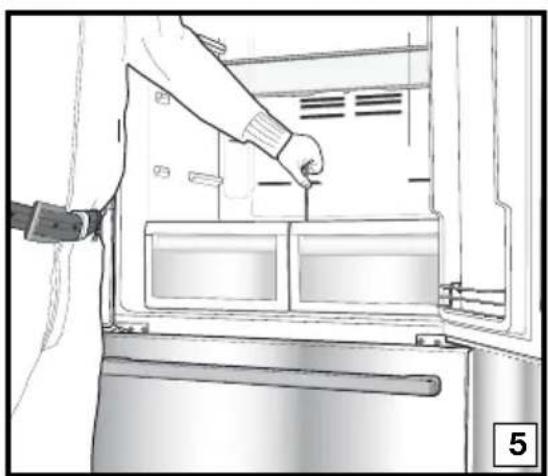
natural_image
Line drawing of a person inserting a component into a refrigerator (no text or symbols)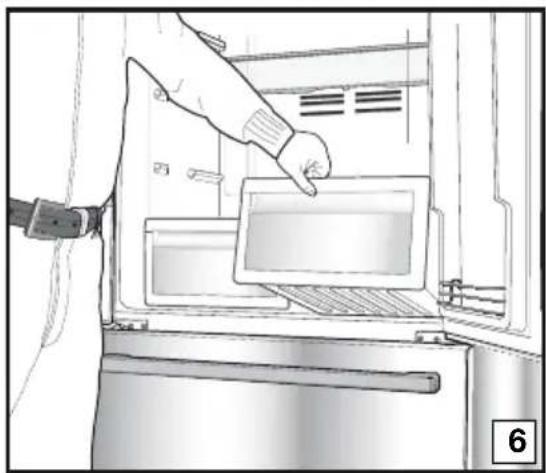
natural_image
Illustration of a hand inserting a tray into an oven with a label '6' (no text or symbols on the diagram itself)
natural_image
Person opening a refrigerator with visible door, handle, and scroll (no text or symbols)محل نگهداری سپزیجات
natural_image
Line drawing of a cabinet interior with drawers and storage shelves (no text or symbols)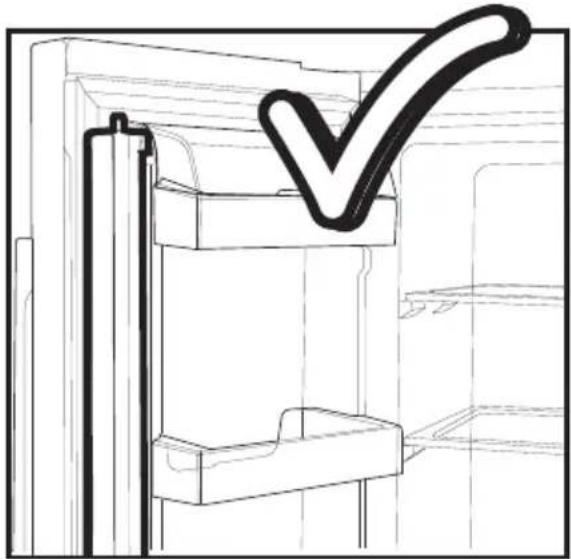
natural_image
Technical line drawing of a door frame with a checkmark overlay (no text or symbols)
natural_image
Technical line drawing of a mechanical assembly with a cross symbol overlay (no text or labels)natural_image
Technical line drawings of a vehicle door frame and foot, showing structural components (no text or symbols)natural_image
Line drawing of a mechanical component placed on a slatted platform (no text or symbols)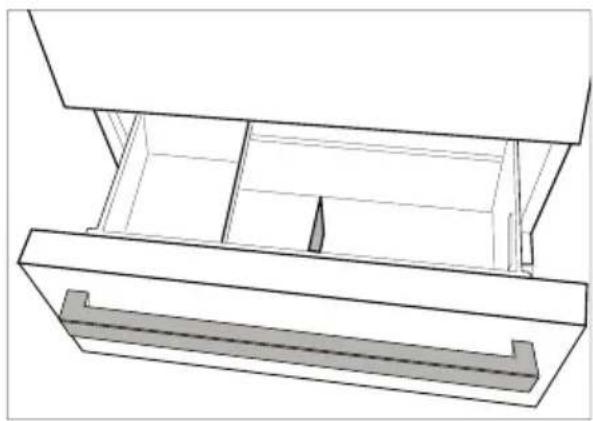
natural_image
Technical line drawing of a mechanical assembly with internal components (no text or symbols)The image contains a graphical symbol: a triangle with a lightning bolt inside, and no textual content. Therefore, the correct OCR output is an empty string.
i
i
4
4
i
!
- Please read this manual first!
- This manual
- Symbols and their descriptions
- The refrigerator 3
- Important Safety Warnings 4
- Installation 7
- Preparation 17
- Using your refrigerator 18
- Maintenance and cleaning 29
- Recommended solutions for the problems 30
- The refrigerator
- Important Safety Warnings
- Intended use
- General safety
- Child safety
- HCA Warning
- If your product is equipped with a cooling system that contains
- R600a:
- Ignore the warning if your product is equipped with a cooling system that contains R134a.
- Things to be done for energy saving
- Installation
- Points to be considered when re-transporting your refrigerator
- i Always remember...
- Before operating your refrigerator
- Electric connection
- Disposing of the packaging
- Disposing of your old refrigerator
- Placing and Installation
- Floor balance adjustment
- Adjusting the gap between the upper door
- Installing Water Filter (in some models) Two different water sources may be connected to the refrigerator for water supply: the mains cold water supply and water in a jug. Installation Requirements
- Connection of the Water Pipe to the Refrigerator
- Connection of Water Hose to the Jug
- (in some models)
- Connection of the Water Pipe to the Cold Water Mains Line
- Prior to first use of Water Dispenser
- Using the water spring
- Warnings
- Spillage Tray
- Preparation
- Using your refrigerator
- Indicator Panel
- 1- Fridge Compartment Temperature Setting Button
- 2- Eco-Ekstra Button
- 3- Freezer Compartment Temperature Setting Button
- Quick CoolButton
- 5- Vacation Button
- 6- Fast Freeze Button
- 7- Fridge Compartment Temperature Indicator
- 8- Eco Extra Function Indicator
- 9- Freezer Compartment Temperature Indicator
- 12- Quick Freeze Function Indicator
- 13- Economy Mode Indicator
- 14- Error Status Indicator
- 15- Key Lock Indicator
- 16- Ionizer Indicator Light
- 17- Humidity Indicator
- 18-Ice Machine OFF Indicator
- 19-Ice Machine ON/OFF Button
- 20- Change Filter Warning Indicator
- 21-Filter Status Reset Button
- Door Open Alarm:
- Things to do to have the filter usage time calculated automatically
- Egg tray
- Sliding Body Shelves
- Chiller compartment
- Crisper
- Movable Middle Section
- Blue light
- Telescopic Drawer
- Dual cooling system:
- Ice maker
- Ice box
- Freezing fresh food
- Recommendations for preservation of frozen food
- Defrosting
- Deep-freeze information
- WARNING!
- Maintenance and cleaning
- Protection of plastic surfaces
- Recommended solutions for the problems
- Vorbereitung
- Gemüsefach
- Teleskopschublade
- Eisfach
- سینی تخم مرغ
Brand : BLOMBERG
Model : KFD 9952 XDA
Category : Refrigerator