GS55SGVi - Dishwasher V-ZUG - Free user manual and instructions
Find the device manual for free GS55SGVi V-ZUG in PDF.


| Product Type | Built-in Fully Integrated Dishwasher |
| Brand | V-ZUG |
| Model | GS55SGVi |
| Installation Type | Built-in |
| Dimensions (H x W x D) | 815 x 598 x 570 mm |
| Weight | 45 kg |
| Rated Voltage | 220-240 V AC |
| Frequency | 50/60 Hz |
| Rated Current | 10 A |
| Total Power Consumption | 2.2 kW |
| Energy Efficiency Class | A+ |
| Number of Place Settings | 13 |
| Noise Level | 42 dB(A) |
| Wash Programs | Eco, Auto, Intensive, Quick, Glass Care |
| Additional Functions | VarioFlex basket, Load sensor, Water softener |
| Control Type | Electronic with LED display |
| Safety Features | Child lock, Leak protection, Overflow protection |
| Maintenance | Clean filter, descale, clean spray arms |
| Spare Parts Availability | Yes, genuine parts from V-ZUG |
| Repairability Index | High (7.0/10) |
Frequently Asked Questions - GS55SGVi V-ZUG
User questions about GS55SGVi V-ZUG
0 question about this device. Answer the ones you know or ask your own.
Ask a new question about this device
Download the instructions for your Dishwasher in PDF format for free! Find your manual GS55SGVi - V-ZUG and take your electronic device back in hand. On this page are published all the documents necessary for the use of your device. GS55SGVi by V-ZUG.
USER MANUAL GS55SGVi V-ZUG
natural_image
Three rectangular electronic devices with gray shades and a white top, displayed against a plain gray background (no text or symbols)Operating instructions
Adora S integrated, design-integrated, fully integrated
Dishwasher
1 Safety precautions

Read the operating instructions before using the appliance for the first time.
General safety precautions
- This appliance can be used by children aged 8 and above and by persons with reduced physical, sensory or mental capabilities, or lack of experience and/or knowledge, provided they are supervised or have been instructed on the safe use of the appliance and have understood the hazards involved. Children must not play with the appliance. Cleaning and user maintenance shall not be undertaken by children without supervision.
- If an appliance is not equipped with a mains cable and a plug or other means for disconnecting from the mains with a contact opening on each pole complying with the conditions of overvoltage category III for full isolation, an isolating device must be incorporated into the permanently installed electrical installation in accordance with
the installation regulations.
- If the mains cable of this appliance is damaged, it must be replaced by the manufacturer or its Customer Services or a similarly qualified person in order to avoid hazard.
1.1 Appliance-specific safety precautions
- Children under 3 years of age must be kept away from the appliance unless they are constantly supervised.
- Never use a steam cleaner to clean the appliance.
- If the appliance is installed on a carpeted floor ensure that the ventilation openings on the base of the appliance are not obstructed.
- Only leave the appliance door open in the at-rest position. An open appliance door poses a danger of tripping or injury. Do not sit or rest on the appliance door or use it as a storage surface.
- CAUTION: Knives and other items with sharp points must be placed with the
point downwards or placed horizontally in the basket.
- CAUTION: Do not drop or insert knives, forks or other sharp items in the opening of the door lock.
- No detergent must enter the opening of the door lock. This can cause the door lock to malfunction.
- The appliance is only suitable for washing household dishes and cutlery with water and standard dishwasher detergent. The appliance is for use in the home and for the intended purpose only. No liability is assumed for any damage caused by improper or incorrect use.
- Capacity: 12 international place settings (SMS 55). 13 international place settings (EURO 60).
- This appliance is designed to be used for household and similar purposes such as: staff kitchens in shops, offices and other commercial premises; agricultural properties; by customers in hotels, motels and other residential facilities; in bed-and-breakfast hotels.
1.2 Correct use
- Any repairs, modifications or manipulations to the appliance, especially any electrically live parts, may only be carried out by the manufacturer, its Customer Services or a similarly qualified person. Repairs if carried out incorrectly may cause serious injury, damage to the appliance and fittings, as well as affect the functioning of the appliance. If the appliance is not working properly or in case of a repair order, follow the instructions given in the «Service & Support» section. Please contact our Customer Services if necessary.
1.3 Instructions for use
- If the appliance is visibly damaged, do not use it. Contact our Customer Services.
- If the appliance is not operating properly, disconnect it from the power supply immediately.
- Use original spare parts only.
- Retain these operating instructions for future reference.
- Avoid opening the appliance door unnecessarily during operation. The dishes and water may be hot – scalding hazard! The steam that escapes can damage wood combination fascias. Spectacles can steam up, impairing your vision.
- Do not wash objects that are soiled with inflammable or corrosive solvent, paint, wax, chemicals (acids or alkaline solutions) or iron chippings or that can shed fibres in the appliance.
- Packaging material, e.g. plastic film and polystyrene, can be dangerous for children. Danger of suffocation! Keep packaging material away from children.
1.4 Transport and installation
text_image
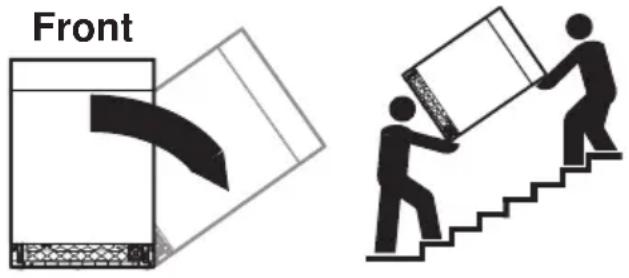
FrontDo not tilt more than 90^ to the right!
Transport the appliance in an upright position only! Transporting it in any other position will result in damage to the appliance! When carried carefully without being shaken, the appliance may be tilted a maximum of 90^ to the left (viewed from the front).
1.5 How to avoid damaging the appliance
- Before closing the appliance door and starting a programme ensure that there are no foreign objects (e.g. nails or paper clips) or pets in the appliance. Foreign objects can damage parts of the appliance as well as the dishes.
- Never fill the rinse agent reservoir or the regeneration salt reservoir with detergent! If this were to happen, however, do not operate the appliance under any circumstances, as this could cause expensive damage to it. Call Customer Services.
- Do not lean on any part of the appliance – risk of accident!
- Turn off the water tap during longer absences.
- The appliance must be connected to the mains supply to ensure appliance protection (overflow protection, among other things).
1.6 Using for the first time

The appliance must be installed and connected to the electricity supply by a qualified fitter/electrician in accordance with the separate installation instructions.
Before operating the newly installed appli- ance for the first time, the following steps should be taken:
Before using for the first time
- Switch on the power and turn on the water tap.
▶ Set (see page 24) the water hardness.
▶ Fill the salt reservoir with approximately 1.0 l water and 1 kg regeneration salt. Wipe away any excess salt on the edge of the salt reservoir. - Fill the rinse agent reservoir with rinse agent.
▶ Run the programme without dishes to protect the appliance from corrosion from any excess salt and to remove traces of grease left behind from the manufacturing process.
The Srefill indicator can flash during the first few wash cycles. S goes out when the salt concentration in the reservoir is evenly distributed.
1.7 Notes on using the operating instructions
Graphical operating instructions can be downloaded on the internet from www.vzug.ch.
Symbols used

Denotes important safety precautions.
Failure to observe said precautions can result in injury or in damage to the appliance or fittings!
Validity
The product family (model number) corresponds to the first alphanumerics on the identification plate. These operating instructions apply to:
Model Type Product family
| Adora | GS55Si | 41049 |
| 55 S | GS55Sdi | 41065 |
| (SMS 55) | GS55SVi | 41071 |
| GS55SGi | 41072 | |
| GS55SGVi | 41073 | |
| GS55SGdi | 41074 | |
| Adora | GS60Si | 41050 |
| 60 S | GS60Sdi | 41062 |
| (EURO | GS60SGi | 41066 |
| 60) | GS60SVi | 41079 |
| GS60SGVi | 41080 | |
| GS60SGdi | 41081 |
Variations depending on the model are noted in the text.
Modifications
Text, diagrams and data correspond to the technical standard of the appliance at the time these operating instructions went to press. The right to make technical modifications for the purpose of the further development of the appliances is reserved.
Contents
1 Safety precautions 2
1.1 Appliance-specific safety precautions ..... 2
1.2 Correct use .... 3
1.3 Instructions for use 3
1.4 Transport and installation.... 4
1.5 How to avoid damaging the appliance..... 4
1.6 Using for the first time.... 5
1.7 Notes on using the operating instructions . 5
2 Appliance description 7
2.1 Construction.... 7
2.2 Operating and display elements...... 8
3 Programme overview 9
3.1 Programme 9
3.2 Additional functions ...... 9
4 Operation 10
4.1 Preparing the appliance 10
4.2 Dish washing tips.... 10
4.3 Loading tips for the upper basket ..... 11
4.4 Loading tips for the lower basket 13
4.5 Detergent.... 17
4.6 Selecting a programme 19
4.7 Delayed start.... 20
4.8 Interrupting a programme 21
4.9 Aborting a programme before time..... 21
4.10 Operation with the childproof lock activated 22
4.11 End of programme 22
5 User settings 23
5.1 Overview of user settings.... 23
5.2 Changing user settings.... 23
5.3 Acoustic signal 24
5.4 All in 1.... 24
5.5 Water hardness 24
5.6 Rinse agent dosage 25
5.7 Water hardness unit 25
5.8 DryPlus.... 25
5.9 RinsePlus.... 25
5.10 Hot water connection 25
5.11 Childproof lock 25
5.12 Automatic door opener.... 26
5.13 Temperature unit.... 26
5.14 Automatic standby.... 26
5.15 Factory setting 26
6 Care and maintenance 27
6.1 Cleaning the interior and exterior 27
6.2 Cleaning the spray arms 27
6.3 Cleaning the filter system.... 28
6.4 Refilling with regeneration salt 28
6.5 Filling with rinse agent 29
7 Trouble-shooting 30
7.1 Error messages.... 30
7.2 Other possible problems.... 32
7.3 Unsatisfactory washing results.... 33
7.4 In the event of a power failure.... 34
8 Accessories and spare parts 34
9 Technical data 36
9.1 Product fiche.... 37
9.2 Consumption data 38
9.3 Note for testing institutes 38
9.4 Noise measurement 38
10 Disposal 39
2 Appliance description
2.1 Construction

text_image
1 2 2 1 3 4 5 6 7 8 9 101 Baskets
2 Spray arms
3 Cutlery basket
4 Rinse agent reservoir
5 Operating and display elements *
6 Quick operating instructions
7 Detergent dispenser
8 Salt reservoir
9 Filter system
10 «Small» cutlery basket *
Integrated appliances
(operating elements are located on the outside of the appliance door):
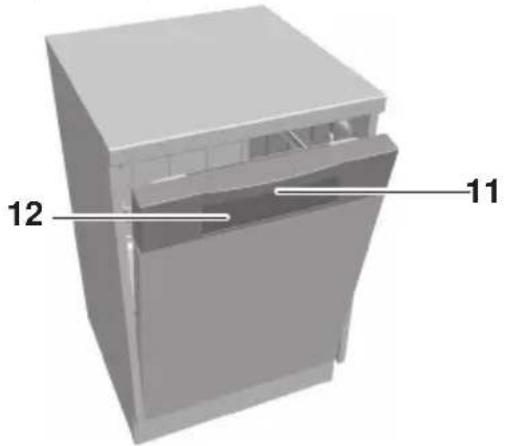
natural_image
3D model of a kitchen appliance with labeled parts (11 and 12), no text or symbols present.11 Door handle
12 Operating and display elements
Fully integrated and design integrated appliances
(operating elements are located on the inside of the appliance door):

natural_image
3D model of a kitchen appliance with labeled parts (11 and 12), no text or symbols beyond labels11 Display on glass panel *
12 Function light *
* Depending on model
2.2 Operating and display elements
Integrated appliances:

text_image
2 Auto 4 1h25 3 e 1/2 1/2 1/2 1/2 1/2 1/2 1/2 1/2 1/2 1/2 1/2 1/2 1/2 1/2 1/2 1/2 1/2 1/2 1/2 1/2 1/2 1/2 1/2 1/2 1/2 1/4 1Fully integrated and design integrated appliances:
text_image
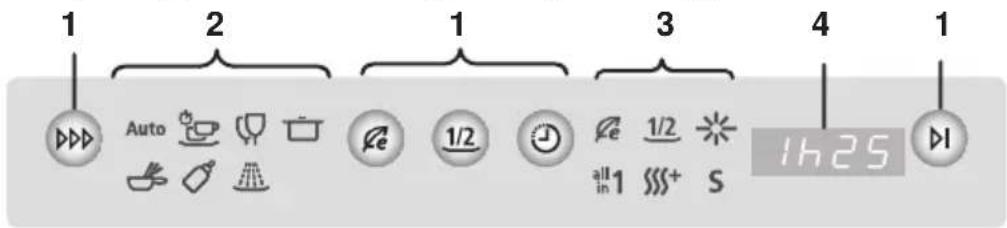
1 2 1 3 4 1 Auto 1/2 e 1/2 all 1 in 25 S1 Buttons 2 Programme symbols 3 Additional function sym-
bols/Indicator symbols
Programme selection Auto Automatic Energy saving
Eco programme Quick wash Partial load 1/2
1/2 Partial load Glass care Rinse agent
Delayed start Intensive «All in 1» detergent all in 1
End of programme Fondue/Raclette DryPlus
Hygiene Salt refill indicator
Pre-rinsing
refill indicator
4 Display
- Programme duration
- Programme duration remaining
- Delayed start
- Hints and trouble-shooting
Acoustic signal (depending on model)
An acoustic signal is emitted at the end of the programme and in the event of a malfunction.
Function light (depending on model)
- Illuminates during the programme sequence.
- Flashes during the final drying phase.
3 Programme overview
3.1 Programme
Programme time, water consumption and energy consumption can be reduced by selecting the and additional functions.

Eco programme: The most efficient programme in terms of water and energy consumption for normally dirty dishes (declaration programme).

Automatic: Optimum cleaning with minimal water and energy consumption. Not for burnt-on or dried leftovers.

Quick: For moderately dirty, everyday dishes. Not suitable for slowly dissolving tabs.

Glass: Gentle programme for glasses.

Intensive: For very dirty dishes, particularly with starchy leftovers (mashed potato, rice etc.).

Fondue/Raclette: For very dirty dishes, including burned-on food. Only use dishes that are suitable for dishwashers. If necessary, put detergent in the pre-rinsing compartment.

Hygiene: For items with higher hygiene requirements (baby bottles, chopping boards etc.). Clean the filter system before starting the programme.
Pre-rinsing: Prevents dirt drying on if the wash programme is not going to be started until later.
3.2 Additional functions

Energy saving: The rinsing temperature is reduced by 5 °C for around 10 % less energy consumption Gentle on glasses.

Partial load: When there is not much to wash. The water quantity is reduced by up to 6 l, the programme is up to 15 minutes shorter.

Delayed start: Allows you to wash during off-peak hours (e.g. at off-peak electricity rates). A delayed start of between 1 and 24 hours can be set.
4 Operation
4.1 Preparing the appliance
▶ Remove any coarse or hard pieces of food or foreign objects (such as toothpicks) left on the dishes.
▶ Load the baskets. After loading, check that the spray arms can turn freely.
4.2 Dish washing tips
General notes
- Do not overload the baskets.
- Dishes, pots and pans with heavily burned-on food debris stuck to them should be soaked in water first.
- Load beverage and food containers such as cups, glasses, pots, etc. with the opening facing downwards so that the water can drain off.
- When loading, ensure glasses do not touch so as to prevent damage and water spots.
- When cleaning range hood grease filters, select the ☐ programme and use the maximum amount of detergent.
Dishes
Not all table- and kitchenware are dishwasher safe.
- Clean wooden or plastic parts that are sensitive to damage from heat and detergent suds by hand.
- Pottery has a tendency to crack or chip.
- The printing on glass and porcelain is hard-wearing only to a point and eventually over time can wear off.
- Glassware, depending on the type and the detergent being used, can become cloudy. Check with your glassware supplier as to whether your glassware is dishwasher safe.
- Stress and tension in thick cut crystal glasses and dishes can cause cracking.
- Do not wash dishes with adhesive labels on them. Adhesive labels can come off and clog up the filter system.
- Objects made of silver, copper and tin tend to discolour, turning brown or black.
- Spots tend to form on aluminium. Wash aluminium separately or by hand.
4.3 Loading tips for the upper basket
▶ Arrange smaller items such as saucers, glasses, cups and dishes.
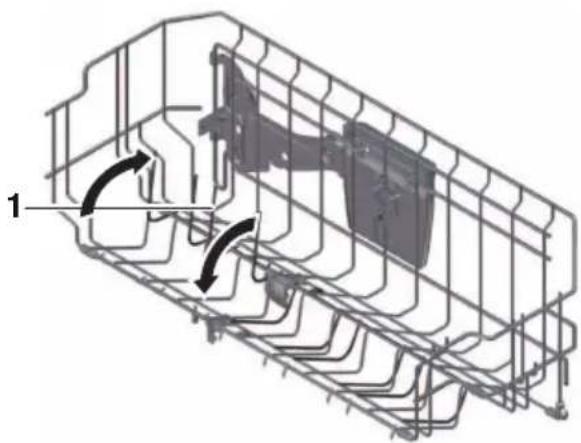
▶ If using the fold-down racks 1, stagger the items.
▶ Rest glasses on the fold-down glass holder 2.

natural_image
3D technical illustration of a mechanical assembly with multiple cylindrical components and a grid framework (no text or symbols)Glass holder
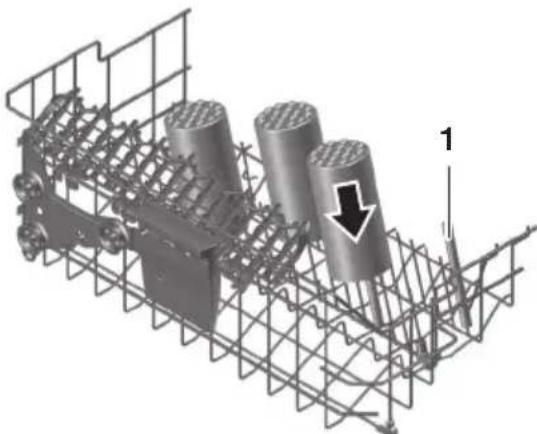
Particularly suitable for tall glasses.
▶ Push the glass holders 1 gently down or, alternatively, pull them up until they engage.
natural_image
Technical line drawing of a mechanical assembly with internal components and directional arrows (no text or symbols)
natural_image
3D wireframe diagram of a mechanical assembly with cylindrical components and mounting brackets (no text or symbols)Easy prongs
For placing drinking glasses, baby bottles, vases and carafes anywhere in the basket.
▶ Put easy prong 1 over basket prongs.
▶ Use 2 easy prongs for wider vessels.
natural_image
3D technical diagram of a mechanical assembly with cylindrical components and structural framework (no text or symbols)Racks
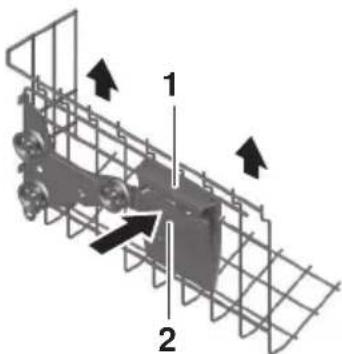
The racks 1 can also be used as glass holders. Remove the racks to accommodate tall glasses.

natural_image
3D technical illustration of a mechanical assembly with two bottles on a rack (no text or symbols)Dismantling/Adjusting the height of the racks
Push the rack 1 up by the hooks 2.
Push the rack inward and then out.
▶ Hook the rack in the higher position 3, if required.

text_image
1 2. 3 2 1.Adjusting the upper basket
The height of the upper basket can be adjusted by around 2–4 cm (depending on model). It can be inclined in various ways.

natural_image
Four sequential diagrams showing structural deformation under upward and downward arrows, with no text or symbols present.▶ To raise: Hold the upper basket at the sides by the grips 1 and raise it into the position required.

natural_image
3D diagram of a vehicle inside a wire cage with two upward arrows indicating motion or force (no text or symbols)▶ To lower: Hold the upper basket at the sides by the grips 1.
- Raise the upper basket slightly and press the button 2 at the same time. The locking device is released.
▶ Lower the upper basket into the position required, release the button and engage the basket.
▶ Put plastic bowls in the upper basket.
natural_image
3D diagram of a mechanical assembly with labeled parts (1 and 2), showing internal components and directional arrows (no text or symbols beyond labels)4.4 Loading tips for the lower basket
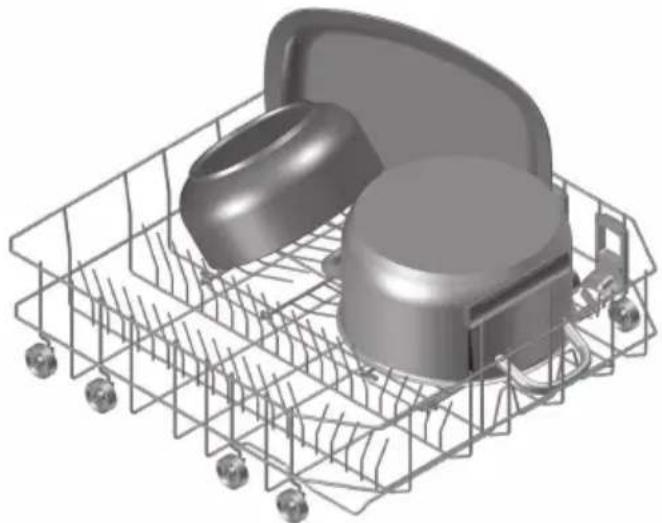
▶ Load larger items such as plates, bowls, platters, pots and pans.
▶ Load wide items (soup plates, lids, etc.) at the back on the right.

natural_image
3D rendered mechanical component with multiple circular parts and a wire cage (no text or symbols visible)Fold-down tines
For a larger area for loading e.g. large plates, pans, dishes or a number of cups and glasses.
Cooking trays can be placed between the prongs. Use easy prongs for greater stability.
▶ Pull up the locking grip 1 at the side.
▶ Fold the tines down.
natural_image
3D rendered image of a shopping cart filled with plastic containers and accessories (no text or symbols visible)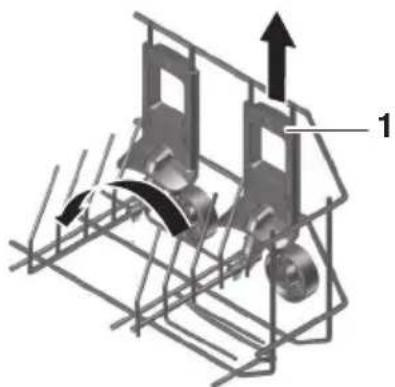
natural_image
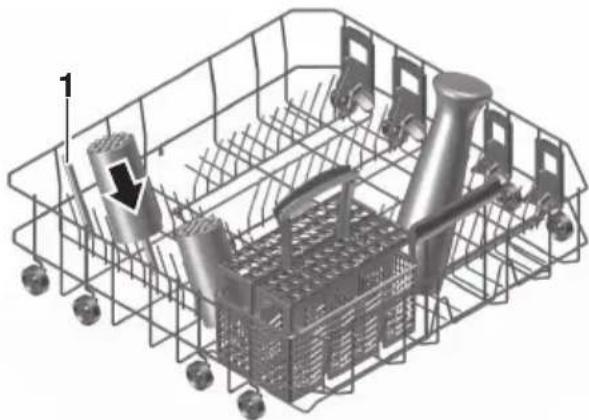
Mechanical assembly diagram showing a motor with rotating components and directional arrows (no text or symbols)Easy prongs
For placing drinking glasses, baby bottles, vases and carafes anywhere in the basket.
▶ Put easy prong 1 over basket prongs.
▶ Use 2 easy prongs for wider vessels.
natural_image
3D wireframe diagram of a shopping cart with mechanical components and a directional arrow (no text or symbols)Cleaning baking and steaming trays
The upper basket has to be removed for larger trays.
▶ Slide the upper basket out as far as possible.
▶ Remove the basket safety lock 2 by pushing it upwards.
▶ Pull the upper basket out of its guides.
▶ Load baking trays, using easy prongs for greater stability.

natural_image
Technical illustration of a multi-panel computer monitor assembly with wireframe views and an inset showing a close-up of the front panel (no text or symbols present)- When the upper basket is put back, the basket safety lock 2 must be returned to the locking position.
Cutlery basket

To avoid injury, place knives and cutlery with sharp edges or points into the cutlery basket in such a way that they do not stick out (points facing downwards).
Do not drop or insert knives, forks or other sharp items in the opening of the door lock. Risk of damage to the appliance!
Knives and cutlery with sharp edges or points may also be placed horizontally in the upper basket.
- Place the cutlery basket over the folded-down prongs anywhere in the basket.
▶ Distribute cutlery loosely in the basket, with handles pointing down (except for knives and the like). Spoons should not be stuck together.
▶ To prevent items of cutlery sticking together, water spots during drying, and smaller items slipping through the basket, put the inserts 1 supplied on the cutlery basket.

natural_image
3D rendered image of a plastic crate containing cutlery including fork, knife, and plate (no text or symbols)1
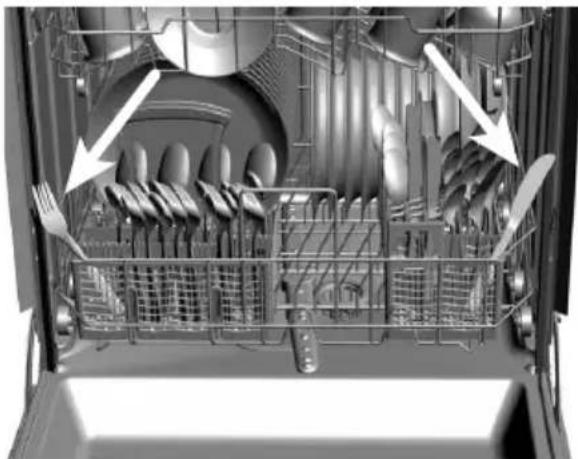
WARNING! When closing the appliance door, ensure no items of cutlery are sticking out of the tub or are trapped. The leak tightness of the appliance cannot otherwise be assured.
natural_image
Interior view of a multi-level industrial machine with visible gears and shafts, showing internal components and airflow direction arrows (no text or symbols)4.5 Detergent
Choice of detergent

Never use washing-up liquid. Heavy foaming can cause malfunctions. Strictly observe the dosage instructions printed on the packaging and contact the detergent manufacturer if you have any questions. Using too high or low a dosage can cause damage to the appliance.
▶ Only use detergent specially formulated for dishwashers.
Tabs may not dissolve properly at a wash temperature of below 55 °C , affecting the cleaning performance of the appliance.
Combination cleaning products (all in tabs/powder)
Continue to use regeneration salt and rinse agent for a good cleaning performance.
- Set «All in 1» to in the user settings. The programmes and displays are adapted to suit the detergent.

When the Sor refill indicators flash, continue to refill with regeneration salt or rinse agent.
▶ If, after washing and drying, the results are not satisfactory, use conventional cleaning products. Set «All in 1» to R in the user settings. For complaints, contact the detergent manufacturer.
Adding the detergent

No detergent must enter the opening of the door lock. This can cause the door lock to malfunction.
Powder
▶ Open the detergent dispenser by pushing the release catch in the direction of the arrow.
- Add the detergent to the detergent compartment. For dosage, follow the detergent manufacturer's instructions.
▶ Observe the «20 and 30 ml» level marks 1.
▶ For heavier soiling, add approximately 1 teaspoon of detergent to the pre-rinsing compartment 2.
▶ Close the cover.

natural_image
3D rendering of a gray plastic electronic device casing with ventilation slots and a black arrow pointing to it (no text or symbols)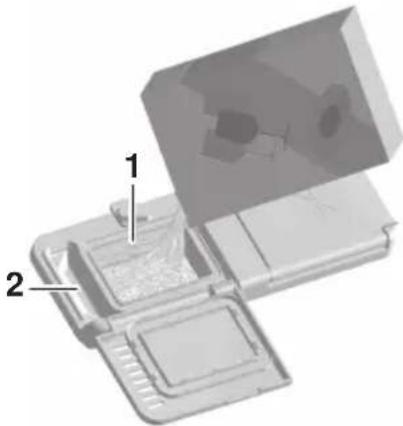
natural_image
3D mechanical component diagram showing a housing with labeled parts (1 and 2), no readable text or symbols present.Tabs
▶ Place the tab 3 flat in the detergent compartment.

natural_image
3D rendered mechanical component with labeled part '3' (no text or symbols beyond label)4.6 Selecting a programme

- Press the button repeatedly until the required programme symbol flashes.
▶ Select any additional function(s), if required.
▶ Close the appliance door.
Integrated appliances: The programme starts in 15 seconds.

Fully integrated and design integrated appliances: The programme starts immediately. The function light illuminates (depending on model).
If the appliance door is not closed within 15 seconds, all entries, symbols and the display are cleared; a 2× acoustic signal is also emitted (depending on model). The programme must be selected again. Press the ▶ button at any time to cancel the programme selected.
NOTICE! Integrated appliances can also be operated with the appliance door closed.
Selecting the Eco programme

▶ With the appliance switched off, press the button.
▶ Close the appliance door.
The programme starts.
Selecting additional function
Additional functions can be selected within 15 seconds of selecting a programme.
e.g. ▶ Press the required additional function button. The corresponding symbol illuminates.


▶ Close the appliance door.
The programme starts.
The ℃ additional function cannot be selected with the ⏰ and ⚠ programmes.
Saving additional functions
When an additional function is saved, it is automatically active during programme selection.
▶ Select the programme.
- Press the additional function button for 5 seconds. The selection is saved.
▶ To cancel the additional function, press the additional function button for 5 seconds.
The symbol flashes briefly and an acoustic signal sounds (depending on the model) to confirm that the additional function has been saved or deselected.
4.7 Delayed start
The delayed start allows you to wash during off-peak hours (e.g. at off-peak electricity rates). It can be set within 15 seconds of selecting a programme.
A delayed start of between 1 and 24 hours can be set.
Setting

▶ Select a programme.
▶ Repeatedly press or hold down the button until the required delayed start duration appears in the display.
▶ Close the appliance door.
The display and symbols go dark *. The countdown to the set delayed start begins. When the delayed start duration is up, the programme selected starts automatically. No acoustic signal is emitted at the end of the programme.
Dishes can be loaded at any time during the delayed start.
* Depending on model
Cancelling a delayed start

▶ Open the appliance door.
▶ Repeatedly press or hold down the button until the delayed start is cleared.
▶ Close the appliance door.
The programme starts.
4.8 Interrupting a programme

The dishes and water may be hot. Scalding hazard!

▶ Integrated appliances: First press the button. The programme is interrupted for 5 seconds.
▶ Carefully open the appliance door.
The programme symbol flashes.
At higher water temperatures, noise from the pump switching on and off up to 5 times with short pauses in between may be heard after the appliance door is closed. During this phase, temperature equalization takes place.
▶ Fully and design-integrated appliances: Carefully open the appliance door.
This interrupts the programme. The programme symbol flashes.
At higher water temperatures, noise from the pump switching on and off up to 5 times with short pauses in between may be heard after the appliance door is closed. During this phase, temperature equalization takes place.
4.9 Aborting a programme before time

The dishes and water may be hot. Scalding hazard!

▶ Integrated appliances: Press the button first. The programme is interrupted for 5 seconds.
▶ Open the appliance door carefully.
The programme symbol flashes.
▶ Fully integrated and design integrated appliances: Open the appliance door carefully.
This interrupts the programme.
The programme symbol flashes.
▶ All appliances: Depress the button for 2 seconds.
The water is pumped off. The following appears in the display:
A 5× acoustic signal is emitted *. The display and symbols go out.
* Depending on model

4.10 Operation with the childproof lock activated
The childproof lock must be overridden each time before selecting the programme.
▶ Integrated appliances: Close the appliance door.
▶ Fully integrated and design integrated appliances: Open the appliance door.
In the display appears:

Economy programme:
▶ All appliances: Hold the button depressed and at the same time press the ▶I button.
The childproof lock is overridden. The appliance can now be used as normal.

4.11 End of programme

The appliance door must not be closed when is shown in the display. The door opener could otherwise be damaged!
A 5× acoustic signal is emitted at the end of the programme *.
If the appliance door remains closed, final drying starts:
Integrated appliances: The symbols remain illuminated for up to 90 minutes.
Fully integrated and design integrated appliances: The display illuminates or the function light flashes for up to 90 minutes *.
If this set in the user settings, the appliance door opens automatically during the drying or final drying phase. After final drying, 3 long acoustic signals are emitted *.
* Depending on model
For optimum drying results, unload the appliance after the final drying phase is finished. When the final drying phase has finished, all the displays go out and the appliance enters the energy-saving stand-by mode.
Unloading
▶ Unload the appliance. Unload the lower basket first.
▶ Periodically check the filter system and clean if necessary.
5 User settings
5.1 Overview of user settings
Hold the ▶ button depressed for 5 seconds
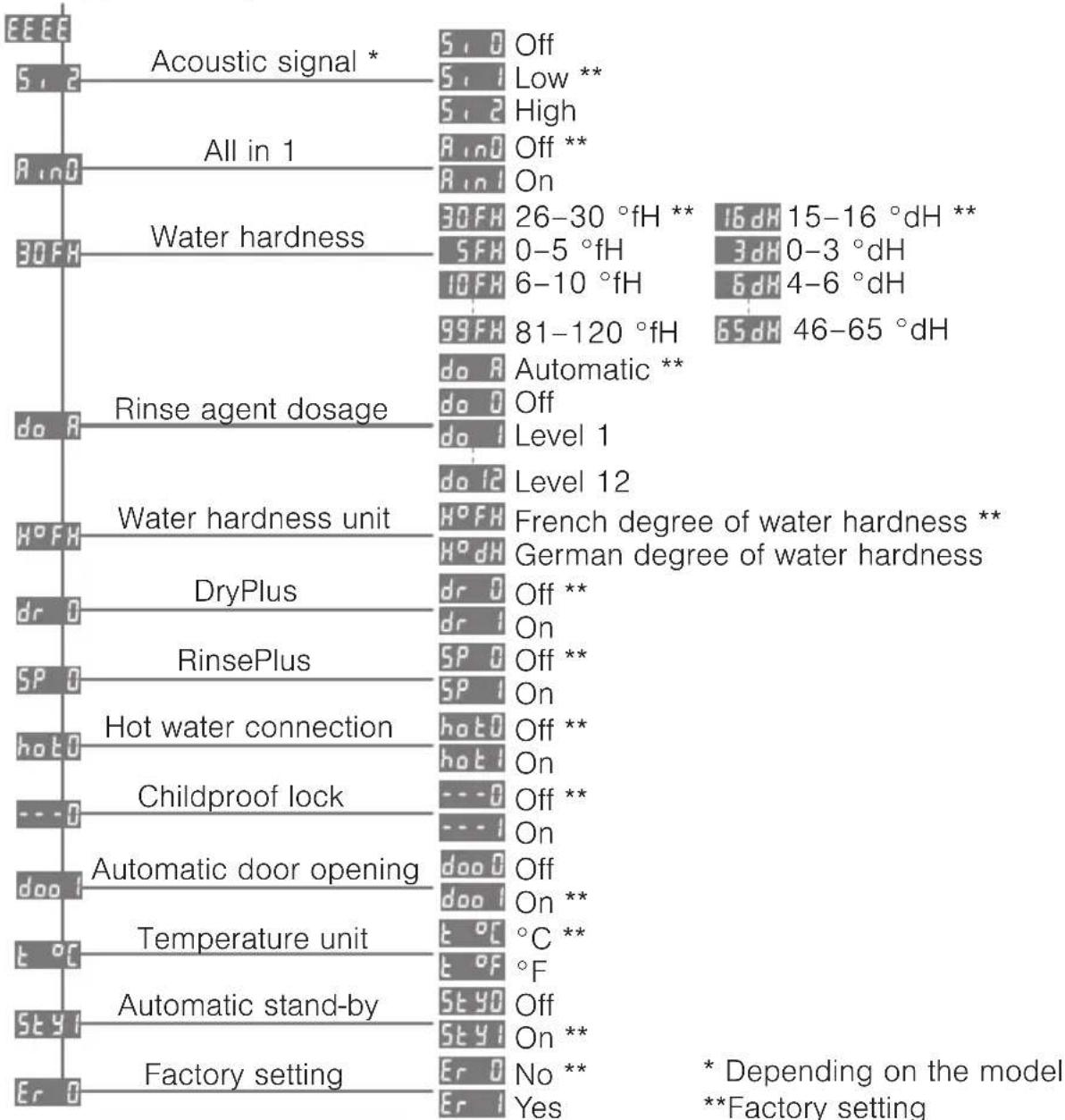
tree
| Category | Node | Value | |---|---|---| | Acoustic signal * | S | Off | | Acoustic signal * | S | Low ** | | Acoustic signal * | S | High | | All in 1 | R | Off ** | | All in 1 | R | On | | Water hardness | 30FH | 26-30 °fH ** | | Water hardness | SFH | 0-5 °fH | | Water hardness | IOFH | 6-10 °fH | | Water hardness | 99FH | 81-120 °fH | | Water hardness | doA | Automatic ** | | Water hardness unit | doA | Off | | Water hardness unit | doI | Level 1 | | Water hardness unit | doI2 | Level 12 | | DryPlus | H°FH | French degree of water hardness ** | | DryPlus | H°dH | German degree of water hardness | | DryPlus | drO | Off ** | | DryPlus | drI | On | | RinsePlus | SPO | Off ** | | RinsePlus | SPI | On | | Hot water connection | hotD | Off ** | | Hot water connection | hotI | On | | Childproof lock | ---O | Off ** | | Childproof lock | ---I | On | | Automatic door opening | dooO | Off | | Automatic door opening | dooI | On ** | | Temperature unit | t°C | °C ** | | Temperature unit | t°F | °F | | Automatic stand-by | StyD | Off | | Automatic stand-by | StyI | On ** | | Factory setting | ErO | No ** | | Factory setting | ErI | Yes | * Depending on the model **Factory setting5.2 Changing user settings
- Hold the button depressed for about 5 seconds until the following appears in the display:
- Press the button repeatedly until the required user setting appears in the display.
▶ Press the button to change the user setting.
▶ To save the changes, press the ▶ button repeatedly until the display goes out.
If no button is pressed within the next 15 seconds, the user settings are saved and the display goes out.
5.3 Acoustic signal
Only present on fully and design-integrated appliances.
Factory setting: 5,1
Possible settings:
5,0 Off
5,1 Low
5,2 High
There are three settings for the acoustic signal.
In the event of a malfunction, an acoustic signal is emitted even if it is set to off.
5.4 All in 1
Factory setting: A ∩ D
Possible settings:
- R in 0 Off
- R in 1 On
If using detergents with integrated salt and rinse agent function, the programmes must be adapted. Very short programmes are extended because this type of detergent takes longer to dissolve.

^all products are not suitable for all degrees of water hardness. Follow the detergent manufacturer's instructions. When the S or *refill indicators flash, continue to refill with regeneration salt or rinse agent.
5.5 Water hardness
Factory setting: 30FH
Possible settings:
- _5FH 13 levels from 0–120 °fH
99FH - -3dH 13 levels from 0–65 °dH
HP59
The water hardness setting can be changed to suit local conditions. Ask your water supplier for information.
Water hardness levels
| Level | 5 10 | 15 20 | 25 30 | 35 | 40 50 | 60 70 | 80 99 | * | ||||||
| °fH 0 | 6 | 11 | 16 | 21 | 26 | 31 | 36 | 41 | 51 | 61 | 71 | 81 | ||
| - | - | - | - | - | - | - | - | - | - | - | - | - | ||
| 5 | 10 | 15 | 20 | 25 | 30 | 35 | 40 | 50 | 60 | 70 | 80 | 120 |
* corresponds to the maximum water hardness level of 120 °fH.
| Level | 3 6 9 | 12 14 | 16 19 | 22 27 3 | 32 38 45 | 65 | |||||||
| ^ dH 0 | 4 | 7 | 10 | 13 | 15 | 17 | 20 | 23 | 28 | 33 | 39 | 46 | |
| - | - | - | - | - | - | - | - | - | - | - | - | - | |
| 3 | 6 | 9 | 12 | 14 | 16 | 19 | 22 | 27 | 32 | 38 | 45 | 65 |
5.6 Rinse agent dosage
Factory setting: do A
Possible settings:
do A Automatic
do 0 Off
- do! Levels 1 to 12
do 12
5.7 Water hardness unit
Factory setting: HOFH
Possible settings:
- German degrees of water hardness
- French degrees of water hardness
5.8 DryPlus
Factory setting: dr 0
Possible settings:
dr 0 Off
- dr 1 On
5.9 RinsePlus
Factory setting: SP 0
Possible settings:
. SP 0 Off
- SP 1 On
5.10 Hot water connection
Factory setting: hot0
Possible settings:
- hot0 Off
- hot! On
5.11 Childproof lock
Factory setting: ---0
Possible settings:
-Off
. On
The rinse agent dosage is automatically adjusted to the load level and the water hardness. If the drying result is unsatisfactory, the dosage can be set manually to one of 12 levels.
The unit of water hardness can be set to the French degree of water hardness (°fH) or the German degree of water hardness (°dH).
If DryPlus is activated, the drying temperature is increased. The duration of drying is extended.
If RinsePlus is activated, the water quantity is increased for every programme. The duration of the programme is extended.
If the appliance has a hot water connection, optimum use is made of the hot water.
The childproof lock prevents a pro-gramme from being started accidentally. If the childproof lock is enabled, a pro-gramme can only be started by pressing two buttons simultaneously.
5.12 Automatic door opener
Factory setting: doo
Possible settings:
- doo 0 No
- doo ! Yes
5.13 Temperature unit
Factory setting: ℃ ℃
Possible settings:
- t °C degrees Celsius
- t of degrees Fahrenheit
5.14 Automatic standby
Factory setting: Style
Possible settings:
- 5t y0 Off
- Sty! On
5.15 Factory setting
Factory setting: Er 0
Possible settings:
- Er 0 No
- Er 1 Yes
The appliance door is automatically opened slightly during drying and final drying to save energy.
If the automatic door opener is switched off, the programme is 10 minutes longer.
The unit of temperature can be set to degrees Celsius (°C) or degrees Fahrenheit (°F).
If the user setting is activated, the information disappears from the display after the end of the programme.
If «Off» is selected, the information is displayed until any button is pressed. End appears at the end of the programme.
With «Yes», the factory settings can be restored.
6 Care and maintenance
6.1 Cleaning the interior and exterior
Cleaning the interior
Using the correct dosage of detergent will automatically clean the interior of the appliance. The appliance should be additionally cleaned twice a year with dishwasher cleaner.
▶ Follow the instructions for the dishwasher cleaner.
- Select the programme as dishwasher cleaners work more effectively at higher temperatures.
Cleaning the exterior
- Do not use abrasive or caustic cleaning agents.
- Do not use scouring pads, steel wool, etc. Otherwise the surface will be damaged.
- Remove any soiling or excess cleaning solution immediately. Only use washing-up liquid or glass cleaner.
- Clean the surfaces with a soft, damp cloth only – for metal surfaces rub in the direction of the polish lines.
- Clean the operating panel with a damp cloth and then wipe dry. Only use washing-up liquid or glass cleaner.
▶ Regularly clean the door seal and edges with a soft, damp cloth.
6.2 Cleaning the spray arms
Upper spray arm
▶ Remove the upper basket.
▶ Release bayonet fastener 1 in an anti-clockwise direction and remove.
- Remove the spray arm 2 from the shaft and rinse well under running water.
▶ Check the nozzles.

text_image
Technical diagram showing a mechanical assembly with labeled parts 1 and 2, and directional arrows indicating motion or force.Lower spray arm
▶ Hold the spray arm 3 in the middle and pull hard upwards.
- Rinse the spray arm well under running water.
▶ Check the nozzles.
- Clean the filter system and the coarse filter at the same time.

natural_image
3D rendered mechanical component with labeled part '3' (no text or symbols on the object itself)6.3 Cleaning the filter system

Only use soft materials for cleaning beneath the filter system. Never use metal objects.
An incorrectly assembled filter system can cause the appliance to malfunction.
▶ Open the appliance door and pull out the lower basket.
▶ Release the filter system in fine filter 1 in an anti-clockwise direction and remove.
▶ Open the coarse filer 2 by pressing on closing lug 3 and clean the filter system under running water using a brush.
▶ Remove any coarse debris.
▶ Replace the filter system and turn the fine filter 1 as far as it will go in a clockwise direction.
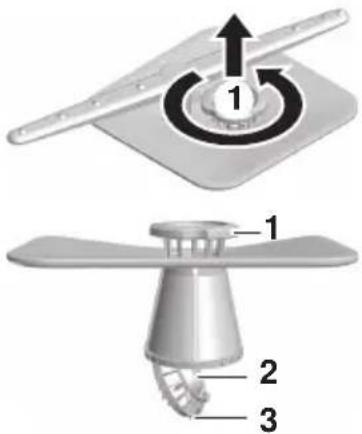
text_image
Technical diagram showing a mechanical component with numbered parts and directional arrows indicating rotation or assembly.6.4 Refilling with regeneration salt

Never put detergent in the salt reservoir.
When the supply of regeneration salt is exhausted, the S refill indicator flashes.
▶ Open the appliance door and remove the lower basket.
▶ Open the cover on the salt reservoir by lifting up the grip.
▶ Fill with 1 kg standard regeneration salt. During the initial setup, add an additional 1 l water.
▶ Wipe away any excess salt on the edge of the salt reservoir.
▶ Close the cover and engage the latch.
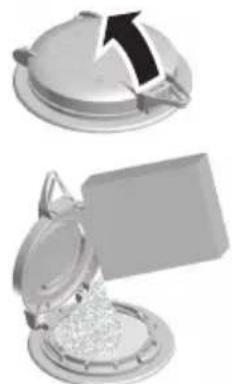
natural_image
Two grayscale images showing a lid and a tray with a plastic container, no text or symbols visible.▶ Run the «Pre-rinsing» programme without dishes to protect the appliance from corrosion from any excess salt.
Approximate consumption of regeneration salt
A = Hardness of the water supply B = Number of rinsing cycles per kg salt
| A °fH | 0 | 6 | 11 | 16 | 21 | 26 | 31 | 36 | 41 | 51 | 61 | 71 | 81 | |
| - | - | - | - | - | - | - | - | - | - | - | - | - | ||
| 5 | 10 | 15 | 20 | 25 | 30 | 35 | 40 | 50 | 60 | 70 | 80 | 99 | ||
| °dH | 0 | 4 | 7 | 10 | 13 | 15 | 17 | 20 | 23 | 28 | 33 | 39 | 46 | |
| - | - | - | - | - | - | - | - | - | - | - | - | - | ||
| 3 | 6 | 9 | 12 | 14 | 16 | 19 | 22 | 27 | 32 | 38 | 45 | 65 | ||
| B | ∞ 6 | 80 36 | 0 250 | 150 1 | 25 10 | 0 85 6 | 0 45 | 35 28 | 20 | |||||
6.5 Filling with rinse agent

Never put detergent in the rinse agent reservoir. Wipe off any spilt rinse agent. Foaming may occur. Follow the manufacturer's safety instructions and warnings.
Rinse agent prevents water spotting after final rinsing (rinsing with rinse agent).
When the supply of rinse agent is exhausted, the * refill indicator flashes.
▶ Open the rinse agent reservoir by pushing the release catch in the direction of the arrow.
▶ Fill with rinse agent up to the «max» mark (1.3 dl = about 35 wash cycles).
▶ Close the cover.
▶ Wipe away any spilt rinse agent.
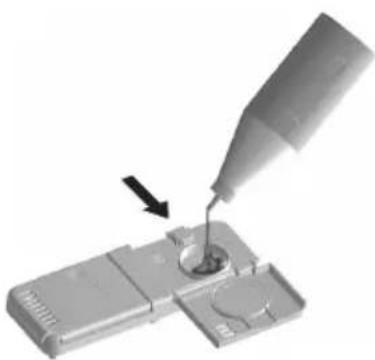
natural_image
Close-up of a pipette dispensing liquid into a small electronic component (no text or symbols visible)7 Trouble-shooting
You may be able to eliminate the following problems yourself. If not, write down the complete error message and the serial number (FN) on the identification plate of your appliance and call Customer Services.
7.1 Error messages
- In the event of a malfunction, an acoustic signal is emitted for 1 minute (depending on the model).
Display Possible cause Solution
| R 0 | ·High-foaming detergent was used.·Spilt rinse agent.·Washing-up liquid was used. | ► Wipe away spilt rinse agent with a cloth.► Get rid of the foam with approximately 1 dl vinegar.► Cancel the error message by pressing the ▶button.► Select the «Pre-rinse» programme. |
| R 2 | ·Filter system is blocked.·Drain hose is bent or kinked.·Drain pump or siphon is blocked.·Excessive foaming due to rinse agent spillage. | ► Clean the filter system.► Fix the problem.► Cancel the error message by pressing the ▶button.► Restart the programme. |
| R 9 | ·Water tap is turned off.·Water inlet filter is blocked.·Interruption in the water supply.·Water pressure is too low. | ► Fix problem or wait until water supply is restored.► Cancel the error message by pressing the ▶button.► Restart the programme. |
| F 8 and E al-ternate | ·Water intake is hotter than 79 °C (hot water connection). | ► Have a plumber reduce the temperat-ure of the water intake. |
Display Possible cause Solution
| F and Eal-ternate | ·Various situations can lead to an «F» message. | ·Cancel the error message by pressing the ▶button.If the error message persists:·Switch the power supply off for about 1 minute.·Switch the power supply back on again.·Cancel the error message by pressing the ▶button.·Restart the programme.·If the error appears again, note down the error message and FN.·Turn off the water tap and the power supply.·Call Customer Services. |
| U -- and Eal-ternate | ·Faulty electrical connec-tion.·Overvoltage | ·Cancel the error message by pressing the ▶button.If the error message persists:·Switch the power supply off for about 1 minute.·Switch the power supply back on again.·Cancel the error message by pressing the ▶button.·Restart the programme.·If the error appears again, note down the error message and FN.·Disconnect the power supply.·Have the electrical installation checked by an expert. |
7.2 Other possible problems
| Problem Possible | cause Solution | |
| The appliance will not start. | There could be several reasons for this. | ▸ Close the appliance door.▸ Insert plug into mains socket.▸ Check the fuse or circuit breaker.▸ See the «Operation with the childproof lock activated» section. |
| «Demo mode» is turned on. | ▸ Hold the and buttons depressed and at the same time press the ▶button. dEn1 appears in the display.▸ Press the ▶button.In the display appears: dEn0 ▸ Cancel the display by pressing the ▶button. | |
| An unpleasant smell tends to come from the appliance. | There could be several reasons for this. | ▸ Clean the filter system.▸ Add detergent and run the programme.▸ Select a more powerful programme.▸ Refill the salt reservoir with enough regeneration salt. |
| The time display freezes for up to 4 minutes at the beginning of the programme or during the wash cycle. | The water softener is being rinsed through after the regeneration process. | ▸ No action required. |
| The duration of the programme and the time display are being automatically adjusted to the degree of soiling of the load being washed. |
7.3 Unsatisfactory washing results
Problem Solution
| The dishes are not clean. | Select a more powerful programme.Load the baskets differently, avoiding blind spots.Clean the filter system and re-insert correctly.Check to see whether the spray arms are clogged or dirty.Use the correct amount of detergent or use a different kind of detergent.Check the water hardness setting.Refill the salt reservoir with regeneration salt. |
| There is a white film on the dishes. | Clean the appliance with dishwasher cleaner.Refill the salt reservoir with regeneration salt and run the programme without any dishes.Use the correct amount of detergent or use a different kind of detergent.Refill the rinse agent.Increase the rinse agent dosage setting.Check the water hardness setting.If not using detergent, set to in the user settings. |
| There are streaks or milky spots on the dishes. | Reduce the rinse agent dosage setting.If not using detergent, set to in the user settings. |
| The dishes are wet and dull or have water marks on them. | Refill the rinse agent.Increase the rinse agent dosage setting.Use a different rinse agent.Do not open the appliance door until the end of the programme when a triple acoustic signal is emitted and the display or function light goes out (depending on model).If not using detergent, set to in the user settings. |
| There are rust spots on the items being washed. | The rust stems from another source e.g. the cutlery, pans, water pipe.The appliance is made of rust-free steel.Refill the salt reservoir with regeneration salt and run the «Pre-rins-ing» programme without dishes. |
| The detergent is not fully dissolved. | Check to see whether the spray arms are clogged or dirty.Use a different kind of detergent.Check the detergent dispenser cover.Check whether the filter system is clogged. |
| There is discolouring of the baskets and plastic parts inside the appliance. | Dishes were washed that still had discolouring food leftovers on them (e.g. tomato or curry sauce). The discolouration may fade after a few wash cycles. |
7.4 In the event of a power failure
- Any programme that is running will be interrupted. After the cause of the power supply failure has been resolved, the programme is resumed.
- The fault indication system is interrupted.
8 Accessories and spare parts
Please give product family of the appliance and exact designation of the accessory or spare part when ordering parts.
Accessories
«Small» cutlery basket
«Large» cutlery basket
Cup support
Lower basket for glasses
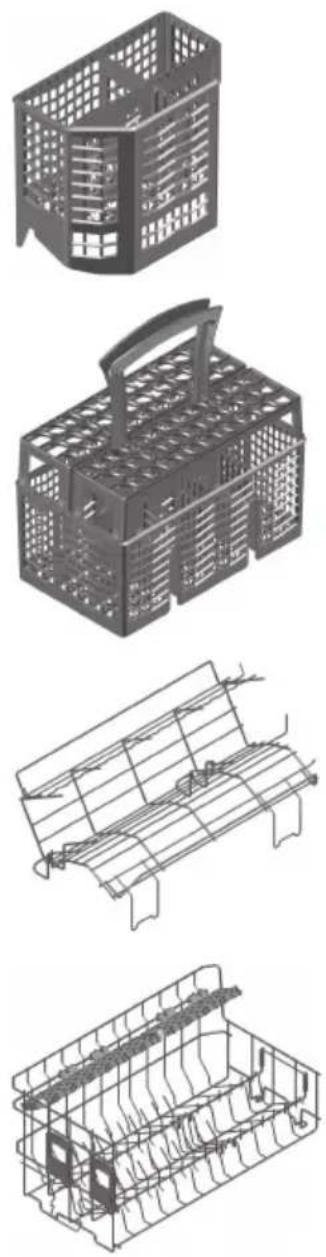
Vario cutlery basket insert
Lower basket for glasses
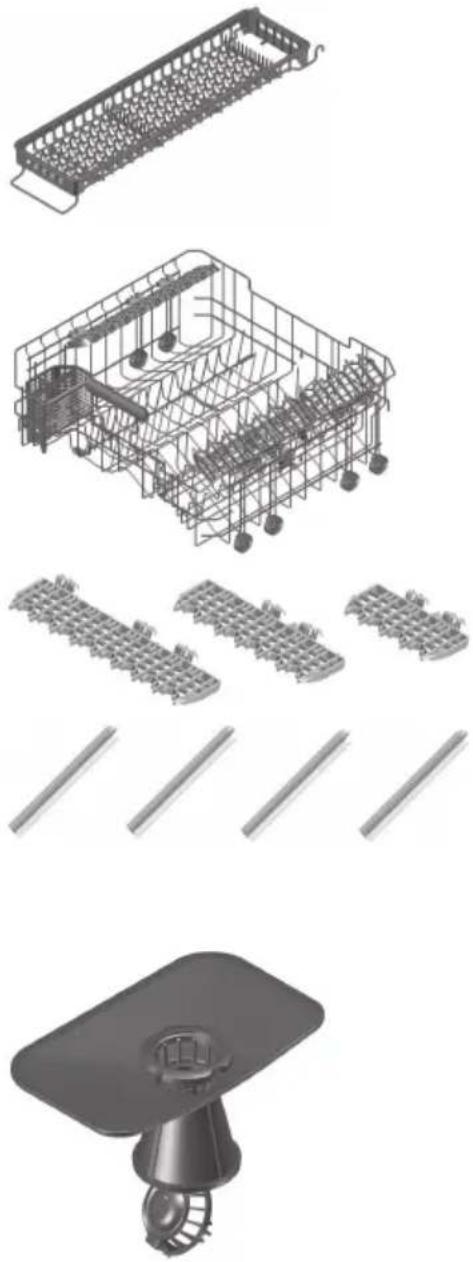
Racks
Set of 4 easy prongs
Spare parts
Filter system
9 Technical data
| Dimensions SMS 55 SMS 55 | Extra height | EURO 60 EURO 60Extra height | |
| Appliance height(incl. slide plate 3 mm) | 762 mm | 827 mm 762 mm | 827 mm |
| Appliance height(incl. adjustable plinth) | -848 | -893 mm 783–828 | mm 848–893 mm |
| Appliance width 546 mm 546 | mm 596 m | mm 596 mm | |
| Appliance depth 572 mm 572 | mm 572 m | mm 572 mm | |
| Appliance weight 42–48 kg | |||
Plumbing in Electrical connection
Cold or hot water up to 60 °C: G ^3/4 " See identification plate:
Permitted pressure of water supply: 0.1–1.0 MPa (1–10 bar)
Max. pumping height: 1.2 m
▶ Open the appliance door.
- Identification plate is located on left-hand side on edge of tub.
Ambient conditions
Minimum ambient temperature: +10 °C
Safety concept
Provided power is going to the appliance, the electronic control unit monitors the appliance. Any malfunctions are indicated by error messages.
Overflow protection

The overflow protection system does not work in the event of a power failure. Turn off the water tap during longer periods without operation.
The electronic control unit monitors the water level in the appliance. In the event of a malfunction, the drain pump turns on, stopping the supply of water to the appliance.
9.1 Product fiche
| In accordance with regulation (EU) No. 1059/2010 | |||
| Brand - V-ZUG Ltd | |||
| Model identifier (the first 5 alphanumerics of the serial number (FN)) | -41049 | 41065 | 41050 |
| 41071 | 41062 | ||
| 41072 | 41066 | ||
| 41073 | 41079 | ||
| 41074 | 41080 | ||
| 41081 | |||
| Rated capacity in standard place settings for the standard cleaning cycle | -1213 | ||
| Energy efficiency class - A+++ | |||
| Annual energy consumption 1) kWh per year | 20821 | ||
| Energy consumption of the standard cleaning cycle kWh | 0.740.75 | ||
| Power consumption in off mode and left-on mode W 0.1/0.0 | |||
| Weighted annual water consumption 2) litres per year | 2,744 | ||
| Drying efficiency class on a scale from G (low efficiency) to A (most efficient). | - | A | |
| Standard programme 3) | - | Economy | |
| Programme duration for standard cleaning cycle | mins. 275 | ||
| Duration of the left-on mode | mins. | 0 | |
| Airborne acoustical noise emissions for... Vi type | dB (A) | 43 | |
| Airborne acoustical noise emissions for... i, ...di types | dB (A) | 44 | |
1) Annual energy consumption based on 280 standard cleaning cycles using cold water fill and the consumption of the low-power modes. Actual energy consumption will depend on how the appliance is used.
2) Weighted annual water consumption based on 280 standard cleaning cycles. Actual water consumption will depend on how the appliance is used.
3) The standard programme to which the information in the fiche relates. This programme is suitable to clean normally soiled tableware and is the most efficient programme in terms of combined energy and water consumption.
9.2 Consumption data
V = Pre-rinsing T = Drying
R = Cleaning D = Duration
Z = Intermediate rinsing W = Water
G = Rinsing with rinse agent E = Energy
The stated programme times and consumption values serve as a guide. The values can also vary according to the selection of additional functions, the load, the degree of soiling of the load, the type and amount of cleaner, the water inlet temperature, the electrical connection and specific programme sequences (e.g. regeneration).
| Programme V | [°C] | R [°C] | Z | G [°C] | T D * W | [l] | E [kWh] | |
| Automatic If required (cold) | 50–60 If | required | 60 Yes | 1h00 | -1h40 | 8-20 | 0.8-1.35 | |
| Quick | No | 45 | Yes | 55 | Quick | 0h30 | 11 | 0.75 |
| Glass | No | 45 | Yes | 55 | Yes | 0h50 | 11 | 0.8 |
| Intensive If required (35) | 65 | Yes | 60 Yes | 1h45 | 18 | -23 | 1.2-1.45 | |
| Fondue/Raclette | Soaking 35 | 65 | Yes | 60 Yes | 2h15 | 16 | 1.3-1.55 | |
| Hygiene | 50 | 70 | 60 | 60 | Yes | 1h40 | 16 | 1.75 |
| Pre-rinsing | Cold | No | No | No | No | 0h07 | 4 | 0.05 |
| Eco programme | No | 50 | Yes | 45 | Yes | 4h00 | 9.8 | 0.77-0.78 |
* Duration without final drying time.
9.3 Note for testing institutes
The note for testing institutes can be obtained from the internet: www.vzug.com/testinstitute.
9.4 Noise measurement
See the 'Note for testing institutes' section.
10 Disposal
10.1 Packaging

Never allow children to play with packaging material due to the danger of injury or suffocation. Store the packaging material in a safe location or dispose of it in an environmentally-friendly way.
10.2 Safety
Render the appliance unusable to prevent accidents caused by improper use (e.g. through children playing):
▶ Disconnect the appliance from the mains. With a fixed appliance, this is to be carried out by a qualified electrician. Then cut the mains cable off flush with the appliance.
▶ Remove or disable the lock on the appliance door.
10.3 Disposal

- The «crossed-out wheelie bin» symbol indicates that waste electrical and electronic equipment (WEEE) must be specially disposed of. Such equipment can contain dangerous and environmentally harmful substances.
- These appliances must be taken to an official collection point for recycling electrical and electronic equipment and must not be disposed of with ordinary household waste. In this way, you help conserve resources and protect the environment.
- Please contact your local authorities for more information.
Quick start guide
Please first read the safety precautions in the operating instructions!
▶ Open the appliance door.
▶ Load the dishes.
▶ Add the detergent.
▶ Select the programme.
▶ Select any additional function(s) required.
▶ Close the appliance door. The programme starts immediately, or after 15 seconds (depending on model).
▶ When a 3× acoustic signal is emitted or the display goes out (depending on model), open the appliance door and unload the dishes.
Services & support
Register your appliance today online via our website at www.vzug.com or using the card supplied and benefit from the best possible support in the event of a malfunction – including during the manufacturer's 2-year warranty period. You will require the serial number (FN) and appliance designation to register your appliance or to contact V-ZUG about a fault. You will find them on the identification plate of your appliance.
You can make your own note of the FN and appliance designation or note them on the service sticker which comes with the appliance:
FN:
Appliance: ____
Your repair order
Call the free service number 0800 850 850 to be directed to your nearest V-ZUG Service Centre.
General queries, accessories and service agreement
V-ZUG will be happy to help you with any general administrative or technical queries, to accept your orders for accessories and spare parts and to inform you about our progressive service agreements. You can contact us by calling tel. + 41 58 767 67 67 or by going to our website at www.vzug.com.