
MXS3500 - Receiver SAMSON - Free user manual and instructions
Find the device manual for free MXS3500 SAMSON in PDF.


| Product Type | Audio/Video Receiver |
| Model | Samson MXS3500 |
| Channels | 5.1 Surround Sound |
| Power Output | 100W per channel (8 ohms, 1 kHz, THD 0.1%) |
| Frequency Response | 20 Hz - 20 kHz (±1 dB) |
| Signal-to-Noise Ratio | 100 dB |
| Inputs | 4x HDMI, 2x Optical, 2x Coaxial, 2x Analog RCA, 1x USB |
| Outputs | 1x HDMI ARC, 1x Subwoofer Pre-out, Speaker terminals (5.1) |
| Radio Tuner | FM/AM with presets |
| Bluetooth | Yes, version 4.2 |
| Remote Control | Included (IR) |
| Dimensions (W x H x D) | 430 x 150 x 340 mm |
| Weight | 8.5 kg |
| Power Supply | AC 230V, 50/60 Hz |
| Power Consumption | 400W (max) |
| Standby Power | <0.5W |
| Cleaning | Wipe with a dry, soft cloth; avoid liquids |
| Safety | Do not expose to moisture; ensure proper ventilation |
| Spare Parts & Repairability | Contact Samson authorized service center |
| Warranty | 2 years (refer to local regulations) |
Frequently Asked Questions - MXS3500 SAMSON
User questions about MXS3500 SAMSON
0 question about this device. Answer the ones you know or ask your own.
Ask a new question about this device
Download the instructions for your Receiver in PDF format for free! Find your manual MXS3500 - SAMSON and take your electronic device back in hand. On this page are published all the documents necessary for the use of your device. MXS3500 by SAMSON.
USER MANUAL MXS3500 SAMSON
MXS3000 4600 Watt Stereo Power Amplifier MXS3500 5400 Watt Stereo Power Amplifier
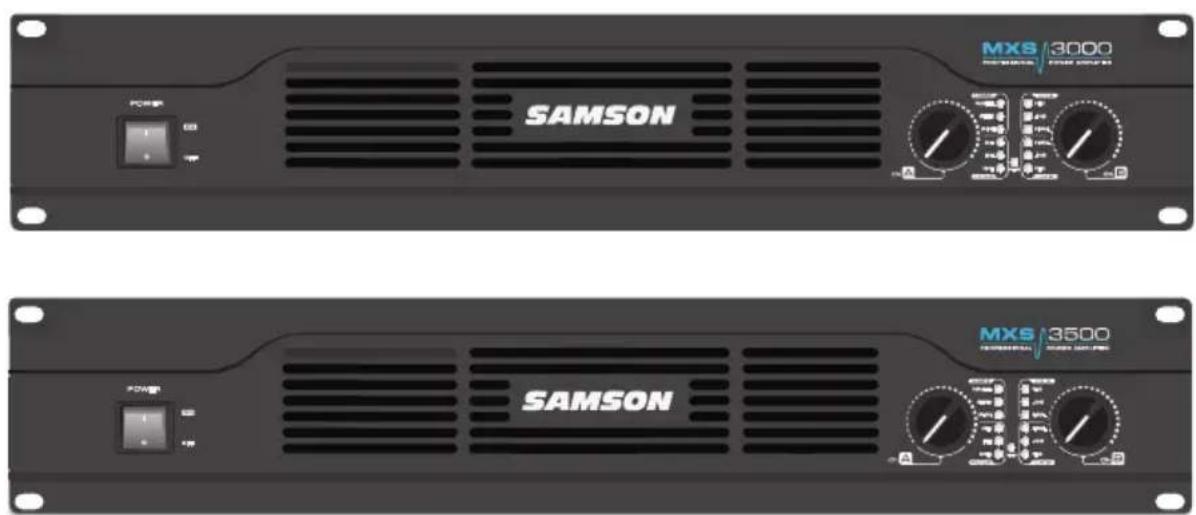
natural_image
Front and back views of a black SAMSON audio equipment rack with control knobs and dials (no readable text or symbols beyond branding)OWNER'S MANUAL
Copyright 2014, Samson Technologies Corp.
v1.1
Samson Technologies Corp.
45 Gilpin Ave
Hauppauge, NY 11788
www.samsontech.com
Important Safety Information
- Read these instructions.
- Keep these instructions.
- Heed all warnings.
- Follow all instructions.
-
This apparatus shall not be exposed to dripping or splashing liquid and no object filled with liquid, such as a vase, should be placed on the apparatus.
-
Clean only with a dry cloth.
-
Do not block any of the ventilation openings. Install in accordance with the manufacturer's instructions.
-
Do not install near any heat sources such as radiators, heat registers, stoves, or other apparatuses (including amplifiers) that produce heat.
-
Only use attachments/accessories specified by the manufacturer.
-
Unplug this apparatus during lightning storms or when not in use for long periods of time.
-
Do not override the intended purpose of the polarized or grounding-type plug. A polarized plug has two blades, with one wider than the other. A grounding-type plug has two blades and a third grounding prong. The wide blade, or third prong, is provided for your safety. If the provided plug does not fit your outlet, consult an electrician to replace the obsolete outlet.
-
Protect the power cord from being walked on or pinched, particularly at the prongs, convenience receptacles, the point where they exit from the apparatus.
-
Use only with the cart stand, tripod bracket, or table specified by the manufacture, or sold with the apparatus. When a cart is used, utilize caution when moving the cart/apparatus combination to avoid injury from tip-over.

natural_image
Silhouette of a person climbing a ladder inside a circular frame (no text or symbols)-
Refer all servicing to qualified service personnel. Servicing is required if the apparatus has been damaged in any way, such as power-supply cord or plug breakage, damage due to liquid or objects falling onto the apparatus, exposure to rain or moisture, or if the apparatus does not operate normally, or has been dropped.
-
MAINS DISCONNECT: The plug should remain readily operable. For rack-mount or installation where plug is not accessible, an all-pole mains switch with a contact separation of at least 3 mm in each pole shall be incorporated into the electrical installation of the rack or building.
-
FOR UNITS EQUIPPED WITH EXTERNALLY ACCESSIBLE FUSE RECEPTACLE: Replace fuse with same type and rating only.
-
MULTIPLE-INPUT VOLTAGE: This equipment may require the use of a different line cord, attachment plug, or both, depending on the available power source at installation. Connect this equipment only to the power source indicated on the equipment rear panel. To reduce the risk of fire or electric shock, refer servicing to qualified service personnel or equivalent.
Important Safety Information

AVIS RISQUE DE CHOC ÉLECTRONIQUE - NE PAS OUVRIR
CAUTION: TO REDUCE THE RISK OF ELECTRIC SHOCK, DO NOT REMOVE COVER (OR BACK). NO USER-SERVICEABLE PARTS INSIDE. REFER SERVICING TO QUALIFIED SERVICE PERSONNEL.

This lightning flash with arrowhead symbol within an equilateral triangle is intended to alert the user to the presence of non-insulated “dangerous voltage” within the product’s enclosure that may be of sufficient magnitude to constitute a risk of electric shock.

The exclamation point within an equilateral triangle is intended to alert the user to the presence of important operating and maintenance instructions in the literature accompanying the appliance.
THIS DEVICE COMPLIES WITH PART 15 OF THE FCC RULES CLASS B. OPERATION IS SUBJECT TO THE FOLLOWING TWO CONDITIONS:
(1) THIS DEVICE MUST NOT CAUSE HARMFUL INTERFERENCE, AND
(2) THIS DEVICE MUST ACCEPT ANY INTERFERENCE RECEIVED INCLUDING INTERFERENCE THAT MAY CAUSE UNDESIRED OPERATION. SUITABLE FOR HOME OR OFFICE USE.

If you want to dispose this product, do not mix it with general household waste. There is a separate collection system for used electronic products in accordance with legislation that requires proper treatment, recovery and recycling.
Private household in the 28 member states of the EU, in Switzerland and Norway may return their used electronic products free of charge to designated collection facilities or to a retailer (if you purchase a similar new one).
For Countries not mentioned above, please contact your local authorities for a correct method of disposal.
By doing so you will ensure that your disposed product undergoes the necessary treatment, recovery and recycling and thus prevent potential negative effects on the environment and human health.
Contents
Introduction 7
Features 8
Getting Started with the MXS Power Amplifier . . . . . . . . . . . . . . . . 9
Front Callouts 10
Rear Callouts. 11
Bridge and Parallel Modes 12
System Setup Examples 13
Specifications 14
Wiring Guide....15
Introduction
The Samson MXS Series stereo power amplifiers have been designed to provide solid, clean output with low distortion and wide dynamic range, along with the dependability demanded by professional front-of-house engineers and installers.
The efficient Class H design provides an abundance of power safely into loads as low as 2 ohms, over the full frequency band, from 20 Hz to 20 kHz. Input connections are made via both balanced XLR and balanced 14 TRS connections. For the outputs, the MXS Series provides standard binding posts as well as a Speakon® connectors. To help you set the correct operating levels, the MXS amplifiers include front panel Signal, Output Level, and Peak LED indicators.
Like all Samson power amplifiers, the MXS Series' internal electronics are based around a serious power-core, with robust power supply's built to handle large current demand from bass frequencies. To keep the MXS amplifiers running cool, the design employs forced-air cooling via a temperature-sensitive, variable speed fan, which greatly reduces the chance of thermal and overheating problems. Multi-stage protection for power-up, short circuit, DC output, over current, and thermal, assures high reliability under the most grueling situations.
Optimized for live sound venues, houses of worship, commercial installations, and for driving live PA systems, the MXS amplifiers will deliver reliable power from gig-to-gig and venue-to-venue. In the following pages, you'll find a detailed description of the many features of the MXS Series power amplifier, as well as a guided tour through its front and rear panels, step-by-step instructions for its setup and use, and full specifications.
We recommend you keep the following records for reference, as well as a copy of your sales receipt.
Serial number: ____
Date of purchase: ____
Dealer name: ____
With proper care and maintenance, your MXS power amplifier will operate trouble-free for many years. Should your amplifier ever require servicing, a Return Authorization (RA) number must be obtained before shipping your unit to Samson. Without this number, the unit will not be accepted. Please call Samson at 1-800-3SAMSON (1-800-372-6766) for an RA number prior to shipping your unit. Please retain the original packing materials and, if possible, return the unit in its original carton. If your MXS amplifier was purchased outside of the United States, contact your local distributor for warranty details and service information.
Features

- Lightweight, high-power amplifier for performance and installation speaker configurations:
MXS3000: 2 x 1850 Watts at 2Ω, 2 x 1550 Watts at 4Ω 4600 Watts at 4Ω, 3100 Watts at 8Ω bridged mono
MXS3500: 2 x 2700 Watts at 2Ω, 2 x 1900 Watts at 4Ω 5400 Watts at 4Ω, 3700 Watts at 8Ω bridged mono
- Clean, crisp sound, 0.02% THD, dynamic range of 100 dB, and frequency response of 20 Hz to 20 kHz, guaranty ultra-clean sound quality
- Independent input level controls for each channel allow precision adjustments
- Three-position Mode (Mono, Stereo, Bridge Mono) and Filter (28Hz, Full, 120Hz) selector switches
- LED signal indicators for each channel continuously display input signals and output levels
- Four-point protection circuitry (Short Circuit, DC Output, Over Current, Thermal)
- Temperature-sensitive, variable speed fan provides reliable performance without thermal and overheating problems
- Protection relay circuitry that guards against overheating or faulty wiring conditions and also prevents “thumps” when powering on or off
- Input connectors for each channel accommodate both balanced XLR or balanced 14 " TRS plugs
- Output connections are made via binding posts and Speakon® connectors
- The MXS Series can be mounted in any standard 19" rack, making it easy to integrate the amp into any fixed or traveling PA rig
• Rugged construction makes the MXS Series completely roadworthy
Getting Started with the MXS Power Amplifier
Setting up your MXS Series is a simple procedure which takes only a few minutes:
Remove all packing materials (save them in case your units needs future service) and decide where the amplifier is to be physically placed—it can be used free-standing or mounted in a standard 19" rack, requiring two rack spaces. When installed, make sure that both the front and rear panels are unobstructed and that there is good ventilation around the entire unit.

When making speaker connections, use the binding posts, or Speakon® output connectors on the rear panel. It is never a good idea to power up any amplifier that is not connected to loudspeakers.
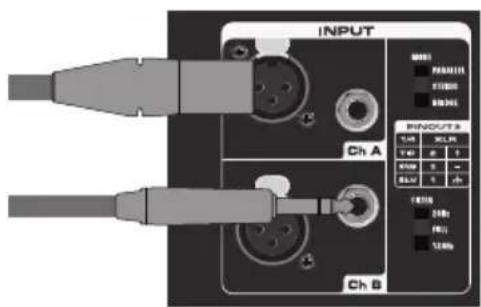
To make the signal input connections, use the input connectors on the rear panel (if operating the amplifier in Parallel mode, use the Ch A input only).
On the front panel of the MXS Series, turn both Channel level controls fully counterclockwise (to their minimum setting). Then connect the supplied heavy-gauge 3-pin power cable to the rear panel AC input and to any grounded AC socket.
Turn the Power switch ON.
Apply an input signal to the MXS Series at or about +4dBu (if sending signal from a mixer, drive the output meters at approximately O vu). While the input signal is present, slowly raise the Channel level controls until the desired sound level is achieved. For the best signal-to-noise ratio, the MXS Series should normally be run with the Channel Input controls at or near maximum (fully clockwise) and the PEAK segments should light occasionally (but not frequently) during maximum levels.

Front Callouts

- Power Switch - Use this switch to power the MXS amplifier on or off
- Channel Level Controls - Two detent controls to precisely adjust and the match the output level of each channel
-
MODE Indicators - The corresponding indicator lights based off of the setting of the rear panel MODE switch (Stereo, Bridge, Parallel).
-
FILTER Indicators - These LED indicators light depending on the setting of the rear panel FILTER switch (Full, 28Hz, 120Hz).
-
Audio Indicators - The front panel LED indicators monitor the power output level for the corresponding channel:
PEAK: The PEAK indicator lights whenever the channel is outputting signal at full strength. For the best signal-to-noise ratio, the right (PEAK) segment should light occasionally during peak levels; if it lights frequently, you may be overloading the amplifier and a distorted (“clipped”) signal is probably being output. If this occurs and backing off the Input Level control delivers too low an output level for your application.
-10:Lights whenever the output level reaches -10dB below the distortion or clipping
SIGNAL: These LED indicators continuously monitor the input level for the corresponding channel. The SIGNAL LED lights whenever signal is present.
Rear Callouts

-
Input Connectors - Connect incoming signals to these electronically balanced connectors, using either XLR or 14 " TRS (Tip/Ring/Sleeve) plugs. The amplifier accepts input levels of any strength but needs at least +4 dBu to achieve maximum power. The inputs are wired in parallel, so they can be used to daisy chain out of each channel to a second power amplifier.
-
FILTER Switch - This switch selects the setting of the internal high-pass filter on the audio outputs. When set to the FULL position, the filter is bypassed and the amplifier passes the full frequency bandwidth (20Hz to 20kHz) to each output channel. In the
28Hz position, it sets a high-pass filter at 28Hz on the speaker outputs. This setting is useful for protecting speakers from over-excursion. The 120Hz position sets a high-pass filter at 120Hz on the speaker outputs. This setting can be used as a crossover for satellite speakers when adding subwoofers to your audio system.
-
MODE Switch - For normal operation, place this three-way switch in the STEREO position. When placed in the PARALLEL position, the signal arriving at the Ch A input only is routed to the power amplifiers of both Ch A and Ch B (the Ch B input is ignored). When placed in its BRIDGE position, the signal arriving at the Ch A input only is again routed to both power amplifiers (the Ch B input is ignored), but the two power amplifiers are bridged together.
-
Exhaust Fan - This variable-speed fan provides cooling to amplifier. Make sure that both the front and rear panels are kept free of all obstructions and that cool, fresh air is accessible at all times.
-
Speakon® Output Connectors - Use these to connect each channel of the amplifier to your loudspeakers.
-
Binding Post-Use these to connect each channel of the amplifier to your loudspeakers. Be sure to connect the loudspeaker correctly, with the red (+) terminal normally connected to the positive input of the speaker and the black (ground) terminal normally connected to the negative input of the speaker.
-
AC Input - Connect the supplied heavy-gauge 3-pin "IEC" power cable here
Bridge and Parallel Modes

The MXS amplifiers provide a rear-panel switch that allows it to be used in either a Bridge or Parallel mode. When this switch is placed in the STEREO position, the MXS amplifier functions as a true stereo amplifier, where both of the two independent amplifier channels (Ch A and Ch B) can receive different input signals and produce independent output signals. However, when the switch is placed in the BRIDGE position, the Ch A input signal is routed to both power amplifiers bridged together, producing a single output signal.

The illustration on the left shows how this works. In Bridge mode, the polarity (phase) of the Ch B output signal is reversed relative to that of the Ch A output signal. Both channels then process the same input signal, with the speaker load connected so that power is derived from both channels. The effective voltage swing seen by the load is thus doubled, so that the power output is multiplied by more four.
When using the binding post outputs in Bridge mode, be sure to connect your loudspeaker with the red (+) terminal of the Ch A output connected to the positive input of the speaker and the red (+) terminal of the Ch B output connected to the negative input of the speaker. Do not use the black ground (-) output terminal of either channel.

You can also use an Speakon® connector, plugged into the CH A output, wired +1 for the positive input of the speaker and +2 for the negative input of the speaker.
When the rear panel switch is placed in the PARALLEL position, the MXS Series operates in an input parallel mode. In this mode, only the signal present at the Ch A input is used. This signal is then routed to both the Ch A and Ch B power amplifiers, thus producing a dual mono output.
System Setup Examples
Typical MXS amplifier and speaker configurations:
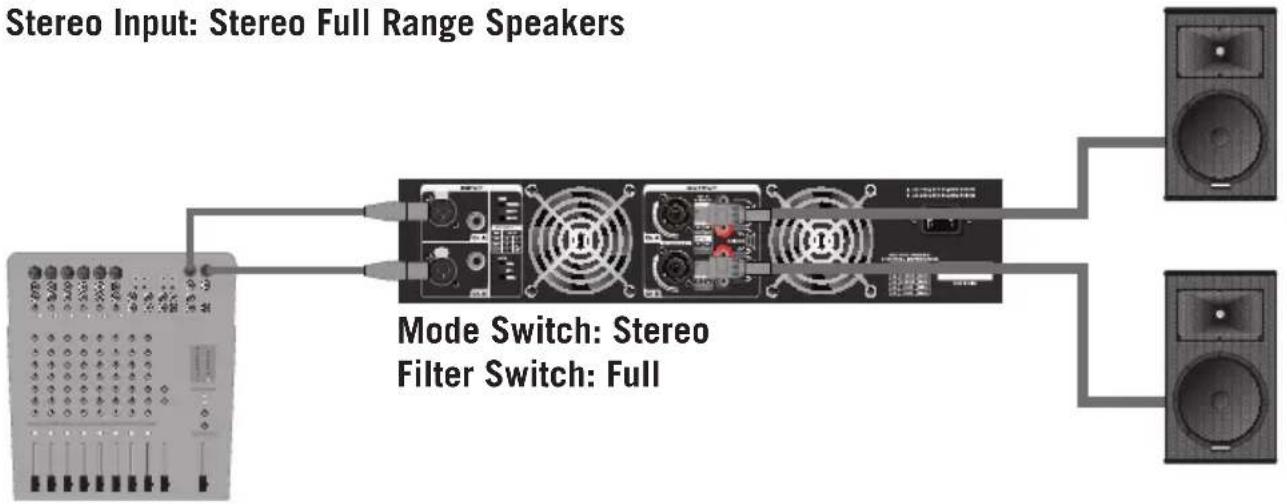
flowchart
graph LR
    A["Stereo Input: Stereo Full Range Speakers"] --> B["Mode Switch: Stereo Filter Switch: Full"]
    B --> C["Speaker 1"]
    B --> D["Speaker 2"]
Mono Input: Bridge Mono Output

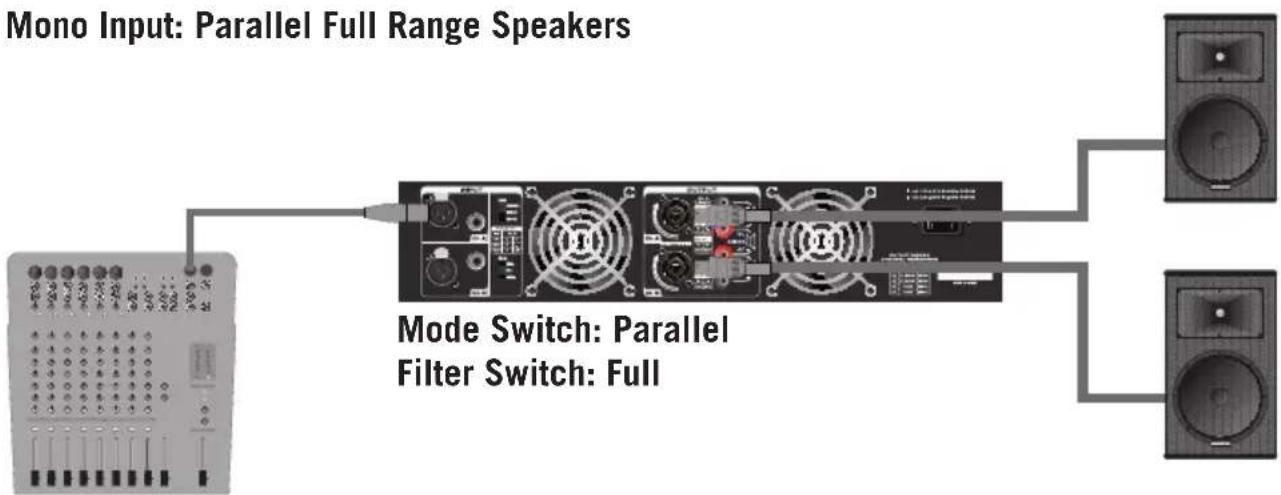
flowchart
graph TD
    A["Mono Input: Parallel Full Range Speakers"] --> B["Mode Switch: Parallel Filter Switch: Full"]
    B --> C["Speaker 1"]
    B --> D["Speaker 2"]
Specifications
| Model MXS3000 MXS3500 | |||
| Rated Output Power | |||
| Stereo both channel driven | 8 ohms 950W 1100W | ||
| 4 ohms 1550W 1900W | |||
| 2 ohms 1850W 2700W | |||
| Bridged mono | 8 ohms 3100W 3700W | ||
| 4 ohms 4600W 5400W | |||
| Signal to Noise Ratio (20Hz-20k) >103dB | |||
| Distortion (SMPTE-IM) 0.02% | |||
| Input sensitivity @8ohms Voltage Gain 0dB | |||
| Voltage Gain @ 8 ohm 38dB 39dB | |||
| Output Circuitry Class H | |||
| Current Consumption (115VAC/230VAC) | |||
| @1/8 rated power 4ohms 670W 850W | |||
| @1/3 rated power 4ohms | 1400W 1700W | ||
| @ rated power 4ohms, max. | 2600W 3300W | ||
| Distortion (typical @4 ohms) | |||
| 20Hz-20kHz,10dB below rated power | 0.003% | ||
| 1kHz,rated power | 0.007% | ||
| Frequency Response @8ohms 1Watt 20Hz to 20KHz +0/-0.2dB4Hz to 50kHz ±3dB | |||
| Damping Factor (400Hz) | >300 | ||
| Input Impedance | Balanced 20K/Unbalanced 10K | ||
| Input Clipping | 0dB | ||
| Cooling Dual continuously variable speed fan;Back-to-Front air flow | |||
| Connectors (each channel) | Inputs | 3-pin XLR and 1⁄4” TRS, balanced | |
| Outputs | Binding post and Speakon® | ||
| Indicators | Signal, -20dB, -10dB, Limit, Thermal | ||
| Protection | Amplifier protection: Thermal,Short,DC output, mismatched loadsAmplifier protection: On/off muting and Delay, Locked the power amplifiers | ||
| Dimensions (LxWxH) | 19” x 14.7” x 3.5”482mm x 375mm x 88mm | ||
| Net Weight | 21.6lb / 9.8kg | ||
Wiring Guide
Unbalanced 14 " Connector

Balanced TRS 14 " Connector

XLR Balanced Connector
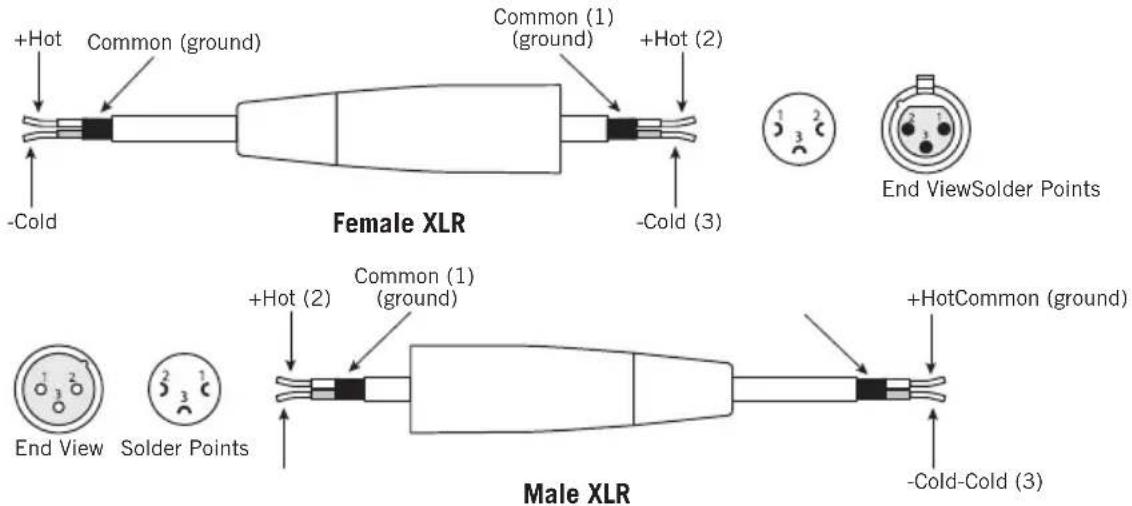
Speakon® Wiring Guide

Samson Technologies Corp.
45 Gilpin Avenue
Hauppauge, New York 11788-8816
Phone: 1-800-3-SAMSON (1-800-372-6766)
Fax: 631-784-2201
www.samsontech.com


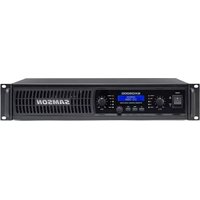


Brand : SAMSON
Model : MXS3500
Category : Receiver