
8330APM - Pregnant GENELEC - Free user manual and instructions
Find the device manual for free 8330APM GENELEC in PDF.


| Product Type | Active Studio Monitor |
| Model | 8330APM |
| Brand | Genelec |
| Woofer Size | 5 inches |
| Tweeter Size | 3/4 inch metal dome |
| Amplifier Power | 50 Watts per channel (LF + HF) |
| Frequency Response | 54 Hz – 25 kHz (-6 dB) |
| Maximum SPL | 100 dB (peak @ 1m) |
| Dimensions (H x W x D) | 299 x 189 x 178 mm (11.8 x 7.4 x 7.0 in) |
| Weight | 5.0 kg (11.0 lb) |
| Power Supply | 100-240 V AC, 50/60 Hz |
| Power Consumption | 30 W idle, 60 W max |
| Input Connectors | 1 x XLR analog, 1 x XLR digital (AES/EBU) |
| Output Connectors | 1 x XLR loop-through (digital) |
| Controls | Volume, DIP switches for room compensation |
| Enclosure Material | Die-cast aluminum with rounded edges |
| Mounting | Tabletop, floor, or ceiling mount (options) |
| Protection Features | Driver protection, overcurrent, thermal shutdown |
| Accessories Included | Power cord, user manual |
| Maintenance | Clean with soft dry cloth; avoid liquids |
| Repairability | Modular design; spare parts available through Genelec |
Frequently Asked Questions - 8330APM GENELEC
User questions about 8330APM GENELEC
0 question about this device. Answer the ones you know or ask your own.
Ask a new question about this device
Download the instructions for your Pregnant in PDF format for free! Find your manual 8330APM - GENELEC and take your electronic device back in hand. On this page are published all the documents necessary for the use of your device. 8330APM by GENELEC.
USER MANUAL 8330APM GENELEC
Operating Manual
General Description
Genelec 8320A and 8330A are two-way smart active monitors designed for demanding professional applications.
Genelec Smart Active Monitor ^™ (SAM ^™ ) digital signal processing (DSP) built inside each smart active monitor with Genelec Loudspeaker Manager ^™ (GLM ^™ ) software provides unparalleled acoustic quality, ease of use, and high monitoring accuracy even in difficult acoustic environments. The high performance drivers are directly connected to dedicated D Class power amplifiers. System protection is implemented as a part of the SAM signal processing.
The MDE ^TM (Minimum Diffraction Enclosure ^TM ) enclosure is made of die-cast aluminium and shaped to reduce edge diffraction. Combined with the advanced Directivity Control Waveguide ^TM (DCW ^TM ), this design contributes to the excellent acoustic neutrality.
Delivery Contents
Each monitor is supplied with a mains cable, 5 meter RJ45 cable, and an operating manual.
Connections
Before connecting, switch off the monitors and the signal source. Once all the connections have been made, the monitors can be switched on.
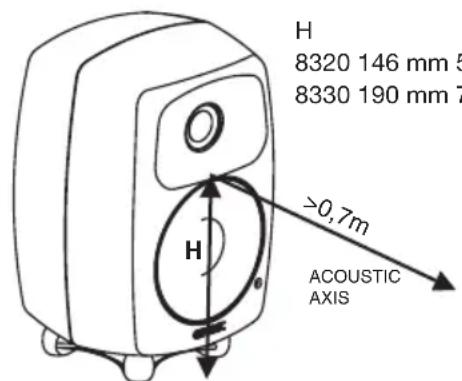
Figure 1: Location of the acoustic axis
Mains Power
The power switch is located on the back panel (see Figure 2). Connect the monitor to a mains socket having a protective earthed connection. Do not connect to an unearthed mains supply or using an unearthed mains cable. These monitors feature an universal mains voltage and can be connected to any voltage between 100-240 VAC 50-60 Hz.
GLM Network Connection
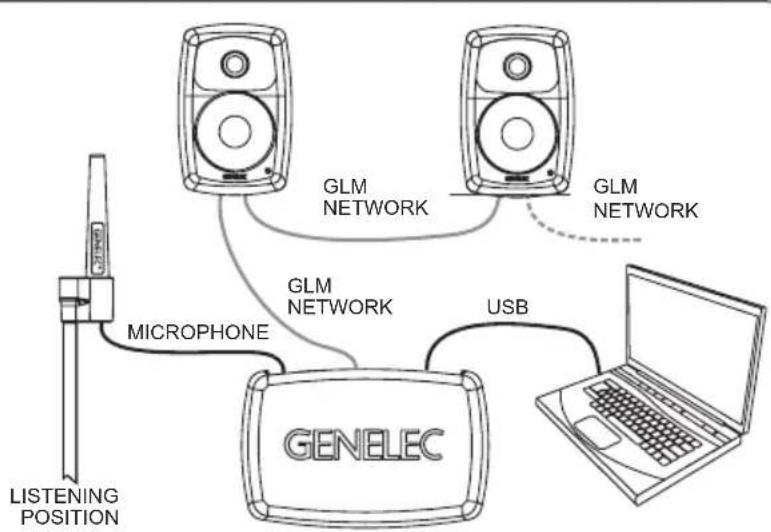
Up to 30 monitors and subwoofers can be connected to a computer using the GLM Adapter. An RJ45 cable is supplied for this. Start control network cabling from the GLM Adapter to the first monitor. Continue daisy-chaining to all monitors and subwoofers (see Figure 3). No special sequence is necessary.
Figure 2: Control and connector layout on the rear panel of an 8330A. The 8320A has an analog input only, and the GLM network connectors point downwards and are located next to the audio input.
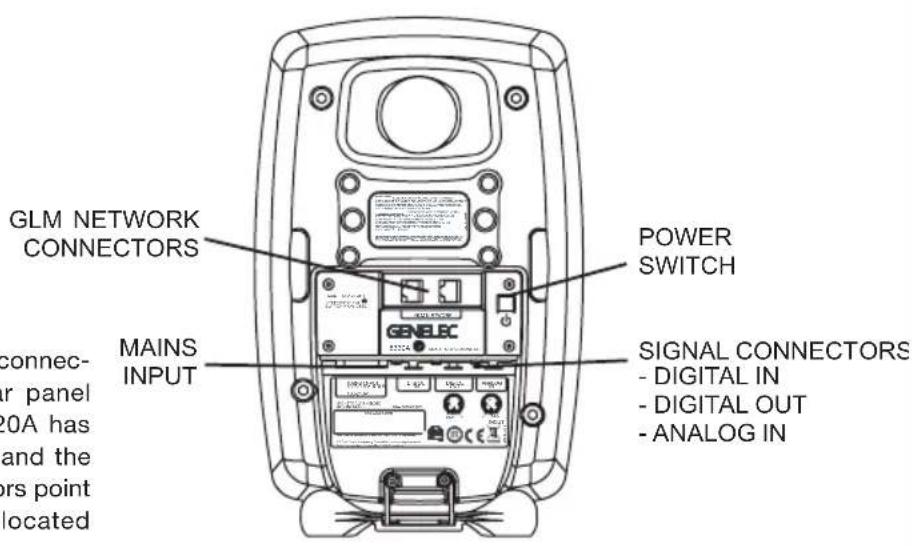
Figure 3: GLM Network Adapter cabling. Audio cabling is not shown.
flowchart
graph TD
    A["LISTENING POSITION"] -->|MICROPHONE| B["GENELEC"]
    B -->|USB| C["Laptop"]
    B --> D["GLM NETWORK"]
    D --> E["GLM NETWORK"]
    E -.-> F["GLM NETWORK"]
    F -.-> A
Analog Audio Input
The analog audio input on both models accepts a balanced male XLR connector.
Digital Audio Input
The 8330A digital audio input (DIGITAL IN) accepts a male XLR connector carrying an AES/EBU formatted digital audio signal. The digital audio can be routed to the next monitor or subwoofer using an XLR output (DIGITAL OUT). The AES/EBU digital audio subframe A or B is selected using the GLM software.
Settings and Acoustic Calibration
The Smart Active Monitors are extremely flexible in compensating the acoustic influences of the room and support automated setup using the GLM User Kit and software. The 8320A and 8330A are compatible with GLM 2.0 and later.
The GLM software can be downloaded from Genelec web site (www.genelec.com/glm). The GLM 2.0 User Kit is needed for the setup. The User Kit contains the GLM Adapter and GLM measurement microphone.
The GLM Adapter is connected to the computer USB port and the GLM network. The GLM measurement microphone is placed at the listening location.
Execute the setup process in the GLM software to align and set up the Smart Active Monitors and Subwoofers as a system. After calibration, keep the computer connected to maintain the settings or save the settings to the Smart Active Monitors using the GLM software.
ISS™ Autostart Function
Intelligent Signal Sensing ^TM (ISS ^TM ) enables very low standby power consumption, less than 0.5 watts.
As a factory default, the ISS function is disabled. The ISS function can be enabled by clicking the "ISS Power Saving" pulldown menu in the GLM software. This menu also provides a selection of the time before entering standby. The playback resumes once an input signal is detected. There is a slight delay before playback resumes.
Mounting Considerations
Align the Monitors Correctly
Place and point the monitors so that their acoustic axes (see figure 1) are aimed towards the listening position. Vertical orientation is preferred, as this minimises the sound colour change around the crossover frequency when the listener is moving horizontally.
Maintain Symmetry
Place the monitors at an equal distance from the listening position and symmetrically relative to the room walls. Place the listening position on the room front-back centreline and the monitors at an equal distance from this centreline.
Minimise Reflections
Acoustic reflections are created by objects close to the monitors. Such objects can be desks, cabinets, computer monitors etc. Acoustic reflections can cause unwanted sound colouration and sound image instability. These can be minimised by placing the monitors and the listening position clear of reflective surfaces.
Minimum Clearances
Sufficient clearance for amplifier cooling and reflex port function must be ensured. The surroundings of the monitor must be open to the listening room with a minimum clearance of 3 centimeters ( 1^3/_16 in) behind, above, and on both sides of the monitor. The ambient temperature may not rise above 35 degrees Celsius (95°F.)
Mounting Options
The Genelec 8320A and 8330A offer several mounting options: The Iso-Pod™ (Isolation Positioner/Decoupler™) vibration insulating stand allows tilting of the monitor to correctly align the acoustic axis. The bottom of the monitor has
a 3/8 in UNC threaded hole compatible with a standard microphone stand. The rear has two M6 x 10 mm threaded inserts for wall or ceiling mount brackets. Genelec offers a wide variety of mounting accessories. Please consult Genelec web site or your nearest Genelec dealer.
Maintenance
No user serviceable parts are inside the monitor. Maintenance and repair must only be undertaken by qualified service personnel.
Safety Considerations
The 8320A and 8330A have been designed in accordance with international safety standards. The following warnings and cautions must be observed to ensure safe operation and to maintain the monitor under safe operating conditions:
- Servicing must only be performed by qualified service personnel. The monitor must not be opened.
- Do not use the monitor with an unearthed mains cable or an unearthed mains connection.
- Do not expose the monitor to water or moisture. Do not place any objects filled with liquid, such as vases, on the monitor or near it.
- This monitor is capable of producing sound pressure levels in excess of 85 dB, which may cause permanent hearing damage.
- Free flow of air behind the monitor is necessary to maintain sufficient cooling. Do not obstruct airflow around the monitor.
- The device is not completely disconnected from the AC mains service unless the mains power cord is detached from the device or the mains outlet.
Guarantee
This product is guaranteed for a period of two years against faults in materials or workmanship. Refer to supplier for full sales and guarantee terms.
Compliance to FCC Rules
This device complies with part 15 of the FCC Rules. Operation is subject to the following two conditions:
This device may not cause harmful interference, and this device must accept any interference received, including interference that may cause undesired operation.
Note: This equipment has been tested and found to comply with the limits for a Class B digital device, pursuant to part 15 of the FCC Rules. These limits are designed to provide reasonable protection against harmful interference in a residential installation. This equipment generates, uses and can radiate radio frequency energy and, if not installed and used in accordance with the instructions, may cause harmful interference to radio communications. However, there is no guarantee that interference will not occur in a particular installation. If this equipment does cause harmful interference to radio or television reception, which can be determined by turning the equipment off and on, the user is encouraged to try to correct the interference by one or more of the following measures:
Reorient or relocate the receiving antenna.
Increase the separation between the equipment and receiver.
Connect the equipment into an outlet on a circuit different from that to which the receiver is connected.
Consult the dealer or an experienced radio/TV technician for help
Modifications not expressly approved by the manufacturer could void the user's authority to operate the equipment under FCC rules.
heatmap
| Frequency (Hz) | Horizontal direction (degrees) | Level (dB) | | -------------- | ------------------------------ | ---------- | | 125 | 90 | 0 | | 250 | 75 | -3 | | 500 | 60 | -6 | | 1000 | 45 | -9 | | 2000 | 30 | -12 | | 4000 | 15 | -15 | | 8000 | 0 | -18 | | 16000 | -15 | -21 |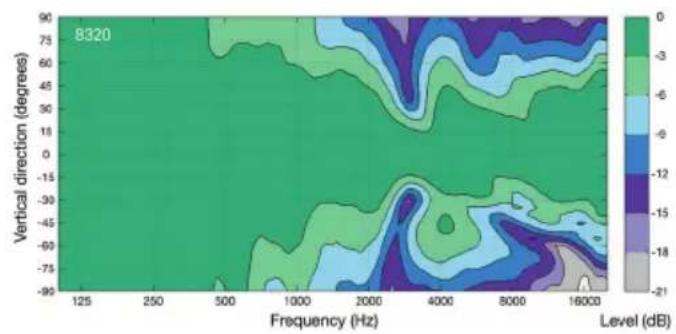
heatmap
| Frequency (Hz) | Vertical direction (degrees) | Level (dB) | | -------------- | ---------------------------- | ---------- | | 125 | 90 | 0 | | 250 | 75 | -3 | | 500 | 60 | -6 | | 1000 | 45 | -9 | | 2000 | 30 | -12 | | 4000 | 15 | -15 | | 8000 | 0 | -18 | | 16000 | -15 | -21 |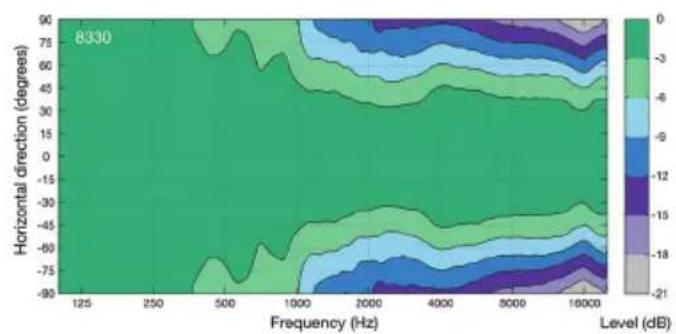
heatmap
| Frequency (Hz) | Horizontal direction (degrees) | Level (dB) | | -------------- | ------------------------------ | ---------- | | 125 | 90 | 0 | | 250 | 78 | -3 | | 500 | 66 | -6 | | 1000 | 54 | -9 | | 2000 | 42 | -12 | | 4000 | 30 | -15 | | 16000 | 18 | -18 | | 16000 | -16 | -21 |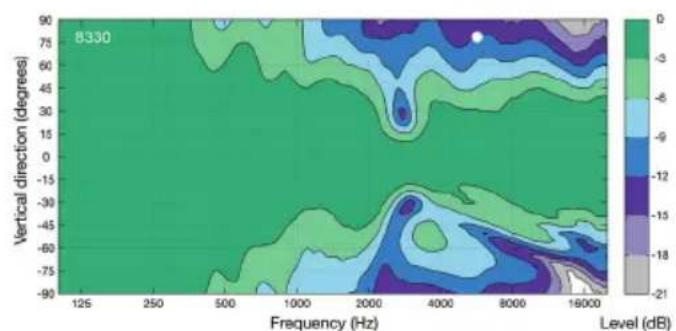
heatmap
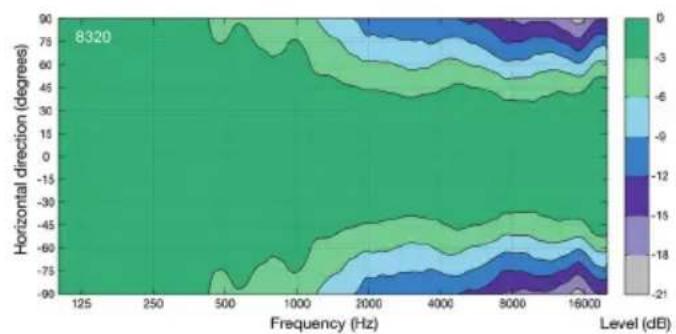
| Frequency (Hz) | Vertical direction (degrees) | Level (dB) | | -------------- | ---------------------------- | ---------- | | 125 | 90 | 0 | | 250 | 75 | -3 | | 500 | 60 | -6 | | 1000 | 45 | -9 | | 2000 | 30 | -12 | | 4000 | 15 | -15 | | 8000 | 0 | -18 | | 16000 | -15 | -21 |Figure 4: Horizontal and vertical directivity plots of the 8320A and 8330A.
SYSTEM SPECIFICATIONS
| 8320 8330 | ||
| Frequency range -6 dB: 55 Hz - 23 kHz 45 Hz - 23 kHz | ||
| Accuracy of frequency response: ±1.5 dB (66 Hz - 20 kHz) ±1.5 dB (58 Hz - 20 kHz) | ||
| Maximum short term sine wave acoustic output on axis in half space, averaged from 100 Hz to 3 kHz: | >100 dB SPL >104 dB SPL | |
| Maximum long term RMS acoustic output in same conditions with IEC weighted noise (limited by driver unit protection circuit): | >94 dB SPL >96 dB SPL | |
| Maximum peak acoustic output per pair, at 1 m distance with music material: | >107 dB >110 dB | |
| Self generated noise level in free field on axis: < 5 dB (A-weighted) | ||
| Harmonic distortion at 85 dB SPL on axis: 50...200 Hz < 3 % | >200 Hz ≤ 0.5 % | 50...100 Hz ≤ 2 %>100 Hz ≤ 0.5 % |
| Drivers (Both drivers are magnetically shielded):WooferTweeter | 105 mm (4 in) cone19 mm ( 34 in) metal dome | 130 mm (5 in) cone19 mm ( 34 in) metal dome |
| Weight: 3.2 kg (7.0 lb) 5.5 kg (12.1 lb) | ||
| Dimensions:Height including Iso-PodTM table standHeight without Iso-PodTM table standWidthDepth | 242 mm ( 912 in)230 mm ( 9116 in)151 mm (6 in)142 mm ( 558 in) | 299 mm ( 111316 in)285 mm ( 1114 in)189 mm ( 7716 in)178 mm (7 in) |
AMPLIFIER SECTION
| Bass amplifier short term output powerTreble amplifier short term output power | 50 W50 W |
| Total harmonic distortion at nominal output <0.05% | |
| Mains voltage | 100-240 VAC, 50-60 Hz |
| Power consumption (ISS active / idle / maximum) | < 0.5 W / 3.0 W / 50 W |
INPUT SECTION
| Digital AES/EBU audio signal connectors (Single wire) | n/a | XLR female IN XLR male OUT |
| Input word length | n/a | 16 - 24 bits |
| Input sampling rate | n/a | 32 - 192 kHz |
| Crossover frequency | 2.9 kHz | |
| Analog input (load impedance) | XLR female (10 kOhm, balanced) | |
| Analog input level for 100 dB SPL output at 1 meter | -6 dBu (adjustable in GLM software) | |
| Maximum analog input | 24 dBu | |
| GLM Control network connectors | 2 x RJ45 | |
GENELEC®
line
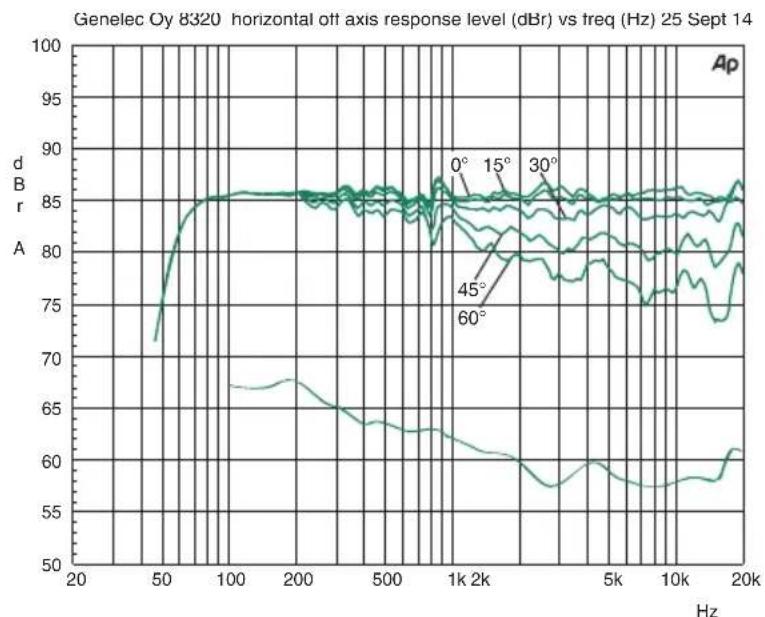
| Frequency (Hz) | dB r (dBm) | | -------------- | ---------- | | 0 | 85 | | 15 | 85 | | 30 | 85 | | 45 | 80 | | 60 | 75 |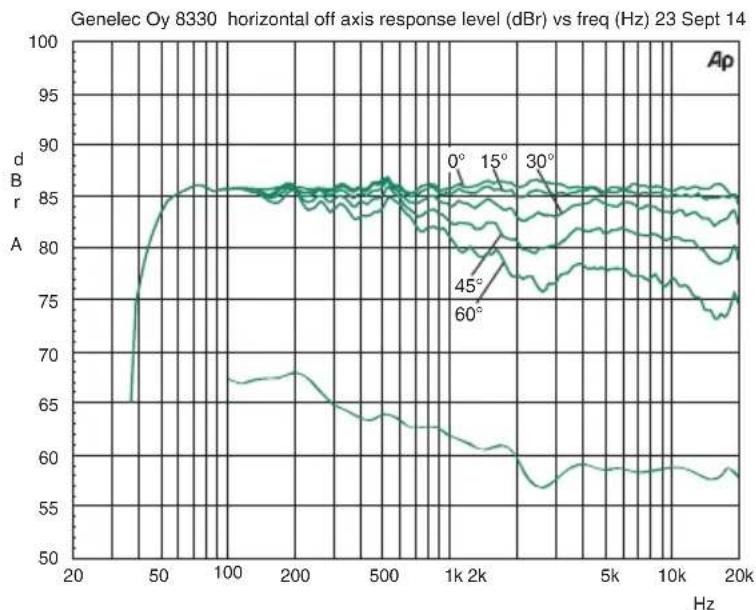
line
| Frequency (Hz) | Response Level (dB) | | -------------- | ------------------- | | 0 | 85 | | 15 | 85 | | 30 | 85 | | 45 | 80 | | 60 | 75 |Figure 5: Frequency response plots in horizontal plane of the 8320A and 8330A. The lower curve is the monitor's power response.
International enquiries
Genelec, Olvitie 5
FI 74100, lisalmi, Finland
Phone +358 17 83881
Fax +358 17 812 267
Email genelec@genelec.com
In Sweden
Genelec Sverige
Ellipsvägen 10B
P.O. Box 5521,
S-141 05 Huddinge
Phone +46 8 449 5220
Fax +46 8 708 7071
Email info@genelec.com
In the USA
Genelec, Inc., 7 Tech Circle
Natick, MA 01760, USA
Beijing Genelec Audio Co.Ltd
Room 101, 1st floor
Building 71 B33
Universal Business Park
No. 10 Jiuxianqiao Road
Chaoyang District
Beijing, China
Phone +86 (10) 5823 2014
Post code: 100015
Email genelec.china@genelec.com
- General Description
- Delivery Contents
- Connections
- Mains Power
- GLM Network Connection
- Analog Audio Input
- Digital Audio Input
- Settings and Acoustic Calibration
- ISS™ Autostart Function
- Mounting Considerations
- Align the Monitors Correctly
- Maintain Symmetry
- Minimise Reflections
- Minimum Clearances
- Mounting Options
- Maintenance
- Safety Considerations
- Guarantee
- Compliance to FCC Rules
- GENELEC®
- International enquiries
- In Sweden
- In the USA
Brand : GENELEC
Model : 8330APM
Category : Pregnant