
CP9319 - Razor Accessories PHILIPS - Free user manual and instructions
Find the device manual for free CP9319 PHILIPS in PDF.


| Product Type | Beard Trimmer Accessory |
| Model Number | CP9319 / QT4000 |
| Power Supply | Rechargeable via adapter (100-240V AC to <24V DC) |
| Charging Time | Approximately 10 hours |
| Operating Time | Up to 45 minutes cordless |
| Trimming Settings | 0.5mm to 10mm via Precision Zoom Lock adjustment ring |
| Stubble Look Setting | Setting 1 for 0.5mm stubble |
| Cutting Unit | Removable, rinseable under tap |
| Comb | Attachable trimming comb with multiple settings |
| Usage | Cordless only (must be charged before use) |
| Safety Features | Do not immerse; use only supplied adapter; automatic voltage selector |
| Cleaning | Cutting unit rinseable; housing wipe with dry cloth; comb clean with brush |
| Replacement Parts | Original Philips cutting unit available at service centers |
| Environmental Compliance | EMF compliant; rechargeable battery recyclable |
| Battery Type | Built-in rechargeable battery (NiMH likely) |
Frequently Asked Questions - CP9319 PHILIPS
User questions about CP9319 PHILIPS
0 question about this device. Answer the ones you know or ask your own.
Ask a new question about this device
Download the instructions for your Razor Accessories in PDF format for free! Find your manual CP9319 - PHILIPS and take your electronic device back in hand. On this page are published all the documents necessary for the use of your device. CP9319 by PHILIPS.
USER MANUAL CP9319 PHILIPS
Register your product and get support at
www.philips.com/welcome
QT4000
PHILIPS
PHILIPS
1
ENGLISH
Introduction
Congratulations on your purchase and welcome to Philips! To fully benefit from the support that Philips offers, register your product at www.philips.com/ welcome.
General description (Fig. 1)
1 Trimming comb
2 Cutting unit
3 Precision Zoom Lock adjustment ring
4 On/off side
5 Socket for appliance plug
6 Brush
7 Appliance plug
8 Adapter with charging light
Important
Read this user manual carefully before you use the appliance and save it for future reference.
Danger
- Make sure the adapter does not get wet.
Warning
- The adapter contains a transformer. Do not cut off the adapter to replace it with another plug, as this causes a hazardous situation.
- This appliance is not intended for use by persons (including children) with reduced physical, sensory or mental capabilities, or lack of experience and knowledge, unless they have been given supervision or instruction concerning use of the appliance by a person responsible for their safety.
- Children should be supervised to ensure that they do not play with the appliance.
Caution
- Never immerse the appliance in water or rinse it under the tap. Only the cutting unit can be rinsed under the tap.
- Use, charge and store the appliance at a temperature between 5°C and 35°C.
- Only use the adapter supplied.
- If the adapter is damaged, always have it replaced with one of the original type in order to avoid a hazard.
- This appliance is only intended for trimming the human beard. Do not use it for any other purpose.
- Do not use the appliance if the cutting unit or the trimming comb is damaged or broken, as this may cause injury.
Electromagnetic fields (EMF)
This Philips appliance complies with all applicable standards and regulations regarding exposure to electromagnetic fields.
General
- The appliance is equipped with an automatic voltage selector and is suitable for mains voltages from 100 to 240 volts.
- The adapter transforms 100-240 volts to a safe low voltage of less than 24 volts.
Charging
Charge the appliance fully before you use it for the first time or after a long period of disuse.
It takes approximately 10 hours to fully charge the appliance.
When it is fully charged, the appliance has a cordless operating time of up to 45 minutes.
Note: For safety reasons, the appliance can only be used cordlessly. Make sure the appliance is charged before use.
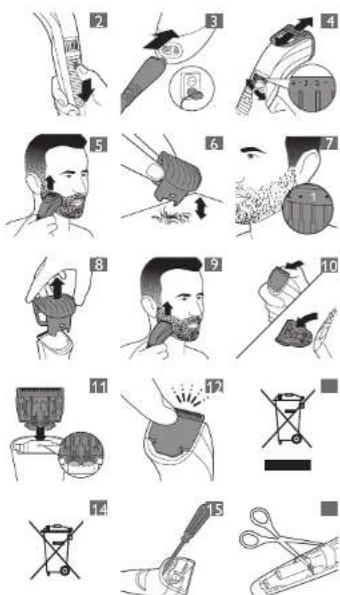
1 Make sure the appliance is switched off (Fig. 2).
2 Insert the appliance plug into the appliance (Fig. 3).
3 Put the adapter in the wall socket.
The charging light on the adapter lights up green continuously to indicate that the appliance is charging.
Note: The charging light on the adapter does not change colour and does not go out when the appliance is fully charged.
4 After charging, remove the adapter from the wall socket and pull the appliance plug out of the appliance.
Optimising the lifetime of the
rechargeable battery
When you have charged the appliance for the first time, we advise you to use it until the battery is completely empty. Continue to use the appliance until the motor almost stops running during a session. Then recharge the battery. Follow this procedure at least twice a year.
Using the appliance
Always comb the beard and/or moustache with a fine comb before you start trimming.
When you trim for the first time, be careful. Do not move the trimmer too fast. Make smooth and gentle movements.
Trimming with comb
1 Turn the Precision Zoom Lock adjustment ring to the desired setting. The selected setting is the setting in the centre of the adjustment ring. (Fig. 4)
See the table below for an overview of the settings and the resulting hair lengths.
| Setting Resultinghair length | Setting Resultinghair length |
0.5mm, 5.5mm
1.1mm 6.6mm
1.5 mm . 6.5mm
22mm77mm
2.5mm.7.5mm
3 3 mm 8 8mm
3.5 mm, 8.5mm
44mm 99mm
4.5 mm . 9.5mm
5 5 mm 10 10mm
Note: When you trim for the first time, start at the highest setting (10) to familiarise yourself with the appliance.
2 Switch on the appliance.
3 To trim most effectively, move the trimmer against the hair growth direction. Make sure the surface of the comb always stays in contact with the skin (Fig. 5).
4 If a lot of hair has accumulated in the beard trimming comb, remove the comb and blow and/or shake the hair out of it. The selected setting does not change when you do this (Fig. 6).
Trimming at the unique 'stubble look' setting
1 To create a 'stubble look', trim with the beard trimming comb set to setting 1 (Fig. 7).
Trimming without comb
Use the trimmer without beard trimming comb to trim full beards and single hairs.
Be careful when you trim without comb because the cutting element removes every hair it touches.
1 Pull the beard trimming comb off the appliance. (Fig. 8)
2 Switch on the appliance.
3 Make well-controlled movements. Touch the hair lightly with the trimmer (Fig. 9).
Cleaning
Never use scouring pads, abrasive cleaning agents or aggressive liquids such as alcohol, petrol or acetone to clean the appliance.
1 Make sure the appliance is switched off and disconnected from the mains.
2 Wipe the housing of the appliance with a dry cloth.
Never immerse the appliance in water or rinse it under the tap.
3 Remove the trimming comb and clean it with the brush.
4 Remove the cutting unit by pushing against the teeth of the cutting unit. Clean it with the brush or rinse it under the tap (Fig. 10).
5 Shake off excess water. Place the cutting unit back by inserting the lug of the cutting unit into the guiding slot. (Fig. 11)
6 Push the cutting unit back onto the appliance ('click').
Replacement
Only replace a worn or damaged cutting unit with an original Philips cutting unit available from authorised Philips service centres.
1 Open the cutting unit.
2 Remove the old cutting unit by pushing against the teeth of the cutting unit. (Fig. 10)
3 Insert the lug of the new cutting unit into the guiding slot (Fig. 11).
4 Push the cutting unit back onto the appliance ('click') (Fig. 12).
Ordering accessories
To buy accessories or spare parts, visit www.shop.phillips.com/service or go to your Philips dealer. You can also contact the Philips Consumer Care centre in your country.
Environment
Do not throw away the appliance with the normal household waste at the end of its life, but hand it in at an official collection point for
recycling. By doing this, you help to preserve the environment (Fig. 13).
- The built-in rechargeable battery contains substances that may pollute the environment. Always remove the battery before you discard and hand in the appliance at an official collection point. Dispose of the battery at an official collection point for batteries. If you have trouble removing the battery, you can also take the appliance to a Philips service centre. The staff of this centre will remove the battery for you and will dispose of it in an environmentally safe way. (Fig. 14)
Removing the rechargeable battery
Only remove the rechargeable battery if it is completely empty.
1 Disconnect the appliance from the mains and let the appliance run until the motor stops.
2 Insert a screwdriver in the hair chamber to separate the housing part (Fig. 15).
3 Cut the wires close to the battery with a pair of household scissors (Fig. 16).
4 Remove the rechargeable battery.
Do not connect the appliance to the mains again after you have opened it.
Guarantee and support
If you need service or support, please visit www.philips.com/support or read the separate worldwide guarantee leaflet.
简体中文
简介

- PHILIPS
- ENGLISH
- Introduction
- General description (Fig. 1)
- Important
- Danger
- Warning
- Caution
- Electromagnetic fields (EMF)
- General
- Charging
- Optimising the lifetime of the
- rechargeable battery
- Using the appliance
- Trimming with comb
- Trimming without comb
- Cleaning
- Replacement
- Ordering accessories
- Environment
- Removing the rechargeable battery
- Guarantee and support
- 简体中文
- 简介
Brand : PHILIPS
Model : CP9319
Category : Razor Accessories