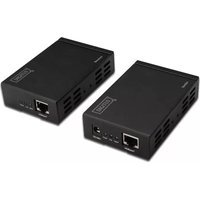
DS-55400 - Audio/video extender Digitus - Free user manual and instructions
Find the device manual for free DS-55400 Digitus in PDF.


| Product Type | Audio/Video Extender (HDMI Extender over HDBaseT) |
| Model | DS-55400 |
| Brand | Digitus |
| Dimensions (L x W x H) | 100 x 65 x 25.5 mm (each unit) |
| Weight (Net) | 170 g (each unit) |
| Power Supply | 48V DC @ 1A (included) |
| Power Consumption (Max) | 16.8 W |
| Transmission Distance | Up to 100 m (330 ft) over Cat5e/6 cable for 1080p/60Hz |
| Video Bandwidth | 10.2 Gbps total (3.4 Gbps per channel) |
| Supported Resolutions | 480i/576i/480p/576p/720p/1080i/1080p |
| HDCP Support | Yes (HDCP pass-through) |
| 3D Pass-through | Yes |
| CEC Pass-through | Yes |
| Audio Support | Uncompressed LPCM, compressed DTS/Dolby Digital (including DTS-HD and Dolby TrueHD) |
| IR Extension | Built-in IR extender (IR receiver and emitter included) for remote control of source |
| PoE (Power over Ethernet) | Yes (power supplied via sender only, 48V DC adapter) |
| Cable Type | Cat5e/6 (IEEE-568B standard) |
| Package Contents | 1x Sender, 1x Receiver, 1x Power Supply (48V DC), 1x IR Receiver, 1x IR Emitter, User Manual |
| Warranty | 1 Year Parts and Labor |
| Regulatory Approvals | FCC, CE, UL (unit and power supply) |
Frequently Asked Questions - DS-55400 Digitus
User questions about DS-55400 Digitus
0 question about this device. Answer the ones you know or ask your own.
Ask a new question about this device
Download the instructions for your Audio/video extender in PDF format for free! Find your manual DS-55400 - Digitus and take your electronic device back in hand. On this page are published all the documents necessary for the use of your device. DS-55400 by Digitus.
USER MANUAL DS-55400 Digitus
User Manual
DS-55400
Table of Contents
1.0 Introduction......2
2.0 Specifications .... 3
3.0 Package Contents .... 3
4.0 Panel Descriptions .... 4
5.0 Connection and operation....7
Dear customer
Thank you for purchasing this product. For optimum performance and safety, please read these instructions carefully before connecting, operating or adjusting this product. Please keep this manual for future reference.
1.0 INTRODUCTION
The Extender is based on the HDBaseT technology. It extends your HD display with the resolutions of 1080p/60Hz up to 330 feet (100 meters) away from your HDMI or DVI-D source using one CAT5e/6 cable. Built-in IR extender function allows IR remote control of Source devices from remote viewing location by sending IR commands received in the vicinity of the Display back to the Source devices.
It also provides POE function that you only need to provide a piece of 48V/1A DC power adapter at the end of the Sender to supply the power both the end of the Sender and Receiver.
1.1 FEATURES
- Support HDCP
- Support POE
• Support uncompressed HDMI signal. - Enables HDMI 10.2Gbps over a single 100m Cat5e/6 cable.
• Support 340MHz/3.4Gbps per channel (10.2Gbps all channel) bandwidth.
• Support 1080p@60Hz@48bit pixels
• Support 3D pass-through.
• Support CEC pass-through. - Support uncompressed audio such as LPCM.
- Support compressed audio such as DTS Digital, Dolby Digital (including DTS-HD and Dolby True HD).
- Built-in IR extender function allows IR remote control of Source devices from remote viewing location by sending IR commands received in the vicinity of the Display back to the Source devices.
- CAT5e/6 cable follows the standard of IEEE-568B.
2.0 SPECIFICATIONS
| Signal Inputs/Output | |
| Input Video Signal 1.2 volts p-p | |
| Output Video HDMI | |
| Video format supported | |
| DTV/HDTV | 480i/576i/480p/576p/720p/1080i/1080P |
| Transmission distance | |
| Cat5e/6 cable 100m for1080p/60Hz | |
| Operating Frequency | |
| Video Amplifier Bandwidth 3.4Gpbs/340MHz | |
| Vertical Frequency Range 50/60Hz | |
| Resolutions(HDTV) | |
| Interlaced(50&60Hz) | 480i,576i,1080i |
| Progressive(50&60Hz) | 480p,576p,720p,1080p |
| Mechanical | |
| Size (L-W-H) 100×65×25.5MM | |
| Weight (Net) | 170G (each unit) |
| Warranty | |
| Limited Warranty | 1 Year Parts and Labor |
| Power Requirement | |
| Power Supply | 48V DC@1A |
| Power consumption (Max) | 16.8W |
| Regulatory Approvals | |
| Converter Unit | FCC,CE,UL |
| Power Supply UL,CE,FCC | |
| Accessories | |
| AC Power Adapter | US standard, UK standard and so on |
| User Manual | English Version |
3.0 PACKAGE CONTENTS
Before attempting to use this unit, please check the packaging and make sure the following items are contained in the shipping carton:
1) Main unit NO. 1 Sender
2) Main unit NO. 2 Receiver
3) One piece of 48V DC Power Supply.
4) IR(Extender infrared receiver) X1
5) IE(Extender infrared emitter) X1
6) User's Manual
4.0 PANEL DESCRIPTIONS
Sender
Front
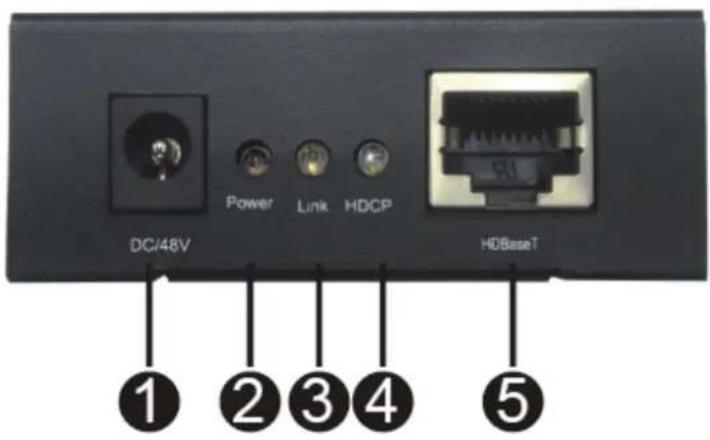
Back

(1) DC/48V
(2) Power Indicator
The LED will turn on once the DC/48V provided.
(3) Link
When LED is "ON", it indicates HDBaseT link connection established between the Sender and the Receiver over the Cat5e/6 cable.
(4) HDCP
When the LED is "ON", it indicates a video content with HDCP protection is being transferred.
When LED is "Blinking", it indicates a video content without HDCP.
When LED is "OFF", it indicates no video connected.
(5) HDBaseT
Connect the Sender to the Receiver using a Cat5e/6 cable.
(6) IE
Connect Extender infrared emitter cable from this port to the HDMI Source to control the source from the viewing location.
(7) HDMI In
Connect HDMI Source to this Port.
Receiver
Front
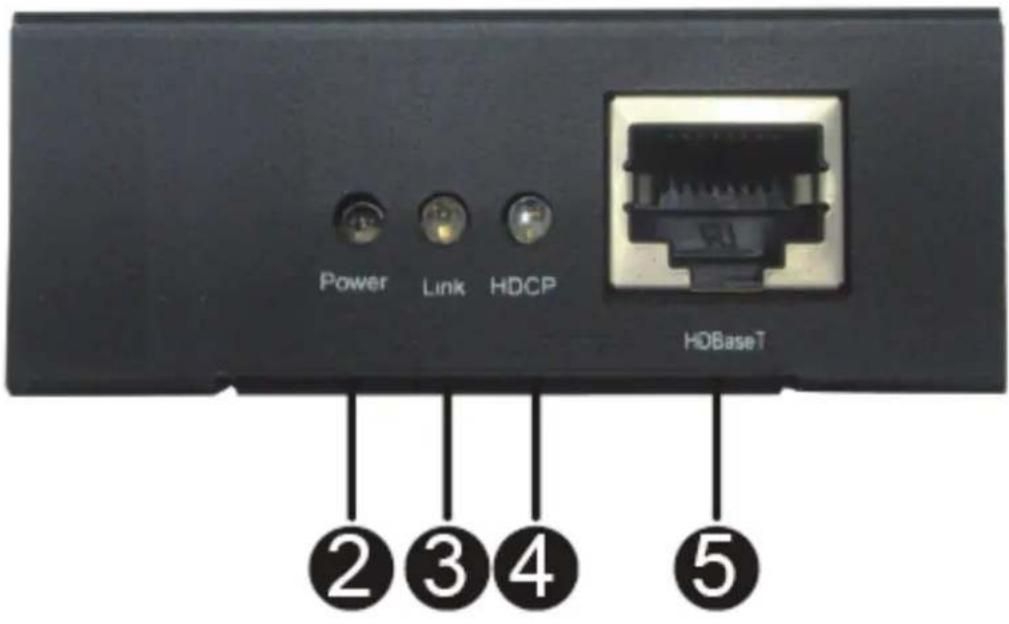
Back

(2) Power Indicator
The LED will turn on once the 48V Power adapter provided at the end of the Sender.
(3) Link
When LED is "ON", it indicates HDBaseT link connection established between the Sender and the Receiver over the Cat5e/6 cable.
(4) HDCP
When the LED is "ON", it indicates a video content with HDCP protection is being transferred.
When LED is "Blinking", it indicates a video content without HDCP.
When LED is "OFF", it indicates no video connected.
(5) HDBaseT
Connect the Sender to the Receiver using a Cat5e/6 cable.
(6) IR
Connect Extender infrared receiver cable from this port to receiver the IR command of the source
(7) HDMI Out
Connect HDMI Sink to this Port
5.0 CONNECTION AND OPERATION
1) Connect the HDMI source (such as DVD, PS3, STB) to the input of Sender.
2) Connect the output of Receiver to HDTV display.
3) Use a Cat5e/6 cable up to 100m to connect the Sender and Receiver.
4) Plug one piece of 48V/1A power supply into the Sender
5) Power on the HDTV display and HDMI source.
Note: It is recommended to use one continuous run Cat5e/6 cable from one end to the other. In some cases, connecting through a patch connector might not work.
Attention: Insert / Extract cable gently.
5.1 CONNECTION DIAGRAM
![graph LR A["HDMI Source"] -->|HDMI Cable| B["100m Cat5e/6 Cable"] B --> C["External infrared receiver"] C --> D["HDTV"] B --> E["48C/1A Power Supply"] E --> F["External infrared emitter"] F --> B style A fill:#f9f,stroke:#333 style B fill:#ccf,stroke:#333 style C fill:#cfc,stroke:#333 style D fill:#…](/content/2026/05/1028922/images/9ac121864c07e63b6a7625a78427d1d0c75a5e6f466c7df349bcd1bc9f4dd0f4.jpg)


Brand : Digitus
Model : DS-55400
Category : Audio/video extender