
Protect D. 6000 - Inverter AEG - Free user manual and instructions
Find the device manual for free Protect D. 6000 AEG in PDF.


| Product Type | UPS (Uninterruptible Power Supply) |
| Model | Protect D. 6000 |
| Brand | AEG |
| Power Rating | 6000 VA / 5400 W |
| Input Voltage | 230 V AC |
| Output Voltage | 230 V AC |
| Frequency | 50/60 Hz |
| Battery Type | Sealed Lead-Acid |
| Battery Runtime | Typically 5-15 minutes at full load |
| Dimensions (H x W x D) | Approximately 310 x 145 x 400 mm |
| Weight | Approximately 28 kg |
| Protection Features | Overload, short circuit, surge protection |
| Communication Port | RS-232 / USB |
| Operating Temperature | 0°C to 40°C |
| Certifications | CE, TÜV, EN 62040 |
| Maintenance | Regular battery check; clean vents with dry cloth |
| Spare Parts Availability | Batteries and fans replaceable via service centers |
| Warranty | 2 years |
Frequently Asked Questions - Protect D. 6000 AEG
User questions about Protect D. 6000 AEG
0 question about this device. Answer the ones you know or ask your own.
Ask a new question about this device
Download the instructions for your Inverter in PDF format for free! Find your manual Protect D. 6000 - AEG and take your electronic device back in hand. On this page are published all the documents necessary for the use of your device. Protect D. 6000 by AEG.
USER MANUAL Protect D. 6000 AEG
Protect D. 6000 (BP)
Protect D. 10000 (BP)
EN
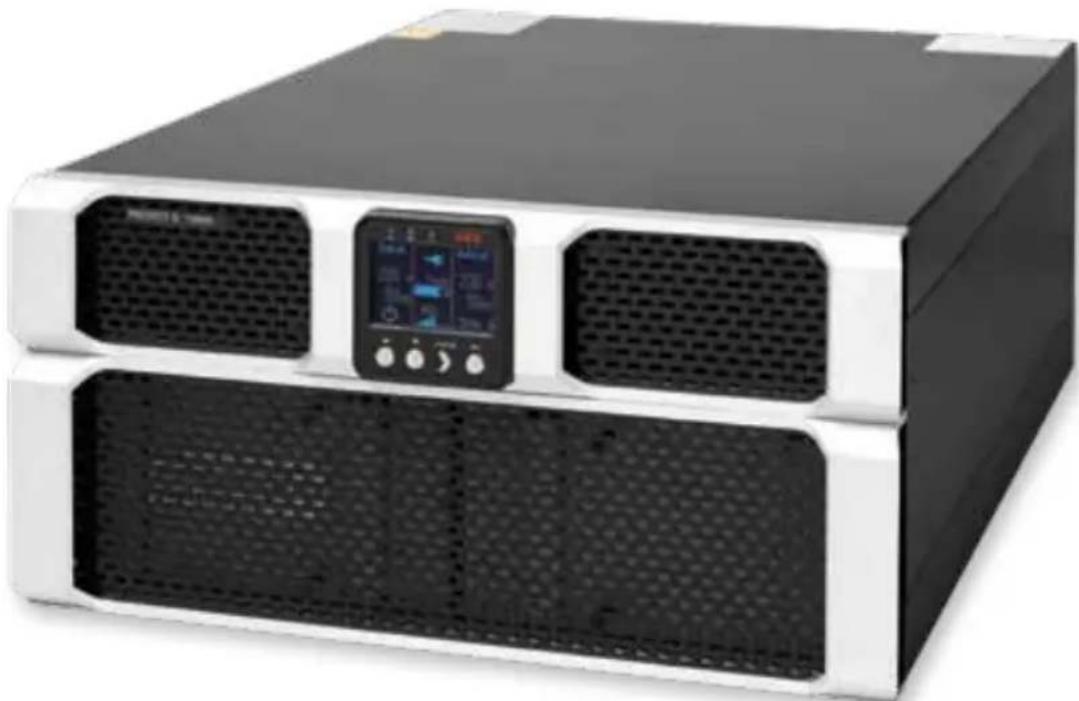
Thank you for purchasing the Protect D. UPS from AEG Power Solutions. The following safety precautions are an important part of these operating instructions. They are designed to help you avoid problems caused by operating errors and to protect you against any possible hazards. Please read these instructions carefully before using the product for the first time!
CONTENTS
- Notes on these operating instructions .... 6
- General Information 8
2.1 Technology ....8 2.2 System description ......9 2.3 Technical data ....11
- Safety Regulations 16
3.1 General safety instructions ....16 3.2 Safety instructions for the Protect D. 16 3.3 CE certificate ....20
- Installation 21
4.1 Unpack and check 21 4.2 Installation....23 4.3 Assembly....23
- Overview of connections, operating / display elements ...... 26
5.1 Front view ....26 5.2 Rear-panel view (connections): 28
- Electrical connection 31
6.1 Safety of personnel 32 6.2 Connection cross-section and fuses 32 6.3 Mains and consumer connection 34 6.4 Contacting the battery modules 36
6.4.1 Connecting the internal battery 36 6.4.2 Connecting external battery extension(s) 39
- 7. Operation Mode and Operating 42
7.1 First start-up 42
7.1.1 Switching on the UPS 42 7.1.2 Switching off the UPS 42
7.2 Usage table 43
7.2.1 Overview 43 7.2.2 Indicators (LEDs) 43 7.2.3 Operating keys (Navigation) 44
7.3 Display (Main Menu) 45
7.3.1 UPS status-display 45
7.3.2 Event log 49 7.3.3 Measurements 50 7.3.4 Control 50 7.3.5 Identification 51 7.3.6 Settings 51
8. Interfaces and communication 56
8.1 RS232 and USB computer interfaces 56 8.2 Communications slot 56 8.3 Shutdown and UPS management software 57 8.4 EPO (Emergency Power Off) 58 8.5 Change-over contact 59
9. Troubleshooting 60
9.1 Malfunctions 60 9.1.1 Alarm / error messages 61
10. Parallel operation 65
10.1 Function....65 10.2 Installation / connection of parallel field operation ......66
11. Maintenance 67
11.1 Charging the battery ....67 11.2 Maintenance checks....67
11.2.1 Visual check 67 11.2.2 Battery check 68 11.2.3 Ventilator check 68 11.3 Battery replacement ....68
12. Storage, Dismantling and Disposal 70
12.1 Storage 70 12.2 Dismantling ....70 12.3 Disposal 70
13. Appendix ...... 72
13.1 Technical terminology ....72 13.2 Keyword register ....74 13.3 Notes 75
1. Notes on these operating instructions
Obligation to provide instructions
These operating instructions are designed to help you properly and safely install and operate the following Uninterruptible Power Supply (UPS) systems: Protect D. 6000 and Protect D. 10000, as well as the corresponding external battery units, Protect D. 6000 BP and Protect D. 10000 BP, hereinafter collectively referred to as Protect D. These operating instructions contain important information on avoiding hazards.
Please read these instructions carefully before first use!
These operating instructions are part of the Protect D.
The operator of this device is required to make these operating instructions openly available to any person transporting, installing, servicing or performing any other work on the Protect D.
Validity
These operating instructions comply with the current technical specifications of the Protect D. at the time of publication. The contents do not constitute a contract and are for informational purposes only.
Warranty and Liability
We reserve the right to make any changes to the information in this operating manual, with respect to the specifications and the operating instructions in particular, at any time.
Complaints about delivered goods must be submitted within eight days of receipt, along with the packing slip. Later claims will not be accepted.
Any damage incurred due to non-compliance with these instructions (including damage to the warranty seal) will void the warranty. AEG accepts no liability for consequential damages. AEG will rescind all obligations, such as warranty agreements, service contacts, etc. without prior notice in the event that any spare parts other than original AEG spare parts or those purchased by AEG are used for maintenance and repair.
Handling
The Protect D. is designed and constructed so that all of the steps that need to be taken for its installation and operation can be done without having to open the device. Any maintenance or repairs are to be performed by qualified technicians only.
Illustrations are included to make certain steps clearer and easier to understand.
If there is any potential danger to personnel or equipment while performing certain work, these activities are accompanied by pictograms, whose meanings are explained in the safety instructions in chapter 3.
Hotline
If you still have questions after reading this operating manual, please contact your retailer or our hotline:
Tel: +49 (0)180 5 234 787
Fax: +49 (0)180 5 234 789
Internet: www.aegps.com
Copyright
Any forwarding, reproduction and/or storage, using electronic or mechanical means, in whole or in part, of these operating instructions requires the express prior written consent of AEG.
© Copyright AEG 2012. All rights reserved.
2. General Information

2.1 Technology
Protect D. is an uninterruptible power supply (UPS) for rack-mounted loads such as PCs, workstations, servers, network components, and similar devices, consisting of:
- Network filter with surge protection (device protection / Class D) and mains back-feed protection
- Rectifier with PFC logic (power factor correction unit)
- Separate input possibilities for rectifier and bypass (DUAL or SINGLE input)
- Separate intelligent battery charger with switch-mode power supply technology
- Sealed system battery with maintenance-free design for energy storage in rack technology with downstream DC/DC converter unit
- 3-level IGBT inverter for continuous supply to the connected loads with sinusoidal AC voltage
- Automatic, electronic bypass (SBS) as an additional passive redundancy. SBS = Static Bypass Switch
- Removable terminal unit with outlets to IEC 60320, fitted with an automatic locking mechanism
- Manual bypass for maintenance and service purposes (with automatic static bypass activation when operated)
- Parallel operation for the purpose of preparation of active redundancy or to increase power. Control unit based on digital signal processor technology
- Multi-lingual LCD display designed to display remaining time and logs in real time.
![graph TD A["Main 1: Mains 1"] --> B["Filter"] C["Mains 2: Mains 1"] --> B B --> D["Filter"] D --> E["PFC"] E --> F["Rectifier"] F --> G["DC/DC Booster"] G --> H["Battery Charger"] G --> I["Battery System"] G --> J["DSP Control Logic"] K["Manual Service Bypass"] --> L["Electronic Locking"] L --> M["S…](/content/2026/05/1028908/images/20425df7f1f0c571f2ac565c1b8ccf698acc78d23fb92aac5088b1d6cc932246.jpg)
2.2 System Description
The UPS is connected between the public network and the power load segment to be protected.
The rectifier is powered from the mains and converts the AC voltage into a stabilized DC voltage to feed the inverter. The circuitry technology used (PFC) enables sinusoidal current consumption, thus allowing a low circuit feedback operation. A separate, second rectifier (charger) based on switching power supply technology, recharges or maintains the charge of the battery in the intermediate circuit. Due to the special circuitry technology used in this charger / rectifier, the harmonics of the charging current are reduced significantly. Additionally, a sleep mode considerably increases the service life of the battery. The inverter converts the DC voltage into a sinusoidal AC voltage. In combination with digital signal processor technology and extremely high pulse rate IGBT-power semiconductors in the inverter, a microprocessor-controlled regulator on the basis of pulse-width modulation (PWM) guarantees a voltage system of the highest quality and availability on the secured busbar.
In the event of mains problems (e.g. power outages), power is supplied to the load segment without an interruption from the inverter, which now uses the battery. Since no switching is required, the load segment experiences no power supply interruption at all.
The automatic bypass provides increased power supply security for single installations in particular by switching the public network, e.g. in the event of an inverter malfunction, through to the load segment directly and without interruption. In other words, the automatic bypass provides the load segment with an additional passive redundancy.
An integrated, manual bypass unit for maintenance and / or servicing provides an uninterrupted supply of power to the consumers. The connection unit is designed so that it can be separated from the UPS circuitry with minimal effort and can thus remain in the rack. Through this simplified line-side activation, servicing of the unit is possible at all times.
In order to ensure maximum security to the supply of the connected loads, the equipment was also prepared for parallel operation: a second UPS system provides maximum availability when used as an active redundancy. If, however, the demand for power is in the foreground, then the second UPS can be used for performance enhancing parallel operation.
The graphical LCD display used provides for versatile use and easy operation. Convenient features such as switchable outputs, a freely programmable, potential-free change-over contact, as well as an emergency power-off contact, round out the standard interface selection (USB, RS232 and communication slot).
2.3 Technical Data
| Type rating | |
| Protect D. 6000 | 6000 VA (cos φ = 0.9 lag) 5400 W |
| Protect D. 10000 | 10000 VA (cos φ = 0.9 lag) 9000 W |
| UPS input 1ph~ / N / PE (DUAL INPUT) | |
| Nominal input voltage 200 / 208 / 220 / 230 / 240 Vac | |
| Rectifier voltage range (without battery operation, 100 % load, cos φ = 0.9 lag) | 176 Vac - 276 Vac |
| Rectifier voltage range (without battery operation 50 % power reduction) | 120 Vac - 276 Vac |
| Bypass voltage range 184 Vac - 264 Vac | |
| Frequency 50 Hz / 60 Hz (automatic detection or manually) | |
| Frequency tolerance range ± 10 % | |
| Charging rate at full load and battery charging (max.) | Protect D. 6000 29 A (UN = 230 Vac) |
| Protect D. 10000 47 A (UN = 230 Vac) | |
| Circuit feedback factor λ ≥ 0.99 (THDi <5 %) | |
| UPS output | |
| Nominal output voltage 200 / 208 / 220 / 230 / 240 Vac ± 1 %Power reduction at 200 VacNominal output voltage: 10 % | |
| Nominal frequency 50 Hz / 60 Hz ± 0,5 % (Tolerance in battery mode or free running in frequency changer mode) | |
| Synchronization range | 50 Hz or 60 Hz ± 10 % |
| Synchronization speed | 1 Hz / s |
| Power factor range | 0.5 lag to 0.9 cap. at full power outputPower reduction: 20 % to 0.5 cap. |
| Frequency converter | 20 % power reduction(Bypass deactivated, frequency range 40 - 70 Hz) |
| Waveform Sinus, distortion | < 2 % THD (linear load)< 5 % THD (non-linear load) |
| Crest factor | 3:1 |
| Overload behavior with existing network | To 102 % continuously; ≥ 102 % - <130 % for 2 min. ≥ 130 % - <150 % for 30 s Automatic seamless transfer to bypass mode (SBS) |
| Overload behavior Bypass | to 130 % continuously; ≥ 130 % - <180 % for 1 min. |
| Overload behavior when on battery | to 102 % continuously; ≥ 102 % - <130 % for 10 s ≥ 130 % for 100 ms |
| Short circuit protection 3 x I | N for 100 ms |
| Battery | |
| Autonomy time | |
| Coupled battery module | (cos φ = 0.9 lag / 100 % charged battery / 25°C) D. 6000 D. 6000 D. 10000 D. 10000 (rated load) (half load) (rated load) (half load) |
| with integrated battery 3 min. 9.5 min. 4 min. 7.5 min. | |
| 1 add. battery module 11 min. 27 min. 9 min. 18 min. | |
| 2 add. battery modules 20 min. 46 min. 15 min. 30 min. | |
| 3 add. battery modules 30 min. 68 min. 21 min. 43 min. | |
| 4 add. battery modules 40 min. 91 min. 27 min. 57 min. | |
| Battery check (programmable): | Daily, weekly, monthly |
| Rated DC voltage (DC Link) | Protect D. 6000 180 Vdc Protect D. 10000 240 Vdc |
| Float voltage 2.28 Vdc / cell (default 20°C) Charging voltage depending on temp. | |
| Adjustment 2.21 Vdc / cell - 2.31 Vdc / cell in 0.01 V increments | |
| Temperature compensation 20m V / 12 V-Block / °C | |
| Battery charging current (max.) | 1.4 Adc (Protect D. 6000) 1.7 Adc (Protect D. 10000) |
| Switch-off | 1.60 to 1.75 V / cell (load and temperature dependent) |
| Battery voltage Visual and audible alarm at 1.90 V / cell | ||
| Type of battery Sealed lead-acid battery (VRLA) | ||
| spec. type for high-current discharge | ||
| Protect D. 6000 15 blocks at 12 V 5 Ah | ||
| Protect D. 6000 BP 15 blocks at 12 V 9 Ah | ||
| Protect D. 10000 20 blocks at 12 V 9 Ah | ||
| Protect D. 10000 BP 20 blocks at 12 V 9 Ah | ||
| Recharging times ~ 3h to 90 % for internal battery~9h / ~15h / ~21h / ~27h with 1 / 2 / 3 / 4 battery extension(s) | ||
| Communication | ||
| Interfaces(DUAL Monitoring) | RS232 (SUB-D (9-pin)), USBAdditional: communication slot for extensions(e.g. relay card / SNMP (PRO), etc.) | |
| EPO contact Potential-free(optionally programmable as opener or closer) | ||
| Relay load-carrying ability 250 Vac 3 A or 30 Vdc 3 A change-over contact(programmable) | ||
| Shutdown software on CD “CompuWatch” for all popular operating systems,inc. Windows, Linux, Mac, Unix, Novell, Sun | ||
| General information | ||
| Classification VFI SS 111 acc. to IEC 62040-3Double-conversion technology | ||
| Full-load efficiency(AC-AC / DC-AC) | Protect D. 6000 | >92% / >89% |
| Protect D. 10000 | >93% / >90% | |
| Full-load efficiency(ECO / transfer time < 10ms) | Protect D. 6000 | >96% |
| Protect D. 10000 | >97% | |
| Inherent noise (1m distance) <55 dB(A) | ||
| Cooling External variable-speed cooling fan | ||
| Operating temperature range 0°C bis +40°CRecommended: +15°C to +25°C(battery system dependent) | ||
| Storage temperature range -15°C to +60°C (UPS)0°C to +35°C (battery) | ||
| Humidity 0 - 95 % (non-condensing) | ||
| Installation height Up to 1000 m at nominal power (for use above 1000 m, power loss is equal to 1 % per 100 m) | ||
| Protection IP20 | ||
| Connections | ||
| Mains connections (DUAL or SINGLE) | Fixed connection (separate connections for GR and bypass (bridged)) | |
| Consumer connections with automatic locking (in addition to standard landline) | Protect D. 6000 2 x IEC320 C131 x IEC320 C19 | |
| Protect D. 10000 4 x IEC320 C19 | ||
| Display Graphic LCD display, Resolution: 128 x 64 pixelsLanguages: EN / DE / ES / FR / RUincl. 3 LEDs for operating display | ||
| Housing color Black line with aluminum front | ||
| Weight (net / gross) Protect D. 6000 46 kg (20 kg without battery) / 53 kg | ||
| Dimensions (net) Protect D. 6000 W 438 mm x D 715 mm x H 132 mm | ||
| Dimensions(gross (packaged)) | Protect D. 6000 W 580 mm x D 800 mm xH 540 mm | |
| Protect D. 10000 W 580 mm x D 800 mm xH 675 mm | ||
| Protect D. 6000 BP W 580 mm x D 800 mm xH 355 mm | ||
| Protect D. 10000 BP W 580 mm x D 800 mm xH 355 mm | ||
| Guidelines | The Protect D. complies with the EN 62040 product standard.The CE seal on the device confirms compliance with the EG Low Voltage Directive 2006 / 95 / EG and EMC Directive 2004 / 108 / EG for electromagnetic compatibility, if the installation instructions provided in this manual are followed.For 2006 / 95 / EG Low Voltage DirectiveReference number EN 62040-1: 2008For 2004 / 108 / EG EMC DirectiveReference number EN 62040-2: 2006 class C2WARNING:This is a category C2–UPS product. In a domestic environment, this product may cause radio interference, in which case the user may be required to take additional measures. | |

3. Safety Regulations
3.1 General Safety Instructions
Read these operating instructions carefully before using the UPS Protect D. and its external battery modules (special accessories) for the first time; pay careful attention to the safety precautions!
Use this device for its intended purpose only and in accordance with the safety instructions and danger warnings in this instruction manual! The device is to be used only when it is in perfect working condition; correct any problems that may affect the safety of the device immediately.
The following pictograms appear in this manual:
Note: DANGER!
In the case of danger to life and limb of the operator.

Note: ATTENTION!
Risk of injury and/or risk of damage to equipment and equipment parts.

Note: INFORMATION!
Useful and important for the operation of the UPS and the external battery modules (optional).
3.2 Safety Instructions for the Protect D.
This chapter contains important safety instructions for the UPS Protect D. and its external battery modules (optional accessories) that must be followed for the mounting, operation and maintenance of the uninterruptible power supply and the battery system (internal and external batteries, if applicable).
The UPS is an electrical device that can be dangerous. The device should only be opened by qualified personnel. Repairs should only be carried out by qualified service personnel!
The output can also be electrically charged, even if the UPS is not connected to the mains power supply. The UPS has its own internal power supply (battery)!
To ensure operator safety, the device must be properly grounded!
The Protect D. must only be connected and operated with a VDE-approved power cord with a grounding conductor to 200 V / 208 V / 220 V / 230 V / 240 V AC voltage networks with a protective ground.
CAUTION – RISK OF BURNS!
The battery has a high short-circuit current. Connection or disconnection errors can lead to the melting of plug connections, to arcing and to severe burns!
The device is equipped with a warning signal that sounds when the Protect D. battery is discharged or when the UPS is not working in the normal mode (see also chapter 9.1.1 "Alarm- / error messages", from page 61).
To ensure the safe operation and reliability of the UPS and battery modules (optional), observe the following safety instructions:
- Do not attempt to open the UPS! (The UPS does not contain any parts that require regular maintenance. Please note that if the UPS has been opened, any warranty claims will be voided)
- Do not expose the device to direct sunlight or a direct heat source!
- The unit is designed for installation in temperature controlled indoor rooms. Do not install the device close to water or in very humid areas!
- If the UPS is brought from a cold environment into the installation area, condensation may occur. Before using the UPS, it must be absolutely dry; therefore a waiting time of a minimum of two hours before use is required.
- Never connect the mains power input with the UPS output!
- Ensure that no liquids or foreign objects enter the housing!
- Do not block the ventilation openings of the device! Make sure, for example, that children do not insert anything into the ventilation openings!
- Never connect any household appliances, e.g. a hair dryer, to the UPS! Also be careful when operating the device with power loads. Any feedback to the inverter, e.g. due to a short-term generator operation of the load, must be avoided at all costs.
- The power outlet should be located near the unit and with easy access in order to make it easier to deactivate the AC input or pull out the plug!!
- While the device is in operation, do not pull the plug from the UPS or from the network power supply outlet (grounded power outlet). This will cancel the ground for the UPS and all of the load segments connected.
Danger of electric shock!
Even when the mains power supply has been disconnected, parts inside the UPS are still connected to the battery and can give you an electric shock. Before attempting any maintenance or service work, always disconnect the battery circuit!
Battery replacement and servicing must be done or at least supervised by a qualified technician, who is familiar with the batteries and the safety precautions that have to be taken!
Do not allow unauthorized access to the batteries!
When replacing the batteries, please note: Use only identical, maintenance-free, valve regulated lead acid batteries with exactly the same specification as the original batteries. Ask your AEG dealer for the appropriate battery tray.
Danger of explosion!
Do not dispose of batteries in an open fire.
Do not attempt to open or interfere with the batteries (the electrolytes released will harm skin and eyes and can also be toxic!)
Batteries can cause electrical shock and high short circuit current.
Whenever you work with batteries, please take the following precautions:
- Remove all watches, rings and any other metallic jewelry!
- Use only tools with insulated handles!

Do not use connecting blocks with central on / off switches to prevent switch-on current peaks.
Switch the UPS to "OFF" if you don't want to use it for a longer period of time. If your company switches off the power, then the Protect D. has to be switched off as well. Otherwise, the battery will run down. To prolong battery life, avoid running the battery down frequently!
For your own protection, never switch on the UPS when the plug has been pulled from the Protect D.!
3.3 CE Certificate
AEG
POWER SOLUTIONS
Declaration of Conformity
Document - No. CE 0263
We
declare under our sole responsibility that the product
Uninterruptible Power Supply (UPS)
Protect D. 6000VA, 10000VA
to which this declaration relates is in conformity with the following standards or other normative documents:
EN 62040-2:2006 Class C2
EN 62040-1:2008
Following the provisions of directives
2004/108/EC EMC- Directive
2006/95/EC Low Voltage Directive
Year of labeling the CE-Mark: 2012
59581 Warstein, 18.01.2012
AEG Power Solutions GmbH Product Management Compact UPS
(i.V. Schneider)
AEG Power Solutions GmbH Quality Management
(i.A. Kirchhoff)
4.1 Unpack and Check
The device has been extensively tested and checked. Although packaging and shipping have been carefully carried out, damage in transit cannot be totally ruled out.

Any transport damage claims must be made directly to the shipping company!
Upon receipt, check the contents of the transport containers for any damage. If necessary, ask the shipping company to check the goods and make a note of any damages while an employee of the shipping company is still present and report the damage within eight days of receipt to an AEG representative or retailer.
Check the contents for completeness:
After opening, the top level of the carton contains:
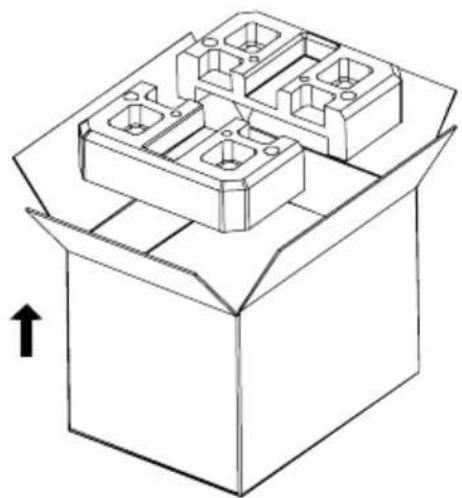
- Rack rail kit
- Mounting brackets
- 3 cable glands
- Power cord • 2 communication cables (RS232 and USB)
- "CompuWatch" management software on CD
- Safety precautions & Operating instructions • Product registration card
Fig. 2: Extract - stage 1
Handle components with care paying particular attention to the weight. Two people may be required to move the battery units.
- Middle level
1 Protect D. 6000 (①) or Protect D. 10000 (②)
![graph TD A["Step ①: Internal component"] --> B["Step ②: Box with internal components"] B --> C["Step ③: Internal component with internal compartments"] C --> D["Step ④: Internal component with internal compartments"]](/content/2026/05/1028908/images/d371015fc73c2066da226d3d937628e9f1a241bf872690c89ba4221142f1c35b.jpg)
Fig. 3: Removal of the UPS and its accessories
Lower level
- 1 connection unit (the bar containing the terminals, the manual bypass and IEC outlet distribution)
• 1 battery tray for D. 6000, respectively 2 battery trays for D. 10000
External battery modules include the following:
• External battery unit Protect D. 6000 BP or D. 10000 BP
- 1 small oblong box containing the rack rails kit including fixing screws and cage nuts
- 2 mounting brackets incl. bolts for final fixation to the front spar of the cabinet frame
Please report any deviations to our hotline (see page 7).
The original packaging provides effective protection against damage and should be kept in case the device has to be transported at a later date.
Always keep plastic bags away from babies and children in order to prevent suffocation.
4.2 Installation
The Protect D. is designed to be installed in a protected environment. When choosing the location, make sure that there is adequate ventilation and any other environmental requirements deemed appropriate.

The Protect D. is air-cooled. Do not block vents or openings!
The UPS and its battery modules in particular, should preferably be operated at room temperature (between 15°C and 25°C).
Install the devices in a room that is dry, relatively dust-free and free of chemical vapors.
Make sure that no magnetic storage media are stored and / or operated in the vicinity of the Protect D.

Check the type rating plate to make sure that the voltage and frequency specifications match those of your load segments.
4.3 Assembly
For rack installation of the UPS system and its external battery units (Optional accessories), please note the following:
- To prevent damage from vibration and shocks, the installation location has to have adequate stability.
- Make sure that racks are able to support the installation.
- Place any external battery units directly underneath the UPS system. To ensure maximum mechanical stability, place each tray in its own rack mount.
- Due to their heavy weight, install the units in the lower part of the cabinet.
- Install the units allowing for adequate air circulation.
- External battery packs are to be placed directly below the UPS system. To maintain maximum mechanical stability, mount each tray on a pair of separate rack rails.
- Avoid extremes of temperature! In order to maximize battery life, an environmental temperature of 15°C to 25°C is recommended. Do not expose the units to direct sunlight or operate them close to any other heat sources, e.g., radiators.
- Protect the units from external environmental influences (particularly moisture and dust). Please pay special attention to the information in chapter 3, starting on page 16 of this manual.
- If the device is taken from a cold room and brought into a warm room or if the room temperature suddenly drops, condensation may occur within the device. To prevent any condensation buildup, let the device acclimatize for 2 hours before you switch it on.
Installation in a 19" rack
Mount the trays in the lower third of the rack, taking into account the center of gravity of the rack and making sure that there is adequate fresh air supply. Universal mounting rail systems are included. The amount of space required for the 6 kVA UPS is 3U and 5U for the 10 kVA. External battery extension units each require, directly under the UPS, a further 3U.
- Firstly install the depth variable enclosed rack rails. Tighten the mounting screws on the left and right rails, leaving the rail loosely fastened. Roughly adjust the depth of the rail in the installation location in the rack.
- Locate the rack mounting positions appropriately and use each two cage nuts on each spar corresponding to the position of the rack rails. Each rack rail requires 4 cage nuts. Ensure that there is sufficient space below each UPS for further addition of battery extension units allowing for a height of 3U. Now insert the rack rails and attach them to the front and rear of each spar with two screws. Securely tighten all screws. Please do not forget about the screws inserted in step 1.
- Carefully lift the UPS unit and place it on a secure flat surface.
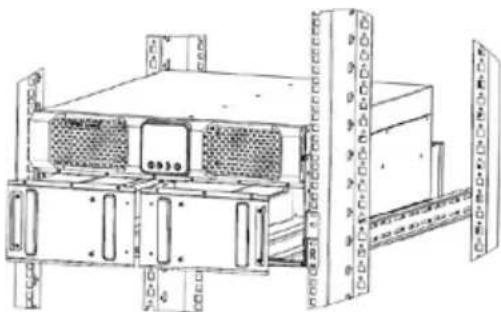
- Now fasten the two brackets that come with the device to the side of the UPS and, if using, an external battery unit according to Fig. 4. Make sure to put the bracket marked "L" on the left and the one marked "R" on the right hand side. Next, above the rack rails fastening on the cabinet front posts attach a further cage nut for final mounting of the UPS unit on the mounting brackets.
- Now insert the trays into the side rack rails previously installed in the cabinet.
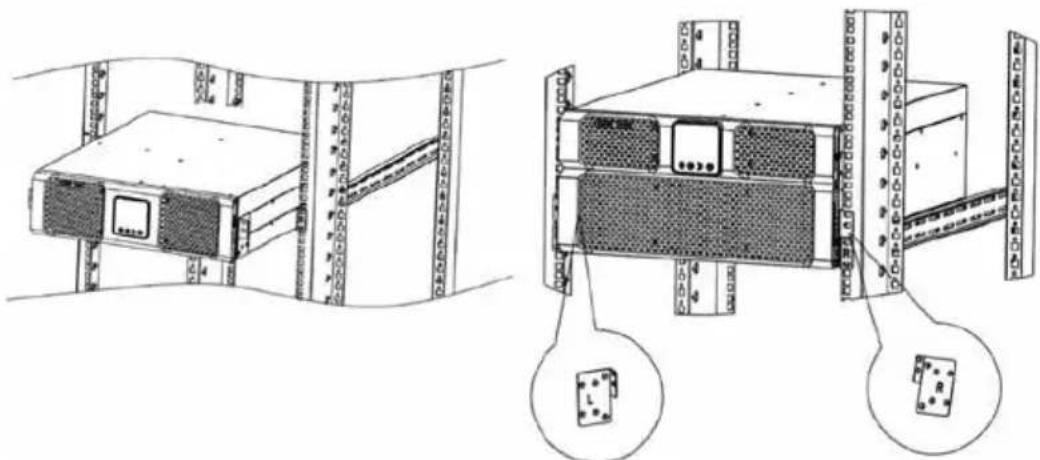
Fig. 4: Left, the mounting of a Protect D. 6000, right, an illustration of a Protect D. 10000 with details of the side-mounting brackets
- Repeat the process with the optional battery packs. These can then be screwed in flush with the rack. The Protect D. 10000 can be attached directly to the cabinet posts. Initially, only mount the Protect D. 6000 loosely.
- Familiarize yourself with the connections overview from chapter 5 and then follow the instructions on "Electrical connection" in chapter 6 beginning on page 31.
5. Overview of Connections, Operating / Display Elements
5.1 Front View
Fig. 5: UPS Protect D. 6000
Fig. 6: UPS Protect D. 10000
![graph TD G["PROTECT O"] --> E["E"] E --> F["F"] F --> G style G fill:#000,stroke:#000,color:#fff style E fill:#000,stroke:#000,color:#fff style F fill:#000,stroke:#000,color:#fff style G fill:#fff,stroke:#000 style E fill:#fff,stroke:#000 style F fill:#fff,stroke:#000](/content/2026/05/1028908/images/6543a6f5578ecefd434503c0c47a5421ff08d983a878e2eeae4e78aefdc820d8.jpg)
Fig. 7: Front view of the external optional battery unit
Explanations:
A UPS model series plate with power rating in VA B Status display (different colored LEDs) C Graphical LCD display for alphanumeric display D Operating keys for menu navigation

A detailed explanation of the operating panel can be found in chapter 7.2 on page 43.
E Locking screws to fasten the front panel

Behind the front panel (with the exception of the battery unit D. 10000 BP), you will find the terminals for the integrated batteries.
F Air vent (do not cover) G Name of the external battery extension
5.2 Rear-Panel View (Connections):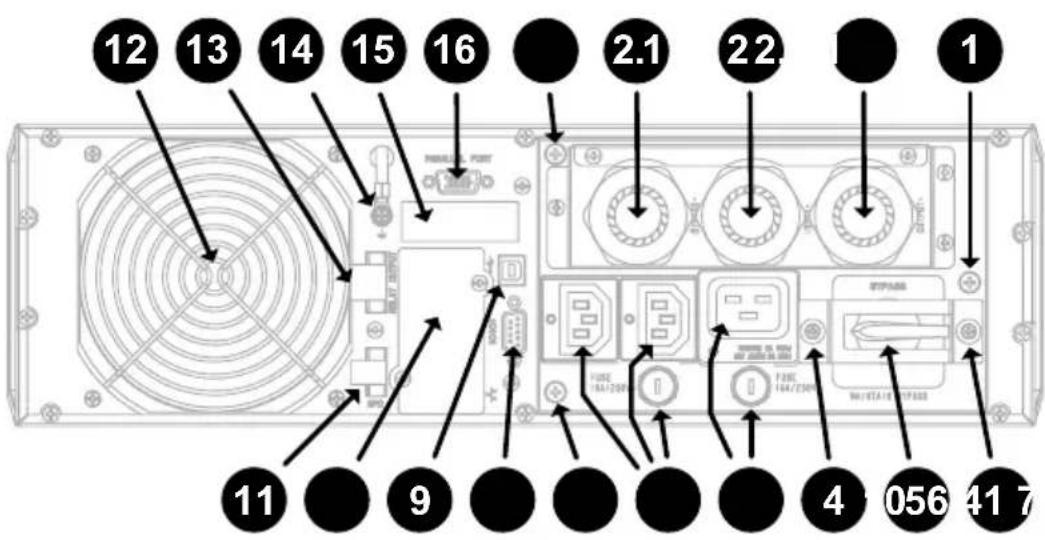
Fig. 8: Rear view of the Protect D. 6000
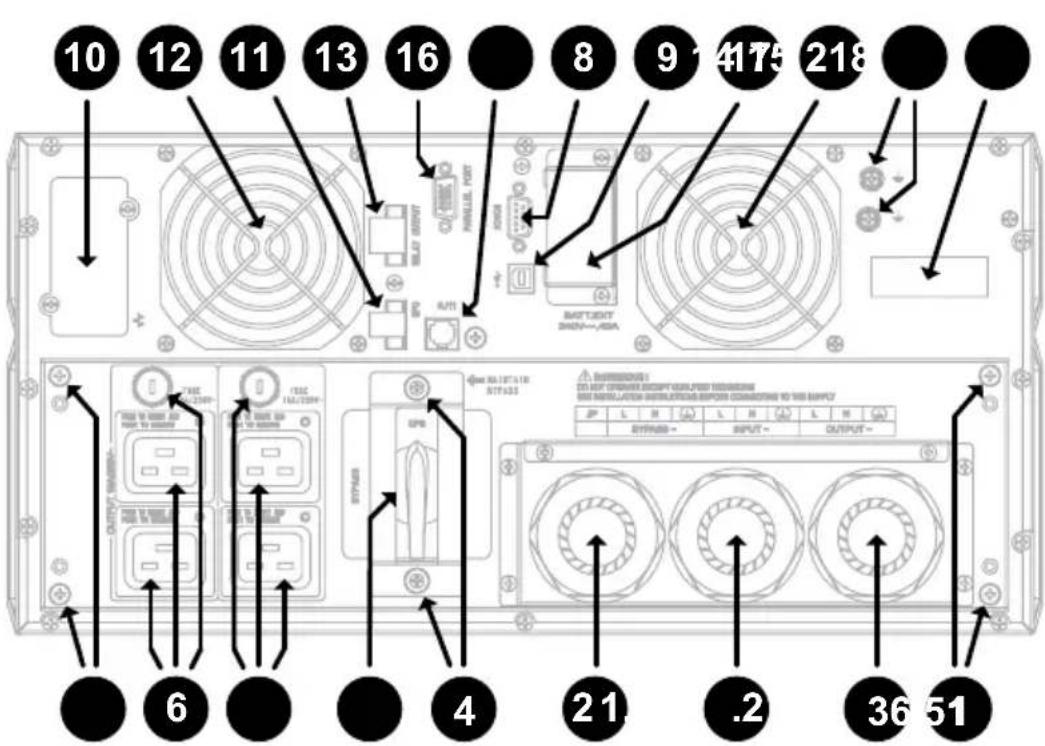
Fig. 9: Rear view of the Protect D. 10000
Explanations:
1 Locking screws for the removable connection unit 2 Power input - separate connection of bypass (2.1) and rectifier unit (2.2) is possible (dual input)

The feed can be run either from the rear-side or from the top of the cable glands (illustration shows rear-side). If only one cable is to be laid, the portable bypass feed (1.2) remains unused.
3 UPS output (load) over fixed connection 4 Locking screws for securing the bracket built into the manual bypass switch connection unit 5 Manual bypass switch 6 Consumer connection via IEC60320 C19 sockets, automatic arrestor fitted with an upstream fuse 7 Consumer connection via IEC60320 C13 sockets, automatic arrestor fitted with an upstream fuse

Taken from the consumer line by pressing the respective push button output of each IEC socket.
8 RS232 communication interface (sub-D9 jack) 9 USB communication interface 10 Communication slot for optional extension cards: Relay card, card for remote on / off, SNMP, ...

The USB and the RS232 communication interfaces cancel each other out, i.e. either USB or RS232. The communication slot is dual-monitor enabled, i.e. can be used parallel to the USB or RS232 interface.
11 Emergency power off contact, can be configured as open or closed 12 Fans (Caution: maintain a minimum of 100mm free space around the fans for free movement of air) 13 Changeover contact, potential free, programmable via the UPS control panel 14 Housing earth potential connection via additional screw(s) 15 Sticker with barcodes for article (GLN) and serial number (S/N) identification 16 Connector for parallel operation (separate BUS line required – see chapter 10) 17 Keyed connector unit for optional external battery pack (accessible by removing the cover) 18 Line detection connector (included with optional external battery pack)

The connection of the external optional battery pack(s) on Protect D. 6000 is made from scratch – see chapter 6.4.2.
6. Electrical Connection
Warning
Before beginning work, please ensure that cables are disconnected and that power is turned off.

In order to simplify assembly and to avoid deformation of the connector unit, secure input and output cables only with separate connection units. Use only highly flexible fine-stranded cables. Connect the connector firstly to the UPS.
High touch voltages can occur with freely accessible metal parts. Protective measures against earthing can be made through the grounding of the Protect D. via the designated (n) grounding screw(s)/PE). Prior to commissioning, please ensure that Protect D. and its optional battery tray contents are compliant with regulations, e.g. VDE0100 is earthed. To do this, connect the terminals " / PE" (Earth) to the grounding point of the cabinet frame.
Before beginning connection work, ensure that:
- The values of the mains voltage (supply) and frequency match those on the label of the UPS,
- The ground connection prescribed by IEC standards or regulations is consistent with local standards and regulations,
- The UPS is connected to the mains supply via a separate connection with the cable secured for low voltage distribution,
- Fuses or circuit breakers are used to match the values specified in chapter 6.2
- The connecting line from the fuse to the UPS with a minimum cross section according to chapter 6.2 "Connection cross section and fuses"
6.1 Safety of Personnel
When fitting the connecting cables, please note the following:
- Switch off power
- Secure against being switched on again
- Verify that equipment is isolated
- Earth and short circuit • Cover or fence off nearby live parts
The UPS may retain residual voltage, which can be dangerous. The device may only be installed by qualified personnel and, if opened, repairs may only be carried out by qualified service personnel!
6.2 Connection cross-section and fuses
Refer to the required dimensions of the table below (based on DIN EN 60439-1 (VDE 0660 part 500) and take into account the built-in terminal block):
| Protect D. 6000 Protect D. 10000 | |||
| Power supply line 1 (UPS input rectifier and possible bypass) | min. | 4\ mm2 | 6\ mm2 |
| max. | 10 mm | 10\ mm2 | |
| Power supply line 2 (optional) (Bypass-input) | min. | 4\ mm2 | 6\ mm2 |
| max. | 10\ mm2 | 10\ mm2 | |
| Consumer connection (UPS permanent connection) | min. | 4\ mm2 | 6\ mm2 |
| max. | 10\ mm2 | 10\ mm2 | |
| Battery connection (front) | using preassembled, using preassembled, polarity battery connectors. | (rear) | |
| Fuse (UPS Input) (Specifications are valid for both mains 1 and mains 2 if necessary ) | 32 A 50 A | ||
| Observed with the use of circuit breakers tripping characteristics “C” note! | |||
| Consumer protection (recommended max.) | 6 A 10 A | ||
| Tripping characteristic “B” note! | |||

The recommended maximum consumer protection ensures the selectivity of each UPS output circuit. Failure to comply with this recommendation may cause interruption to other loads connected to this UPS.
Protect D. offers high availability and the possibility of a separate supply from the rectifier and bypass (dual-input) all connected from one single power supply. If you require connection from two power supplies, they must be from the same network with identical reference potential. For other network connections, please contact AEG Power Solutions.
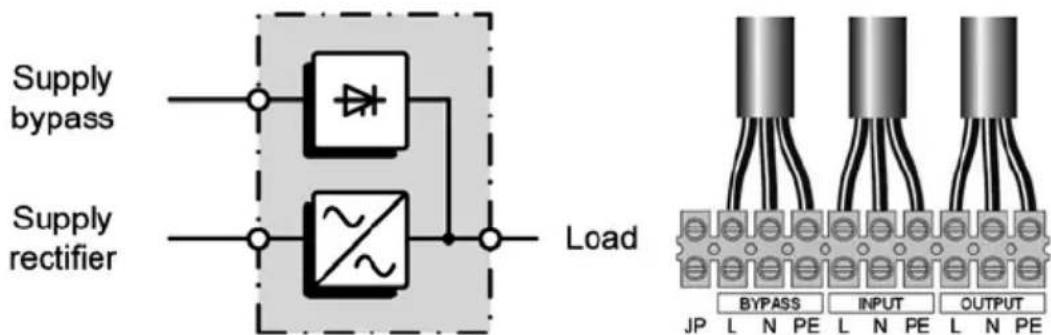
Fig.10: Supply with separate leads (DUAL-INPUT)
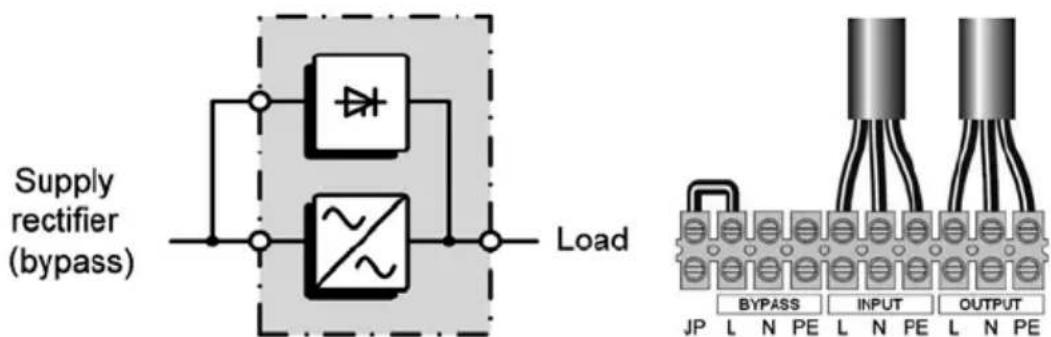
Fig.11: Central supply with one lead (SINGLE-INPUT)
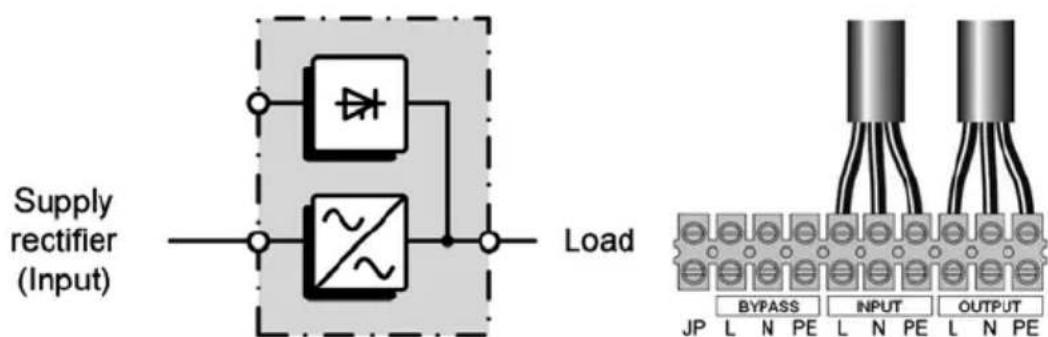
Fig.12: Operating as frequency converter (Bypass deactivated)
6.3 Mains and consumer connection
The in- and output cables are installed as follows:
- Connect the unit directly from the packaging for easier assembly, unscrew the rear strain relief screw. Depending on the desired cable entry (from the top or rear, e.g. dependent on the cabinet depth) break open the appropriate blanking plates. If the UPS will be operated with two separate power cords, then break open all three blanking plates; otherwise leave them untouched apart from the outside left (bypass) blanking plate.
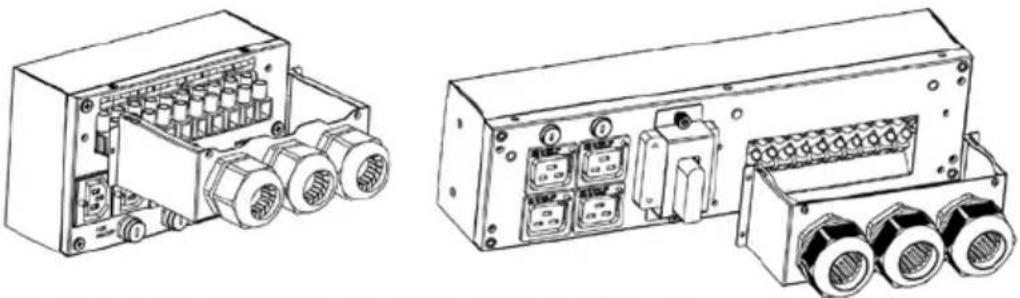
Fig. 13: Left, the detachable connection of the D. 6000 unit.
Right the Protect D. 10000, each shown with rear cable entry and dual-input.
- Strip the incoming and outgoing cables (after the onset of the cable glands) and feed them into the terminal compartment of the Protect D., ensuring that the proper strain relief glands are used.
- The cores of the cables hang at the appropriate terminal block. Ensure that ferrules are applied to the cable ends before connection. Begin by installing the ground (earth).

Check the bridges between "JP" and "L" (Feed-in bypass).
Remove the bridge unless you want to feed the bypass input of the UPS separately or to operate the UPS in frequency converter operation (refer to chapter 6.2).
- Remove cable scrap, tools, screws, etc. Install the previously removed strain relief gland back onto the Protect D. Make sure that you do not crush the individual cables. Fix the rear right side (D.6000) or rear left and right side (Protect D.10000) remaining mounting brackets for later fixing of the terminal unit. Finally, with the aid of the guide pins, plug the connector unit to the rear of the UPS and lock the unit with the outer fixing screws.
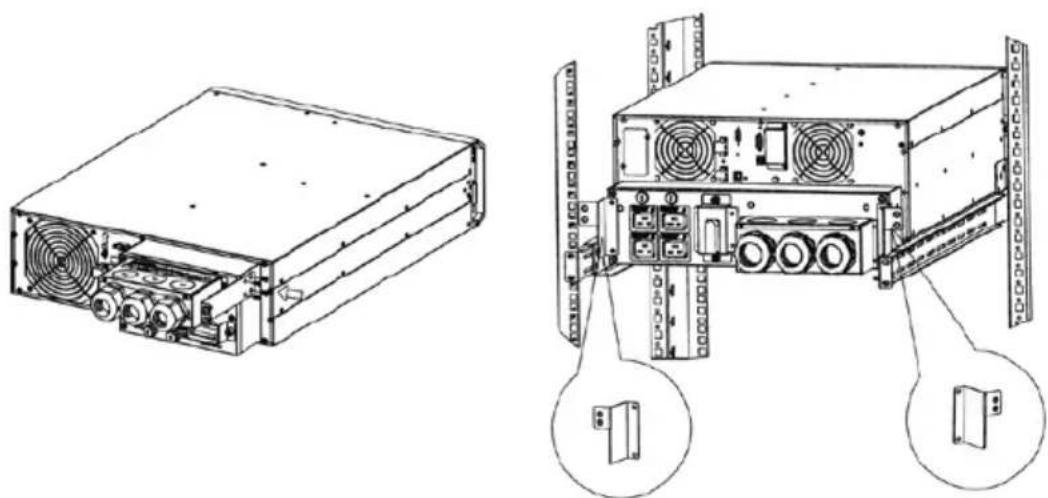
Fig.14: Connection unit with mounting bracket(s) for final assembly at the rear of Protect D.

In the case of a joint distribution box (circuits with both network as well as UPS power), you must identify each respective circuit power supply (AC or UPS).
The load of the UPS should not exceed the specified maximum capacity of the device at any time. If there is a device overload, the red LED light will flag a fault accompanied by an audible warning signal. Depending on the magnitude of the overload, the supply to the connected consumers remains for an amount of time. However, the connected load must be reduced immediately.
Failure to action the state "device overload" can lead to a total loss of all UPS functions!
Do not connect household appliances or machine tools to the UPS.

Do not connect additional loads to the UPS or switch if there is a power failure, i.e., the UPS is in standby mode!
As a rule, when in normal operation and no overload has occurred, then no overload should occur in battery usage.

A flashing LED in conjunction with a fault signal indicates a disconnection fault. Follow the instructions in chapter 9.1.
Finally check the seating of the emergency shutdown connector and the cable bridge. Check that the two outer screws of the plug are firmly seated (refer to page 30, item 11).
If you would like to use the emergency function, refer to chapter 8.4 on page 58.

The built-in emergency shutdown of the UPS is only for power. This is carried out electronically and does not constitute an EMERGENCY STOP device according to DIN EN ISO 13850.

6.4 Contacting the Battery Modules
This chapter refers to the contact of the internal battery and then to a slide-on connection of the optional external battery pack(s).
6.4.1 Connecting the Internal Battery
- Remove the four screws on the front panel with a suitable screwdriver (Phillips PH1 recommended, item "E" of the illustration on page 26).
- Hold the Protect D. 6000 on the left and right sides behind the front panel and carefully pull the UPS out about 70mm from the front of the rack frame (not required with Protect D. 10000).
- Move the front panel a few millimeters to the left. The locking mechanism should now be released.
How to proceed D. 6000
- ... you can flip up the entire front. Do not disconnect the ribbon cable to the LCD display! Please handle carefully and with minimum force.
How to proceed D. 10000
• ... you can move the entire front panel forwards. Please handle carefully and with minimum force.
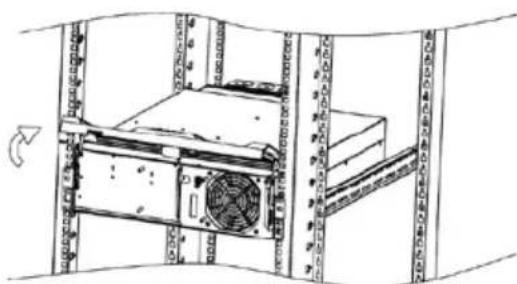
- Now unscrew the left side screw located on the battery compartment cover.
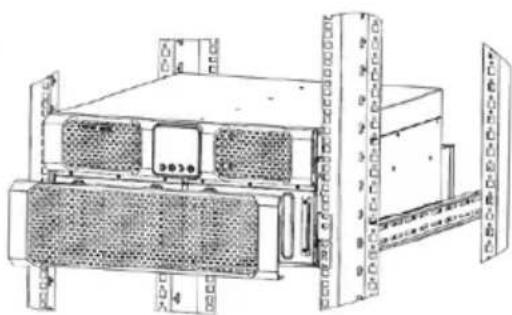
- Now unscrew the left and right side screws located on the battery compartment cover.
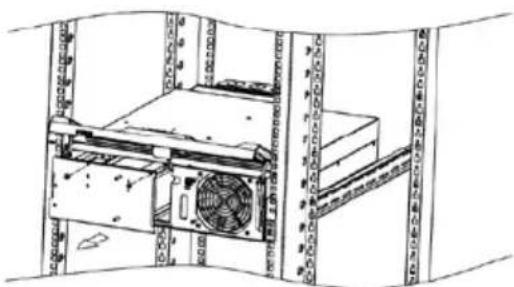
- Slide the battery tray carefully into the slot on the left hand side of the UPS. The connections for the UPS front panel should be facing in the direction of the front panel.
- Slide forward the two battery trays connected to the terminals carefully towards the back of the UPS.
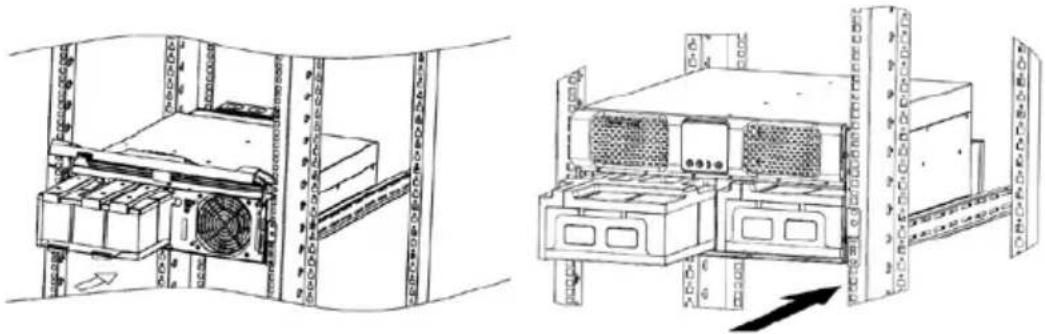
- Connect the internal battery system using the two battery connectors (each consisting of a black and a red plug): connect black to black and red to red.
- The battery modules automatically contact the rear part of the UPS via a special connector. To ensure a proper connection, press the appropriate slot towards the end quickly and firmly into the connector.

When connecting, insert the plugs quickly and firmly together. It is likely that a small arc may occur. This is of no significance.
- Fix the dismantled battery compartment cover back in place. If you are using the extensions in conjunction with the UPS external battery, then proceed to the next chapter. Otherwise, close the front panel carefully and be careful not to pinch any of the wires.
- Now re-attach the demounted battery compartment cover. Then return the front panel back to its original position.
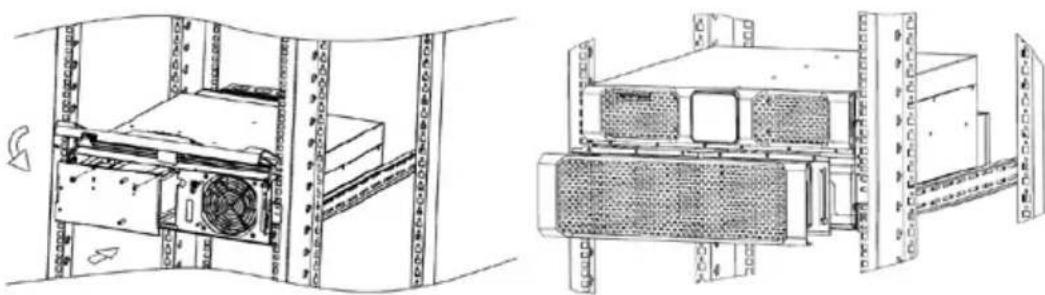
- As a final step, remember to tighten the four centrally positioned cross-head screws in the center to lock the panel into place.
- Finally, slide the UPS completely into the rack and attach the UPS on the side with the supplied screws.
6.4.2 Connecting External Battery Extension(s)

The connection of the optional external battery unit(s) for the Protect D. 6000 takes place on the front, while on the D. 10000 it takes place at the rear. Due to the different procedure for connecting the two variants, each is therefore described separately in separate chapters.
Protect D. 6000
The front panel of the Protect D. 6000 should still be in the open folded up state. Now remove the slot cover at the bottom of the UPS front cover.
Similarly to the UPS, also remove the front panel(s) of the external battery pack(s). Each front panel has a top and bottom slot cover. Now remove the top slot cover on the front panel. If you are using more than one battery unit, remove both slot covers in the remaining front panels so that you can wire the battery units all the way through.
Now start to lay the battery wiring according to the following diagram. The electrical connection takes place via the connection of the respective battery connectors (each consisting of one green, one black and one red male): green to green, black to black, red to red.

Make sure to press the connectors quickly and firmly into one another (green to green, black to black, red to red). If you see a small electric arc while doing this, this is no cause for concern.
Automatic detection takes place via a detection line, whose small transparent RJ11 plugs are to be inserted in the sockets provided for this purpose.
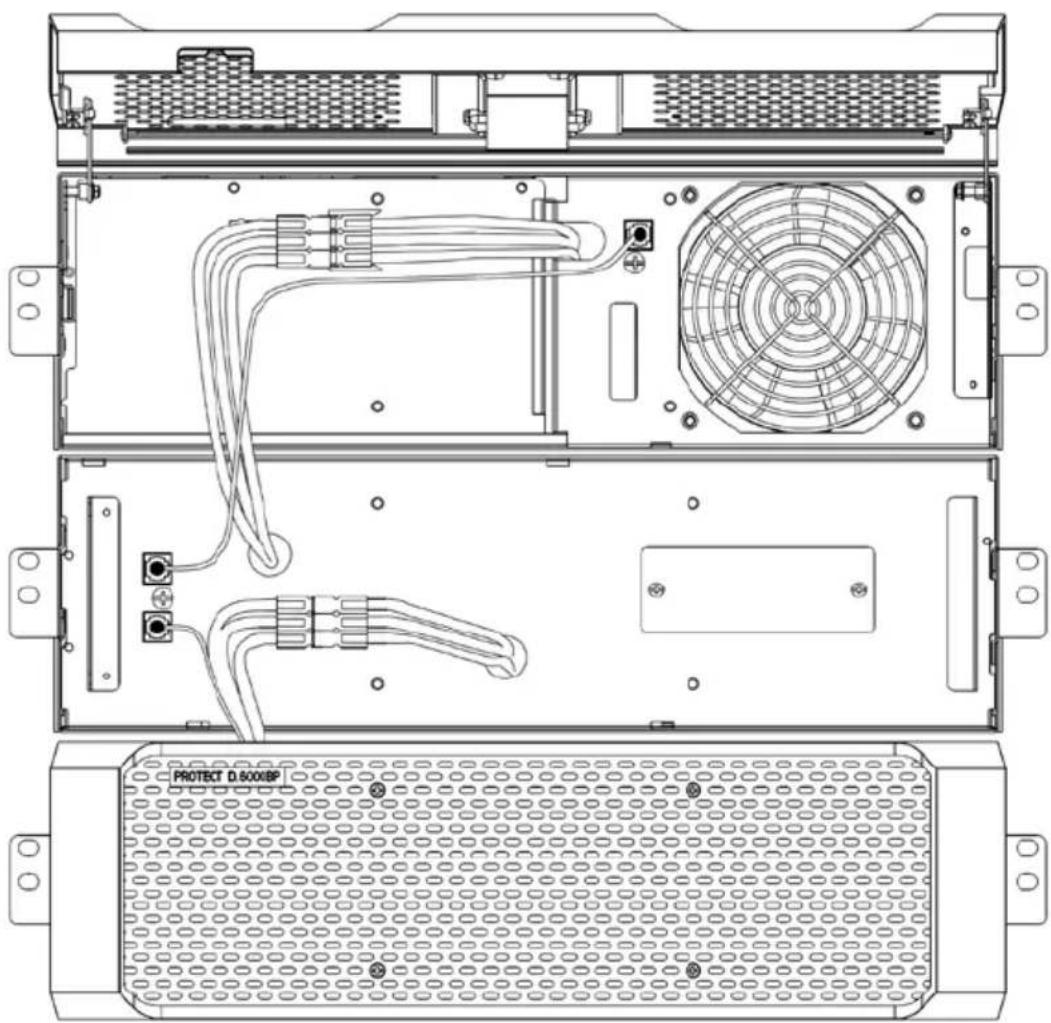
As the last step, replace the front panels. The wires are to be threaded carefully through the corresponding access slots and are protected behind the front panels. Remember to tighten the four centrally positioned cross-head screws in the center to lock the panel into place.
As mentioned, the connection for the external battery pack(s) takes place at the rear of the unit. Opening the front panel(s) is not required here.
Next, start with the contact for the first external unit. Remove the battery connector cover from the back side of the UPS (see No.17 on page 28). Connect the connecting cable affixed to the external battery pack from now on with the UPS, according to the accompanying illustration. Insert the plug firmly and fully in the reverse polarity protected battery connection jacks.
The next step pertains to the enclosed data cable with the small transparent RJ11 connectors. It is used for automatic detection of the battery unit(s). Connect the UPS in turn with the first battery unit according to the illustration.
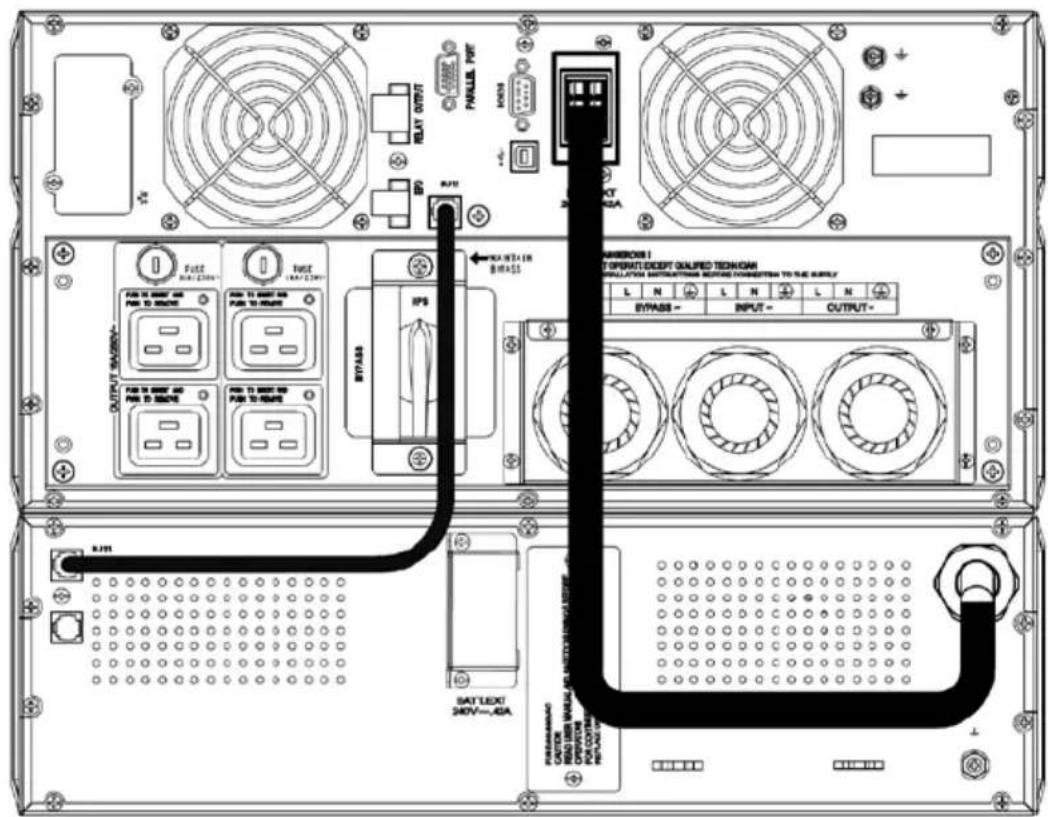
Repeat the above mentioned steps for adding additional external battery units. In this case the connection of the next battery takes place on the previous one and so on.
7. Operation Mode and Operating
7.1 First Start-Up
7.1.1 Switching On the UPS
Attach the back-up fuse into your low-voltage main distribution (where the UPS system was connected on the input side to the public network), or activate the corresponding line circuit breaker. Remember the supply for a separate bypass feed-in.
The UPS will be immediately supplied with power from the public power network. It will start up with an initialization phase, indicated by the AEG logo, which appears on the screen for 5 seconds. After that, you will see the following message:
UPS On
Now confirm the highlighted "UPS On" command by pressing "ENTER". Hold the key pressed for approx. 1 second. The UPS will synchronize and switch into normal operating mode after just a few seconds. The display will switch to the UPS status display.

If there are no keys pressed for 5 minutes, the display will automatically switch back to the UPS status display. Press "▲" to return.
7.1.2 Switching Off the UPS
UPS Off
Confirm: yes no
If the UPS is in operation, it is possible to access the command above by pressing "▲" when in the basic UPS status screen. Once you have confirmed the command again, the UPS will switch off or switch to bypass (depending on the setting selected).
To enable you to find the "UPS On" or "UPS Off" menu item more easily, the following symbol appears above the "▲" key:
Complete shutdown of the system, i.e., taking out of service occurs after shut-off of the UPS via separation of the public power supply connected on the input side.
7.2 Usage Table
7.2.1 Overview
The main feature of the operating panel is its graphical, LCD display. The standard setting is white lettering on a black background. There are 4 keys at the bottom for menu navigation and another 3 different-colored LEDs at the top.
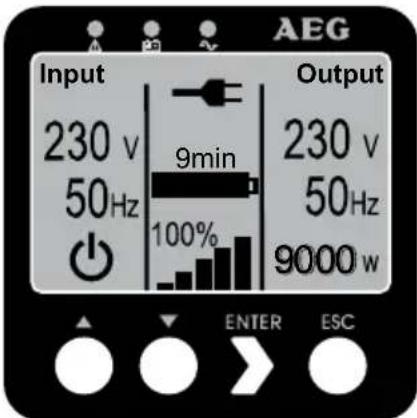
Fig. 15: Standard "UPS status" display
7.2.2 Indicators (LEDs)
The indicators (LEDs) show the following different modes:
| DisplayStatusDescription | ||
 | Red (flashing) Warning | |
| Red (permanently on) System error | ||
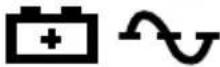 | Yellow and Green (permanently on) | Battery mode |
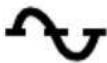 | Green (flashing) | Bypass mode |
 | Green (permanently on) | Normal mode (double-conversion) |
7.2.3 Operating Keys (Navigation)
The 4 keys for navigation control the following functions:
"▲" key: Press this key to scroll upwards in the menu levels or to alter a value you want to set.
If you press this key in the status display, you will access the "UPS On or Off" menu item.
"▼" key: Press this key to scroll downwards in the menu levels or to alter a value you want to set.
"ENTER" key: Press this key briefly to select the corresponding menu item. To confirm and store a menu item in the "Settings" menu, press this key and hold it down for at least 1 second.
"ESC" key: Press this key to return to the previous menu level without altering any settings. If you press this key in the status display, you will access the main menu.
If no keys are pressed, the display will automatically return to the standard display after 5 minutes. If you want to "freeze" a screen in the "Measurements" menu, press "▲" and "▼" at the same time for about 3 seconds. A small key appears on the upper right-hand side of the display to indicate this setting. Press both these keys again for approx. 3 seconds to cancel this setting.
7.3 Display (Main Menu)
Press "ESC" to access the main menu.
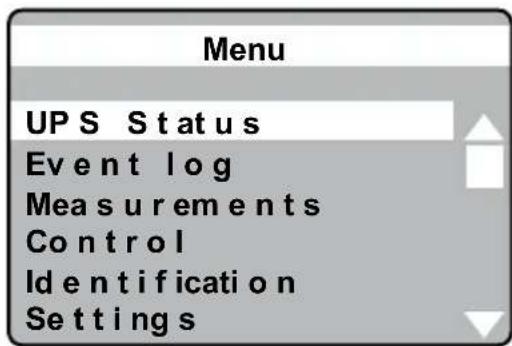
Main menu for the LCD display
The following figures show the display in English (to change the language see chapter 7.3.6 from page 51 "Settings").
7.3.1 UPS Status Display
You can access the status screen by pressing "▲" or "▼" in the main menu to go to "UPS Status" (the line is then highlighted) and then press "ENTER" (automatic display after 5 min.).
The UPS status display is divided into several different sections to retrieve the following information:
- Display that summarizes all load segment-relevant input and output parameters, including the information on operation status, the current load and the currently available battery capacity
- Messages and alarms (also see chapter 9.1.1 from page 61)
- Battery display with status window and state of charge
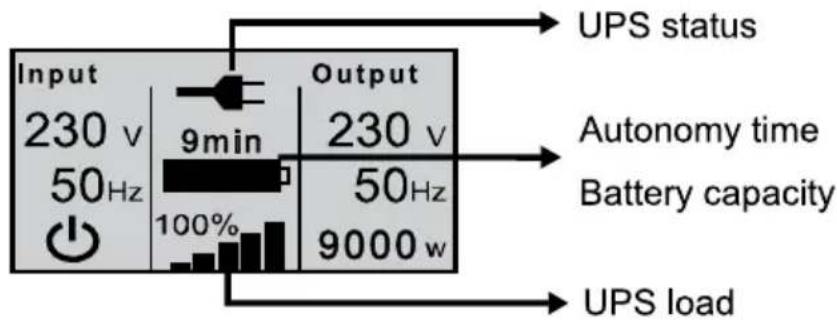
Part 1 of the UPS status display
The display indicates the current UPS status in the top middle section.
Here is a list of the symbols used and what they mean:
DisplayStatus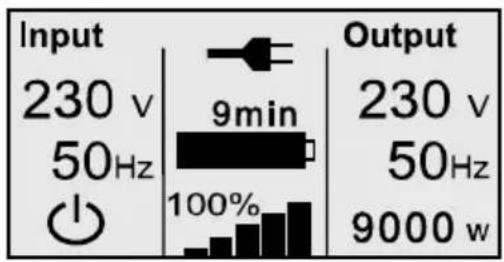
UPS is in normal / continuous double-conversion mode. Power supply is available and within the acceptable tolerance range (Mode: "High performance").
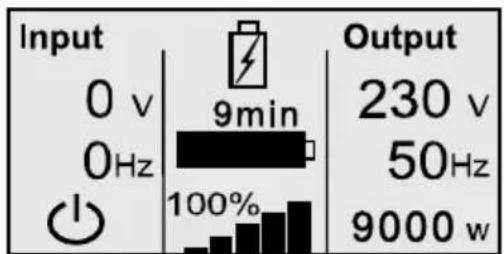
UPS is in battery mode.
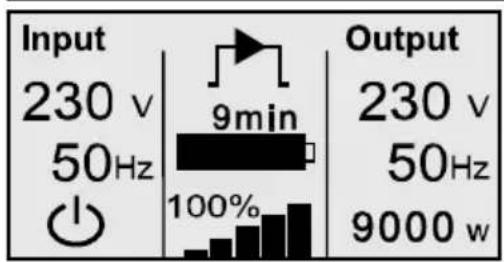
UPS supplies the load via the integrated bypass.
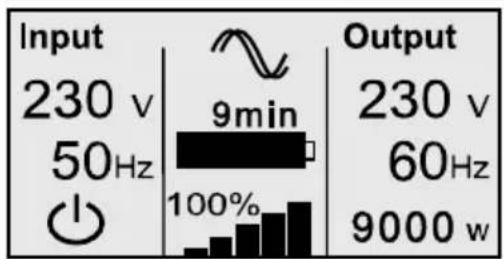
UPS is operating in frequency converter mode.
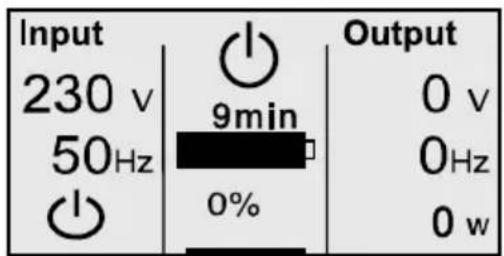
UPS is in standby mode.
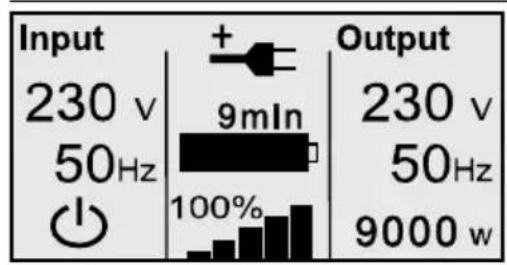
UPS is operating in economical mode (ECO mode).
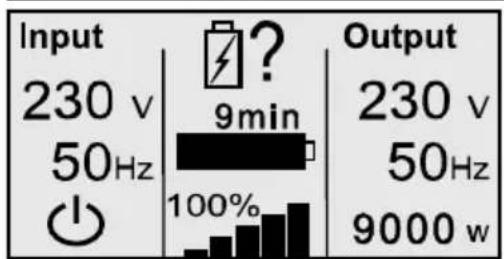
UPS is testing the battery.
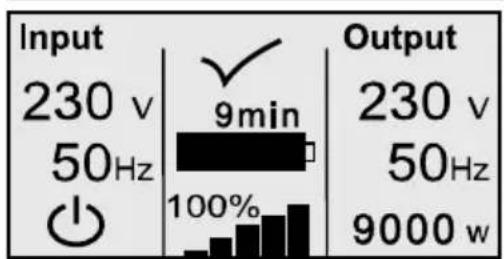
Display for 10 seconds after a successful battery test.
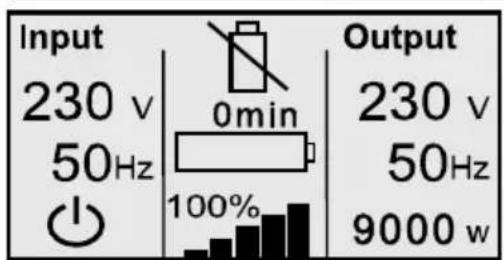
UPS reports a defective or disconnected battery system.
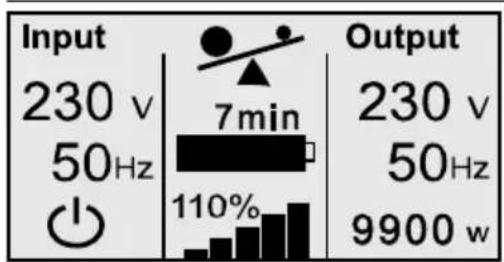
UPS is overloaded.
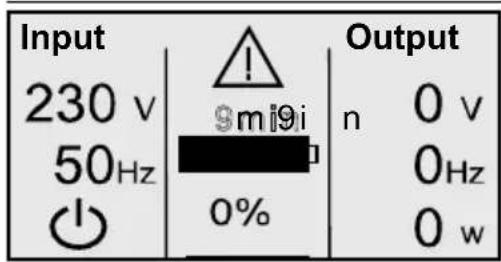
UPS indicates a critical error and has switched off the UPS output.
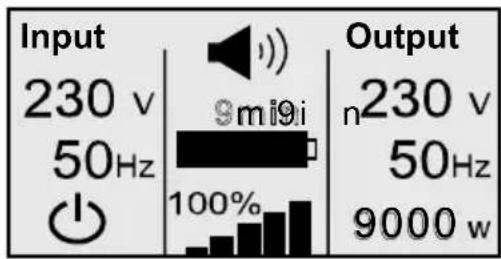
General UPS alarm. Details can be found in the Alarm messages and entries in the event log.

The "Input" display changes periodically every few seconds between the "mains rectifier" and "bypass" display and its technical data.
Messages and alarms
Press "▼" to access part 2 of the UPS status display. It contains current messages and alarms, if any. Each message or each alarm is displayed in its own window and you can press "▼" to scroll through them.
If there is no information available, the following message will appear: "No alarms"

Events are listed and stored in the "Event log" only (a separate menu item) with the corresponding date and time.
Part 3 of the UPS display contains information on the battery status; it can also be accessed by pressing "▼".
| Battery status display Description |
| Battery charge Batteries are currently charging with constant current. |
| Battery float charge Batteries are currently being supplied with constant voltage. |
| Battery resting Batteries on standby, but in “sleep” mode (part of the battery standby cycle mode). |
| Battery discharge Batteries are currently discharging, e.g. due to a power outage. |
| Battery disconnected Battery system not available because currently not connected. |
7.3.2 Event log
Up to 127 events are stored in the internal non-volatile event memory in the UPS. The last event that occurred is the first on the list, followed by other previous events. Similar to the messages and alarms, each event is shown in its own window.
An event is indicated along with the date and time, followed by a description in plain text. The numerical code facilitates error analysis and other procedures in dealing with the event that has occurred (also see chapter 9.1.1 from page 61). In the lower right-hand corner of the display, you will find the total number of events already stored as well as your position when scrolling through the window. "1 / ..." indicates the most recent, last stored event (= starting position when accessed).
If there are no events stored or if the event memory has been deleted (also see chapter 7.3.6 from page 51), the following message will appear: "No events in the event log".
Accessing the event log
Access the event log by pressing "ESC" to go to the main menu and then pressing "▲" or "▼" to go to the "Event log" menu item (line appears highlighted) and then press "ENTER" (basis / starting point is the UPS status display).
Return to the UPS status display by pressing "ESC" again (or automatically after 5 minutes if no other keys are pressed).
7.3.3 Measurements
Select this menu item to find the following measurements in this order:
Power Usage Efficiency [%]
Output power (active and apparent power) [W] & [VA]
Output power (current and power factor) [A]
Output (voltage and frequency) [V] & [Hz]
Input (voltage and frequency) [V] & [Hz]
Battery (voltage and charge state) [V] & [%]
DC bus (intermediate circuit voltage) [V]
External battery modules
Total kWh consumption [kWh]

If you want to see any particular measurement on the screen permanently, you can “freeze” the screen in the Measurements menu. To do so, press “▲” and “▼” for approx. 3 seconds at the same time until a small key appears in the upper right-hand corner of the display. Press the two buttons again at the same time for approx. 3 seconds to cancel this setting.
7.3.4 Control
During normal mode, you can activate this menu item to access the following sub-menu items: "Go to bypass mode", "Battery test", and "Reset error state".

Depending on the operating mode, only those sub-menu items that are available will appear.
| "Control" / Command Description | |
| Go to Bypass / Normal Possibility to change operation mode. | |
| Menu item visible only when the UPS is currently in Bypass or Normal Mode. | |
| Battery Test Conducts battery test after confirmation. | |
| Cancellation possible at any time as needed. | |
| Reset Error State Resets alarm messages | |
| Manually clears any active alarms, such as battery fault detected or DC Bus over / under voltage. | |
| With an active battery fault alarm, the battery test status will also simultaneously reset to "Not Tested". | |
7.3.5 Identification
Activate this menu item to view the following sub-menu items: "Type / Model", "Part number", "Serial number" and finally the current "UPS firmware" version one after the other.
7.3.6 Settings
The following table provides you with a detailed description of the possible user settings using the UPS operating panel:
| Description Adjustable parameters Presetting | |
| Change Language [English], [German], [French], [Spanish], English[Russian]NOTE: Language selection order depends on the current selection. | |
| User Password [[enabled], [disabled] disabledIf Enabled, select character between A~z and numbers between 0~9.NOTE: If you enter an incorrect password, the message “Incorrect Password” appears. Press any button to return to the password screen and retry the password. |
| Description Adjustable parameters Presetting | ||
| Audible Alarms [enabled], [disabled] | enabled | |
| NOTE. The setting takes place immediately and will remain permanently stored, even in the case of power failures.This differs from the mute feature where the horn is temporarily silenced on any button press, but turns on again if a new alarm is triggered. | ||
| Set Date and Time | Set Month, Day, Year, Hours and Minutes; | 03 / 15 / 2010 |
| Date layout: mm / dd / yyyy | 18:00 | |
| Time layout: hh:mm | ||
| NOTE: The date format depends on the language selection. | ||
| NOTE: Time is a 24-hour clock. | ||
| Relay configuration | [UPS ok], [on bypass],[on economical mode (ECO)],[on battery], [battery low],[battery fault], [battery missing],[fan fault], [combined alarm] | UPS ok |
| Control Commands from Serial Port | [enabled], [disabled]If Enabled, control commands are accepted through Serial & USB port and cards in the communication slot.If Disabled, configuration and load control commands are restricted to LCD panel only. | enabled |
| Output Voltage | [200V], [208V], [220V], [230V], [240V], [auto-sensing]Setting only available in UPS stand-by mode. | auto-sensing |
| Output Frequency | [50Hz], [60Hz], [auto-sensing]Setting only available in UPS stand-by mode. | auto-sensing |
| Load Alarm Level (Overload) | [10 %], [20 %], [30 %], ... [100 %]NOTE: The adjustment is configurable in 10 % increments so a possible UPS overload can be detected early. | 100 % |
| Power strategy [High performance mode (normal)], [Economical mode (ECO)], [converter] - Setting only available in UPS stand-by mode. | normal | |
| Start w / o mains [enabled], [disabled]UPS start from battery supply | enabled | |
| Battery Saving Mode | [disabled], [10 %], [20 %], ...[100 %]On battery operation the UPS output is turned off as soon as the battery capacity is below the selected level. | disabled |
| Alarm for phase error | [enabled], [disabled] disabled | |
| Charger output voltage / cell | Float charging voltage per battery cell 2.21V, 2.22V, 2.23V, 2.24V, 2.25V, 2.26V, 2.27V, 2.28V, 2.29V, 2.30V, 2.31V | 2.28V |
| Battery charge capability % to restart | [0 %], [10 %], [20 %], ...[100 %]UPS switches consumers only after reaching the preset minimum battery threshold capacity. | 0 |
| Automatic battery test | [enabled], [disabled] enabled | |
| Periodic battery tests | [daily], [weekly], [monthly] weekly | |
Automatic battery tests run according to “periodic battery test”, unless disabled. During the test, the UPS transfers to Battery mode and discharges the batteries for about 20 seconds under the existing load.

The "UPS on Battery" notice and the "Battery Low" alarm do not activate during a battery test.
A battery test can only be run under the following conditions:
- The UPS must be in Normal mode • There can be no active alarms
- The batteries must be fully charged.
- The input voltage with respect to the bypass voltage window must be within tolerance range
| Description Adjustable parameters Presetting | ||
| High ambient temperature alarm | [enabled], [disabled] Preset alarm threshold at >40 °C | enabled |
| EPO operation (normally open), [normally closed] Normally open means UPS makes a shutdown by a closing input state. Normally closed means UPS makes a shutdown by an opening input state. Setting only available in UPS stand-by mode. | normally closed | |
| Reset Cumulative Consumption kWh | [no], [yes] If “no”, no action. If “yes”, the Cumulative Consumption kWh value is cleared and the date and time stamp for this statistic is set to the current date and time. | no |
| Limitations of battery usage | 5h, 6h, ...14h, 15h, 16h, ...999h, inactive 14h If the selected time window for UPS battery operation is exceeded, the UPS will make bat low alarm and then shut itself down 30 minutes later even if battery voltage is still above the shutdown value. Disabled means “No time limitation” for battery mode | 14h |
| Auto reboot [enabled], [disabled] | enabled | |
| "Enabled " means the UPS outputs are automatically reconnected after ensuing switch-off, e.g. due to low battery voltage after power is restored. | ||
| Auto bypass [enabled], [disabled] | enabled | |
| "Enabled" means UPS will have bypass output when utility power on. | ||
| "Disabled" means UPS will not have bypass output when power is on but could get bypass output when UPS is in fault or overload. | ||
| Start-up without battery | [enabled], [disabled] | disabled |
| "Active" means the UPS can be started without installed battery system. | ||
| Clear Event Log | The number after "Total events" shows how — many events are currently stored in the log. Press the "ENTER" button for one second to reset the event count to zero and clear the log. | |
| LCD Contrast [-5], [-4], ...[-1], [0], [+1], ...[+4], [+5] | 0 | |
| The LCD Contrast is adjustable and the valid range is from -5 to +5. | ||
| Restore Factory Settings | [no], [yes] | No |
| Setting only available in UPS stand-by mode. | ||
| Restoring the factory settings: | ||
| Returns all user-configurable settings to default factory settings | ||
| Resets all pending on / off commands | ||
| Clears the alarm and event log | ||
| After acknowledgement the UPS conducts a new initialization process | ||

The "Restore Factory Settings" process is completed after the UPS is switched off completely. Wait until the fans stopped to prevent the UPS internal EEPROM overwriting.
8. Interfaces and Communication
8.1 RS232 and USB Computer Interfaces
There are several different interfaces available to control the UPS and conveniently read out status messages and measurements. The interface log is designed to be used with "CompuWatch", the shutdown and UPS management software from AEG. Use the RS232 or USB communication cable that comes with the device to connect your UPS to a PC.

The USB and the RS232 communication interface rule each another out, i.e. either USB or RS232. Pin allocation of the RS232 Sub-D9 jack:
2 = TxD; 3 = RxD; 5 = GND
8.2 Communication slot
There is a cover on the rear panel of the UPS (see no. 10 on page 29); remove it to install additional, optionally available communication components, e.g.:
Relay card: Plug-in card with status messages, realized via potential-free relay contacts (opener or closer)
Relay PRO card: As above, but with programmable pin allocation, connection via terminal, additional option of remote On / Off
SNMP card: Plug-in card for the direct integration of the UPS into the Ethernet network via RJ45 (TCP / IP)
SNMP PRO card: As above, but with the additional option of connecting and managing an external sensor system
For details, please refer to the descriptions that come with each option. Additional cards are in preparation.

The communication slot can be used in parallel to the RS232 or USB interface.
8.3 Shutdown and UPS management software
"CompuWatch", the AEG software developed specially for these purposes, continuously checks the mains power supply and the status of the UPS.
In combination with the "intelligent" UPS, this ensures that the data-processing components and data backup are available.
The "CompuWatch" shutdown and management software supports a diverse range of operating systems, including Windows 98 / ME, WindowsNT / 2000 / XP, Windows Vista / 7, Linux SUSE, Linux RedHat, Novell Netware, IBM AIX, HP-UX, SUN Solaris, Mac OS X, ...
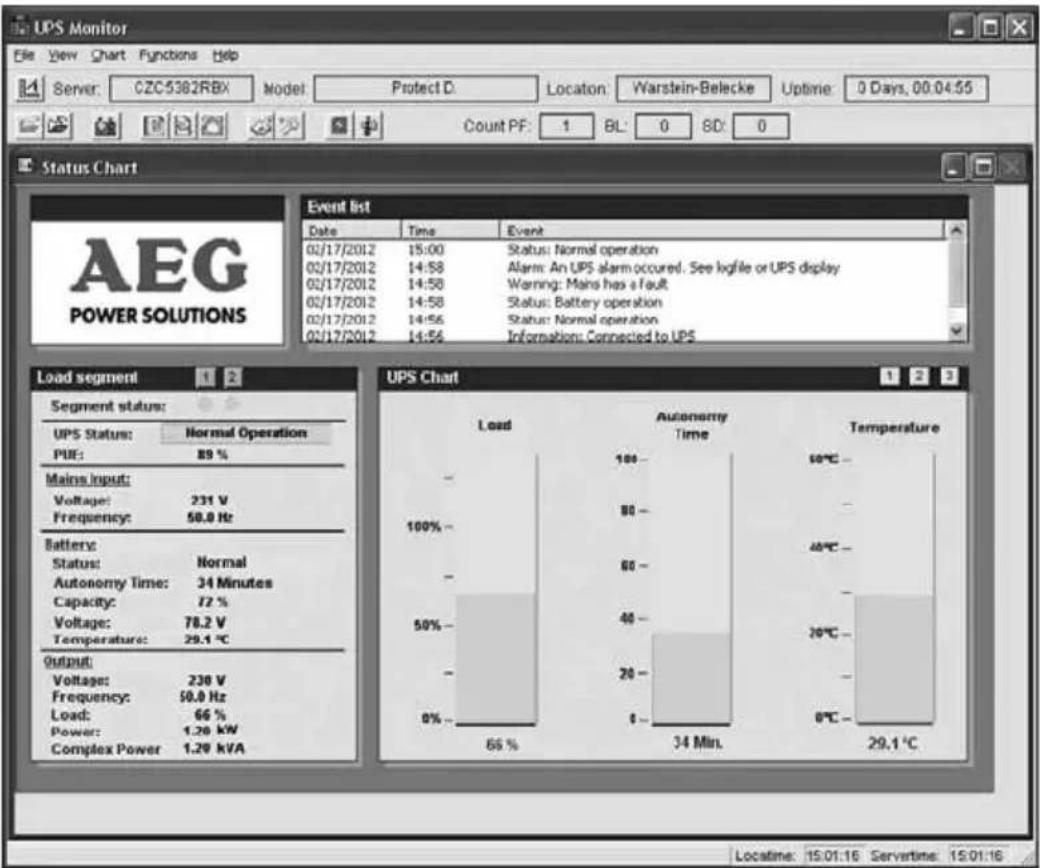
Fig. 16: Example of a "CompuWatch" screen
For details on the installation under the different operating systems, please refer to the operating manuals on the CD.
Download updates are available from www.aegps.com.
8.4 EPO (Emergency Power Off)
All the devices in the Protect D. series are equipped with a connection that allows the immediate shutdown of the UPS output to deactivate any connected devices and does not follow the control software shutdown process.

Note:
Once the emergency power off has been activated, the UPS outputs are voltage-free. The UPS will not return to normal operation until the emergency power off has been confirmed / reset and a manual reboot is performed by activating "UPS On" switch once again.
To install the Emergency Power Off, proceed as follows:
- Check to see that the UPS is switched off and switch it off if necessary.
- Remove the plug from the EPO insert on the rear panel of the UPS by unscrewing the 2 outer screws (also see page 30 item 11).
- Connect a potential-free opener contact (able to manage a load of at least 60 Vdc / 30 Vac 20 mA) with the pins of the plug.
- To do so, use a flexible wire with a cross section of min. 0.5 mm², max. 2.5 mm². Replace the plug and lock the insert into place in the base by tightening the outer screws.
To do so, use a flexible wire with a cross section of min. 0.5 mm², max. 2.5 mm². Replace the plug and lock the insert into place in the base by tightening the outer screws.

Note:
If you want to use an open contact rather than a closed contact, go to "Settings" in the main menu and set "EPO operation" to (N.O.) "normally open".

The Emergency Power Off installed only switches off the UPS voltage. This is done electronically and is not the same as an EMERGENCY STOP system corresponding to DIN EN ISO 13850.
8.5 Change-over Contact
A potential-free change-over contact is located on the rear panel of the Protect D. series to provide for external, potential-free signaling. For the exact pin allocation, refer to the label next to the base. The contact load is 250V ac 3 A, respectively 30 V dc 3 A.
Depending on the application, different messages can be allocated to the contact using the operating panel (see chapter 7.3.6 from page 51 "Relay configuration").
Use a flexible wire with a cross section of min. 0.5 mm² to max. 2.5 mm².
Replace the plug and lock the insert into place in the base by tightening the outer screws.
9. Troubleshooting
9.1 Malfunctions
The Protect D. issues detailed error messages to help you or the maintenance staff to localize and interpret any malfunctions that may occur quickly and with high precision. In the following, please find process / solution suggestions to eliminate the problem that has occurred.
If you cannot solve the current problem, terminate the entire process, switch the UPS off and disconnect it from the power supply. In this case, call our hotline (see page 7).
Make sure that you have the serial number of the device and the purchasing date handy. The hotline will provide you with technical support and tell you what to do after you have described the problem.
9.1.1 Alarm / Error Messages
| Alarm or Notice Possible cause Remark / Action | ||
| UPS On Bypass(Notice #169) | UPS has been manually or automatically switched to bypass operation. | The load is supplied with voltage through the bypass network.System disturbances are attenuated by passive filter elements, but there is no active control by the inverter, i.e. a power failure would mean the direct loss of consumer power. If the system automatically switches to bypass operation, check if there is- Overheating or- Overload or general- UPS fault. |
| UPS on Battery(Notice #168)Intermittent Alarm mode. | A utility failure has occurred and the UPS is in battery mode. | The UPS inverter feeds load via the UPS internal battery.Try to restore line voltage (blown fuse in your sub-distribution; if necessary, refer to responsible electrician). |
| BatteryDisconnected(Alarm #199)Continuous Alarm | The UPS does not recognize the internal batteries.Voltage of the battery system is not within the tolerance window. | Switch off UPS voltage; check for correct connection of UPS and battery system.If the condition persists, contact your service representative. |
| Low BatteryWarning(Alarm #56)Intermittent Alarm | The battery time remaining or battery capacity is lower than the battery low warning level that is defined for this UPS. | Warning signal as a last warning to the impending switch-off. The actual time to shutdown will vary depending on the UPS load and presence of an extended battery module. |
| ShutdownImminent(Alarm #55)Intermittent Alarm | UPS communication is repealed since shutdown of load is imminent. No further communications until power is restored. | Alarm is generated when the battery capacity reaches the value 0. All connected loads should already be shut down at this point. |
| Battery Test Failed(Alarm #191)Intermittent Alarm | A weak battery was detected during the last battery test. | This is a warning notice. Replace the batteries soon. |
| Service Battery(Alarm #149)Continuous Alarm | A faulted battery has been detected and as a result, the charger is disabled. | Check battery system. If the problem persists, contact your service representative. |
| Input power failure(Alarm #59)Intermittent Alarm | Power supply voltage is interrupted. | Operating phase related, UPS switches to battery power and shuts down. |
| Input AC Over Voltage(Alarm #6)Intermittent Alarm | The utility power voltage exceeds the maximum operating range. | Operating phase related, UPS switches to battery power and shuts down. |
| Input AC Under Voltage(Alarm #7)Intermittent Alarm | The utility power voltage exceeds the maximum operating range. | Operating phase related, UPS switches to battery power and shuts down. |
| Input frequency deviation(Alarm #8)Intermittent Alarm | The utility power frequency is out of usable frequency range. | Operating phase related, UPS switches to battery power and shuts down. |
| Phase error (error in network connection)(Alarm #194)Intermittent Alarm | Phase and neutral conductors interchanged at the input of the UPS system. | Check / correct the connection of phase and neutral conductors. |
| Emergency Power Off(Alarm #12)Intermittent Alarm | The external contacts for emergency power-off were activated in settings menu and triggered. | Load supplied by the UPS is turned off immediately.For more information, see “EPO (Emergency Power Off)” in chapter 8.4 on page 58. |
| Output Overload(Alarm #25)Intermittent Alarm | Overload of the UPS system. | Check the display for utilization capacity of the UPS. If necessary, reduce the load by removing a portion of your consumer. |
| Battery DC Over Voltage(Alarm #68)Intermittent Alarm | The voltage on the DC intermediate voltage circuit of the UPS has exceeded the DC tolerance range. | To protect the consumer, the UPS immediately switches the outlet off. Connected load / load type possibly unsuitable. If the problem arises during normal operation, check with your dealer. |
| Charger Failure(Alarm #34)Continuous Alarm | Charger Failure(Alarm #34)Continuous Alarm | Battery charger was disabled electronically.Contact your service representative. |
| Output Short Circuit(Alarm #58)Intermittent Alarm | The UPS has detected an extremely low "consumer" and regarded it as a short circuit. | UPS tried to delete the short circuit and functions as a constant current source (3 x IN for 100 ms).If the short circuit exists, then the UPS shuts down. |
| Heat sink Over Temperature(Alarm #73)Intermittent Alarm | The internal heat sink tempe-Regard air circulation. Do rature is detected outside thenot block front and rear of tolerance range. Possibly fan ventilation. If necessary clean error (see also below). | If necessary, clean off increased dust, check fan function, replace fan if necessary. |
| Fan Failure(Alarm #193)Continuous Alarm | The uninterruptible power supply has detected that one or more fans are not functioning correctly. | If necessary, clean off increased dust, check fan function, replace fan if necessary. Check with your dealer. |
| Fatal EEPROM Fault(Alarm #53)Continuous Alarm | Verification of the data stored in the EEPROM, possibly caused by a not successfully encrypted running firmware update (flash process). | Check flash file, perform flash process again.If the problem persists, contact your dealer. |
| Manual bypass switch is activated(Alarm # 144) | Bypass switch is activated. | Check the position of the bypass switch. If necessary put the manual bypass switch, back into the "UPS" position. |
10. Parallel Operation
10.1 Function
The concept of the Protect D. parallel operation requires the parallel operation of max. 2 units of the same type. This yields the following feasible constellations:
1 + 0 Use of 1 device max. 6 or 10 kVA No redundancy
1 + 1 Use of 2 devices max. 6 or 10 kVA Redundancy active
2 + 0 Use of 2 devices max. 12 or 20 kVA Increased power
(no redundancy)
![graph TD A["Input distribution field (UPS (mains rectifier) / mains bypass)"] --> B["Protection Device 1"] A --> C["Protection Device 2"] A --> D["Protection Device 3"] B --> E["Parallel switching field / external central bypass switch and sub-distribution"] C --> E D --> E E --> F["Output"]](/content/2026/05/1028908/images/b7844632d34bdbaeb21003d425a8f31b4b5c5cb87364910b41252e2697a00b1a.jpg)
The active redundant parallel operation automatically goes into performance-enhancing operation, if the output power requirements exceed the UPS single-block performance. Conversely, the active degree of redundancy will be activated automatically when the power consumption is lower than the UPS single-block capacity of two parallel-connected devices. As a rule they can be interconnected on the low-voltage main distribution boards (LV), which include the external manual bypass and the subsequent sub-distribution of connected load circuits. Optionally, such a supply and paralleling field is available in the rack-mount (3U) version including external manual bypass, from AEG Power Solutions through your dealer (article-no. 6000012436).
10.2 Installation / Connection of Parallel Field Operation
The power supply of each UPS is analogous to the description in chapter 6.

With regard to the bypass feed, the power supply secured per UPS has to be made simultaneous, i.e. both UPSs are connected to the bypass input terminals - (No mix!) and fed by the respective same phase.
The UPS outlets are each connected through a disconnector to the parallel operation. Here again, the instructions are in chapter 6.
Generally applicable for UPS entry and exit wires: with wire lengths up to 10 meters per UPS the wire length differences may be max. 20 %, and for lengths >10 m max. per UPS it may be 5 %.
The UPS outlet distribution must also be in accordance with the procedures contained in chapter 6. Pay particular attention to the correct identification of the individual switching elements, to prevent incorrect use later on. The communication between the paralleled units occurs via an optional 15-pin parallel operational line.
11. MAINTENANCE
The Protect D. is constructed using modern, low-wear components. Nevertheless, in order to maintain constant availability and operating reliability, it is advisable to make visual checks (of the battery and the vents in particular) at regular intervals (but at least every 6 months).
CAUTION!
Always make sure to secure the working area and carefully follow all safety instructions!
11.1 Charging the Battery
The battery is always charged automatically when connected to the mains power supply, regardless of the operating mode
The total charging time for the battery after it has been discharged for a long period of time can depend on the number of additional external battery packs (see chapter 2.3 on page 13).
11.2 Maintenance checks
The following maintenance work should be performed:
Activity Frequency Described in
Visual check 6 months chapter 11.2.1
Battery / ventilator check 6 months chapter 11.2.2 / 11.2.3
11.2.1 Visual check
When doing visual checks, be sure to check whether ...
- there are any mechanical damages or foreign bodies in the system,
- there is any conductive dirt or dust accumulation in the device and
- dust accumulation impedes the heat input or heat dissipation.
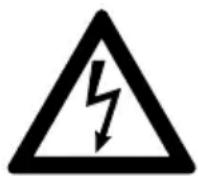
Caution!
Before performing the next step, make sure to switch off the voltage supply to the Protect D.
If a large amount of dust has accumulated, the device should be carefully cleaned with dry compressed air to allow for better heat exchange.
The time intervals of the visual checks to be performed largely depend on where the devices are installed and the environmental conditions at these locations.
11.2.2 Battery check
You can tell whether the batteries are getting older by making regular capacity tests. Every six months, make comparative checks with respect to the bridging time possible by, for example, simulating a power outage. The load should always show close to the same power requirements. If the battery time sinks drastically compared to the previous check, please contact our hotline (see page 7).
11.2.3 Ventilator check
Check the ventilators regularly for dust accumulation and any noticeably irregular noises. If the vents are clogged, they must be cleaned; if the ventilator appears to be unusually loud or is not operating smoothly, please contact our hotline (see page 7).
11.3 Battery replacement
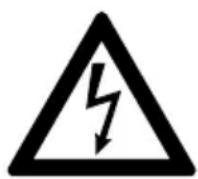
Caution:
A battery can present a risk of electrical shock and can be very dangerous if handled improperly.
The following precautions should be observed before replacing the batteries:
- Remove rings, watches and other metal objects.
- If the battery replacement kit is damaged in any way or shows signs of leakage, contact your dealer immediately.
- Recycle or dispose used batteries properly. Do not dispose of batteries in a fire. The batteries may explode.

Note:
The UPS internal batteries are heavy. Use caution when handling the heavy batteries.
The internal batteries are located behind the UPS front cover (behind the LCD control panel). The internal batteries are packaged together as one unit for easier handling.

Note:
Should you also use external battery systems, for technical reasons we strongly recommend replacing all battery systems.
External battery packs will be replaced through conventional battery-swapping. Please talk to your local UPS representative.
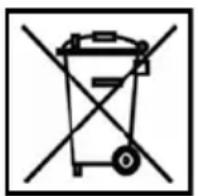
Disposal of waste batteries (applicable in the European Union and other European countries with separate collection systems for such products)
This symbol on the battery or on the packaging indicates that the battery provided with this product shall not be treated as household waste. On certain batteries this symbol might be used in combination with a chemical symbol. The chemical symbol "Pb" (lead) is added if the battery contains more than 0.4 % lead.
By ensuring these batteries are disposed of correctly, you will help prevent potentially negative consequences for the environment and human health which otherwise could be caused by inappropriate waste handling of the battery. The recycling of the materials will help to conserve natural resources.
In the case of products that for safety, performance or data integrity reasons require a permanent connection with an incorporated battery, this battery should be replaced by qualified service staff only.
To ensure that the battery will be treated properly, hand over the product at end-of-life to the applicable collection point for the recycling of electrical and electronic equipment.
For more detailed information about the recycling of this battery, please contact your local Civic Office, your household waste disposal service or the shop where you purchased the product.
Disposal note: Please only dispose of discharged batteries at retail stores or the local authorities.
12. STORAGE, DISMANTLING AND DISPOSAL

12.1 Storage
Long storage times without occasionally recharging or discharging can lead to permanent damage to the battery.
If the battery is stored at room temperature (20°C to 30°C), there will be a spontaneous self-discharge due to inner reactions of 3 to 6% a month. Please avoid storage at temperatures above room temperature. High storage temperature will lead to the increased self-discharge of the battery.
To maintain full capacity and service life, batteries stored at room temperature should be recharged every six months.

Before being put into storage, the Protect D. should be connected to the power supply to ensure that the battery is completely charged. For the minimum charging time, please refer to the information in chapter 2.3.
12.2 Dismantling
To de-install the UPS, perform the same steps as for the installation in reversed order.
12.3 Disposal
In the interests of environmental protection and recycling, please dispose of the individual parts of the device as specified and according to the legal regulations when its service life has ended. Please remember that any violation of these regulations can be interpreted as a breach of the law.
Disposal of old electrical & electronic equipment (applicable in the European Union and other European countries with separate collection systems).
Instead it shall be handed over at the applicable collection point for the recycling of electrical and electronic equipment.
By ensuring this product is disposed of correctly, you will help prevent potential negative consequences for the environment and human health.
Material recycling helps to reduce the consumption of raw materials. For more detailed information about recycling of this product, please contact your local city office, your household waste disposal service or the shop where you purchased the product.
13. Appendix
13.1 Technical Terminology
DC / DC Booster Circuit technology for increasing a DC voltage to a higher voltage level
ECO Measure to increase system efficiency Efficiency Corrective Optimizer
EPO Device for emergency shutdown Emergency Power Off
Device protection Term from surge technology: The classic mains overload protection consists of lightning arrester (Class B), surge protection (Class C) and the so-called protective devices (Class D)
IGBT Insulated Gate Bipolar Transistor – High-performance transistors, latest design, with minimal power consumption need (MOSFET structure) and minimal losses on the output side (structure of a bipolar transistor)
Class D See device protection
LED Light Emitting Diode Electronic semiconductor component, used for visual signaling
PFC Power Factor Correction - Circuit technology used to minimize the harmonic current (particularly important when connecting non-linear loads)
PWM Pulse Width Modulation Here: Circuit technology to generate a sine-like flux density waveform of highest quality from existing direct-current voltage
SNMP Simple Network Management Protocol Frequently used protocol in the network to manage / administrate components
VFD Voltage and Frequency Dependent from mains supply. The UPS output is dependent on mains voltage and frequency fluctuations. Formerly known as: OFFLINE
VI Output Voltage Independent from mains supply
The UPS output is dependent on mains frequency fluctuations, but the mains voltage is prepared by electronic / passive voltage regulation devices.
Formerly known as: LINE INTERACTIVE
VFI Output Voltage and Frequency Independent from mains
supply. The UPS output is independent of mains voltage and frequency fluctuations. Formerly known as: ONLINE
13.2 Keyword register
A n Assembly 23 Normal operation 10, 44 Autonomy time 12 B Operating states 9 Battery extension 39 Overload 12 Battery mode 10 P Battery test 47, 51, 53 Power supply 34 Bypass operation ...... 10, 44 R C Rack / 19" installation .... 24 CE certificate 20 RS 232 Interface 29, 56 Cold start 55s Communication 56 Safety instructions 16 Connections 28 Scope of delivery 21 Control panel .... 43 Settings .... 51 D Status display 46 Device overload .... 11 Storage .... 70 Dimensions .... 15 System description .... 9 Display 43 t e Table of contents ....4 Emergency off .... 58 Technical data .... 11 G u Guidelines 15USB 29,56 h User port 34 Hotline 7 v I Value display 50 (Initial) start-up 42W Indicator 43Website 7 Installation sites 23Weights 14 Interface (PC) 56 Malfunctions 60
M
13.3 Notes
WARRANTY
MODEL:
SERIAL NUMBER: ____
PURCHASE DATE: ____
DEALER STAMP/SIGNATURE
Errors and technical modifications subject to change.
Operating instructions
8000042546_01 BaL, en


- CONTENTS
- INTERFACES AND COMMUNICATION
- TROUBLESHOOTING
- PARALLEL OPERATION
- MAINTENANCE
- STORAGE, DISMANTLING AND DISPOSAL
- APPENDIX
- NOTES ON THESE OPERATING INSTRUCTIONS
- OBLIGATION TO PROVIDE INSTRUCTIONS
- PLEASE READ THESE INSTRUCTIONS CAREFULLY BEFORE FIRST USE
- VALIDITY
- WARRANTY AND LIABILITY
- HANDLING
- HOTLINE
- COPYRIGHT
- GENERAL INFORMATION
- TECHNOLOGY
- SYSTEM DESCRIPTION
- SAFETY REGULATIONS
- GENERAL SAFETY INSTRUCTIONS
- SAFETY INSTRUCTIONS FOR THE PROTECT D
- CAUTION – RISK OF BURNS
- DANGER OF ELECTRIC SHOCK
- DANGER OF EXPLOSION
- CE CERTIFICATE
- AEG
- POWER SOLUTIONS
- DECLARATION OF CONFORMITY
- UNPACK AND CHECK
- CHECK THE CONTENTS FOR COMPLETENESS
- LOWER LEVEL
- EXTERNAL BATTERY MODULES INCLUDE THE FOLLOWING
- INSTALLATION
- ASSEMBLY
- INSTALLATION IN A 19" RACK
- OVERVIEW OF CONNECTIONS, OPERATING / DISPLAY ELEMENTS
- EXPLANATIONS
- ELECTRICAL CONNECTION
- WARNING
- SAFETY OF PERSONNEL
- CONNECTION CROSS-SECTION AND FUSES
- MAINS AND CONSUMER CONNECTION
- CONTACTING THE BATTERY MODULES
- CONNECTING THE INTERNAL BATTERY
- HOW TO PROCEED D
- CONNECTING EXTERNAL BATTERY EXTENSION(S)
- PROTECT D
- OPERATION MODE AND OPERATING
- FIRST START-UP
- SWITCHING ON THE UPS
- SWITCHING OFF THE UPS
- USAGE TABLE
- OVERVIEW
- INDICATORS (LEDS)
- OPERATING KEYS (NAVIGATION)
- DISPLAY (MAIN MENU)
- UPS STATUS DISPLAY
- MESSAGES AND ALARMS
- EVENT LOG
- ACCESSING THE EVENT LOG
- MEASUREMENTS
- CONTROL
- IDENTIFICATION
- SETTINGS
- RS232 AND USB COMPUTER INTERFACES
- COMMUNICATION SLOT
- SHUTDOWN AND UPS MANAGEMENT SOFTWARE
- EPO (EMERGENCY POWER OFF)
- NOTE
- CHANGE-OVER CONTACT
- MALFUNCTIONS
- FUNCTION
- INSTALLATION / CONNECTION OF PARALLEL FIELD OPERATION
- CAUTION
- CHARGING THE BATTERY
- MAINTENANCE CHECKS
- ACTIVITY FREQUENCY DESCRIBED IN
- VISUAL CHECK
- BATTERY CHECK
- VENTILATOR CHECK
- BATTERY REPLACEMENT
- DISPOSAL OF WASTE BATTERIES (APPLICABLE IN THE EUROPEAN UNION AND OTHER EUROPEAN COUNTRIES WITH SEPARATE COLLECTION SYSTEMS FOR SUCH PRODUCTS)
- STORAGE
- DISMANTLING
- DISPOSAL
- TECHNICAL TERMINOLOGY
- KEYWORD REGISTER
- M
- NOTES
Brand : AEG
Model : Protect D. 6000
Category : Inverter