
U971 - Smartphone HISENSE - Free user manual and instructions
Find the device manual for free U971 HISENSE in PDF.


| Product Type | Smartphone |
| Brand | Hisense |
| Model | U971 |
| Display Size | 5.5 inches |
| Display Resolution | HD (1280 x 720 pixels) |
| Processor | Quad-core 1.3 GHz |
| RAM | 2 GB |
| Internal Storage | 16 GB |
| Expandable Storage | MicroSD up to 64 GB |
| Operating System | Android 8.0 Oreo |
| Rear Camera | 8 MP with LED flash |
| Front Camera | 5 MP |
| Battery Capacity | 3000 mAh |
| Dimensions (H x W x D) | 152 x 76 x 8.5 mm |
| Weight | 165 g |
| Network | 4G LTE, 3G, 2G |
| SIM | Dual SIM (Nano-SIM) |
| Connectivity | Wi-Fi 802.11 b/g/n, Bluetooth 4.0, GPS |
| Sensors | Accelerometer, proximity, ambient light |
| Maintenance | Clean with a soft, dry cloth; avoid liquids |
| Safety | Do not disassemble; avoid extreme temperatures |
| Repairability | Battery not user-replaceable; service center recommended |
Frequently Asked Questions - U971 HISENSE
User questions about U971 HISENSE
0 question about this device. Answer the ones you know or ask your own.
Ask a new question about this device
Download the instructions for your Smartphone in PDF format for free! Find your manual U971 - HISENSE and take your electronic device back in hand. On this page are published all the documents necessary for the use of your device. U971 by HISENSE.
USER MANUAL U971 HISENSE
Safety Precautions ...... 1
Personal Information and Data Security 2
Getting Started 3
Key Functions at Your Finger tips .... 3
Inserting the SIM/USIM card 4
Inserting SD card 5
Installing the battery 5
Removing the battery 5
Charging the battery 6
Battery performance 6
Basic operations 7
Turning your phone on and off 7
Desktop manager 7
Making a call 8
Contact others 9
-
Phone 9
-
Contacts....9
-
Messaging....10
-
Email....11
-
Gmail 11
Surf the Internet....12
-
Maps....12
-
Getting Connected....13
Entertainment....16
Using Other Applications....18
Managing Your Mobile Phone....19
Read Before Proceeding
Safety Precautions
Please read the safety precautions carefully to ensure the correct use of your mobile phone.
- Do not crash, throw, or puncture your mobile phone. Avoid the falling, squeezing, and bending of your mobile phone.
- Do not use your mobile phone in a moist environment, such as the bathroom. Prevent your mobile phone from being soaked or washed in liquid.
- Do not switch on your mobile phone when it is prohibited to use or when the phone may cause interference or danger.
- Do not use your mobile phone while driving.
- Follow any rules or regulations in hospitals and health care facilities. Switch off your mobile phone near medical apparatus.
- Switch off your mobile phone in aircraft. The phone may cause interference to control equipment of the aircraft.
- Switch off your mobile phone near high-precision electronic devices. The phone may affect the performance of these devices.
- Do not attempt to disassemble your mobile phone or its accessories. Only qualified personnel are allowed to service or repair the phone.
- Do not place your mobile phone or its accessories in containers with a strong electromagnetic field.
- Do not place magnetic storage media near your mobile phone. Radiation from the phone may erase the information stored on them.
- Do not put your mobile phone in a high-temperature place or use it in a place with flammable gas such as a gas station.
- Keep your mobile phone and its accessories away
from children. Do not allow children to use your mobile phone without guidance.
- Use only approved batteries and chargers to avoid the risk of explosion.
- Observe any laws or regulations on the use of wireless devices. Respect others' privacy and legal rights when using your wireless device.
- Strictly follow the relevant instructions of this manual while using the USB cable. Otherwise your mobile phone or PC may be damaged.
- This manual is for reference only, please refer to the material object as standard.
Personal Information and Data Security
The use of some functions or third-party applications on your device could result in your personal information and data being lost becoming accessible to others. Several measures are recommended to help you protect personal and confidential information.
- Place your device in a safe area to prevent it from unauthorized use.
- Set your device screen to lock and create a password or unlock pattern to unlock it.
- Periodically back up personal information kept on your SIM/USIM card, memory card, or stored in your device memory. If you change to a different device, be sure to move or delete any personal information on your old device.
- If you are worried about viruses when you receive messages or emails from a stranger, you can delete them without opening them.
- If you use your device to browse the Internet, avoid websites that might pose a security risk to avoid theft of your personal information.
- If you use services such as Wi-Fi tether or Bluetooth, set passwords for these services to prevent
unauthorized access. When these services are not in use, turn them off.
● Install or upgrade device security software and regularly scan for viruses.
- Be sure to obtain third-party applications from a legitimate source. Downloaded third-party applications should be scanned for viruses.
● Install security software or patches released by Hisense or third-party application providers.
- Some applications require and transmit location information. As a result, a third-party may be able to share your location information.
- Your device may provide detection and diagnostic information to third-party application providers. Third party vendors use this information to improve their products and services.
Getting Started
All the pictures in this guide are for your reference only. Your phone's actual display features may be different to those described here, depending on its software version.
Key Functions at Your Finger tips
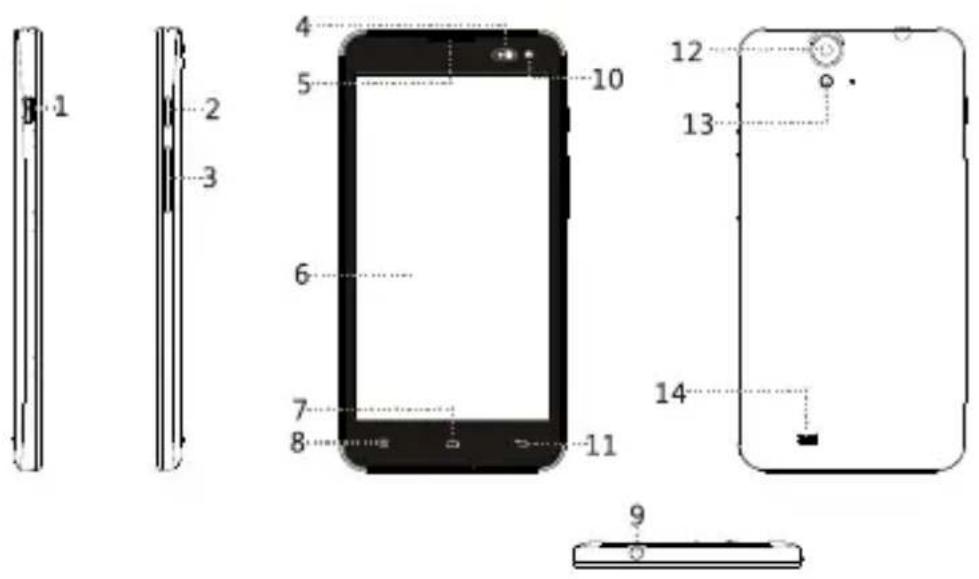
| Description | |
| 1 | Charge/USB jack |
| 2 | Power keyPress to turn on or off the phone. |
| 3 | Volume Up/DownPress to accommodate the volume and start up silence mode when there is an incoming call. |
| 4 | Sensor |
| 5 | Earpiece |
| 6 | Touch screen |
| 7 | Home keyPress to return to home screen. |
| 8 | Menu keyTap the button:shows the options available for the current display. |
| 9 | 3.5mm headphone socket |
| 10 | Front camera |
| 11 | Back keyTouch to go to the previous screen. |
| 12 | Camera |
| 13 | Flash |
| 14 | Speaker |
Inserting the SIM/USIM card
Your phone must work with a card provided by your service provider. Your card contains all your subscription
information.
Insert SIM/USIM card with the metal contacts facing down and the cut corner aligned with that of the slot.
Notes:
- If no card is installed, the string of "No SIM Card" will display on the screen.
- If your card is PIN-locked your phone will display "SIM card is locked". You must enter PIN before the phone can start working. Please contact your network service provider if you need.
- When inserting card, please keep it away from possible damage caused by static, scratch and bend, and put it where is not available for children.
Inserting SD card
Insert SD card with the metal contacts facing down and the cut corner aligned with that of the slot.
Installing the battery
You must install and charge the battery to use your phone. Insert the ridge at the top of the battery into the base of the phone, make sure to touch the metal contact on the phone, then push the battery down and snap it into place.
Note:
Your phone is designed to be used only with original batteries and chargers. Use of other batteries or chargers may cause damage to your phone and the warranty will be void.
Removing the battery
Make sure your phone is powered off to avoid the important information getting lost.
Hold battery bottom and remove the battery from the phone.
Charging the battery
New batteries are shipped partially charged. Before you can use your phone, you need to charge the battery. Some batteries will have best performance after several full charge/discharge cycles.
- Connect data cable and charger, plug one end into your phone's data port.
- Plug the other end of the charger into the appropriate electrical outlet (100\~240V AC).
- When your phone indicates that the battery is fully charged, remove the charger.
Notes:
- Before charge, make sure the battery is installed in the phone.
- The battery can discharge gradually even when your phone is powered off. If the battery is drained for a long time, the information stored in the phone could possibly be lost. So even you don't need to use your phone for a long period, you should charge the battery some times to keep it away from drained.
- You need longer charging period with the lower voltage.
- Charging time will be longer if the cellphone is operated during charging.
- The normal charge temperature is during 0^ C- 40^ C.
Battery performance
| 2000mAh (standard battery) | |
| Standby time* | 130hours |
| Talk time* | 190 minutes |
- Many conditions can affect battery's standby time, such as local network conditions, phone's settings, frequent operations, using data services, etc.
- The battery performance is also affected by charge state and temperature.
Basic operations
Turning your phone on and off
Turn on the phone: Press and hold Power key for more than 3 seconds to turn on your phone.
Turn off the phone: Press and hold Power key to pop up option menu, select "Power off". If it is powered off, you can not receive, make a call or do other operations.
Desktop manager
Lock the screen
The screen lock prevents unwanted actions on the touch screen when you are not using your phone. When the phone is left idle for a set period, the screen locks automatically if you enabled screen lock in settings→ security.
Unlock the screen
You can unlock the screen according to your settings.
The default way is pulling the lock to right after your screen is enabled with pressing power key.
Add icon:
Press and hold a selected icon on main menu and drag it to desktop after you feel it vibrating. Put it where you intend to, then you can release it.
Delete icon:
Press and hold a selected icon on desktop, you will find a “×Remove” icon appearing, At this time drag the icon to “×Remove”, then release.
Status bar
A status bar at the top of the screen displays phone status information and notifications.
Change the wallpaper
Long press the desktop space, and then pop up the following menu: Gallery /Live wallpapers/Photos/Wallpapers.
Notification panel
You can open notifications such as unread messages or missed calls directly from the notification panel.
How to open the panel:
Hold the status bars with your finger, and drag it downwards.
Accessing Applications and Widgets
To access the application list, on the Home screen, touch 📄.
From the application list, you can:
- Touch an icon to open an application.
- Touch the WIDGETS tab to switch to the widget list.
Viewing Recently Used Applications
To display the list of recently used applications, press and hold 🔒. To open an application, touch the corresponding thumbnail. To close the application, flick left or right across the screen.
Managing Folders on the Home Screen
- To create a folder: Drag an application icon onto another application icon to create a new folder that contains both icons.
- To rename a folder: On the Home screen, touch a folder, and then touch the folder name field beneath it.
- To delete a folder: On the Home screen, touch and hold a folder, and then drag it to the “× Remove”.
Making a call
Click to enter dialer interface on idle screen or main menu
screen, input phone number and click

or to make
a call, click the End button or press the power key to end a
call. If you make a mistake, you can click

to delete the
number or hold it to delete all numbers before the cursor.
Contact others
1. Phone
Input phone number, click 📄 or 📋 to make a call, click 🔒 to delete the number you do not need or hold it to delete all numbers before the cursor.
2. Contacts
All of your contacts are displayed alphabetically in a list that you can scroll through.
Click menu key, pop up the submenu: Contacts to display/Import/Export /Accounts/ Copy/Memory status/Batch operation/ Settings.
Add a contact
Click, you can add a new contact to the phone or card.
Search for a contact
- Click ;
- Enter the first few letters of the contact name, all contacts beginning with these letters appear.
Adding a Contact to Your Favorites
Touch a contact, and then touch the star to the right of the contact's name. The star turns white.
Editing a Contact
You can make changes to the information you have stored for a contact at any time.
- In the contacts list, touch the contact you want to edit,
and then touch

-
Touch the category of contact information you wish to change: name, phone number, email address, or any other information you recorded earlier.
-
Make the desired changes to the contact information, and then touch "DONE". To cancel all of your changes,
touch "CANCEL".
Using a microSD Card to Back Up Contacts
- In the contacts list, touch Menu key.
- Touch "Import/ export" in the displayed menu to select you needed.
- Select "Export to storage".
- Touch OK to export your phone contact's information to the installed microSD card.
You also can copy the .vcf files backed up on the microSD card to your computer. The files are stored in the microSD card's folder.
Managing Groups
Creating a Group
- In the contact list, touch.

-
Touch in the displayed menu.
-
Enter the name and note you want to assign to the group.
-
Click "DONE".
3. Messaging
The Messaging application allows you to exchange text messages (SMS) and multimedia messages (MMS) with anyone using an SMS-or-MMS-capable phone.
Create message
Click“CREATE MESSAGE” to create a message. Input
receiver's phone number and edit contents.
- For phone number:
- You can click the keyboard to input number directly.
- You can select number from contacts.
- You can select several numbers to send.
Notes:
If the message editing is interrupted by incoming calls, alarm clock, powering off, the entered texts will be saved
temporarily.
-
Click "Type message" to edit the message.Click Menu key, Click "Add subject" to add the message subject. Your mobile phone is now in multimedia message mode.
-
When you are ready to send the message, click

Opening and Viewing a Multimedia Message
-
In the message list, touch the message thread you wish to view.
-
Touch the multimedia message to view the message.
-
Email
Your mobile phone also puts email at your fingertips. With your phone's Email application, you can use your email account with some popular email services on your phone.
Adding an Email Account
When using the Email application for the first time, you must configure an email account. The Email setup wizard helps you to configure your account. A number of popular email systems are supported. You can work with the same email service that you use on your PC or you can select another email service that you use on your PC or you can select another email service.
- Touch Email on the main menu.
- Enter the account name and the Password, then touch Next.
- When setting finish, touch Next.
Viewing an Email Message
On the accounts screen, touch the email account you want to use.
- Gmail
You can access and use Gmail to read and write email from your account on any mobile device or browser. Gmail is not
just about email. Your Gmail name and password can provide you access into to all Google apps and services. To launch Gmail, touch the Gmail icon 🤘 on a Home or All Apps screen.
The phone can load the default mailbox.
- Read email.
Touch a message to read it. Unread message are bold. -
Organize email.
Check the box beside a message to select it. Then use the icons and menu along the bottom of the screen to manage the selected messages. -
Change your settings.
Touch the Menu key to change your preferences, get Settings or Help.
No matter where you are within Gmail, you can always get back to the Inbox by touching 📂 in the top left corner of the screen.
Surf the Internet
1. Maps
Maps enables you to find your current location, view real-time traffic conditions (depending on availability in your area), and get detailed directions to your destinations. You can view satellite images, traffic maps, or other kinds of maps of your current or other locations.
- Enabling the Location Service Enable the location service before using Maps to find your location or search for places of interest.
1) On the main menu, touch "Settings".
2) Touch Location access.
3) Select the GPS satellites.
- Searching for Places of Interest
1) On the map, touch
2) Enter appropriate keywords in the search box, and then touch the search icon.
3) The search results are displayed. Touch a place you are interested in. The Maps application will shows its location on the map.
- Getting Directions
1) When viewing a map, touch

2) Enter your start point in the first text box and your destination in the second.
3) Touch the icon for driving, public transit, or walking directions.
- Getting Connected
1 Mobile Networks
Your mobile phone will be automatically configured to use your network operator's 2G/3G service (if available) when you turn on the phone for the first time. Note that the SIM/USIM card must be inserted.
Checking the Network Connection
- Touch "Settings" on the main menu.
- Touch More > Mobile networks> Access Point Names.
- Touch Access Point Names to check the network.
2 Wi-Fi
Turn on Wi-Fi
- Touch "Settings" on the main menu.
-
Touch Wi-Fi to select ON.
Connecting to a Wireless Network -
Touch "Settings" on the main menu.
- Touch Wi-Fi. You will see a list of detected Wi-Fi networks in the Wi-Fi networks section.
3 Bluetooth
Your mobile phone has Bluetooth, which allows you to create a wireless connection with other Bluetooth devices so you can share files with your friends, talk hands-free with a Bluetooth headset, or even transfer photos from your
phone to your PC.
If you are using Bluetooth, remember to stay within 10 meters (33 feet) of the other Bluetooth devices to which you want to connect. Be aware that obstacles like walls or other electronic equipment may interfere with your Bluetooth connection.
Turning On Bluetooth
- Touch Settings on the main menu.
- Touch Bluetooth to select ON. When Bluetooth is turned on, the Bluetooth icon appears in the notification bar.
- Touch Bluetooth settings, and then touch the device's name to make your mobile phone visible to other Bluetooth devices.
Pairing with and Connecting to a Bluetooth Device Before you use Bluetooth, pair your mobile phone with another Bluetooth device as follows:
- Ensure that the Bluetooth function on your mobile phone is enabled.
- On the main menu, touch Settings > Bluetooth. Your mobile phone will then scan for Bluetooth devices in range.
- If required, enter the pairing password to complete the connection.
4 Browser
Your mobile phone comes with an Internet browser pre-installed.
Opening the Browser
- Touch Browser on the main menu.
- When known or open Wi-Fi networks and mobile data networks are available at the same time, your phone will preferably select a Wi-Fi network for Internet access.
-
Touch Menu Key to open the browser options menu. Opening a Webpage
-
In a browser window, touch the URL field at the top of
the screen.
- As you enter the address, matching webpage addresses will appear on the screen. If you see the address you want, touch it and go directly to that webpage or complete entering your desired webpage.
Entertainment
In addition to being a communication device and personal assistant, your mobile phone also provides you with a multitude of entertainment possibilities. You can take photos, create videos and audio clips, and download and listen to music.
1 Taking Photos and Recording Videos
The camera is a combination of camera and camcorder that you can use to shoot and share pictures and videos.
Opening Your Camera
- Touch Camera to open the camera. The camera opens in landscape mode, ready to take a picture or record a video.
- Touch Back Key to close the camera.
Take a photo
Click camera to enter camera interface.
Click

to take photos.
Recording a Video
- Open the camera application, and switch it to camcorder mode.
- If necessary, change the camcorder settings.
-
Frame the scene with which you want to start your video.
-
Touch

to start recording a video.
1. Using the Gallery
Your Gallery application can automatically search for pictures and videos on your mobile phone and microSD card. Use Gallery to sort photos and videos into folders, view and edit pictures, watch videos, and set a picture as wallpaper or as a photo for a contact.
Opening the Gallery
The Gallery application categorizes your pictures and videos by storage card and displays these files in folders.
Touch a folder to view the pictures or videos inside.
View a picture
- In Gallery, touch the folder that contains the pictures you want to view.
- Touch the picture to view it in full-screen mode.
Notes:
The picture viewer supports the automatic rotation function. When you rotate your mobile phone, the picture adjusts itself to the rotation.
2. Play Music
Before you using music player, you must copy music files from your computer to the microSD card.
Once you have done this, the player will search for music on the microSD card. After the search is complete, you will be able to view all available music files in the music library. Click to enter music player.
- SONGS: view all songs list.
- ARTISTS: view different artists' songs.
- ALBUMS: view different albums' list.
- GENRES: view different genres'list.
- PLAYLISTS: view current playlist and saved playlist.
3. Listening to the Radio FM
The FM radio lets you listen to FM radio programs on your mobile phone. Since the FM radio uses the provided wired stereo headset as its antenna, before opening the application, connect the headset to your phone's the audio jack.
Search radio settings and play it:
-
Click menu key, and then select "Scan" to scan all channel.
-
Select some channel and play it.
Using Other Applications
1. Calculator
Perform basic arithmetics such as addition, subtraction, multiplication and division.
- Touch the Calculator application icon.
- Touch the numbers and operation symbols to do the calculation.
- Touch DELETE to clear the result one by one, touch and hold DELETE to clear all.
2. Calendar
The Calendar app lets you view and edit your schedule. To change the Calendar view, touch the date at the top left corner and choose Day, Week, Month, or Agenda.
Create agenda
- Press menu key and click "New event" button.
- Before you can add an event, you must add at least one calendar account to your device and make a calendar visible.
- Input Event name / Location / Time and so on.
- Click "DONE" button.
The new agenda will appear on the calendar menu when you entering again.
3. Clock
Touch the Clock application icon.
Alarm
Turn Alarm on
- Click to enter the Alarm list, find the desire alarm.
- Click the OFF button to turn on the alarm.
- Click "+" to add more alarm.
On the alarm menu, click ☐ to pup up the menu, as follow:
● Night mode: turn on the night mode.
- Settings: set the style and alarm length of time.
Notes :
- The alarm clock will still work even the phone is powered off.
- Don't set the phone in silence mode to guarantee the alarming effect (unless if the vibrate mode is set to always on).
- Please change the battery in a minute or else the information stored in the phone will be lost, in the low electric power.
Stopwatch
Click the to enter stopwatch.
Click "START" to start the stopwatch, click the 📄 to record the time;
Click "STOP" to stop the time, click "💡" clear all record.
Timer
Click the ☑ to enter timer.
Enter the time, then click "START" to start count.
4 Recorder
You can record for a long time, please make sure your microSD card has enough storage.
Record:
- Keep the phone near the sound source.
- Click “ ” to record, click “ ” to stop.
5 Notepad
Click + to edit a new notebpad; then click “√” to save the notepad.
Managing Your Mobile Phone
To configure your mobile phone, touch Settings.
WIRELESS & NETWORKS
● Turn on the Mobile data.
- Click to turn on Wi-Fi or Bluetooth and set them.
- Click to view the data usage.
- Click "more", you can do the follow:
▶ Click to turn on Airplane mode.
➢ Set up VPN.
➢ Set the tethering & portable hotspot.
➢ Set Mobile Network
DEVICES
1. Dual SIM settings
Select different card and set options for mobile networks, set call settings.
2. Sound:
- Set volumes for music, video, games and other media, ringtone, notifications, alarms.
- Turn on or off vibrate when ringing.
- Set phone ringtone for incoming calls of card 1 and card 2.
- Turn on or off dial pad touch tones, touch sounds, screen lock sound, vibrate on touch.
3. Display
- Adjust the brightness of the screen.
- Choose the wallpaper from Gallery/Live wallpapers / Photos/Wallpapers.
- Turn on or off Auto-rotate screen.
- Adjust the delay before the screen automatically turns off.
- Set daydream
- Turn on or off key backlight.
- Select the font size.
4. Storage
Set primary storage, open the status bar notification; View the external (Micro-SD) and internal memory storage capacity and usage.
5. Battery
View the battery usage data based on the process and application that were consuming the battery.
6. Apps
Manage and remove installed apps; View and control currently running services; view storage used by apps, change the preferred installation location for new apps.
PERSONAL
1. Location access
Turn on or off Access to my location/GPS satellites/Wi-Fi & mobile network location.
2. Security
- Lock screen with None/Slide /Face Unlock/ Pattern/PIN or Password.
- Edit owner information displayed on the lock screen.
- Set up SIM/USIM card lock and edit passwords.
● Make the password visible or not. - Select device administrators.
- Allow installation of non-market apps or not.
- Disallow or warn before installation of apps that may cause harm.
- Display trusted CA certificates;
● Install certificates from SD card - Remove all certificates.
3. Language & input
- Select language.
- Turn on or off spell checker.
- Select default input method.
- Set the voice search and text-to-speech output.
- Set the pointer speed.
4. Backup & reset
Turn on or off Back up my data;
Click Factory data reset to erase all data on phone.
ACCOUNTS
Add accounts of different kind.
SYSTEM
1. Date & time
Set the date, time, time zone and formats.
- The current date and time will display on the idle screen if you choose automatic.
- If you do not choose automatic, please set the date, time zone.
- Set the format of time and date.
2. Accessibility
- Turn on or off Talkback.
- Turn on or off Magnification gestures/ Large text/ Power button ends call/ Speak passwords/ Accessibility shortcut/ Text-to-speech output.
- Select the Touch & hold delay time.
3. About phone
Touch the Settings→About phone, then you can see sub menu as follows:
- System Updates
- Status, to check the status of the battery, IMEI information,Wi-Fi & Bluetooth address, IP address,serial number and up time.
● Legal information, to see the legal information from open source and google legal
● Model number. Etc.

- Read Before Proceeding
- Safety Precautions
- Personal Information and Data Security
- Getting Started
- Inserting the SIM/USIM card
- Notes:
- Inserting SD card
- Installing the battery
- Note:
- Removing the battery
- Charging the battery
- Battery performance
- Basic operations
- Lock the screen
- Unlock the screen
- Add icon:
- Delete icon:
- Status bar
- Change the wallpaper
- Notification panel
- Accessing Applications and Widgets
- Viewing Recently Used Applications
- Managing Folders on the Home Screen
- Making a call
- Contact others
- Phone
- Contacts
- Add a contact
- Search for a contact
- Adding a Contact to Your Favorites
- Editing a Contact
- Using a microSD Card to Back Up Contacts
- Managing Groups
- Messaging
- Create message
- Opening and Viewing a Multimedia Message
- Surf the Internet
- Maps
- Mobile Networks
- Wi-Fi
- Bluetooth
- Turning On Bluetooth
- Browser
- Opening the Browser
- Entertainment
- Taking Photos and Recording Videos
- Opening Your Camera
- Recording a Video
- Using the Gallery
- Opening the Gallery
- View a picture
- Play Music
- Listening to the Radio FM
- Using Other Applications
- Calculator
- Calendar
- Create agenda
- Clock
- Alarm
- Turn Alarm on
- Notes :
- Stopwatch
- Timer
- Recorder
- Record:
- Notepad
- Managing Your Mobile Phone
- WIRELESS & NETWORKS
- DEVICES
- Dual SIM settings
- Sound:
- Display
- Storage
- Battery
- Apps
- PERSONAL
- Location access
- Security
- Language & input
- Backup & reset
- ACCOUNTS
- SYSTEM
- Date & time
- Accessibility
- About phone
Brand : HISENSE
Model : U971
Category : Smartphone